Build a WhatsApp AI assistant from scratch with Evolution and the WEC API

 ++
++
- 1Self-host a WhatsApp AI bridge
- 🏆Production delivery via Cloud API
Most "self-host a WhatsApp AI" guides stop at "the container started." This one goes all the way: you deploy a real, programmable WhatsApp gateway (Evolution API), then write the bridge yourself — the ~50 lines that turn an incoming message into an LLM answer and send it back. That bridge (webhook → model → reply) is the reusable pattern behind every chat-AI integration: SMS, Slack, Telegram, voice — swap the channel, the shape is identical.
And because this is a real build, we hit — and fix — every gotcha: an image that moved publishers, a Baileys version loop, an infinite reply loop, group-chat spam, WhatsApp's new LID addressing, and a genuine delivery wall that most tutorials pretend doesn't exist. Every command, error, and output below is from an actual run.
Evolution links to a WhatsApp number as a companion device (like WhatsApp Web) — the bot acts as that account and can read every DM and group it receives. For a demo on a number you control it's fine; for anything real, use a dedicated number. And see the delivery limitation at the end before you build on this in production.
What you'll build
Four containers: Evolution + its Postgres + Redis, and the bridge you'll write. The bridge is the whole point — everything else is off-the-shelf.
Prerequisites: a WEC Instance with Docker + Compose, a WEC Inference API key (Inference → API Keys), a WhatsApp number for the demo, and ~2 GB free disk.
Step 1 — Deploy the Evolution stack
Evolution needs its own Postgres and Redis. We give it a dedicated set on an internal
network and expose only the API port (8080). docker-compose.yml:
services:
  evolution-api:
    image: evoapicloud/evolution-api:v2.2.3
    restart: unless-stopped
    ports:
      - "8080:8080"
    env_file: .env
    volumes:
      - evolution_instances:/evolution/instances
    depends_on: [evolution-postgres, evolution-redis]
    logging:
      driver: json-file
      options: { max-size: "50m", max-file: "3" }

  evolution-postgres:
    image: postgres:17
    restart: unless-stopped
    environment:
      POSTGRES_USER: evolution
      POSTGRES_PASSWORD: ${POSTGRES_PASSWORD}
      POSTGRES_DB: evolution
    volumes:
      - evolution_pgdata:/var/lib/postgresql/data

  evolution-redis:
    image: redis:7
    restart: unless-stopped
    volumes:
      - evolution_redis:/data

volumes:
  evolution_instances:
  evolution_pgdata:
  evolution_redis:
The logging: block caps container logs at 3×50 MB. Skip it and a chatty container can
fill the disk and take the box down — a lesson learned the hard way on this VM. Set it
before you need it.
The .env (generated secrets, connection URIs, and — importantly — a pinned Baileys
WhatsApp-Web version):
cd ~/evolution-api && cat > .env << EOF
AUTHENTICATION_API_KEY=$(openssl rand -hex 24)
SERVER_URL=http://<your-vm-ip>:8080
POSTGRES_PASSWORD=$(openssl rand -hex 16)
DATABASE_ENABLED=true
DATABASE_PROVIDER=postgresql
DATABASE_CONNECTION_URI=postgresql://evolution:\${POSTGRES_PASSWORD}@evolution-postgres:5432/evolution?schema=public
CACHE_REDIS_ENABLED=true
CACHE_REDIS_URI=redis://evolution-redis:6379/0
CACHE_REDIS_PREFIX_KEY=evolution
CACHE_LOCAL_ENABLED=false
QRCODE_LIMIT=30
EOF
Bring it up:
docker compose up -d
sleep 15
curl -s http://localhost:8080 | jq
{
  "status": 200,
  "message": "Welcome to the Evolution API, it is working!",
  "version": "2.2.3",
  ...
}
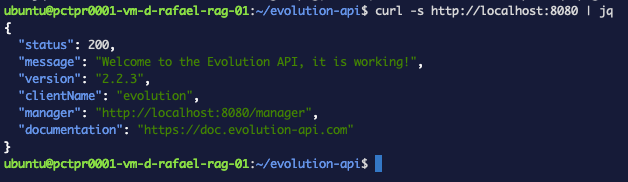 Figure 1. The stack is up: Evolution answers on
 :8080 with its version and status.
(1) The publisher moved. The image most guides reference — atendai/evolution-api —
now returns "pull access denied / repository does not exist." The current image is
evoapicloud/evolution-api. The old repo's tag list still resolves, which sends you
down a rabbit hole; confirm with a fresh pull of hello-world that it's not rate-limiting.
(2) Pin a real tag. v2.1.1 (from a popular blog) was never published — check
https://hub.docker.com/v2/repositories/evoapicloud/evolution-api/tags and pin one that
exists (we use v2.2.3).
Step 2 — Create an instance and link WhatsApp
Set your API key as a shell var (every request needs it in an apikey: header):
APIKEY=$(grep '^AUTHENTICATION_API_KEY=' .env | cut -d= -f2)
Create the instance:
curl -s -X POST http://localhost:8080/instance/create \
  -H "apikey: $APIKEY" -H "Content-Type: application/json" \
  -d '{"instanceName":"wec-demo","integration":"WHATSAPP-BAILEYS","qrcode":true}' | jq '.instance'
Then open the built-in Manager at http://<your-vm-ip>:8080/manager, enter your server
URL + API key, click wec-demo, and scan the QR from WhatsApp → Settings → Linked
Devices → Link a Device. Confirm it's connected:
curl -s http://localhost:8080/instance/fetchInstances -H "apikey: $APIKEY" \
  | jq '.[] | {name, connectionStatus}'
{ "name": "wec-demo", "connectionStatus": "open" }
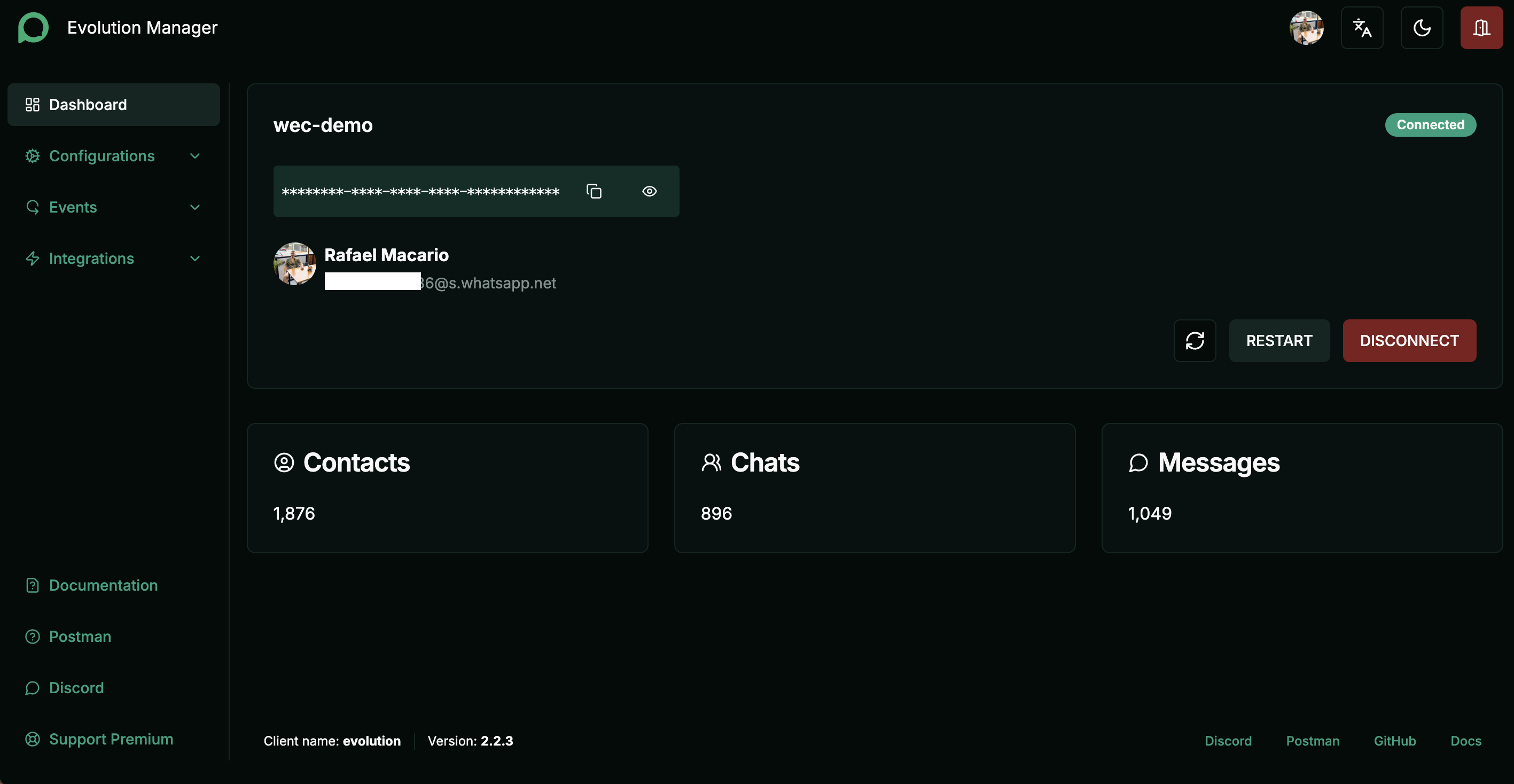 Figure 2. The Evolution Manager dashboard once the instance links:
 Connected, with live contact, chat, and message counts.
If the instance never leaves connecting and the logs show ChannelStartupService
re-initializing every few seconds with a Baileys version env: 2,3000,... line, the
pinned WhatsApp-Web version is stale and WhatsApp rejects the handshake before a QR is
ever generated. Fetch the current version and pin it, then recreate:
curl -s "https://raw.githubusercontent.com/WhiskeySockets/Baileys/master/src/Defaults/baileys-version.json"
# {"version":[2,3000,1035194821]}
echo "CONFIG_SESSION_PHONE_VERSION=2.3000.1035194821" >> .env
docker compose up -d --force-recreate evolution-api
Step 3 — The bridge, v1: see the webhook
Now the part you actually write. Rule: never wire logic before you've seen the real data. So v1 does nothing but print whatever Evolution sends.
The bridge runs as another container in the same Compose, so Evolution reaches it by
name (http://bridge:8090) and the bridge reaches Evolution at
http://evolution-api:8080. Create bridge/main.py:
from fastapi import FastAPI, Request

app = FastAPI()

@app.post("/webhook")
async def webhook(request: Request):
    data = await request.json()
    print("=== WEBHOOK RECEIVED ===", flush=True)
    print(data, flush=True)
    return {"received": True}
flush=True mattersWithout it, print output is buffered and never shows in docker compose logs — you'll
stare at an empty log convinced it's broken.
bridge/Dockerfile:
FROM python:3.12-slim
WORKDIR /app
RUN pip install --no-cache-dir fastapi uvicorn requests
COPY main.py .
CMD ["uvicorn", "main:app", "--host", "0.0.0.0", "--port", "8090"]
Add the service to docker-compose.yml (inside services:), then build it:
  bridge:
    build: ./bridge
    restart: unless-stopped
    env_file: .env
    depends_on: [evolution-api]
    logging:
      driver: json-file
      options: { max-size: "10m", max-file: "3" }
docker compose up -d --build bridge
Now register the webhook so Evolution POSTs messages to the bridge:
curl -s -X POST "http://localhost:8080/webhook/set/wec-demo" \
  -H "apikey: $APIKEY" -H "Content-Type: application/json" \
  -d '{"webhook":{"enabled":true,"url":"http://bridge:8090/webhook","webhookByEvents":false,"events":["MESSAGES_UPSERT"]}}' | jq '.enabled, .url'
Tail the logs (docker compose logs -f bridge) and send yourself a WhatsApp message. The
real payload appears:
{'event': 'messages.upsert', 'instance': 'wec-demo',
 'data': {'key': {'remoteJid': '123456789012345@lid', 'fromMe': False, 'id': '...'},
          'pushName': 'Test Contact',
          'message': {'conversation': 'Oii'},
          'messageType': 'conversation'},
 'sender': '[email protected]', ...}
Three things we now know — and every one drives the code next:
- text is at
data.message.conversation(plain) ordata.message.extendedTextMessage.text(quoted) data.key.fromMe—Truefor our own messages (the loop guard)remoteJidends in@lid— WhatsApp's privacy identifier, not a phone number (this one's a saga; Step 5)
Step 4 — v2: read, think, reply (with the loop guard)
Give the bridge the WEC Inference key so it can call the model:
echo "WEC_API_KEY=<your-wec-inference-key>" >> ~/evolution-api/.env
Now the logic — main.py v2:
import os, requests
from fastapi import FastAPI, Request

app = FastAPI()
EVOLUTION_URL = "http://evolution-api:8080"
INSTANCE = "wec-demo"
EVOLUTION_APIKEY = os.environ["AUTHENTICATION_API_KEY"]
WEC_API_KEY = os.environ["WEC_API_KEY"]
WEC_URL = "https://inference.wiline.com/v1/chat/completions"
MODEL = "Qwen2.5-3B-Instruct"

def ask_llm(text: str) -> str:
    r = requests.post(WEC_URL,
        headers={"Authorization": f"Bearer {WEC_API_KEY}"},
        json={"model": MODEL, "messages": [{"role": "user", "content": text}]},
        timeout=60)
    r.raise_for_status()
    return r.json()["choices"][0]["message"]["content"]

def send_whatsapp(number: str, text: str):
    r = requests.post(f"{EVOLUTION_URL}/message/sendText/{INSTANCE}",
        headers={"apikey": EVOLUTION_APIKEY, "Content-Type": "application/json"},
        json={"number": number, "text": text}, timeout=60)
    print(f"SEND -> {r.status_code}", flush=True)

@app.post("/webhook")
async def webhook(request: Request):
    data = (await request.json()).get("data", {})
    key = data.get("key", {})

    if key.get("fromMe"):                     # (1) LOOP GUARD
        return {"skipped": "fromMe"}

    msg = data.get("message", {})             # (2) extract text
    text = msg.get("conversation") or msg.get("extendedTextMessage", {}).get("text")
    if not text:
        return {"skipped": "no text"}

    to = key.get("remoteJid")
    print(f"IN  {to}: {text}", flush=True)
    answer = ask_llm(text)                     # (3) think
    send_whatsapp(to, answer)                  # (4) reply
    print(f"OUT {to}: {answer[:60]}...", flush=True)
    return {"ok": True}
The one line beginners always miss is (1) the loop guard. When the bridge sends a
reply, that outgoing message fires another MESSAGES_UPSERT webhook with fromMe: true
— without the guard, the bridge answers itself, forever. Rebuild:
docker compose up -d --build bridge
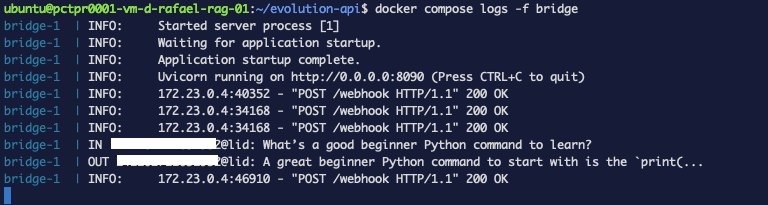 Figure 3. v2 in action: a DM comes in, the model answers, the reply goes out.
It answers DMs now. But watch what happens next.
Step 5 — The two real walls: group spam, then LID
Tail the logs with the bot live and you'll see it try to answer every group you're in, including promo/spam groups, and Evolution times out sending to them — flooding errors:
IN  [email protected]: *ALÔ CORREDORES 🏃 ... pechin.co/135449*
requests.exceptions.ReadTimeout: HTTPConnectionPool(host='evolution-api', port=8080): Read timed out.
A companion account receives everything. Fix: answer DMs only — groups end in
@g.us:
    to = key.get("remoteJid", "")
    if to.endswith("@g.us") or "broadcast" in to:   # DMs only
        return {"skipped": "not a DM"}
Now the subtler wall. With groups filtered, a real DM comes in — but the reply gets rejected:
{"status":400,"error":"Bad Request","response":{"message":[
  {"exists":false,"jid":"123456789012345@lid","name":"Test Contact","number":"123456789012345@lid"}]}}
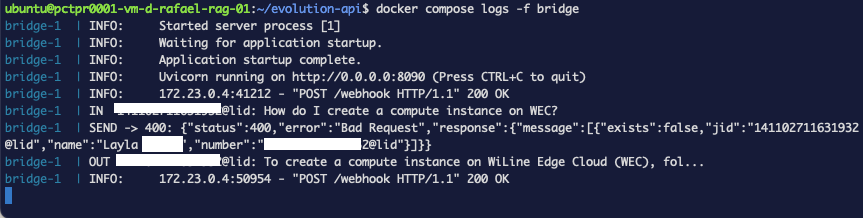 Figure 4. The LID wall in the logs: the incoming DM arrives as
 @lid, and the reply is rejected with exists:false.
exists: false. This is WhatsApp's LID addressing (a 2025 privacy change): incoming
DMs arrive with an @lid identifier, and you cannot send back to an @lid — Evolution
needs the real @s.whatsapp.net phone JID. Evolution's contact store has both, though:
curl -s -X POST "http://localhost:8080/chat/findContacts/wec-demo" \
  -H "apikey: $APIKEY" -H "Content-Type: application/json" -d '{}' \
  | jq '[.[] | select(.pushName=="Test Contact")]'
[ { "remoteJid": "123456789012345@lid",         "pushName": "Test Contact" },
  { "remoteJid": "[email protected]", "pushName": "Test Contact" } ]
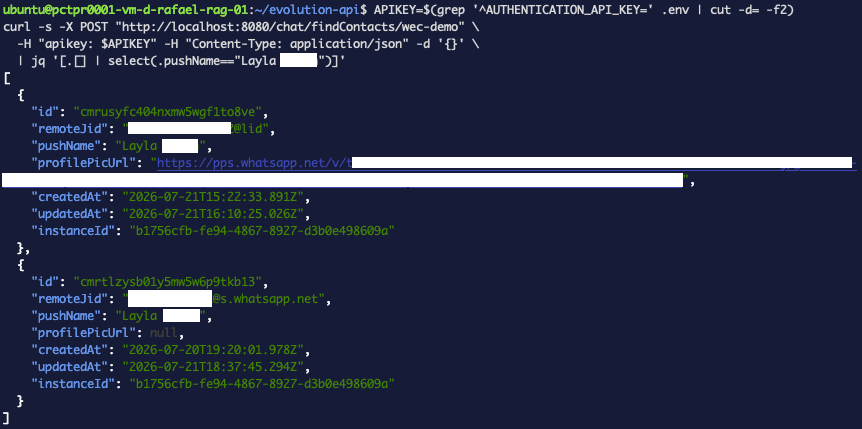 Figure 5. Evolution stores both identities for the same person — the
 @lid and the real phone JID. That is the key to resolving the reply address.
So we resolve the @lid to the phone number before replying. Add a resolver and use it:
def resolve_number(remote_jid: str, push_name: str):
    if remote_jid.endswith("@s.whatsapp.net"):
        return remote_jid.split("@")[0]
    # LID: find the contact's real number by matching the name
    contacts = requests.post(f"{EVOLUTION_URL}/chat/findContacts/{INSTANCE}",
        headers={"apikey": EVOLUTION_APIKEY, "Content-Type": "application/json"},
        json={}, timeout=30).json()
    for c in contacts:
        if c.get("pushName") == push_name and c.get("remoteJid", "").endswith("@s.whatsapp.net"):
            return c["remoteJid"].split("@")[0]
    return None
In the handler, resolve before sending:
    number = resolve_number(to, data.get("pushName", ""))
    if not number:
        return {"skipped": "unresolved lid"}
    ...
    send_whatsapp(number, answer)
Now SEND -> 201. (Matching by name is a heuristic — two contacts sharing a name would
collide; production keeps a proper LID→phone map. But it works, and it's the honest state
of Evolution's LID support in v2.2.3.)
Step 6 — Speak WhatsApp, not Markdown
LLMs emit Markdown (**bold**, [text](url)), but WhatsApp has its own formatting:
bold is *single asterisk*, and Markdown links don't render. So **Compute** shows up
with literal asterisks. Translate the model's output before sending, and append the RAG's
sources as plain URLs:
import re

def to_whatsapp(md: str) -> str:
    md = re.sub(r"\*\*(.+?)\*\*", r"*\1*", md)                        # **bold** -> *bold*
    md = re.sub(r"\[([^\]]+)\]\((https?://[^)]+)\)", r"\1 (\2)", md)  # [t](url) -> t (url)
    md = re.sub(r"(?m)^#{1,6}\s*", "", md)                            # drop # headings
    return md
Verified against a real answer — exactly what WhatsApp will render:
To create a compute instance on WiLine Edge Cloud (WEC), follow these steps:

1. Log in to the WiLine Edge Cloud.
2. In the sidebar, click *Compute*.
3. Select *Instances*.
4. Click the "Launch Virtual Machine" wizard to begin the deployment process.

_Sources:_
https://wec.wiline.com/docs/cloud_portal/platform/compute/instances/compute_instance/
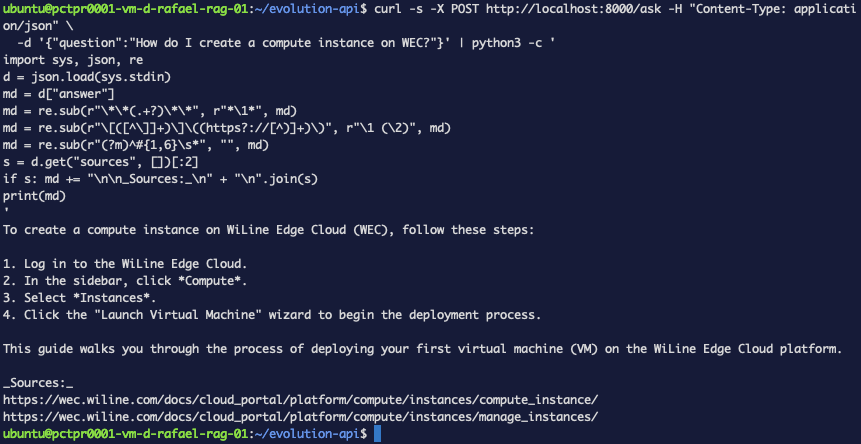 Figure 6. The model output after to_whatsapp(): single-asterisk bold, plain links, sources appended.
Level up — point the bridge at your docs (RAG)
Everything so far uses the raw model, so a WEC question gets a general answer. To make it
answer from your documentation, swap ask_llm to call the RAG service from the
evals series — one function, nothing
else changes:
RAG_URL = "http://<your-vm-ip>:8000/ask"

def ask_llm(text: str) -> str:
    r = requests.post(RAG_URL, json={"question": text}, timeout=120)
    r.raise_for_status()
    d = r.json()
    answer = to_whatsapp(d["answer"])
    sources = d.get("sources", [])[:2]
    if sources:
        answer += "\n\n_Sources:_\n" + "\n".join(sources)
    return answer
That's the payoff of the bridge pattern: swap the brain, keep the plumbing. Now WhatsApp answers WEC questions from the real docs, with sources:
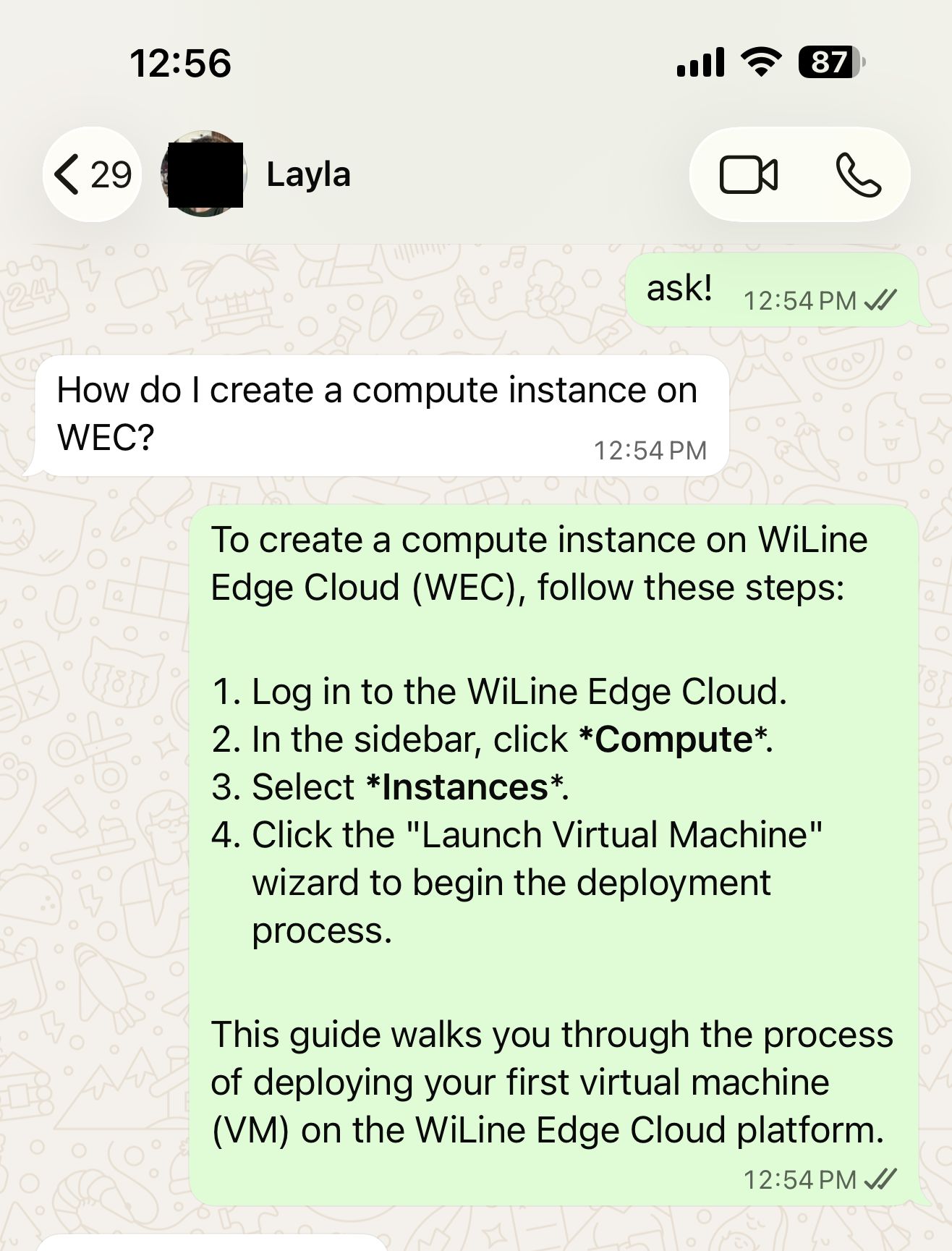 Figure 7. A real message in → the bridge → RAG over the WEC docs → a grounded answer
delivered on WhatsApp, sources included.
Figure 7. A real message in → the bridge → RAG over the WEC docs → a grounded answer
delivered on WhatsApp, sources included.
You self-hosted a programmable WhatsApp gateway and wrote the bridge that turns it into an AI assistant — webhook in, model out, reply back — grounded in your own docs.
The delivery wall
Here's the part other tutorials won't tell you. Even with SEND -> 201, replies to a
LID-migrated account frequently arrive as "Waiting for this message" on the
recipient's phone — WhatsApp accepted the ciphertext but no device can decrypt it. It's a
known Baileys companion-device limitation, and WhatsApp's LID rollout makes it worse.
What we observed, honestly:
- A fresh re-link (log out the device, scan a new QR) buys a short window where delivery works cleanly.
- After a while the session degrades and
"Waiting for this message"returns — even though every send still reports201.
So the bridge is correct end-to-end; the unofficial Baileys transport is the weak link. If you're building this for real:
- Use a dedicated, non-LID number — the issue is tied to LID-migrated accounts.
- For production-grade reliability, use the official WhatsApp Cloud API, or — if your goal is an AI agent rather than a programmable gateway — OpenClaw's native WhatsApp channel, which handles the session for you.
Evolution shines for outbound automation to numbers you control (notifications, alerts, flows). As a two-way AI assistant on a personal LID account, treat delivery as best-effort.
Troubleshooting recap
pull access deniedonatendai/evolution-api→ image moved toevoapicloud/evolution-api.- Instance stuck
connecting, re-init loop → stale Baileys version; pinCONFIG_SESSION_PHONE_VERSION. - Bridge answers itself forever → missing
fromMeloop guard. - Flood of group messages / send timeouts → filter
@g.us; answer DMs only. SEND -> 400 exists:false ...@lid→ resolve the LID to the phone JID viafindContacts.**asterisks**in replies → translate Markdown to WhatsApp formatting.- "Waiting for this message" → Baileys/LID decryption wall; fresh re-link is a temporary window; use a non-LID number / Cloud API for production.
Teardown
cd ~/evolution-api && docker compose down # add -v to also wipe the DB/session
Unlink the device in WhatsApp → Linked Devices if you're done.
What's next
You built the reusable bridge pattern — webhook → resolve → model → reply. Point it at a different brain, a different channel, or add tools. If you want an AI agent on WhatsApp without the Baileys caveats, the OpenClaw native WhatsApp channel is the managed path; for docs-grounded answers, the evals & observability series builds the RAG service this tutorial plugs into.