Run OpenClaw on WEC Models

 +
+Through Parts 1–4 you deployed OpenClaw, secured it with HTTPS, added Telegram, and made it private over a NetBird mesh — all pointed at OpenAI. This part swaps the model out from under it: point the same agent at WEC Models — WiLine's own OpenAI-compatible inference — and run it on an open-weight model, Llama 3.1 8B Instruct. Same box, no rebuild — just a base-URL, key, and model change via the OpenClaw CLI.
Continues on the same WEC Instance from Parts 1–4. WEC Models is an
OpenAI-compatible endpoint at https://inference.wiline.com/v1; every command
below was run against a live OpenClaw gateway container
(openclaw-openclaw-gateway-1).
Why point OpenClaw at WEC Models
If you self-hosted the agent to begin with, you already care about control — not depending on someone else's cloud, not being one pricing-page email away from a rebuild. But there's a gap in that story: the agent runs on your box, and every single message it handles is still shipped off to OpenAI to think. Self-hosting the agent and outsourcing the model is only half the job. This part closes it.
- One model, end to end on WiLine — your agent and its model run on WEC; no third-party provider on the hot path.
- Open weights — Llama 3.1 isn't a closed box; you're not locked to a single vendor's API to keep the agent running.
- It's a config change, not a migration — OpenClaw already speaks the OpenAI API, and WEC Models is OpenAI-compatible, so you keep your agent, prompts, and channels untouched.
It's also just cheaper. WEC's own catalog prices Llama3.1-8B-Instruct at
$0.15 / 1M input tokens · $0.20 / 1M output tokens. OpenAI doesn't publish a
standalone rate for gpt-5.5 (the model OpenClaw defaults to in
Part 1) any more, but its closest
current family member — GPT-5.6 "Terra," pitched by OpenAI as
"performance competitive with GPT-5.5" — lists at
$2.50 / 1M in · $15 / 1M out. That's an approximate comparison, not an
apples-to-apples benchmark — the honest move, as always on this blog, is to
eval it on your own workload
rather than trust either vendor's number. But the direction is clear enough to be
worth the ten minutes this takes.
Prerequisites
- OpenClaw running from Parts 1–4 (any
of the setups works). This guide assumes the gateway container is named
openclaw-openclaw-gateway-1. - A WEC API key.
- Shell access to the OpenClaw box.
Step 1 — Get a WEC API key
See Inference → API Keys if you don't already have one (the same key from Part 1 of the evals series works fine here).
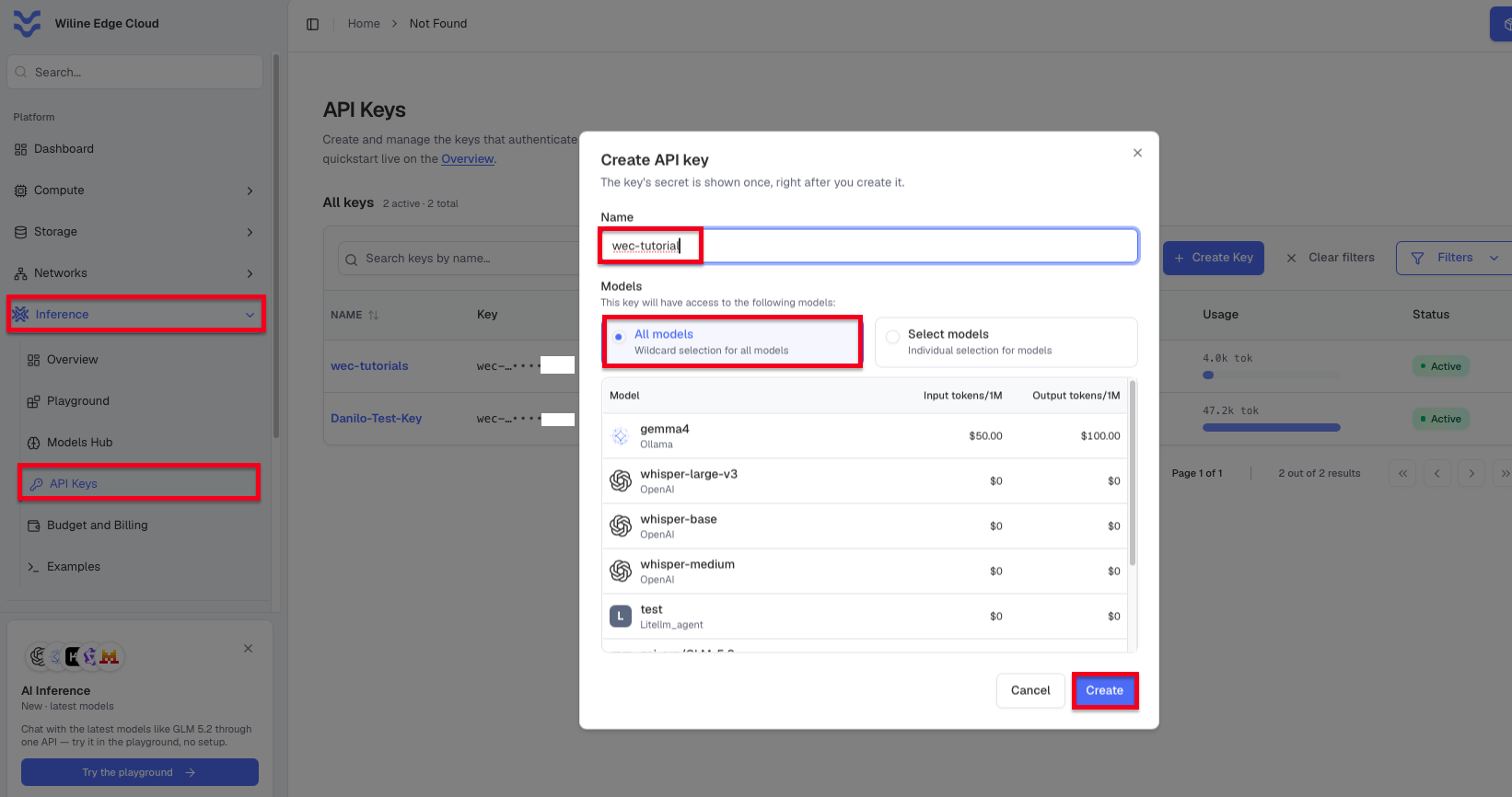 Figure 1. Create a key under Inference → API Keys, then copy it.
Keep it out of your shell history — put it in a file instead of exporting it directly:
echo 'WEC_API_KEY=sk-wec-...' >> env.local
source <(grep -v '^#' env.local | sed 's/^/export /')
Step 2 — Find the model ID
Query the OpenAI-compatible /v1/models endpoint to see what's live on your WEC
Instance:
curl -s -H "Authorization: Bearer $WEC_API_KEY" https://inference.wiline.com/v1/models
The response lists every model available to your key, alongside the id this tutorial uses:
{"data":[
  ...,
  {"id":"Llama3.1-8B-Instruct","object":"model","created":1677610602,"owned_by":"openai"},
  ...
]}
Model ids on WEC aren't always the display name shown in the portal — always take
the exact id from this response, not a guess.
Step 3 — Point OpenClaw at WEC Models
Don't hand-edit openclaw.json — use openclaw config set. It validates the
whole file on every write, so a typo fails loudly instead of quietly breaking
the gateway. A custom provider needs its base URL, its API style, and its model
list declared together, in one write — the schema rejects a provider that's
missing any of the three, so build the full object up front:
docker exec openclaw-openclaw-gateway-1 openclaw config set models.providers.wec '{
  "baseUrl": "https://inference.wiline.com/v1",
  "api": "openai-completions",
  "models": [
    {"id": "Llama3.1-8B-Instruct", "name": "Llama 3.1 8B Instruct"}
  ]
}' --strict-json
Updated models.providers.wec. Change will apply without restarting the gateway.
That registers WEC as a provider, but it's not authenticated yet. Don't put the
key straight into that JSON — OpenClaw's compose setup keeps API keys out of
environment variables entirely and stores them in a dedicated, file-backed
secrets directory instead (OPENCLAW_AUTH_PROFILE_SECRET_DIR, mounted into the
container). Hand the key to OpenClaw's own auth store and let it do the wiring:
echo "$WEC_API_KEY" | docker exec -i openclaw-openclaw-gateway-1 openclaw models auth paste-api-key --provider wec
Updated config: $OPENCLAW_HOME/.openclaw/openclaw.json
  Backup: $OPENCLAW_HOME/.openclaw/openclaw.json.bak
Auth profile: wec:manual (wec/api_key)
Check that the provider and its auth resolved together, then make the model the default so every agent picks it up without extra config:
docker exec openclaw-openclaw-gateway-1 openclaw models list
docker exec openclaw-openclaw-gateway-1 openclaw models set wec/Llama3.1-8B-Instruct
Model                                      Input      Ctx         Local Auth  Tags
wec/Llama3.1-8B-Instruct                   text       200k        no    yes   configured
openai/gpt-5.5                             text       200k        no    yes   configured,alias:GPT
...

Updated config: $OPENCLAW_HOME/.openclaw/openclaw.json
  Backup: $OPENCLAW_HOME/.openclaw/openclaw.json.bak
Default model: wec/Llama3.1-8B-Instruct
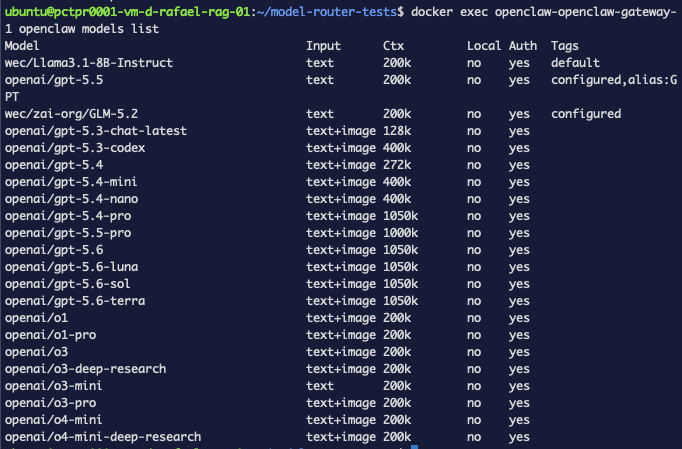 Figure 2.
 wec/Llama3.1-8B-Instruct, authenticated and set as the default model.
Step 4 — Verify
OpenClaw can run more than one agent per gateway, so every message needs a
target — pass --agent, matching whatever openclaw agents list calls yours
(main, unless you renamed it):
docker exec openclaw-openclaw-gateway-1 openclaw agents list
Agents:
- main (default)
  Workspace: $OPENCLAW_HOME/.openclaw/workspace
  Model: wec/Llama3.1-8B-Instruct
  Routing rules: 0
Send it a message and see who answers:
docker exec openclaw-openclaw-gateway-1 openclaw agent --agent main --message "What is the capital of France?"
Paris is the capital of France.
That's WEC, on Llama 3.1, with no OpenAI in the loop.
 Figure 3. The agent, running on Llama 3.1 8B Instruct via WEC.
Step 5 (optional) — Turn off thinking mode
Want it snappier? Turn off thinking mode — it's a slash command inside the chat, not a shell command:
docker exec openclaw-openclaw-gateway-1 openclaw agent --agent main --message "/think off"
Thinking mode has been turned off.
Or make it stick for every session:
docker exec openclaw-openclaw-gateway-1 openclaw config set agents.defaults.thinkingDefault "off"
Updated agents.defaults.thinkingDefault. No gateway restart needed.
Troubleshooting (real)
"custom model providers must declare models" — declare baseUrl, api,
and models together, in one config set call. A custom provider missing any
of the three gets rejected; you can't add models in a follow-up write.
"models.providers.wec.apiKey is unresolved in the active runtime snapshot"
— don't set apiKey on the provider object; let models auth paste-api-key
own it (Step 3). Already set one? Remove it:
docker exec openclaw-openclaw-gateway-1 openclaw config unset models.providers.wec.apiKey
"No target session selected" — always pass --agent <id> with
openclaw agent. Check the id with openclaw agents list first if you're not
sure (main, unless you renamed it).
-bash: /think: No such file or directory — /think is a slash command
for inside the chat, not a shell command. Pass it through --message instead,
as in Step 5.
What's next
With the agent running on our own model, the next step is measuring it — evaluating answer quality with Promptfoo + WEC Models.