Mask PII at the gateway: set up Presidio, plus the one line the docs leave out

 +
+ +
+Part 2 ended with the gateway deciding which model answers each request — and still forwarding every prompt verbatim, including the ones carrying customer names, emails and phone numbers.
This post puts a PII filter in that path. Not in front of the model, though: in front of the logs. The model reading your prompt is doing its job; the risk is what gets stored. So the raw text goes to the model and a masked copy goes to your logging.
That is what the gateway advertises. Following its documented configuration got
me the opposite — a model that answered correctly and a reply that came back as
<LOCATION>. This is how to find that and how to fix it.
LiteLLM 1.96.2 (ghcr.io/berriai/litellm:main-stable), Presidio images from
ghcr.io/data-privacy-stack, models qwen-small (Qwen2.5-3B-Instruct) and
qwen-mid (Qwen3.5-9B) via the WEC Inference API, on 20 August 2026. Defaults
change — if your results differ, check your version first.
What Presidio is, and where it goes
Presidio detects personal data in text: names, emails, phone numbers, card numbers. You POST it a string and it returns the entities it found, with character offsets and a confidence score.
It ships as two services — an analyzer that finds PII and an anonymizer that replaces it. The gateway calls both.
One naming note that trips people up: Presidio was Microsoft's project and most
tutorials still call it that. The repository moved to the data-privacy-stack
organisation, and github.com/microsoft/presidio now answers Moved Permanently. Same project, new home, which is why the images below aren't under
a Microsoft path.
Add Presidio to the gateway's compose
Presidio only ever talks to the gateway, so it does not need published ports.
Open the docker-compose.yml from Part 1 and add two services after the db:
block, above volumes::
  presidio-analyzer:
    image: ghcr.io/data-privacy-stack/presidio-analyzer:latest
    container_name: presidio-analyzer
    restart: unless-stopped

  presidio-anonymizer:
    image: ghcr.io/data-privacy-stack/presidio-anonymizer:latest
    container_name: presidio-anonymizer
    restart: unless-stopped
Two spaces of indentation, same level as litellm: and db:.
Notice what is absent: no ports:. Putting them in the same compose project as
the gateway means Docker gives them a shared network and DNS, so the gateway
reaches them by service name and nothing else on your network can reach them at
all. If you deployed Presidio separately with ports: ["5002:3000"], that
exposed your PII analyzer to everything that can route to the host — worth
undoing.
cd ~/llm-gateway && docker compose up -d
docker compose ps
Four containers, and the Presidio rows should show 3000/tcp with no host
mapping:
NAME                  SERVICE               STATUS         PORTS
llm-gateway           litellm               Up             127.0.0.1:4000->4000/tcp
llm-gateway-db        db                    Up (healthy)   5432/tcp
presidio-analyzer     presidio-analyzer     Up (healthy)   3000/tcp
presidio-anonymizer   presidio-anonymizer   Up (healthy)   3000/tcp

If docker compose ps shows only two containers, the compose file was not saved.
Confirm what compose is actually reading:
docker compose config --services
That must list four names. It reads the file on disk, so it catches an edit that never made it out of your editor.
Check the analyzer, and learn its limits
Before wiring anything, see what Presidio actually finds:
There are no host ports now, so ask from inside the gateway. The LiteLLM image
ships no curl, so use its Python:
docker exec llm-gateway python -c "import json,urllib.request as u; r=u.Request('http://presidio-analyzer:3000/analyze', data=json.dumps({'text':'Call Rafael on 555-0142 or [email protected]','language':'en'}).encode(), headers={'Content-Type':'application/json'}); print(u.urlopen(r).read().decode())"
[{"entity_type": "EMAIL_ADDRESS", "score": 1.0, "start": 27, "end": 45},
 {"entity_type": "PERSON", "score": 0.85, "start": 5, "end": 11},
 {"entity_type": "URL", "score": 0.5, "start": 34, "end": 45}]
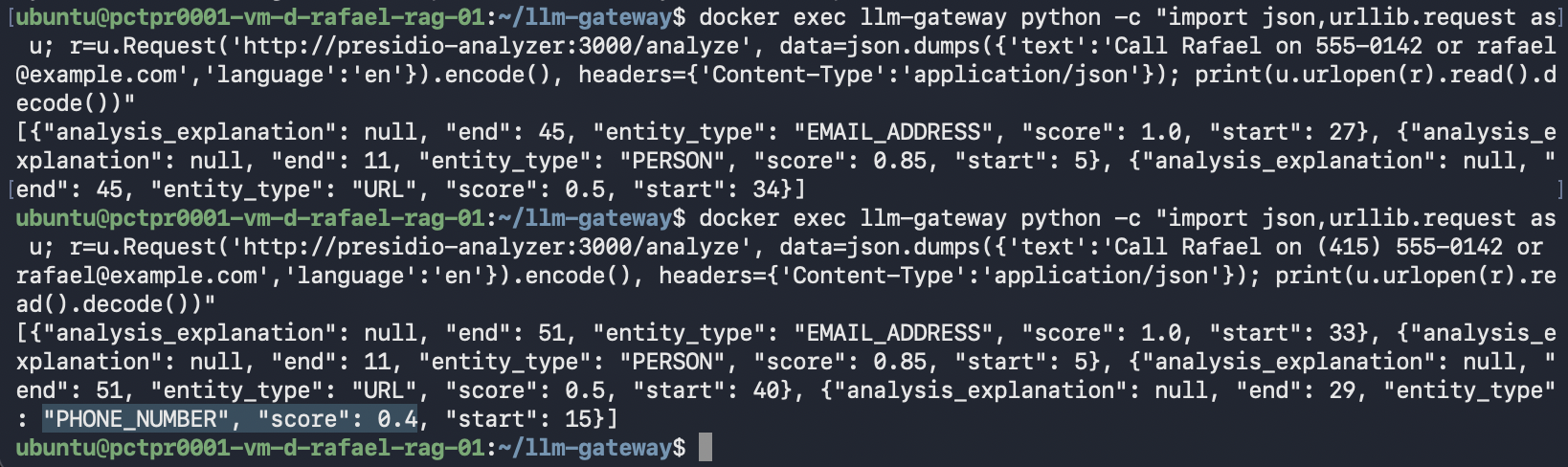
Read that carefully, because it sets expectations for everything after.
It found the email at full confidence and the name at 0.85. It did not find the
phone number at all. 555-0142 is seven digits with no area code, and
Presidio validates against real numbering plans rather than pattern-matching
anything that looks phone-shaped. Add an area code:
docker exec llm-gateway python -c "import json,urllib.request as u; r=u.Request('http://presidio-analyzer:3000/analyze', data=json.dumps({'text':'Call Rafael on (415) 555-0142 or [email protected]','language':'en'}).encode(), headers={'Content-Type':'application/json'}); print(u.urlopen(r).read().decode())"
Now PHONE_NUMBER appears — scoring 0.4, against 1.0 for the email.
It is worth checking whether the 555 prefix is the problem, since that range is
reserved for fiction. It is not. A plausible number behaves identically:
docker exec llm-gateway python -c "import json,urllib.request as u; r=u.Request('http://presidio-analyzer:3000/analyze', data=json.dumps({'text':'Call Rafael on (415) 682-4531 or on 682-4531','language':'en'}).encode(), headers={'Content-Type':'application/json'}); print(u.urlopen(r).read().decode())"
[{"entity_type": "PERSON", "score": 0.85, "start": 5, "end": 11},
 {"entity_type": "PHONE_NUMBER", "score": 0.4, "start": 15, "end": 29}]
Same 0.4 for the full number, and the bare 682-4531 is still missed. So two
things are true: an area code is what makes a phone number detectable at all,
and 0.4 is simply what this recognizer returns for phone numbers — not a
penalty for fake ones.
Which means entity types are not equally trustworthy, and confidence is a number
you will want to set deliberately. Presidio exposes presidio_score_thresholds
for exactly that: a per-entity floor below which detections are discarded. Set it
at 0.5 and you would silently stop masking every phone number in your traffic.
Do not build a compliance story on the assumption that this catches everything.
Teaching it the numbers it misses
There is an escape hatch, and it is worth knowing before you decide the coverage
is unacceptable. presidio_ad_hoc_recognizers takes a path to a JSON file of
extra recognizers, loaded when the guardrail starts:
[
  {
    "name": "LocalPhoneRecognizer",
    "supported_language": "en",
    "supported_entity": "PHONE_NUMBER",
    "patterns": [
      { "name": "us-local-7", "regex": "\\b\\d{3}-\\d{4}\\b", "score": 0.9 }
    ]
  }
]
Mount it beside the config and point the guardrail at it:
- ./recognizers.json:/app/recognizers.json:ro
presidio_ad_hoc_recognizers: /app/recognizers.json
Recreate the container — a new volume needs up -d, not restart — and the same
prompt that leaked now masks:
Reply OK. Contact <PERSON> on <PHONE_NUMBER> about the invoice.
Why the score is 0.9 and not 0.8. Put 682-4531 inside a sentence —
Call me on 682-4531 — and the default recognizers return DATE_TIME at
0.85: seven digits with a dash, read as a date. (Pass the number on its own,
with no sentence around it, and nothing fires at all; the NER model wants
context before it commits to anything.) At 0.8 your phone recognizer loses the
overlap and the number is masked as <DATE_TIME>: still redacted, but filed
under the wrong entity, which quietly breaks any reporting that counts by type.
At 0.86 or above PHONE_NUMBER wins.
Measured across three runs each, entirely deterministic:
| Text | Default | Recognizer at 0.8 | Recognizer at 0.9 |
|---|---|---|---|
Call me on 555-0142 | left in the clear | <PHONE_NUMBER> | <PHONE_NUMBER> |
Call me on 682-4531 | <DATE_TIME> | <DATE_TIME> | <PHONE_NUMBER> |
(415) 682-4531 or on 682-4531 | bare one leaks | both masked | both masked |
Note the middle row is not a miss — it is a misclassification, and the anonymizer still redacts it. The first and third rows are the real leaks, and a recognizer closes both.
The version above is not safe to ship
Seven digits and a dash is a shape, not a meaning, and plenty of things share it. Run that recognizer against text from an actual support queue:
| Text | Masked as |
|---|---|
Order 482-1099 shipped yesterday | <PHONE_NUMBER> |
Invoice 100-2000 is overdue | <PHONE_NUMBER> |
Part number 250-4000 is discontinued | <PHONE_NUMBER> |
The error code was 500-1001 | <PHONE_NUMBER> |
Our office is at 200-4500 Main Street | <PHONE_NUMBER> |
RFC 793-1981 defines TCP | <PHONE_NUMBER> |
Six for six. And the 0.9 you set to win the DATE_TIME overlap now wins every
overlap, so the recognizer does not merely add noise — it overwrites correct
classifications with a wrong one. Traces full of <PHONE_NUMBER> where the order
numbers used to be are worse than traces with one number in the clear, because
now you cannot tell which is which.
The fix is to stop matching on shape alone and require a cue word in front of the
digits. That has to be a lookbehind: Presidio redacts the whole match, so
(call\W+)(\d{3}-\d{4}) would swallow the word "call" along with the number —
capture groups do not narrow the span. Python's re only allows fixed-width
lookbehinds, which is why this is an alternation rather than one tidy list:
[
  {
    "name": "LocalPhoneRecognizer",
    "supported_language": "en",
    "supported_entity": "PHONE_NUMBER",
    "patterns": [
      {
        "name": "us-local-7-cued",
        "regex": "(?i)(?:(?<=call )|(?<=called )|(?<=calling )|(?<=phone )|(?<=phone: )|(?<=phone is )|(?<=tel )|(?<=tel: )|(?<=cell )|(?<=cell: )|(?<=cell is )|(?<=mobile )|(?<=mobile: )|(?<=contact )|(?<=contact: )|(?<=number )|(?<=number: )|(?<=number is )|(?<=me on )|(?<=him on )|(?<=her on )|(?<=them on )|(?<=us on )|(?<=me at )|(?<=him at )|(?<=her at )|(?<=them at )|(?<=us at ))(?<!part number )(?<!serial number )(?<!order number )(?<!invoice number )(?<!account number )(?<!model number )(?<!tracking number )(?<!reference number )(?<!batch number )(?<!ticket number )(?<!case number )\\d{3}-\\d{4}\\b",
        "score": 0.9
      }
    ]
  }
]
The trailing negative lookbehinds are there because number is a useful cue and
part number is not.
Measured over twelve phone phrasings and twelve lookalikes:
\b\d{3}-\d{4}\b | Cue-anchored | |
|---|---|---|
| Phone numbers masked | 12/12 | 12/12 |
| Lookalikes wrongly masked | 12/12 | 0/12 |
Two things this does not fix, and you should know both. Order 482-1099 still
comes back as <DATE_TIME> — that is spaCy misfiring on its own, with or without
your recognizer. And a phone number introduced by a phrase you did not think of
goes back to leaking. A cue list is a guess about how people write, so treat it
as something to revisit against your own traffic rather than a finished artefact.
BR is in the default region list, so (11) 91234-5678 is recognised — and
91234-5678 without the DDD is not, exactly as with a missing US area code. The
same recognizer closes it with \d{4,5}-\d{4} and a Portuguese cue list.
Wire the guardrail
The gateway calls Presidio through a guardrail. Open config.yaml and add a
guardrails: block at the end — this is the configuration the LiteLLM
documentation gives for masking only on the logging path:
guardrails:
  - guardrail_name: presidio-log-mask
    litellm_params:
      guardrail: presidio
      mode: logging_only
      default_on: true
      presidio_analyzer_api_base: http://presidio-analyzer:3000
      presidio_anonymizer_api_base: http://presidio-anonymizer:3000
mode: logging_only is the important one. The documentation describes it as:
Run after LLM call, only apply PII Masking before logging to Langfuse, etc. Not on the actual llm api request / response.
default_on: true applies it to every request rather than only those that ask
for it by name. And the two api_base values are the service names from the
compose file — the guardrail runs inside the gateway container, so localhost
would point at the wrong place.
Restart, and wait for the proxy to actually come back — it takes 30 to 60
seconds, which is longer than most sleep commands people put in front of it:
docker compose restart litellm
until curl -sf localhost:4000/health/readiness >/dev/null 2>&1; do printf '.'; sleep 3; done; echo " ready"
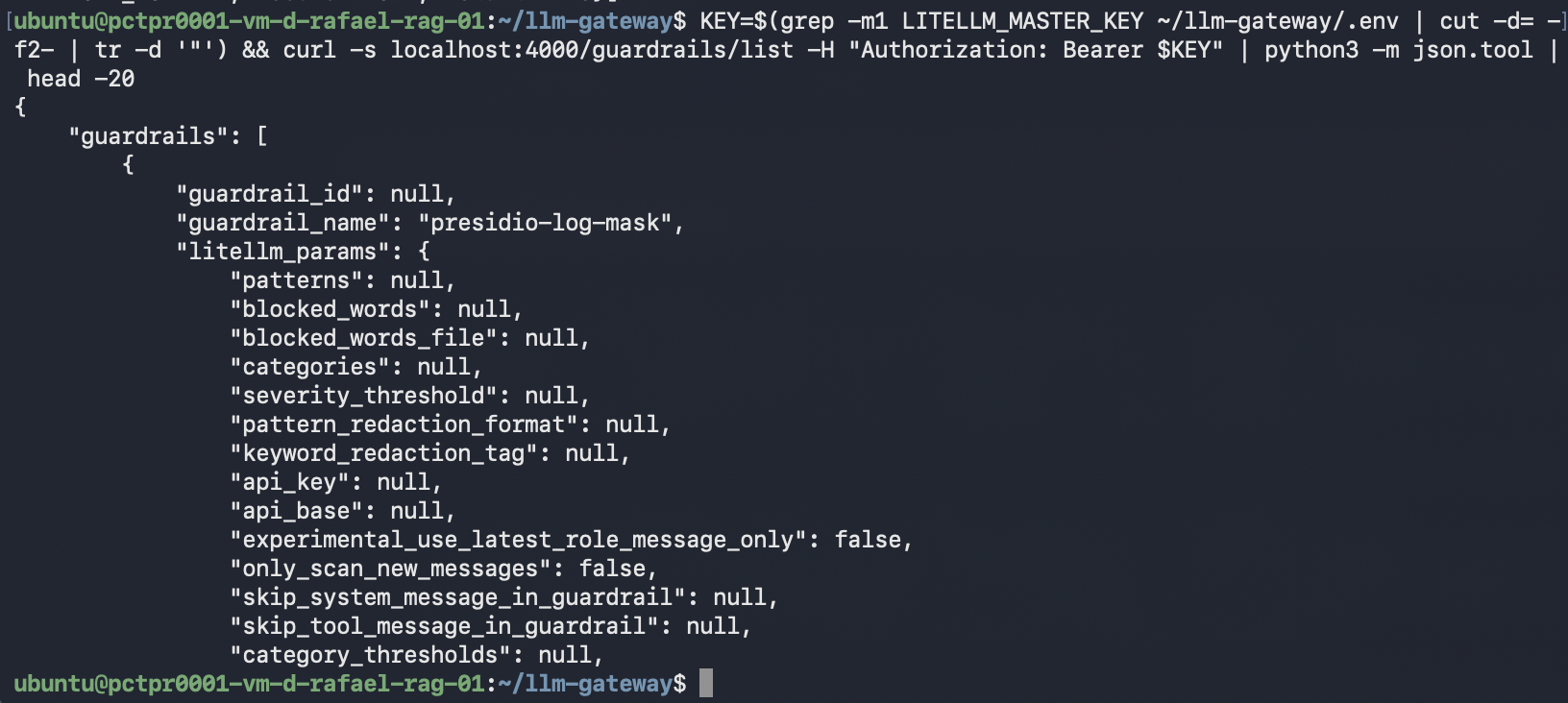
Then confirm the guardrail loaded, which is more reliable than reading logs:
KEY=$(grep -m1 LITELLM_MASTER_KEY ~/llm-gateway/.env | cut -d= -f2- | tr -d '"') && \
curl -s localhost:4000/guardrails/list -H "Authorization: Bearer $KEY" \
  | python3 -c "import sys,json; g=json.load(sys.stdin)['guardrails'][0]; p=g['litellm_params']; print(json.dumps({'guardrail_name': g['guardrail_name'], **{k: p.get(k) for k in ('guardrail','mode','presidio_filter_scope','default_on','presidio_analyzer_api_base','presidio_anonymizer_api_base','fail_on_error','unreachable_fallback')}}, indent=2))"
The endpoint returns every possible guardrail field, most of them null, so this
picks out the ones that matter:
{
  "guardrail_name": "presidio-log-mask",
  "guardrail": "presidio",
  "mode": "logging_only",
  "presidio_filter_scope": "input",
  "default_on": true,
  "presidio_analyzer_api_base": "http://presidio-analyzer:3000",
  "presidio_anonymizer_api_base": "http://presidio-anonymizer:3000",
  "fail_on_error": true,
  "unreachable_fallback": "fail_closed"
}
Those last two are the defaults worth knowing before this sees real traffic: if Presidio is unreachable, requests fail rather than passing unmasked.
Test it, and get a surprise
Now the part that matters. Send a prompt whose answer proves whether the model saw the real text — asking it to echo the PII back is useless, because the reply gets scanned too:
KEY=$(grep -m1 LITELLM_MASTER_KEY ~/llm-gateway/.env | cut -d= -f2- | tr -d '"') && \
curl -s localhost:4000/v1/chat/completions \
  -H "Authorization: Bearer $KEY" -H 'Content-Type: application/json' \
  -d '{"model":"qwen-small","temperature":0,"messages":[{"role":"user","content":"Which US city does this area code belong to: (415) 555-0142? Answer with only the city name."}]}' \
  | python3 -c "import sys,json; print(json.load(sys.stdin)['choices'][0]['message']['content'])"
Expected: San Francisco, proving the model read the digits.
Actual:
<LOCATION>

The model answered a question that requires reading a real area code — and then
the answer itself came back masked. logging_only was supposed to stay off the
actual response.
Why that happens
There is a second setting, and its default is doing the work.
presidio_filter_scope controls which direction gets scanned. From the
documentation:
input: only user → model content is scanned;output: only model → user content is scanned;both(default): scan both directions
And, on the same page:
Use
presidio_filter_scope: output(orboth) when you want Presidio to actively scan and mask the model's response before it reaches the user.
So both — the default — actively masks responses. The documented logging_only
example does not set presidio_filter_scope at all, which leaves it at both.
The result is a configuration that masks the thing the same page says it will not
touch.
In the source, initialize_presidio reads that scope and registers a second
callback with apply_to_output=True on post_call whenever output scanning is
enabled. That callback's event hook is hard-coded, so the mode you set never
reaches it.
This has been reported.
Issue #30447, "logging_only
Presidio guardrail corrupts user-facing response (assistant content replaced with
PII tokens)", was filed on 15 June 2026 and closed the next day with no
discussion, alongside a pull request titled "fix(presidio): don't mask the live
request when guardrail is logging_only". The report was about the response; the
fix addressed the request. On the main-stable image used here, the behaviour
above still reproduces.
A second report is open:
#35951 notes that in
logging_only mode the masking hook rewrites kwargs["messages"] but does not
propagate to standard_logging_object, which is what downstream loggers read.
The fix
One line. Add presidio_filter_scope: input to the guardrail:
guardrails:
  - guardrail_name: presidio-log-mask
    litellm_params:
      guardrail: presidio
      mode: logging_only
      presidio_filter_scope: input
      default_on: true
      presidio_analyzer_api_base: http://presidio-analyzer:3000
      presidio_anonymizer_api_base: http://presidio-anonymizer:3000
Restart, wait for readiness, and run the same request:
San Francisco
You can run Presidio beside a gateway, mask prompts at logging time without
touching the live request, and tell the two directions apart with
presidio_filter_scope.
Proving it properly
One right answer could be a lucky guess — "San Francisco" is a plausible default
for a masked area-code question, and temperature: 0 makes a guess repeat just
as reliably as a real answer. So ask about several area codes the model cannot
bluff:
KEY=$(grep -m1 LITELLM_MASTER_KEY ~/llm-gateway/.env | cut -d= -f2- | tr -d '"')
for ac in 907 808 216 505; do
  printf "area %s -> " "$ac"
  curl -s localhost:4000/v1/chat/completions \
    -H "Authorization: Bearer $KEY" -H 'Content-Type: application/json' \
    -d "{\"model\":\"qwen-mid\",\"temperature\":0,\"messages\":[{\"role\":\"user\",\"content\":\"Which US state does this phone number's area code belong to: ($ac) 555-0142? Answer with only the state name.\"}]}" \
    | python3 -c "import sys,json; print(' '.join(json.load(sys.stdin)['choices'][0]['message']['content'].split()))"
done
area 907 -> Alaska
area 808 -> Hawaii
area 216 -> Ohio
area 505 -> New Mexico
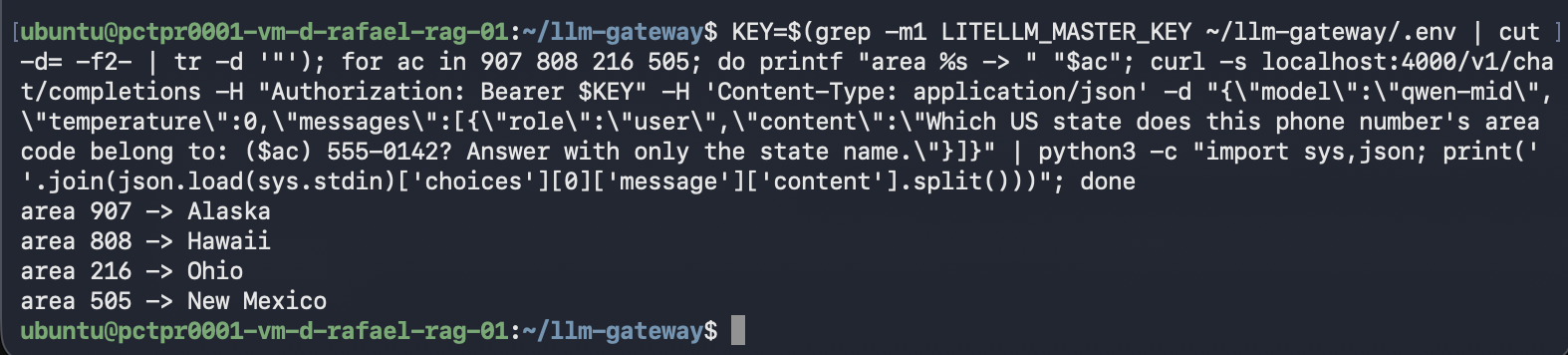
Four for four. The model is reading the digits, so the prompt is reaching it unmasked. That is the behaviour this post set out to get.
The whitespace collapse in that command is not cosmetic fussiness — qwen-mid is
a reasoning model and prefixes its answers with newlines, inconsistently enough
that .strip() alone leaves ragged output.
Why not just mask before the model?
It is the obvious question, and the obvious answer is wrong. mode: pre_call
masks the prompt before the model ever sees it — which sounds like the safest
possible arrangement.
Change the one line and find out:
mode: pre_call
Restart, then ask the same question:
KEY=$(grep -m1 LITELLM_MASTER_KEY ~/llm-gateway/.env | cut -d= -f2- | tr -d '"') && \
curl -s localhost:4000/v1/chat/completions \
  -H "Authorization: Bearer $KEY" -H 'Content-Type: application/json' \
  -d '{"model":"qwen-small","temperature":0,"max_tokens":60,"messages":[{"role":"user","content":"Which US state does this phone number'"'"'s area code belong to: (907) 555-0142? Answer with only the state name."}]}' \
  | python3 -c "import sys,json; print(' '.join(json.load(sys.stdin)['choices'][0]['message']['content'].split()))"
To determine the state for a given phone number's area code, I would need to know
the specific area code of the phone number provided. Please provide the area code
or the full phone number so I can identify the corresponding state.
The exact wording moves around between runs even at temperature: 0 — the point
is that every version of it asks you for the number you already sent.

The model is politely asking for the number you just gave it. It received
<PHONE_NUMBER> and there is nothing in a placeholder to reason about. Nothing
failed, nothing errored — you simply got a useless answer, which is the failure
mode that is hardest to notice in production.
qwen-mid behaved worse in my runs: the same request timed out twice at 40
seconds with max_tokens: 60, where it answered in well under a second on
unmasked input. I would not claim a mechanism from two samples, but if you are
routing to a reasoning model, time this before trusting it.
So the three placements, same question each time:
| Configuration | Model receives | Result |
|---|---|---|
mode: pre_call | <PHONE_NUMBER> | asks you for the number it was given |
mode: logging_only, scope left default | real digits | correct answer, returned as <LOCATION> |
mode: logging_only, presidio_filter_scope: input | real digits | San Francisco |
Only the third gives you a working application. Put mode back to
logging_only before continuing.
What this gives you, and what it does not
You now have prompts reaching models intact, with PII masking attached to the logging path instead of the request path — and one setting away from silently redacting your users' answers.
One thing this fix does not cover, and it matters: input scope masks the
prompt only. Whatever the model says is logged verbatim — and a model asked
about a customer will repeat that customer's name back. So the PII you removed
from the prompt reappears in the completion. Widening the scope to both closes
that hole and reintroduces the response corruption above; there is no setting
that does both.
Part 4 measures the leak
and builds the missing piece on async_logging_hook, the documented callback
that runs after the response has been sent.
Being straight about the boundary: the masked copy lands wherever your logging
callbacks send it. The gateway's own LiteLLM_SpendLogs table is not one of
those — messages stayed {} in every configuration I tried, including with
store_prompts_in_spend_logs set both in config.yaml and as an environment
variable. The documentation points at Langfuse and similar destinations, which is
where the next post looks. Until you have wired one up and seen a masked
payload in it, treat the masking half as unproven in your own deployment.
Two more things worth knowing before this sits in front of real traffic. The
guardrail defaults to fail_on_error: true with unreachable_fallback: fail_closed, so if Presidio goes down your requests fail rather than passing
unmasked — the right default, but plan for it. And every Presidio call adds
latency to the logging path; Part 2's timing method applies here too.
Troubleshooting
docker compose ps shows two containers, not four
The compose file was not saved. docker compose config --services reads what is
on disk — if Presidio is missing there, the edit did not land.
curl: executable file not found in $PATH
The LiteLLM image has no curl. Probe with the python -c one-liner above.
Name or service not known reaching presidio-analyzer
The two stacks are on different Docker networks. Both sets of services must be in the same compose project, or share an external network.
Startup fails with ValidationError: mode Field required
mode is mandatory on a guardrail. Omitting it exits the proxy on startup —
Application startup failed. Exiting. You cannot express logging-only by leaving
mode out.
The model answers correctly but the reply is <LOCATION> or <PHONE_NUMBER>
presidio_filter_scope is at its both default. Set it to input.
A phone number is not being masked
Check the score. 555-0142 is not detected at all; (415) 555-0142 scores 0.4.
Use presidio_score_thresholds to set a per-entity floor.
Changes to config.yaml seem to have no effect
Edit the file, then restart — in that order. And a cd from an earlier step
carries over, so check which directory you are in before running docker compose.
.env changes are ignored
docker compose restart does not reload environment. Use
docker compose up -d --force-recreate litellm.
What's next
Masking is configured, but you have not yet watched a masked payload land
anywhere. The next post wires a real logging destination to the gateway and looks
for <PERSON> in a trace — closing the loop this one deliberately leaves open —
and then turns to budgets and what the whole arrangement actually costs.
Further reading
- PII, PHI Masking — Presidio — the guardrail reference, including
presidio_filter_scopeandpresidio_score_thresholds - Logging, Alerting, Metrics — the destinations a masked copy can go to
- Presidio — the analyzer and anonymizer
- Mask your logs, not your prompts — why masking belongs on the storage path
- Part 1 — deploy an LLM gateway on a WEC Instance
- Part 2 — complexity routing and what it costs