Checkpoint a LangGraph agent on a WEC Instance so crashes cost you nothing

 +
+
- 1State that survives a restart
- 2Hand work between agents
- 3Governed tools an agent can call
- 🏆Engineer the context, not the prompt
Your agent has been working on a customer's request for forty seconds. It has read the ticket, pulled the account, and checked three engineers' calendars. It is about to book the appointment.
Then the process dies. A deploy going out, the host running out of memory, someone restarting the container — it does not matter which.
The agent does not pick up where it left off, because there is nothing to pick up from. Everything it learned lived in variables inside a process that no longer exists. The customer is still waiting. Run it again and you pay for all that work a second time. And the part that should worry you most: nobody can say whether the appointment was booked in the last second before it died.
An agent is a model in a loop. As an ordinary Python script, that loop is exactly as fragile as the process holding it.
Here we build one that saves its state to Postgres after every step, so a crash costs nothing.
Verified versions: Python 3.10.12 · langgraph 1.2.11 ·
langgraph-checkpoint 4.2.0 · langgraph-checkpoint-postgres 3.1.2 ·
psycopg 3.3.4 · psycopg-pool 3.3.1 · langchain-openai 1.6.0 ·
langfuse 4.14.5 against Langfuse server v3.205.1 OSS · image postgres:17.
The problem, before the solution
What you want is a resumable run: each step's result written somewhere durable the moment it finishes, so a new process can carry on from there.
That is what a checkpointer does.
Why a graph and not a loop
A loop with a try/except and a few database writes could do this for four fixed
steps. It stops working the moment the agent picks its own path: when the model
chooses the next tool, "where are we?" has no answer you can write down.
LangGraph makes you declare the work as a graph — named nodes, explicit edges. That feels like ceremony until you want durability.
| A loop | A graph |
|---|---|
| Steps are implicit in control flow | Steps are named nodes |
| "Where am I?" has no answer | Position is a value you can read |
| State lives in local variables | State is a declared object |
| Nothing to save | There is an obvious moment to save: node boundaries |
The runtime knows when a node starts and ends, so it has an obvious moment to save. The state is a declared object, so there is something definite to write.
That is what "a deterministic state machine around a non-deterministic model" means: the output is unpredictable, the next step is not. More on that debate in "Loop Engineering Is Dead".
What you'll build
Three properties the usual examples do not have:
- state in Postgres, not in the process
- a human approval gate the graph can sit at for days
- every node traced as a span, with token counts and per-node latency
Prerequisites
- A WEC Instance — deploy one if you have not already
- A WEC Inference API key — create one in the portal
- A Langfuse instance — see Observe production with Langfuse
Step 1 — Install, and why three packages
python3 -m venv .venv
source .venv/bin/activate
pip install "langgraph" "langgraph-checkpoint-postgres" "psycopg[binary,pool]"
| Package | What it does | Why you need it here |
|---|---|---|
langgraph | The graph runtime — nodes, edges, state | The orchestration itself |
langgraph-checkpoint-postgres | Writes state to Postgres | The point of this tutorial |
psycopg[binary,pool] | Postgres driver + connection pool | PostgresSaver requires a pool |
The middle row is worth pausing on. LangGraph's default persistence is in-memory. Durability is opt-in, in a separate package you have to know to install. That is precisely why so many published examples quietly lose state: they never installed this, and nothing warned them.
Three names pull in more than three packages:
./.venv/bin/pip list | grep -iE "langgraph|psycopg" && python3 --version
langgraph                     1.2.11
langgraph-checkpoint          4.2.0
langgraph-checkpoint-postgres 3.1.2
langgraph-prebuilt            1.1.0
langgraph-sdk                 0.4.3
psycopg                       3.3.4
psycopg-binary                3.3.4
psycopg-pool                  3.3.1
Python 3.10.12
langgraph-checkpoint is the one to notice: it is the abstract interface, and
-postgres is one implementation of it. That split is why swapping Postgres for
SQLite or Redis later changes one line.
The pool extra is not decoration either. Install plain psycopg and the failure
comes at connect time, not install time — which is a much more confusing place to
find it.
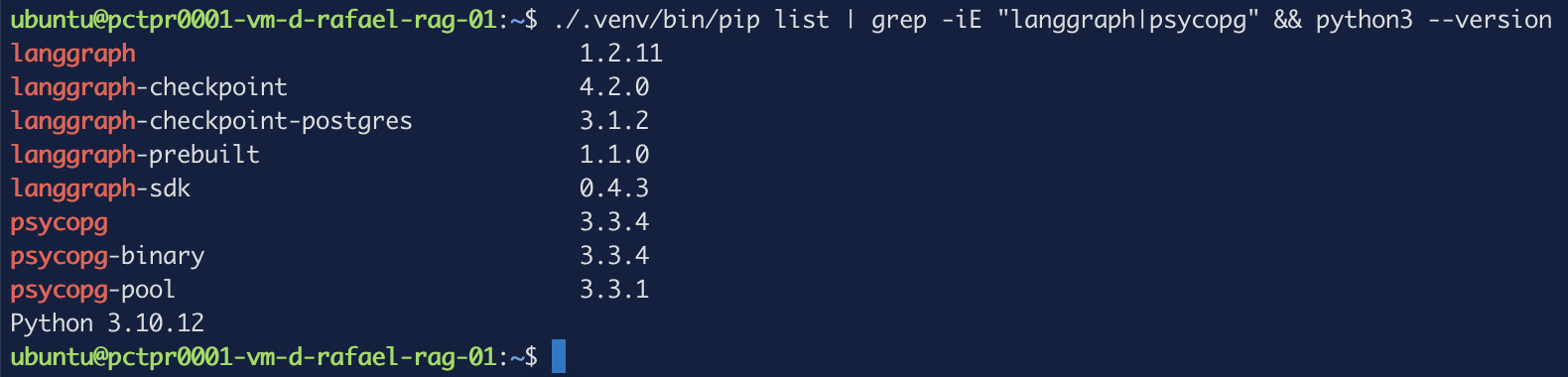 Figure 1. Eight packages from three names — the checkpoint interface and its
Postgres implementation arrive separately.
Figure 1. Eight packages from three names — the checkpoint interface and its
Postgres implementation arrive separately.
Step 2 — A database for checkpoints, not for the app
docker run -d --name lg-checkpoints \
  -e POSTGRES_USER=langgraph -e POSTGRES_PASSWORD=changeme -e POSTGRES_DB=checkpoints \
  -p 127.0.0.1:5434:5432 postgres:17
Three deliberate decisions:
A dedicated database. Checkpoints are write-heavy — a row per node transition, per thread, forever. Mixed into your application database they become a table you are afraid to truncate. Separate, they are disposable.
127.0.0.1:5434:5432, not -p 5434:5432. The short form binds every
interface, and Docker writes its own iptables rules that bypass UFW — so a
firewall that looks correct is not protecting this port. Covered in
Harden Docker networks.
The left number is the host port, the right the container's. On an empty instance
use 5432:5432. If you already self-host anything with a database, that port is
probably taken — pick any free one.
postgres:17 pinned. latest means a reader six months from now runs
something you never tested.
Running is not the same as ready:
docker exec lg-checkpoints pg_isready -U langgraph -d checkpoints
/var/run/postgresql:5432 - accepting connections
A container reports Up the instant it starts, while Postgres inside is still
initialising. Connecting too early gives a connection error that looks like a
configuration problem and is not.
Step 3 — The graph, deliberately without a model
No LLM in this step. If something fails now, it is the checkpointer's fault and not the model's — and separating those two is most of what debugging an agent consists of.
The state object
from operator import add
from typing import Annotated
from typing_extensions import TypedDict

class State(TypedDict):
    completed: Annotated[list[str], add]
This declares what the graph remembers. TypedDict gives the shape; the
Annotated[..., add] part is the interesting half.
By default, when a node returns a value for a key, that value replaces what
was there. Annotated[list[str], add] attaches a reducer — a function
combining the old value with the new one instead of overwriting it. With
operator.add on a list, that means append.
| Declaration | step_one returns ["a"], then step_two returns ["b"] |
|---|---|
completed: list[str] | ["b"] — the first result is lost |
completed: Annotated[list[str], add] | ["a", "b"] — accumulates |
Get this wrong and your state silently forgets everything except the last node.
The nodes
def step_one(state: State):
    print("step_one running", flush=True); time.sleep(2)
    return {"completed": ["step_one"]}

def step_two(state: State):
    print("step_two running — 30s window, KILL ME HERE", flush=True); time.sleep(30)
    return {"completed": ["step_two"]}
A node is a plain function. It receives the current state and returns a partial update — only the keys it changed, not the whole object. The runtime merges that update using the reducers you declared.
The thirty-second sleep in step_two stands in for a slow step — a model call, an
external API, a batch job. It is also what gives you time to kill the process on
cue in the next step.
Wiring the graph
builder = StateGraph(State)
for name, fn in [("step_one", step_one), ("step_two", step_two), ("step_three", step_three)]:
    builder.add_node(name, fn)
builder.add_edge(START, "step_one")
builder.add_edge("step_one", "step_two")
builder.add_edge("step_two", "step_three")
builder.add_edge("step_three", END)
StateGraph(State) binds the schema. add_node registers a function under a
name — that name is what appears in checkpoints and in traces later. add_edge
declares order, with START and END as the sentinels marking entry and exit.
This graph is a straight line. Branching comes in part 2.
Attaching the checkpointer
with PostgresSaver.from_conn_string(DB_URI) as checkpointer:
    checkpointer.setup()
    graph = builder.compile(checkpointer=checkpointer)
    config = {"configurable": {"thread_id": THREAD}}
    result = graph.invoke({"completed": []}, config)
Four lines, each carrying a trap.
with ... as checkpointer. from_conn_string is decorated @contextmanager
in the source — it yields, it does not return. Assigning it directly hands you a
context manager object where you expected a saver, and the error arrives much
later than the mistake.
It also opens the connection with autocommit=True, prepare_threshold=0, and
row_factory=dict_row. Pass your own connection and you must set those yourself, or
.setup() can look like it worked and save nothing. Why each is needed is documented
nowhere — see issue #4937,
closed without an answer.
.setup() is required on first use. It creates the tables and runs
migrations.
compile(checkpointer=...). Without this argument the graph runs perfectly and
saves nothing. There is no warning. It is the single most likely reason someone
believes checkpointing "doesn't work".
thread_id. The identifier for one conversation or one run. Every checkpoint
is scoped to it, and resuming means passing the same one. It must stay under 255
characters.
Together, that is lg_agent.py:
import sys, time
from operator import add
from typing import Annotated
from typing_extensions import TypedDict
from langgraph.graph import StateGraph, START, END
from langgraph.checkpoint.postgres import PostgresSaver
THREAD = sys.argv[1] if len(sys.argv) > 1 else "ticket-1"
RESUME = "--resume" in sys.argv
class State(TypedDict):
completed: Annotated[list[str], add]
def step_one(state: State):
print("step_one running", flush=True); time.sleep(2)
return {"completed": ["step_one"]}
def step_two(state: State):
print("step_two running — 30s window, KILL ME HERE", flush=True); time.sleep(30)
return {"completed": ["step_two"]}
def step_three(state: State):
print("step_three running", flush=True)
return {"completed": ["step_three"]}
builder = StateGraph(State)
for name, fn in [("step_one", step_one), ("step_two", step_two), ("step_three", step_three)]:
builder.add_node(name, fn)
builder.add_edge(START, "step_one")
builder.add_edge("step_one", "step_two")
builder.add_edge("step_two", "step_three")
builder.add_edge("step_three", END)
with PostgresSaver.from_conn_string(DB_URI) as checkpointer:
checkpointer.setup()
graph = builder.compile(checkpointer=checkpointer)
config = {"configurable": {"thread_id": THREAD}}
snap = graph.get_state(config)
print(f"BEFORE values={snap.values} next={snap.next}", flush=True)
result = graph.invoke(None if RESUME else {"completed": []}, config)
print("FINAL:", result, flush=True)
snap = graph.get_state(config)
print(f"AFTER values={snap.values} next={snap.next}", flush=True)
RESUME is what makes --resume work: on a resume the input is None rather
than a fresh state, which is covered in the next step.
python lg_agent.py ticket-41
After the first run, four tables exist:
docker exec lg-checkpoints psql -U langgraph -d checkpoints -c '\dt'
 public | checkpoint_blobs      | table | langgraph
 public | checkpoint_migrations | table | langgraph
 public | checkpoint_writes     | table | langgraph
 public | checkpoints           | table | langgraph
| Table | Holds |
|---|---|
checkpoints | One row per node boundary — the snapshot index |
checkpoint_blobs | The serialised state values |
checkpoint_writes | Pending writes from nodes that finished in a super-step |
checkpoint_migrations | Schema version bookkeeping |
checkpoint_writes is the one that makes crash recovery work, as the next step
shows.
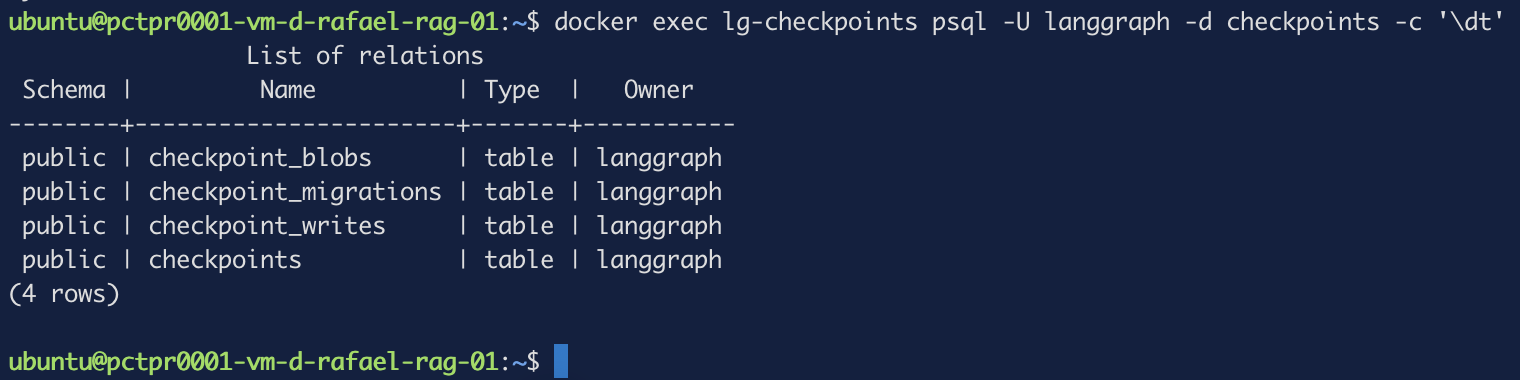 Figure 2.
 .setup() writes the schema for you — no manual DDL.
Reading position
snap = graph.get_state(config)
print(f"BEFORE  values={snap.values}  next={snap.next}")
get_state returns a StateSnapshot. Two fields matter: values is the state
right now, and next is the tuple of nodes still to run. next=() means the
thread is finished or has never started; anything else names what is pending.
next is how you answer "where is this run?" — the question a loop cannot answer.
Step 4 — Kill it, and watch it come back
Start a fresh thread, then press Ctrl+C during the thirty-second window.
python lg_agent.py ticket-42
BEFORE  values={}  next=()
step_one running
step_two running — 30s window, KILL ME HERE
^CKeyboardInterrupt
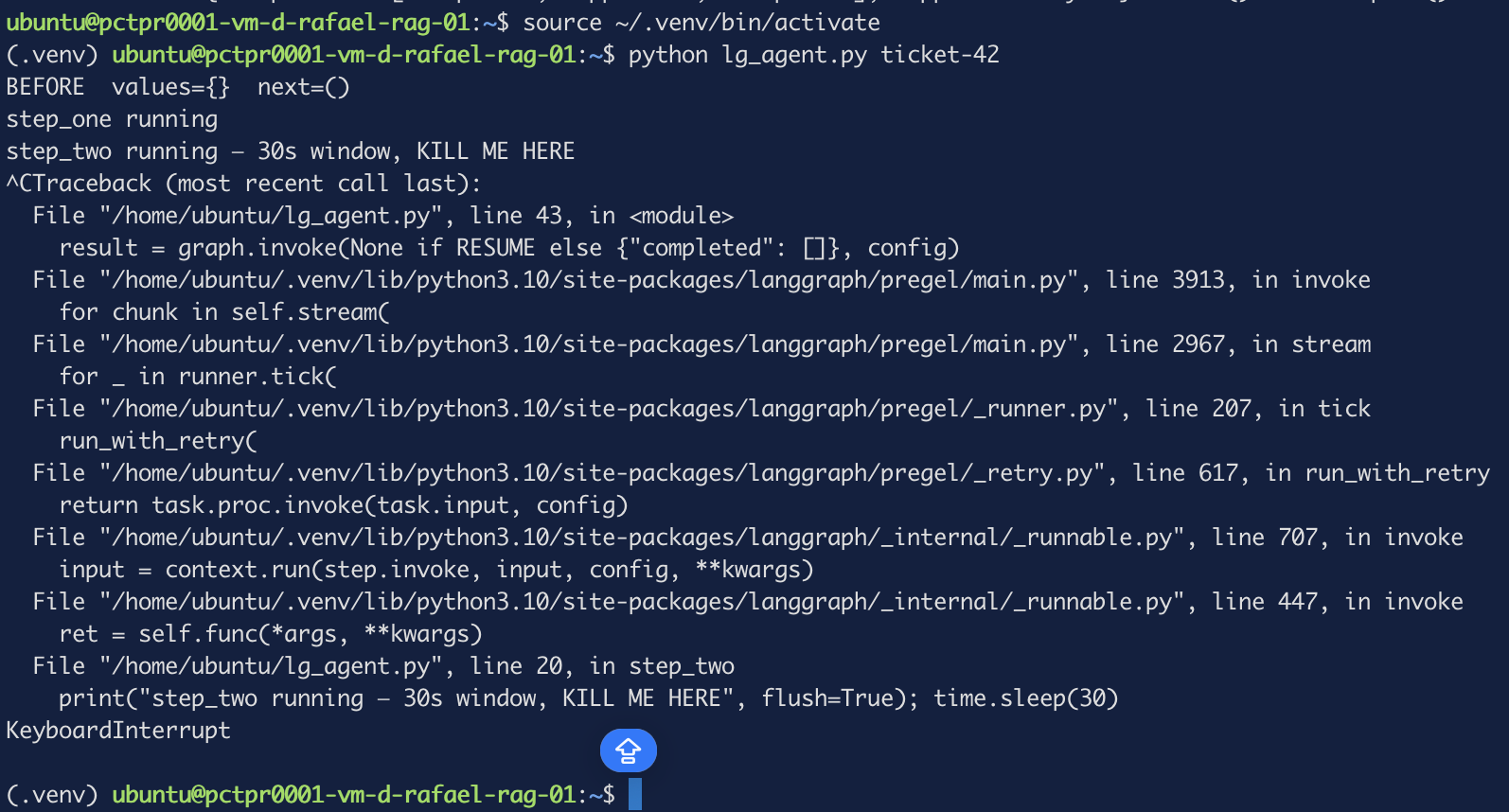 Figure 3. A real crash — the traceback comes from inside
 step_two, which therefore never completed.
Now resume the same thread_id:
python lg_agent.py ticket-42 --resume
BEFORE  values={'completed': ['step_one']}  next=('step_two',)
step_two running — 30s window, KILL ME HERE
step_three running
FINAL: {'completed': ['step_one', 'step_two', 'step_three']}
AFTER   values={'completed': [...]}  next=()
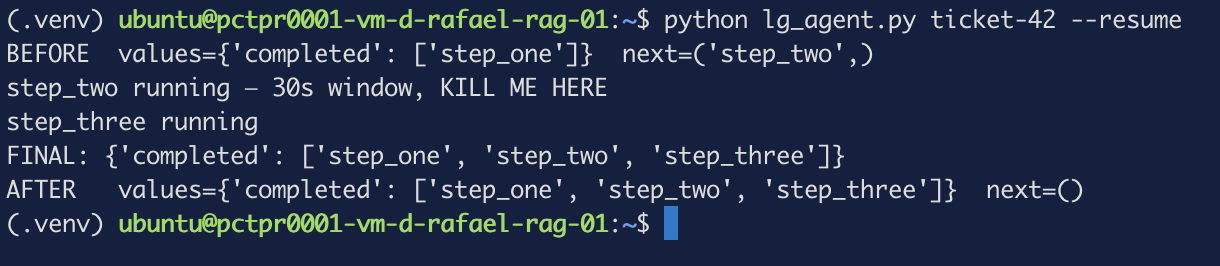 Figure 4. The
 BEFORE line is the proof — state recovered from Postgres by a brand-new process.
Read that first line closely, because it is the whole tutorial:
valuesshowsstep_one's result, recovered from Postgres by a process that had not existed when it was producednext=('step_two',)— the graph knows exactly which node did not finishstep_onedid not run again. It executed once across three invocations
That last point is what checkpoint_writes buys: LangGraph keeps the completed
writes from a super-step, so resuming does not repeat work that succeeded.
The resume call itself is:
graph.invoke(None, config)
None as input means "no new input — continue from the checkpoint." Worth
knowing: this is documented on the interrupts page for static breakpoints, but not
on the persistence or durable-execution pages, which is where you look when your
process has just died. It works; it is simply not written down where you need it.
Kill it a second time and resume again. It works, because reading a checkpoint does not consume it.
Step 5 — Pause for a human
A crash is an accidental stop. An approval is a deliberate one — and once you can survive the first, the second is nearly free.
The agent is about to write an appointment into a customer's calendar. That is irreversible and a real person sees it, so you want someone to check first.
Without durable state, waiting for a human means holding a process open. With state in Postgres the agent stops, the process exits, and the approval arrives whenever it arrives — ten minutes or Monday morning.
from langgraph.types import interrupt, Command

def approval(state: State):
    decision = interrupt({"question": "Approve step_two?", "so_far": state["completed"]})
    return {"completed": ["approval"], "approved": decision}
Save it as lg_agent2.py and run it:
python lg_agent2.py booking-7
interrupt() does two things at once: it stops the graph, and it hands its
argument out to whoever is calling. That argument is your question to the human —
any JSON-serialisable value.
step_one running
RESULT: {'completed': ['step_one'], 'approved': '',
         '__interrupt__': [Interrupt(value={'question': 'Approve step_two?',
         'so_far': ['step_one']}, id='29f211cf5a73ea78e0f694e1bd38822b')]}
AFTER   next=('approval',)  interrupts=(Interrupt(...),)
No exception, exit code 0. Note the difference from Step 4: the crash produced a traceback, this produces a clean return.
The pause surfaces in two places, and the difference matters:
| Where | Use |
|---|---|
__interrupt__ in the invoke result | The caller that just ran the graph |
snapshot.interrupts | Any other process — a dashboard rendering the question |
The id correlates an answer back to the right pause, which matters once more
than one approval is outstanding.
The process is now gone; the state is in Postgres. An hour or a week later:
python lg_agent2.py booking-7 yes
which calls:
graph.invoke(Command(resume="yes"), config)
approval resumed with: yes
step_two running (approved=yes)
AFTER   next=()  interrupts=()
Command(resume=...) is different from invoke(None, ...). None says "carry
on"; Command(resume=X) says "carry on, and interrupt() should return X."
That value came from the command line, through interrupt()'s return, into state,
and was read by the next node.
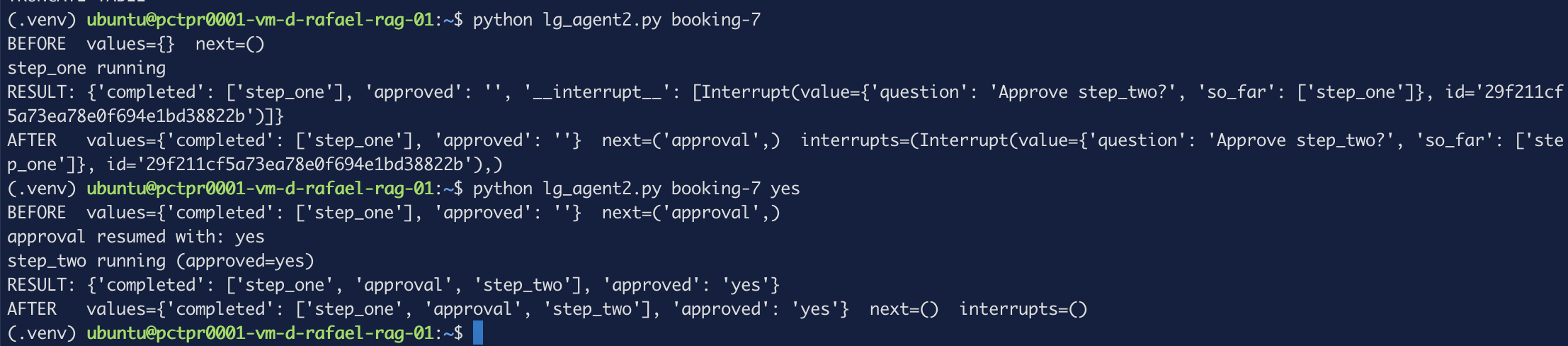 Figure 5. Pause and resume — two separate processes, one run.
The part that will bite you
On resume, LangGraph re-executes the interrupted node from the top. This time
interrupt() returns your value instead of pausing — but everything above it in
that function has already run a second time.
Put a print before the interrupt, then run a fresh thread and approve it:
python lg_agent2.py booking-8
python lg_agent2.py booking-8 approve
It appears in both runs, for a single approval:
run 1:  step_one running
        SIDE EFFECT — before interrupt
        RESULT: {... '__interrupt__': [Interrupt(...)]}

run 2:  SIDE EFFECT — before interrupt
        approval resumed with: approve
        step_two running (approved=approve)
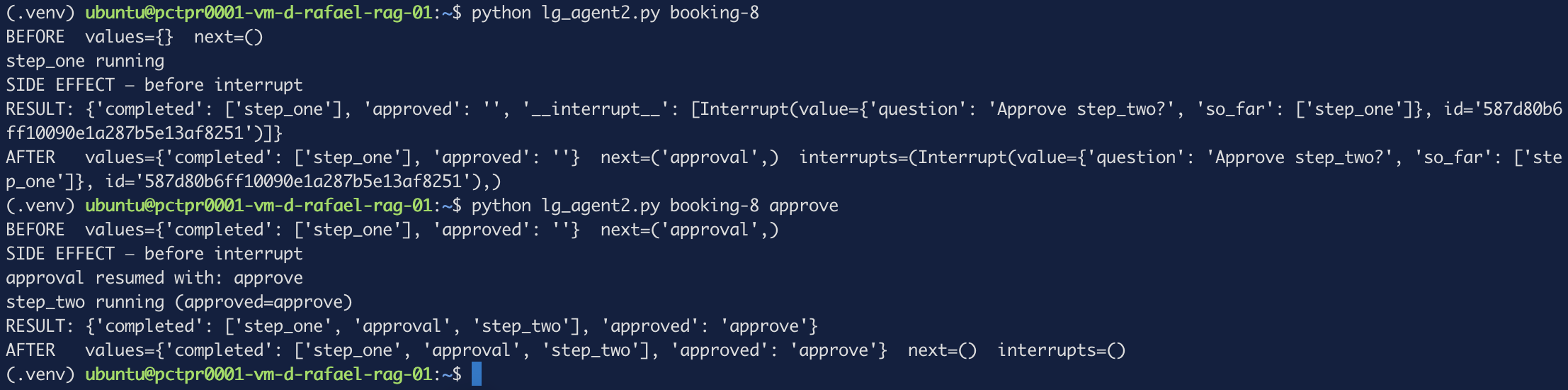 Figure 6. One approval, two executions of everything above the interrupt.
If that line were send_email() or charge_card(), one approval charges the
customer twice. Nothing raises. Final state is correct. Only the side effect
duplicated — which is why this is easy to ship and hard to notice.
Put nothing before interrupt() in that node. Move side effects after it, or
give the interrupt a node of its own that does nothing else. The same reasoning
applies to crash resume: a node can always run more than once, so anything with an
external consequence should be idempotent or isolated.
Step 6 — A real model, and traces
Two more packages: one to talk to the model, one to trace it.
pip install langchain-openai langfuse
llm = ChatOpenAI(
    model="Qwen2.5-3B-Instruct",
    base_url="https://inference.wiline.com/v1",
    api_key=os.environ["WEC_API_KEY"],
    temperature=0,
)
ChatOpenAI is not OpenAI-specific — it speaks the OpenAI wire protocol, which
WEC Inference implements. Pointing base_url at it is the whole integration.
temperature=0 keeps runs comparable while you are testing.
The call goes inside a node like any other work:
def write(state: State):
    r = llm.invoke(f"Write one sentence about {state['topic']}.")
    return {"completed": ["write"], "draft": r.content}
You need a Langfuse project and an API key pair for this — created under Organization → Project, then Settings → API Keys, as covered in Observe production with Langfuse.
Tracing attaches per invocation, in the same config dict as the thread id:
from langfuse.langchain import CallbackHandler
handler = CallbackHandler()
config = {"configurable": {"thread_id": THREAD}, "callbacks": [handler]}
configurable is LangGraph's own settings; callbacks is LangChain's observer
hook. Langfuse subscribes to node start and end events and builds spans from them
— which is why the trace mirrors your graph without any extra instrumentation.
Credentials come from the environment — in SDK v4 CallbackHandler() takes no
arguments, so this is the only way to configure it:
export WEC_API_KEY='...'
export LANGFUSE_PUBLIC_KEY='pk-lf-...'
export LANGFUSE_SECRET_KEY='sk-lf-...'
export LANGFUSE_HOST='http://localhost:3001'
Putting it together as lg_llm.py:
import os, sys
from operator import add
from typing import Annotated
from typing_extensions import TypedDict
from langgraph.graph import StateGraph, START, END
from langgraph.checkpoint.postgres import PostgresSaver
from langchain_openai import ChatOpenAI
from langfuse.langchain import CallbackHandler
THREAD = sys.argv[1] if len(sys.argv) > 1 else "draft-1"
llm = ChatOpenAI(
model="Qwen2.5-3B-Instruct",
base_url="https://inference.wiline.com/v1",
api_key=os.environ["WEC_API_KEY"],
temperature=0,
)
class State(TypedDict):
topic: str
completed: Annotated[list[str], add]
draft: str
def plan(state: State):
print("plan running", flush=True)
return {"completed": ["plan"]}
def write(state: State):
r = llm.invoke(f"Write one sentence about {state['topic']}.")
print("model said:", r.content, flush=True)
return {"completed": ["write"], "draft": r.content}
builder = StateGraph(State)
builder.add_node("plan", plan)
builder.add_node("write", write)
builder.add_edge(START, "plan")
builder.add_edge("plan", "write")
builder.add_edge("write", END)
handler = CallbackHandler()
with PostgresSaver.from_conn_string(DB_URI) as checkpointer:
checkpointer.setup()
graph = builder.compile(checkpointer=checkpointer)
config = {"configurable": {"thread_id": THREAD}, "callbacks": [handler]}
result = graph.invoke(
{"topic": "edge computing", "completed": [], "draft": ""}, config
)
print("FINAL:", result, flush=True)
python lg_llm.py draft-1
LangGraph            2.18s
  plan               0.00s
  write              2.14s
    ChatOpenAI       2.13s   36 -> 37 (73 tokens)
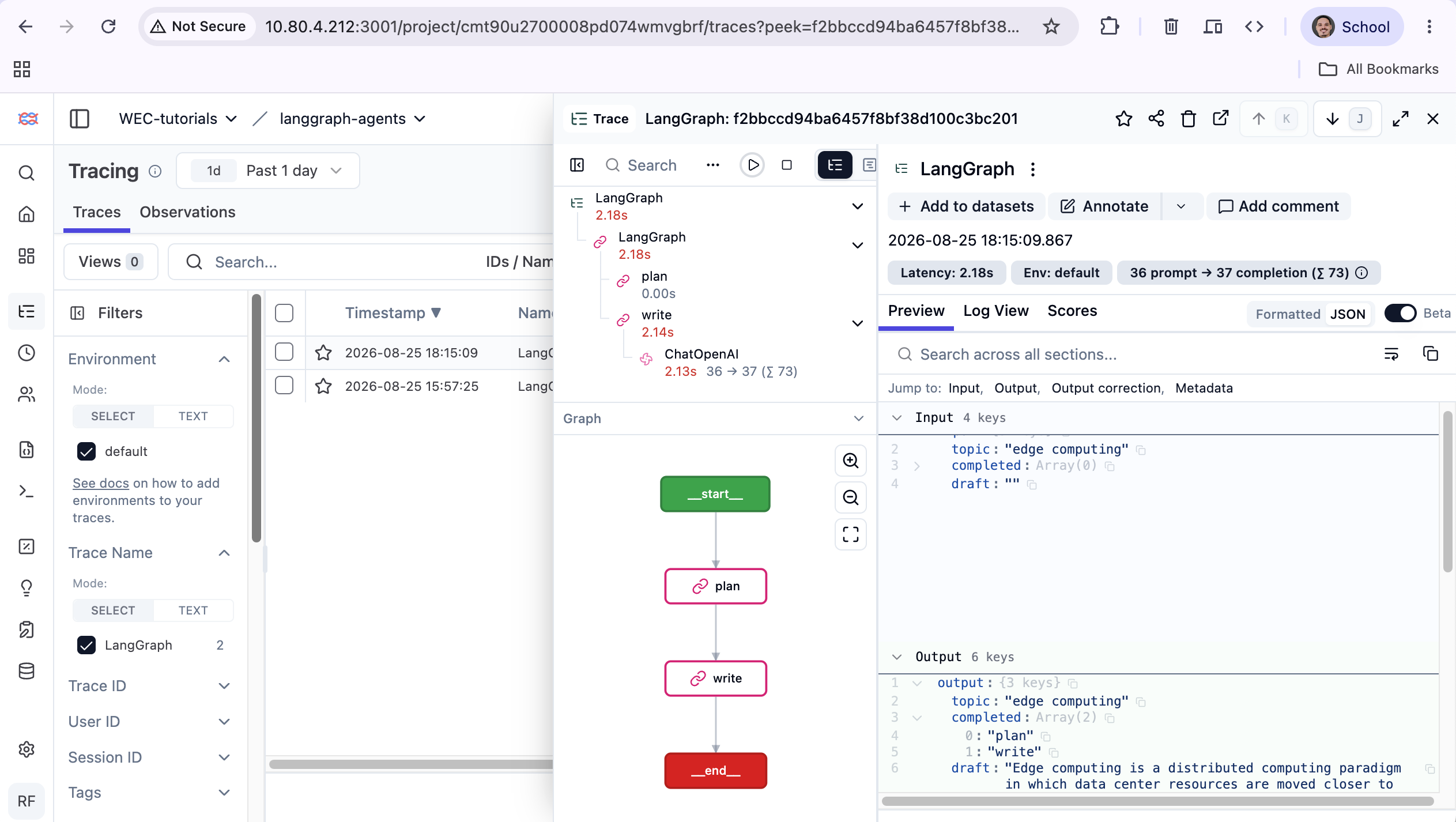 Figure 7. Span tree, graph topology and token counts — from one callback.
Almost all of it is the model call. That leaves about 40ms for the graph and
tracing, and the gap stayed near 40ms even on runs that took twice as long. plan,
which calls nothing, reports 0.00s.
The useful conclusion: orchestration is not your latency problem. If an agent feels slow, the graph is not why.
Troubleshooting (real errors)
address already in use vs port is already allocated. These look
interchangeable and are not. The first means a host process holds the port; the
second means another container does — Docker's own bookkeeping, before the bind
is attempted. Diagnose with:
docker ps --format '{{.Names}}\t{{.Ports}}' && sudo ss -ltnp | grep :543
A failed docker run blocks the name. The container is created, then dies, and
still holds its name — so your retry fails differently than the first attempt did.
docker rm <name> before retrying.
ModuleNotFoundError: No module named 'langchain' when importing Langfuse's
CallbackHandler. Neither LangGraph nor langchain-openai needs the langchain
umbrella package; Langfuse imports it purely as a version sentinel. The fix is
installing a package nothing else in your stack uses.
Two upstream threads are worth knowing apart.
#9758 reported the import
failure in October 2025 and is closed — but it still reproduces on the SDK
version above, so read it as history rather than as a fix that landed.
#13651 is open and
proposes the actual remedy: read langchain_core.__version__ instead of requiring
the umbrella package at all.
Langfuse disables itself in silence. Miss an environment variable and you get one warning line, then a completely normal run — exit code 0, correct output, no traces at all:
Authentication error: Langfuse client initialized without public_key.
Client will be disabled.
In SDK v4 CallbackHandler() accepts no constructor arguments, so environment
variables are the only configuration path — and a missing one does not raise.
Assert the client is enabled at startup rather than trusting the absence of errors.
Version drift. Most LangGraph + Langfuse material targets Langfuse SDK v3. On
v4 the update_trace parameter is gone and raises TypeError, and credentials can
no longer be passed to the constructor.
What's next
Part 2: handing work between agents — and what happens to shared state when they disagree.
Related reading on this site:
- Component-level tracing for agent tool calls — finding which step of an agent failed, not just that it did
- Self-host the Hermes Agent with persistent memory — a different persistence model, memory across conversations rather than state within a run
- "Loop Engineering Is Dead" — why the industry moved from loops to graphs