Your firewall is lying to you: hardening Docker networks for multi-agent systems

- 1Lock down Docker networks
- 2Run containers as non-root
- 🏆Identity in front of every port
You start with one agent. Then it needs a database. Then you add a second agent, a messaging bridge, an observability stack. Six months later a single WEC Instance is running five compose projects, twenty-something containers, and nobody remembers which ports are open to the world.
That's not a hypothetical — that's the box this tutorial was written on. So instead of theorizing, we probed it: can containers reach each other across stacks? Can they reach the databases? Is the firewall actually protecting anything?
Three of the answers surprised me. One of them was a database sitting there with no password. And the firewall — the firewall was lying.
The box we're auditing
Five independent compose projects, deployed over months, each with its own network (host, none and bridge are Docker's built-ins, plus one leftover from a service that isn't running):
docker network ls
NETWORK ID     NAME                             DRIVER    SCOPE
655850b24125   bridge                           bridge    local
05e5d49e7e9d   evolution-api_default            bridge    local
e8bd75ecbb0a   host                             host      local
ce697baac173   langfuse_default                 bridge    local
ead3e0822ce6   nlp-evaluation-service_nlp-net   bridge    local
5d0ab32d14d7   none                             null      local
9a6727150f2b   openclaw_default                 bridge    local
ec77b98f457b   rag-service_default              bridge    local
5f88cabf97f0   remark42_default                 bridge    local
And here's what's published to the world:
docker ps --format '{{.Names}}\t{{.Ports}}' | grep '0.0.0.0'
remark42-remark42-1             0.0.0.0:8082->8080/tcp, [::]:8082->8080/tcp
evolution-api-evolution-api-1   0.0.0.0:8080->8080/tcp, [::]:8080->8080/tcp
langfuse-langfuse-web-1         0.0.0.0:3001->3000/tcp, [::]:3001->3000/tcp
langfuse-minio-1                0.0.0.0:9090->9000/tcp, [::]:9090->9000/tcp, 127.0.0.1:9091->9001/tcp
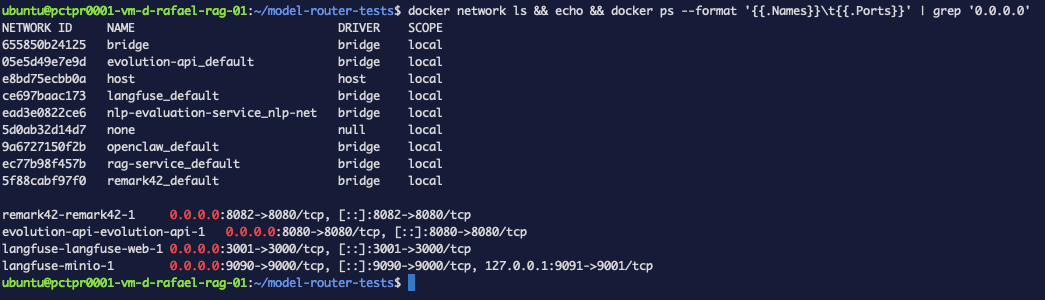 Figure 1. The start of any audit. Nine networks: three Docker built-ins (
bridge, host,
none), five compose projects, and one leftover. Four services published on 0.0.0.0 — every
interface, including the public one.
Four services listening on every interface. Note what's not in that list: the Postgres,
ClickHouse and Redis behind Langfuse. Those were published to 127.0.0.1 instead — someone
made a good decision there. Hold that thought.
Test 1 — Do separate Docker networks actually isolate? (yes, and most blogs are wrong)
The classic worry: OpenClaw gets compromised, and the attacker walks into Langfuse's database next door. Let's find out instead of guessing. Grab the container IPs:
for c in langfuse-postgres-1 evolution-api-evolution-postgres-1; do
  docker inspect -f '{{.Name}} {{range .NetworkSettings.Networks}}{{.IPAddress}}{{end}}' $c
done
/langfuse-postgres-1 172.19.0.5
/evolution-api-evolution-postgres-1 172.23.0.4
Now try to reach both from inside the OpenClaw container, by IP — no DNS, no shortcuts:
docker exec openclaw-openclaw-gateway-1 node -e '
const net=require("net");
[["langfuse-postgres","172.19.0.5",5432],["evolution-postgres","172.23.0.4",5432]]
  .forEach(([n,ip,p])=>{
    const s=net.connect({host:ip,port:p,timeout:4000});
    s.on("connect",()=>{console.log(`REACHED   ${n}`);s.destroy()});
    s.on("timeout",()=>{console.log(`blocked   ${n}`);s.destroy()});
    s.on("error",e=>console.log(`error     ${n} ${e.code}`));
  });'
blocked   langfuse-postgres
blocked   evolution-postgres
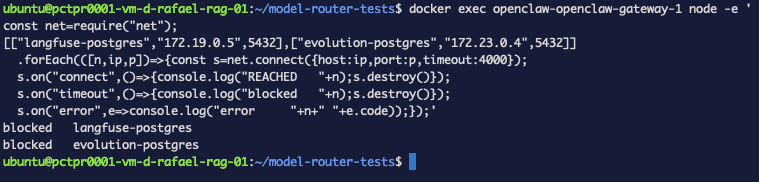 Figure 2. Connecting by raw IP from one stack's container to another stack's database:
both time out. Docker's isolation rules are doing their job.
Figure 2. Connecting by raw IP from one stack's container to another stack's database:
both time out. Docker's isolation rules are doing their job.
Blocked. Modern Docker installs DOCKER-ISOLATION-STAGE rules that drop traffic between
user-defined bridge networks, and they work. If you've read that "Docker networks don't
really isolate," test it on your own box before believing it — on current Docker they do.
You can verify network isolation empirically instead of trusting folklore: get the target's
IP with docker inspect, then connect by IP from inside another container.
So cross-stack isolation is fine. Which means the real risk is somewhere else.
Test 2 — Inside a network, everything is wide open
Each compose project puts all its services on one network. That's the default, and it means the application container can reach every backing service — which is intended. The question is what that access actually looks like. From Evolution API's bridge container:
docker exec evolution-api-bridge-1 python3 -c '
import socket
for name, host, port in [("postgres","evolution-postgres",5432),
                         ("redis","evolution-redis",6379),
                         ("api","evolution-api",8080)]:
    s=socket.socket(); s.settimeout(4)
    try:
        s.connect((host,port)); print(f"REACHED   {name}:{port}")
    except Exception as e:
        print(f"blocked   {name}:{port} -- {type(e).__name__}")
    finally: s.close()'
REACHED   postgres:5432
REACHED   redis:6379
REACHED   api:8080
Reachable is expected. Unauthenticated is not. Check whether those services actually ask for credentials — first Redis:
docker exec evolution-api-bridge-1 python3 -c '
import socket
s=socket.socket(); s.settimeout(5); s.connect(("evolution-redis",6379))
s.sendall(b"INFO server\r\n")
print(s.recv(200).decode(errors="replace")[:120])'
$625
# Server
redis_version:7.4.9
redis_git_sha1:00000000
redis_git_dirty:0
redis_build_id:b61b4eb609520881
redis_
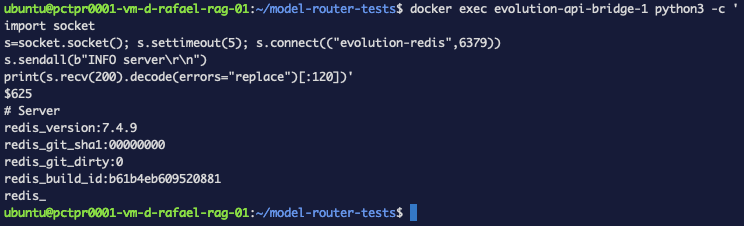 Figure 3. The finding:
 INFO server answered with no credentials (output truncated at 120
chars by the probe). Any container on this network can read or wipe the session store.
That's a INFO command answered with no AUTH — the Redis holding this deployment's
session state has no password. Anything that gets code execution in any container on that
network can read it, write to it, or FLUSHALL it.
Postgres, in the same stack, behaves correctly:
docker exec evolution-api-bridge-1 python3 -c '
import socket,struct
s=socket.socket(); s.settimeout(5); s.connect(("evolution-postgres",5432))
msg=b"user\x00postgres\x00database\x00postgres\x00\x00"
s.sendall(struct.pack("!ii",len(msg)+8,196608)+msg)
print(s.recv(64))'
b'R\x00\x00\x00\x17\x00\x00\x00\nSCRAM-SHA-256\x00\x00'
It demands SCRAM-SHA-256. Same box, same network, two backing services — one asks for a password, the other doesn't. Nobody decided that; it's just what the images default to when you don't set a password.
The lesson: "internal network" is not a security boundary. It's a convenience. Treat every service as if the attacker is already on that network, because if one container falls, they are.
Test 3 — The firewall that isn't
Now the big one. Turn on UFW and deny everything inbound except SSH:
sudo ufw allow 22/tcp          # ALWAYS first, or you lock yourself out
sudo ufw default deny incoming
sudo ufw --force enable
sudo ufw status verbose
Status: active
Logging: on (low)
Default: deny (incoming), allow (outgoing), deny (routed)
New profiles: skip

To                         Action      From
--                         ------      ----
60000:61000/udp            ALLOW IN    Anywhere
22/tcp                     ALLOW IN    Anywhere
60000:61000/udp (v6)       ALLOW IN    Anywhere (v6)
22/tcp (v6)                ALLOW IN    Anywhere (v6)
Deny incoming — only SSH and mosh's UDP range allowed. Now, from a different machine, open the Langfuse UI and the Evolution API:
http://<instance-ip>:3001   ->  Langfuse UI loads normally
http://<instance-ip>:8080   ->  {"status":200,"message":"Welcome to the Evolution API..."}
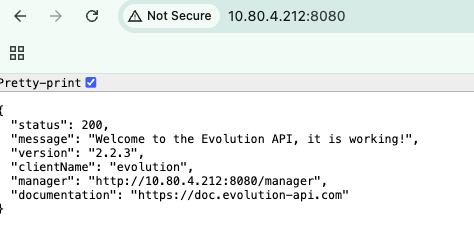
Figure 4. The firewall says it denies everything inbound. The Evolution API on :8080
answers anyway — status 200, straight from a browser on another machine.
Both wide open, through a firewall configured to block them. This is the single most common security surprise in self-hosted Docker, and it isn't a bug.
Why: Docker gets to the packet first
Look at the order of the FORWARD chain:
sudo iptables -L FORWARD -n --line-numbers | head -8
Chain FORWARD (policy DROP)
num  target     prot opt source               destination
1    DOCKER-USER  all  --  0.0.0.0/0            0.0.0.0/0
2    DOCKER-FORWARD  all  --  0.0.0.0/0            0.0.0.0/0
3    ACCEPT     all  --  0.0.0.0/0            0.0.0.0/0            ctstate RELATED,ESTABLISHED
4    ACCEPT     all  --  0.0.0.0/0            0.0.0.0/0
5    ufw-before-logging-forward  all  --  0.0.0.0/0            0.0.0.0/0
6    ufw-before-forward  all  --  0.0.0.0/0            0.0.0.0/0
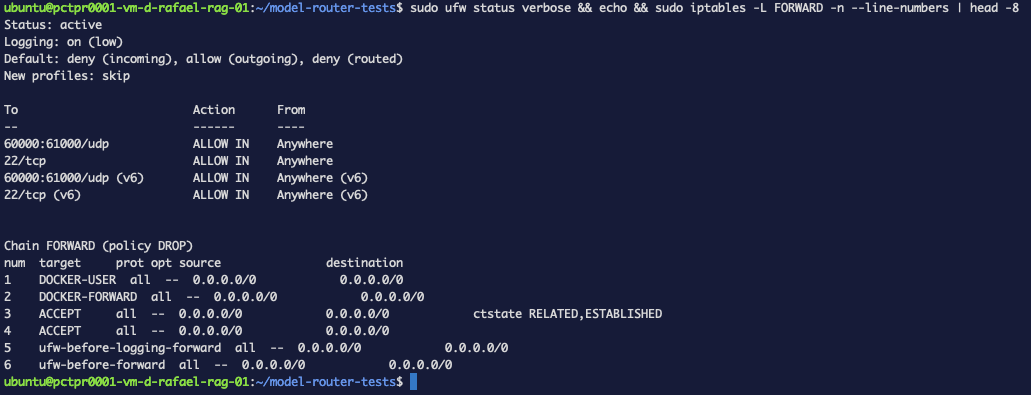 Figure 5. The whole explanation in one screen: the firewall says deny incoming, and
Docker's chains sit at positions 1-2 while UFW's start at 5.
Figure 5. The whole explanation in one screen: the firewall says deny incoming, and
Docker's chains sit at positions 1-2 while UFW's start at 5.
Docker's chains sit at positions 1 and 2. UFW's don't appear until 5 and 6. And publishing a port isn't a listener on the host — it's a NAT rule:
sudo iptables -t nat -L DOCKER -n | grep -E '3001|8080'
DNAT tcp -- 0.0.0.0/0  0.0.0.0/0  tcp dpt:8080 to:172.23.0.3:8080
DNAT tcp -- 0.0.0.0/0  0.0.0.0/0  tcp dpt:3001 to:172.19.0.2:3000
The packet arrives, Docker's NAT rewrites the destination to the container, and it becomes forwarded traffic that Docker's own chain accepts — long before any UFW rule is consulted. Your UFW rules aren't ignored; they're simply never reached.
ufw deny does not protect a published Docker port. If you've been relying on UFW in
front of -p 8080:8080, that port has been open the whole time.
Four fixes, in order of preference
Fix 1 — Don't publish it at all
The cleanest fix isn't a firewall rule; it's not opening the door. If a service is only
consumed by other containers, it needs no ports: entry — service-to-service traffic
works over the compose network by name.
If you need it reachable from the host (a debugging port, a local psql), bind it to loopback explicitly:
services:
  postgres:
    # 127.0.0.1 prefix = host-only, never the public interface
    ports:
      - "127.0.0.1:5433:5432"
That's exactly what the Langfuse stack on this box already does — its Postgres, ClickHouse
and Redis are all on 127.0.0.1, which is why they never showed up in our exposure audit.
The default "5433:5432" means 0.0.0.0 — every interface, including the public one.
Fix 2 — Split networks by trust zone, and mark backends internal
One network per compose project is the default, not a design. Give the backing services their own network, and put only the application in both:
services:
  app:                      # talks to the world AND to the database
    image: your-agent
    networks: [frontend, backend]

  db:
    image: redis:7
    command: redis-server --requirepass ${REDIS_PASSWORD}
    networks: [backend]     # backend only — no route out

  public:                   # e.g. a webhook receiver
    image: your-public-thing
    networks: [frontend]    # cannot see the database at all

networks:
  frontend:
  backend:
    internal: true          # no gateway: no inbound, no outbound
Verified on the same box:
# the frontend-only container tries to reach the database
docker exec netsecdemo-public-1 python3 -c '
import socket
s=socket.socket(); s.settimeout(4)
try: s.connect(("db",6379)); print("REACHED db  <- leak")
except Exception as e: print(f"blocked: {type(e).__name__}")'

# the app, which is on both networks
docker exec netsecdemo-app-1 python3 -c '
import socket
s=socket.socket(); s.settimeout(4)
try: s.connect(("db",6379)); print("REACHED db  <- correct, it needs it")
except Exception as e: print(f"blocked: {type(e).__name__}")'

# and can the database itself reach the internet?
docker exec netsecdemo-db-1 timeout 6 getent hosts pypi.org >/dev/null \
  && echo "resolved external DNS" || echo "no internet egress  <- internal working"
blocked: gaierror
REACHED db  <- correct, it needs it
no internet egress  <- internal working
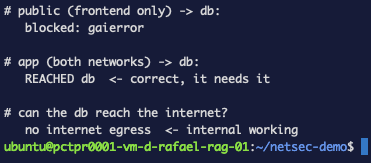
Figure 6. Three properties proven in one run — the public-facing container can't even resolve the database, the app can reach it, and the database has no route to the internet.
Three properties at once: the public-facing container can't even resolve the database, the app can, and the database can't phone home — which matters the day a dependency of yours turns malicious.
Fix 3 — Authenticate everything, including "internal" services
Our audit found Redis answering INFO with no credentials. One line fixes it:
  db:
    image: redis:7
    command: redis-server --requirepass ${REDIS_PASSWORD}
-NOAUTH Authentication required.
That's the real output from this box, after applying the fix — the finding from Test 2 is
closed. If you set a password on a Redis that something already uses, remember to update the
client's connection string too (redis://:<password>@host:6379/0), or you'll trade an open
database for a broken one.
Do this even for services that aren't published. Defense in depth means the second layer holds when the first one fails.
Fix 4 — When you must publish, filter in DOCKER-USER
Sometimes a port genuinely has to be public-facing but restricted by source. The chain to
use is DOCKER-USER — Docker guarantees it runs before its own accept rules, and never
overwrites it:
# only 203.0.113.0/24 may open new connections to the container's port 3000
sudo iptables -I DOCKER-USER 1 -p tcp --dport 3000 \
  -m conntrack --ctstate NEW ! -s 203.0.113.0/24 -j DROP
Tested live on the Langfuse port, from a browser on another machine:
http://<instance-ip>:3001 -> Langfuse UI loads
ERR_CONNECTION_TIMED_OUT
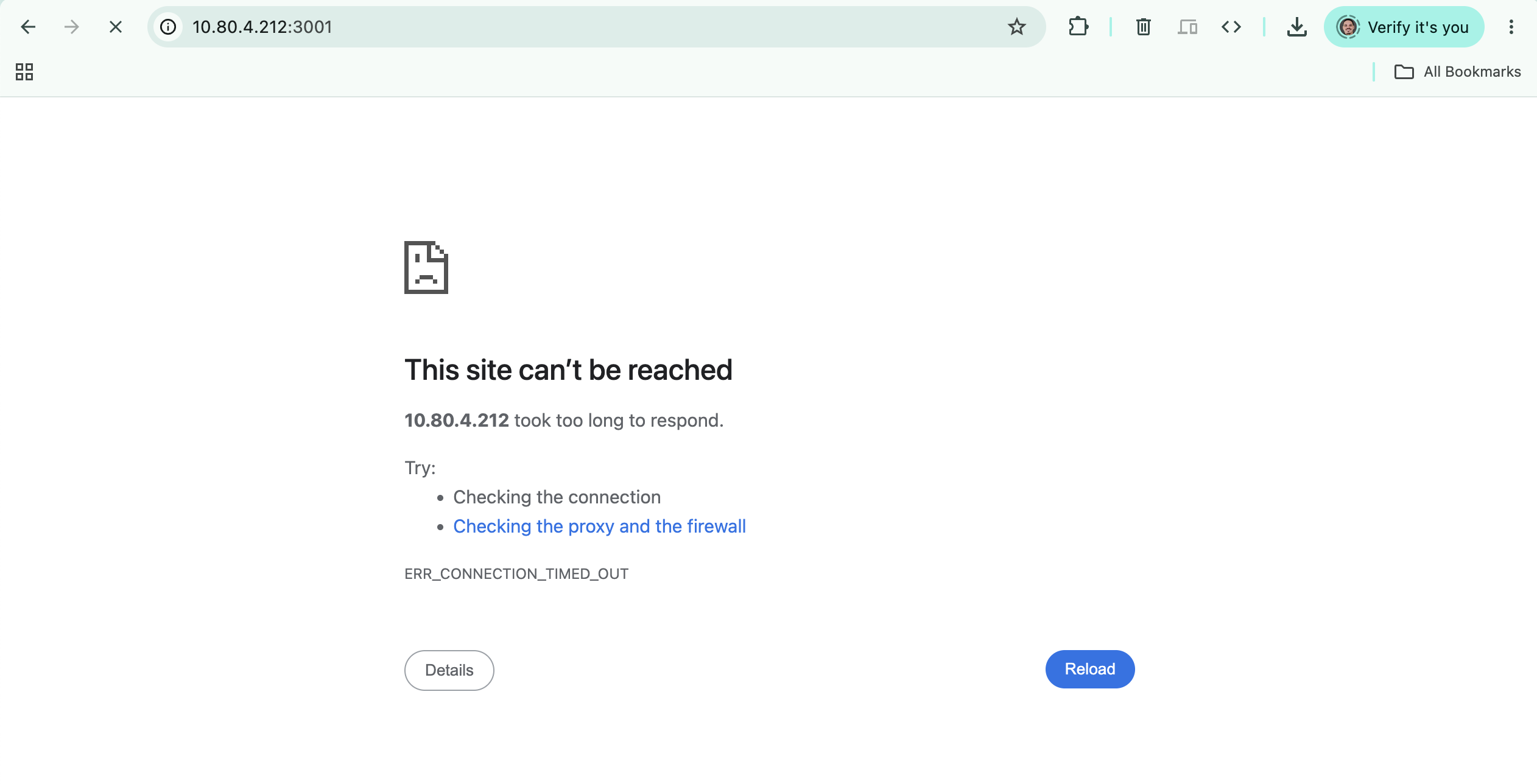
Figure 7. Same URL, same firewall, one rule in the right chain — and the port is finally closed. Note Chrome's own suggestion: "Checking the proxy and the firewall." This time the firewall really is the answer.
Meanwhile the Evolution API on :8080, which we deliberately left alone, kept answering.
The rule is surgical, and it works exactly where UFW couldn't.
iptables -I is not persistent. Use iptables-persistent (netfilter-persistent save), or
put the rule in a small systemd unit that runs after docker.service. A firewall rule that
disappears on reboot is worse than none, because you'll think you're protected.
You can audit and lock down a multi-stack Docker host: prove what's reachable, bind or split what shouldn't be, authenticate the backends, and filter published ports in the one chain Docker respects.
The audit, as a checklist
Run these four commands on any box you own. They take a minute and tell you more than any architecture diagram:
# 1. What's exposed to the world?
docker ps --format '{{.Names}}\t{{.Ports}}' | grep '0.0.0.0'

# 2. Are your firewall rules even in the path? (Docker chains before ufw = they aren't)
sudo iptables -L FORWARD -n --line-numbers | head -8

# 3. What can a compromised container reach on its own network?
docker exec <container> python3 -c "import socket;s=socket.socket();s.settimeout(3);s.connect(('<svc>',<port>));print('reached')"

# 4. Does that backing service ask for a password?
docker exec <container> python3 -c "
import socket;s=socket.socket();s.settimeout(4);s.connect(('redis',6379))
s.sendall(b'INFO server\r\n');print(s.recv(60))"
What we found, and what it cost to fix
| Finding | Severity | Fix |
|---|---|---|
| Cross-network isolation works | ✅ none | nothing — Docker already does this |
| Every service on one network, mutually reachable | ⚠️ medium | split by trust zone, internal: true |
Redis answering with no AUTH | 🔴 high | one line: --requirepass |
ufw deny not applied to published ports | 🔴 high | bind to 127.0.0.1, or DOCKER-USER rule |
Backing DBs on 127.0.0.1 (Langfuse) | ✅ none | already correct — copy this pattern |
None of the fixes took more than a line of YAML. The expensive part was knowing which line — and the only way to know is to probe your own box instead of trusting the diagram in your head.
Troubleshooting
I added a DOCKER-USER rule and nothing changed
Two usual causes. First, --dport must be the container's port, not the published one —
the DNAT already rewrote the destination by the time DOCKER-USER sees the packet (in our
case 3000, not 3001). Second, existing connections aren't affected: the
--ctstate NEW match only touches new ones, so an already-open browser tab keeps working.
I enabled UFW and lost my SSH session
sudo ufw allow 22/tcp before ufw enable, always. If you're already locked out, most
providers give you a serial/VNC console — use it to run ufw disable.
internal: true broke my container's package install
That's it working. An internal network has no gateway, so no egress at all — no pip install, no DNS, no calling an external API. Backing services shouldn't need any of that;
if a container does, it belongs on the frontend network too.
Services can't find each other after I split the networks
Compose DNS only resolves names within a shared network. If app and db are on
different networks with nothing in common, db won't resolve. The app has to be a member of
both, as in Fix 2.
What's next
Network hardening is the layer that keeps a compromised container from becoming a
compromised host. The next layers, in the order I'd do them: run containers as non-root
(user: in compose) so a breakout starts with fewer privileges, and put an identity
provider in front of the ports you must expose — a private mesh with
NetBird plus authentication is the natural pairing
with everything above.