Root by default: hardening container privilege on a self-hosted AI stack


- 1Lock down Docker networks
- 2Run containers as non-root
- 🏆Identity in front of every port
Part 1 of this series audited a live
multi-agent box and found every network-exposure question worth asking. One line from
that audit didn't get followed up: "the Postgres, ClickHouse and Redis behind Langfuse
were published to 127.0.0.1 instead of the world — someone made a good decision
there. Hold that thought."
Here's the other half of that thought: getting the network right says nothing about what happens after someone's already inside a container. If the process running in there is root, a compromise starts with the keys to the whole filesystem. So we checked — on the same box, the same Langfuse stack Part 1 already praised — whether "network correct" also meant "privilege correct." It didn't, for two of the six containers. Here's what fixing that actually looked like, including the part that broke.
Checking who's actually root
Docker doesn't tell you this by default — a container can be published correctly,
healthy, and running as root the entire time, with nothing in docker ps hinting at
it. The only way to know is to ask the container directly:
docker exec langfuse-postgres-1 id -u
docker exec langfuse-redis-1 id -u
0
0
 Figure 1. The check that most setups never run: both
 id -u calls come back 0.
Healthy, published correctly, and root the entire time.
0 is root. Both were running as root, and looking at the compose file explains why —
neither service has a user: directive at all:
  redis:
    image: docker.io/redis:7
    restart: always
    command: >
      --requirepass ${REDIS_AUTH:-myredissecret}
      --maxmemory-policy noeviction
    ...

  postgres:
    image: docker.io/postgres:${POSTGRES_VERSION:-17}
    restart: always
    ...
Nobody decided these should run as root. It's just what happens when you don't set
anything — same shape as Part 1's finding that an unset Redis password defaults to no
authentication at all. The clickhouse service in the same file shows the fix already
half-done, sitting right there for comparison:
  clickhouse:
    image: docker.io/clickhouse/clickhouse-server
    restart: always
    user: "101:101"
One line. Somebody set it for ClickHouse and never got to the other two.
Finding the right user, not a guess
Don't invent a UID — both official images already ship a non-root user built for exactly this, and guessing wrong means either a permission error or, worse, a UID that silently doesn't match the one the image's own files are owned by:
docker exec langfuse-postgres-1 id postgres
docker exec langfuse-redis-1 id redis
uid=999(postgres) gid=999(postgres) groups=999(postgres),101(ssl-cert)
uid=999(redis) gid=999(redis) groups=999(redis)
Both images happen to use 999:999 for their built-in non-root user. Add it to the
compose file:
  redis:
    image: docker.io/redis:7
    user: "999:999"
    restart: always
    ...

  postgres:
    image: docker.io/postgres:${POSTGRES_VERSION:-17}
    user: "999:999"
    restart: always
    ...
The conversion itself was a non-event
docker compose up -d --force-recreate postgres redis
 ✔ Container langfuse-postgres-1 Recreated
 ✔ Container langfuse-redis-1 Recreated
sleep 5
docker compose ps
docker exec langfuse-postgres-1 id -u
docker exec langfuse-redis-1 id -u
langfuse-postgres-1   Up 34 seconds (healthy)   127.0.0.1:5433->5432/tcp
langfuse-redis-1      Up 34 seconds (healthy)   127.0.0.1:6379->6379/tcp
999
999
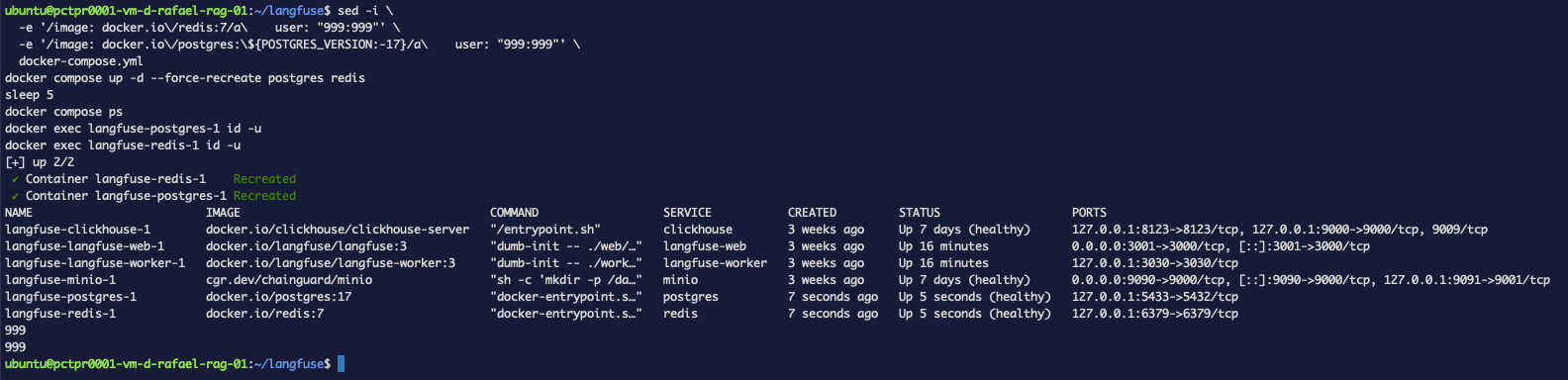 Figure 2. Same two containers, seconds after
 --force-recreate: both healthy, both
id -u now 999 instead of 0.
No permission errors, no ownership drama, both healthy within seconds. That's worth
saying plainly because it's not always true — if these volumes had been initialized as
root somewhere upstream and never chown-ed, this exact command can fail with
permission denied on the data directory. It didn't here, but check your own logs after
recreating, don't assume "no output" means "no problem."
You can check whether a running container is actually root (docker exec <container> id -u), find its image's intended non-root user instead of guessing a UID
(docker exec <container> id <username>), and convert it with a one-line user: in
compose.
The part that actually broke
Everything above was clean. Then the logs from a completely different container told a different story:
docker logs langfuse-langfuse-worker-1 --tail 20
Error: getaddrinfo ENOTFOUND redis
    at GetAddrInfoReqWrap.onlookupall [as oncomplete] (node:dns:122:26)
Redis error getaddrinfo ENOTFOUND redis
Redis error connect ECONNREFUSED 172.19.0.5:6379
Queue job mixpanel-integration-processing-queue errored: Error: Socket timeout.
Expecting data, but didn't receive any in 30000ms.
Queue job trace-delete errored: Error: Socket timeout. Expecting data, but didn't
receive any in 30000ms.
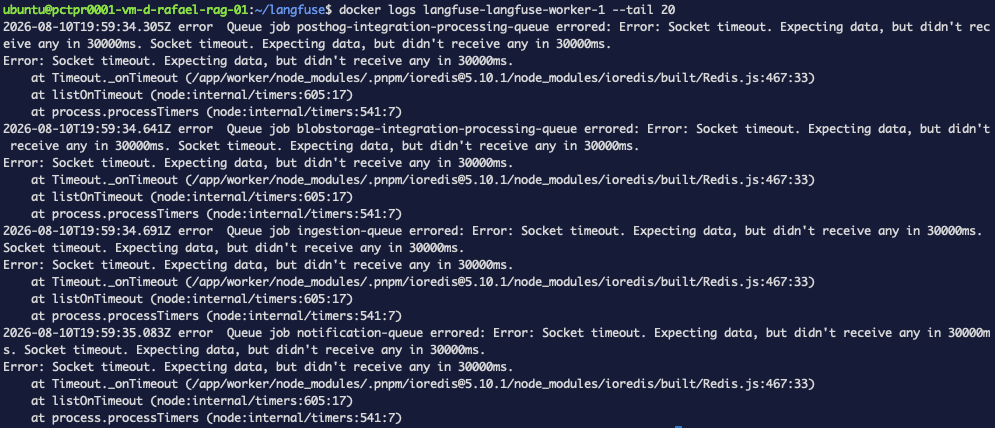 Figure 3. A container nobody touched, failing anyway — every queue job erroring with
the same 30-second socket timeout against Redis, well after the recreate that caused it.
Figure 3. A container nobody touched, failing anyway — every queue job erroring with
the same 30-second socket timeout against Redis, well after the recreate that caused it.
langfuse-worker never touched Postgres or Redis's ownership — it just holds a live
connection to Redis, and --force-recreate tore down the container that connection
pointed at. Docker's own healthcheck said Redis was healthy again well before the
worker gave up retrying; ioredis just doesn't reconnect cleanly on its own here, and
kept failing with 30-second socket timeouts long after the dependency it depended on was
back.
The fix is the dependent service's own restart, not another look at Redis:
docker compose restart langfuse-worker langfuse-web
2026-08-10T19:40:22.505Z info    Redis connection has been closed.
2026-08-10T19:40:22.769Z info    Shutdown complete, exiting process...
sleep 10
docker logs langfuse-langfuse-worker-1 --tail 15
experiment-create-queue executor started: true
posthog-integration-queue executor started: true
data-retention-queue executor started: true
webhook-queue executor started: true
Listening: http://21caf9a28775:3030
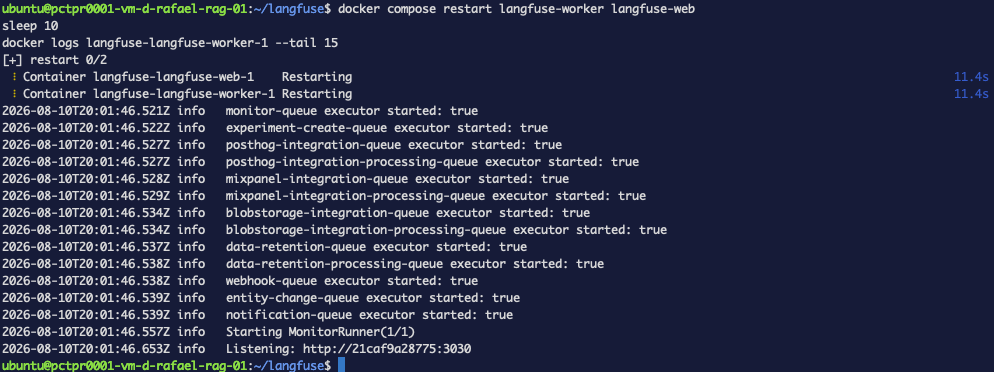 Figure 4. Same container, one restart later — every queue executor starts clean, no
Redis errors anywhere in the log.
Figure 4. Same container, one restart later — every queue executor starts clean, no
Redis errors anywhere in the log.
Clean queue startup, no Redis errors. That's the whole lesson: hardening a container doesn't stay contained to that container. Anything holding a live connection to the thing you just recreated needs its own restart, on purpose, not as an afterthought you discover from an error log twenty minutes later.
--force-recreate on a shared dependency (a database, a queue, a cache) can silently
break every service that already had a connection open to it — even after the
dependency itself reports healthy again. Restart dependents explicitly; don't assume
they'll notice on their own.
What we found, and what it cost to fix
| Container | Before | Fix | Broke anything? |
|---|---|---|---|
langfuse-postgres-1 | root (uid 0) | user: "999:999" | No — recreated clean |
langfuse-redis-1 | root (uid 0) | user: "999:999" | No — recreated clean |
langfuse-clickhouse-1 | already 101:101 | none needed | — |
langfuse-langfuse-worker-1 | untouched | none — just needed a restart | Yes — lost its Redis connection after the other two containers recreated |
Two one-line fixes. The actual cost wasn't the fix — it was noticing the third container that nobody touched was the one that broke.
Troubleshooting
docker compose restart said "no configuration file provided: not found"
You're not in the project directory Compose expects — it only finds docker-compose.yml
relative to your current working directory (or via -f). cd into the stack's own
folder first; this exact error means Compose never even looked at your containers.
The worker's still erroring after I restarted Redis
Restarting the dependency doesn't help — the connection that broke belongs to the
dependent service. Restart the thing holding the connection (here, langfuse-worker),
not the thing it connects to.
docker exec <container> id <username> returns "no such user"
The image doesn't ship a dedicated non-root user under that name — check the image's own
documentation, or docker exec <container> cat /etc/passwd to see what's actually
available before picking a UID.
What's next
Privilege is the second layer: network hardening keeps a compromise from spreading between stacks, non-root keeps a compromise from owning the whole container. The last layer in this series is identity — putting real authentication in front of the ports that must stay exposed, which is where NetBird and Caddy come in.