One endpoint, many models: deploy an LLM gateway on a WEC Instance

 +
+- 1One endpoint, scoped keys
- 2Route work to the right model
- 3Mask PII at the gateway
- 🏆Budgets and real cost
Here's how it usually goes. One app needs a model, so you paste the API key into
its .env. Then a second app needs one. Then a script. Six months later the same
key is in five places, nobody remembers which of them is still running, and you
can't rotate it without breaking something you'll only find out about when it
breaks.
A gateway is the boring fix. One endpoint in front of every model, one place that holds the real credential, and a scoped key per app that you can revoke on its own. This post deploys one on a WEC Instance and points it at the WEC Inference API.
What we're putting on the box
The host already runs five other stacks, which matters — this is the normal case, not a clean VM. Before adding anything, check what's listening and what's free:
docker ps --format '{{.Names}}\t{{.Ports}}'
sudo ss -tlnp | grep -E ':(4000|5432|5433)\b'
langfuse-postgres-1   127.0.0.1:5433->5432/tcp
langfuse-clickhouse-1 127.0.0.1:8123->8123/tcp, 127.0.0.1:9000->9000/tcp
openclaw-caddy-1      100.87.239.229:80->80/tcp, 100.87.239.229:443->443/tcp
...
LISTEN 0  244   127.0.0.1:5432   users:(("postgres",pid=892))
LISTEN 0  4096  127.0.0.1:5433   users:(("docker-proxy"))
Port 4000 is free. Postgres 5432 belongs to the host and 5433 to Langfuse, so the gateway's database gets neither — it won't publish a port at all.
Then confirm the backend answers before putting anything in front of it:
curl -s https://inference.wiline.com/v1/models \
  -H "Authorization: Bearer $WEC_API_KEY" | jq -r '.data[].id'
whisper-large-v3
gemma4
wiline-coding
zai-org/GLM-5.2
Qwen2.5-3B-Instruct
Qwen3.5:9B
Qwen3.5-122B
kokoro
Llama3.1-8B-Instruct
bge-m3
Qwen3.5-9B
wiline-auto
wiline-cost
Thirteen models on one key. That's the thing we're about to stop handing out.
The stack
Two containers: the gateway and a Postgres for its own state. Make a directory and write the compose file:
mkdir -p ~/llm-gateway && cd ~/llm-gateway
services:
  litellm:
    image: ghcr.io/berriai/litellm:main-stable
    container_name: llm-gateway
    restart: unless-stopped
    ports:
      - "127.0.0.1:4000:4000"
    volumes:
      - ./config.yaml:/app/config.yaml:ro
    command: ["--config", "/app/config.yaml", "--port", "4000"]
    env_file: .env
    depends_on:
      db:
        condition: service_healthy

  db:
    image: postgres:17
    container_name: llm-gateway-db
    restart: unless-stopped
    user: "999:999"
    environment:
      POSTGRES_USER: llmproxy
      POSTGRES_PASSWORD: ${POSTGRES_PASSWORD}
      POSTGRES_DB: litellm
    volumes:
      - gateway-db:/var/lib/postgresql/data
    healthcheck:
      test: ["CMD-SHELL", "pg_isready -U llmproxy -d litellm"]
      interval: 5s
      timeout: 5s
      retries: 10

volumes:
  gateway-db:
Four of those lines are doing real work:
127.0.0.1:4000:4000 keeps the gateway off the public internet. It holds every
model credential you own, so publishing it to 0.0.0.0 would put all of them
behind a single shared password. Part 1 of the hardening
series is the long version of why
that's a bad trade.
The database has no ports: at all. Nothing outside the compose network needs to
reach it, and 5432 was taken anyway.
user: "999:999" runs Postgres as its built-in non-root user from the first boot.
Part 2 covers what that buys you
and how to find the right UID for an image instead of guessing.
condition: service_healthy matters more than it looks. The gateway runs database
migrations on startup — without it, it races Postgres and crash-loops.
Telling it about the models
model_list:
  - model_name: qwen-small
    litellm_params:
      model: openai/Qwen2.5-3B-Instruct
      api_base: https://inference.wiline.com/v1
      api_key: os.environ/WEC_API_KEY

  - model_name: qwen-mid
    litellm_params:
      model: openai/Qwen3.5-9B
      api_base: https://inference.wiline.com/v1
      api_key: os.environ/WEC_API_KEY

  - model_name: qwen-large
    litellm_params:
      model: openai/Qwen3.5-122B
      api_base: https://inference.wiline.com/v1
      api_key: os.environ/WEC_API_KEY

  - model_name: embeddings
    litellm_params:
      model: openai/bge-m3
      api_base: https://inference.wiline.com/v1
      api_key: os.environ/WEC_API_KEY

general_settings:
  master_key: os.environ/LITELLM_MASTER_KEY
  database_url: os.environ/DATABASE_URL
  store_model_in_db: true

litellm_settings:
  drop_params: true
model_name is the alias your apps ask for. model: is what the gateway actually
calls. That indirection is most of the value — swap qwen-mid to point somewhere
else next month and not one client changes.
The openai/ prefix says "speak the OpenAI protocol to a custom api_base." The
WEC Inference API is OpenAI-compatible, so that's all it takes.
Secrets
Generate the passwords rather than inventing them:
PGPW=$(openssl rand -hex 16)
MK="sk-$(openssl rand -hex 20)"
cat > .env <<EOF
POSTGRES_PASSWORD=${PGPW}
DATABASE_URL=postgresql://llmproxy:${PGPW}@db:5432/litellm
LITELLM_MASTER_KEY=${MK}
WEC_API_KEY=your-wec-key-here
EOF
chmod 600 .env
Then put your real WEC key in place of your-wec-key-here. The master key is the
gateway's root credential — it can create keys, delete keys and reach every model,
so it goes in your password manager and nowhere else.
Bringing it up
docker compose up -d
 ✔ Image ghcr.io/berriai/litellm:main-stable Pulled          58.2s
 ✔ Network llm-gateway_default               Created          0.1s
 ✔ Volume llm-gateway_gateway-db             Created          0.1s
 ✔ Container llm-gateway-db                  Healthy          8.8s
 ✔ Container llm-gateway                     Created          0.2s
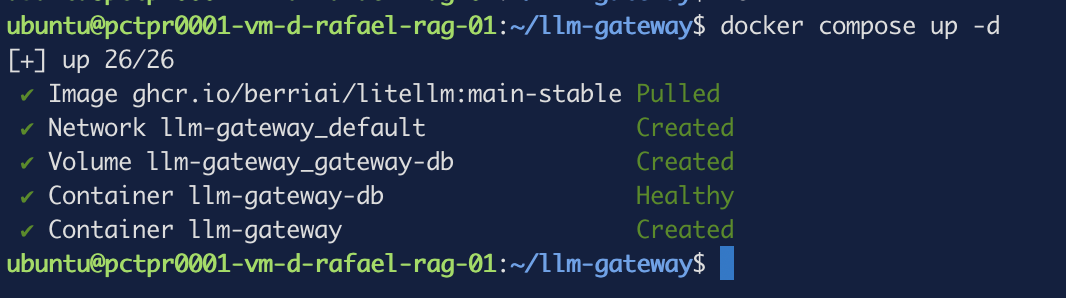 Figure 1. One pull, two containers, a network and a volume.
Created rather than Started on that last line is normal for the compose output,
but check anyway — and check what the image cost you in disk while you're there:
docker compose ps -a && echo && df -h /
NAME             IMAGE                                 SERVICE   STATUS                   PORTS
llm-gateway      ghcr.io/berriai/litellm:main-stable   litellm   Up 3 minutes             127.0.0.1:4000->4000/tcp
llm-gateway-db   postgres:17                           db        Up 3 minutes (healthy)   5432/tcp

Filesystem      Size  Used Avail Use% Mounted on
/dev/vda1        58G   54G  4.2G  93% /
Note the database's PORTS column — 5432/tcp with no host binding in front of
it. The gateway image is 1.16GB, which on a box already running five stacks is not
nothing. Check you have the room before you start, not after.
Two lines in the startup log are worth reading, because both look worse than they are:
docker compose logs litellm --tail 40
✅ Migration diff applied successfully
INFO:     Application startup complete.
INFO:     Uvicorn running on http://0.0.0.0:4000 (Press CTRL+C to quit)
register_model: model=openai/Qwen2.5-3B-Instruct not in built-in cost map and no
prefix/region variant matched; cache cost fields will default to 0.
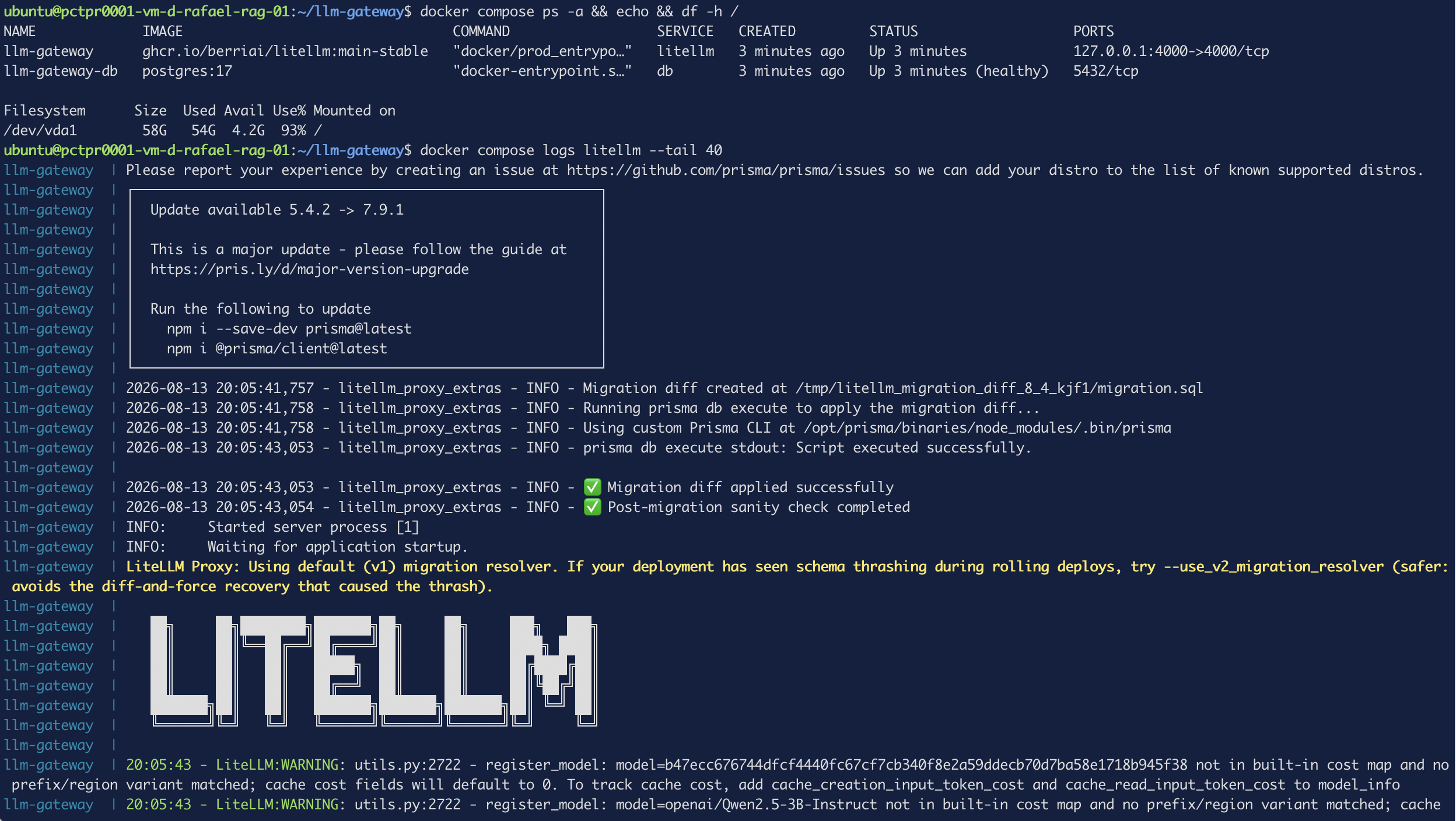 Figure 2. Migrations applied, application startup complete, and one cost-map
warning per model.
Figure 2. Migrations applied, application startup complete, and one cost-map
warning per model.
0.0.0.0:4000 is the bind inside the container. The host publish is still
127.0.0.1, which is what actually gates access. And the cost-map warning is
narrower than it reads — it's about cache pricing specifically. Regular token
pricing still happens, which turns out to matter later.
The first call
set -a && . ./.env && set +a
curl -s http://127.0.0.1:4000/v1/chat/completions \
  -H "Authorization: Bearer $LITELLM_MASTER_KEY" \
  -H "Content-Type: application/json" \
  -d '{"model":"qwen-mid","messages":[{"role":"user","content":"Reply with exactly: gateway works"}],"max_tokens":20}' | jq
"finish_reason": "length",
"message": {
  "reasoning_content": "Thinking Process:\n\n1.  **Analyze the Request:**\n    *   Input: \"",
  "content": null
}
"usage": {"completion_tokens": 20, "prompt_tokens": 16, "total_tokens": 36}
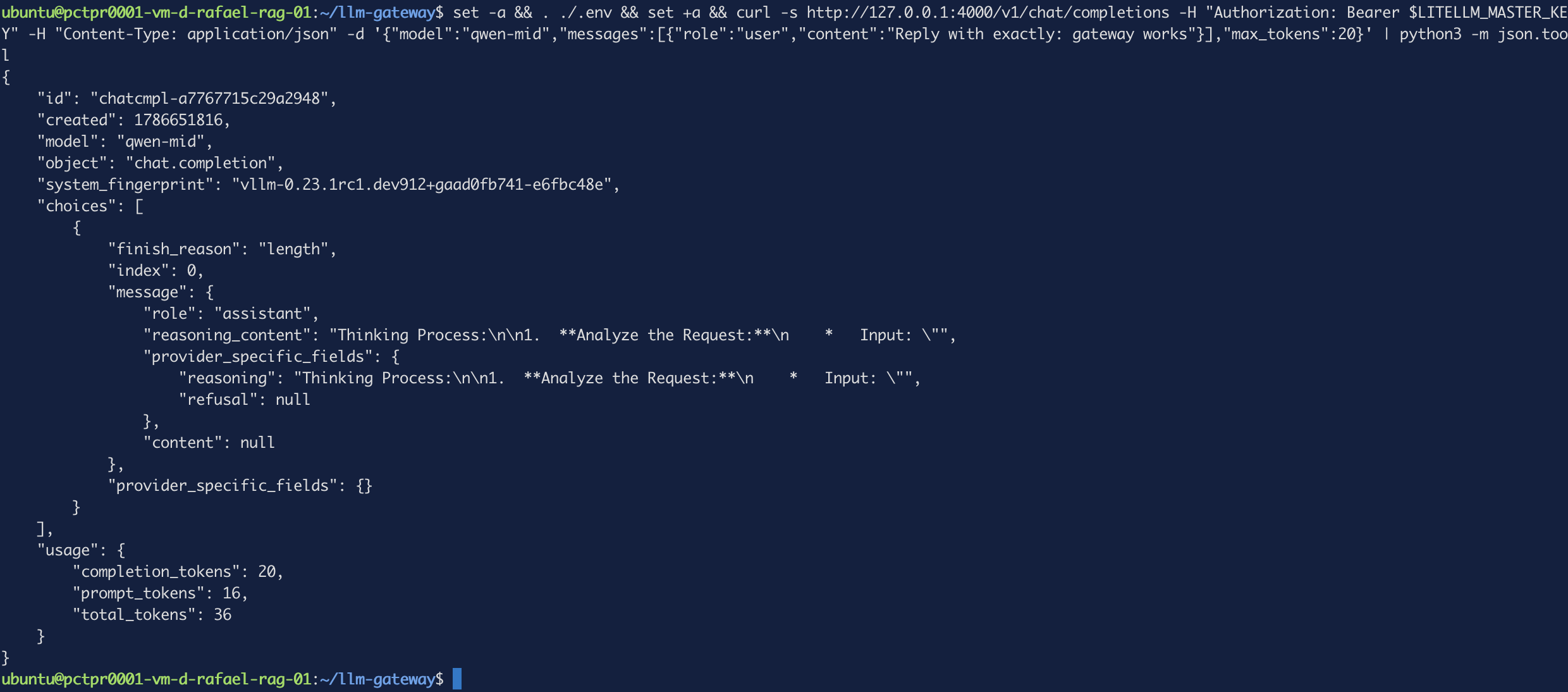 Figure 3. A successful call with nothing in it.
content: null. The call worked — it routed, it hit the backend, it counted tokens
— but there's no answer in it.
Qwen3.5-9B is a reasoning model. It spent all twenty tokens thinking and had none
left to speak with. The obvious move is to give it more room:
curl -s http://127.0.0.1:4000/v1/chat/completions \
  -H "Authorization: Bearer $LITELLM_MASTER_KEY" \
  -H "Content-Type: application/json" \
  -d '{"model":"qwen-mid","messages":[{"role":"user","content":"Reply with exactly: gateway works"}],"max_tokens":200}' | jq '.choices[0].message.content, .usage'
null
{
  "completion_tokens": 200,
  "prompt_tokens": 16,
  "total_tokens": 216
}
Two hundred tokens, still nothing. And this is the part worth pausing on: an earlier
run of that exact command did answer, at 192 tokens. Same model, same prompt,
different amount of thinking. There's no max_tokens you can set that reliably
buys you an answer, because the reasoning length isn't fixed.
Now the same prompt through the small model, at the original twenty tokens:
curl -s http://127.0.0.1:4000/v1/chat/completions \
  -H "Authorization: Bearer $LITELLM_MASTER_KEY" \
  -H "Content-Type: application/json" \
  -d '{"model":"qwen-small","messages":[{"role":"user","content":"Reply with exactly: gateway works"}],"max_tokens":20}' | jq '.choices[0].message.content, .usage'
"gateway works"
{
  "completion_tokens": 3,
  "prompt_tokens": 35,
  "total_tokens": 38
}
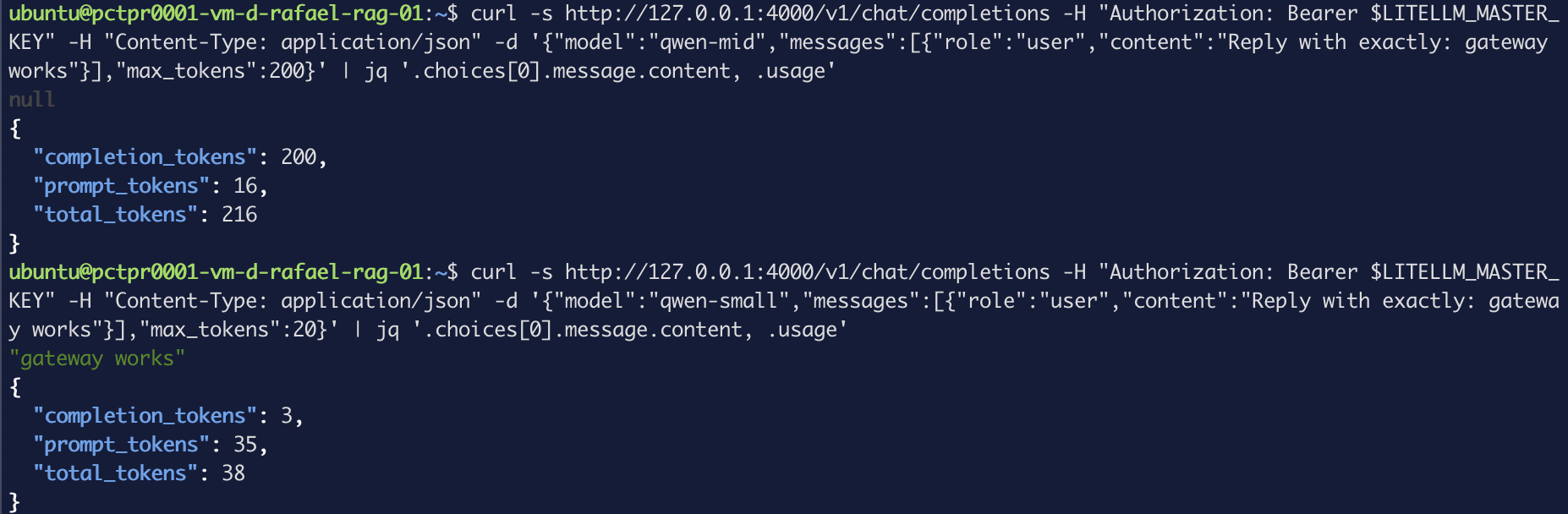 Figure 4. Two hundred tokens and no answer, against three tokens and the answer.
Nothing is broken here. The reasoning model is doing exactly what it's built to do, on a question that didn't need it. The fix isn't a bigger token budget — it's not sending trivial work to that model in the first place. Which is the entire argument for routing, and the subject of the next post.
You can put a gateway in front of several models, give each one an alias your apps call instead of a provider model ID, and read a response well enough to tell a reasoning model from a plain one.
Proving the door is locked
A gateway that holds every credential you own should refuse anyone without a key. Worth checking rather than assuming:
curl -s -o /dev/null -w "no key:     %{http_code}\n" http://127.0.0.1:4000/v1/chat/completions \
  -H "Content-Type: application/json" \
  -d '{"model":"qwen-mid","messages":[{"role":"user","content":"hi"}]}'

curl -s -o /dev/null -w "wrong key:  %{http_code}\n" http://127.0.0.1:4000/v1/chat/completions \
  -H "Authorization: Bearer sk-not-a-real-key" -H "Content-Type: application/json" \
  -d '{"model":"qwen-mid","messages":[{"role":"user","content":"hi"}]}'

curl -s -o /dev/null -w "master key: %{http_code}\n" http://127.0.0.1:4000/v1/chat/completions \
  -H "Authorization: Bearer $LITELLM_MASTER_KEY" -H "Content-Type: application/json" \
  -d '{"model":"qwen-mid","messages":[{"role":"user","content":"hi"}],"max_tokens":5}'
no key:     401
wrong key:  401
master key: 200
 Figure 5. Anonymous and forged both rejected, the real key through.
The admin UI
The gateway ships a web interface, and it's bound to localhost — which is the point, so reach it over SSH rather than opening a port:
ssh -L 4000:127.0.0.1:4000 ubuntu@your-wec-instance
Leave that running and open http://localhost:4000/ui. Username admin, password
is the master key from your .env.
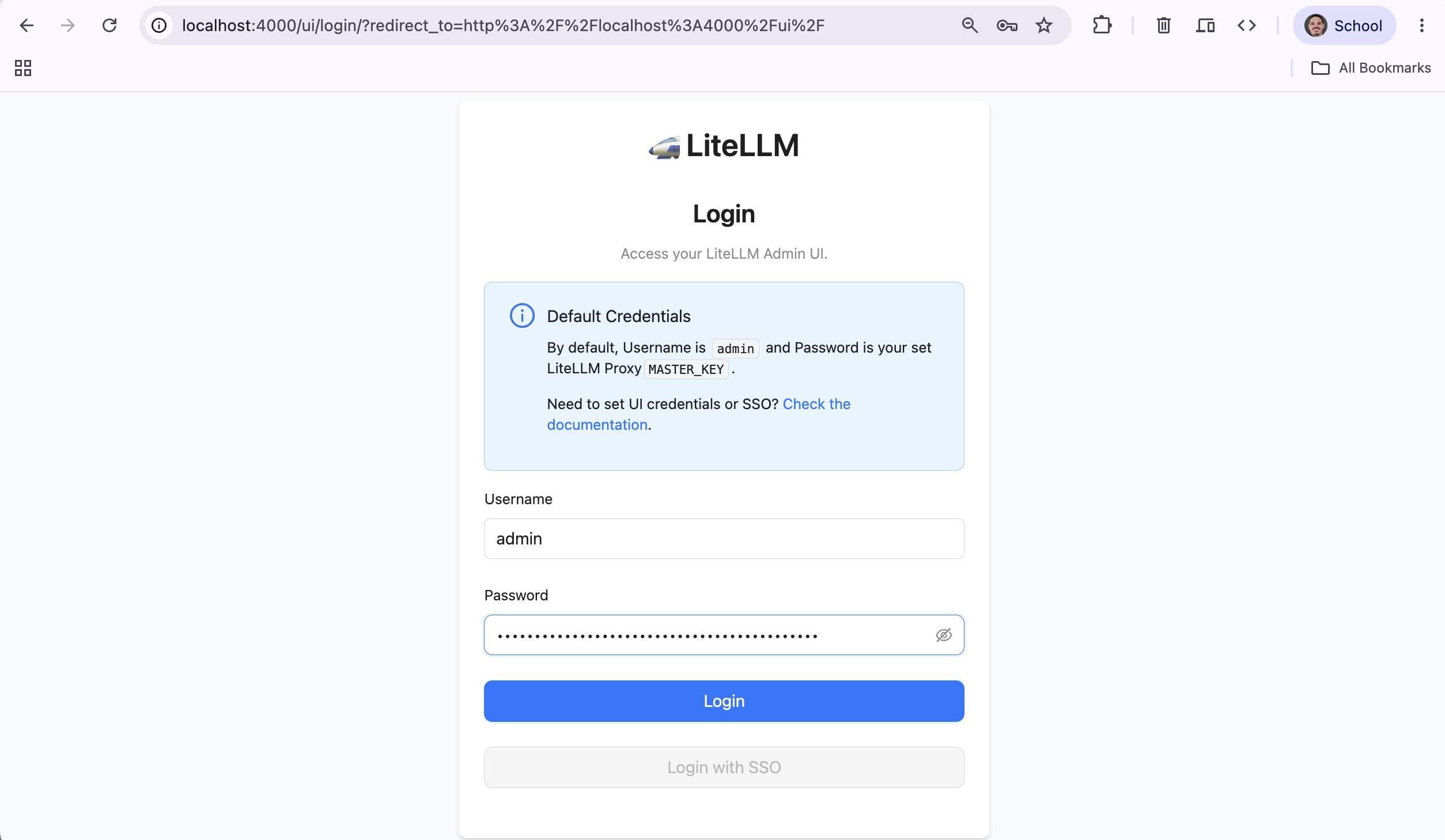 Figure 6. The login page states its own default credentials, which is a good
reminder that the master key is the only thing standing there.
Figure 6. The login page states its own default credentials, which is a good
reminder that the master key is the only thing standing there.
Click Models + Endpoints:
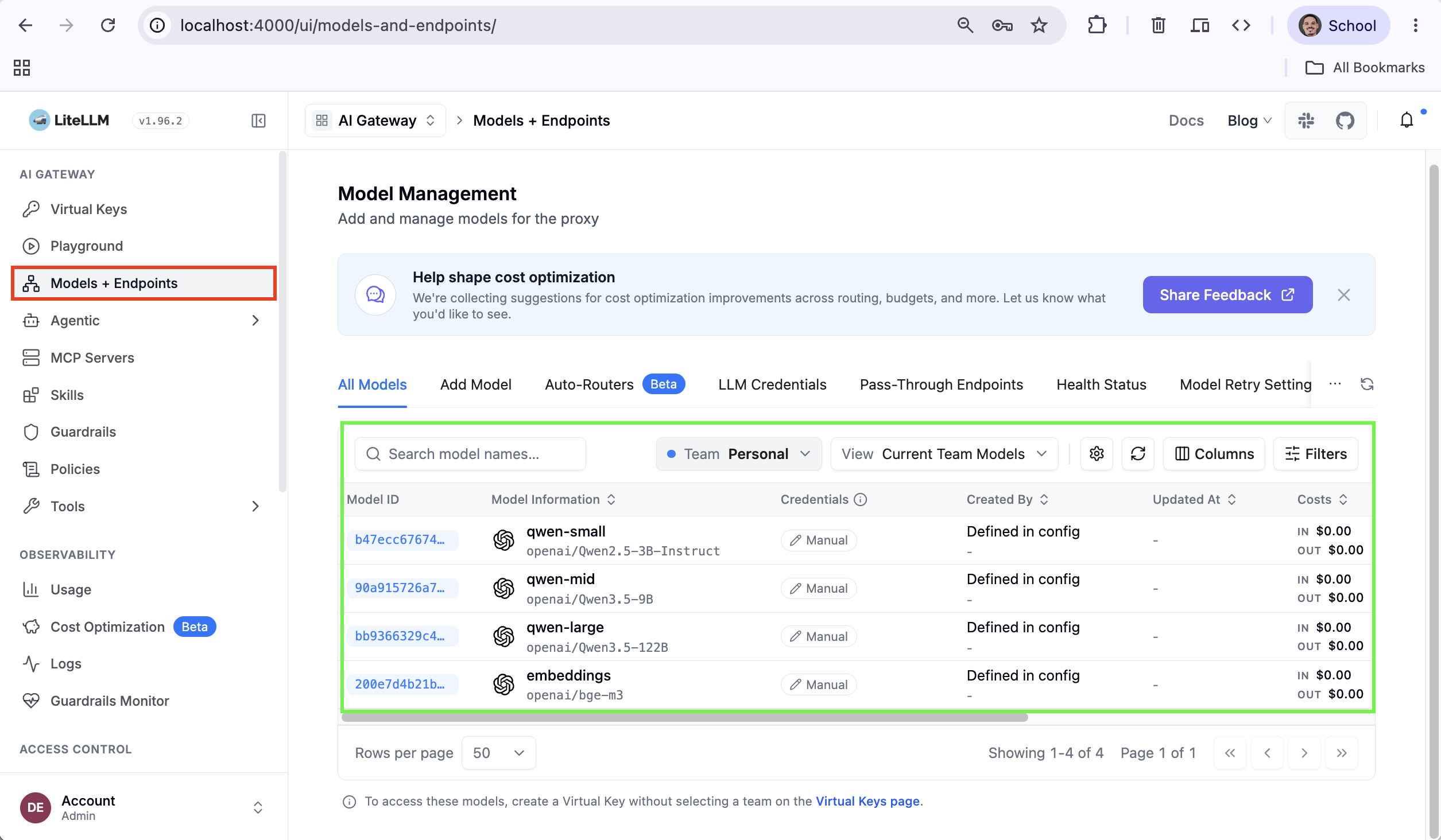 Figure 7. All four aliases registered, each mapped to its
 openai/... target.
Keys that can't do everything
The master key can reach every model and create more keys. No application should ever hold it. Instead, issue a virtual key scoped to what that app actually needs.
Virtual Keys → + Create New Key:
| Field | Value |
|---|---|
| Owned By | You |
| Team | leave empty |
| Key Name | demo-app |
| Models | qwen-small |
| Max Budget (USD) | 0.10 |
| Reset Budget | daily |
Two things about this form. Max Budget lives under Optional Settings, which starts collapsed — easy to miss and then wonder where the budget field went. And leaving Models empty means all models, the opposite of what you want here.
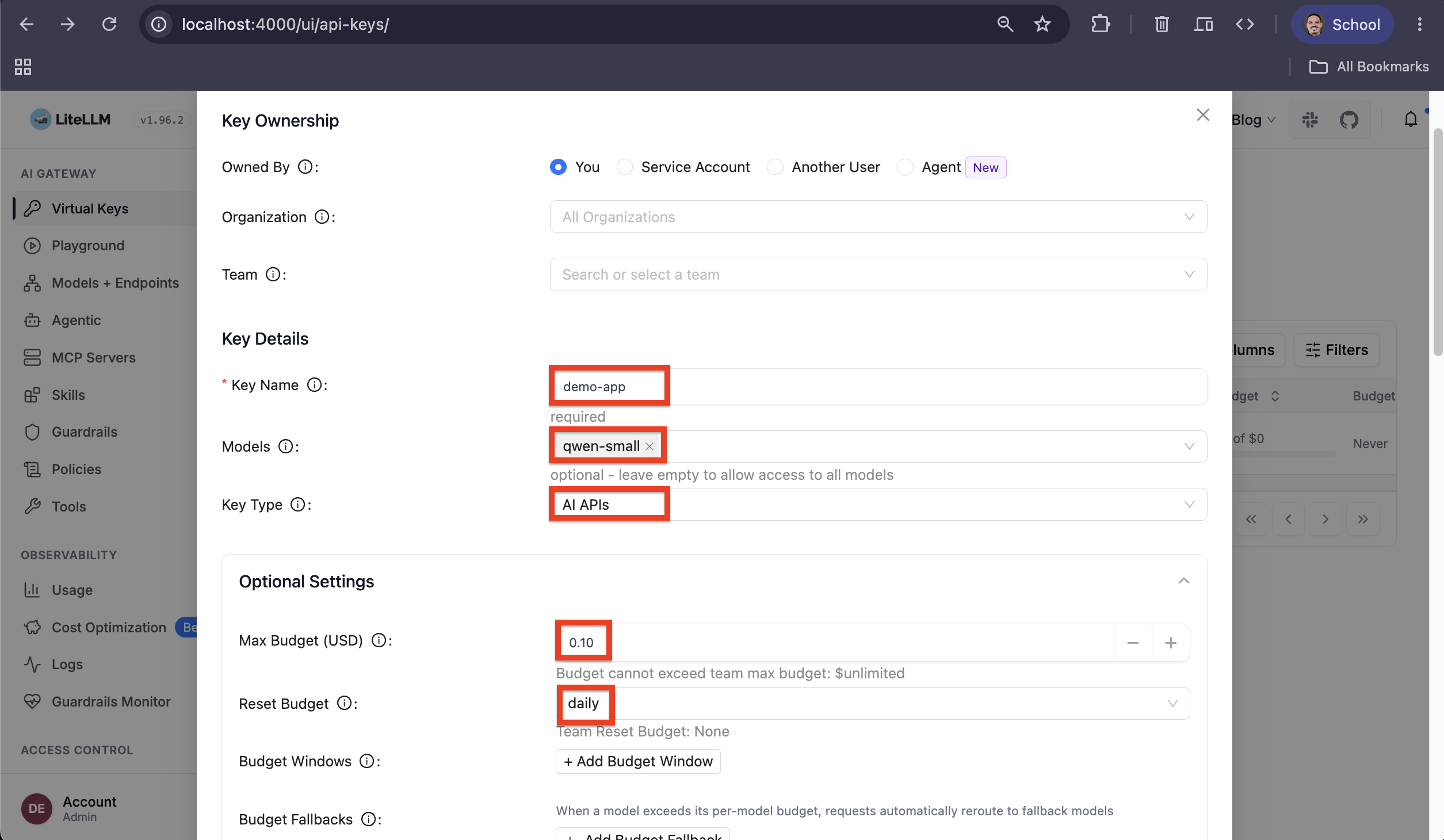 Figure 8. Scoped to one model, capped at ten cents a day.
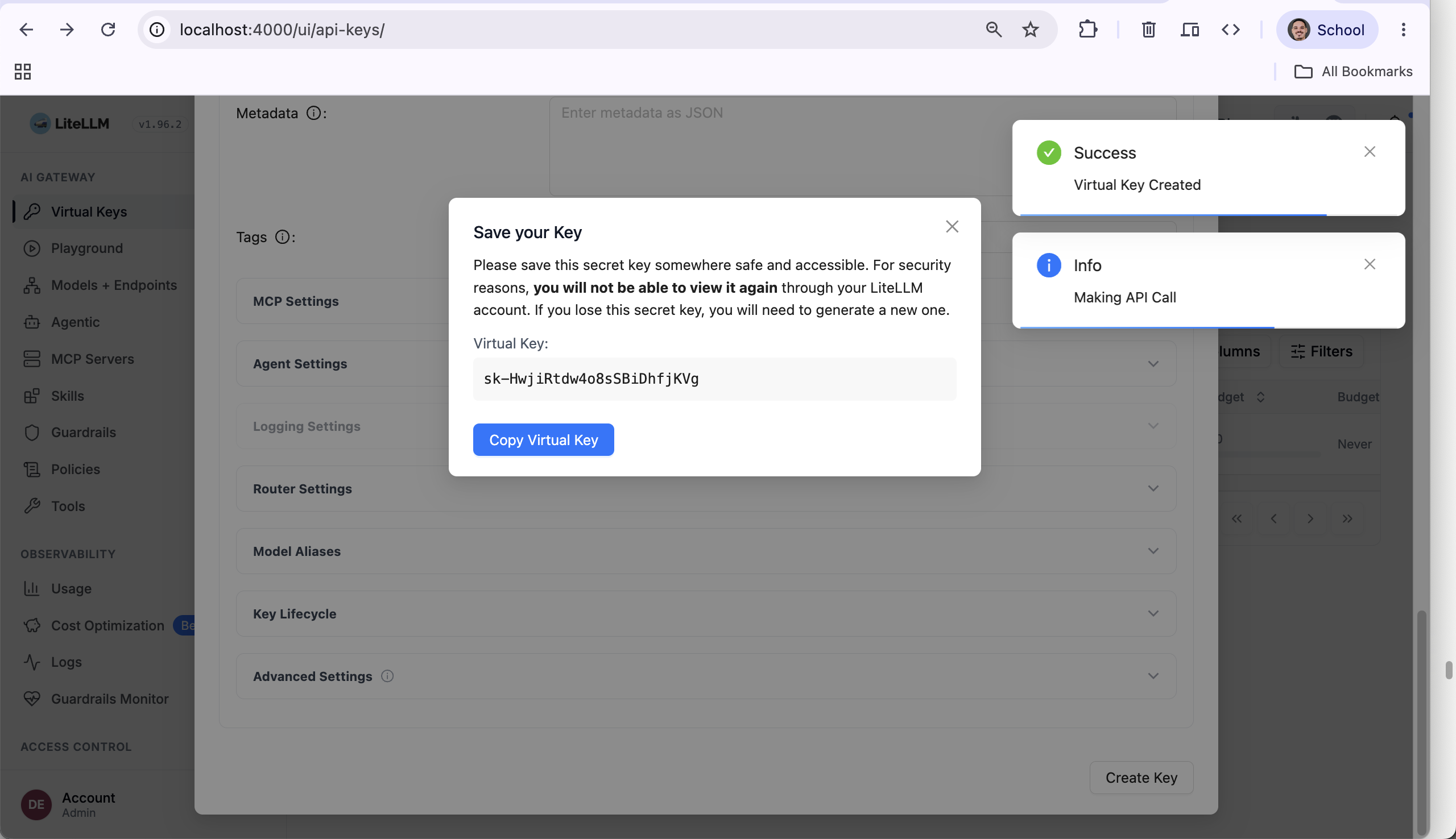 Figure 9. The dialog says it plainly. Believe it.
The generated key is shown once and never again. Close this without copying and your only option is to delete the key and create another.
Now the part that justifies the whole exercise. Same key, two models:
curl -s http://127.0.0.1:4000/v1/chat/completions \
  -H "Authorization: Bearer $VK" -H "Content-Type: application/json" \
  -d '{"model":"qwen-small","messages":[{"role":"user","content":"say hi"}],"max_tokens":20}' | jq -r '.choices[0].message.content'
Hi there! How can I assist you today?
curl -s http://127.0.0.1:4000/v1/chat/completions \
  -H "Authorization: Bearer $VK" -H "Content-Type: application/json" \
  -d '{"model":"qwen-large","messages":[{"role":"user","content":"say hi"}],"max_tokens":20}' | jq
{
  "error": {
    "message": "key not allowed to access model. This key can only access models=['qwen-small']. Tried to access qwen-large",
    "type": "key_model_access_denied",
    "param": "model",
    "code": "403"
  }
}
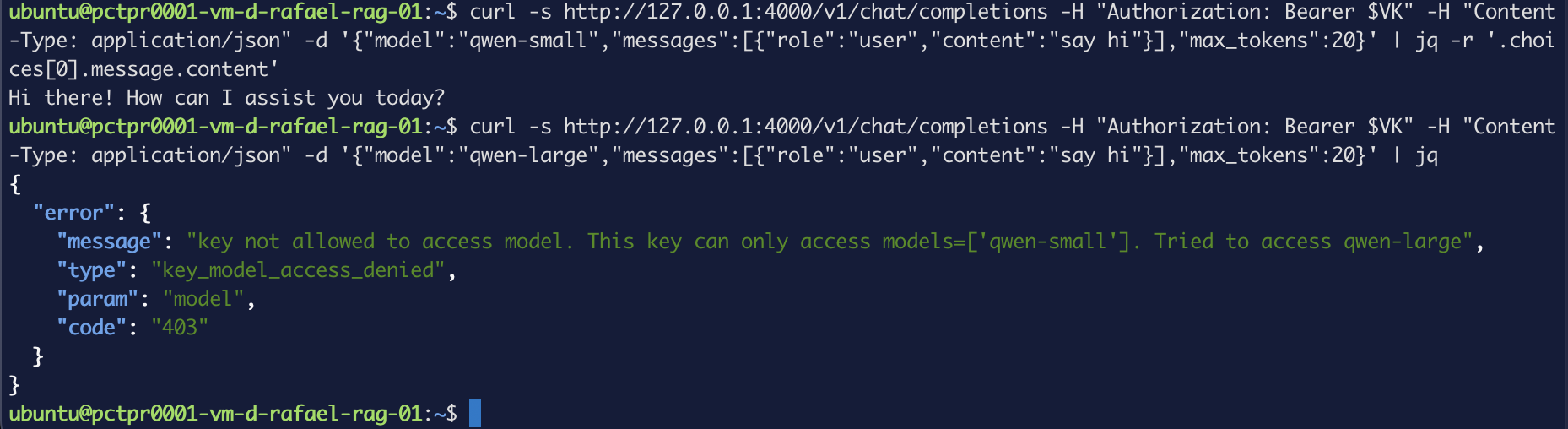 Figure 10. One credential, one model. Leak it and the blast radius is that one line.
Compare that to the situation we started in: a key in five .env files, with access
to all thirteen models and no way to tell which app is using it.
You can issue a scoped credential per application, restrict it to specific models with a spend cap, and revoke it on its own without touching anything else.
What the gateway recorded
Every call lands in a spend log:
curl -s http://127.0.0.1:4000/spend/logs \
  -H "Authorization: Bearer $LITELLM_MASTER_KEY" \
  | jq '[.[] | select(.spend > 0)] | .[-3:] | .[] | {model, spend, prompt_tokens, completion_tokens}'
{
  "model": "openai/Qwen3.5-9B",
  "spend": 8.520000000000001e-05,
  "prompt_tokens": 16,
  "completion_tokens": 20
}
{
  "model": "openai/Qwen3.5-9B",
  "spend": 2.62e-05,
  "prompt_tokens": 11,
  "completion_tokens": 5
}
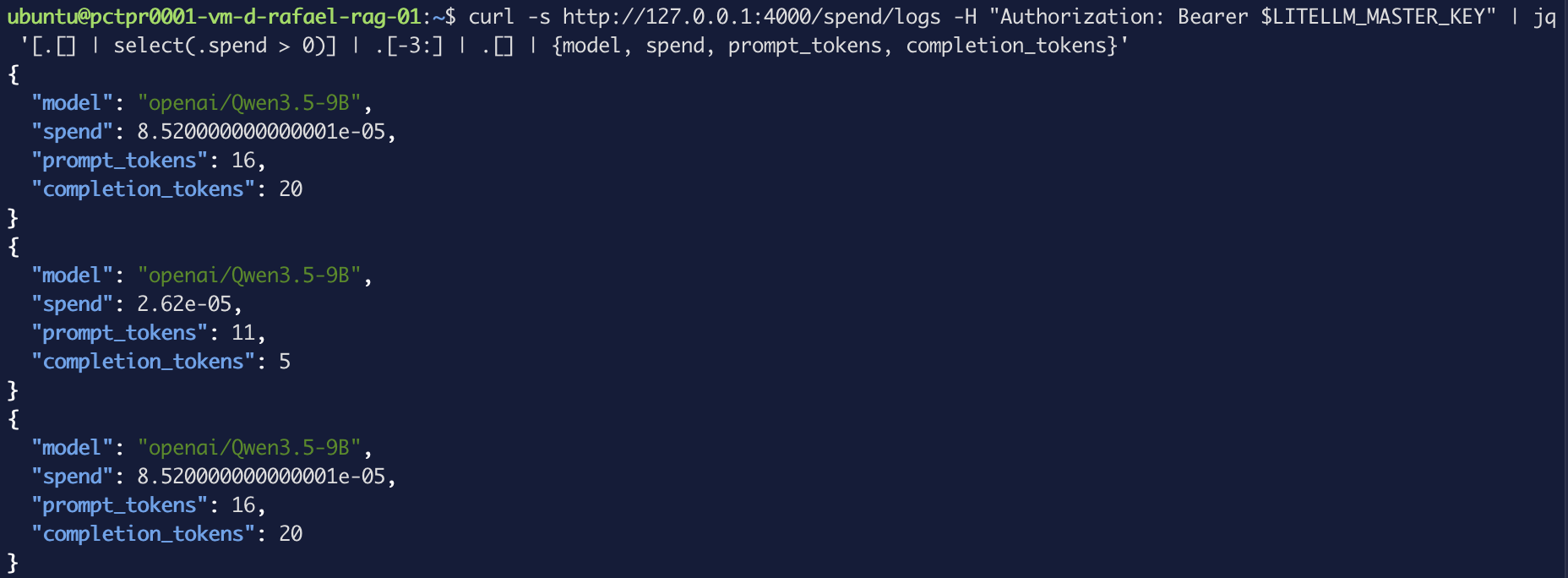 Figure 11. Tokens counted per call, with a price attached to each.
That select(.spend > 0) isn't cosmetic. Failed calls are logged too, at zero
tokens and zero spend — the 401s from earlier are all sitting in there with
status: "failure". Useful on its own: the spend log doubles as a record of
someone trying keys that don't work.
Token counts are real. The dollar figures are not — not for you, anyway. These are self-hosted models on your own infrastructure; the gateway is pricing them off a built-in table of public API rates. The number is precise and confidently wrong, which is worse than blank. Fixing that means declaring your own cost per token, and that's the subject of the fourth post in this series.
Two more things in the full log entry, both useful:
"litellm_overhead_time_ms": 36.189,
"messages": {},
"response": {}
The gateway measures its own overhead and reports it per request — 36ms here, which is a real number you can hold it to. And prompts and responses aren't stored by default: the log knows a call happened and what it cost, not what was said.
Troubleshooting
The gateway container starts and immediately exits
Almost always the database. Check docker compose logs litellm for migration
errors — if the gateway came up before Postgres was ready, the depends_on
condition is missing or the healthcheck isn't passing.
content comes back null with finish_reason: "length"
The model is a reasoning model and it used your whole token budget thinking. Raising
max_tokens helps but doesn't guarantee anything — the same prompt at 200 tokens
answered on one run and returned null on the next. For work that doesn't need
reasoning, send it to a model that doesn't do any.
The admin UI won't load
It's bound to 127.0.0.1, so it's unreachable from anywhere but the box itself.
Use an SSH tunnel. If the tunnel is up and the page still won't load, confirm the
port in docker compose ps matches the one you forwarded.
A shell chain quietly did nothing
Chains joined with && stop at the first command that fails, and a failed grep
counts as a failure. Sourcing an env file whose variable name you guessed wrong
leaves a placeholder in place and everything looks fine until an auth error three
steps later. Check for placeholders explicitly:
grep -c 'your-wec-key-here' .env
Deleting a virtual key
From the terminal, by alias:
curl -s -X POST http://127.0.0.1:4000/key/delete \
  -H "Authorization: Bearer $LITELLM_MASTER_KEY" \
  -H "Content-Type: application/json" \
  -d '{"key_aliases":["demo-app"]}' | jq
What's next
You now have one endpoint, a credential per app, and a log of every call. The obvious question is the one Figure 4 raised: if the small model answers in 3 tokens what the reasoning model spends 200 on without answering at all, why is anything routing to the expensive one by default?
The next post puts the gateway in charge of that decision, and measures what asking it costs.