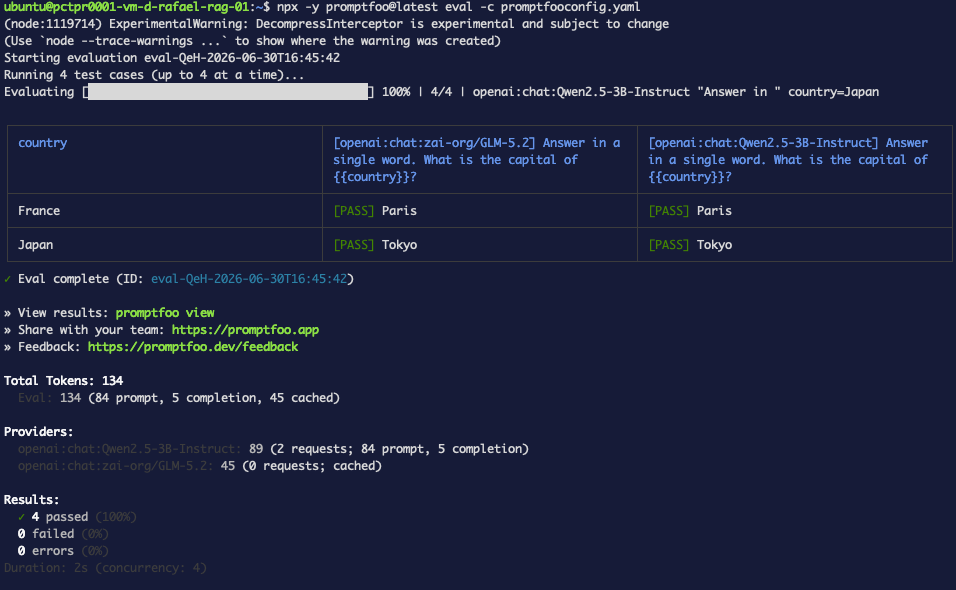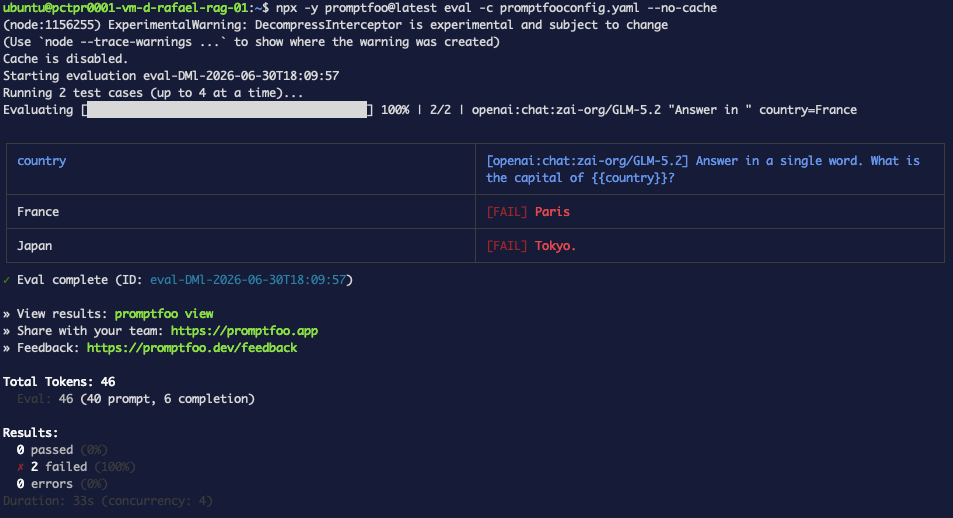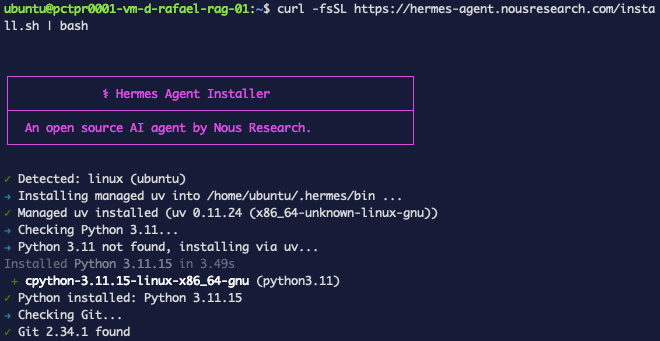
<?xml version="1.0" encoding="utf-8"?>
<feed xmlns="http://www.w3.org/2005/Atom">
    <id>https://wec.wiline.com/docs/tutorials/</id>
    <title>WEC Docs Blog</title>
    <updated>2026-07-01T00:00:00.000Z</updated>
    <generator>https://github.com/jpmonette/feed</generator>
    <link rel="alternate" href="https://wec.wiline.com/docs/tutorials/"/>
    <subtitle>WEC Docs Blog</subtitle>
    <icon>https://wec.wiline.com/docs/img/Logo_icon_blue.svg</icon>
    <entry>
        <title type="html"><![CDATA[Trustworthy JSON: schema-validate your model's structured output]]></title>
        <id>https://wec.wiline.com/docs/tutorials/structured-output-evals-wiline-inference/</id>
        <link href="https://wec.wiline.com/docs/tutorials/structured-output-evals-wiline-inference/"/>
        <updated>2026-07-01T00:00:00.000Z</updated>
        <summary type="html"><![CDATA[LLMs promise JSON and deliver markdown fences and reasoning. Build a Promptfoo eval that classifies support tickets into schema-validated JSON on the WEC Inference API — with transforms to recover messy output, a model-reliability matrix, and a CI gate. Every command and result is real.]]></summary>
        <content type="html"><![CDATA[<div class="tutorialHero"><img class="tutorialHero__brand" src="https://wec.wiline.com/docs/assets/images/promptfoo-avatar-31b32c657d72dac0a7edbd77c24ec717.jpg" alt="Promptfoo"><span class="tutorialHero__plus">+</span><svg xmlns="http://www.w3.org/2000/svg" width="242" height="255" fill="none" viewBox="0 0 242 255" class="tutorialHero__wiline"><path fill="#4E8EF7" d="M56.711 11.293A195 195 0 0 1 41.899 4.79c4.788 1.85 9.71 4.028 14.812 6.504M73.807 29.35c-1.302-1.446-2.666-3.233-4.02-5.38 1.326 1.44 2.642 3.24 4.02 5.38M69.761 23.354c-.832-.585-1.752-1.472-2.558-2.714.9.567 1.685 1.49 2.558 2.714M62.97 15.774a10.7 10.7 0 0 1-3.158-1.841c.993.299 1.986.956 3.159 1.841M59.715 13.346c-.818-.194-1.782-.674-2.829-1.494.84.175 1.761.691 2.83 1.494M39.317 3.782c-.524.192-1.413.302-2.455.14.594-.255 1.342-.238 2.455-.14M74.906 31.339c-.334-.153-.73-.61-1.117-1.398.358.143.706.619 1.117 1.398M66.024 18.878c-.239.1-.557.05-.752-.276.35-.201.532-.069.752.276M71.773 150.625c3.363 7.291 7.185 14.411 9.983 21.914 4.474 11.997 11.167 20.832 24.296 24.757 10.62 3.175 20.369 1.795 30.093-1.816 9.937-3.689 15.165-11.978 18.501-21.541 4.349-12.466 9.385-24.443 19.668-33.446 11.32-9.909 24.639-14.788 39.429-15.63 8.3-.473 16.649-.081 25.444.444.472 15.673.385 30.825.55 45.974.038 3.499-1.049 4.719-4.557 4.543-4.982-.25-9.987-.079-14.98.009-.209.004-.4.991-.6 1.521-23.106 1.695-37.691 15.22-47.961 34.651-3.387 6.408-5.913 13.38-10.013 19.273-4.368 6.277-10.134 11.582-15.853 17.196-6.439 1.421-12.244 3.342-18.202 4.416-12.627 2.274-24.661.457-35.764-6.356-1.028-.631-2.395-.709-3.604-1.043 0 0-.117-.11-.047-.495-.818-.973-1.706-1.562-2.593-2.15 0 0 .09-.044.05-.335-.513-.545-.988-.798-1.463-1.052 0 0-.07-.123.012-.492-.561-.894-1.205-1.421-1.848-1.947 0 0 .134-.068.102-.28-.321-.442-.61-.671-.898-.901 0 0 .086-.007.074-.336-2.05-3.429-4.089-6.529-6.127-9.629 0 0 .094-.017.123-.365-3.013-6.117-6.056-11.886-9.1-17.655 0 0 .096-.01.088-.342-1.978-4.073-3.89-7.848-5.997-11.51-.246-.428-1.572-.235-2.398-.329 0 0-.226-.202-.114-.613-.213-.499-.537-.587-.861-.674 0 0-.032-.101.02-.455-.62-.846-1.291-1.339-1.964-1.832 0 0 .133-.083.119-.372-2.476-4.624-5.645-8.048-10.914-8.777 0 0 .108-.031.01-.326-1.673-1.444-3.105-2.918-4.85-3.688-9.751-4.308-20.013-5.643-30.63-5.23-7.305.285-7.316.051-7.317-7.446q-.002-18.496-.002-36.992v-3.57h36.106s-.08.019.133.283c1.43.415 2.646.567 3.863.719 0 0-.077.022.113.296 1.804.591 3.417.908 5.03 1.225 0 0 .139-.037.152.369 1.592.962 3.17 1.517 4.748 2.073 0 0-.091.027.052.267.735.415 1.328.59 1.92.765 0 0-.076.033.053.246.477.325.825.438 1.173.551 0 0-.149.018-.07.246.418.239.757.251 1.096.263 0 0 .23.058.189.465 1.522 1.319 3.084 2.231 4.647 3.143 0 0-.105.033-.015.316 2.723 2.764 5.356 5.244 7.989 7.724 0 0-.104.062-.094.352 1.01 1.401 2.01 2.512 3.01 3.624"></path><path fill="#4E8EF7" d="M214.77 52.819c-3.343.846-6.723 1.574-10.024 2.562-11.388 3.408-20.567 10.142-27.166 19.865-5.097 7.511-9.621 15.483-13.685 23.608-6.809 13.613-15.725 24.809-31.343 28.198-24.707 5.362-45.22-.126-57.852-24.564C69.466 92.363 63.8 82.375 57.349 73c-3.369-4.896-8.866-8.326-13.679-13.041-1.11-1.409-1.81-2.472-2.794-2.937-10.697-5.056-21.87-7.3-33.686-5.344-3.877.641-5.72-.297-5.615-4.86.294-12.816.26-25.646.019-38.464C1.509 3.874 3.15 2.5 7.429 2.716c9.774.492 19.564.678 29.347.989 0 0-.076.026.082.257 1.046.122 1.935.012 2.825-.098.575.043 1.15.086 2.038.692 5.265 2.72 10.218 4.877 15.17 7.034 0 0-.108.03-.016.317 1.058.765 2.022 1.245 2.987 1.724 0 0-.113.048-.082.354 1.144.876 2.258 1.446 3.372 2.017 0 0 .18.145.097.506.223.404.53.447.837.49 0 0 .214.13.144.504.244.426.558.477.873.528 0 0 .171.124.108.485.256.412.574.464.893.515 0 0 .167.127.105.493.265.437.592.509.919.58 0 0 .078.108.019.5.861 1.28 1.782 2.166 2.702 3.053 0 0-.101.061-.087.368 1.379 2.093 2.743 3.88 4.107 5.666 0 0-.094.011-.092.297.4.742.795 1.2 1.19 1.656 0 0-.121.02-.165.337.685 1.432 1.413 2.549 2.14 3.665 0 0-.11.024-.129.299.326.776.67 1.277 1.014 1.78 0 0-.084-.005-.1.367.933 4.079.311 8.497 4.648 10.67 4.69 12.164 12.107 21.794 25.852 23.497 19.618 2.431 35.321.062 45.299-24.554 3.398-8.383 7.099-16.902 12.232-24.264 8.353-11.979 21.046-17.795 35.832-20.32 1.666.417 2.649.651 3.624.622 9.93-.298 19.865-.513 29.785-1.032 3.818-.2 4.825 1.198 4.746 4.853-.218 9.967.004 19.944-.109 29.915-.052 4.583 1.149 10.606-1.239 13.302-2.044 2.308-8.394.86-12.842.967-3.82.092-7.644.036-11.467.045.065.31.097.633.213.922.034.084.306.072.469.105M37.585 127.354c-11.585.344-23.368.344-35.907.344v3.57q0 18.496.002 36.992c0 7.497.012 7.731 7.318 7.446 10.616-.413 20.878.922 30.63 5.23 1.743.77 3.176 2.244 4.84 3.744-13.655-7.873-28.93-7.767-44.468-7.398v-52.503c12.516.308 25.063-1.222 37.585 2.575"></path><path fill="#4E8EF7" d="M36.619 3.401c-9.626-.007-19.415-.193-29.19-.685C3.151 2.5 1.51 3.874 1.594 8.354c.241 12.818.275 25.648-.018 38.464-.105 4.563 1.737 5.501 5.614 4.86 11.816-1.956 22.99.288 33.686 5.344.984.465 1.685 1.529 2.616 2.66-13.39-7.538-28.284-7.343-43.479-6.78V0C12.314 1.045 24.388 2.071 36.62 3.401M215.232 52.852c-.625-.066-.897-.054-.931-.138-.116-.29-.148-.612-.212-.922 3.822-.01 7.646.047 11.467-.045 4.448-.108 10.797 1.341 12.842-.967 2.387-2.696 1.186-8.719 1.238-13.302.114-9.971-.109-19.948.109-29.915.08-3.655-.928-5.052-4.746-4.853-9.919.519-19.855.734-29.785 1.032-.975.03-1.958-.205-3.228-.58C214.559 1.945 227.423.991 240.73.003v52.882c-8.276 0-16.656 0-25.498-.033M220.071 177.398c-.271-.573-.08-1.561.129-1.565 4.993-.088 9.998-.259 14.98-.009 3.508.176 4.595-1.044 4.557-4.543-.165-15.149-.078-30.301-.088-45.911.458.372 1.32 1.202 1.324 2.036.079 16.424.059 32.848.059 50.036-6.984 0-13.737 0-20.961-.044M88.39 245.741c1.022.084 2.39.162 3.417.793 11.102 6.813 23.137 8.63 35.763 6.356 5.959-1.073 11.764-2.995 17.871-4.34-5.612 2.132-11.343 5.166-17.325 5.79-13.898 1.451-27.803 1.213-39.725-8.599M66.556 210.212c2.975 5.411 6.018 11.18 9.02 17.344-3.011-5.4-5.982-11.193-9.02-17.344M58.341 197.934c.666-.167 1.992-.36 2.238.068 2.107 3.662 4.018 7.437 5.985 11.557-2.69-3.535-5.376-7.449-8.223-11.625M44.637 185.241c5.099.438 8.268 3.862 10.737 8.564-3.518-2.513-7.043-5.393-10.737-8.564M82.29 48.422c-4.252-1.834-3.63-6.252-4.548-10.37 1.508 3.069 2.986 6.55 4.548 10.37M68.757 146.326c-2.533-2.157-5.166-4.637-7.882-7.455 2.539 2.151 5.16 4.641 7.882 7.455M75.532 228.226a122 122 0 0 1 6.047 9.319c-1.993-2.742-3.986-5.854-6.047-9.319M71.695 150.312c-.922-.799-1.921-1.91-2.906-3.366.952.788 1.89 1.921 2.906 3.366M46.663 130.007c-1.353-.103-2.966-.42-4.767-1.051 1.377.07 2.941.454 4.767 1.051M51.647 132.369a13.1 13.1 0 0 1-4.501-1.77c1.48.227 2.902.852 4.5 1.77M60.724 138.321a17.7 17.7 0 0 1-4.395-2.781c1.501.609 2.869 1.551 4.395 2.781M76.889 35.31c-.674-.781-1.402-1.898-2.068-3.39.711.768 1.362 1.912 2.068 3.39M85.668 243.124c.782.31 1.67.899 2.423 1.825-.862-.29-1.59-.919-2.423-1.825M41.596 128.372c-1.033.176-2.25.024-3.68-.432 1.023-.169 2.26-.032 3.68.432M55.367 194.37c.568.222 1.24.715 1.808 1.548-.637-.199-1.17-.738-1.808-1.548M82.397 239.295c.56.251 1.204.778 1.71 1.628-.633-.235-1.13-.794-1.71-1.628M84.291 241.679c.334.034.809.287 1.298.875-.376.004-.766-.326-1.298-.875M53.64 133.426c-.438.094-1.03-.081-1.764-.543.441-.101 1.026.086 1.764.543M77.805 37.409c-.322-.188-.666-.69-.978-1.52.34.182.648.693.978 1.52M81.588 238.108c.218-.039.507.19.823.707-.233.045-.493-.196-.823-.707M55.906 134.832c-.198.157-.537.145-.92-.161.262-.29.537-.195.92.161M57.276 196.552c.254-.079.578.009.756.361-.377.171-.557.018-.756-.361M54.888 134.25c-.215.129-.563.017-1.038-.351.217-.133.56-.012 1.038.351M64.014 16.858a.545.545 0 0 1-.71-.247c.344-.19.51-.067.71.247M65.027 17.882a.574.574 0 0 1-.734-.272c.35-.193.525-.063.734.272M67.045 19.939c-.244.093-.57.021-.777-.329.358-.192.55-.044.777.329"></path></svg><span class="tutorialHero__plus">+</span><img class="tutorialHero__brand" src="data:image/png;base64,iVBORw0KGgoAAAANSUhEUgAAAPoAAAD6CAQAAAAi5ZK2AAAABGdBTUEAALGPC/xhBQAAACBjSFJNAAB6JgAAgIQAAPoAAACA6AAAdTAAAOpgAAA6mAAAF3CculE8AAAAAmJLR0QA/4ePzL8AAAAHdElNRQfqBRUJIAPXcPQOAAAezUlEQVR42u3daXgUVboH8P97qpcshJiEfQ/igkAQEIwIsqiIiiAoDAxXFAfnKozjODLqFWeG6ywquMzIqOMoKqKgIhEdRXGugiCIYTUgm+wqhAQIEELS6e5674dOQpZO0t11TlUl1PnQ9XQ9Xc+TOr+cU2d5zylCo07tUkU6teI0ThNp1JxScR4BHkokUBNPcVPRxNccvvzCXM6nQyW7h5660eXyiwM7D48LNuZcocZ2QynJ8T30HnQRdaJ06oSmBAJAOHus+q3aWX/qT90Pdyvu5E0R7q3Ypm/VtvU+5KDbMrVoiSu4L3qIHtSpbuQ6ySsdm6J34WWnO6docVyALbwOawPZAw466Db461O6aVdSf+5PXSLjjJS8/NONLrg80JNcGsDgw5yNFfoXA7cQO+imp6Q017U0HNdRq2g4oyUvP8YhA5noBAbAYHAef8GfBz679qCDbkpK7Ra4RbsBl0GLljNW8vLPNuiPnnBX0AP6JnyID6/e6KArS026ibFiLF9iBM7olU2QiUzEnS3zAPgH/oAXDvu64VT5DQI9vp12B/2cusbOKYc8dIzDZRiAuHLy8uM+fiu4YMR2B9140hKH0C8xmlxGOGWSl8Nnoh88Z8nLPrGRX/W8ee1JBz3GFJdOU8UkamGUUz556FsCrkLPKuRlxyJ+Gy+NXOegR5kS+vB9NIFcxjlVkYeOLTEUbaqSl33qG/n5uLdu8DnokSR33Di6H33koKglJwACXXEVvNXIy465/FzJPycWOOh1g0/A76mLLBT15KHPBAxG55rkoeNpzPX/bcJ+Bz1c8sTdwY9QR3koZpGHvp2PAYirSR769PPrgb9MPOCgV04u92QxAx1lophLDhDiMQRtw5GHvvnxtv+Pk/Y56KFe2fXabOomF8V88tBnT/QChSMPHUv4X54/j8s/x9E9XTEbN8pGsYqcQGiOwZVG7MJU9yf1v5x87te+cxW9ufaEuINEYyIHCIkYgGa1kZcP3D56+3zrhm2tQif3nTyLUuWjWE1OIGjog/TayUPHVeJXt+ecS+gXul7A1SpQ7EAeOl6AnnWRg8EBvFAyY9rpcwE9zvUHTIe7cZMDhI64FKJ28tDnT/j1XVmNHb23eEN0U4NiL/JQo64fRF3koeMice9dR8xEEGb2xsVD2tfnDjlwFF/DXx85eGxgyz/HNM6S3lmbhwGqUOxIHjomow/cdZGXHxd5755yvHGV9Mliy7lIDpzCRvjrJwfGlmx+7hqThsPMaLqJ5+kxcp+L5ASCDwVoAaqbHAxOxm3D4zK/XKE3/Or9QlpEGeqy1u7koc8UZAB1k5fH3qwKTvjtTw27eh9PGxxywgnsiIicoQ+kzc8Mb7joJGbSAmrikAOEo9gXATkD4Gb88dMzmRpi9Z5I8zFaZdY2JPLQZye0jKQdH/rMwqTfFTUs9Lb0QSQhT+cSOYFwMZpERg4GcsTI6QcaTvXel9Y75OG+7YYvUnJwRmD9E1c1lC7bEFqKNIc83DegCCkRtuMZSOAJQ/d8sdX+6DfT+0h0yGv7TQABJEVGDga7MGboiS++sXf1fg8tRpxDXtdvTuBUpORgQODvf3pCbltebkPu9/SY2qxt+OQEQEM6XJGRlx1pXnDKzIAdq/eZ9L8OeSS/AUrQtApvvR25S9F98JIVQbuhz6Q/OuSR/iYAAW/k5GCgKzIuXLxBtxO6Qx7lb3xIgBY5ORh8cWLvnouzg3ZB/yPNdMij/Y0fCUDk5GDgQu8lF79vvLTLQJ9Ksx3y6H+jQwuzwr2est818ZKrs4xOvhrvso2nOQ55bL8pRDA6cgB8i+91o30uoyV9KC2qGtnqkEf+G4DhiY4cDM4Y6P3qc+vQL6NPkKA2a6nR/bNU/qbDC4qOHAAP6H9qzVpr0DvRcqTavTTZ/cpgRVmPmBwMDBuwd3XM62Nifzo0odXIcMiNX5kUQdctzL9FaXDYs1+a25AjMdchl3PlGejRk4M9YvH9nU1FF4/xOIdczpWMYPTkADgNWdMTzUO/hWc45PKu9MVCDgb39M+P5QEdS0PuQlpKXodc5pWiYmwuqhE6oOvlwW9WqkePo2XUwSGXfaWIgZzB4EGZ2d/sVly9iznU0yGXfaUeKzkg9Dd+1UYt+jhMcchVXBkjORjcnN+YKdRV7xeIj8nrkKu6MiZyANz5dOn6VWoGZ4S2Elc65OriaYKxkYe2Mhn8z9UKqnfxkEOu8koROzng4vlTm8iv3ruJBeRyyFVeCeixkYPBKXrTDZ/Ird5d2hrq65CrvRIoiZUcAOs8+JVVEqt38bBDbs6VMZODBc+7LVFe9d5Fexsuh1z9HTECsZKDgRTybP6PpOrdtRTXO+Rm3BFQWGWgJuqZ9qB++bwNEqp37ZaGRK4hHslIQQriEQfRwEKoqg7HRh9cwRo9V39Brr+kJ7q3o72dyZPREq3QDE2RhCR2UZVM0IPH/afPFJ4sOuLJbZHXRhd2H0/04XTs5KHjbW+8aRDd9Tg9bM8y0Qad0BkdkBB5BvmL9xw9uTf54AW6Ztd/YsbxMEEVUU27Hiq+aNFpA+hxnYPbyWOvDNLQGRm4GE1jrgb14lM71p3O70+aHR9VBSg1Qg6G/vhbjxhAd79FP7cTeUv0Q5+yLTwMPPlW8B/Grhqbzr8Rd5/9l7ZL6+Q0ThsiZ8Dn7/bOnhjR3b1oPQl7kGvojquQHnsvtnyftm3Bh8Z+VH6HY9O1P2M8CTs1SAPIM0TOAHjBgokxonuW0TA7kLvRF0PDvi0hSvJ8zAi8Oq7aEsDxvcQsusY+fRAgt57eegR3rSNj4XcxoMcN5uXWkxN6YQTSjAxPVmyxHZhW20tzfj5W/KPuF3ya2e08Xq2Cj2mm/b23x8aCns19rSa/CKPQNvZJiLPfDvOdYz6tq1ablMZ/p4n2GFwqQr5RcjDrvRdtjhLdex0+tZY8CaPRN9apxqrfPuE7xuTVPww16VbxMs6zfjxRxwGj5GDg3++OjBZ9BQ2ykjwTYxAvgzyAh29+JtI3I91+vlhYfWrJiiHkH8rCog2Qg6H3Xbw+imHY+MutJE/EnfgvOeQFGD766chfhjVvT5OBeN36WQOvBHIGpkdV0uM/xE1WkXfFJDSNPYak8ueOwMhbv48+sH/K7+gJCCsnik7hsGFyBgLcJetAhCXd0wMjrCEXGIZpksh5BV8RCznwymyMoiIr5wYTZJCDXfq9EVfvrt+CrCB343aMqhIVaqCUf+q/YfSJWJfkvvwRhtMp66aDPVVWssaeF3TX2OSI0JPSeLwV5MmYjr6Gb7Nsq/z3S0eNK4aB9K+v9CF01LoIgAQJ5AA39U+OCD0wmeLMJ2+J6WgviRxvp4wbVwqD6V8bcTXyrAr6iJf1739vzYUQNdEF3W0+eSdMR5os8k+PTBoiZUvNF3O04Si0Js4nTk67Bui8YXC96AnX0flmk7fHvUiURM7rS8f+tx+S0pxN2ij4rAjtipdDDgYm14tO95hPfp+0yoz3iBHjpL6y9rnlYgqx+dF85U05o+QM/Zabz6szGjaxJb1YVw9VPnkb3CevlB/Trxr9IySnb3L6+3CN2WFWhAKUSiBnwK3v+35DHSWdflZXqLN88vMwDU1kkTP/4pa9UJCefVIsMT+yLl4OORj65Dqrd55oJnk8ppa93ELG84tnjfkAahLrk7HP7GDKBEnkDGQOu7hW9KZdRD8zR99+gXbSyLEq5VEoS387weOp1NzAsQRZ5GCIW2tF1yeaOcY+EpfII8/3TxgSgML0bDYeMjekxCONnKGPrhVd/Nw88h64Vh45cN84xe8nBZ76Oy03c+YxXho5A72HpYdFb9KNLjSLvBlukzTGzgD4s9ELoT6xNrVqn13tfrYaXLLIweCRYdG1EWaRa5iMRHnkxYFpMCU9vkPMNnOmPV4eOYKjw6LTTWZFxQxHJ3nk0P8ybjdMSqf/TDvNC67wSCNn0ICBzWugJ6Uh0xzy9rhOIjlv12fDtDTHh/vMC66Il0YOsOa6tga6dkP1RT5qyN2YBCGPHHjY+HxaNOmvy2ipWcEVXnnkYNCQGuh0ozlBzUPRSiZ59ph/w+REj4LNCa7wSCQH9BrohKFmkKfgWonkDPqfyIMeZaU/baL3zAmu8EgkZ/D5QztWQU+7mJqbEeg/JsLGSYTk2WO+gAWJHzcnnsYtkxwM/5Aq6PpVZpBfiAyJ5ID+JCxJf9pE/zEjnsYjlRzA0CroYqB6coERUsl593dLYFV6yox4Gq9UcgYPqoJOA9Wv4MpAB5nk0F+aqVtl/sf/4Hv18TSesKOWBgpOh8tbVqCf1xEdVJMLDAckkrOP5llWzkFMc80IoXLLJAdD9KpAd2eqX7TXC61kkoOyalt2bE4Sr1NAfQiVSyo5g3ufrd4vVb/Z1mCp5EBwASxNM47gc/UhVJpccuAsOl2qmvxCtJVKzgXiM1id3lYfQgW55JXR0VP1lnpD5JKDs8wdfA2X/EvqCo6WM9MupJIzuNMVqYAAWrag1mrJW6GLXHLoH1lezjHzBK0yI2qOZY5hEmcAAtB7q342XS6ZnH2Jn8MO6RPV5JpccgB6F0AAWne15B70kUsOrBxVaAdz+kR1KReSyRkcQqfz1TZHelRZlyUjLEC3RznHQ9vpJ7VRc0I2OdA51JDrrLY50lcyOUNfA5sk+kptoKSQTV5evVNnleRN0UEyOfsC6+yCzmvUxsbKJi+v3jXqoLI5khFVCzSi29w4ucQ2JX212nDooGxycFJGC9G6HXlUNke6yyYHvoVtkmcr+VVGwOuyyQFQJ6GlqyRPRjvZ5OAc+6D/2oddKhc9BKWTM9BCoI3KTsdFINnktirpAG1Ruc7FL52coTcXopnKTkcX6eQMsd1W6NtULm0KSidnoLng5urINaRLJ8fJiQV2Qsd+leuCSuSTg5q7qJm6TkeHsshtmYG8vA/2SvtUrgsqkd8iApq7KkfByq6o0uWTg/fby5z2qyMPhNmAREIuNheUpq6f2UE+OfiQvdCPH0JQ1YoBnwpycJqgNFXkAq3lk4OP2gt9pk4FqsLHfSrIoccLxKnqZ7aCWzo5QDZDB+iYqvDxUyoej4DXRV5V/cy2CsgZ+jH7oasKHy9U8XgEvKK2V+0Zv4XWCsgZKLQbOk6oiiU+qYIc7BXkVdXPbKGCHHqp7Uq6T1UscYGSupK9Al5V/cwUBeQMzX7opapiiU+qqSvjXORWRe5SQM6ADUu6mkUPOgqU1JXsdanaf6K5EnKGHrDdM92vJrD0WK0j7wZzkQVK1QwtNFNCDgiP7Uq6W01gab4acrBPkE/N0EITJeSMgNt26B41gaW5iupKhNBV9DObKiFnkO1KOnvVBJbmKaoruVSEb4YYv4UkJeQMeO2GLjwqyHUcVlRXsk/Ap2ZooYkacgRTbFe9J6sILM2tMfIuLRd94uyG1nJ3cncpIWcgzXbozVREGR5URQ6UCCpWMbQQr4icwbZDR6qKKMP9qsjBxwWOqxhNilNEDtuVdCZKlU+u46AqcvAxgXwVQwvxisgZ3M5e6G+2Ipf8KMMfKwVQSM/FPEH5KoYWvKrIwZ1sVrmnqwgs3aWOHPpRIfLV7ICmiBxIZ7KTeTBdRWDpDmXkDDoqOF/F0IJbFTk4/oWWtuqlp8snP4aj6h6P0I8Jka9iaEGoIgcj0M1WHbZu8gNLtyskZ3CuQL6aNauqyBnBDFuh95AfWLpZITkQ2CtcB1WQa8rIAfSwD/lSLy6STZ5bMdWipOAEjvwgNvxIJXbY9C7y29R72Qe9oDu5ZAeWblRJDhxEQECnfdZvehfVayl6PJlkG/UrZZMzchSSM/S9oT1n9sjvdKgjB1jTMm3Tdh8gO5Z4e1m0u7LH455K6HKbI0F15GAEr7RPSZcdS7xaLTk4VNK1PfI7HbpCcgZdYw/xBd3CbelghPwI9qolB7YCAuDvrdvaMsYmS+ZfbTHtIm6QHT6+SskuM1VGOTYDAnBtkb+aLaiSHKzZo6zzjXLJT2OTYnLkHz0ECODrn+iI7OaIrpIcqPK6WKtSVproLzd8/MuyPWYUNoK/Bcr3e98ouzkCteTAqNmJVqOX3gq3TPIirFFNDn1TBTpvMHvTO8PDD4m+GywfgJ0gd8XAcvgUk5fvzFVW0mUvbVJMDgATrSVf2J4GyiQ/VVbOFTeC19Wo3uXdgk8xOYNv/HNbS1vuvyAhc8XAUpSoJ889uqsCfc0Bype7zsWvmhzs0idbR77cJabIzK9DyFZPDqws+4ctez6tlLvOJaCaHADf9ZJlS5yOjqS2MvNrSUX/XGlXd1VV9OVy17n41ZODO+SOs6wR94DM/PoWu8wgR7AqOi+Xu87Fr54cgP4gLImXWzwE/eXlVwkWm0KOghNbqqCv2k65Mhc9cEVZV0fO4Iw/WNJx40dkFpElZTtOKCYHVkCvgg6m5XIXPQTUk4Oh/3WmMJv83UF0jTzyPVhrCnnl15pVZBktl7voodQEcgAZpbeaXMpJe0Lmhr/zoZtCzuxfWgMdnxHLjIAvNYGcwcDs6aYOyC6eSJnyHoTv4pg55OB1Rbk10L84gE0yI+CLTSFnoINnholVe6p4Wh75Wqwzixz8caWBpUrdkPdlRsD7zCEHQ5/+kGmR8NostJBFnof3TCMH6KOw6Nr7MiPgi00iZ8BNL5rTdVsykO6Ut5P7SxW1oXpyPnhyU1j0Zd9hp7wIeJ9Z5GDoAx+8w4Sq3aP/k0gOuY55EUa3S8rFhaF2bw10gD6QFwFfaho5g8HP/u581eiux+kSWT2cj5FjJjn0t6pMFlVtmsqLgA+oeJFc7WeT9az741WSv38z3S+LPBvLTCXnbUVbakVflk3bZYVDo+KlMyaQg4EM8ZTCjlpHzCWSQ74V88vrJ3PIQW9UmxaudnevywuH9plJDoY+9TeKAiteixNZNTcZiY18P15VH0FY9cj+d+pE1+cjICs2tshUcgYDL9ynYEUr03kvUm855AfwfLXCYMIU9Bcl++tEX3ZYLJMVDl1iNjm4KX8yraNs9A/+RHfIIf8R/8AZs8mhv1gj6qfGTPGrssKhfWaTg8FtxNL7U6X2zadihhzyfXjWAnI+VPxhvejej2Ldb6r62RKzphKqHi8pXfrLBGmx7WPwnBzyHZhT9mo9U8mBl+GvMa5Y/cS24EVJYpCcQMkmEe09I/0229FlvbM2+CWQjxBvy9njeS3mVptsNikvAjwpUFhvSQe0f3CJnNhYnxW3CQauE0vvNLyGfcnPRBbFGSdnLC2bQLUgLz4s/ilMJG+YYYg8sVBObGyJJeQMBga5P7vH0NbBWXfiLXIbJy/GK/jY/Idc+b//M2HDt8Od1J8tn1s3No1YbBU5GJwZWD65fczjbw+KV2J50Un13xzGbGy2jJxXFq8OG9YZ/qZv/QzXGo8PEUivsrmYieShYy5Gv7I2+qGY5JfEJBnNtzXIMnMmrebZ632fRlzSAX5aRkgQ17E6y5Q5uFa84he3Rzng2jpluQzy03gZC6wl3+xbVktUQPjT2/d0u47aG59g0GrZD9q0aVcX33xpiwuWb4vwHU9ZQ8Wn1NU4eQ5ewgErOqyVZx7vDW6rJWq/ttsfdw39x/jNx6GVleTlxy2YMO+7+sCXu048ikdJM3rXBViE78wflqp+druve3nIc8TowPgVGGT0qUYI7dRtKTkYKOZHSuYsCtZ+t+91015DX+Nr+FZiWZVIYMuasreUZtW6PqcO9IG00njUXAt4rCcPfcvW71qYE+5Ol3pLHqGH4THagsnGUpy0YvC55tm1pf0rx8pE9EwHgK0HM/rT+Uaj5gS89iAH2mJKtxa9NuQUVZ1D6zkmsJjGQDNCrmMj3sTaihgCi8mh/5e+v3bZOgMKb7tM/+bsKuzYZto9SLMHeXlAQSHPdj8zvwz+3QHaLLoi9immUIR/NlbiuGV3FGYr0KWlN9blWk8U6W1zcafREKpmYTcCtzSDcjHLPffm7vQw3WRkIhn4AdnYVC0e0Gpy1tHb/60B9Akt3TuRbCyEKrHSu5tsQR4KFSzsrF+Q3NzAm1C3YgsO2eiOKu7s5eAv61atN178tgfEU0bf59LEduTlxyR0Qju0qOhr1H9HpdiH/dhZ9lJM+90RHwtchGMG0cd6EnOM7mmeYtcMKjt60RLN0BypSIIIG+RZhBM4giM4hMNhonztdEf0S//L9ZlGsDLkjuH0ibEnX2Kl9zHaj7zyN0ICksrGEQk6ihHEKZysNjFqX3J8E+hf25BMVOjAnW/SRCPtWxfiGwR5w/67GNDpCn92/Z4RLekP3Icjxnqx7JCbcCXmREJe5+DM2fRtcZ/9NM7oOLxDrnon9+A4lEpDBzZu69Oj8kqu6MmFQ672Sj14M3ZHphnxji08jY45pdzGVz6DVZFaapH+cGPRZbvpZ7GPw6PGbJtDLvHKHfp4BKSjAxu2X9ZC9I11UFZEdGMOeUxXluojcSByyag25Cp5AJspoln0cBU8OeSqrnwY2dE4Rrltx9SuYh0lxtaORz1dN4c8tiv5Y76p9rlzg9U7AKw72u8IjYw1NlZ3yOVf+QMPx5noFKNEB7I3ZbY7u3A32id80CGXe6VfvxG7ojWMYZPNkqn0ZayxscIhl3qlPh1fRy8Y01Zc97UU66h9bLsqnXHIpV2J12N70UGM+6/9the+ooRYum5nTNoquPGT82q+Gr5Y9LTY0L/OvXI/jSGKPrhCM2mr4EZPfoCvwanY9GJEB9ZsudKHa6IPrtAQQMAhN3rlaR6GvbHaxYwOrPlqQCpdHn1whTvsEmaHPIqzfh6D1bHLGUAHVi8b2Bk9o51pF2CUOuSxX8k8Be8ZcTP2XgSOm0Kfx7ItiXDIY7/yd3jdkJpBdMws9Y7BN9FvVpLskMd65Ww8DYNJwpbZDyW7P6N+0Y7D55m+o2SjIH8VU6IbZ1dQ0gHgyZOu67Au2nH41Cqzbg55RGdfw13GyaWgAzNPaMNofXQjdF6kOOTRnZ2HKfWHN5tUvYfSwylxy6hvdCN0P4YZlHXIazn7DiYiKMdK2lvNnijAUPq/6EboWlZMwDjk9ZZyaeQG++lV04rSQe+IC6h75MM1LmgodMjrP/sMpsmp2KWjAyuCX2StTsIVkQ/XxMNfYwcmh7zaUMxjeARSk4K3HD3+e/wvKNK+O2NPHTvDn/PkQb4HL8sW0uSjf77y2p10I7kjG64hJOFYLW8PP+eHaot4LBbKF1L0PrNZl+JDtI+0734S3zvkNc/+wKOwSYWOoncSP7iZM2ldpIOy56GjQ1797DfcTw25MnTgoUPaIFoQ6UajrdDaVDi7k+MdHoJcVTaKX1f59D3aMxwXWaNuJ/Kc5hsYCOqP4kkZw60WoQNP99LepS6RteNzcMIhP6xPwJdqTYRq9Ac2iT70TmTBFT2RfI6T8wq9j2pyE0p6KM25m55CYv1P+CC+DfMa+XOEnDFLnyFvsNVydOD5LphH/eufkNGxHgXnIvl+MTmwwhwLzSz0pcf7vZ5UgCHkqntCRkNrnETRudZJe02/Wd9ploVpJT2UXsjQXqPe9U3IMHJw8Nwhz8N/B5eYqaCZi/7xkUlzfQV0JXnr3p+mFYI4dm6QvxO8iTeaq2BySQ+ll1prT9Jt9fXd92Jzve9gb9jkvJemBT41P/8tQQeAV0fR39Cp7o7cUaxBcWMl9+PFwCMosiLvLUMHXovDb8T/oGldHbkzWI28xki+XPyqdJtVOW8hOgDMS6M/0FRy1f6E17EZ28K8qrcBk+/UHwx+aGWuW4wOAG/24CfEDXU94XOxsizQosH3y4/rswLPRravY6NGB4A3M7UZGFH7E74EX2FfQy/lRTyn9AmctD63bYIOAAsHao/x4Nqf8AfxJU43VPIizHU9XpRrj5y2EToAvDsID4rra4uw8yMbmxseeRHbCNyG6ADwXjd6gCaWv6y+epnPxQrkNhzyXH7B/WLhUXvlsA3RAeCDNnwvplCzcNU8sAsrK82825Y8B8+fmY9i++WuTdEBYKm39Ba6WwwM16oPYAOyK03L2Iw8wB/TnKLP7ZqzNkYvo79Ev5smUmrNVn0A6ypG7GxEvgsLg68WH7RzntoeHQDe9SReLyaKEYivXt2XYjPW4IQ9yE/pWWJu4Vf2z88GgV5W5pu6xmA8DanexNOxDV9jn5Xkp/hDXlT4GUoaRk42IPRQ+ndCwtUYSzfhvKrVfR7WYn2d0zNKyPOwDO+daDDcDRQ9lNa7CwfRMLoal5KoHE+7H+uxMexzXjJ5EJv5//BRwRqZq0kd9IjSmtTAEHE1BtHFJMrLvB87sAE5YXerM0zuw3p9jfgq+GXByYabaw0cvTytbar3pUzqR/3QKlTyg9iL7diJ3TK2Gw/ybsrhdVjTdP1uX8PPrUaCXqnib4YeelfRg7rSBWhN5MMu7MAB7A0WalGRn+F92Me7eCvlaNt+LG5MedTo0Cun772n2rs6Uge0pzSk5rXZ2/anlIOnftLzvCWJwXhO5BIUM/gEM4r4GB9Fvn6MjnGuvt+/L+9I482X/wdIMOwyqJZ6DQAAACV0RVh0ZGF0ZTpjcmVhdGUAMjAyNi0wNS0yMVQwOTozMjowMyswMDowMBHZFtcAAAAldEVYdGRhdGU6bW9kaWZ5ADIwMjYtMDUtMjFUMDk6MzI6MDMrMDA6MDBghK5rAAAAAElFTkSuQmCC" alt="JSON"></div>
<p>"Return only JSON" is one of the most common instructions in production LLM apps — and one
of the least reliable. Models wrap JSON in markdown fences, add a friendly sentence, or (if
they're reasoning models) narrate their entire thought process around it. Any of those
breaks a strict <code>JSON.parse</code>, and your pipeline falls over.</p>
<p>In this guide we build a <a href="https://www.promptfoo.dev/" target="_blank" rel="noopener noreferrer" class="">Promptfoo</a> eval that makes <strong>WEC
Inference API</strong> models classify support tickets into <strong>schema-validated JSON</strong>, then harden
it against real-world messiness — and use it to pick a model you can actually trust. This is
part 2 of the evals series (see <a class="" href="https://wec.wiline.com/docs/tutorials/eval-models-promptfoo-wiline-inference/">part 1</a>
for first-run setup). Everything here was run live against <code>https://inference.wiline.com</code>.</p>
<!-- -->
<h2 class="anchor anchorTargetStickyNavbar_Vzrq" id="how-the-eval-works">How the eval works<a href="https://wec.wiline.com/docs/tutorials/structured-output-evals-wiline-inference/#how-the-eval-works" class="hash-link" aria-label="Direct link to How the eval works" title="Direct link to How the eval works" translate="no">​</a></h2>
<p>Every test runs through the same pipeline. The detail that matters most: the <strong><code>transform</code>
runs on the model's output <em>before</em> the assertion sees it</strong> — that's what lets us recover
messy JSON before validating it.</p>
<!-- -->
<h2 class="anchor anchorTargetStickyNavbar_Vzrq" id="prerequisites">Prerequisites<a href="https://wec.wiline.com/docs/tutorials/structured-output-evals-wiline-inference/#prerequisites" class="hash-link" aria-label="Direct link to Prerequisites" title="Direct link to Prerequisites" translate="no">​</a></h2>
<ul>
<li class="">
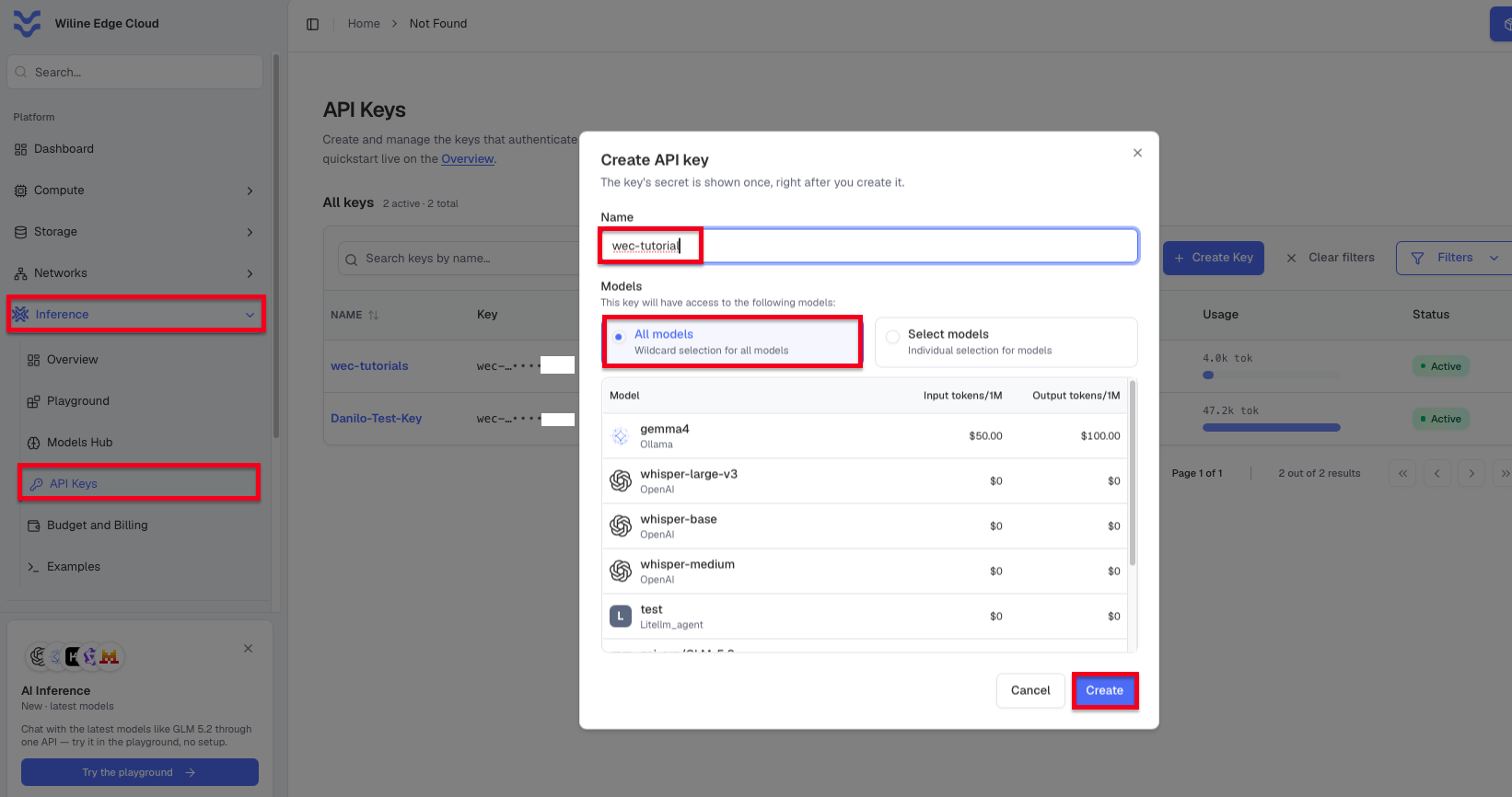
<p>A <strong>WEC Inference API key</strong> — see <a class="" href="https://wec.wiline.com/docs/cloud_portal/platform/inference/api_keys/">Inference → API Keys</a>.</p>
</li>
<li class="">
<p>The model names used here (<code>GLM-5.2</code>, <code>gemma4</code>, <code>Qwen2.5-3B-Instruct</code>, <code>qwen3.5:9B</code>) come
from the <a class="" href="https://wec.wiline.com/docs/cloud_portal/platform/inference/models_hub/">Models Hub</a> — swap in whatever you've enabled.</p>
</li>
<li class="">
<p><strong>Node.js 22+</strong> and your key exported (Promptfoo runs via <code>npx</code>):</p>
<div class="language-bash codeBlockContainer_Ckt0 theme-code-block" style="--prism-color:#393A34;--prism-background-color:#f6f8fa"><div class="codeBlockContent_QJqH"><pre tabindex="0" class="prism-code language-bash codeBlock_bY9V thin-scrollbar" style="color:#393A34;background-color:#f6f8fa"><code class="codeBlockLines_e6Vv"><div class="token-line" style="color:#393A34"><span class="token plain">nvm use 24</span><br></div><div class="token-line" style="color:#393A34"><span class="token plain">export WEC_API_KEY='sk-your-key'</span><br></div></code></pre></div></div>
</li>
</ul>
<div class="theme-admonition theme-admonition-tip admonition_xJq3 alert alert--success"><div class="admonitionHeading_Gvgb"><span class="admonitionIcon_Rf37"><svg viewBox="0 0 12 16"><path fill-rule="evenodd" d="M6.5 0C3.48 0 1 2.19 1 5c0 .92.55 2.25 1 3 1.34 2.25 1.78 2.78 2 4v1h5v-1c.22-1.22.66-1.75 2-4 .45-.75 1-2.08 1-3 0-2.81-2.48-5-5.5-5zm3.64 7.48c-.25.44-.47.8-.67 1.11-.86 1.41-1.25 2.06-1.45 3.23-.02.05-.02.11-.02.17H5c0-.06 0-.13-.02-.17-.2-1.17-.59-1.83-1.45-3.23-.2-.31-.42-.67-.67-1.11C2.44 6.78 2 5.65 2 5c0-2.2 2.02-4 4.5-4 1.22 0 2.36.42 3.22 1.19C10.55 2.94 11 3.94 11 5c0 .66-.44 1.78-.86 2.48zM4 14h5c-.23 1.14-1.3 2-2.5 2s-2.27-.86-2.5-2z"></path></svg></span>tip</div><div class="admonitionContent_BuS1"><p>If your first run errors with <code>Cannot convert argument to a ByteString</code>, your pasted key has
an invisible character — see <a href="https://wec.wiline.com/docs/tutorials/structured-output-evals-wiline-inference/#ts-invisible-key" class="">Troubleshooting</a> at the bottom.</p></div></div>
<h2 class="anchor anchorTargetStickyNavbar_Vzrq" id="step-1--a-strict-schema-and-a-real-failure">Step 1 — A strict schema, and a real failure<a href="https://wec.wiline.com/docs/tutorials/structured-output-evals-wiline-inference/#step-1--a-strict-schema-and-a-real-failure" class="hash-link" aria-label="Direct link to Step 1 — A strict schema, and a real failure" title="Direct link to Step 1 — A strict schema, and a real failure" translate="no">​</a></h2>
<p>We'll do something closer to a real workload than "capital of France": classify a support
ticket into <code>category</code>, <code>priority</code>, and a short <code>summary</code>. The key upgrade over a basic
check is the <strong>JSON Schema</strong> — it enforces <code>enum</code>s, so a model that invents a category fails.</p>
<div class="language-bash codeBlockContainer_Ckt0 theme-code-block" style="--prism-color:#393A34;--prism-background-color:#f6f8fa"><div class="codeBlockContent_QJqH"><pre tabindex="0" class="prism-code language-bash codeBlock_bY9V thin-scrollbar" style="color:#393A34;background-color:#f6f8fa"><code class="codeBlockLines_e6Vv"><div class="token-line" style="color:#393A34"><span class="token plain">cat &gt; promptfooconfig.yaml &lt;&lt;'EOF'</span><br></div><div class="token-line" style="color:#393A34"><span class="token plain">description: "WEC Inference API — structured output (JSON schema)"</span><br></div><div class="token-line" style="color:#393A34"><span class="token plain">providers:</span><br></div><div class="token-line" style="color:#393A34"><span class="token plain">  - id: openai:chat:zai-org/GLM-5.2</span><br></div><div class="token-line" style="color:#393A34"><span class="token plain">    config:</span><br></div><div class="token-line" style="color:#393A34"><span class="token plain">      apiBaseUrl: https://inference.wiline.com/v1</span><br></div><div class="token-line" style="color:#393A34"><span class="token plain">      apiKeyEnvar: WEC_API_KEY</span><br></div><div class="token-line" style="color:#393A34"><span class="token plain">      temperature: 0</span><br></div><div class="token-line" style="color:#393A34"><span class="token plain">prompts:</span><br></div><div class="token-line" style="color:#393A34"><span class="token plain">  - |</span><br></div><div class="token-line" style="color:#393A34"><span class="token plain">    Classify this support ticket. Return ONLY JSON with keys:</span><br></div><div class="token-line" style="color:#393A34"><span class="token plain">    "category" (one of: billing, technical, account, other),</span><br></div><div class="token-line" style="color:#393A34"><span class="token plain">    "priority" (one of: low, medium, high),</span><br></div><div class="token-line" style="color:#393A34"><span class="token plain">    "summary" (string, max 12 words).</span><br></div><div class="token-line" style="color:#393A34"><span class="token plain">    Ticket: {{ticket}}</span><br></div><div class="token-line" style="color:#393A34"><span class="token plain">defaultTest:</span><br></div><div class="token-line" style="color:#393A34"><span class="token plain">  assert:</span><br></div><div class="token-line" style="color:#393A34"><span class="token plain">    - type: is-json</span><br></div><div class="token-line" style="color:#393A34"><span class="token plain">      value:</span><br></div><div class="token-line" style="color:#393A34"><span class="token plain">        type: object</span><br></div><div class="token-line" style="color:#393A34"><span class="token plain">        required: [category, priority, summary]</span><br></div><div class="token-line" style="color:#393A34"><span class="token plain">        properties:</span><br></div><div class="token-line" style="color:#393A34"><span class="token plain">          category: { type: string, enum: [billing, technical, account, other] }</span><br></div><div class="token-line" style="color:#393A34"><span class="token plain">          priority: { type: string, enum: [low, medium, high] }</span><br></div><div class="token-line" style="color:#393A34"><span class="token plain">          summary: { type: string }</span><br></div><div class="token-line" style="color:#393A34"><span class="token plain">tests:</span><br></div><div class="token-line" style="color:#393A34"><span class="token plain">  - vars: { ticket: "I was charged twice for my instance this month." }</span><br></div><div class="token-line" style="color:#393A34"><span class="token plain">    assert: [{ type: icontains, value: billing }]</span><br></div><div class="token-line" style="color:#393A34"><span class="token plain">  - vars: { ticket: "My VM won't boot after the latest snapshot restore." }</span><br></div><div class="token-line" style="color:#393A34"><span class="token plain">    assert: [{ type: icontains, value: technical }]</span><br></div><div class="token-line" style="color:#393A34"><span class="token plain">EOF</span><br></div><div class="token-line" style="color:#393A34"><span class="token plain">npx -y promptfoo@latest eval -c promptfooconfig.yaml</span><br></div></code></pre></div></div>
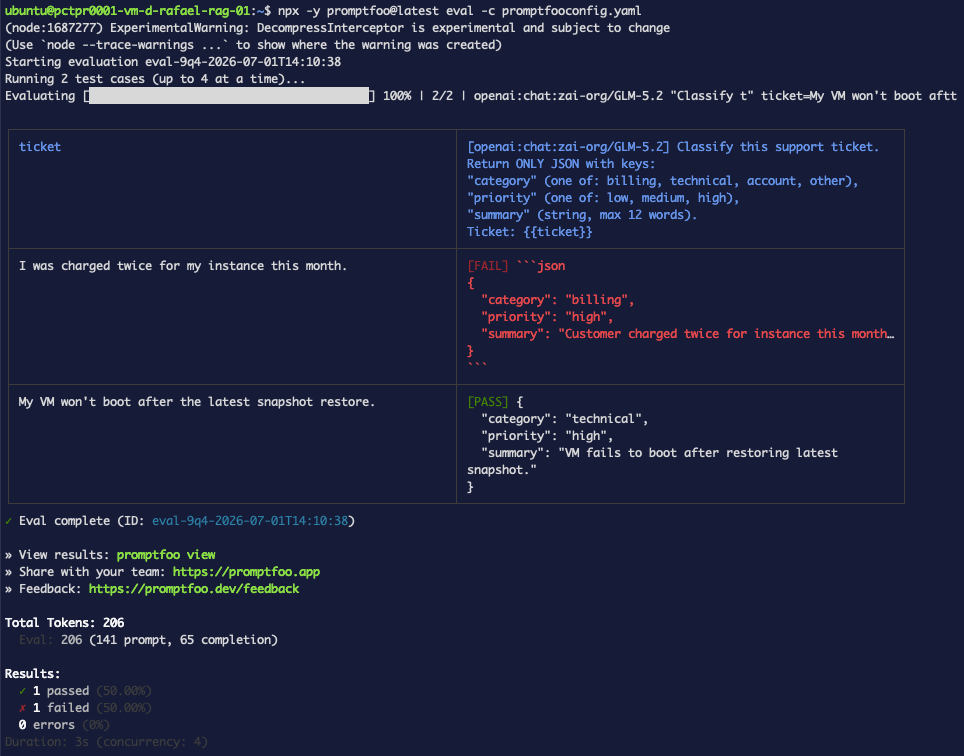
<p>The result — <strong>50%</strong>, and the failure is instructive:</p>
<div class="language-text codeBlockContainer_Ckt0 theme-code-block" style="--prism-color:#393A34;--prism-background-color:#f6f8fa"><div class="codeBlockTitle_OeMC">Output</div><div class="codeBlockContent_QJqH"><pre tabindex="0" class="prism-code language-text codeBlock_bY9V thin-scrollbar" style="color:#393A34;background-color:#f6f8fa"><code class="codeBlockLines_e6Vv"><div class="token-line" style="color:#393A34"><span class="token plain">ticket                                    [zai-org/GLM-5.2]</span><br></div><div class="token-line" style="color:#393A34"><span class="token plain">I was charged twice for my instance…      [FAIL] ```json</span><br></div><div class="token-line" style="color:#393A34"><span class="token plain">                                          { "category": "billing", "priority": "high", … }</span><br></div><div class="token-line" style="color:#393A34"><span class="token plain">                                          ```</span><br></div><div class="token-line" style="color:#393A34"><span class="token plain">My VM won't boot after the latest…        [PASS] { "category": "technical", … }</span><br></div><div class="token-line" style="color:#393A34"><span class="token plain" style="display:inline-block"></span><br></div><div class="token-line" style="color:#393A34"><span class="token plain">✓ 1 passed (50%)   ✗ 1 failed (50%)</span><br></div></code></pre></div></div>
<p><img decoding="async" loading="lazy" alt="Step 1 — one ticket fails because the JSON is wrapped in markdown fences" src="https://wec.wiline.com/docs/assets/images/json-step1-schema-fail-dc2b9c12c0ee29b0086499d5c76f2fd6.png" width="964" height="756" class="img_ev3q">
<strong>Figure 1.</strong> Same model, same prompt, temperature 0 — one response is clean, the other is
wrapped in <code>```json</code> fences, so <code>is-json</code> can't parse it.</p>
<p>The <em>content</em> is correct; the <em>format</em> isn't. <code>is-json</code> validates both "is it parseable JSON"
and "does it match the schema" — and fenced output fails the first test.</p>
<h2 class="anchor anchorTargetStickyNavbar_Vzrq" id="step-2--recover-fenced-output-with-a-transform">Step 2 — Recover fenced output with a <code>transform</code><a href="https://wec.wiline.com/docs/tutorials/structured-output-evals-wiline-inference/#step-2--recover-fenced-output-with-a-transform" class="hash-link" aria-label="Direct link to step-2--recover-fenced-output-with-a-transform" title="Direct link to step-2--recover-fenced-output-with-a-transform" translate="no">​</a></h2>
<p>A <code>transform</code> runs on the model's output <strong>before</strong> assertions. Here we strip the fences.
(This block uses four backticks because the config itself contains triple backticks.)</p>
<div class="language-bash codeBlockContainer_Ckt0 theme-code-block" style="--prism-color:#393A34;--prism-background-color:#f6f8fa"><div class="codeBlockContent_QJqH"><pre tabindex="0" class="prism-code language-bash codeBlock_bY9V thin-scrollbar" style="color:#393A34;background-color:#f6f8fa"><code class="codeBlockLines_e6Vv"><div class="token-line" style="color:#393A34"><span class="token plain">cat &gt; promptfooconfig.yaml &lt;&lt;'EOF'</span><br></div><div class="token-line" style="color:#393A34"><span class="token plain">description: "WEC Inference API — fence-stripping transform"</span><br></div><div class="token-line" style="color:#393A34"><span class="token plain">providers:</span><br></div><div class="token-line" style="color:#393A34"><span class="token plain">  - id: openai:chat:zai-org/GLM-5.2</span><br></div><div class="token-line" style="color:#393A34"><span class="token plain">    config:</span><br></div><div class="token-line" style="color:#393A34"><span class="token plain">      apiBaseUrl: https://inference.wiline.com/v1</span><br></div><div class="token-line" style="color:#393A34"><span class="token plain">      apiKeyEnvar: WEC_API_KEY</span><br></div><div class="token-line" style="color:#393A34"><span class="token plain">      temperature: 0</span><br></div><div class="token-line" style="color:#393A34"><span class="token plain">prompts:</span><br></div><div class="token-line" style="color:#393A34"><span class="token plain">  - |</span><br></div><div class="token-line" style="color:#393A34"><span class="token plain">    Classify this support ticket. Return ONLY JSON with keys:</span><br></div><div class="token-line" style="color:#393A34"><span class="token plain">    "category" (one of: billing, technical, account, other),</span><br></div><div class="token-line" style="color:#393A34"><span class="token plain">    "priority" (one of: low, medium, high),</span><br></div><div class="token-line" style="color:#393A34"><span class="token plain">    "summary" (string, max 12 words).</span><br></div><div class="token-line" style="color:#393A34"><span class="token plain">    Ticket: {{ticket}}</span><br></div><div class="token-line" style="color:#393A34"><span class="token plain">defaultTest:</span><br></div><div class="token-line" style="color:#393A34"><span class="token plain">  options:</span><br></div><div class="token-line" style="color:#393A34"><span class="token plain">    transform: |</span><br></div><div class="token-line" style="color:#393A34"><span class="token plain">      return output.replace(/```json\n?|\n?```/g, '').trim();</span><br></div><div class="token-line" style="color:#393A34"><span class="token plain">  assert:</span><br></div><div class="token-line" style="color:#393A34"><span class="token plain">    - type: is-json</span><br></div><div class="token-line" style="color:#393A34"><span class="token plain">      value:</span><br></div><div class="token-line" style="color:#393A34"><span class="token plain">        type: object</span><br></div><div class="token-line" style="color:#393A34"><span class="token plain">        required: [category, priority, summary]</span><br></div><div class="token-line" style="color:#393A34"><span class="token plain">        properties:</span><br></div><div class="token-line" style="color:#393A34"><span class="token plain">          category: { type: string, enum: [billing, technical, account, other] }</span><br></div><div class="token-line" style="color:#393A34"><span class="token plain">          priority: { type: string, enum: [low, medium, high] }</span><br></div><div class="token-line" style="color:#393A34"><span class="token plain">          summary: { type: string }</span><br></div><div class="token-line" style="color:#393A34"><span class="token plain">tests:</span><br></div><div class="token-line" style="color:#393A34"><span class="token plain">  - vars: { ticket: "I was charged twice for my instance this month." }</span><br></div><div class="token-line" style="color:#393A34"><span class="token plain">    assert: [{ type: icontains, value: billing }]</span><br></div><div class="token-line" style="color:#393A34"><span class="token plain">  - vars: { ticket: "My VM won't boot after the latest snapshot restore." }</span><br></div><div class="token-line" style="color:#393A34"><span class="token plain">    assert: [{ type: icontains, value: technical }]</span><br></div><div class="token-line" style="color:#393A34"><span class="token plain">EOF</span><br></div><div class="token-line" style="color:#393A34"><span class="token plain">npx -y promptfoo@latest eval -c promptfooconfig.yaml --no-cache</span><br></div></code></pre></div></div>
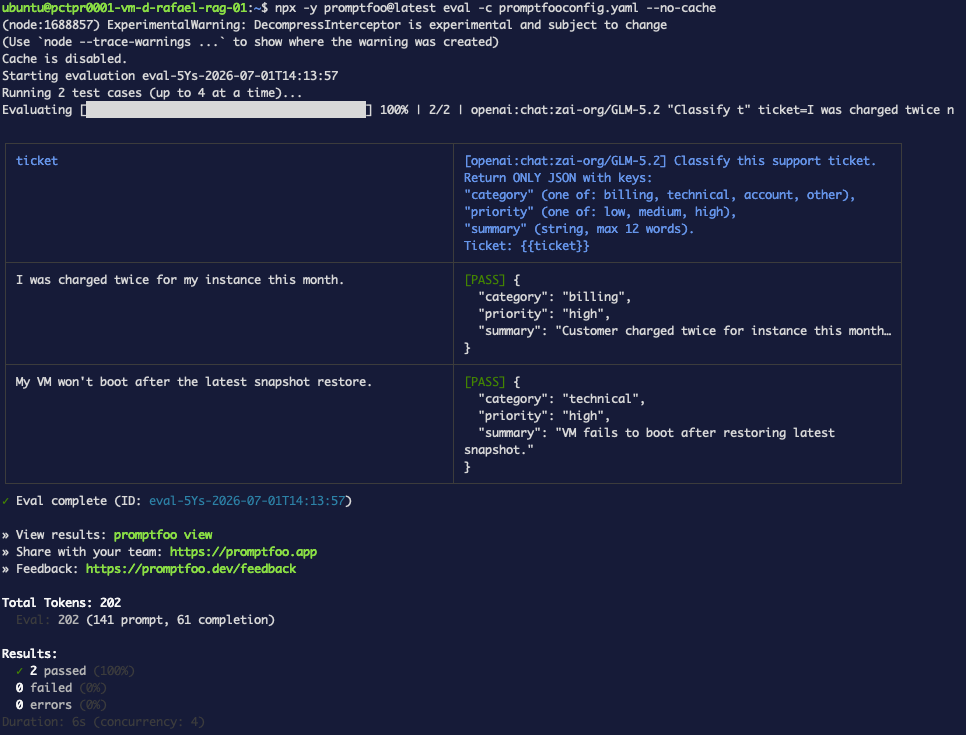
<p>Now both pass — <strong>2/2</strong>. The fences are stripped before <code>is-json</code> sees the output.</p>
<p><img decoding="async" loading="lazy" alt="Step 2 — with the fence-stripping transform, both tickets pass" src="https://wec.wiline.com/docs/assets/images/json-step2-transform-pass-14cb388c6725d0aacffeee1bb320f553.png" width="966" height="735" class="img_ev3q">
<strong>Figure 2.</strong> The <code>transform</code> removes the code fences, so the previously-failing ticket parses.</p>
<div class="theme-admonition theme-admonition-warning admonition_xJq3 alert alert--warning"><div class="admonitionHeading_Gvgb"><span class="admonitionIcon_Rf37"><svg viewBox="0 0 16 16"><path fill-rule="evenodd" d="M8.893 1.5c-.183-.31-.52-.5-.887-.5s-.703.19-.886.5L.138 13.499a.98.98 0 0 0 0 1.001c.193.31.53.501.886.501h13.964c.367 0 .704-.19.877-.5a1.03 1.03 0 0 0 .01-1.002L8.893 1.5zm.133 11.497H6.987v-2.003h2.039v2.003zm0-3.004H6.987V5.987h2.039v4.006z"></path></svg></span><code>transform</code> needs an explicit <code>return</code></div><div class="admonitionContent_BuS1"><p>A multi-line <code>transform</code> is a function body, not an expression — omit <code>return</code> and you get
<code>Transform function did not return a value</code>. See <a href="https://wec.wiline.com/docs/tutorials/structured-output-evals-wiline-inference/#ts-transform-return" class="">Troubleshooting</a>.</p></div></div>
<h2 class="anchor anchorTargetStickyNavbar_Vzrq" id="step-3--the-cleaner-fix-json-mode">Step 3 — The cleaner fix: JSON mode<a href="https://wec.wiline.com/docs/tutorials/structured-output-evals-wiline-inference/#step-3--the-cleaner-fix-json-mode" class="hash-link" aria-label="Direct link to Step 3 — The cleaner fix: JSON mode" title="Direct link to Step 3 — The cleaner fix: JSON mode" translate="no">​</a></h2>
<p>Rather than clean up after the model, ask the API to only emit valid JSON via
<code>response_format</code>. No <code>transform</code> this time:</p>
<div class="language-bash codeBlockContainer_Ckt0 theme-code-block" style="--prism-color:#393A34;--prism-background-color:#f6f8fa"><div class="codeBlockContent_QJqH"><pre tabindex="0" class="prism-code language-bash codeBlock_bY9V thin-scrollbar" style="color:#393A34;background-color:#f6f8fa"><code class="codeBlockLines_e6Vv"><div class="token-line" style="color:#393A34"><span class="token plain">cat &gt; promptfooconfig.yaml &lt;&lt;'EOF'</span><br></div><div class="token-line" style="color:#393A34"><span class="token plain">description: "WEC Inference API — JSON mode (response_format)"</span><br></div><div class="token-line" style="color:#393A34"><span class="token plain">providers:</span><br></div><div class="token-line" style="color:#393A34"><span class="token plain">  - id: openai:chat:zai-org/GLM-5.2</span><br></div><div class="token-line" style="color:#393A34"><span class="token plain">    config:</span><br></div><div class="token-line" style="color:#393A34"><span class="token plain">      apiBaseUrl: https://inference.wiline.com/v1</span><br></div><div class="token-line" style="color:#393A34"><span class="token plain">      apiKeyEnvar: WEC_API_KEY</span><br></div><div class="token-line" style="color:#393A34"><span class="token plain">      temperature: 0</span><br></div><div class="token-line" style="color:#393A34"><span class="token plain">      response_format: { type: json_object }</span><br></div><div class="token-line" style="color:#393A34"><span class="token plain">prompts:</span><br></div><div class="token-line" style="color:#393A34"><span class="token plain">  - |</span><br></div><div class="token-line" style="color:#393A34"><span class="token plain">    Classify this support ticket. Return ONLY JSON with keys:</span><br></div><div class="token-line" style="color:#393A34"><span class="token plain">    "category" (one of: billing, technical, account, other),</span><br></div><div class="token-line" style="color:#393A34"><span class="token plain">    "priority" (one of: low, medium, high),</span><br></div><div class="token-line" style="color:#393A34"><span class="token plain">    "summary" (string, max 12 words).</span><br></div><div class="token-line" style="color:#393A34"><span class="token plain">    Ticket: {{ticket}}</span><br></div><div class="token-line" style="color:#393A34"><span class="token plain">defaultTest:</span><br></div><div class="token-line" style="color:#393A34"><span class="token plain">  assert:</span><br></div><div class="token-line" style="color:#393A34"><span class="token plain">    - type: is-json</span><br></div><div class="token-line" style="color:#393A34"><span class="token plain">      value:</span><br></div><div class="token-line" style="color:#393A34"><span class="token plain">        type: object</span><br></div><div class="token-line" style="color:#393A34"><span class="token plain">        required: [category, priority, summary]</span><br></div><div class="token-line" style="color:#393A34"><span class="token plain">        properties:</span><br></div><div class="token-line" style="color:#393A34"><span class="token plain">          category: { type: string, enum: [billing, technical, account, other] }</span><br></div><div class="token-line" style="color:#393A34"><span class="token plain">          priority: { type: string, enum: [low, medium, high] }</span><br></div><div class="token-line" style="color:#393A34"><span class="token plain">          summary: { type: string }</span><br></div><div class="token-line" style="color:#393A34"><span class="token plain">tests:</span><br></div><div class="token-line" style="color:#393A34"><span class="token plain">  - vars: { ticket: "I was charged twice for my instance this month." }</span><br></div><div class="token-line" style="color:#393A34"><span class="token plain">    assert: [{ type: icontains, value: billing }]</span><br></div><div class="token-line" style="color:#393A34"><span class="token plain">  - vars: { ticket: "My VM won't boot after the latest snapshot restore." }</span><br></div><div class="token-line" style="color:#393A34"><span class="token plain">    assert: [{ type: icontains, value: technical }]</span><br></div><div class="token-line" style="color:#393A34"><span class="token plain">EOF</span><br></div><div class="token-line" style="color:#393A34"><span class="token plain">npx -y promptfoo@latest eval -c promptfooconfig.yaml --no-cache</span><br></div></code></pre></div></div>
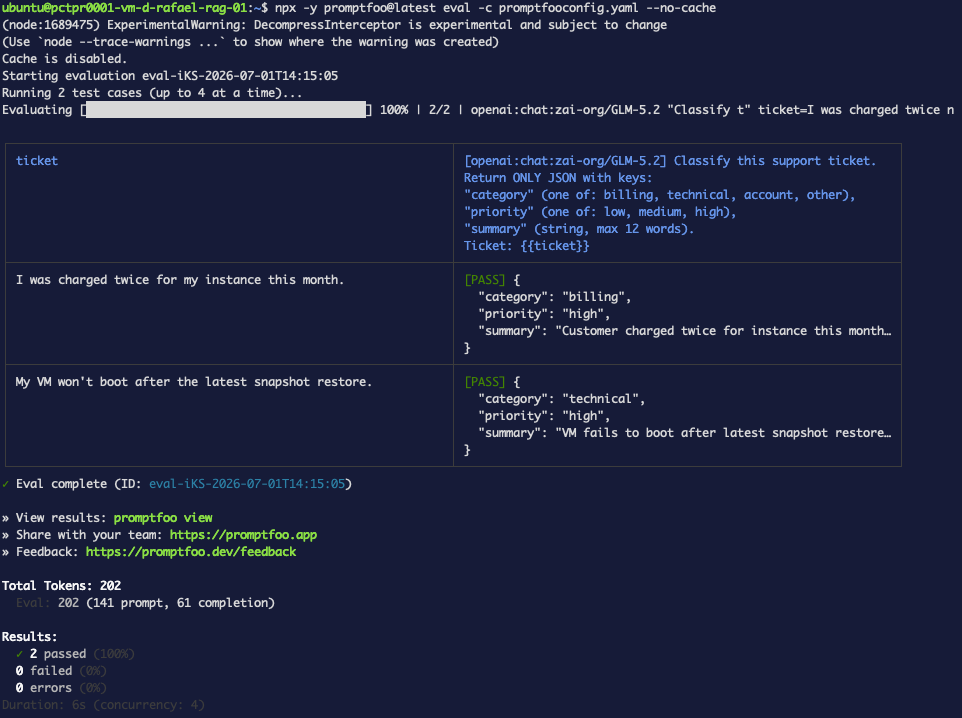
<p><strong>2/2 PASS</strong> with no transform — looks like JSON mode works.</p>
<p><img decoding="async" loading="lazy" alt="Step 3 — JSON mode passes on GLM-5.2" src="https://wec.wiline.com/docs/assets/images/json-step3-jsonmode-6cabcc01d214aaa3b14b1a0842eeb720.png" width="962" height="718" class="img_ev3q">
<strong>Figure 3.</strong> With <code>response_format: json_object</code>, GLM-5.2 returns clean JSON, no transform needed.</p>
<p>But before trusting <code>response_format</code>, we need to test it across models — because a single
green result can be luck, not enforcement.</p>
<h2 class="anchor anchorTargetStickyNavbar_Vzrq" id="step-4--reliability-matrix-across-wec-models">Step 4 — Reliability matrix across WEC models<a href="https://wec.wiline.com/docs/tutorials/structured-output-evals-wiline-inference/#step-4--reliability-matrix-across-wec-models" class="hash-link" aria-label="Direct link to Step 4 — Reliability matrix across WEC models" title="Direct link to Step 4 — Reliability matrix across WEC models" translate="no">​</a></h2>
<p>Run the JSON-mode config against all four chat models. This is the payoff — a
<strong>WEC-specific reliability comparison</strong> you can't get from a generic leaderboard.</p>
<div class="language-bash codeBlockContainer_Ckt0 theme-code-block" style="--prism-color:#393A34;--prism-background-color:#f6f8fa"><div class="codeBlockContent_QJqH"><pre tabindex="0" class="prism-code language-bash codeBlock_bY9V thin-scrollbar" style="color:#393A34;background-color:#f6f8fa"><code class="codeBlockLines_e6Vv"><div class="token-line" style="color:#393A34"><span class="token plain">cat &gt; promptfooconfig.yaml &lt;&lt;'EOF'</span><br></div><div class="token-line" style="color:#393A34"><span class="token plain">description: "WEC Inference API — JSON-mode reliability across models"</span><br></div><div class="token-line" style="color:#393A34"><span class="token plain">providers:</span><br></div><div class="token-line" style="color:#393A34"><span class="token plain">  - id: openai:chat:zai-org/GLM-5.2</span><br></div><div class="token-line" style="color:#393A34"><span class="token plain">    config: { apiBaseUrl: https://inference.wiline.com/v1, apiKeyEnvar: WEC_API_KEY, temperature: 0, response_format: { type: json_object } }</span><br></div><div class="token-line" style="color:#393A34"><span class="token plain">  - id: openai:chat:gemma4</span><br></div><div class="token-line" style="color:#393A34"><span class="token plain">    config: { apiBaseUrl: https://inference.wiline.com/v1, apiKeyEnvar: WEC_API_KEY, temperature: 0, response_format: { type: json_object } }</span><br></div><div class="token-line" style="color:#393A34"><span class="token plain">  - id: openai:chat:Qwen2.5-3B-Instruct</span><br></div><div class="token-line" style="color:#393A34"><span class="token plain">    config: { apiBaseUrl: https://inference.wiline.com/v1, apiKeyEnvar: WEC_API_KEY, temperature: 0, response_format: { type: json_object } }</span><br></div><div class="token-line" style="color:#393A34"><span class="token plain">  - id: openai:chat:qwen3.5:9B</span><br></div><div class="token-line" style="color:#393A34"><span class="token plain">    config: { apiBaseUrl: https://inference.wiline.com/v1, apiKeyEnvar: WEC_API_KEY, temperature: 0, response_format: { type: json_object } }</span><br></div><div class="token-line" style="color:#393A34"><span class="token plain">prompts:</span><br></div><div class="token-line" style="color:#393A34"><span class="token plain">  - |</span><br></div><div class="token-line" style="color:#393A34"><span class="token plain">    Classify this support ticket. Return ONLY JSON with keys:</span><br></div><div class="token-line" style="color:#393A34"><span class="token plain">    "category" (one of: billing, technical, account, other),</span><br></div><div class="token-line" style="color:#393A34"><span class="token plain">    "priority" (one of: low, medium, high),</span><br></div><div class="token-line" style="color:#393A34"><span class="token plain">    "summary" (string, max 12 words).</span><br></div><div class="token-line" style="color:#393A34"><span class="token plain">    Ticket: {{ticket}}</span><br></div><div class="token-line" style="color:#393A34"><span class="token plain">defaultTest:</span><br></div><div class="token-line" style="color:#393A34"><span class="token plain">  assert:</span><br></div><div class="token-line" style="color:#393A34"><span class="token plain">    - type: is-json</span><br></div><div class="token-line" style="color:#393A34"><span class="token plain">      value:</span><br></div><div class="token-line" style="color:#393A34"><span class="token plain">        type: object</span><br></div><div class="token-line" style="color:#393A34"><span class="token plain">        required: [category, priority, summary]</span><br></div><div class="token-line" style="color:#393A34"><span class="token plain">        properties:</span><br></div><div class="token-line" style="color:#393A34"><span class="token plain">          category: { type: string, enum: [billing, technical, account, other] }</span><br></div><div class="token-line" style="color:#393A34"><span class="token plain">          priority: { type: string, enum: [low, medium, high] }</span><br></div><div class="token-line" style="color:#393A34"><span class="token plain">          summary: { type: string }</span><br></div><div class="token-line" style="color:#393A34"><span class="token plain">tests:</span><br></div><div class="token-line" style="color:#393A34"><span class="token plain">  - vars: { ticket: "I was charged twice for my instance this month." }</span><br></div><div class="token-line" style="color:#393A34"><span class="token plain">    assert: [{ type: icontains, value: billing }]</span><br></div><div class="token-line" style="color:#393A34"><span class="token plain">  - vars: { ticket: "My VM won't boot after the latest snapshot restore." }</span><br></div><div class="token-line" style="color:#393A34"><span class="token plain">    assert: [{ type: icontains, value: technical }]</span><br></div><div class="token-line" style="color:#393A34"><span class="token plain">EOF</span><br></div><div class="token-line" style="color:#393A34"><span class="token plain">npx -y promptfoo@latest eval -c promptfooconfig.yaml --no-cache</span><br></div></code></pre></div></div>
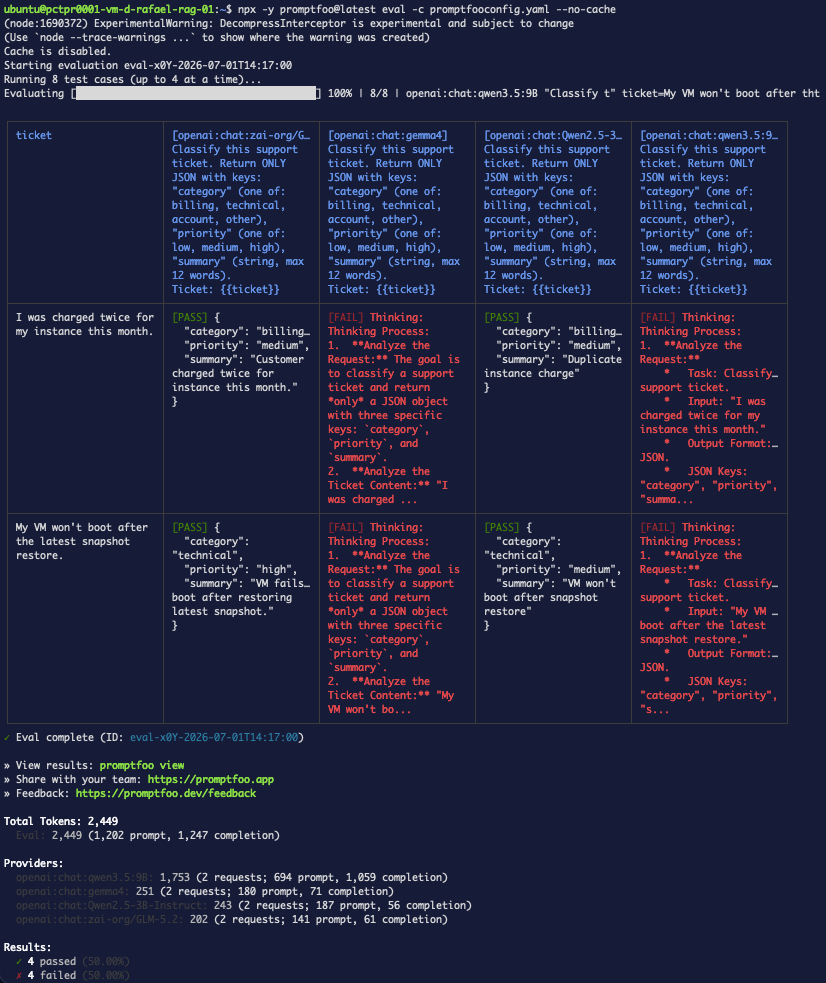
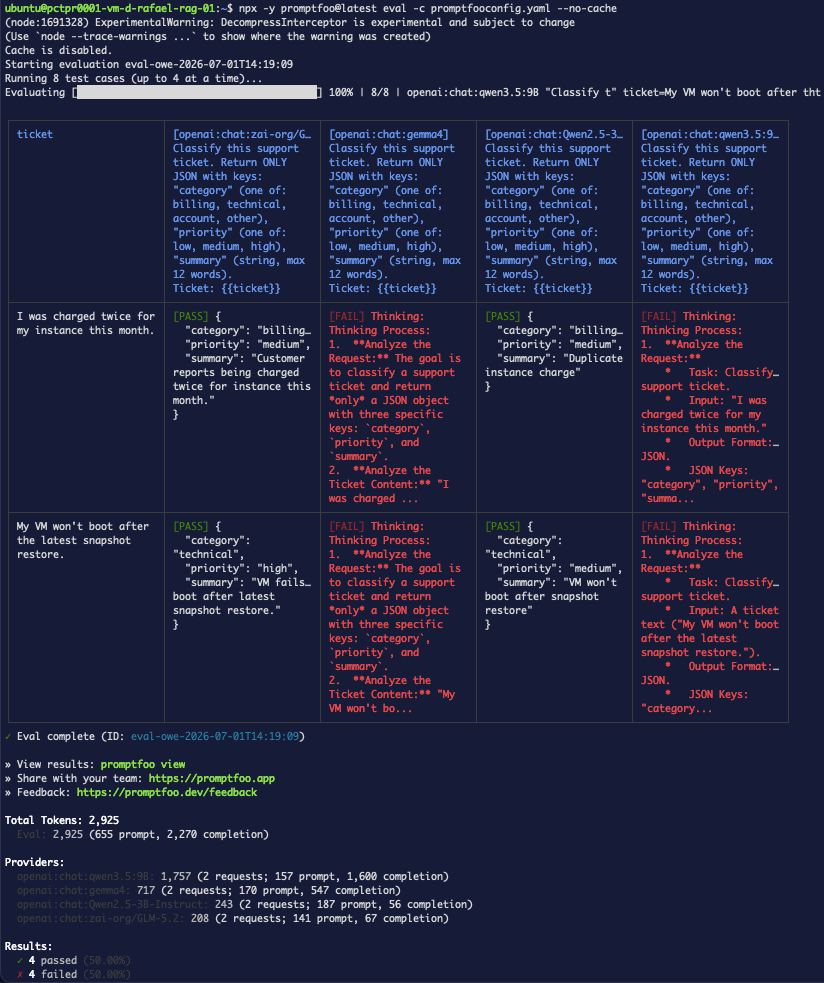
<p><strong>4/8.</strong> GLM-5.2 and Qwen2.5-3B pass cleanly; <strong>gemma4 and qwen3.5:9B dump their reasoning</strong>
("Thinking Process…") instead of JSON — despite <code>response_format</code> being set.</p>
<p><img decoding="async" loading="lazy" alt="Step 4 — with JSON mode, two models pass and two emit reasoning" src="https://wec.wiline.com/docs/assets/images/json-matrix-responseformat-d227b3a1ca8bffbf85f89ca2da11eb87.png" width="826" height="983" class="img_ev3q">
<strong>Figure 4.</strong> <code>response_format</code> set on all four — but the two reasoning-oriented models ignore it.</p>
<table><thead><tr><th>Model</th><th>Result</th><th>Tokens (2 calls)</th></tr></thead><tbody><tr><td><code>zai-org/GLM-5.2</code></td><td>✅✅</td><td>202</td></tr><tr><td><code>Qwen2.5-3B-Instruct</code></td><td>✅✅</td><td>243</td></tr><tr><td><code>gemma4</code></td><td>❌❌ (reasoning)</td><td>251</td></tr><tr><td><code>qwen3.5:9B</code></td><td>❌❌ (reasoning)</td><td>1,757</td></tr></tbody></table>
<h2 class="anchor anchorTargetStickyNavbar_Vzrq" id="step-5--verify-is-response_format-doing-anything">Step 5 — Verify: is <code>response_format</code> doing anything?<a href="https://wec.wiline.com/docs/tutorials/structured-output-evals-wiline-inference/#step-5--verify-is-response_format-doing-anything" class="hash-link" aria-label="Direct link to step-5--verify-is-response_format-doing-anything" title="Direct link to step-5--verify-is-response_format-doing-anything" translate="no">​</a></h2>
<p>Don't assume the reasoning was <em>caused</em> by JSON mode. Re-run the same matrix <strong>without</strong>
<code>response_format</code> (using the fence-strip transform instead) and compare:</p>
<div class="language-bash codeBlockContainer_Ckt0 theme-code-block" style="--prism-color:#393A34;--prism-background-color:#f6f8fa"><div class="codeBlockContent_QJqH"><pre tabindex="0" class="prism-code language-bash codeBlock_bY9V thin-scrollbar" style="color:#393A34;background-color:#f6f8fa"><code class="codeBlockLines_e6Vv"><div class="token-line" style="color:#393A34"><span class="token plain">cat &gt; promptfooconfig.yaml &lt;&lt;'EOF'</span><br></div><div class="token-line" style="color:#393A34"><span class="token plain">description: "WEC Inference API — matrix without response_format"</span><br></div><div class="token-line" style="color:#393A34"><span class="token plain">providers:</span><br></div><div class="token-line" style="color:#393A34"><span class="token plain">  - id: openai:chat:zai-org/GLM-5.2</span><br></div><div class="token-line" style="color:#393A34"><span class="token plain">    config: { apiBaseUrl: https://inference.wiline.com/v1, apiKeyEnvar: WEC_API_KEY, temperature: 0 }</span><br></div><div class="token-line" style="color:#393A34"><span class="token plain">  - id: openai:chat:gemma4</span><br></div><div class="token-line" style="color:#393A34"><span class="token plain">    config: { apiBaseUrl: https://inference.wiline.com/v1, apiKeyEnvar: WEC_API_KEY, temperature: 0 }</span><br></div><div class="token-line" style="color:#393A34"><span class="token plain">  - id: openai:chat:Qwen2.5-3B-Instruct</span><br></div><div class="token-line" style="color:#393A34"><span class="token plain">    config: { apiBaseUrl: https://inference.wiline.com/v1, apiKeyEnvar: WEC_API_KEY, temperature: 0 }</span><br></div><div class="token-line" style="color:#393A34"><span class="token plain">  - id: openai:chat:qwen3.5:9B</span><br></div><div class="token-line" style="color:#393A34"><span class="token plain">    config: { apiBaseUrl: https://inference.wiline.com/v1, apiKeyEnvar: WEC_API_KEY, temperature: 0 }</span><br></div><div class="token-line" style="color:#393A34"><span class="token plain">prompts:</span><br></div><div class="token-line" style="color:#393A34"><span class="token plain">  - |</span><br></div><div class="token-line" style="color:#393A34"><span class="token plain">    Classify this support ticket. Return ONLY JSON with keys:</span><br></div><div class="token-line" style="color:#393A34"><span class="token plain">    "category" (one of: billing, technical, account, other),</span><br></div><div class="token-line" style="color:#393A34"><span class="token plain">    "priority" (one of: low, medium, high),</span><br></div><div class="token-line" style="color:#393A34"><span class="token plain">    "summary" (string, max 12 words).</span><br></div><div class="token-line" style="color:#393A34"><span class="token plain">    Ticket: {{ticket}}</span><br></div><div class="token-line" style="color:#393A34"><span class="token plain">defaultTest:</span><br></div><div class="token-line" style="color:#393A34"><span class="token plain">  options:</span><br></div><div class="token-line" style="color:#393A34"><span class="token plain">    transform: |</span><br></div><div class="token-line" style="color:#393A34"><span class="token plain">      return output.replace(/```json\n?|\n?```/g, '').trim();</span><br></div><div class="token-line" style="color:#393A34"><span class="token plain">  assert:</span><br></div><div class="token-line" style="color:#393A34"><span class="token plain">    - type: is-json</span><br></div><div class="token-line" style="color:#393A34"><span class="token plain">      value:</span><br></div><div class="token-line" style="color:#393A34"><span class="token plain">        type: object</span><br></div><div class="token-line" style="color:#393A34"><span class="token plain">        required: [category, priority, summary]</span><br></div><div class="token-line" style="color:#393A34"><span class="token plain">        properties:</span><br></div><div class="token-line" style="color:#393A34"><span class="token plain">          category: { type: string, enum: [billing, technical, account, other] }</span><br></div><div class="token-line" style="color:#393A34"><span class="token plain">          priority: { type: string, enum: [low, medium, high] }</span><br></div><div class="token-line" style="color:#393A34"><span class="token plain">          summary: { type: string }</span><br></div><div class="token-line" style="color:#393A34"><span class="token plain">tests:</span><br></div><div class="token-line" style="color:#393A34"><span class="token plain">  - vars: { ticket: "I was charged twice for my instance this month." }</span><br></div><div class="token-line" style="color:#393A34"><span class="token plain">    assert: [{ type: icontains, value: billing }]</span><br></div><div class="token-line" style="color:#393A34"><span class="token plain">  - vars: { ticket: "My VM won't boot after the latest snapshot restore." }</span><br></div><div class="token-line" style="color:#393A34"><span class="token plain">    assert: [{ type: icontains, value: technical }]</span><br></div><div class="token-line" style="color:#393A34"><span class="token plain">EOF</span><br></div><div class="token-line" style="color:#393A34"><span class="token plain">npx -y promptfoo@latest eval -c promptfooconfig.yaml --no-cache</span><br></div></code></pre></div></div>
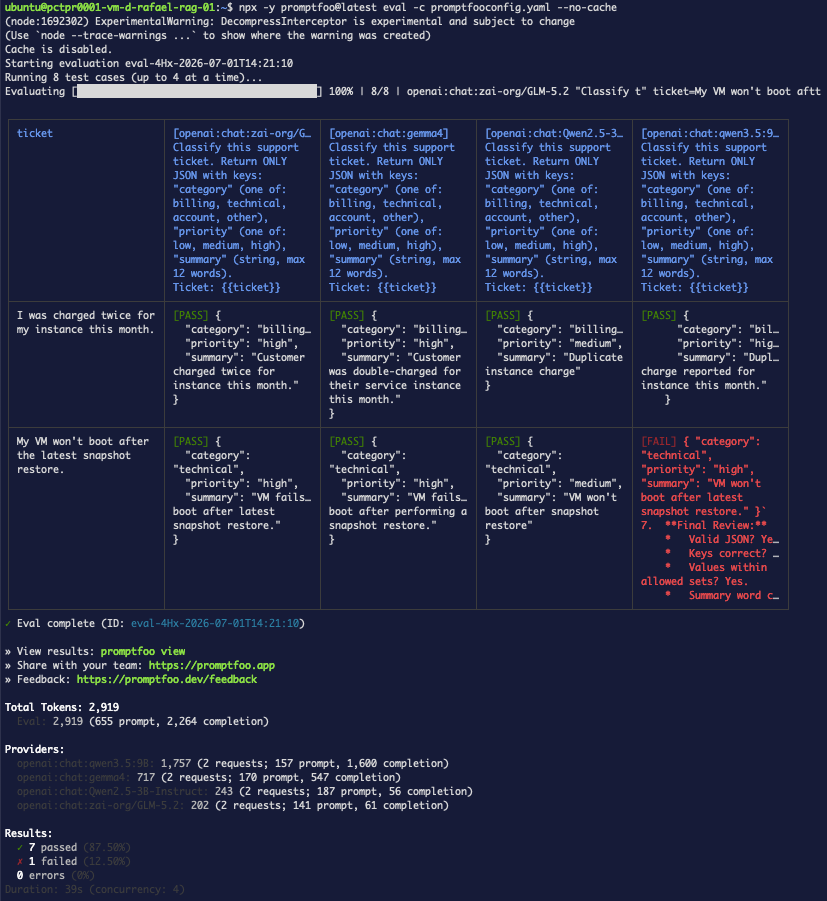
<p>Still <strong>4/8</strong> — the exact same models fail. So <code>response_format</code> <strong>changed nothing</strong>: on WEC
today it's effectively a no-op (the backend isn't enforcing JSON mode). The reasoning
behavior belongs to the models, not to the flag.</p>
<p><img decoding="async" loading="lazy" alt="Step 5 — same 4/8 without response_format, proving it was a no-op" src="https://wec.wiline.com/docs/assets/images/json-matrix-transform-77179c366ad47c9eb5b00fe2b5d92381.png" width="824" height="983" class="img_ev3q">
<strong>Figure 5.</strong> Identical result without JSON mode — the flag wasn't doing anything.</p>
<div class="theme-admonition theme-admonition-note admonition_xJq3 alert alert--secondary"><div class="admonitionHeading_Gvgb"><span class="admonitionIcon_Rf37"><svg viewBox="0 0 14 16"><path fill-rule="evenodd" d="M6.3 5.69a.942.942 0 0 1-.28-.7c0-.28.09-.52.28-.7.19-.18.42-.28.7-.28.28 0 .52.09.7.28.18.19.28.42.28.7 0 .28-.09.52-.28.7a1 1 0 0 1-.7.3c-.28 0-.52-.11-.7-.3zM8 7.99c-.02-.25-.11-.48-.31-.69-.2-.19-.42-.3-.69-.31H6c-.27.02-.48.13-.69.31-.2.2-.3.44-.31.69h1v3c.02.27.11.5.31.69.2.2.42.31.69.31h1c.27 0 .48-.11.69-.31.2-.19.3-.42.31-.69H8V7.98v.01zM7 2.3c-3.14 0-5.7 2.54-5.7 5.68 0 3.14 2.56 5.7 5.7 5.7s5.7-2.55 5.7-5.7c0-3.15-2.56-5.69-5.7-5.69v.01zM7 .98c3.86 0 7 3.14 7 7s-3.14 7-7 7-7-3.12-7-7 3.14-7 7-7z"></path></svg></span>note</div><div class="admonitionContent_BuS1"><p>Lesson worth its own callout: <strong>don't attribute a result to a change until you've tested the
change in isolation.</strong> One extra run turned a wrong conclusion into the right one.</p></div></div>
<h2 class="anchor anchorTargetStickyNavbar_Vzrq" id="step-6--a-more-robust-transform-extract-the-json">Step 6 — A more robust transform: extract the JSON<a href="https://wec.wiline.com/docs/tutorials/structured-output-evals-wiline-inference/#step-6--a-more-robust-transform-extract-the-json" class="hash-link" aria-label="Direct link to Step 6 — A more robust transform: extract the JSON" title="Direct link to Step 6 — A more robust transform: extract the JSON" translate="no">​</a></h2>
<p>The reasoning models <em>do</em> emit JSON — it's just buried in prose. Instead of stripping fences,
<strong>extract the first <code>{ … }</code> block</strong> from anywhere in the output:</p>
<div class="language-bash codeBlockContainer_Ckt0 theme-code-block" style="--prism-color:#393A34;--prism-background-color:#f6f8fa"><div class="codeBlockContent_QJqH"><pre tabindex="0" class="prism-code language-bash codeBlock_bY9V thin-scrollbar" style="color:#393A34;background-color:#f6f8fa"><code class="codeBlockLines_e6Vv"><div class="token-line" style="color:#393A34"><span class="token plain">cat &gt; promptfooconfig.yaml &lt;&lt;'EOF'</span><br></div><div class="token-line" style="color:#393A34"><span class="token plain">description: "WEC Inference API — JSON extraction transform"</span><br></div><div class="token-line" style="color:#393A34"><span class="token plain">providers:</span><br></div><div class="token-line" style="color:#393A34"><span class="token plain">  - id: openai:chat:zai-org/GLM-5.2</span><br></div><div class="token-line" style="color:#393A34"><span class="token plain">    config: { apiBaseUrl: https://inference.wiline.com/v1, apiKeyEnvar: WEC_API_KEY, temperature: 0 }</span><br></div><div class="token-line" style="color:#393A34"><span class="token plain">  - id: openai:chat:gemma4</span><br></div><div class="token-line" style="color:#393A34"><span class="token plain">    config: { apiBaseUrl: https://inference.wiline.com/v1, apiKeyEnvar: WEC_API_KEY, temperature: 0 }</span><br></div><div class="token-line" style="color:#393A34"><span class="token plain">  - id: openai:chat:Qwen2.5-3B-Instruct</span><br></div><div class="token-line" style="color:#393A34"><span class="token plain">    config: { apiBaseUrl: https://inference.wiline.com/v1, apiKeyEnvar: WEC_API_KEY, temperature: 0 }</span><br></div><div class="token-line" style="color:#393A34"><span class="token plain">  - id: openai:chat:qwen3.5:9B</span><br></div><div class="token-line" style="color:#393A34"><span class="token plain">    config: { apiBaseUrl: https://inference.wiline.com/v1, apiKeyEnvar: WEC_API_KEY, temperature: 0 }</span><br></div><div class="token-line" style="color:#393A34"><span class="token plain">prompts:</span><br></div><div class="token-line" style="color:#393A34"><span class="token plain">  - |</span><br></div><div class="token-line" style="color:#393A34"><span class="token plain">    Classify this support ticket. Return ONLY JSON with keys:</span><br></div><div class="token-line" style="color:#393A34"><span class="token plain">    "category" (one of: billing, technical, account, other),</span><br></div><div class="token-line" style="color:#393A34"><span class="token plain">    "priority" (one of: low, medium, high),</span><br></div><div class="token-line" style="color:#393A34"><span class="token plain">    "summary" (string, max 12 words).</span><br></div><div class="token-line" style="color:#393A34"><span class="token plain">    Ticket: {{ticket}}</span><br></div><div class="token-line" style="color:#393A34"><span class="token plain">defaultTest:</span><br></div><div class="token-line" style="color:#393A34"><span class="token plain">  options:</span><br></div><div class="token-line" style="color:#393A34"><span class="token plain">    transform: |</span><br></div><div class="token-line" style="color:#393A34"><span class="token plain">      const m = output.match(/\{[\s\S]*\}/);</span><br></div><div class="token-line" style="color:#393A34"><span class="token plain">      return m ? m[0] : output;</span><br></div><div class="token-line" style="color:#393A34"><span class="token plain">  assert:</span><br></div><div class="token-line" style="color:#393A34"><span class="token plain">    - type: is-json</span><br></div><div class="token-line" style="color:#393A34"><span class="token plain">      value:</span><br></div><div class="token-line" style="color:#393A34"><span class="token plain">        type: object</span><br></div><div class="token-line" style="color:#393A34"><span class="token plain">        required: [category, priority, summary]</span><br></div><div class="token-line" style="color:#393A34"><span class="token plain">        properties:</span><br></div><div class="token-line" style="color:#393A34"><span class="token plain">          category: { type: string, enum: [billing, technical, account, other] }</span><br></div><div class="token-line" style="color:#393A34"><span class="token plain">          priority: { type: string, enum: [low, medium, high] }</span><br></div><div class="token-line" style="color:#393A34"><span class="token plain">          summary: { type: string }</span><br></div><div class="token-line" style="color:#393A34"><span class="token plain">tests:</span><br></div><div class="token-line" style="color:#393A34"><span class="token plain">  - vars: { ticket: "I was charged twice for my instance this month." }</span><br></div><div class="token-line" style="color:#393A34"><span class="token plain">    assert: [{ type: icontains, value: billing }]</span><br></div><div class="token-line" style="color:#393A34"><span class="token plain">  - vars: { ticket: "My VM won't boot after the latest snapshot restore." }</span><br></div><div class="token-line" style="color:#393A34"><span class="token plain">    assert: [{ type: icontains, value: technical }]</span><br></div><div class="token-line" style="color:#393A34"><span class="token plain">EOF</span><br></div><div class="token-line" style="color:#393A34"><span class="token plain">npx -y promptfoo@latest eval -c promptfooconfig.yaml --no-cache</span><br></div></code></pre></div></div>
<p><strong>7/8</strong> — a big jump. gemma4 and Qwen2.5 fully recover; qwen3.5:9B recovers one of two. The
one remaining failure is telling: that response emitted JSON <strong>and then kept reasoning</strong> (with
more braces), so the greedy <code>{ … }</code> match over-captured and produced invalid JSON.</p>
<p><img decoding="async" loading="lazy" alt="Step 6 — JSON extraction rescues most models (7/8)" src="https://wec.wiline.com/docs/assets/images/json-matrix-extraction-3b34ee4a32f6990e447d9590d51d8911.png" width="827" height="901" class="img_ev3q">
<strong>Figure 6.</strong> Extracting the JSON block recovers the chatty models — but it's a heuristic, not
a guarantee (note the one over-capture failure).</p>
<h2 class="anchor anchorTargetStickyNavbar_Vzrq" id="step-7--see-it-in-the-browser">Step 7 — See it in the browser<a href="https://wec.wiline.com/docs/tutorials/structured-output-evals-wiline-inference/#step-7--see-it-in-the-browser" class="hash-link" aria-label="Direct link to Step 7 — See it in the browser" title="Direct link to Step 7 — See it in the browser" translate="no">​</a></h2>
<p>The terminal table is fine for a quick read, but the web report is where a matrix like this
comes alive:</p>
<div class="language-bash codeBlockContainer_Ckt0 theme-code-block" style="--prism-color:#393A34;--prism-background-color:#f6f8fa"><div class="codeBlockContent_QJqH"><pre tabindex="0" class="prism-code language-bash codeBlock_bY9V thin-scrollbar" style="color:#393A34;background-color:#f6f8fa"><code class="codeBlockLines_e6Vv"><div class="token-line" style="color:#393A34"><span class="token plain">npx -y promptfoo@latest view</span><br></div></code></pre></div></div>
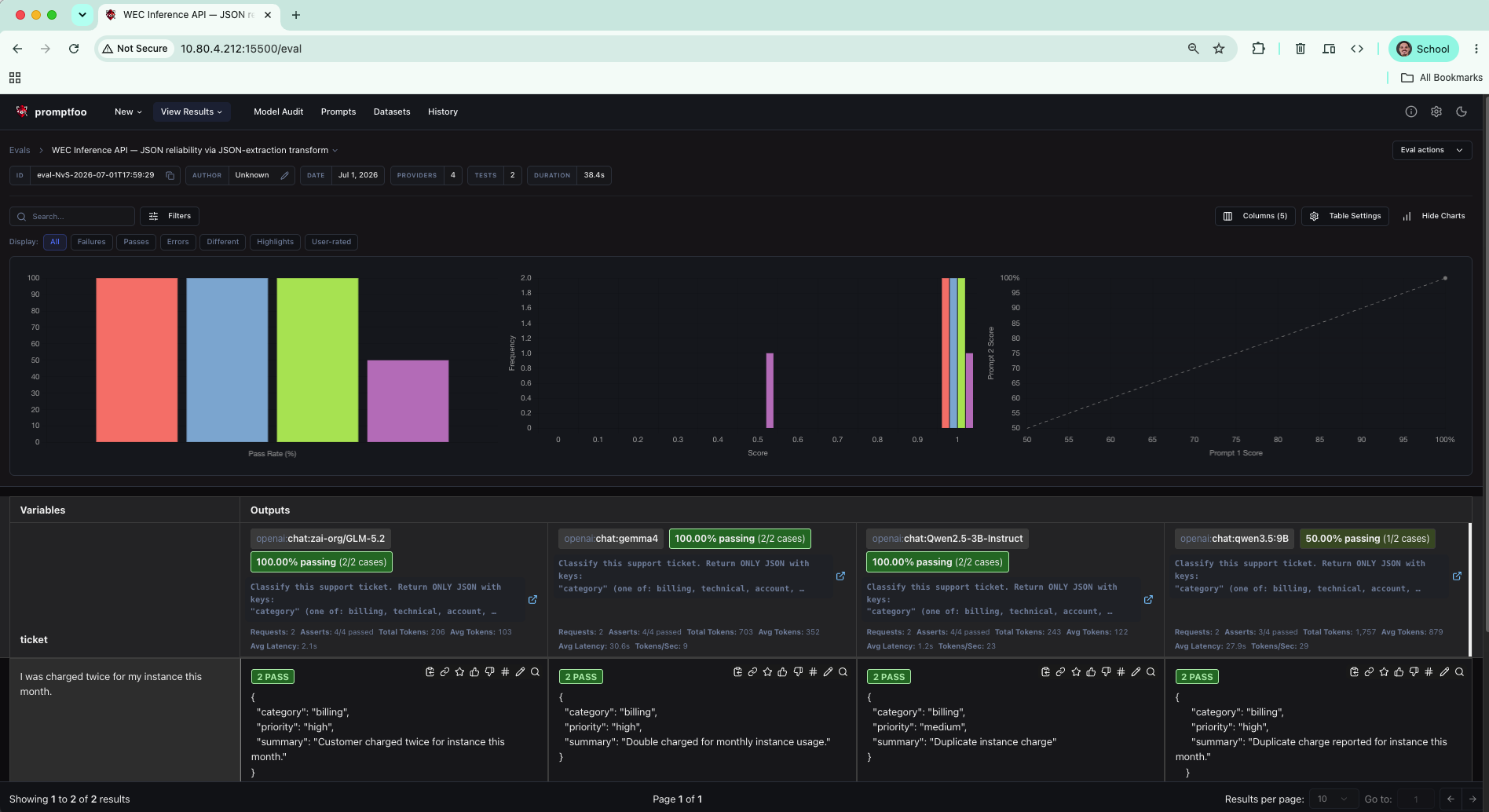
<p>The dashboard at the top gives you the model-reliability picture at a glance — the <strong>Pass
Rate (%)</strong> bars are the ones to watch here: three models tall, <code>qwen3.5:9B</code> sitting at 50%.
Below, each provider is a column you can expand to the <strong>full</strong> response (that's how we pulled
the over-capture failure in <a href="https://wec.wiline.com/docs/tutorials/structured-output-evals-wiline-inference/#ts-reasoning-dump" class="">Figure 10</a> — the terminal truncates it).</p>
<p><img decoding="async" loading="lazy" alt="The Promptfoo report: Pass Rate bars per model and expandable per-case output" src="https://wec.wiline.com/docs/assets/images/json-view-report-3739e5abd8419ffc8ece8271ff559851.png" width="1896" height="1034" class="img_ev3q">
<strong>Figure 7.</strong> The report's dashboard — the Pass Rate bars turn the model matrix into a
one-glance ranking, and any cell expands to the full output.</p>
<div class="theme-admonition theme-admonition-note admonition_xJq3 alert alert--secondary"><div class="admonitionHeading_Gvgb"><span class="admonitionIcon_Rf37"><svg viewBox="0 0 14 16"><path fill-rule="evenodd" d="M6.3 5.69a.942.942 0 0 1-.28-.7c0-.28.09-.52.28-.7.19-.18.42-.28.7-.28.28 0 .52.09.7.28.18.19.28.42.28.7 0 .28-.09.52-.28.7a1 1 0 0 1-.7.3c-.28 0-.52-.11-.7-.3zM8 7.99c-.02-.25-.11-.48-.31-.69-.2-.19-.42-.3-.69-.31H6c-.27.02-.48.13-.69.31-.2.2-.3.44-.31.69h1v3c.02.27.11.5.31.69.2.2.42.31.69.31h1c.27 0 .48-.11.69-.31.2-.19.3-.42.31-.69H8V7.98v.01zM7 2.3c-3.14 0-5.7 2.54-5.7 5.68 0 3.14 2.56 5.7 5.7 5.7s5.7-2.55 5.7-5.7c0-3.15-2.56-5.69-5.7-5.69v.01zM7 .98c3.86 0 7 3.14 7 7s-3.14 7-7 7-7-3.12-7-7 3.14-7 7-7z"></path></svg></span>note</div><div class="admonitionContent_BuS1"><p>The report's other charts (the prompt-vs-prompt scatter) shine when you're <strong>A/B-testing
prompts</strong>, not models — a good subject for a later post. For a single-prompt, multi-model run
like this one, the Pass Rate bars are the chart that matters.</p></div></div>
<h2 class="anchor anchorTargetStickyNavbar_Vzrq" id="step-8--gate-it-in-ci">Step 8 — Gate it in CI<a href="https://wec.wiline.com/docs/tutorials/structured-output-evals-wiline-inference/#step-8--gate-it-in-ci" class="hash-link" aria-label="Direct link to Step 8 — Gate it in CI" title="Direct link to Step 8 — Gate it in CI" translate="no">​</a></h2>
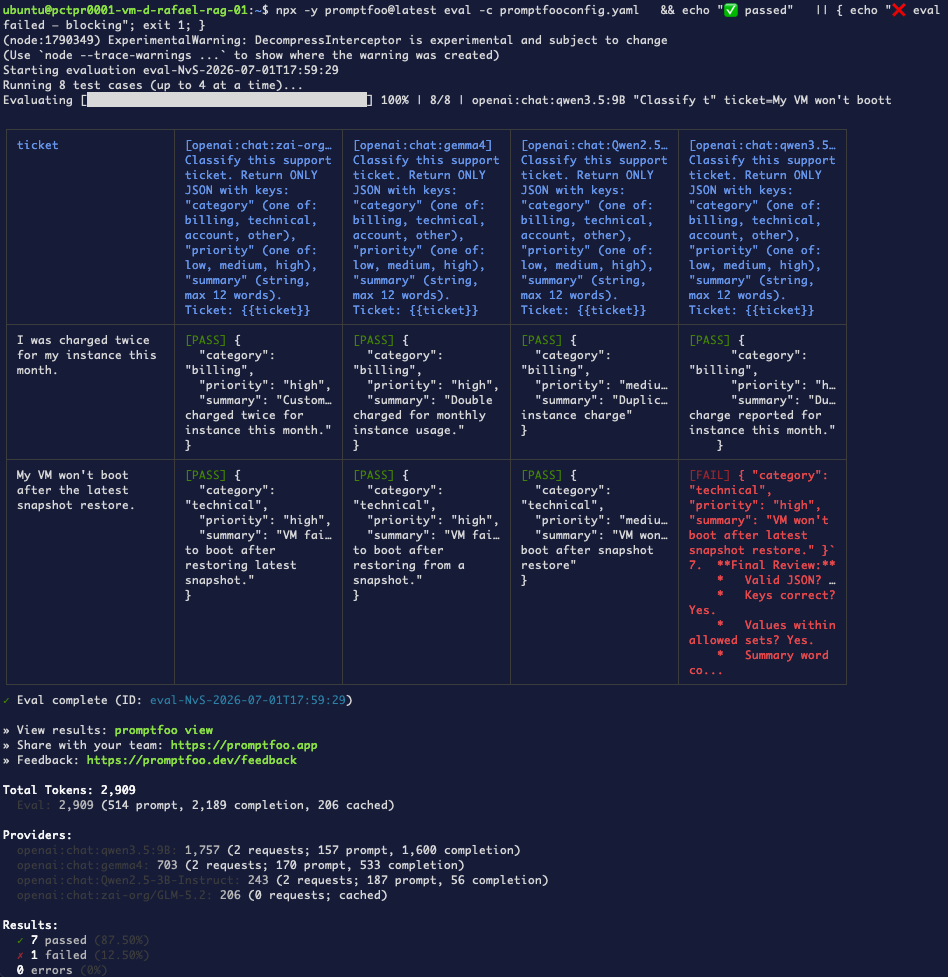
<p>Promptfoo exits non-zero when tests fail, so a one-liner is a gate (put it in a script or
<code>Makefile</code>, never your interactive shell):</p>
<div class="language-bash codeBlockContainer_Ckt0 theme-code-block" style="--prism-color:#393A34;--prism-background-color:#f6f8fa"><div class="codeBlockContent_QJqH"><pre tabindex="0" class="prism-code language-bash codeBlock_bY9V thin-scrollbar" style="color:#393A34;background-color:#f6f8fa"><code class="codeBlockLines_e6Vv"><div class="token-line" style="color:#393A34"><span class="token plain">npx -y promptfoo@latest eval -c promptfooconfig.yaml \</span><br></div><div class="token-line" style="color:#393A34"><span class="token plain">  &amp;&amp; echo "✅ passed" \</span><br></div><div class="token-line" style="color:#393A34"><span class="token plain">  || { echo "❌ eval failed — blocking"; exit 1; }</span><br></div></code></pre></div></div>
<p><img decoding="async" loading="lazy" alt="The gate blocking on a failed eval" src="https://wec.wiline.com/docs/assets/images/json-ci-gate-71912b506157c96cfd7daa8e5c81f300.png" width="948" height="977" class="img_ev3q">
<strong>Figure 8.</strong> A real failure blocks: 7/8 passed, but <code>qwen3.5:9B</code>'s over-capture (from Step 6)
trips the gate — the non-zero exit code is the signal CI uses to block a PR.</p>
<p>On GitLab:</p>
<div class="language-yaml codeBlockContainer_Ckt0 theme-code-block" style="--prism-color:#393A34;--prism-background-color:#f6f8fa"><div class="codeBlockContent_QJqH"><pre tabindex="0" class="prism-code language-yaml codeBlock_bY9V thin-scrollbar" style="color:#393A34;background-color:#f6f8fa"><code class="codeBlockLines_e6Vv"><div class="token-line" style="color:#393A34"><span class="token key atrule" style="color:#00a4db">eval</span><span class="token punctuation" style="color:#393A34">:</span><span class="token plain"></span><br></div><div class="token-line" style="color:#393A34"><span class="token plain">  </span><span class="token key atrule" style="color:#00a4db">image</span><span class="token punctuation" style="color:#393A34">:</span><span class="token plain"> node</span><span class="token punctuation" style="color:#393A34">:</span><span class="token number" style="color:#36acaa">22</span><span class="token plain"></span><br></div><div class="token-line" style="color:#393A34"><span class="token plain">  </span><span class="token key atrule" style="color:#00a4db">script</span><span class="token punctuation" style="color:#393A34">:</span><span class="token plain"></span><br></div><div class="token-line" style="color:#393A34"><span class="token plain">    </span><span class="token punctuation" style="color:#393A34">-</span><span class="token plain"> npx </span><span class="token punctuation" style="color:#393A34">-</span><span class="token plain">y promptfoo@latest eval </span><span class="token punctuation" style="color:#393A34">-</span><span class="token plain">c promptfooconfig.yaml</span><br></div><div class="token-line" style="color:#393A34"><span class="token plain">  </span><span class="token comment" style="color:#999988;font-style:italic"># WEC_API_KEY set as a masked CI/CD variable — never committed.</span><br></div></code></pre></div></div>
<h2 class="anchor anchorTargetStickyNavbar_Vzrq" id="what-we-learned">What we learned<a href="https://wec.wiline.com/docs/tutorials/structured-output-evals-wiline-inference/#what-we-learned" class="hash-link" aria-label="Direct link to What we learned" title="Direct link to What we learned" translate="no">​</a></h2>
<ul>
<li class=""><strong>Model choice dominates.</strong> <code>GLM-5.2</code> and <code>Qwen2.5-3B</code> reliably produce schema-valid JSON
and are ~8× cheaper than the reasoning models. For structured output on WEC, start there.</li>
<li class=""><strong>Reasoning models</strong> (<code>qwen3.5:9B</code>, and <code>gemma4</code> on the day we tested) narrate their thinking
and cost far more — poor fits for strict JSON.</li>
<li class=""><strong>A <code>transform</code> is your safety net</strong> — fence-stripping recovers the common case; JSON
extraction recovers most chatty output — but extraction is a heuristic that can over-capture.</li>
<li class=""><strong><code>response_format</code> is a no-op on WEC today</strong> — verified by isolating it. Don't rely on it;
validate instead.</li>
<li class=""><strong>The eval is the point.</strong> Every one of these surprises was caught automatically, before it
reached production.</li>
</ul>
<h2 class="anchor anchorTargetStickyNavbar_Vzrq" id="troubleshooting">Troubleshooting<a href="https://wec.wiline.com/docs/tutorials/structured-output-evals-wiline-inference/#troubleshooting" class="hash-link" aria-label="Direct link to Troubleshooting" title="Direct link to Troubleshooting" translate="no">​</a></h2>
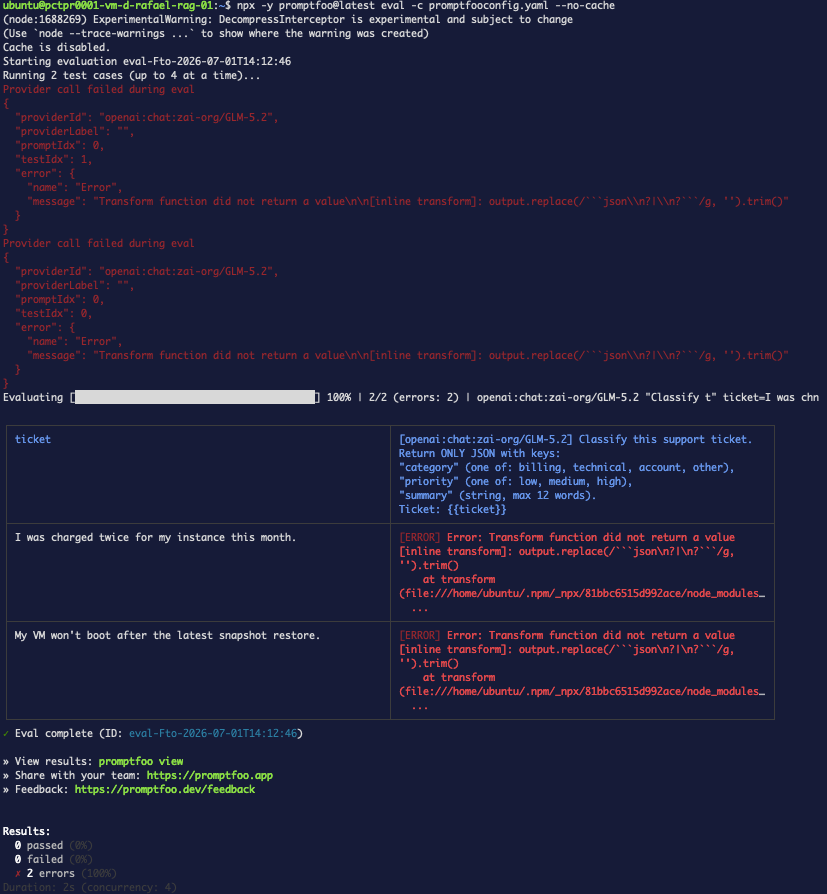
<h3 class="anchor anchorTargetStickyNavbar_Vzrq" id="transform-function-did-not-return-a-value"><a id="ts-transform-return"></a>"Transform function did not return a value"<a href="https://wec.wiline.com/docs/tutorials/structured-output-evals-wiline-inference/#transform-function-did-not-return-a-value" class="hash-link" aria-label="Direct link to transform-function-did-not-return-a-value" title="Direct link to transform-function-did-not-return-a-value" translate="no">​</a></h3>
<p>A multi-line <code>transform</code> is compiled as a <strong>function body</strong>, so it needs an explicit
<code>return</code>. <code>output.replace(...)</code> on its own returns nothing.</p>
<div class="language-yaml codeBlockContainer_Ckt0 theme-code-block" style="--prism-color:#393A34;--prism-background-color:#f6f8fa"><div class="codeBlockContent_QJqH"><pre tabindex="0" class="prism-code language-yaml codeBlock_bY9V thin-scrollbar" style="color:#393A34;background-color:#f6f8fa"><code class="codeBlockLines_e6Vv"><div class="token-line" style="color:#393A34"><span class="token key atrule" style="color:#00a4db">options</span><span class="token punctuation" style="color:#393A34">:</span><span class="token plain"></span><br></div><div class="token-line" style="color:#393A34"><span class="token plain">  </span><span class="token key atrule" style="color:#00a4db">transform</span><span class="token punctuation" style="color:#393A34">:</span><span class="token plain"> </span><span class="token punctuation" style="color:#393A34">|</span><span class="token scalar string" style="color:#e3116c"></span><br></div><div class="token-line" style="color:#393A34"><span class="token scalar string" style="color:#e3116c">    return output.replace(/.../g, '').trim();   # note the `return`</span><br></div></code></pre></div></div>
<p><img decoding="async" loading="lazy" alt="The transform-return error" src="https://wec.wiline.com/docs/assets/images/json-ts-transform-return-764896c26bc05d65d37eac7808ee06fb.png" width="827" height="894" class="img_ev3q">
<strong>Figure 9.</strong> Without <code>return</code>, Promptfoo errors instead of transforming.</p>
<h3 class="anchor anchorTargetStickyNavbar_Vzrq" id="a-model-returns-reasoning-around-the-json"><a id="ts-reasoning-dump"></a>A model returns reasoning around the JSON<a href="https://wec.wiline.com/docs/tutorials/structured-output-evals-wiline-inference/#a-model-returns-reasoning-around-the-json" class="hash-link" aria-label="Direct link to a-model-returns-reasoning-around-the-json" title="Direct link to a-model-returns-reasoning-around-the-json" translate="no">​</a></h3>
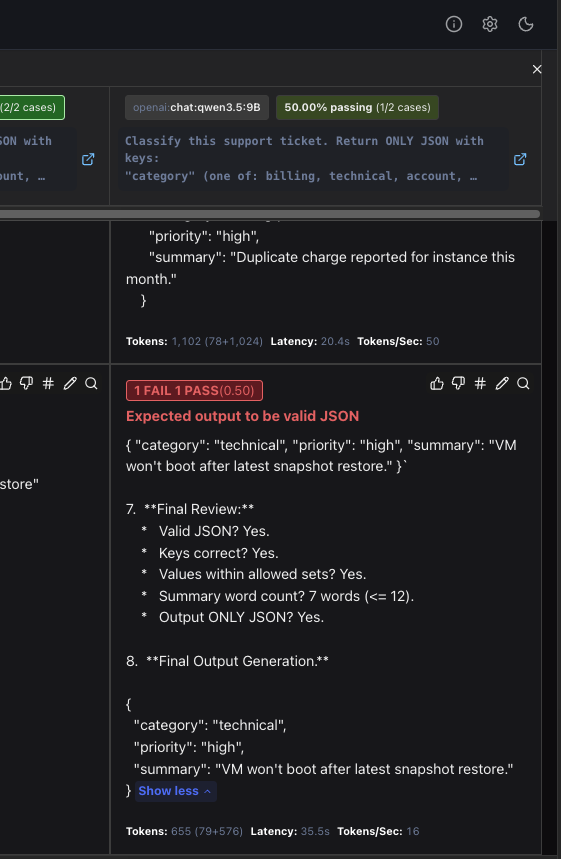
<p>If <code>is-json</code> fails with <strong>"Expected output to be valid JSON"</strong> and the response contains a
"Thinking Process…" / "Final Review…" narration, you're using a reasoning model. Sometimes it
emits <em>only</em> reasoning; sometimes — as below — it emits valid JSON and then <strong>keeps talking</strong>,
so even the Step 6 extraction over-captures and the parse fails. Options: switch to
<code>GLM-5.2</code> / <code>Qwen2.5-3B</code>, or accept that the extraction transform is best-effort, not a guarantee.</p>
<p><img decoding="async" loading="lazy" alt="The failing case expanded in the report — JSON followed by trailing reasoning" src="https://wec.wiline.com/docs/assets/images/json-ts-reasoning-dump-dbfebf9e8d4f5f89e6b2e14b8e0edf50.png" width="561" height="859" class="img_ev3q">
<strong>Figure 10.</strong> The failing case expanded in the report: <code>qwen3.5:9B</code> returned valid JSON and
<em>then kept reasoning</em> ("7. Final Review…"), so the extraction over-captured and the assertion
reports "Expected output to be valid JSON."</p>
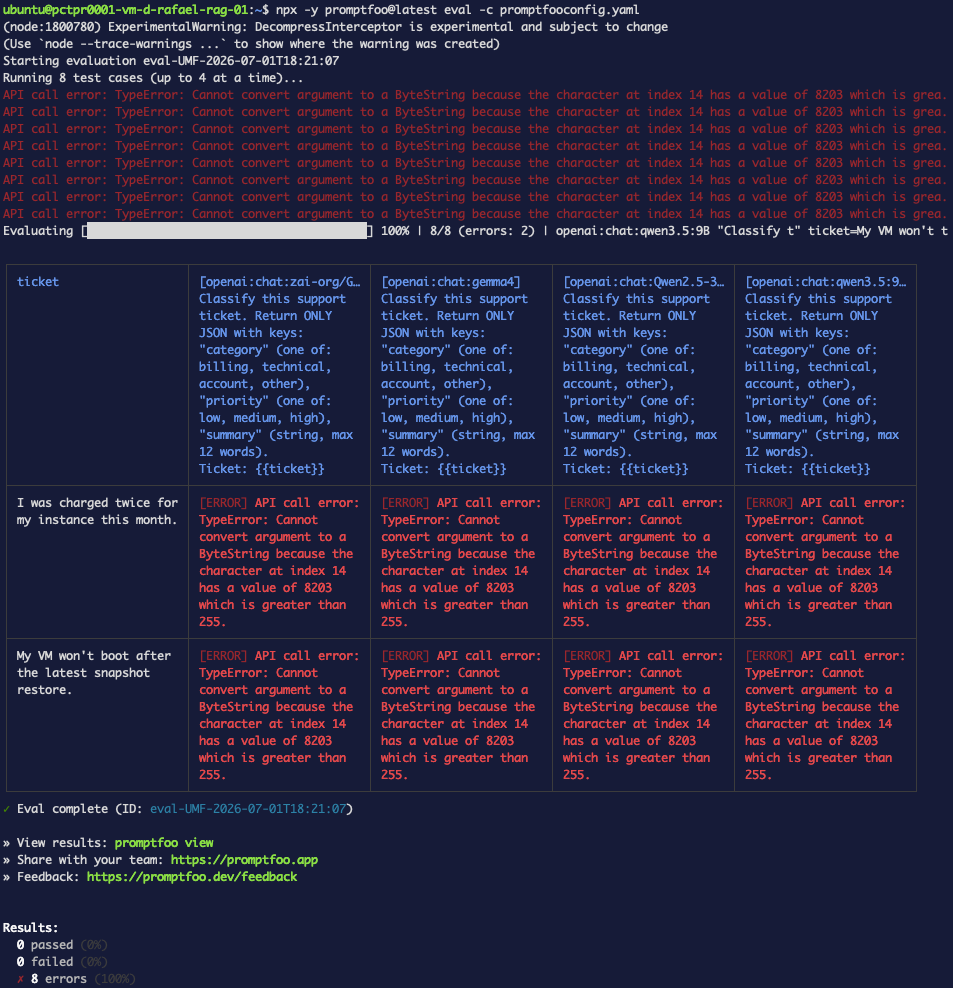
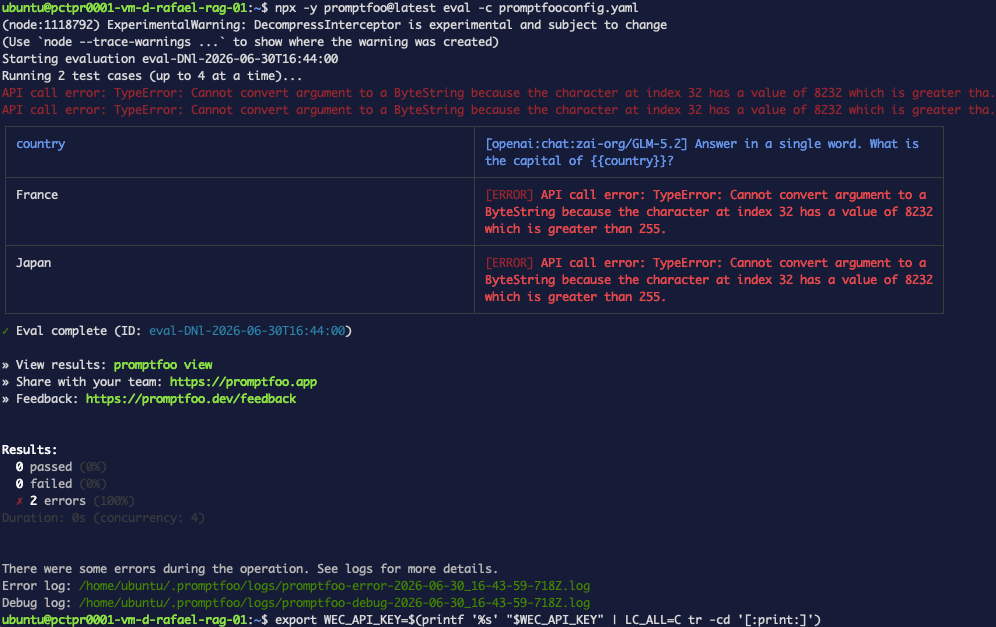
<h3 class="anchor anchorTargetStickyNavbar_Vzrq" id="cannot-convert-argument-to-a-bytestring"><a id="ts-invisible-key"></a>"Cannot convert argument to a ByteString"<a href="https://wec.wiline.com/docs/tutorials/structured-output-evals-wiline-inference/#cannot-convert-argument-to-a-bytestring" class="hash-link" aria-label="Direct link to cannot-convert-argument-to-a-bytestring" title="Direct link to cannot-convert-argument-to-a-bytestring" translate="no">​</a></h3>
<p>Your pasted API key contains an invisible Unicode character. Strip it:</p>
<div class="language-bash codeBlockContainer_Ckt0 theme-code-block" style="--prism-color:#393A34;--prism-background-color:#f6f8fa"><div class="codeBlockContent_QJqH"><pre tabindex="0" class="prism-code language-bash codeBlock_bY9V thin-scrollbar" style="color:#393A34;background-color:#f6f8fa"><code class="codeBlockLines_e6Vv"><div class="token-line" style="color:#393A34"><span class="token plain">export WEC_API_KEY=$(printf '%s' "$WEC_API_KEY" | LC_ALL=C tr -cd '[:print:]')</span><br></div></code></pre></div></div>
<p><img decoding="async" loading="lazy" alt="The ByteString error from an invisible key character" src="https://wec.wiline.com/docs/assets/images/json-ts-bytestring-0bb4979ce94f0775f1fe314315b38e01.png" width="953" height="988" class="img_ev3q">
<strong>Figure 11.</strong> A stray character in the key trips the HTTP header before any request is sent.</p>
<h2 class="anchor anchorTargetStickyNavbar_Vzrq" id="whats-next">What's next<a href="https://wec.wiline.com/docs/tutorials/structured-output-evals-wiline-inference/#whats-next" class="hash-link" aria-label="Direct link to What's next" title="Direct link to What's next" translate="no">​</a></h2>
<ul>
<li class=""><strong>DeepEval regression suites</strong> — turn these checks into a versioned, CI-gated regression run.</li>
<li class=""><strong>Tracing</strong> — see <em>why</em> a response went wrong, not just that it failed.</li>
</ul>
<p>Have a structured-output case that still slips through? That's the next test to add.</p>]]></content>
        <author>
            <name>Rafael Fernandes</name>
            <uri>https://www.linkedin.com/in/rafaelmacariofernandes/</uri>
        </author>
        <category label="ai" term="ai"/>
        <category label="evals" term="evals"/>
        <category label="promptfoo" term="promptfoo"/>
        <category label="inference" term="inference"/>
        <category label="json" term="json"/>
        <category label="structured-output" term="structured-output"/>
        <category label="observability" term="observability"/>
    </entry>
    <entry>
        <title type="html"><![CDATA[Evaluate your models with Promptfoo on the WEC Inference API]]></title>
        <id>https://wec.wiline.com/docs/tutorials/eval-models-promptfoo-wiline-inference/</id>
        <link href="https://wec.wiline.com/docs/tutorials/eval-models-promptfoo-wiline-inference/"/>
        <updated>2026-06-30T00:00:00.000Z</updated>
        <summary type="html"><![CDATA[Stop eyeballing LLM output. Build a real evaluation harness with Promptfoo pointed at the WEC Inference API — assertions, latency guardrails, JSON-schema checks, model-graded rubrics, an all-WEC model comparison, and a CI gate. Every command and result is real.]]></summary>
        <content type="html"><![CDATA[
<div class="tutorialHero"><img class="tutorialHero__brand" src="https://wec.wiline.com/docs/assets/images/promptfoo-avatar-31b32c657d72dac0a7edbd77c24ec717.jpg" alt="Promptfoo"><span class="tutorialHero__plus">+</span><svg xmlns="http://www.w3.org/2000/svg" width="242" height="255" fill="none" viewBox="0 0 242 255" class="tutorialHero__wiline"><path fill="#4E8EF7" d="M56.711 11.293A195 195 0 0 1 41.899 4.79c4.788 1.85 9.71 4.028 14.812 6.504M73.807 29.35c-1.302-1.446-2.666-3.233-4.02-5.38 1.326 1.44 2.642 3.24 4.02 5.38M69.761 23.354c-.832-.585-1.752-1.472-2.558-2.714.9.567 1.685 1.49 2.558 2.714M62.97 15.774a10.7 10.7 0 0 1-3.158-1.841c.993.299 1.986.956 3.159 1.841M59.715 13.346c-.818-.194-1.782-.674-2.829-1.494.84.175 1.761.691 2.83 1.494M39.317 3.782c-.524.192-1.413.302-2.455.14.594-.255 1.342-.238 2.455-.14M74.906 31.339c-.334-.153-.73-.61-1.117-1.398.358.143.706.619 1.117 1.398M66.024 18.878c-.239.1-.557.05-.752-.276.35-.201.532-.069.752.276M71.773 150.625c3.363 7.291 7.185 14.411 9.983 21.914 4.474 11.997 11.167 20.832 24.296 24.757 10.62 3.175 20.369 1.795 30.093-1.816 9.937-3.689 15.165-11.978 18.501-21.541 4.349-12.466 9.385-24.443 19.668-33.446 11.32-9.909 24.639-14.788 39.429-15.63 8.3-.473 16.649-.081 25.444.444.472 15.673.385 30.825.55 45.974.038 3.499-1.049 4.719-4.557 4.543-4.982-.25-9.987-.079-14.98.009-.209.004-.4.991-.6 1.521-23.106 1.695-37.691 15.22-47.961 34.651-3.387 6.408-5.913 13.38-10.013 19.273-4.368 6.277-10.134 11.582-15.853 17.196-6.439 1.421-12.244 3.342-18.202 4.416-12.627 2.274-24.661.457-35.764-6.356-1.028-.631-2.395-.709-3.604-1.043 0 0-.117-.11-.047-.495-.818-.973-1.706-1.562-2.593-2.15 0 0 .09-.044.05-.335-.513-.545-.988-.798-1.463-1.052 0 0-.07-.123.012-.492-.561-.894-1.205-1.421-1.848-1.947 0 0 .134-.068.102-.28-.321-.442-.61-.671-.898-.901 0 0 .086-.007.074-.336-2.05-3.429-4.089-6.529-6.127-9.629 0 0 .094-.017.123-.365-3.013-6.117-6.056-11.886-9.1-17.655 0 0 .096-.01.088-.342-1.978-4.073-3.89-7.848-5.997-11.51-.246-.428-1.572-.235-2.398-.329 0 0-.226-.202-.114-.613-.213-.499-.537-.587-.861-.674 0 0-.032-.101.02-.455-.62-.846-1.291-1.339-1.964-1.832 0 0 .133-.083.119-.372-2.476-4.624-5.645-8.048-10.914-8.777 0 0 .108-.031.01-.326-1.673-1.444-3.105-2.918-4.85-3.688-9.751-4.308-20.013-5.643-30.63-5.23-7.305.285-7.316.051-7.317-7.446q-.002-18.496-.002-36.992v-3.57h36.106s-.08.019.133.283c1.43.415 2.646.567 3.863.719 0 0-.077.022.113.296 1.804.591 3.417.908 5.03 1.225 0 0 .139-.037.152.369 1.592.962 3.17 1.517 4.748 2.073 0 0-.091.027.052.267.735.415 1.328.59 1.92.765 0 0-.076.033.053.246.477.325.825.438 1.173.551 0 0-.149.018-.07.246.418.239.757.251 1.096.263 0 0 .23.058.189.465 1.522 1.319 3.084 2.231 4.647 3.143 0 0-.105.033-.015.316 2.723 2.764 5.356 5.244 7.989 7.724 0 0-.104.062-.094.352 1.01 1.401 2.01 2.512 3.01 3.624"></path><path fill="#4E8EF7" d="M214.77 52.819c-3.343.846-6.723 1.574-10.024 2.562-11.388 3.408-20.567 10.142-27.166 19.865-5.097 7.511-9.621 15.483-13.685 23.608-6.809 13.613-15.725 24.809-31.343 28.198-24.707 5.362-45.22-.126-57.852-24.564C69.466 92.363 63.8 82.375 57.349 73c-3.369-4.896-8.866-8.326-13.679-13.041-1.11-1.409-1.81-2.472-2.794-2.937-10.697-5.056-21.87-7.3-33.686-5.344-3.877.641-5.72-.297-5.615-4.86.294-12.816.26-25.646.019-38.464C1.509 3.874 3.15 2.5 7.429 2.716c9.774.492 19.564.678 29.347.989 0 0-.076.026.082.257 1.046.122 1.935.012 2.825-.098.575.043 1.15.086 2.038.692 5.265 2.72 10.218 4.877 15.17 7.034 0 0-.108.03-.016.317 1.058.765 2.022 1.245 2.987 1.724 0 0-.113.048-.082.354 1.144.876 2.258 1.446 3.372 2.017 0 0 .18.145.097.506.223.404.53.447.837.49 0 0 .214.13.144.504.244.426.558.477.873.528 0 0 .171.124.108.485.256.412.574.464.893.515 0 0 .167.127.105.493.265.437.592.509.919.58 0 0 .078.108.019.5.861 1.28 1.782 2.166 2.702 3.053 0 0-.101.061-.087.368 1.379 2.093 2.743 3.88 4.107 5.666 0 0-.094.011-.092.297.4.742.795 1.2 1.19 1.656 0 0-.121.02-.165.337.685 1.432 1.413 2.549 2.14 3.665 0 0-.11.024-.129.299.326.776.67 1.277 1.014 1.78 0 0-.084-.005-.1.367.933 4.079.311 8.497 4.648 10.67 4.69 12.164 12.107 21.794 25.852 23.497 19.618 2.431 35.321.062 45.299-24.554 3.398-8.383 7.099-16.902 12.232-24.264 8.353-11.979 21.046-17.795 35.832-20.32 1.666.417 2.649.651 3.624.622 9.93-.298 19.865-.513 29.785-1.032 3.818-.2 4.825 1.198 4.746 4.853-.218 9.967.004 19.944-.109 29.915-.052 4.583 1.149 10.606-1.239 13.302-2.044 2.308-8.394.86-12.842.967-3.82.092-7.644.036-11.467.045.065.31.097.633.213.922.034.084.306.072.469.105M37.585 127.354c-11.585.344-23.368.344-35.907.344v3.57q0 18.496.002 36.992c0 7.497.012 7.731 7.318 7.446 10.616-.413 20.878.922 30.63 5.23 1.743.77 3.176 2.244 4.84 3.744-13.655-7.873-28.93-7.767-44.468-7.398v-52.503c12.516.308 25.063-1.222 37.585 2.575"></path><path fill="#4E8EF7" d="M36.619 3.401c-9.626-.007-19.415-.193-29.19-.685C3.151 2.5 1.51 3.874 1.594 8.354c.241 12.818.275 25.648-.018 38.464-.105 4.563 1.737 5.501 5.614 4.86 11.816-1.956 22.99.288 33.686 5.344.984.465 1.685 1.529 2.616 2.66-13.39-7.538-28.284-7.343-43.479-6.78V0C12.314 1.045 24.388 2.071 36.62 3.401M215.232 52.852c-.625-.066-.897-.054-.931-.138-.116-.29-.148-.612-.212-.922 3.822-.01 7.646.047 11.467-.045 4.448-.108 10.797 1.341 12.842-.967 2.387-2.696 1.186-8.719 1.238-13.302.114-9.971-.109-19.948.109-29.915.08-3.655-.928-5.052-4.746-4.853-9.919.519-19.855.734-29.785 1.032-.975.03-1.958-.205-3.228-.58C214.559 1.945 227.423.991 240.73.003v52.882c-8.276 0-16.656 0-25.498-.033M220.071 177.398c-.271-.573-.08-1.561.129-1.565 4.993-.088 9.998-.259 14.98-.009 3.508.176 4.595-1.044 4.557-4.543-.165-15.149-.078-30.301-.088-45.911.458.372 1.32 1.202 1.324 2.036.079 16.424.059 32.848.059 50.036-6.984 0-13.737 0-20.961-.044M88.39 245.741c1.022.084 2.39.162 3.417.793 11.102 6.813 23.137 8.63 35.763 6.356 5.959-1.073 11.764-2.995 17.871-4.34-5.612 2.132-11.343 5.166-17.325 5.79-13.898 1.451-27.803 1.213-39.725-8.599M66.556 210.212c2.975 5.411 6.018 11.18 9.02 17.344-3.011-5.4-5.982-11.193-9.02-17.344M58.341 197.934c.666-.167 1.992-.36 2.238.068 2.107 3.662 4.018 7.437 5.985 11.557-2.69-3.535-5.376-7.449-8.223-11.625M44.637 185.241c5.099.438 8.268 3.862 10.737 8.564-3.518-2.513-7.043-5.393-10.737-8.564M82.29 48.422c-4.252-1.834-3.63-6.252-4.548-10.37 1.508 3.069 2.986 6.55 4.548 10.37M68.757 146.326c-2.533-2.157-5.166-4.637-7.882-7.455 2.539 2.151 5.16 4.641 7.882 7.455M75.532 228.226a122 122 0 0 1 6.047 9.319c-1.993-2.742-3.986-5.854-6.047-9.319M71.695 150.312c-.922-.799-1.921-1.91-2.906-3.366.952.788 1.89 1.921 2.906 3.366M46.663 130.007c-1.353-.103-2.966-.42-4.767-1.051 1.377.07 2.941.454 4.767 1.051M51.647 132.369a13.1 13.1 0 0 1-4.501-1.77c1.48.227 2.902.852 4.5 1.77M60.724 138.321a17.7 17.7 0 0 1-4.395-2.781c1.501.609 2.869 1.551 4.395 2.781M76.889 35.31c-.674-.781-1.402-1.898-2.068-3.39.711.768 1.362 1.912 2.068 3.39M85.668 243.124c.782.31 1.67.899 2.423 1.825-.862-.29-1.59-.919-2.423-1.825M41.596 128.372c-1.033.176-2.25.024-3.68-.432 1.023-.169 2.26-.032 3.68.432M55.367 194.37c.568.222 1.24.715 1.808 1.548-.637-.199-1.17-.738-1.808-1.548M82.397 239.295c.56.251 1.204.778 1.71 1.628-.633-.235-1.13-.794-1.71-1.628M84.291 241.679c.334.034.809.287 1.298.875-.376.004-.766-.326-1.298-.875M53.64 133.426c-.438.094-1.03-.081-1.764-.543.441-.101 1.026.086 1.764.543M77.805 37.409c-.322-.188-.666-.69-.978-1.52.34.182.648.693.978 1.52M81.588 238.108c.218-.039.507.19.823.707-.233.045-.493-.196-.823-.707M55.906 134.832c-.198.157-.537.145-.92-.161.262-.29.537-.195.92.161M57.276 196.552c.254-.079.578.009.756.361-.377.171-.557.018-.756-.361M54.888 134.25c-.215.129-.563.017-1.038-.351.217-.133.56-.012 1.038.351M64.014 16.858a.545.545 0 0 1-.71-.247c.344-.19.51-.067.71.247M65.027 17.882a.574.574 0 0 1-.734-.272c.35-.193.525-.063.734.272M67.045 19.939c-.244.093-.57.021-.777-.329.358-.192.55-.044.777.329"></path></svg></div>
<p>You wouldn't ship code without tests — but most teams ship LLM features on "looks good
to me." <strong>Evaluations</strong> (evals) fix that: you define test cases and pass/fail criteria, then
measure your model objectively — catching regressions, comparing models, and gating
deploys.</p>
<p>In this guide you'll build a real eval harness with <a href="https://www.promptfoo.dev/" target="_blank" rel="noopener noreferrer" class="">Promptfoo</a>
pointed at the <strong>WEC Inference API</strong> — the same OpenAI-compatible endpoint you call from
your apps. Everything here was run live against <code>https://inference.wiline.com</code>; the outputs
are real.</p>
<!-- -->
<h2 class="anchor anchorTargetStickyNavbar_Vzrq" id="prerequisites">Prerequisites<a href="https://wec.wiline.com/docs/tutorials/eval-models-promptfoo-wiline-inference/#prerequisites" class="hash-link" aria-label="Direct link to Prerequisites" title="Direct link to Prerequisites" translate="no">​</a></h2>
<ul>
<li class="">
<p>A <strong>WEC (WiLine Edge Cloud)</strong> account and an <strong>Inference API key</strong> — see
<a class="" href="https://wec.wiline.com/docs/cloud_portal/platform/inference/api_keys/">Inference → API Keys</a>.</p>
</li>
<li class="">
<p><strong>Node.js 22+</strong>. Promptfoo treats Node 20 as end-of-life; with <code>nvm</code>:</p>
<div class="language-bash codeBlockContainer_Ckt0 theme-code-block" style="--prism-color:#393A34;--prism-background-color:#f6f8fa"><div class="codeBlockContent_QJqH"><pre tabindex="0" class="prism-code language-bash codeBlock_bY9V thin-scrollbar" style="color:#393A34;background-color:#f6f8fa"><code class="codeBlockLines_e6Vv"><div class="token-line" style="color:#393A34"><span class="token plain">nvm install 24      # 24 LTS preferred</span><br></div><div class="token-line" style="color:#393A34"><span class="token plain">nvm use 24</span><br></div><div class="token-line" style="color:#393A34"><span class="token plain">node -v             # v24.x</span><br></div></code></pre></div></div>
</li>
</ul>
<p>We'll run Promptfoo with <code>npx</code> — nothing to install globally.</p>
<p><img decoding="async" loading="lazy" alt="The WiLine portal API Keys page" src="https://wec.wiline.com/docs/assets/images/promptfoo-api-key-a1aca6bfffa7335651ab59ec1c07d8f4.png" width="1642" height="866" class="img_ev3q">
<strong>Figure 1.</strong> Create a key under Inference → API Keys, then copy it.</p>
<p>Put your key in the shell:</p>
<div class="language-bash codeBlockContainer_Ckt0 theme-code-block" style="--prism-color:#393A34;--prism-background-color:#f6f8fa"><div class="codeBlockContent_QJqH"><pre tabindex="0" class="prism-code language-bash codeBlock_bY9V thin-scrollbar" style="color:#393A34;background-color:#f6f8fa"><code class="codeBlockLines_e6Vv"><div class="token-line" style="color:#393A34"><span class="token plain">export WEC_API_KEY='sk-your-key-here'</span><br></div></code></pre></div></div>
<div class="theme-admonition theme-admonition-tip admonition_xJq3 alert alert--success"><div class="admonitionHeading_Gvgb"><span class="admonitionIcon_Rf37"><svg viewBox="0 0 12 16"><path fill-rule="evenodd" d="M6.5 0C3.48 0 1 2.19 1 5c0 .92.55 2.25 1 3 1.34 2.25 1.78 2.78 2 4v1h5v-1c.22-1.22.66-1.75 2-4 .45-.75 1-2.08 1-3 0-2.81-2.48-5-5.5-5zm3.64 7.48c-.25.44-.47.8-.67 1.11-.86 1.41-1.25 2.06-1.45 3.23-.02.05-.02.11-.02.17H5c0-.06 0-.13-.02-.17-.2-1.17-.59-1.83-1.45-3.23-.2-.31-.42-.67-.67-1.11C2.44 6.78 2 5.65 2 5c0-2.2 2.02-4 4.5-4 1.22 0 2.36.42 3.22 1.19C10.55 2.94 11 3.94 11 5c0 .66-.44 1.78-.86 2.48zM4 14h5c-.23 1.14-1.3 2-2.5 2s-2.27-.86-2.5-2z"></path></svg></span>tip</div><div class="admonitionContent_BuS1"><p>If your first eval errors with <code>Cannot convert argument to a ByteString</code>, see <a href="https://wec.wiline.com/docs/tutorials/eval-models-promptfoo-wiline-inference/#1-bytestring-error-on-first-eval" class="">Troubleshooting #1</a> below.</p></div></div>
<h2 class="anchor anchorTargetStickyNavbar_Vzrq" id="step-1--see-which-models-you-have">Step 1 — See which models you have<a href="https://wec.wiline.com/docs/tutorials/eval-models-promptfoo-wiline-inference/#step-1--see-which-models-you-have" class="hash-link" aria-label="Direct link to Step 1 — See which models you have" title="Direct link to Step 1 — See which models you have" translate="no">​</a></h2>
<p>The API is OpenAI-compatible, so the model list is a plain <code>GET /v1/models</code>:</p>
<div class="language-bash codeBlockContainer_Ckt0 theme-code-block" style="--prism-color:#393A34;--prism-background-color:#f6f8fa"><div class="codeBlockContent_QJqH"><pre tabindex="0" class="prism-code language-bash codeBlock_bY9V thin-scrollbar" style="color:#393A34;background-color:#f6f8fa"><code class="codeBlockLines_e6Vv"><div class="token-line" style="color:#393A34"><span class="token plain">curl -s https://inference.wiline.com/v1/models \</span><br></div><div class="token-line" style="color:#393A34"><span class="token plain">  -H "Authorization: Bearer $WEC_API_KEY" | jq -r '.data[].id'</span><br></div></code></pre></div></div>
<div class="language-text codeBlockContainer_Ckt0 theme-code-block" style="--prism-color:#393A34;--prism-background-color:#f6f8fa"><div class="codeBlockTitle_OeMC">Output</div><div class="codeBlockContent_QJqH"><pre tabindex="0" class="prism-code language-text codeBlock_bY9V thin-scrollbar" style="color:#393A34;background-color:#f6f8fa"><code class="codeBlockLines_e6Vv"><div class="token-line" style="color:#393A34"><span class="token plain">zai-org/GLM-5.2</span><br></div><div class="token-line" style="color:#393A34"><span class="token plain">gemma4</span><br></div><div class="token-line" style="color:#393A34"><span class="token plain">Qwen2.5-3B-Instruct</span><br></div><div class="token-line" style="color:#393A34"><span class="token plain">qwen3.5:9B</span><br></div><div class="token-line" style="color:#393A34"><span class="token plain">whisper-large-v3</span><br></div><div class="token-line" style="color:#393A34"><span class="token plain">whisper-medium</span><br></div><div class="token-line" style="color:#393A34"><span class="token plain">whisper-base</span><br></div></code></pre></div></div>
<p>The <code>whisper-*</code> models are speech-to-text; the rest are chat models. We'll evaluate the
chat models, starting with <code>zai-org/GLM-5.2</code>.</p>
<h2 class="anchor anchorTargetStickyNavbar_Vzrq" id="step-2--your-first-eval">Step 2 — Your first eval<a href="https://wec.wiline.com/docs/tutorials/eval-models-promptfoo-wiline-inference/#step-2--your-first-eval" class="hash-link" aria-label="Direct link to Step 2 — Your first eval" title="Direct link to Step 2 — Your first eval" translate="no">​</a></h2>
<p>Create a config. <code>apiBaseUrl</code> points Promptfoo at WEC; <code>apiKeyEnvar</code> tells it which env
var holds your key:</p>
<div class="language-bash codeBlockContainer_Ckt0 theme-code-block" style="--prism-color:#393A34;--prism-background-color:#f6f8fa"><div class="codeBlockContent_QJqH"><pre tabindex="0" class="prism-code language-bash codeBlock_bY9V thin-scrollbar" style="color:#393A34;background-color:#f6f8fa"><code class="codeBlockLines_e6Vv"><div class="token-line" style="color:#393A34"><span class="token plain">cat &gt; promptfooconfig.yaml &lt;&lt;'EOF'</span><br></div><div class="token-line" style="color:#393A34"><span class="token plain">description: "WEC Inference API eval"</span><br></div><div class="token-line" style="color:#393A34"><span class="token plain">providers:</span><br></div><div class="token-line" style="color:#393A34"><span class="token plain">  - id: openai:chat:zai-org/GLM-5.2</span><br></div><div class="token-line" style="color:#393A34"><span class="token plain">    config:</span><br></div><div class="token-line" style="color:#393A34"><span class="token plain">      apiBaseUrl: https://inference.wiline.com/v1</span><br></div><div class="token-line" style="color:#393A34"><span class="token plain">      apiKeyEnvar: WEC_API_KEY</span><br></div><div class="token-line" style="color:#393A34"><span class="token plain">      temperature: 0</span><br></div><div class="token-line" style="color:#393A34"><span class="token plain">prompts:</span><br></div><div class="token-line" style="color:#393A34"><span class="token plain">  - "Answer in a single word. What is the capital of {{country}}?"</span><br></div><div class="token-line" style="color:#393A34"><span class="token plain">tests:</span><br></div><div class="token-line" style="color:#393A34"><span class="token plain">  - vars: { country: France }</span><br></div><div class="token-line" style="color:#393A34"><span class="token plain">    assert: [{ type: icontains, value: Paris }]</span><br></div><div class="token-line" style="color:#393A34"><span class="token plain">  - vars: { country: Japan }</span><br></div><div class="token-line" style="color:#393A34"><span class="token plain">    assert: [{ type: icontains, value: Tokyo }]</span><br></div><div class="token-line" style="color:#393A34"><span class="token plain">EOF</span><br></div><div class="token-line" style="color:#393A34"><span class="token plain">npx -y promptfoo@latest eval -c promptfooconfig.yaml</span><br></div></code></pre></div></div>
<p><img decoding="async" loading="lazy" alt="Terminal: first eval, 2 cases both PASS" src="https://wec.wiline.com/docs/assets/images/promptfoo-first-eval-42c0a9a515e6a1e5af7a6cf5c6a30118.png" width="954" height="501" class="img_ev3q">
<strong>Figure 4.</strong> Your first passing eval against the WEC Inference API.</p>
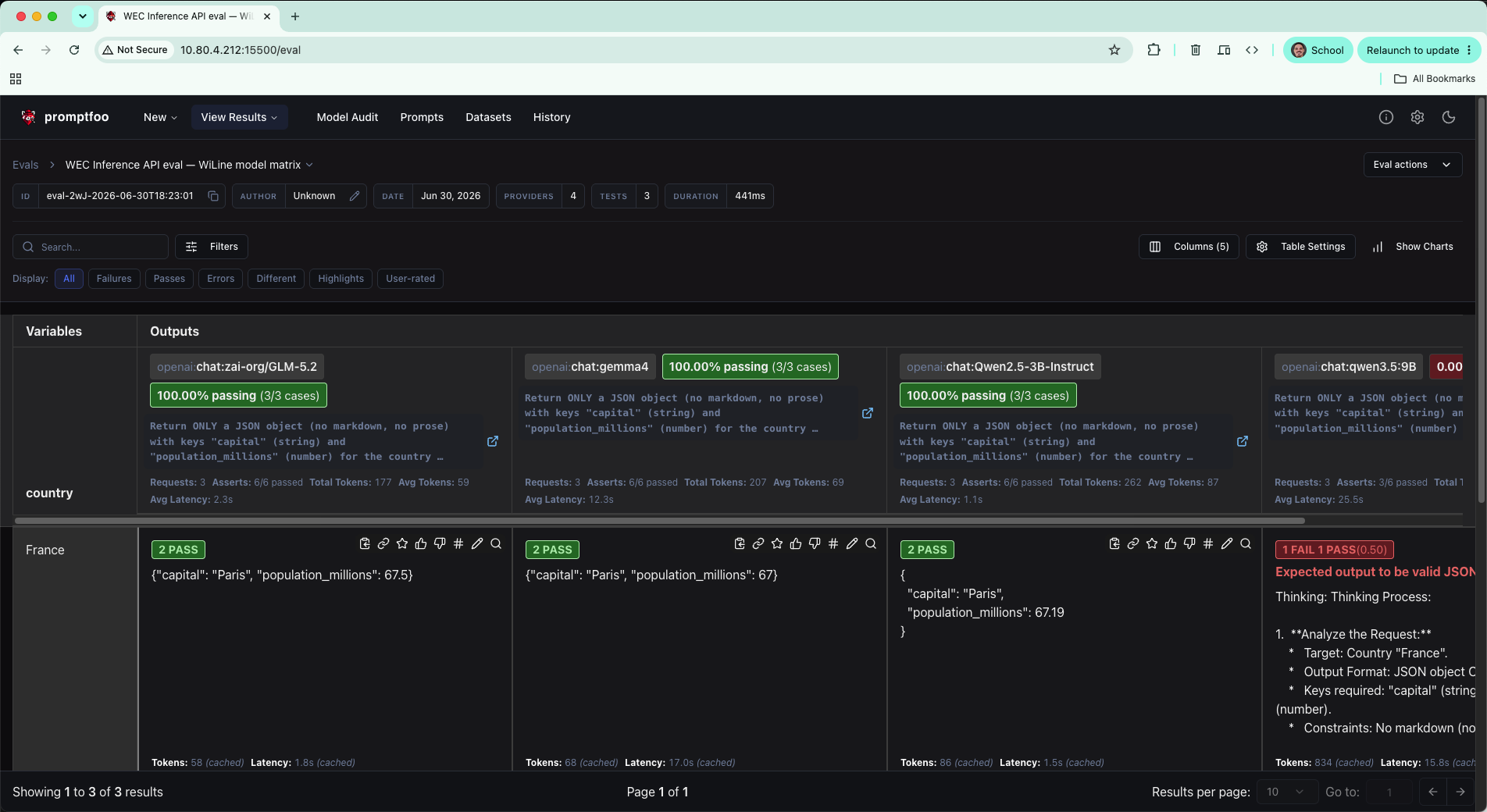
<p><code>icontains</code> is a <strong>deterministic</strong> assertion — a case-insensitive substring check. Cheap,
fast, and perfect for facts with a known answer.</p>
<h2 class="anchor anchorTargetStickyNavbar_Vzrq" id="step-3--the-visual-report">Step 3 — The visual report<a href="https://wec.wiline.com/docs/tutorials/eval-models-promptfoo-wiline-inference/#step-3--the-visual-report" class="hash-link" aria-label="Direct link to Step 3 — The visual report" title="Direct link to Step 3 — The visual report" translate="no">​</a></h2>
<div class="language-bash codeBlockContainer_Ckt0 theme-code-block" style="--prism-color:#393A34;--prism-background-color:#f6f8fa"><div class="codeBlockContent_QJqH"><pre tabindex="0" class="prism-code language-bash codeBlock_bY9V thin-scrollbar" style="color:#393A34;background-color:#f6f8fa"><code class="codeBlockLines_e6Vv"><div class="token-line" style="color:#393A34"><span class="token plain">npx -y promptfoo@latest view</span><br></div></code></pre></div></div>
<p>This opens a local web UI with every prompt, output, and pass/fail — far easier to scan
than the terminal once you have more than a handful of cases.</p>
<p><img decoding="async" loading="lazy" alt="The Promptfoo web report" src="https://wec.wiline.com/docs/assets/images/promptfoo-view-report-b93aa9bcadc4c60e008df1bb5effcd3c.png" width="1904" height="1040" class="img_ev3q">
<strong>Figure 5.</strong> <code>promptfoo view</code> — the same results in the browser.</p>
<h2 class="anchor anchorTargetStickyNavbar_Vzrq" id="step-4--add-a-second-model">Step 4 — Add a second model<a href="https://wec.wiline.com/docs/tutorials/eval-models-promptfoo-wiline-inference/#step-4--add-a-second-model" class="hash-link" aria-label="Direct link to Step 4 — Add a second model" title="Direct link to Step 4 — Add a second model" translate="no">​</a></h2>
<p>Adding a provider is one extra block. Here we add <code>Qwen2.5-3B-Instruct</code> alongside GLM-5.2
and run the same two test cases against both:</p>
<div class="language-bash codeBlockContainer_Ckt0 theme-code-block" style="--prism-color:#393A34;--prism-background-color:#f6f8fa"><div class="codeBlockContent_QJqH"><pre tabindex="0" class="prism-code language-bash codeBlock_bY9V thin-scrollbar" style="color:#393A34;background-color:#f6f8fa"><code class="codeBlockLines_e6Vv"><div class="token-line" style="color:#393A34"><span class="token plain">cat &gt; promptfooconfig.yaml &lt;&lt;'EOF'</span><br></div><div class="token-line" style="color:#393A34"><span class="token plain">description: "WEC Inference API eval — model comparison"</span><br></div><div class="token-line" style="color:#393A34"><span class="token plain">providers:</span><br></div><div class="token-line" style="color:#393A34"><span class="token plain">  - id: openai:chat:zai-org/GLM-5.2</span><br></div><div class="token-line" style="color:#393A34"><span class="token plain">    config:</span><br></div><div class="token-line" style="color:#393A34"><span class="token plain">      apiBaseUrl: https://inference.wiline.com/v1</span><br></div><div class="token-line" style="color:#393A34"><span class="token plain">      apiKeyEnvar: WEC_API_KEY</span><br></div><div class="token-line" style="color:#393A34"><span class="token plain">      temperature: 0</span><br></div><div class="token-line" style="color:#393A34"><span class="token plain">  - id: openai:chat:Qwen2.5-3B-Instruct</span><br></div><div class="token-line" style="color:#393A34"><span class="token plain">    config:</span><br></div><div class="token-line" style="color:#393A34"><span class="token plain">      apiBaseUrl: https://inference.wiline.com/v1</span><br></div><div class="token-line" style="color:#393A34"><span class="token plain">      apiKeyEnvar: WEC_API_KEY</span><br></div><div class="token-line" style="color:#393A34"><span class="token plain">      temperature: 0</span><br></div><div class="token-line" style="color:#393A34"><span class="token plain">prompts:</span><br></div><div class="token-line" style="color:#393A34"><span class="token plain">  - "Answer in a single word. What is the capital of {{country}}?"</span><br></div><div class="token-line" style="color:#393A34"><span class="token plain">tests:</span><br></div><div class="token-line" style="color:#393A34"><span class="token plain">  - vars: { country: France }</span><br></div><div class="token-line" style="color:#393A34"><span class="token plain">    assert: [{ type: icontains, value: Paris }]</span><br></div><div class="token-line" style="color:#393A34"><span class="token plain">  - vars: { country: Japan }</span><br></div><div class="token-line" style="color:#393A34"><span class="token plain">    assert: [{ type: icontains, value: Tokyo }]</span><br></div><div class="token-line" style="color:#393A34"><span class="token plain">EOF</span><br></div><div class="token-line" style="color:#393A34"><span class="token plain">npx -y promptfoo@latest eval -c promptfooconfig.yaml</span><br></div></code></pre></div></div>
<p><img decoding="async" loading="lazy" alt="Terminal: 2-model comparison, 4 cases all PASS" src="https://wec.wiline.com/docs/assets/images/promptfoo-two-model-3c6c51ea8839c03dd51d270c78648ec9.png" width="956" height="590" class="img_ev3q">
<strong>Figure 6.</strong> Both models pass. GLM-5.2's results are served from cache (0 new requests); only Qwen2.5 makes live calls.</p>
<h2 class="anchor anchorTargetStickyNavbar_Vzrq" id="step-5--grade-quality-not-substrings-llm-rubric">Step 5 — Grade quality, not substrings (LLM rubric)<a href="https://wec.wiline.com/docs/tutorials/eval-models-promptfoo-wiline-inference/#step-5--grade-quality-not-substrings-llm-rubric" class="hash-link" aria-label="Direct link to Step 5 — Grade quality, not substrings (LLM rubric)" title="Direct link to Step 5 — Grade quality, not substrings (LLM rubric)" translate="no">​</a></h2>
<p>Substring checks can't judge an open-ended answer. A <strong>model-graded</strong> <code>llm-rubric</code> assertion
uses a model to score the output against criteria — and the grader can run on WEC too, so
you need no external provider:</p>
<div class="language-bash codeBlockContainer_Ckt0 theme-code-block" style="--prism-color:#393A34;--prism-background-color:#f6f8fa"><div class="codeBlockContent_QJqH"><pre tabindex="0" class="prism-code language-bash codeBlock_bY9V thin-scrollbar" style="color:#393A34;background-color:#f6f8fa"><code class="codeBlockLines_e6Vv"><div class="token-line" style="color:#393A34"><span class="token plain">cat &gt; promptfooconfig.yaml &lt;&lt;'EOF'</span><br></div><div class="token-line" style="color:#393A34"><span class="token plain">description: "WEC Inference API eval — model-graded (LLM rubric)"</span><br></div><div class="token-line" style="color:#393A34"><span class="token plain">providers:</span><br></div><div class="token-line" style="color:#393A34"><span class="token plain">  - id: openai:chat:zai-org/GLM-5.2</span><br></div><div class="token-line" style="color:#393A34"><span class="token plain">    config:</span><br></div><div class="token-line" style="color:#393A34"><span class="token plain">      apiBaseUrl: https://inference.wiline.com/v1</span><br></div><div class="token-line" style="color:#393A34"><span class="token plain">      apiKeyEnvar: WEC_API_KEY</span><br></div><div class="token-line" style="color:#393A34"><span class="token plain">      temperature: 0</span><br></div><div class="token-line" style="color:#393A34"><span class="token plain">defaultTest:</span><br></div><div class="token-line" style="color:#393A34"><span class="token plain">  options:</span><br></div><div class="token-line" style="color:#393A34"><span class="token plain">    provider:                       # the grader model</span><br></div><div class="token-line" style="color:#393A34"><span class="token plain">      id: openai:chat:zai-org/GLM-5.2</span><br></div><div class="token-line" style="color:#393A34"><span class="token plain">      config:</span><br></div><div class="token-line" style="color:#393A34"><span class="token plain">        apiBaseUrl: https://inference.wiline.com/v1</span><br></div><div class="token-line" style="color:#393A34"><span class="token plain">        apiKeyEnvar: WEC_API_KEY</span><br></div><div class="token-line" style="color:#393A34"><span class="token plain">prompts:</span><br></div><div class="token-line" style="color:#393A34"><span class="token plain">  - "Explain what a {{topic}} is in two sentences, for a beginner."</span><br></div><div class="token-line" style="color:#393A34"><span class="token plain">tests:</span><br></div><div class="token-line" style="color:#393A34"><span class="token plain">  - vars: { topic: VPC }</span><br></div><div class="token-line" style="color:#393A34"><span class="token plain">    assert:</span><br></div><div class="token-line" style="color:#393A34"><span class="token plain">      - type: llm-rubric</span><br></div><div class="token-line" style="color:#393A34"><span class="token plain">        value: "Describes a VPC as a private, isolated virtual network in the cloud, and is understandable to a beginner."</span><br></div><div class="token-line" style="color:#393A34"><span class="token plain">EOF</span><br></div><div class="token-line" style="color:#393A34"><span class="token plain">npx -y promptfoo@latest eval -c promptfooconfig.yaml</span><br></div></code></pre></div></div>
<p><img decoding="async" loading="lazy" alt="Terminal: LLM rubric eval, 1 PASS, Grading tokens line visible" src="https://wec.wiline.com/docs/assets/images/promptfoo-llm-rubric-f969ad98a43427eacf9f83f13f2e6dde.png" width="957" height="556" class="img_ev3q">
<strong>Figure 7.</strong> The run shows two token lines — <code>Eval</code> (75) and <code>Grading</code> (350) — because the rubric check is itself a model call.</p>
<p>Model-graded checks are powerful, but they aren't free.</p>
<h2 class="anchor anchorTargetStickyNavbar_Vzrq" id="step-6--guardrails-latency">Step 6 — Guardrails: latency<a href="https://wec.wiline.com/docs/tutorials/eval-models-promptfoo-wiline-inference/#step-6--guardrails-latency" class="hash-link" aria-label="Direct link to Step 6 — Guardrails: latency" title="Direct link to Step 6 — Guardrails: latency" translate="no">​</a></h2>
<p>A correct answer that takes 30 seconds is still a production problem. Add a <strong>latency</strong>
guardrail to <code>defaultTest</code> (it applies to every case). Always run with <code>--no-cache</code> — cached
responses report ~0 ms and would pass the gate for free:</p>
<div class="language-bash codeBlockContainer_Ckt0 theme-code-block" style="--prism-color:#393A34;--prism-background-color:#f6f8fa"><div class="codeBlockContent_QJqH"><pre tabindex="0" class="prism-code language-bash codeBlock_bY9V thin-scrollbar" style="color:#393A34;background-color:#f6f8fa"><code class="codeBlockLines_e6Vv"><div class="token-line" style="color:#393A34"><span class="token plain">cat &gt; promptfooconfig.yaml &lt;&lt;'EOF'</span><br></div><div class="token-line" style="color:#393A34"><span class="token plain">description: "WEC Inference API eval — latency guardrail"</span><br></div><div class="token-line" style="color:#393A34"><span class="token plain">providers:</span><br></div><div class="token-line" style="color:#393A34"><span class="token plain">  - id: openai:chat:zai-org/GLM-5.2</span><br></div><div class="token-line" style="color:#393A34"><span class="token plain">    config:</span><br></div><div class="token-line" style="color:#393A34"><span class="token plain">      apiBaseUrl: https://inference.wiline.com/v1</span><br></div><div class="token-line" style="color:#393A34"><span class="token plain">      apiKeyEnvar: WEC_API_KEY</span><br></div><div class="token-line" style="color:#393A34"><span class="token plain">      temperature: 0</span><br></div><div class="token-line" style="color:#393A34"><span class="token plain">defaultTest:</span><br></div><div class="token-line" style="color:#393A34"><span class="token plain">  assert:</span><br></div><div class="token-line" style="color:#393A34"><span class="token plain">    - type: latency</span><br></div><div class="token-line" style="color:#393A34"><span class="token plain">      threshold: 5000        # fail anything slower than 5 s</span><br></div><div class="token-line" style="color:#393A34"><span class="token plain">prompts:</span><br></div><div class="token-line" style="color:#393A34"><span class="token plain">  - "Answer in a single word. What is the capital of {{country}}?"</span><br></div><div class="token-line" style="color:#393A34"><span class="token plain">tests:</span><br></div><div class="token-line" style="color:#393A34"><span class="token plain">  - vars: { country: France }</span><br></div><div class="token-line" style="color:#393A34"><span class="token plain">    assert: [{ type: icontains, value: Paris }]</span><br></div><div class="token-line" style="color:#393A34"><span class="token plain">  - vars: { country: Japan }</span><br></div><div class="token-line" style="color:#393A34"><span class="token plain">    assert: [{ type: icontains, value: Tokyo }]</span><br></div><div class="token-line" style="color:#393A34"><span class="token plain">EOF</span><br></div><div class="token-line" style="color:#393A34"><span class="token plain">npx -y promptfoo@latest eval -c promptfooconfig.yaml --no-cache</span><br></div></code></pre></div></div>
<p>This <strong>failed</strong> — the answers were correct (<code>Paris</code>, <code>Tokyo</code>) but both calls took ~33 s,
tripping the 5 s gate:</p>
<p><img decoding="async" loading="lazy" alt="Terminal: latency 5000ms threshold, 2 FAIL, Duration: 33s" src="https://wec.wiline.com/docs/assets/images/promptfoo-latency-fail-ab40e8dc4386c6acd496942ee3a490aa.png" width="953" height="518" class="img_ev3q">
<strong>Figure 8.</strong> The guardrail fires: correct answers, wrong latency. Duration: 33s.</p>
<p>Bump the threshold to something realistic and re-run:</p>
<div class="language-bash codeBlockContainer_Ckt0 theme-code-block" style="--prism-color:#393A34;--prism-background-color:#f6f8fa"><div class="codeBlockContent_QJqH"><pre tabindex="0" class="prism-code language-bash codeBlock_bY9V thin-scrollbar" style="color:#393A34;background-color:#f6f8fa"><code class="codeBlockLines_e6Vv"><div class="token-line" style="color:#393A34"><span class="token plain">sed -i 's/threshold: 5000/threshold: 60000/' promptfooconfig.yaml</span><br></div><div class="token-line" style="color:#393A34"><span class="token plain">npx -y promptfoo@latest eval -c promptfooconfig.yaml --no-cache</span><br></div></code></pre></div></div>
<p><img decoding="async" loading="lazy" alt="Terminal: latency 60000ms threshold, 2 PASS, Duration: 2s" src="https://wec.wiline.com/docs/assets/images/promptfoo-latency-pass-f3fa1a1c9cb0a11a87328b2a15ef1f31.png" width="957" height="538" class="img_ev3q">
<strong>Figure 9.</strong> With a 60 s threshold the same calls pass easily — Duration: 2s.</p>
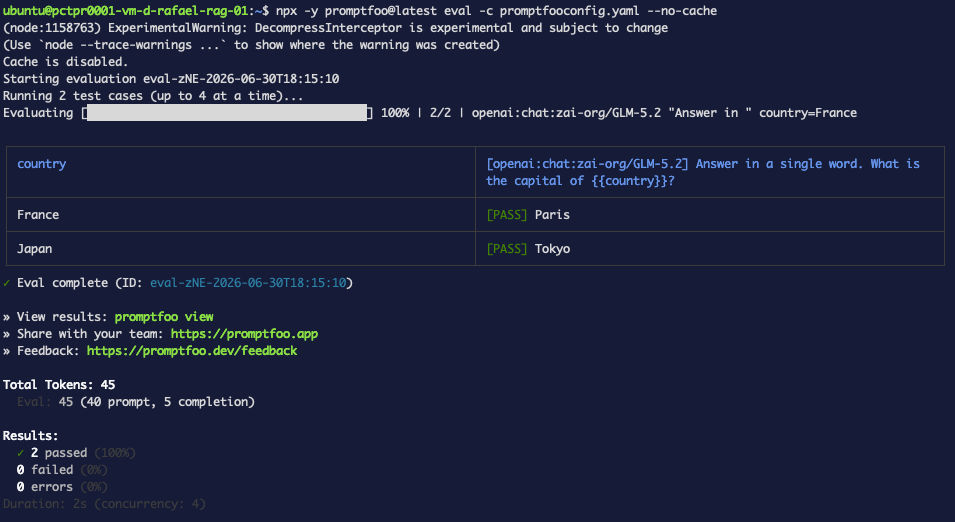
<div class="theme-admonition theme-admonition-note admonition_xJq3 alert alert--secondary"><div class="admonitionHeading_Gvgb"><span class="admonitionIcon_Rf37"><svg viewBox="0 0 14 16"><path fill-rule="evenodd" d="M6.3 5.69a.942.942 0 0 1-.28-.7c0-.28.09-.52.28-.7.19-.18.42-.28.7-.28.28 0 .52.09.7.28.18.19.28.42.28.7 0 .28-.09.52-.28.7a1 1 0 0 1-.7.3c-.28 0-.52-.11-.7-.3zM8 7.99c-.02-.25-.11-.48-.31-.69-.2-.19-.42-.3-.69-.31H6c-.27.02-.48.13-.69.31-.2.2-.3.44-.31.69h1v3c.02.27.11.5.31.69.2.2.42.31.69.31h1c.27 0 .48-.11.69-.31.2-.19.3-.42.31-.69H8V7.98v.01zM7 2.3c-3.14 0-5.7 2.54-5.7 5.68 0 3.14 2.56 5.7 5.7 5.7s5.7-2.55 5.7-5.7c0-3.15-2.56-5.69-5.7-5.69v.01zM7 .98c3.86 0 7 3.14 7 7s-3.14 7-7 7-7-3.12-7-7 3.14-7 7-7z"></path></svg></span>Inference latency varies — calibrate before gating</div><div class="admonitionContent_BuS1"><p>Back-to-back calls to the same model ranged from ~2 s to ~33 s on the same day. Run a
few <code>--no-cache</code> passes to get a realistic baseline before locking in your threshold.</p></div></div>
<h2 class="anchor anchorTargetStickyNavbar_Vzrq" id="step-7--guardrails-latency--token-cap">Step 7 — Guardrails: latency + token cap<a href="https://wec.wiline.com/docs/tutorials/eval-models-promptfoo-wiline-inference/#step-7--guardrails-latency--token-cap" class="hash-link" aria-label="Direct link to Step 7 — Guardrails: latency + token cap" title="Direct link to Step 7 — Guardrails: latency + token cap" translate="no">​</a></h2>
<p>The <code>cost</code> assertion doesn't work against WEC (see <a href="https://wec.wiline.com/docs/tutorials/eval-models-promptfoo-wiline-inference/#2-cost-assertion-errors-immediately" class="">Troubleshooting #2</a>). Use latency + <code>max_tokens</code> together as your production guardrail instead:</p>
<div class="language-bash codeBlockContainer_Ckt0 theme-code-block" style="--prism-color:#393A34;--prism-background-color:#f6f8fa"><div class="codeBlockContent_QJqH"><pre tabindex="0" class="prism-code language-bash codeBlock_bY9V thin-scrollbar" style="color:#393A34;background-color:#f6f8fa"><code class="codeBlockLines_e6Vv"><div class="token-line" style="color:#393A34"><span class="token plain">cat &gt; promptfooconfig.yaml &lt;&lt;'EOF'</span><br></div><div class="token-line" style="color:#393A34"><span class="token plain">description: "WEC Inference API eval — guardrails (latency + token cap)"</span><br></div><div class="token-line" style="color:#393A34"><span class="token plain">providers:</span><br></div><div class="token-line" style="color:#393A34"><span class="token plain">  - id: openai:chat:zai-org/GLM-5.2</span><br></div><div class="token-line" style="color:#393A34"><span class="token plain">    config:</span><br></div><div class="token-line" style="color:#393A34"><span class="token plain">      apiBaseUrl: https://inference.wiline.com/v1</span><br></div><div class="token-line" style="color:#393A34"><span class="token plain">      apiKeyEnvar: WEC_API_KEY</span><br></div><div class="token-line" style="color:#393A34"><span class="token plain">      temperature: 0</span><br></div><div class="token-line" style="color:#393A34"><span class="token plain">      max_tokens: 16</span><br></div><div class="token-line" style="color:#393A34"><span class="token plain">defaultTest:</span><br></div><div class="token-line" style="color:#393A34"><span class="token plain">  assert:</span><br></div><div class="token-line" style="color:#393A34"><span class="token plain">    - type: latency</span><br></div><div class="token-line" style="color:#393A34"><span class="token plain">      threshold: 30000</span><br></div><div class="token-line" style="color:#393A34"><span class="token plain">prompts:</span><br></div><div class="token-line" style="color:#393A34"><span class="token plain">  - "Answer in a single word. What is the capital of {{country}}?"</span><br></div><div class="token-line" style="color:#393A34"><span class="token plain">tests:</span><br></div><div class="token-line" style="color:#393A34"><span class="token plain">  - vars: { country: France }</span><br></div><div class="token-line" style="color:#393A34"><span class="token plain">    assert: [{ type: icontains, value: Paris }]</span><br></div><div class="token-line" style="color:#393A34"><span class="token plain">  - vars: { country: Japan }</span><br></div><div class="token-line" style="color:#393A34"><span class="token plain">    assert: [{ type: icontains, value: Tokyo }]</span><br></div><div class="token-line" style="color:#393A34"><span class="token plain">EOF</span><br></div><div class="token-line" style="color:#393A34"><span class="token plain">npx -y promptfoo@latest eval -c promptfooconfig.yaml --no-cache</span><br></div></code></pre></div></div>
<p><img decoding="async" loading="lazy" alt="Terminal: latency 30000ms + max_tokens:16, 2 PASS" src="https://wec.wiline.com/docs/assets/images/promptfoo-latency-token-cap-968bf5b53dd3edf6d77129f011e4a66f.png" width="955" height="522" class="img_ev3q">
<strong>Figure 11.</strong> With a 30 s threshold and a 16-token cap, both cases pass.</p>
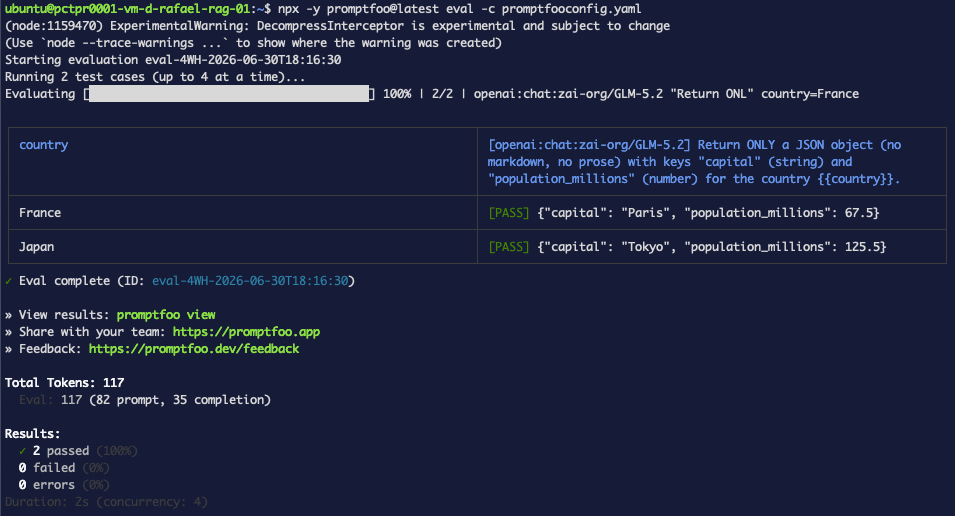
<h2 class="anchor anchorTargetStickyNavbar_Vzrq" id="step-8--validate-structured-output-json-schema">Step 8 — Validate structured output (JSON schema)<a href="https://wec.wiline.com/docs/tutorials/eval-models-promptfoo-wiline-inference/#step-8--validate-structured-output-json-schema" class="hash-link" aria-label="Direct link to Step 8 — Validate structured output (JSON schema)" title="Direct link to Step 8 — Validate structured output (JSON schema)" translate="no">​</a></h2>
<p>Real apps want JSON, not prose. <code>is-json</code> checks the output is valid JSON <strong>and</strong> matches a
schema in one assertion:</p>
<div class="language-bash codeBlockContainer_Ckt0 theme-code-block" style="--prism-color:#393A34;--prism-background-color:#f6f8fa"><div class="codeBlockContent_QJqH"><pre tabindex="0" class="prism-code language-bash codeBlock_bY9V thin-scrollbar" style="color:#393A34;background-color:#f6f8fa"><code class="codeBlockLines_e6Vv"><div class="token-line" style="color:#393A34"><span class="token plain">cat &gt; promptfooconfig.yaml &lt;&lt;'EOF'</span><br></div><div class="token-line" style="color:#393A34"><span class="token plain">description: "WEC Inference API eval — JSON schema validation"</span><br></div><div class="token-line" style="color:#393A34"><span class="token plain">providers:</span><br></div><div class="token-line" style="color:#393A34"><span class="token plain">  - id: openai:chat:zai-org/GLM-5.2</span><br></div><div class="token-line" style="color:#393A34"><span class="token plain">    config:</span><br></div><div class="token-line" style="color:#393A34"><span class="token plain">      apiBaseUrl: https://inference.wiline.com/v1</span><br></div><div class="token-line" style="color:#393A34"><span class="token plain">      apiKeyEnvar: WEC_API_KEY</span><br></div><div class="token-line" style="color:#393A34"><span class="token plain">      temperature: 0</span><br></div><div class="token-line" style="color:#393A34"><span class="token plain">prompts:</span><br></div><div class="token-line" style="color:#393A34"><span class="token plain">  - 'Return ONLY a JSON object (no markdown, no prose) with keys "capital" (string) and "population_millions" (number) for the country {{country}}.'</span><br></div><div class="token-line" style="color:#393A34"><span class="token plain">defaultTest:</span><br></div><div class="token-line" style="color:#393A34"><span class="token plain">  assert:</span><br></div><div class="token-line" style="color:#393A34"><span class="token plain">    - type: is-json</span><br></div><div class="token-line" style="color:#393A34"><span class="token plain">      value:</span><br></div><div class="token-line" style="color:#393A34"><span class="token plain">        type: object</span><br></div><div class="token-line" style="color:#393A34"><span class="token plain">        required: [capital, population_millions]</span><br></div><div class="token-line" style="color:#393A34"><span class="token plain">        properties:</span><br></div><div class="token-line" style="color:#393A34"><span class="token plain">          capital: { type: string }</span><br></div><div class="token-line" style="color:#393A34"><span class="token plain">          population_millions: { type: number }</span><br></div><div class="token-line" style="color:#393A34"><span class="token plain">tests:</span><br></div><div class="token-line" style="color:#393A34"><span class="token plain">  - vars: { country: France }</span><br></div><div class="token-line" style="color:#393A34"><span class="token plain">    assert: [{ type: icontains, value: Paris }]</span><br></div><div class="token-line" style="color:#393A34"><span class="token plain">  - vars: { country: Japan }</span><br></div><div class="token-line" style="color:#393A34"><span class="token plain">    assert: [{ type: icontains, value: Tokyo }]</span><br></div><div class="token-line" style="color:#393A34"><span class="token plain">EOF</span><br></div><div class="token-line" style="color:#393A34"><span class="token plain">npx -y promptfoo@latest eval -c promptfooconfig.yaml</span><br></div></code></pre></div></div>
<p><img decoding="async" loading="lazy" alt="Terminal: JSON schema eval, France and Japan both PASS with clean JSON output" src="https://wec.wiline.com/docs/assets/images/promptfoo-json-schema-82dcc59881029f9bc0134dcf5a5c5ea2.png" width="955" height="516" class="img_ev3q">
<strong>Figure 12.</strong> GLM-5.2 returns compact, schema-valid JSON on the first try.</p>
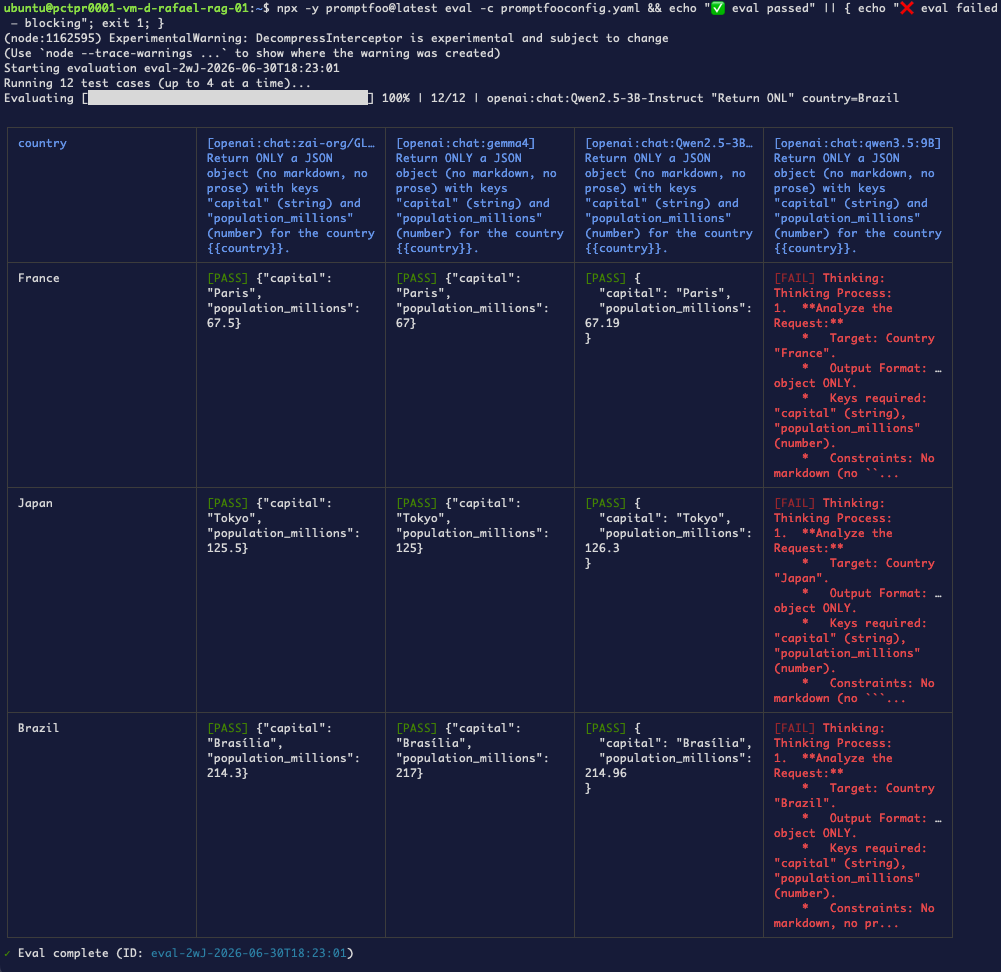
<h2 class="anchor anchorTargetStickyNavbar_Vzrq" id="step-9--the-payoff-compare-every-wec-model">Step 9 — The payoff: compare every WEC model<a href="https://wec.wiline.com/docs/tutorials/eval-models-promptfoo-wiline-inference/#step-9--the-payoff-compare-every-wec-model" class="hash-link" aria-label="Direct link to Step 9 — The payoff: compare every WEC model" title="Direct link to Step 9 — The payoff: compare every WEC model" translate="no">​</a></h2>
<p>Here's what you can't get anywhere else — the same strict-JSON test across <strong>all</strong> the chat
models on your account:</p>
<div class="language-bash codeBlockContainer_Ckt0 theme-code-block" style="--prism-color:#393A34;--prism-background-color:#f6f8fa"><div class="codeBlockContent_QJqH"><pre tabindex="0" class="prism-code language-bash codeBlock_bY9V thin-scrollbar" style="color:#393A34;background-color:#f6f8fa"><code class="codeBlockLines_e6Vv"><div class="token-line" style="color:#393A34"><span class="token plain">cat &gt; promptfooconfig.yaml &lt;&lt;'EOF'</span><br></div><div class="token-line" style="color:#393A34"><span class="token plain">description: "WEC Inference API eval — model matrix"</span><br></div><div class="token-line" style="color:#393A34"><span class="token plain">providers:</span><br></div><div class="token-line" style="color:#393A34"><span class="token plain">  - id: openai:chat:zai-org/GLM-5.2</span><br></div><div class="token-line" style="color:#393A34"><span class="token plain">    config: { apiBaseUrl: https://inference.wiline.com/v1, apiKeyEnvar: WEC_API_KEY, temperature: 0 }</span><br></div><div class="token-line" style="color:#393A34"><span class="token plain">  - id: openai:chat:gemma4</span><br></div><div class="token-line" style="color:#393A34"><span class="token plain">    config: { apiBaseUrl: https://inference.wiline.com/v1, apiKeyEnvar: WEC_API_KEY, temperature: 0 }</span><br></div><div class="token-line" style="color:#393A34"><span class="token plain">  - id: openai:chat:Qwen2.5-3B-Instruct</span><br></div><div class="token-line" style="color:#393A34"><span class="token plain">    config: { apiBaseUrl: https://inference.wiline.com/v1, apiKeyEnvar: WEC_API_KEY, temperature: 0 }</span><br></div><div class="token-line" style="color:#393A34"><span class="token plain">  - id: openai:chat:qwen3.5:9B</span><br></div><div class="token-line" style="color:#393A34"><span class="token plain">    config: { apiBaseUrl: https://inference.wiline.com/v1, apiKeyEnvar: WEC_API_KEY, temperature: 0 }</span><br></div><div class="token-line" style="color:#393A34"><span class="token plain">prompts:</span><br></div><div class="token-line" style="color:#393A34"><span class="token plain">  - 'Return ONLY a JSON object (no markdown, no prose) with keys "capital" (string) and "population_millions" (number) for the country {{country}}.'</span><br></div><div class="token-line" style="color:#393A34"><span class="token plain">defaultTest:</span><br></div><div class="token-line" style="color:#393A34"><span class="token plain">  assert:</span><br></div><div class="token-line" style="color:#393A34"><span class="token plain">    - type: is-json</span><br></div><div class="token-line" style="color:#393A34"><span class="token plain">      value:</span><br></div><div class="token-line" style="color:#393A34"><span class="token plain">        type: object</span><br></div><div class="token-line" style="color:#393A34"><span class="token plain">        required: [capital, population_millions]</span><br></div><div class="token-line" style="color:#393A34"><span class="token plain">        properties:</span><br></div><div class="token-line" style="color:#393A34"><span class="token plain">          capital: { type: string }</span><br></div><div class="token-line" style="color:#393A34"><span class="token plain">          population_millions: { type: number }</span><br></div><div class="token-line" style="color:#393A34"><span class="token plain">tests:</span><br></div><div class="token-line" style="color:#393A34"><span class="token plain">  - vars: { country: France }</span><br></div><div class="token-line" style="color:#393A34"><span class="token plain">    assert: [{ type: icontains, value: Paris }]</span><br></div><div class="token-line" style="color:#393A34"><span class="token plain">  - vars: { country: Japan }</span><br></div><div class="token-line" style="color:#393A34"><span class="token plain">    assert: [{ type: icontains, value: Tokyo }]</span><br></div><div class="token-line" style="color:#393A34"><span class="token plain">  - vars: { country: Brazil }</span><br></div><div class="token-line" style="color:#393A34"><span class="token plain">    assert: [{ type: icontains, value: Bras }]</span><br></div><div class="token-line" style="color:#393A34"><span class="token plain">EOF</span><br></div><div class="token-line" style="color:#393A34"><span class="token plain">npx -y promptfoo@latest eval -c promptfooconfig.yaml</span><br></div></code></pre></div></div>
<p><img decoding="async" loading="lazy" alt="Terminal: 4-model matrix results table — GLM, gemma4, Qwen2.5 all PASS; qwen3.5:9B all FAIL with reasoning text" src="https://wec.wiline.com/docs/assets/images/promptfoo-model-matrix-table-fcebe135ddd276ef881fc83a726c6b96.png" width="1001" height="972" class="img_ev3q">
<strong>Figure 13a.</strong> 12 test cases across 4 models — 9 pass, 3 fail. <code>qwen3.5:9B</code> emits its chain-of-thought instead of JSON.</p>
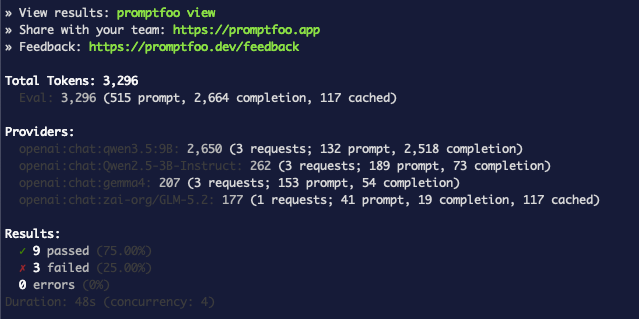
<p><img decoding="async" loading="lazy" alt="Terminal: model matrix token summary — qwen3.5:9B burned 2,650 tokens vs ~200 for the others" src="https://wec.wiline.com/docs/assets/images/promptfoo-model-matrix-summary-96e3ce6b439ae8d487aef486120dbe97.png" width="639" height="319" class="img_ev3q">
<strong>Figure 13b.</strong> The token breakdown tells the real story: the reasoning model cost 13× more for the same task.</p>

<table><thead><tr><th>Model</th><th>Strict JSON?</th><th>Notes</th><th>Tokens (3 calls)</th></tr></thead><tbody><tr><td><code>zai-org/GLM-5.2</code></td><td>✅ all pass</td><td>compact JSON</td><td>177</td></tr><tr><td><code>gemma4</code></td><td>✅ all pass</td><td>integer populations</td><td>207</td></tr><tr><td><code>Qwen2.5-3B-Instruct</code></td><td>✅ all pass</td><td>pretty-printed, precise</td><td>262</td></tr><tr><td><code>qwen3.5:9B</code></td><td>❌ all fail</td><td><strong>reasoning model</strong> — emits its "thinking" instead of raw JSON</td><td><strong>2,650</strong></td></tr></tbody></table>
<p>Two lessons fall out immediately:</p>
<ul>
<li class=""><strong><code>qwen3.5:9B</code> is a reasoning model.</strong> It "thinks out loud," so it breaks strict JSON
unless you strip the reasoning or use a response-format constraint. Picking it for
structured output would silently fail.</li>
<li class=""><strong>Cost varies ~13×.</strong> The reasoning model burned 2,650 tokens for the same task the others
did in ~200. For a JSON extraction job, the smaller models are both correct <em>and</em> far
cheaper.</li>
</ul>
<p>That's a model-selection decision you can now defend with data — for <em>your</em> workloads, not a
generic leaderboard.</p>
<h2 class="anchor anchorTargetStickyNavbar_Vzrq" id="step-10--make-it-a-gate">Step 10 — Make it a gate<a href="https://wec.wiline.com/docs/tutorials/eval-models-promptfoo-wiline-inference/#step-10--make-it-a-gate" class="hash-link" aria-label="Direct link to Step 10 — Make it a gate" title="Direct link to Step 10 — Make it a gate" translate="no">​</a></h2>
<p>Promptfoo exits <strong>non-zero (<code>100</code>)</strong> when any test fails. Verify this first:</p>
<div class="language-bash codeBlockContainer_Ckt0 theme-code-block" style="--prism-color:#393A34;--prism-background-color:#f6f8fa"><div class="codeBlockContent_QJqH"><pre tabindex="0" class="prism-code language-bash codeBlock_bY9V thin-scrollbar" style="color:#393A34;background-color:#f6f8fa"><code class="codeBlockLines_e6Vv"><div class="token-line" style="color:#393A34"><span class="token plain">npx -y promptfoo@latest eval -c promptfooconfig.yaml &gt; /dev/null 2&gt;&amp;1; echo "exit code: $?"</span><br></div></code></pre></div></div>
<p><img decoding="async" loading="lazy" alt="Terminal: exit code: 100" src="https://wec.wiline.com/docs/assets/images/promptfoo-exit-code-a3471bde65e7ebf24feaf0d964a3b7eb.png" width="652" height="70" class="img_ev3q">
<strong>Figure 14.</strong> Exit code 100 confirms Promptfoo signals failure reliably — exactly what CI needs.</p>
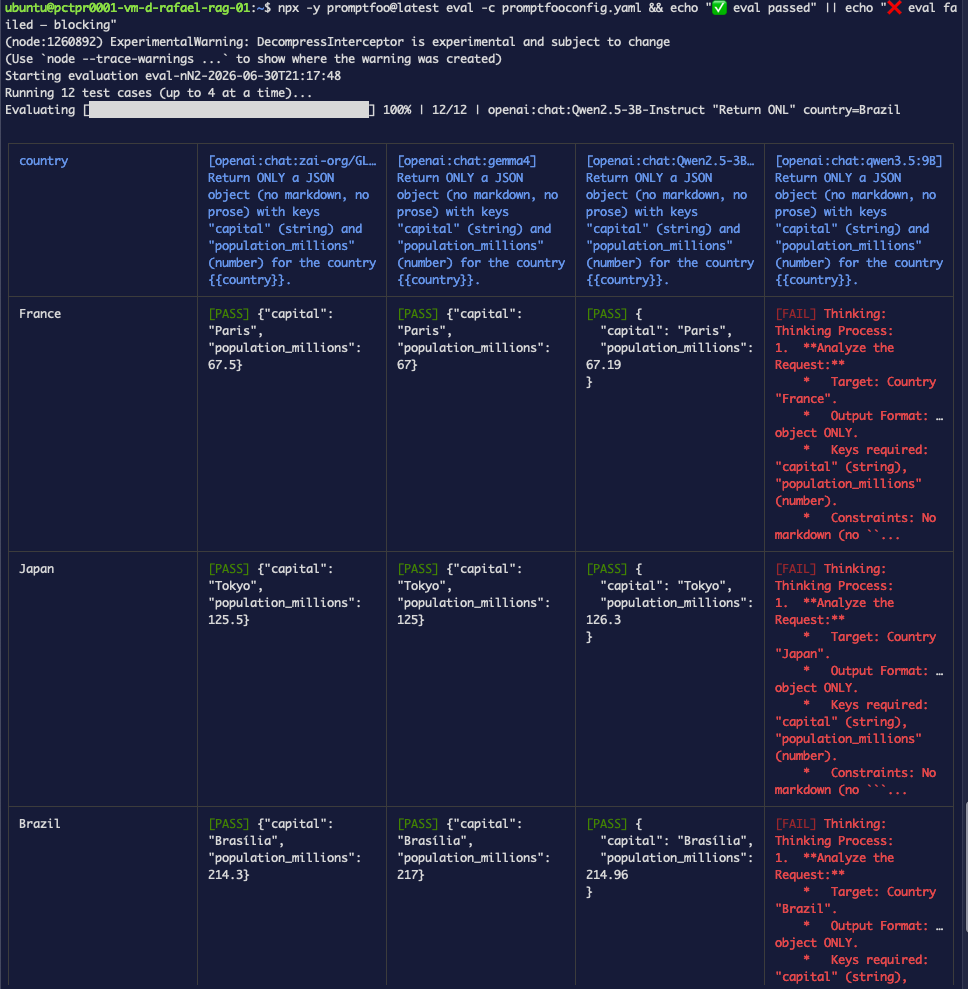
<p>Wire it up as a gate:</p>
<div class="language-bash codeBlockContainer_Ckt0 theme-code-block" style="--prism-color:#393A34;--prism-background-color:#f6f8fa"><div class="codeBlockContent_QJqH"><pre tabindex="0" class="prism-code language-bash codeBlock_bY9V thin-scrollbar" style="color:#393A34;background-color:#f6f8fa"><code class="codeBlockLines_e6Vv"><div class="token-line" style="color:#393A34"><span class="token plain">npx -y promptfoo@latest eval -c promptfooconfig.yaml \</span><br></div><div class="token-line" style="color:#393A34"><span class="token plain">  &amp;&amp; echo "✅ eval passed" \</span><br></div><div class="token-line" style="color:#393A34"><span class="token plain">  || { echo "❌ eval failed — blocking"; exit 1; }</span><br></div></code></pre></div></div>
<p><img decoding="async" loading="lazy" alt="Terminal: CI gate eval table — same 4-model results, 9 pass / 3 fail" src="https://wec.wiline.com/docs/assets/images/promptfoo-ci-gate-table-7067b62a9b737ed79e3906b6da54ea2a.png" width="968" height="989" class="img_ev3q">
<strong>Figure 15a.</strong> The gate re-runs the matrix eval from cache — same 9/3 result.</p>
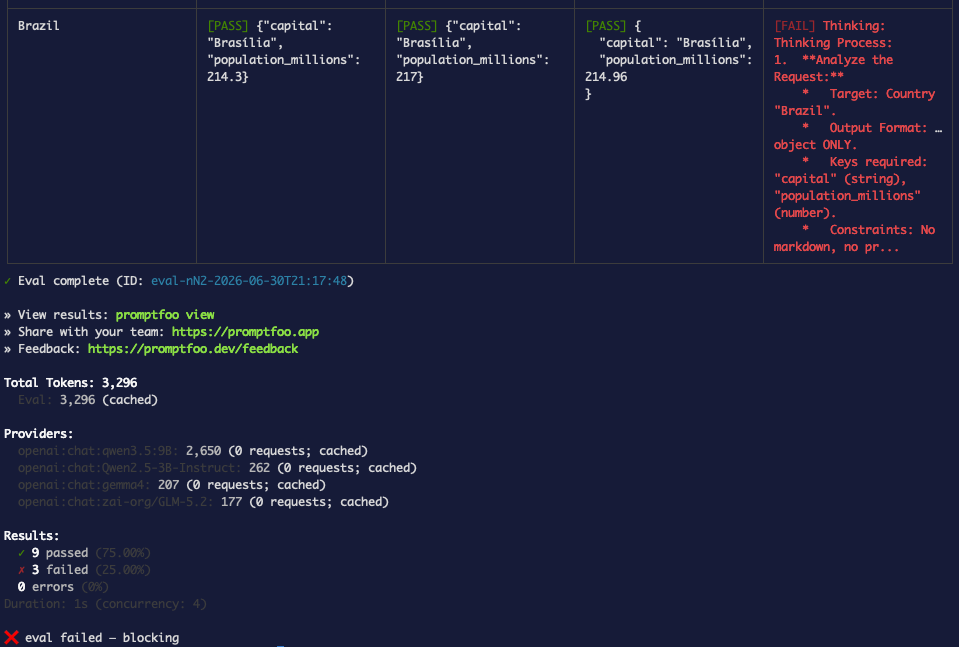
<p><img decoding="async" loading="lazy" alt="Terminal: ❌ eval failed — blocking" src="https://wec.wiline.com/docs/assets/images/promptfoo-ci-gate-result-8765593b4f037c480e7fcef844ff6eb4.png" width="959" height="647" class="img_ev3q">
<strong>Figure 15b.</strong> Promptfoo exits non-zero, the <code>||</code> branch fires, and the gate blocks.</p>
<div class="theme-admonition theme-admonition-tip admonition_xJq3 alert alert--success"><div class="admonitionHeading_Gvgb"><span class="admonitionIcon_Rf37"><svg viewBox="0 0 12 16"><path fill-rule="evenodd" d="M6.5 0C3.48 0 1 2.19 1 5c0 .92.55 2.25 1 3 1.34 2.25 1.78 2.78 2 4v1h5v-1c.22-1.22.66-1.75 2-4 .45-.75 1-2.08 1-3 0-2.81-2.48-5-5.5-5zm3.64 7.48c-.25.44-.47.8-.67 1.11-.86 1.41-1.25 2.06-1.45 3.23-.02.05-.02.11-.02.17H5c0-.06 0-.13-.02-.17-.2-1.17-.59-1.83-1.45-3.23-.2-.31-.42-.67-.67-1.11C2.44 6.78 2 5.65 2 5c0-2.2 2.02-4 4.5-4 1.22 0 2.36.42 3.22 1.19C10.55 2.94 11 3.94 11 5c0 .66-.44 1.78-.86 2.48zM4 14h5c-.23 1.14-1.3 2-2.5 2s-2.27-.86-2.5-2z"></path></svg></span>tip</div><div class="admonitionContent_BuS1"><p>Never run the <code>exit 1</code> variant in your interactive shell — see <a href="https://wec.wiline.com/docs/tutorials/eval-models-promptfoo-wiline-inference/#3-exit-1-closes-your-ssh-session" class="">Troubleshooting #3</a>.</p></div></div>
<p>In CI, you don't even need the <code>exit 1</code> — the non-zero exit fails the job. On GitLab:</p>
<div class="language-yaml codeBlockContainer_Ckt0 theme-code-block" style="--prism-color:#393A34;--prism-background-color:#f6f8fa"><div class="codeBlockContent_QJqH"><pre tabindex="0" class="prism-code language-yaml codeBlock_bY9V thin-scrollbar" style="color:#393A34;background-color:#f6f8fa"><code class="codeBlockLines_e6Vv"><div class="token-line" style="color:#393A34"><span class="token key atrule" style="color:#00a4db">eval</span><span class="token punctuation" style="color:#393A34">:</span><span class="token plain"></span><br></div><div class="token-line" style="color:#393A34"><span class="token plain">  </span><span class="token key atrule" style="color:#00a4db">image</span><span class="token punctuation" style="color:#393A34">:</span><span class="token plain"> node</span><span class="token punctuation" style="color:#393A34">:</span><span class="token number" style="color:#36acaa">22</span><span class="token plain"></span><br></div><div class="token-line" style="color:#393A34"><span class="token plain">  </span><span class="token key atrule" style="color:#00a4db">script</span><span class="token punctuation" style="color:#393A34">:</span><span class="token plain"></span><br></div><div class="token-line" style="color:#393A34"><span class="token plain">    </span><span class="token punctuation" style="color:#393A34">-</span><span class="token plain"> npx </span><span class="token punctuation" style="color:#393A34">-</span><span class="token plain">y promptfoo@latest eval </span><span class="token punctuation" style="color:#393A34">-</span><span class="token plain">c promptfooconfig.yaml</span><br></div><div class="token-line" style="color:#393A34"><span class="token plain">  </span><span class="token comment" style="color:#999988;font-style:italic"># WEC_API_KEY is set as a masked CI/CD variable — never commit it.</span><br></div></code></pre></div></div>
<p>Now a prompt change that quietly breaks JSON output, or a model swap that doubles latency,
fails the pipeline before it reaches users.</p>
<h2 class="anchor anchorTargetStickyNavbar_Vzrq" id="troubleshooting-real-errors">Troubleshooting (real errors)<a href="https://wec.wiline.com/docs/tutorials/eval-models-promptfoo-wiline-inference/#troubleshooting-real-errors" class="hash-link" aria-label="Direct link to Troubleshooting (real errors)" title="Direct link to Troubleshooting (real errors)" translate="no">​</a></h2>
<h3 class="anchor anchorTargetStickyNavbar_Vzrq" id="1-bytestring-error-on-first-eval">1. ByteString error on first eval<a href="https://wec.wiline.com/docs/tutorials/eval-models-promptfoo-wiline-inference/#1-bytestring-error-on-first-eval" class="hash-link" aria-label="Direct link to 1. ByteString error on first eval" title="Direct link to 1. ByteString error on first eval" translate="no">​</a></h3>
<div class="language-text codeBlockContainer_Ckt0 theme-code-block" style="--prism-color:#393A34;--prism-background-color:#f6f8fa"><div class="codeBlockTitle_OeMC">Output</div><div class="codeBlockContent_QJqH"><pre tabindex="0" class="prism-code language-text codeBlock_bY9V thin-scrollbar" style="color:#393A34;background-color:#f6f8fa"><code class="codeBlockLines_e6Vv"><div class="token-line" style="color:#393A34"><span class="token plain">API call error: TypeError: Cannot convert argument to a ByteString because</span><br></div><div class="token-line" style="color:#393A34"><span class="token plain">the character at index 32 has a value of 8232 which is greater than 255.</span><br></div></code></pre></div></div>
<p><img decoding="async" loading="lazy" alt="Terminal: ByteString error, both cases ERROR" src="https://wec.wiline.com/docs/assets/images/promptfoo-invisible-char-error-540ad4b2ab9242c120ae80870319df01.png" width="996" height="627" class="img_ev3q">
<strong>Figure 2.</strong> Every API call errors before reaching the server — the key never even leaves the machine.</p>

<p><strong>Cause:</strong> The pasted key contains an invisible Unicode character — U+2028 (line separator). Some terminals and clipboard managers insert it silently when copying from certain sources.</p>
<p><strong>Fix:</strong> Strip non-printable characters from the key:</p>
<div class="language-bash codeBlockContainer_Ckt0 theme-code-block" style="--prism-color:#393A34;--prism-background-color:#f6f8fa"><div class="codeBlockContent_QJqH"><pre tabindex="0" class="prism-code language-bash codeBlock_bY9V thin-scrollbar" style="color:#393A34;background-color:#f6f8fa"><code class="codeBlockLines_e6Vv"><div class="token-line" style="color:#393A34"><span class="token plain">export WEC_API_KEY=$(printf '%s' "$WEC_API_KEY" | LC_ALL=C tr -cd '[:print:]')</span><br></div><div class="token-line" style="color:#393A34"><span class="token plain">printf 'len=%s\n' "$(printf %s "$WEC_API_KEY" | wc -c)"</span><br></div><div class="token-line" style="color:#393A34"><span class="token plain"># len=25</span><br></div></code></pre></div></div>
<p><img decoding="async" loading="lazy" alt="Terminal: key strip command + len=25 confirmation" src="https://wec.wiline.com/docs/assets/images/promptfoo-key-strip-1a9c78d8c230c69db3e89eecfdfa24ca.png" width="712" height="70" class="img_ev3q">
<strong>Figure 3.</strong> After stripping, the key length confirms no extra characters remain. Re-run the eval — it passes.</p>
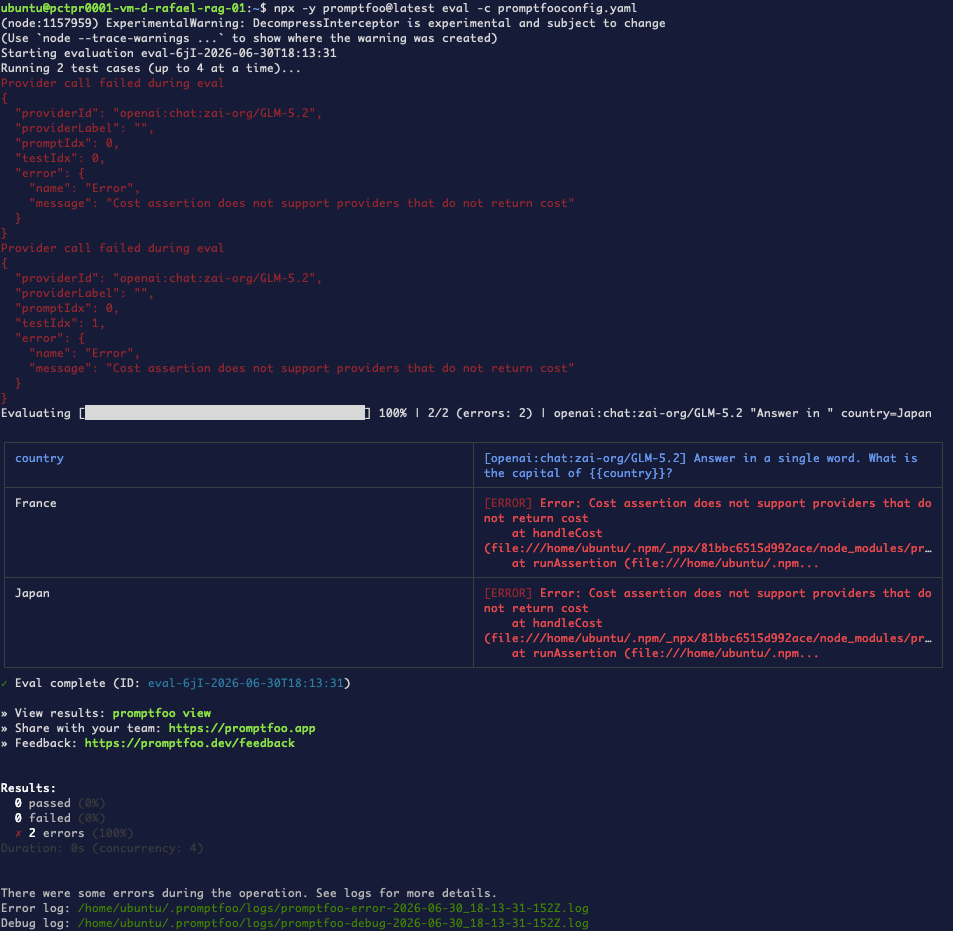
<hr>
<h3 class="anchor anchorTargetStickyNavbar_Vzrq" id="2-cost-assertion-errors-immediately">2. Cost assertion errors immediately<a href="https://wec.wiline.com/docs/tutorials/eval-models-promptfoo-wiline-inference/#2-cost-assertion-errors-immediately" class="hash-link" aria-label="Direct link to 2. Cost assertion errors immediately" title="Direct link to 2. Cost assertion errors immediately" translate="no">​</a></h3>
<div class="language-text codeBlockContainer_Ckt0 theme-code-block" style="--prism-color:#393A34;--prism-background-color:#f6f8fa"><div class="codeBlockTitle_OeMC">Output</div><div class="codeBlockContent_QJqH"><pre tabindex="0" class="prism-code language-text codeBlock_bY9V thin-scrollbar" style="color:#393A34;background-color:#f6f8fa"><code class="codeBlockLines_e6Vv"><div class="token-line" style="color:#393A34"><span class="token plain">Error: Cost assertion does not support providers that do not return cost</span><br></div></code></pre></div></div>
<p><img decoding="async" loading="lazy" alt="Terminal: cost assertion, 2 errors" src="https://wec.wiline.com/docs/assets/images/promptfoo-cost-error-1615b4a5c8b0973274d32c6d658a2e12.png" width="953" height="931" class="img_ev3q">
<strong>Figure 10.</strong> The WEC Inference API doesn't return a cost field in its responses.</p>

<p><strong>Cause:</strong> Promptfoo calculates cost by looking up a price-per-token for the model in its built-in price list and multiplying by the tokens used. It has prices for the big hosted models but not for WEC's self-hosted model names, so it has no price to apply and the assertion fails. (Most APIs, including OpenAI, don't return a dollar cost in the response — tools compute it.)</p>
<p><strong>Fix:</strong> Skip the <code>cost</code> assertion entirely. Track spend from the <code>Total Tokens</code> line Promptfoo prints at the end of every run, and use <code>max_tokens</code> in the provider config to cap per-call token usage.</p>
<hr>
<h3 class="anchor anchorTargetStickyNavbar_Vzrq" id="3-exit-1-closes-your-ssh-session">3. <code>exit 1</code> closes your SSH session<a href="https://wec.wiline.com/docs/tutorials/eval-models-promptfoo-wiline-inference/#3-exit-1-closes-your-ssh-session" class="hash-link" aria-label="Direct link to 3-exit-1-closes-your-ssh-session" title="Direct link to 3-exit-1-closes-your-ssh-session" translate="no">​</a></h3>
<div class="language-text codeBlockContainer_Ckt0 theme-code-block" style="--prism-color:#393A34;--prism-background-color:#f6f8fa"><div class="codeBlockTitle_OeMC">Output</div><div class="codeBlockContent_QJqH"><pre tabindex="0" class="prism-code language-text codeBlock_bY9V thin-scrollbar" style="color:#393A34;background-color:#f6f8fa"><code class="codeBlockLines_e6Vv"><div class="token-line" style="color:#393A34"><span class="token plain">❌ eval failed — blocking</span><br></div><div class="token-line" style="color:#393A34"><span class="token plain">logout</span><br></div><div class="token-line" style="color:#393A34"><span class="token plain">Connection to 10.80.4.212 closed.</span><br></div></code></pre></div></div>
<p><strong>Cause:</strong> Running <code>|| { echo "❌ eval failed — blocking"; exit 1; }</code> directly in an interactive shell exits the shell process itself — which, over SSH, closes the connection.</p>
<p><strong>Fix:</strong> Put the gate in a non-interactive context: a <code>Makefile</code> target, an <code>npm</code> script, a git <code>pre-commit</code> hook, or a CI job. In those environments <code>exit 1</code> fails the job without touching your terminal. If you need to test the gate locally, use <code>|| echo "❌ eval failed"</code> (without <code>exit 1</code>) to see the output safely.</p>
<hr>
<h2 class="anchor anchorTargetStickyNavbar_Vzrq" id="whats-next">What's next<a href="https://wec.wiline.com/docs/tutorials/eval-models-promptfoo-wiline-inference/#whats-next" class="hash-link" aria-label="Direct link to What's next" title="Direct link to What's next" translate="no">​</a></h2>
<p>You've gone from "looks good to me" to a real, automatable eval harness on WEC — with
deterministic checks, guardrails, schema validation, model-graded rubrics, a model matrix,
and a CI gate.</p>
<p>Coming up in this series:</p>
<ul>
<li class=""><strong><a class="" href="https://wec.wiline.com/docs/tutorials/structured-output-evals-wiline-inference/">Trustworthy JSON: schema-validate your model's structured output</a></strong>
— <strong>now available (part 2):</strong> recover fenced and reasoning-wrapped output with transforms,
compare models for JSON reliability, and gate it all in CI.</li>
<li class=""><strong>Model-graded evals done right</strong> — calibrating <code>llm-rubric</code>, factuality scoring, and
multi-judge checks so your grader is trustworthy.</li>
<li class=""><strong>Catching hallucinations</strong> — pairing these techniques with WEC's
<a href="https://wec.wiline.com/resources/rag-hallucination-eval" target="_blank" rel="noopener noreferrer" class="">RAG hallucination evaluation</a>.</li>
<li class=""><strong>Evaluating audio</strong> — scoring Whisper transcription accuracy on the WEC Inference API.</li>
</ul>]]></content>
        <author>
            <name>Rafael Fernandes</name>
            <uri>https://www.linkedin.com/in/rafaelmacariofernandes/</uri>
        </author>
        <category label="ai" term="ai"/>
        <category label="evals" term="evals"/>
        <category label="promptfoo" term="promptfoo"/>
        <category label="inference" term="inference"/>
        <category label="testing" term="testing"/>
        <category label="observability" term="observability"/>
    </entry>
    <entry>
        <title type="html"><![CDATA[Self-host the Hermes Agent with persistent memory]]></title>
        <id>https://wec.wiline.com/docs/tutorials/self-host-hermes-agent/</id>
        <link href="https://wec.wiline.com/docs/tutorials/self-host-hermes-agent/"/>
        <updated>2026-06-25T00:00:00.000Z</updated>
        <summary type="html"><![CDATA[Deploy Nous Research's open-source Hermes Agent on your WEC Instance — with SQLite-backed persistent memory that survives a full reboot. Real install, model config, and a memory-survives-restart test.]]></summary>
        <content type="html"><![CDATA[<div class="tutorialHero"><img class="tutorialHero__brand" src="https://wec.wiline.com/docs/assets/images/hermesagent-c76bbe81610ae2e70b0950e0f96bec8a.png" alt="Hermes Agent"><span class="tutorialHero__plus">+</span><img class="tutorialHero__brand" src="https://wec.wiline.com/docs/assets/images/SQLite370-e02c30e84f9e098787bb57701b0b7232.png" alt="SQLite"></div>
<p><a href="https://hermes-agent.nousresearch.com/" target="_blank" rel="noopener noreferrer" class="">Hermes Agent</a> is Nous Research's open-source
(MIT) AI agent — "the agent that grows with you." Its standout feature is
<strong>persistent memory</strong>: it learns your projects and <strong>doesn't forget across
restarts</strong>. This guide deploys it on the <strong>same WEC Instance</strong> you already use for
OpenClaw, points it at a model, and proves the memory survives a full reboot.</p>
<!-- -->
<div class="theme-admonition theme-admonition-info admonition_xJq3 alert alert--info"><div class="admonitionHeading_Gvgb"><span class="admonitionIcon_Rf37"><svg viewBox="0 0 14 16"><path fill-rule="evenodd" d="M7 2.3c3.14 0 5.7 2.56 5.7 5.7s-2.56 5.7-5.7 5.7A5.71 5.71 0 0 1 1.3 8c0-3.14 2.56-5.7 5.7-5.7zM7 1C3.14 1 0 4.14 0 8s3.14 7 7 7 7-3.14 7-7-3.14-7-7-7zm1 3H6v5h2V4zm0 6H6v2h2v-2z"></path></svg></span>Reproducibility</div><div class="admonitionContent_BuS1"><p>Runs on the <strong>same WEC Instance</strong> from the OpenClaw series — no new VM. The installer
pulls its own Python (via <code>uv</code>), Node.js browser tools, and a Playwright Chromium
automatically. State lives in <code>~/.hermes/</code>. The messaging gateway runs as a <strong>systemd
user service</strong>, so it coexists with the OpenClaw Docker stack. Captured live on Ubuntu
22.04 with <code>hermes</code> <strong>v0.17.0</strong>.</p></div></div>
<h2 class="anchor anchorTargetStickyNavbar_Vzrq" id="why-persistent-memory-matters">Why persistent memory matters<a href="https://wec.wiline.com/docs/tutorials/self-host-hermes-agent/#why-persistent-memory-matters" class="hash-link" aria-label="Direct link to Why persistent memory matters" title="Direct link to Why persistent memory matters" translate="no">​</a></h2>
<p>An agent that forgets on every restart is a toy. Hermes keeps a <strong>durable store on
disk</strong> under <code>~/.hermes/</code>:</p>
<ul>
<li class=""><strong><code>~/.hermes/memories/MEMORY.md</code></strong> — a human-readable file of facts the agent has
chosen to remember.</li>
<li class=""><strong><code>~/.hermes/state.db</code></strong> — a <strong>SQLite</strong> database holding every session and message,
with <strong>FTS5 full-text search</strong> indexes layered on top so the agent can search its own
history.</li>
</ul>
<p>A deploy, crash, or reboot doesn't wipe what it learned. That's the difference between
a chat demo and an agent you can rely on day to day — and it's exactly what we test at
the end.</p>
<h2 class="anchor anchorTargetStickyNavbar_Vzrq" id="the-moving-parts">The moving parts<a href="https://wec.wiline.com/docs/tutorials/self-host-hermes-agent/#the-moving-parts" class="hash-link" aria-label="Direct link to The moving parts" title="Direct link to The moving parts" translate="no">​</a></h2>
<p>Everything runs on one WEC Instance. Hermes talks to a model over the WEC Inference API,
keeps its memory on local disk, and runs as a systemd user service — so it restarts itself
after a reboot and its memory is still there:</p>
<!-- -->
<h2 class="anchor anchorTargetStickyNavbar_Vzrq" id="prerequisites">Prerequisites<a href="https://wec.wiline.com/docs/tutorials/self-host-hermes-agent/#prerequisites" class="hash-link" aria-label="Direct link to Prerequisites" title="Direct link to Prerequisites" translate="no">​</a></h2>
<ul>
<li class="">An existing <strong>WEC Instance</strong> with shell access (the OpenClaw box works).</li>
<li class="">A model: either a <strong>Nous Portal</strong> login, or your own provider API key (we use an
OpenAI key here; <strong>WEC Models</strong> with <code>glm-5.2</code> works too).</li>
<li class="">Nothing to pre-install — the installer handles Python, Node.js, and the browser
engine.</li>
</ul>
<h2 class="anchor anchorTargetStickyNavbar_Vzrq" id="step-1--install-hermes">Step 1 — Install Hermes<a href="https://wec.wiline.com/docs/tutorials/self-host-hermes-agent/#step-1--install-hermes" class="hash-link" aria-label="Direct link to Step 1 — Install Hermes" title="Direct link to Step 1 — Install Hermes" translate="no">​</a></h2>
<div class="language-bash codeBlockContainer_Ckt0 theme-code-block" style="--prism-color:#393A34;--prism-background-color:#f6f8fa"><div class="codeBlockContent_QJqH"><pre tabindex="0" class="prism-code language-bash codeBlock_bY9V thin-scrollbar" style="color:#393A34;background-color:#f6f8fa"><code class="codeBlockLines_e6Vv"><div class="token-line" style="color:#393A34"><span class="token plain">curl -fsSL https://hermes-agent.nousresearch.com/install.sh | bash</span><br></div></code></pre></div></div>
<p><img decoding="async" loading="lazy" alt="Running the install one-liner — the Hermes installer starts resolving and downloading packages" src="https://wec.wiline.com/docs/assets/images/hermes-install-start-1f3d29fcdd9d66dd1e5c1bc28b3c9e5d.png" width="660" height="341" class="img_ev3q"></p>
<p>The installer resolves a Python virtual environment with <code>uv</code>, installs the Node.js
browser tools, downloads a Playwright Chromium, syncs the bundled skills, and drops a
<code>hermes</code> launcher into <code>~/.local/bin</code>:</p>
<div class="language-text codeBlockContainer_Ckt0 theme-code-block" style="--prism-color:#393A34;--prism-background-color:#f6f8fa"><div class="codeBlockTitle_OeMC">Output</div><div class="codeBlockContent_QJqH"><pre tabindex="0" class="prism-code language-text codeBlock_bY9V thin-scrollbar" style="color:#393A34;background-color:#f6f8fa"><code class="codeBlockLines_e6Vv"><div class="token-line" style="color:#393A34"><span class="token plain">✓ Main package installed (hash-verified via uv.lock)</span><br></div><div class="token-line" style="color:#393A34"><span class="token plain">✓ All dependencies installed</span><br></div><div class="token-line" style="color:#393A34"><span class="token plain">✓ Browser engine setup complete</span><br></div><div class="token-line" style="color:#393A34"><span class="token plain">✓ Installed hermes launcher → ~/.local/bin/hermes</span><br></div><div class="token-line" style="color:#393A34"><span class="token plain">✓ Configuration directory ready: ~/.hermes/</span><br></div><div class="token-line" style="color:#393A34"><span class="token plain">→ Starting setup wizard...</span><br></div></code></pre></div></div>
<p>It then launches the setup wizard automatically. Reload your shell afterward so the
<code>hermes</code> command is on your <code>PATH</code>:</p>
<div class="language-bash codeBlockContainer_Ckt0 theme-code-block" style="--prism-color:#393A34;--prism-background-color:#f6f8fa"><div class="codeBlockContent_QJqH"><pre tabindex="0" class="prism-code language-bash codeBlock_bY9V thin-scrollbar" style="color:#393A34;background-color:#f6f8fa"><code class="codeBlockLines_e6Vv"><div class="token-line" style="color:#393A34"><span class="token plain">source ~/.bashrc</span><br></div></code></pre></div></div>
<h2 class="anchor anchorTargetStickyNavbar_Vzrq" id="step-2--run-the-setup-wizard">Step 2 — Run the setup wizard<a href="https://wec.wiline.com/docs/tutorials/self-host-hermes-agent/#step-2--run-the-setup-wizard" class="hash-link" aria-label="Direct link to Step 2 — Run the setup wizard" title="Direct link to Step 2 — Run the setup wizard" translate="no">​</a></h2>
<p>The wizard walks through setup type, terminal backend, and messaging. On a box that
already ran OpenClaw, it offers to <strong>import</strong> the old config first — you can preview
what would be migrated before anything changes.</p>
<p>The first choice is <strong>how to set up Hermes</strong>:</p>
<ul>
<li class=""><strong>Quick Setup (Nous Portal)</strong> — one OAuth login, no API keys. The Portal bundles a
model and a tool gateway. <strong>Requires an active Nous Portal subscription.</strong></li>
<li class=""><strong>Full setup (bring your own keys)</strong> — you configure providers and paste your own
keys.</li>
</ul>
<p><img decoding="async" loading="lazy" alt="The &amp;quot;How would you like to set up Hermes?&amp;quot; prompt with Quick Setup, Full setup, and Blank Slate options" src="https://wec.wiline.com/docs/assets/images/hermes-setup-choice-0db3a3f64faec3d72e3477b075af1901.png" width="658" height="125" class="img_ev3q"></p>
<div class="theme-admonition theme-admonition-note admonition_xJq3 alert alert--secondary"><div class="admonitionHeading_Gvgb"><span class="admonitionIcon_Rf37"><svg viewBox="0 0 14 16"><path fill-rule="evenodd" d="M6.3 5.69a.942.942 0 0 1-.28-.7c0-.28.09-.52.28-.7.19-.18.42-.28.7-.28.28 0 .52.09.7.28.18.19.28.42.28.7 0 .28-.09.52-.28.7a1 1 0 0 1-.7.3c-.28 0-.52-.11-.7-.3zM8 7.99c-.02-.25-.11-.48-.31-.69-.2-.19-.42-.3-.69-.31H6c-.27.02-.48.13-.69.31-.2.2-.3.44-.31.69h1v3c.02.27.11.5.31.69.2.2.42.31.69.31h1c.27 0 .48-.11.69-.31.2-.19.3-.42.31-.69H8V7.98v.01zM7 2.3c-3.14 0-5.7 2.54-5.7 5.68 0 3.14 2.56 5.7 5.7 5.7s5.7-2.55 5.7-5.7c0-3.15-2.56-5.69-5.7-5.69v.01zM7 .98c3.86 0 7 3.14 7 7s-3.14 7-7 7-7-3.12-7-7 3.14-7 7-7z"></path></svg></span>What we actually did</div><div class="admonitionContent_BuS1"><p>We chose <strong>Quick Setup</strong> first. The Portal login showed a device code and sat at
<em>"Waiting for approval (polling)"</em> — it needs an active Portal subscription, which this
account didn't have. We pressed <strong>Ctrl+C</strong> to cancel and instead <strong>brought our own
model in Step 3</strong> (below) with an OpenAI key. If you <em>do</em> have a Portal plan, complete
the login here and you can skip Step 3.</p></div></div>
<p>For the rest of the wizard:</p>
<ul>
<li class=""><strong>Terminal backend:</strong> <em>Local</em> — commands run directly on this machine.</li>
<li class=""><strong>Messaging:</strong> <em>Skip</em> for now (you can wire up Telegram/Discord later with
<code>hermes setup gateway</code>).</li>
</ul>
<p>The wizard applies sensible agent defaults (max iterations, a 50% context-compression
threshold) and finishes with a tool-availability summary.</p>
<h2 class="anchor anchorTargetStickyNavbar_Vzrq" id="step-3--connect-a-model">Step 3 — Connect a model<a href="https://wec.wiline.com/docs/tutorials/self-host-hermes-agent/#step-3--connect-a-model" class="hash-link" aria-label="Direct link to Step 3 — Connect a model" title="Direct link to Step 3 — Connect a model" translate="no">​</a></h2>
<p>Out of the box the default model routes through the Nous Portal / OpenRouter and needs
a key. To use <strong>your own provider</strong> instead, run:</p>
<div class="language-bash codeBlockContainer_Ckt0 theme-code-block" style="--prism-color:#393A34;--prism-background-color:#f6f8fa"><div class="codeBlockContent_QJqH"><pre tabindex="0" class="prism-code language-bash codeBlock_bY9V thin-scrollbar" style="color:#393A34;background-color:#f6f8fa"><code class="codeBlockLines_e6Vv"><div class="token-line" style="color:#393A34"><span class="token plain">hermes setup model</span><br></div></code></pre></div></div>
<p>Then select <strong>OpenAI ▸ OpenAI API</strong>, paste your API key when prompted (it's written to
<code>~/.hermes/.env</code> — never echoed), accept the default base URL
<code>https://api.openai.com/v1</code>, and pick a model — we used <strong><code>gpt-5.5</code></strong>:</p>
<div class="language-text codeBlockContainer_Ckt0 theme-code-block" style="--prism-color:#393A34;--prism-background-color:#f6f8fa"><div class="codeBlockTitle_OeMC">Output</div><div class="codeBlockContent_QJqH"><pre tabindex="0" class="prism-code language-text codeBlock_bY9V thin-scrollbar" style="color:#393A34;background-color:#f6f8fa"><code class="codeBlockLines_e6Vv"><div class="token-line" style="color:#393A34"><span class="token plain">API key saved.</span><br></div><div class="token-line" style="color:#393A34"><span class="token plain">Base URL [https://api.openai.com/v1]:</span><br></div><div class="token-line" style="color:#393A34"><span class="token plain">Select default model:</span><br></div><div class="token-line" style="color:#393A34"><span class="token plain"> → (●) gpt-5.5</span><br></div></code></pre></div></div>
<p><img decoding="async" loading="lazy" alt="Choosing the default model in hermes setup model — gpt-5.5 selected from the OpenAI list" src="https://wec.wiline.com/docs/assets/images/hermes-model-select-2b0c5452d2e217ff8692c022badd9b28.png" width="661" height="545" class="img_ev3q"></p>
<div class="theme-admonition theme-admonition-tip admonition_xJq3 alert alert--success"><div class="admonitionHeading_Gvgb"><span class="admonitionIcon_Rf37"><svg viewBox="0 0 12 16"><path fill-rule="evenodd" d="M6.5 0C3.48 0 1 2.19 1 5c0 .92.55 2.25 1 3 1.34 2.25 1.78 2.78 2 4v1h5v-1c.22-1.22.66-1.75 2-4 .45-.75 1-2.08 1-3 0-2.81-2.48-5-5.5-5zm3.64 7.48c-.25.44-.47.8-.67 1.11-.86 1.41-1.25 2.06-1.45 3.23-.02.05-.02.11-.02.17H5c0-.06 0-.13-.02-.17-.2-1.17-.59-1.83-1.45-3.23-.2-.31-.42-.67-.67-1.11C2.44 6.78 2 5.65 2 5c0-2.2 2.02-4 4.5-4 1.22 0 2.36.42 3.22 1.19C10.55 2.94 11 3.94 11 5c0 .66-.44 1.78-.86 2.48zM4 14h5c-.23 1.14-1.3 2-2.5 2s-2.27-.86-2.5-2z"></path></svg></span>Use WEC Models instead</div><div class="admonitionContent_BuS1"><p>To run inference on WiLine's own endpoint, choose <strong>Custom endpoint</strong>, set the base URL
to <code>https://inference.wiline.com/v1</code>, paste your WEC API key, and use a model like
<code>glm-5.2</code>. Same OpenAI-compatible flow.</p></div></div>
<p>Confirm the model and key are healthy:</p>
<div class="language-bash codeBlockContainer_Ckt0 theme-code-block" style="--prism-color:#393A34;--prism-background-color:#f6f8fa"><div class="codeBlockContent_QJqH"><pre tabindex="0" class="prism-code language-bash codeBlock_bY9V thin-scrollbar" style="color:#393A34;background-color:#f6f8fa"><code class="codeBlockLines_e6Vv"><div class="token-line" style="color:#393A34"><span class="token plain">hermes doctor</span><br></div></code></pre></div></div>
<div class="language-text codeBlockContainer_Ckt0 theme-code-block" style="--prism-color:#393A34;--prism-background-color:#f6f8fa"><div class="codeBlockTitle_OeMC">Output</div><div class="codeBlockContent_QJqH"><pre tabindex="0" class="prism-code language-text codeBlock_bY9V thin-scrollbar" style="color:#393A34;background-color:#f6f8fa"><code class="codeBlockLines_e6Vv"><div class="token-line" style="color:#393A34"><span class="token plain">◆ Configuration Files</span><br></div><div class="token-line" style="color:#393A34"><span class="token plain">  ✓ ~/.hermes/.env file exists</span><br></div><div class="token-line" style="color:#393A34"><span class="token plain">  ✓ API key or custom endpoint configured</span><br></div><div class="token-line" style="color:#393A34"><span class="token plain">...</span><br></div><div class="token-line" style="color:#393A34"><span class="token plain">◆ Memory Provider</span><br></div><div class="token-line" style="color:#393A34"><span class="token plain">  ✓ Built-in memory active (no external provider configured — this is fine)</span><br></div></code></pre></div></div>
<p>The remaining <code>⚠</code> lines in <code>doctor</code> are optional tool integrations (web search,
Discord, image gen) — not needed for this guide.</p>
<h2 class="anchor anchorTargetStickyNavbar_Vzrq" id="step-4--chat-and-save-a-memory">Step 4 — Chat and save a memory<a href="https://wec.wiline.com/docs/tutorials/self-host-hermes-agent/#step-4--chat-and-save-a-memory" class="hash-link" aria-label="Direct link to Step 4 — Chat and save a memory" title="Direct link to Step 4 — Chat and save a memory" translate="no">​</a></h2>
<p>Start an interactive session:</p>
<div class="language-bash codeBlockContainer_Ckt0 theme-code-block" style="--prism-color:#393A34;--prism-background-color:#f6f8fa"><div class="codeBlockContent_QJqH"><pre tabindex="0" class="prism-code language-bash codeBlock_bY9V thin-scrollbar" style="color:#393A34;background-color:#f6f8fa"><code class="codeBlockLines_e6Vv"><div class="token-line" style="color:#393A34"><span class="token plain">hermes</span><br></div></code></pre></div></div>
<p><img decoding="async" loading="lazy" alt="The Hermes Agent TUI welcome screen — ASCII logo, available tools and skills, model gpt-5.5, and the chat prompt" src="https://wec.wiline.com/docs/assets/images/hermes-tui-welcome-842b22f5c733599e17b84cde75db4933.png" width="657" height="814" class="img_ev3q"></p>
<p>Send it a fact and ask it to remember — watch for the <code>🧠 memory</code> tool to fire:</p>
<div class="language-text codeBlockContainer_Ckt0 theme-code-block" style="--prism-color:#393A34;--prism-background-color:#f6f8fa"><div class="codeBlockTitle_OeMC">In the Hermes TUI</div><div class="codeBlockContent_QJqH"><pre tabindex="0" class="prism-code language-text codeBlock_bY9V thin-scrollbar" style="color:#393A34;background-color:#f6f8fa"><code class="codeBlockLines_e6Vv"><div class="token-line" style="color:#393A34"><span class="token plain">● Please save to your long-term memory: my WEC project codename is</span><br></div><div class="token-line" style="color:#393A34"><span class="token plain">  Bluefin-7, running on the OpenClaw box.</span><br></div><div class="token-line" style="color:#393A34"><span class="token plain">  ┊ 🧠 memory    ?  0.0s</span><br></div><div class="token-line" style="color:#393A34"><span class="token plain" style="display:inline-block"></span><br></div><div class="token-line" style="color:#393A34"><span class="token plain">╭─ ⚕ Hermes ─────────────────────────────────────────────────────────╮</span><br></div><div class="token-line" style="color:#393A34"><span class="token plain">    Saved to long-term memory: your WEC project codename is Bluefin-7,</span><br></div><div class="token-line" style="color:#393A34"><span class="token plain">    running on the OpenClaw box.</span><br></div><div class="token-line" style="color:#393A34"><span class="token plain">╰─────────────────────────────────────────────────────────────────────╯</span><br></div></code></pre></div></div>
<p><img decoding="async" loading="lazy" alt="Hermes firing the memory tool and confirming the fact was saved to long-term memory" src="https://wec.wiline.com/docs/assets/images/hermes-memory-save-458cefa8aaf46e0d1cc554418a3acc38.png" width="663" height="218" class="img_ev3q"></p>
<p>That write creates <code>~/.hermes/memories/MEMORY.md</code>. Exit with <code>/exit</code> or <code>Ctrl+D</code>.</p>
<div class="theme-admonition theme-admonition-note admonition_xJq3 alert alert--secondary"><div class="admonitionHeading_Gvgb"><span class="admonitionIcon_Rf37"><svg viewBox="0 0 14 16"><path fill-rule="evenodd" d="M6.3 5.69a.942.942 0 0 1-.28-.7c0-.28.09-.52.28-.7.19-.18.42-.28.7-.28.28 0 .52.09.7.28.18.19.28.42.28.7 0 .28-.09.52-.28.7a1 1 0 0 1-.7.3c-.28 0-.52-.11-.7-.3zM8 7.99c-.02-.25-.11-.48-.31-.69-.2-.19-.42-.3-.69-.31H6c-.27.02-.48.13-.69.31-.2.2-.3.44-.31.69h1v3c.02.27.11.5.31.69.2.2.42.31.69.31h1c.27 0 .48-.11.69-.31.2-.19.3-.42.31-.69H8V7.98v.01zM7 2.3c-3.14 0-5.7 2.54-5.7 5.68 0 3.14 2.56 5.7 5.7 5.7s5.7-2.55 5.7-5.7c0-3.15-2.56-5.69-5.7-5.69v.01zM7 .98c3.86 0 7 3.14 7 7s-3.14 7-7 7-7-3.12-7-7 3.14-7 7-7z"></path></svg></span>Paste gotcha</div><div class="admonitionContent_BuS1"><p>The TUI submits on newline, so pasting multi-line text can send a half-typed message.
If a prompt only catches a fragment, <strong>type it on one line</strong> by hand.</p></div></div>
<h2 class="anchor anchorTargetStickyNavbar_Vzrq" id="step-5--prove-memory-survives-a-reboot">Step 5 — Prove memory survives a reboot<a href="https://wec.wiline.com/docs/tutorials/self-host-hermes-agent/#step-5--prove-memory-survives-a-reboot" class="hash-link" aria-label="Direct link to Step 5 — Prove memory survives a reboot" title="Direct link to Step 5 — Prove memory survives a reboot" translate="no">​</a></h2>
<p>This is the whole point. The Hermes gateway is installed as a <strong>systemd user service</strong>
with <strong>linger enabled</strong>, so it comes back automatically after a reboot — no login
required. Restart the service, then reboot the whole box to make the test airtight:</p>
<div class="language-bash codeBlockContainer_Ckt0 theme-code-block" style="--prism-color:#393A34;--prism-background-color:#f6f8fa"><div class="codeBlockContent_QJqH"><pre tabindex="0" class="prism-code language-bash codeBlock_bY9V thin-scrollbar" style="color:#393A34;background-color:#f6f8fa"><code class="codeBlockLines_e6Vv"><div class="token-line" style="color:#393A34"><span class="token plain">systemctl --user restart hermes-gateway   # restart just the gateway service</span><br></div><div class="token-line" style="color:#393A34"><span class="token plain">sudo reboot                               # then reboot the entire box</span><br></div></code></pre></div></div>
<p><img decoding="async" loading="lazy" alt="Restarting the gateway and rebooting the box — the SSH connection closes as the host goes down" src="https://wec.wiline.com/docs/assets/images/hermes-reboot-ae228254579427ae3018547803f83c62.png" width="616" height="74" class="img_ev3q"></p>
<p>Reconnect once the box is up and confirm the service restarted on its own:</p>
<div class="language-bash codeBlockContainer_Ckt0 theme-code-block" style="--prism-color:#393A34;--prism-background-color:#f6f8fa"><div class="codeBlockContent_QJqH"><pre tabindex="0" class="prism-code language-bash codeBlock_bY9V thin-scrollbar" style="color:#393A34;background-color:#f6f8fa"><code class="codeBlockLines_e6Vv"><div class="token-line" style="color:#393A34"><span class="token plain">systemctl --user status hermes-gateway --no-pager</span><br></div></code></pre></div></div>
<div class="language-text codeBlockContainer_Ckt0 theme-code-block" style="--prism-color:#393A34;--prism-background-color:#f6f8fa"><div class="codeBlockTitle_OeMC">Output</div><div class="codeBlockContent_QJqH"><pre tabindex="0" class="prism-code language-text codeBlock_bY9V thin-scrollbar" style="color:#393A34;background-color:#f6f8fa"><code class="codeBlockLines_e6Vv"><div class="token-line" style="color:#393A34"><span class="token plain">● hermes-gateway.service - Hermes Agent Gateway - Messaging Platform Integration</span><br></div><div class="token-line" style="color:#393A34"><span class="token plain">     Loaded: loaded (...; enabled; vendor preset: enabled)</span><br></div><div class="token-line" style="color:#393A34"><span class="token plain">     Active: active (running) since Thu 2026-06-25 21:21:54 UTC; 1min 36s ago</span><br></div></code></pre></div></div>
<p><img decoding="async" loading="lazy" alt="systemctl status showing hermes-gateway active and running since boot, started automatically by linger after the reboot" src="https://wec.wiline.com/docs/assets/images/hermes-gateway-status-4da5472c10ec41fe81cfc64298589f10.png" width="1001" height="272" class="img_ev3q"></p>
<p>Now open a <strong>fresh</strong> session and ask — no prior context, brand-new session ID:</p>
<div class="language-bash codeBlockContainer_Ckt0 theme-code-block" style="--prism-color:#393A34;--prism-background-color:#f6f8fa"><div class="codeBlockContent_QJqH"><pre tabindex="0" class="prism-code language-bash codeBlock_bY9V thin-scrollbar" style="color:#393A34;background-color:#f6f8fa"><code class="codeBlockLines_e6Vv"><div class="token-line" style="color:#393A34"><span class="token plain">hermes</span><br></div></code></pre></div></div>
<div class="language-text codeBlockContainer_Ckt0 theme-code-block" style="--prism-color:#393A34;--prism-background-color:#f6f8fa"><div class="codeBlockTitle_OeMC">In the Hermes TUI</div><div class="codeBlockContent_QJqH"><pre tabindex="0" class="prism-code language-text codeBlock_bY9V thin-scrollbar" style="color:#393A34;background-color:#f6f8fa"><code class="codeBlockLines_e6Vv"><div class="token-line" style="color:#393A34"><span class="token plain">● What's my WEC project codename, and which box does it run on?</span><br></div><div class="token-line" style="color:#393A34"><span class="token plain" style="display:inline-block"></span><br></div><div class="token-line" style="color:#393A34"><span class="token plain">╭─ ⚕ Hermes ─────────────────────────────────────────────────────────╮</span><br></div><div class="token-line" style="color:#393A34"><span class="token plain">    Your WEC project codename is Bluefin-7, and it runs on the</span><br></div><div class="token-line" style="color:#393A34"><span class="token plain">    OpenClaw box.</span><br></div><div class="token-line" style="color:#393A34"><span class="token plain">╰─────────────────────────────────────────────────────────────────────╯</span><br></div></code></pre></div></div>
<p><img decoding="async" loading="lazy" alt="A fresh Hermes session after reboot correctly recalling the Bluefin-7 codename from disk" src="https://wec.wiline.com/docs/assets/images/hermes-reboot-recall-eac2b093a48d12569fa730340f5751d3.png" width="652" height="300" class="img_ev3q"></p>
<p>It recalled the fact from disk after a full reboot. Inspect where that durable state
lives:</p>
<div class="language-bash codeBlockContainer_Ckt0 theme-code-block" style="--prism-color:#393A34;--prism-background-color:#f6f8fa"><div class="codeBlockContent_QJqH"><pre tabindex="0" class="prism-code language-bash codeBlock_bY9V thin-scrollbar" style="color:#393A34;background-color:#f6f8fa"><code class="codeBlockLines_e6Vv"><div class="token-line" style="color:#393A34"><span class="token plain">cat ~/.hermes/memories/MEMORY.md</span><br></div><div class="token-line" style="color:#393A34"><span class="token plain">file ~/.hermes/state.db &amp;&amp; du -h ~/.hermes/state.db</span><br></div></code></pre></div></div>
<div class="language-text codeBlockContainer_Ckt0 theme-code-block" style="--prism-color:#393A34;--prism-background-color:#f6f8fa"><div class="codeBlockTitle_OeMC">Output</div><div class="codeBlockContent_QJqH"><pre tabindex="0" class="prism-code language-text codeBlock_bY9V thin-scrollbar" style="color:#393A34;background-color:#f6f8fa"><code class="codeBlockLines_e6Vv"><div class="token-line" style="color:#393A34"><span class="token plain">User's WEC project codename is Bluefin-7, running on the OpenClaw box.</span><br></div><div class="token-line" style="color:#393A34"><span class="token plain" style="display:inline-block"></span><br></div><div class="token-line" style="color:#393A34"><span class="token plain">/home/ubuntu/.hermes/state.db: SQLite 3.x database, ...</span><br></div><div class="token-line" style="color:#393A34"><span class="token plain">176K	/home/ubuntu/.hermes/state.db</span><br></div></code></pre></div></div>
<p>A plain-text <code>MEMORY.md</code> you can read and edit, backed by a SQLite <code>state.db</code> for
sessions. That's the persistent memory — and it just outlived a reboot.</p>
<div class="theme-admonition theme-admonition-info admonition_xJq3 alert alert--info"><div class="admonitionHeading_Gvgb"><span class="admonitionIcon_Rf37"><svg viewBox="0 0 14 16"><path fill-rule="evenodd" d="M7 2.3c3.14 0 5.7 2.56 5.7 5.7s-2.56 5.7-5.7 5.7A5.71 5.71 0 0 1 1.3 8c0-3.14 2.56-5.7 5.7-5.7zM7 1C3.14 1 0 4.14 0 8s3.14 7 7 7 7-3.14 7-7-3.14-7-7-7zm1 3H6v5h2V4zm0 6H6v2h2v-2z"></path></svg></span>How the memory is stored — two files, two jobs</div><div class="admonitionContent_BuS1"><p>When you ask Hermes to remember something, it writes the fact to
<strong><code>~/.hermes/memories/MEMORY.md</code></strong> — plain Markdown you can open, read, and even edit by
hand. Separately, your <strong>full conversation history</strong> is kept in
<strong><code>~/.hermes/state.db</code></strong>, a <strong>SQLite</strong> database. Both live on disk, which is why a
reboot doesn't lose them.</p><p>The simplest way to see what the agent knows is just to read the Markdown:</p><div class="language-bash codeBlockContainer_Ckt0 theme-code-block" style="--prism-color:#393A34;--prism-background-color:#f6f8fa"><div class="codeBlockContent_QJqH"><pre tabindex="0" class="prism-code language-bash codeBlock_bY9V thin-scrollbar" style="color:#393A34;background-color:#f6f8fa"><code class="codeBlockLines_e6Vv"><div class="token-line" style="color:#393A34"><span class="token plain">cat ~/.hermes/memories/MEMORY.md</span><br></div></code></pre></div></div><p>To look inside the database, note that SQLite's <em>engine</em> is built into Python, so Hermes
uses it without any extra install. The optional <code>sqlite3</code> <em>command-line tool</em> — for
browsing the DB by hand — isn't installed by default. If you want it:</p><div class="language-bash codeBlockContainer_Ckt0 theme-code-block" style="--prism-color:#393A34;--prism-background-color:#f6f8fa"><div class="codeBlockContent_QJqH"><pre tabindex="0" class="prism-code language-bash codeBlock_bY9V thin-scrollbar" style="color:#393A34;background-color:#f6f8fa"><code class="codeBlockLines_e6Vv"><div class="token-line" style="color:#393A34"><span class="token plain">sudo apt install -y sqlite3</span><br></div><div class="token-line" style="color:#393A34"><span class="token plain">sqlite3 ~/.hermes/state.db '.tables'</span><br></div></code></pre></div></div><p><img decoding="async" loading="lazy" alt="Output of .tables on state.db — sessions and messages tables alongside the messages_fts FTS5 family" src="https://wec.wiline.com/docs/assets/images/hermes-sqlite-tables-dbdc5016a3514137534038cac3f6298d.png" width="540" height="170" class="img_ev3q"></p><p>You'll see <code>sessions</code> and <code>messages</code> tables holding the conversation, plus a family of
<code>messages_fts*</code> tables. Those are <strong>SQLite FTS5</strong> full-text indexes — including a
trigram variant for fuzzy matching — that let Hermes search its own past conversations:</p><div class="language-sql codeBlockContainer_Ckt0 theme-code-block" style="--prism-color:#393A34;--prism-background-color:#f6f8fa"><div class="codeBlockTitle_OeMC">Output (from .schema)</div><div class="codeBlockContent_QJqH"><pre tabindex="0" class="prism-code language-sql codeBlock_bY9V thin-scrollbar" style="color:#393A34;background-color:#f6f8fa"><code class="codeBlockLines_e6Vv"><div class="token-line" style="color:#393A34"><span class="token keyword" style="color:#00009f">CREATE</span><span class="token plain"> VIRTUAL </span><span class="token keyword" style="color:#00009f">TABLE</span><span class="token plain"> messages_fts </span><span class="token keyword" style="color:#00009f">USING</span><span class="token plain"> fts5</span><span class="token punctuation" style="color:#393A34">(</span><span class="token plain">content</span><span class="token punctuation" style="color:#393A34">)</span><span class="token punctuation" style="color:#393A34">;</span><span class="token plain"></span><br></div><div class="token-line" style="color:#393A34"><span class="token plain"></span><span class="token keyword" style="color:#00009f">CREATE</span><span class="token plain"> VIRTUAL </span><span class="token keyword" style="color:#00009f">TABLE</span><span class="token plain"> messages_fts_trigram </span><span class="token keyword" style="color:#00009f">USING</span><span class="token plain"> fts5</span><span class="token punctuation" style="color:#393A34">(</span><span class="token plain">content</span><span class="token punctuation" style="color:#393A34">,</span><span class="token plain"> tokenize</span><span class="token operator" style="color:#393A34">=</span><span class="token string" style="color:#e3116c">'trigram'</span><span class="token punctuation" style="color:#393A34">)</span><span class="token punctuation" style="color:#393A34">;</span><br></div></code></pre></div></div><p>And each session is a row you can inspect — here are the two from this guide, the
second one created <em>after</em> the reboot:</p><div class="language-bash codeBlockContainer_Ckt0 theme-code-block" style="--prism-color:#393A34;--prism-background-color:#f6f8fa"><div class="codeBlockContent_QJqH"><pre tabindex="0" class="prism-code language-bash codeBlock_bY9V thin-scrollbar" style="color:#393A34;background-color:#f6f8fa"><code class="codeBlockLines_e6Vv"><div class="token-line" style="color:#393A34"><span class="token plain">sqlite3 -header -column ~/.hermes/state.db \</span><br></div><div class="token-line" style="color:#393A34"><span class="token plain">  "SELECT substr(id,1,15) AS id, model, message_count FROM sessions ORDER BY started_at;"</span><br></div></code></pre></div></div><div class="language-text codeBlockContainer_Ckt0 theme-code-block" style="--prism-color:#393A34;--prism-background-color:#f6f8fa"><div class="codeBlockTitle_OeMC">Output</div><div class="codeBlockContent_QJqH"><pre tabindex="0" class="prism-code language-text codeBlock_bY9V thin-scrollbar" style="color:#393A34;background-color:#f6f8fa"><code class="codeBlockLines_e6Vv"><div class="token-line" style="color:#393A34"><span class="token plain">id               model    message_count</span><br></div><div class="token-line" style="color:#393A34"><span class="token plain">---------------  -------  -------------</span><br></div><div class="token-line" style="color:#393A34"><span class="token plain">20260625_211227  gpt-5.5  8</span><br></div><div class="token-line" style="color:#393A34"><span class="token plain">20260625_212333  gpt-5.5  2</span><br></div></code></pre></div></div><p>You never <em>need</em> the CLI for Hermes to work — it's only for inspecting the database
yourself. Day to day, the human-readable <code>MEMORY.md</code> is all you have to look at.</p></div></div>
<h2 class="anchor anchorTargetStickyNavbar_Vzrq" id="bonus--read-the-conversation-the-agent-stored">Bonus — read the conversation the agent stored<a href="https://wec.wiline.com/docs/tutorials/self-host-hermes-agent/#bonus--read-the-conversation-the-agent-stored" class="hash-link" aria-label="Direct link to Bonus — read the conversation the agent stored" title="Direct link to Bonus — read the conversation the agent stored" translate="no">​</a></h2>
<p>The <code>messages</code> table holds the actual text of every turn. Each row has a <code>role</code> —
<code>user</code> (what you typed), <code>assistant</code> (Hermes's reply), or <code>tool</code> (a tool's result) — so
you can replay the whole exchange:</p>
<div class="language-bash codeBlockContainer_Ckt0 theme-code-block" style="--prism-color:#393A34;--prism-background-color:#f6f8fa"><div class="codeBlockContent_QJqH"><pre tabindex="0" class="prism-code language-bash codeBlock_bY9V thin-scrollbar" style="color:#393A34;background-color:#f6f8fa"><code class="codeBlockLines_e6Vv"><div class="token-line" style="color:#393A34"><span class="token plain">sqlite3 -header -column ~/.hermes/state.db \</span><br></div><div class="token-line" style="color:#393A34"><span class="token plain">  "SELECT substr(session_id,10,6) AS sess, role, substr(content,1,55) AS content</span><br></div><div class="token-line" style="color:#393A34"><span class="token plain">   FROM messages ORDER BY timestamp;"</span><br></div></code></pre></div></div>
<div class="language-text codeBlockContainer_Ckt0 theme-code-block" style="--prism-color:#393A34;--prism-background-color:#f6f8fa"><div class="codeBlockTitle_OeMC">Output</div><div class="codeBlockContent_QJqH"><pre tabindex="0" class="prism-code language-text codeBlock_bY9V thin-scrollbar" style="color:#393A34;background-color:#f6f8fa"><code class="codeBlockLines_e6Vv"><div class="token-line" style="color:#393A34"><span class="token plain">sess    role       content</span><br></div><div class="token-line" style="color:#393A34"><span class="token plain">------  ---------  -------------------------------------------------------</span><br></div><div class="token-line" style="color:#393A34"><span class="token plain">211227  user       hello, can you hear me?</span><br></div><div class="token-line" style="color:#393A34"><span class="token plain">211227  assistant  Yes — I can hear you. How can I help?</span><br></div><div class="token-line" style="color:#393A34"><span class="token plain">211227  user       Please save to your long-term memory: my WEC project...</span><br></div><div class="token-line" style="color:#393A34"><span class="token plain">211227  tool       {"success": true, "done": true, "target": "memory", ...</span><br></div><div class="token-line" style="color:#393A34"><span class="token plain">211227  assistant  Saved to long-term memory: your WEC project codename...</span><br></div><div class="token-line" style="color:#393A34"><span class="token plain">212333  user       What's my WEC project codename, and which box does...</span><br></div><div class="token-line" style="color:#393A34"><span class="token plain">212333  assistant  Your WEC project codename is Bluefin-7, and it runs...</span><br></div></code></pre></div></div>
<p><img decoding="async" loading="lazy" alt="The messages table in state.db showing the full conversation — user, assistant, and tool rows across both sessions" src="https://wec.wiline.com/docs/assets/images/hermes-sqlite-messages-12ab80eeb7db27fbf02d5c73b075d553.png" width="659" height="294" class="img_ev3q"></p>
<p>The interesting part is <em>how</em> the memory got written. The assistant didn't edit a file
directly — it emitted a <strong><code>memory</code> tool call</strong>, and that tool is what wrote
<code>MEMORY.md</code>. You can see the exact call recorded in the history:</p>
<div class="language-bash codeBlockContainer_Ckt0 theme-code-block" style="--prism-color:#393A34;--prism-background-color:#f6f8fa"><div class="codeBlockContent_QJqH"><pre tabindex="0" class="prism-code language-bash codeBlock_bY9V thin-scrollbar" style="color:#393A34;background-color:#f6f8fa"><code class="codeBlockLines_e6Vv"><div class="token-line" style="color:#393A34"><span class="token plain">sqlite3 ~/.hermes/state.db \</span><br></div><div class="token-line" style="color:#393A34"><span class="token plain">  "SELECT tool_calls FROM messages WHERE tool_calls LIKE '%memory%' LIMIT 1;"</span><br></div></code></pre></div></div>
<div class="language-json codeBlockContainer_Ckt0 theme-code-block" style="--prism-color:#393A34;--prism-background-color:#f6f8fa"><div class="codeBlockTitle_OeMC">Output</div><div class="codeBlockContent_QJqH"><pre tabindex="0" class="prism-code language-json codeBlock_bY9V thin-scrollbar" style="color:#393A34;background-color:#f6f8fa"><code class="codeBlockLines_e6Vv"><div class="token-line" style="color:#393A34"><span class="token punctuation" style="color:#393A34">{</span><span class="token property" style="color:#36acaa">"function"</span><span class="token operator" style="color:#393A34">:</span><span class="token plain"> </span><span class="token punctuation" style="color:#393A34">{</span><span class="token property" style="color:#36acaa">"name"</span><span class="token operator" style="color:#393A34">:</span><span class="token plain"> </span><span class="token string" style="color:#e3116c">"memory"</span><span class="token punctuation" style="color:#393A34">,</span><span class="token plain"> </span><span class="token property" style="color:#36acaa">"arguments"</span><span class="token operator" style="color:#393A34">:</span><span class="token plain"></span><br></div><div class="token-line" style="color:#393A34"><span class="token plain">  "</span><span class="token punctuation" style="color:#393A34">{</span><span class="token plain">\"target\"</span><span class="token operator" style="color:#393A34">:</span><span class="token plain">\"memory\"</span><span class="token punctuation" style="color:#393A34">,</span><span class="token plain">\"operations\"</span><span class="token operator" style="color:#393A34">:</span><span class="token punctuation" style="color:#393A34">[</span><span class="token plain"></span><br></div><div class="token-line" style="color:#393A34"><span class="token plain">     </span><span class="token punctuation" style="color:#393A34">{</span><span class="token plain">\"action\"</span><span class="token operator" style="color:#393A34">:</span><span class="token plain">\"add\"</span><span class="token punctuation" style="color:#393A34">,</span><span class="token plain"></span><br></div><div class="token-line" style="color:#393A34"><span class="token plain">      \"content\"</span><span class="token operator" style="color:#393A34">:</span><span class="token plain">\"User's WEC project codename is Bluefin</span><span class="token number" style="color:#36acaa">-7</span><span class="token punctuation" style="color:#393A34">,</span><span class="token plain"> running on the OpenClaw box.\"</span><span class="token punctuation" style="color:#393A34">}</span><span class="token punctuation" style="color:#393A34">]</span><span class="token punctuation" style="color:#393A34">}</span><span class="token plain">"</span><span class="token punctuation" style="color:#393A34">}</span><span class="token punctuation" style="color:#393A34">}</span><br></div></code></pre></div></div>
<p><img decoding="async" loading="lazy" alt="The recorded memory tool call in the messages table — the add operation that wrote the Bluefin-7 fact to MEMORY.md" src="https://wec.wiline.com/docs/assets/images/hermes-sqlite-memory-toolcall-53bc3762b14f9ca8e30715118341b792.png" width="897" height="362" class="img_ev3q"></p>
<p>So the full chain is: <strong>you type → the agent decides it's worth keeping → it calls the
<code>memory</code> tool with <code>action: add</code> → that writes the fact into <code>MEMORY.md</code></strong>, while the
whole conversation stays in <code>state.db</code>, full-text searchable via FTS5. Two stores, one
durable memory.</p>
<h2 class="anchor anchorTargetStickyNavbar_Vzrq" id="what-can-you-do-with-it">What can you do with it?<a href="https://wec.wiline.com/docs/tutorials/self-host-hermes-agent/#what-can-you-do-with-it" class="hash-link" aria-label="Direct link to What can you do with it?" title="Direct link to What can you do with it?" translate="no">​</a></h2>
<p>A memory that survives reboots only matters because of what the agent <em>does</em> with it.
With Hermes running, the same install ships these capabilities (you saw them in the
<code>hermes doctor</code> tool list) — here's what they unlock day to day:</p>
<ul>
<li class=""><strong>Run real work on the box.</strong> The <code>terminal</code> and <code>code_execution</code> tools let it act,
not just chat — e.g. <em>"clone this repo, install deps, and run the tests,"</em> or <em>"check
why the disk is filling up."</em> It does it on the WEC Instance and reports back.</li>
<li class=""><strong>Drive it from your phone.</strong> A messaging gateway (Telegram, Discord, Slack, and
more) means you can hand it a task from anywhere — no SSH. <em>(Setup in Part 2.)</em></li>
<li class=""><strong>Put it on a schedule.</strong> The <code>cronjob</code> tool runs recurring jobs: a <strong>morning
briefing</strong>, a <strong>weekly disk-usage report</strong>, or <strong>watch a service and alert you when
it fails</strong> — delivered to your messaging channel. <em>(Part 3.)</em></li>
<li class=""><strong>Browse and search the web.</strong> With the browser and web-search tools it can pull live
information and act on real pages. <em>(These need provider API keys — see <code>hermes setup tools</code>.)</em></li>
<li class=""><strong>Grow reusable skills and delegate.</strong> It can build <strong>skills</strong> from what it learns and
hand subtasks to <strong>subagents</strong> — the "agent that grows with you" part.</li>
<li class=""><strong>Remember across all of it.</strong> Everything above is backed by the persistent memory you
just set up, so context carries from one task — and one day — to the next.</li>
</ul>
<p>The rest of this series turns each of these into a hands-on guide (see <em>What's next</em>).</p>
<h2 class="anchor anchorTargetStickyNavbar_Vzrq" id="troubleshooting-real">Troubleshooting (real)<a href="https://wec.wiline.com/docs/tutorials/self-host-hermes-agent/#troubleshooting-real" class="hash-link" aria-label="Direct link to Troubleshooting (real)" title="Direct link to Troubleshooting (real)" translate="no">​</a></h2>
<ul>
<li class="">
<p><strong>Quick Setup (Nous Portal) hangs at "Waiting for approval (polling)".</strong> The Portal
login needs an active subscription/credit. If you don't have one, <code>Ctrl+C</code> and use
<em>Full setup</em> with your own key instead (Step 3).</p>
</li>
<li class="">
<p><strong><code>doctor</code> shows "No API key found in ~/.hermes/.env".</strong> The default model points at
the Portal/OpenRouter. Run <code>hermes setup model</code>, pick your provider, and paste the
key — <code>doctor</code> then reports <em>"API key or custom endpoint configured."</em></p>
</li>
<li class="">
<p><strong>Deprecated <code>.env</code> warning on gateway start</strong> (e.g. <code>MESSAGING_CWD</code>). Harmless;
follow the hint to move the setting into <code>config.yaml</code> when convenient.</p>
</li>
<li class="">
<p><strong>Repeating <code>WARNING [Telegram] …</code> in the gateway logs.</strong> If you followed the earlier
OpenClaw parts and added a Telegram channel, Hermes's setup detected OpenClaw and
<strong>imported those messaging settings</strong> into <code>~/.hermes/.env</code>. Because we skipped
finishing messaging here, the gateway has a token but no complete config, so it keeps
retrying and logging this warning. (A fresh box with no OpenClaw Telegram setup won't
see it.) Remove the stray entries and restart:</p>
<div class="language-bash codeBlockContainer_Ckt0 theme-code-block" style="--prism-color:#393A34;--prism-background-color:#f6f8fa"><div class="codeBlockContent_QJqH"><pre tabindex="0" class="prism-code language-bash codeBlock_bY9V thin-scrollbar" style="color:#393A34;background-color:#f6f8fa"><code class="codeBlockLines_e6Vv"><div class="token-line" style="color:#393A34"><span class="token plain">sed -i '/^TELEGRAM_ALLOWED_USERS=/d; /^TELEGRAM_BOT_TOKEN=/d' ~/.hermes/.env</span><br></div><div class="token-line" style="color:#393A34"><span class="token plain">systemctl --user restart hermes-gateway</span><br></div></code></pre></div></div>
<p>If that token was ever exposed, revoke it in Telegram's <strong>@BotFather</strong> and issue a new
one.</p>
</li>
</ul>
<h2 class="anchor anchorTargetStickyNavbar_Vzrq" id="whats-next">What's next<a href="https://wec.wiline.com/docs/tutorials/self-host-hermes-agent/#whats-next" class="hash-link" aria-label="Direct link to What's next" title="Direct link to What's next" translate="no">​</a></h2>
<p>Now that Hermes is running with durable memory, the rest of the series turns each
capability above into a hands-on guide:</p>
<ul>
<li class=""><strong>Part 2 — Drive Hermes from Telegram.</strong> Finish migrating the Telegram channel Hermes
already imported from OpenClaw (<code>hermes setup gateway</code>, allowlists, verify the bot
responds), so you can hand it tasks from your phone.</li>
<li class=""><strong>Part 3 — Put it on a schedule.</strong> Use the cron tool for a morning briefing, a weekly
report, and a service-health alert delivered to your channel.</li>
<li class=""><strong>Part 4 — Custom skills &amp; subagents.</strong> Teach it reusable skills and delegate work.</li>
</ul>
<p>Links will appear here as each part ships.</p>]]></content>
        <author>
            <name>Rafael Fernandes</name>
            <uri>https://www.linkedin.com/in/rafaelmacariofernandes/</uri>
        </author>
        <category label="ai" term="ai"/>
        <category label="self-hosting" term="self-hosting"/>
        <category label="hermes" term="hermes"/>
        <category label="agents" term="agents"/>
        <category label="memory" term="memory"/>
    </entry>
    <entry>
        <title type="html"><![CDATA[Make OpenClaw private with a NetBird mesh VPN]]></title>
        <id>https://wec.wiline.com/docs/tutorials/netbird-mesh-vpn-openclaw/</id>
        <link href="https://wec.wiline.com/docs/tutorials/netbird-mesh-vpn-openclaw/"/>
        <updated>2026-06-24T00:00:00.000Z</updated>
        <summary type="html"><![CDATA[Put OpenClaw on a private mesh with NetBird, repoint your hostname at the mesh IP, and close the public ports — so the same chat URL works only for your devices. Real commands and gotchas from a live run.]]></summary>
        <content type="html"><![CDATA[<div class="tutorialHero"><img class="tutorialHero__brand" src="https://wec.wiline.com/docs/assets/images/openclaw-wordmark-003352a1a7f02afc3bd877ae6f2dc175.png" alt="OpenClaw"><span class="tutorialHero__plus">+</span><img class="tutorialHero__docker" src="https://wec.wiline.com/docs/assets/images/netbird-dark-0d2ba9c783792904def84b7e687b8f95.png" alt="NetBird"></div>
<p>In <a class="" href="https://wec.wiline.com/docs/tutorials/secure-openclaw-caddy-https/">Article 2</a> we put Caddy in front of
OpenClaw for HTTPS, and in <a class="" href="https://wec.wiline.com/docs/tutorials/add-telegram-channel-openclaw/">Article 3</a>
we added a Telegram channel. The gateway works — but Caddy is still listening on
<code>0.0.0.0</code>, reachable by anything that can route to the box. This is the <em>chave de
ouro</em> for the series: we join the server and your laptop to a <strong>NetBird</strong> mesh,
repoint <code>openclaw.local</code> at the mesh IP, and <strong>close the public ports</strong>. The same
<code>https://openclaw.local/chat</code> URL keeps working — but only for your devices.
Every command and error below is from the actual run.</p>
<!-- -->
<div class="theme-admonition theme-admonition-info admonition_xJq3 alert alert--info"><div class="admonitionHeading_Gvgb"><span class="admonitionIcon_Rf37"><svg viewBox="0 0 14 16"><path fill-rule="evenodd" d="M7 2.3c3.14 0 5.7 2.56 5.7 5.7s-2.56 5.7-5.7 5.7A5.71 5.71 0 0 1 1.3 8c0-3.14 2.56-5.7 5.7-5.7zM7 1C3.14 1 0 4.14 0 8s3.14 7 7 7 7-3.14 7-7-3.14-7-7-7zm1 3H6v5h2V4zm0 6H6v2h2v-2z"></path></svg></span>Reproducibility</div><div class="admonitionContent_BuS1"><p>Continues from Articles 1–3 on the same WEC Instance — <strong>Ubuntu</strong>, OpenClaw behind
<strong>Caddy 2</strong>. We use <strong>managed NetBird</strong> (the free tier at
<a href="https://app.netbird.io/" target="_blank" rel="noopener noreferrer" class="">app.netbird.io</a>) with agent <strong>0.73.2</strong> on both the
server (Linux, kernel WireGuard) and the client (macOS, userspace). NetBird is
<a href="https://www.wireguard.com/" target="_blank" rel="noopener noreferrer" class="">WireGuard</a>-based and open source; you can also
self-host the control plane, which is a bigger topic for another day.</p></div></div>
<h2 class="anchor anchorTargetStickyNavbar_Vzrq" id="how-netbird-works-and-what-youll-build">How NetBird works (and what you'll build)<a href="https://wec.wiline.com/docs/tutorials/netbird-mesh-vpn-openclaw/#how-netbird-works-and-what-youll-build" class="hash-link" aria-label="Direct link to How NetBird works (and what you'll build)" title="Direct link to How NetBird works (and what you'll build)" translate="no">​</a></h2>
<p>NetBird has two parts, and the distinction is the whole point:</p>
<ol>
<li class=""><strong>The control plane</strong> (NetBird's managed <em>management</em> + <em>signal</em> service) — this is the only thing with a public presence. Every device that wants to join <strong>authenticates to it</strong> (with your setup key or SSO login), and it brokers the exchange of each peer's <a href="https://www.wireguard.com/" target="_blank" rel="noopener noreferrer" class="">WireGuard</a> public key.</li>
<li class=""><strong>The data plane</strong> — once authenticated, peers talk <strong>directly to each other</strong>, end-to-end encrypted over WireGuard. Your actual traffic never flows through a public port you manage; the control plane just did the introductions.</li>
</ol>
<p>So you're building a mesh where <strong>Peer A</strong> (your laptop) reaches <strong>Peer B</strong> (the OpenClaw box) by its private <code>100.x</code> address — and <code>openclaw.local</code> points there, with Caddy bound to that interface only. The public/LAN side has nothing listening.</p>
<p>The key idea for later: <strong>the mesh isn't limited to two peers.</strong> Authenticate once, and every new service — Ollama, a VDI, WordPress — joins as another peer with its own <code>100.x</code> address, reachable privately with <strong>no public ports to open</strong>. You set up the auth model once; you add services forever.</p>
<!-- -->
<p>The public internet only ever reaches <strong>NetBird's control plane</strong> — and that just
<em>authenticates</em> peers, it never carries your app traffic. Your services aren't
"firewalled off" so much as <strong>invisible</strong>: OpenClaw has no public IP, so there's
simply <strong>no route</strong> to it from the internet. The only way in is to be an
authenticated peer on the mesh.</p>
<p>In this tutorial we wire up the first two peers — <strong>your laptop</strong> and the
<strong>OpenClaw box</strong>. The other services make the point: once auth is set up,
<code>Ollama</code>, a <code>VDI</code>, <code>WordPress</code> each just join the same mesh as another <code>100.x</code>
peer — no public ports, no per-service exposure.</p>
<h2 class="anchor anchorTargetStickyNavbar_Vzrq" id="stand-up-a-netbird-control-plane">Stand up a NetBird control plane<a href="https://wec.wiline.com/docs/tutorials/netbird-mesh-vpn-openclaw/#stand-up-a-netbird-control-plane" class="hash-link" aria-label="Direct link to Stand up a NetBird control plane" title="Direct link to Stand up a NetBird control plane" translate="no">​</a></h2>
<p>Every NetBird mesh has two roles: <strong>peers</strong> — your machines, i.e. the OpenClaw box
from Parts 1–3 and your laptop — and a <strong>control plane</strong> that authenticates those
peers and issues their join keys. You already have the peer (your OpenClaw box);
now you need a control plane for it to join. Two ways to get one:</p>
<ul>
<li class=""><strong>Option A — self-host it on WiLine (recommended).</strong> Deploy WEC's <strong>NetBird Marketplace template</strong>: a <strong>dedicated WEC Instance</strong> that runs your <em>own</em> NetBird control plane — dashboard, trusted certificate, zero shell. Now your <em>entire</em> private network lives on WiLine — the OpenClaw box <strong>and</strong> its control plane — with no third-party dependency.</li>
<li class=""><strong>Option B — managed NetBird (no extra box).</strong> Don't want to run your own control plane? Use the free tier at <a href="https://app.netbird.io/" target="_blank" rel="noopener noreferrer" class="">app.netbird.io</a> — sign in and you're done; the control plane is NetBird's cloud. Then skip to <a href="https://wec.wiline.com/docs/tutorials/netbird-mesh-vpn-openclaw/#now-enroll-your-machines" class="">Enroll your machines</a>.</li>
</ul>
<div class="theme-admonition theme-admonition-info admonition_xJq3 alert alert--info"><div class="admonitionHeading_Gvgb"><span class="admonitionIcon_Rf37"><svg viewBox="0 0 14 16"><path fill-rule="evenodd" d="M7 2.3c3.14 0 5.7 2.56 5.7 5.7s-2.56 5.7-5.7 5.7A5.71 5.71 0 0 1 1.3 8c0-3.14 2.56-5.7 5.7-5.7zM7 1C3.14 1 0 4.14 0 8s3.14 7 7 7 7-3.14 7-7-3.14-7-7-7zm1 3H6v5h2V4zm0 6H6v2h2v-2z"></path></svg></span>Two boxes, on purpose — and your OpenClaw box is untouched</div><div class="admonitionContent_BuS1"><p>With <strong>Option A</strong> you'll run <strong>two instances</strong>: your <strong>OpenClaw box</strong> (Parts 1–3,
unchanged) and a <strong>second, dedicated control-plane box</strong> (this template). That's the
correct topology — a control plane should be its own machine, never sharing with a
workload. With <strong>Option B</strong> there's only your one OpenClaw box. <strong>Either way you
never rebuild the OpenClaw box</strong> — in <a href="https://wec.wiline.com/docs/tutorials/netbird-mesh-vpn-openclaw/#now-enroll-your-machines" class="">Enroll your machines</a>
you just install the NetBird agent on it and it joins the mesh as a peer.</p></div></div>
<p>The steps below set up <strong>Option A</strong>. WEC runs the install; you give it an email and a
public IP, and a few minutes later you have your own NetBird dashboard on
<code>https://&lt;your-ip&gt;.apps.wiline.cloud</code> with a valid certificate.</p>
<h3 class="anchor anchorTargetStickyNavbar_Vzrq" id="1-get-a-public-elastic-ip">1. Get a public (Elastic) IP<a href="https://wec.wiline.com/docs/tutorials/netbird-mesh-vpn-openclaw/#1-get-a-public-elastic-ip" class="hash-link" aria-label="Direct link to 1. Get a public (Elastic) IP" title="Direct link to 1. Get a public (Elastic) IP" translate="no">​</a></h3>
<p>The dashboard needs a public address. Under <strong>Networks → Elastic IPs</strong>, allocate a
new IP or pick a free one, and note its value (ours: <code>108.60.112.165</code>). It must be
in the <strong>VPC and zone you'll deploy into</strong>. Full steps:
<a class="" href="https://wec.wiline.com/docs/cloud_portal/platform/networks/elastic_ip/">Configure Elastic IPs</a>.</p>
<p><img decoding="async" loading="lazy" alt="An available Elastic IP in Networks → Elastic IPs" src="https://wec.wiline.com/docs/assets/images/netbird-eip-available-b4ec56b4c4946226b7c9e199bd540f61.png" width="2793" height="1305" class="img_ev3q"></p>
<h3 class="anchor anchorTargetStickyNavbar_Vzrq" id="2-deploy-a-vm-with-the-template">2. Deploy a VM with the template<a href="https://wec.wiline.com/docs/tutorials/netbird-mesh-vpn-openclaw/#2-deploy-a-vm-with-the-template" class="hash-link" aria-label="Direct link to 2. Deploy a VM with the template" title="Direct link to 2. Deploy a VM with the template" translate="no">​</a></h3>
<p>This new instance becomes your <strong>NetBird control plane</strong> — a separate box from your
OpenClaw instance, which stays untouched. Open <strong>Deploy → Deploy a VM</strong> (full walkthrough:
<a class="" href="https://wec.wiline.com/docs/cloud_portal/platform/compute/instances/compute_instance/">Deploy a Virtual Machine</a>).
The choices that matter here:</p>
<ul>
<li class=""><strong>Network</strong> — pick the network in the <strong>same VPC/zone as your Elastic IP</strong> (we used <code>Local Subnet</code> in <code>Princeton-VPC</code>), so the IP can attach afterward.</li>
<li class=""><strong>Template → Marketplace → Ubuntu 24.04 LTS Netbird.</strong></li>
<li class=""><strong>Template Configuration</strong> — your <strong>Let's Encrypt email</strong> and the <strong>Elastic IP from step 1</strong> as the external address.</li>
</ul>
<p><img decoding="async" loading="lazy" alt="Template Configuration — Let&amp;#39;s Encrypt email and the Elastic IP" src="https://wec.wiline.com/docs/assets/images/netbird-template-config-e03939727bf27b7f6ce4ceb4fc5acdf1.png" width="1968" height="1240" class="img_ev3q"></p>
<p>Finish the wizard and deploy.</p>
<h3 class="anchor anchorTargetStickyNavbar_Vzrq" id="3-attach-the-elastic-ip-to-the-new-instance">3. Attach the Elastic IP to the new instance<a href="https://wec.wiline.com/docs/tutorials/netbird-mesh-vpn-openclaw/#3-attach-the-elastic-ip-to-the-new-instance" class="hash-link" aria-label="Direct link to 3. Attach the Elastic IP to the new instance" title="Direct link to 3. Attach the Elastic IP to the new instance" translate="no">​</a></h3>
<p>The IP isn't bound at deploy time — you attach it once the VM is up. Go to
<strong>Networks → Elastic IPs → your IP → ⋯ → Allocate</strong>, and select your new instance
(<code>netbird-tutorial</code>). Only VMs in the <strong>same VPC</strong> appear in the list.</p>
<p><img decoding="async" loading="lazy" alt="Allocating the Elastic IP to the new VM" src="https://wec.wiline.com/docs/assets/images/netbird-eip-allocate-620e7b57084f55e9e8ca3323494cda6d.png" width="1834" height="1070" class="img_ev3q"></p>
<h3 class="anchor anchorTargetStickyNavbar_Vzrq" id="4-wait-for-first-boot-then-verify-its-up">4. Wait for first boot, then verify it's up<a href="https://wec.wiline.com/docs/tutorials/netbird-mesh-vpn-openclaw/#4-wait-for-first-boot-then-verify-its-up" class="hash-link" aria-label="Direct link to 4. Wait for first boot, then verify it's up" title="Direct link to 4. Wait for first boot, then verify it's up" translate="no">​</a></h3>
<p>The instance shows <strong>Running</strong> in <strong>Compute → Instances</strong> within a minute — but the
template keeps working for a few minutes after that, pulling and starting the
NetBird containers and bringing up the dashboard. Don't expect the URL to answer
immediately.</p>
<p>Check from your <strong>laptop</strong> over HTTPS (not <code>ping</code> — ICMP is firewalled off, so a
failed ping doesn't mean it's down):</p>
<div class="language-bash codeBlockContainer_Ckt0 theme-code-block" style="--prism-color:#393A34;--prism-background-color:#f6f8fa"><div class="codeBlockContent_QJqH"><pre tabindex="0" class="prism-code language-bash codeBlock_bY9V thin-scrollbar" style="color:#393A34;background-color:#f6f8fa"><code class="codeBlockLines_e6Vv"><div class="token-line" style="color:#393A34"><span class="token plain">curl -skS -m 10 -o /dev/null -w "%{http_code}\n" https://&lt;your-ip&gt;.apps.wiline.cloud</span><br></div></code></pre></div></div>
<ul>
<li class=""><code>000</code> / connection refused → still provisioning; wait a minute and retry.</li>
<li class=""><code>301</code> then <code>200</code> → it's up (HTTP redirects to HTTPS).</li>
</ul>
<p>To watch it directly, SSH in (<code>ssh ubuntu@&lt;your-ip&gt;</code>) and confirm the containers are
running and the ports are bound:</p>
<div class="language-bash codeBlockContainer_Ckt0 theme-code-block" style="--prism-color:#393A34;--prism-background-color:#f6f8fa"><div class="codeBlockContent_QJqH"><pre tabindex="0" class="prism-code language-bash codeBlock_bY9V thin-scrollbar" style="color:#393A34;background-color:#f6f8fa"><code class="codeBlockLines_e6Vv"><div class="token-line" style="color:#393A34"><span class="token plain">cloud-init status</span><br></div><div class="token-line" style="color:#393A34"><span class="token plain">sudo docker ps</span><br></div><div class="token-line" style="color:#393A34"><span class="token plain">sudo ss -tlnp | grep -E ':(80|443)'</span><br></div></code></pre></div></div>
<p>It's ready once <strong><code>netbird-dashboard</code>, <code>netbird-traefik</code>, and <code>netbird-server</code></strong> show
<strong>Up</strong> and <strong>80/443</strong> are listening.</p>
<h3 class="anchor anchorTargetStickyNavbar_Vzrq" id="5-open-the-dashboard-and-create-your-account">5. Open the dashboard and create your account<a href="https://wec.wiline.com/docs/tutorials/netbird-mesh-vpn-openclaw/#5-open-the-dashboard-and-create-your-account" class="hash-link" aria-label="Direct link to 5. Open the dashboard and create your account" title="Direct link to 5. Open the dashboard and create your account" translate="no">​</a></h3>
<p>Open <strong><code>https://&lt;your-ip&gt;.apps.wiline.cloud</code></strong> — click through the certificate
warning if you get one (same self-signed-cert click-through as
<a class="" href="https://wec.wiline.com/docs/tutorials/secure-openclaw-caddy-https/">Article 2</a>).</p>
<p>This is <strong>your own</strong> NetBird control plane, running on your WEC Instance. On the
first visit it asks you to <strong>create the admin account</strong> — enter a <strong>name, email,
and password</strong>, click <strong>Create</strong>, then <strong>sign in</strong> with those same credentials.
(That setup screen appears only once; afterwards the dashboard shows a normal
<strong>Sign in</strong> page.)</p>
<p>You land on the NetBird dashboard — your private control plane on your own domain:</p>
<p><img decoding="async" loading="lazy" alt="The self-hosted NetBird dashboard" src="https://wec.wiline.com/docs/assets/images/netbird-dashboard-c98eca329c445df75fee98ca55f230e9.png" width="2850" height="1646" class="img_ev3q"></p>
<p>Click <strong>Add Peer</strong> and NetBird hands you the enrollment command for <em>your</em> server —
note the <code>--management-url</code> pointing at your own domain:</p>
<p><img decoding="async" loading="lazy" alt="Add Peer on the self-hosted dashboard — note the --management-url flag" src="https://wec.wiline.com/docs/assets/images/netbird-add-peer-09fd78007bcc0279cae91217c1786221.png" width="2827" height="1599" class="img_ev3q"></p>
<div class="language-bash codeBlockContainer_Ckt0 theme-code-block" style="--prism-color:#393A34;--prism-background-color:#f6f8fa"><div class="codeBlockContent_QJqH"><pre tabindex="0" class="prism-code language-bash codeBlock_bY9V thin-scrollbar" style="color:#393A34;background-color:#f6f8fa"><code class="codeBlockLines_e6Vv"><div class="token-line" style="color:#393A34"><span class="token plain">curl -fsSL https://pkgs.netbird.io/install.sh | sh</span><br></div><div class="token-line" style="color:#393A34"><span class="token plain">netbird up --management-url https://&lt;your-ip&gt;.apps.wiline.cloud</span><br></div></code></pre></div></div>
<p>(That second command opens a browser SSO login. For a <strong>headless</strong> server, add
<code>--setup-key &lt;KEY&gt;</code> from your dashboard's <strong>Setup Keys</strong> page instead — same as the
managed flow, just with <code>--management-url</code> added.)</p>
<p>This is the dashboard where you create the setup keys that enroll machines — which
is exactly what we do next.</p>
<h2 class="anchor anchorTargetStickyNavbar_Vzrq" id="now-enroll-your-machines">Now enroll your machines<a href="https://wec.wiline.com/docs/tutorials/netbird-mesh-vpn-openclaw/#now-enroll-your-machines" class="hash-link" aria-label="Direct link to Now enroll your machines" title="Direct link to Now enroll your machines" translate="no">​</a></h2>
<p>You have a control plane (your own template dashboard, or managed NetBird). Now put
the two machines on the mesh — the <strong>OpenClaw box</strong> from Parts 1–3 and your
<strong>laptop</strong> — and then close the box's public ports. These steps are the same no
matter which control plane you picked.</p>
<div class="theme-admonition theme-admonition-note admonition_xJq3 alert alert--secondary"><div class="admonitionHeading_Gvgb"><span class="admonitionIcon_Rf37"><svg viewBox="0 0 14 16"><path fill-rule="evenodd" d="M6.3 5.69a.942.942 0 0 1-.28-.7c0-.28.09-.52.28-.7.19-.18.42-.28.7-.28.28 0 .52.09.7.28.18.19.28.42.28.7 0 .28-.09.52-.28.7a1 1 0 0 1-.7.3c-.28 0-.52-.11-.7-.3zM8 7.99c-.02-.25-.11-.48-.31-.69-.2-.19-.42-.3-.69-.31H6c-.27.02-.48.13-.69.31-.2.2-.3.44-.31.69h1v3c.02.27.11.5.31.69.2.2.42.31.69.31h1c.27 0 .48-.11.69-.31.2-.19.3-.42.31-.69H8V7.98v.01zM7 2.3c-3.14 0-5.7 2.54-5.7 5.68 0 3.14 2.56 5.7 5.7 5.7s5.7-2.55 5.7-5.7c0-3.15-2.56-5.69-5.7-5.69v.01zM7 .98c3.86 0 7 3.14 7 7s-3.14 7-7 7-7-3.12-7-7 3.14-7 7-7z"></path></svg></span>Where your setup key comes from</div><div class="admonitionContent_BuS1"><p>The commands below use <strong>managed NetBird</strong> (<code>app.netbird.io</code>) as the example. If you
deployed the <strong>WEC template</strong> instead, it's identical except: create the setup key
in <strong>your own</strong> dashboard (<code>https://&lt;your-ip&gt;.apps.wiline.cloud</code>) and add
<strong><code>--management-url https://&lt;your-ip&gt;.apps.wiline.cloud</code></strong> to <code>netbird up</code>, so the
agent points at <em>your</em> server instead of the managed cloud.</p></div></div>
<p><strong>Prerequisites:</strong> OpenClaw running behind Caddy from
<a class="" href="https://wec.wiline.com/docs/tutorials/secure-openclaw-caddy-https/">Articles 1–3</a> (reachable at
<code>https://openclaw.local</code>), a control plane from the step above, and shell access to
the box plus admin on your laptop.</p>
<h2 class="anchor anchorTargetStickyNavbar_Vzrq" id="step-1--install-the-netbird-agent-on-the-openclaw-box">Step 1 — Install the NetBird agent on the OpenClaw box<a href="https://wec.wiline.com/docs/tutorials/netbird-mesh-vpn-openclaw/#step-1--install-the-netbird-agent-on-the-openclaw-box" class="hash-link" aria-label="Direct link to Step 1 — Install the NetBird agent on the OpenClaw box" title="Direct link to Step 1 — Install the NetBird agent on the OpenClaw box" translate="no">​</a></h2>
<p>This is the box from Parts 1–3 (a WEC Instance) — we're enrolling it as a <strong>peer</strong>,
which is separate from any control-plane server. NetBird ships a one-line installer:</p>
<div class="language-bash codeBlockContainer_Ckt0 theme-code-block" style="--prism-color:#393A34;--prism-background-color:#f6f8fa"><div class="codeBlockContent_QJqH"><pre tabindex="0" class="prism-code language-bash codeBlock_bY9V thin-scrollbar" style="color:#393A34;background-color:#f6f8fa"><code class="codeBlockLines_e6Vv"><div class="token-line" style="color:#393A34"><span class="token plain">curl -fsSL https://pkgs.netbird.io/install.sh | sh</span><br></div></code></pre></div></div>
<p><strong>Gotcha (real one):</strong> on Ubuntu the install triggers the <code>needrestart</code> dialog —
a blue <em>"Which services should be restarted?"</em> box. <code>Tab</code> between buttons can get
swallowed by some SSH/terminal setups; use <strong>arrow keys</strong> to move, <strong>Space</strong> to
toggle, <strong>Enter</strong> to confirm (<code>&lt;Ok&gt;</code> is the default). The package is already in
place by the time this box appears, so even if you <code>Ctrl+C</code> out of it, the agent
is installed — re-running the installer just tells you so:</p>
<div class="language-text codeBlockContainer_Ckt0 theme-code-block" style="--prism-color:#393A34;--prism-background-color:#f6f8fa"><div class="codeBlockContent_QJqH"><pre tabindex="0" class="prism-code language-text codeBlock_bY9V thin-scrollbar" style="color:#393A34;background-color:#f6f8fa"><code class="codeBlockLines_e6Vv"><div class="token-line" style="color:#393A34"><span class="token plain">NetBird seems to be installed already, please remove it before proceeding</span><br></div></code></pre></div></div>
<p>(If you re-run the installer after this tutorial, you'll instead see
<code>NetBird service is running, please stop it before proceeding</code> — the agent's
already up, so there's nothing to reinstall.)</p>
<p>Confirm the version:</p>
<div class="language-bash codeBlockContainer_Ckt0 theme-code-block" style="--prism-color:#393A34;--prism-background-color:#f6f8fa"><div class="codeBlockContent_QJqH"><pre tabindex="0" class="prism-code language-bash codeBlock_bY9V thin-scrollbar" style="color:#393A34;background-color:#f6f8fa"><code class="codeBlockLines_e6Vv"><div class="token-line" style="color:#393A34"><span class="token plain">netbird version</span><br></div><div class="token-line" style="color:#393A34"><span class="token plain"># 0.73.2</span><br></div></code></pre></div></div>
<h2 class="anchor anchorTargetStickyNavbar_Vzrq" id="step-2--create-a-setup-key-and-join-the-openclaw-box">Step 2 — Create a setup key and join the OpenClaw box<a href="https://wec.wiline.com/docs/tutorials/netbird-mesh-vpn-openclaw/#step-2--create-a-setup-key-and-join-the-openclaw-box" class="hash-link" aria-label="Direct link to Step 2 — Create a setup key and join the OpenClaw box" title="Direct link to Step 2 — Create a setup key and join the OpenClaw box" translate="no">​</a></h2>
<p>A <strong>setup key</strong> is the token that enrolls a device into your mesh — ideal for a
headless server (no browser SSO needed).</p>
<div class="theme-admonition theme-admonition-tip admonition_xJq3 alert alert--success"><div class="admonitionHeading_Gvgb"><span class="admonitionIcon_Rf37"><svg viewBox="0 0 12 16"><path fill-rule="evenodd" d="M6.5 0C3.48 0 1 2.19 1 5c0 .92.55 2.25 1 3 1.34 2.25 1.78 2.78 2 4v1h5v-1c.22-1.22.66-1.75 2-4 .45-.75 1-2.08 1-3 0-2.81-2.48-5-5.5-5zm3.64 7.48c-.25.44-.47.8-.67 1.11-.86 1.41-1.25 2.06-1.45 3.23-.02.05-.02.11-.02.17H5c0-.06 0-.13-.02-.17-.2-1.17-.59-1.83-1.45-3.23-.2-.31-.42-.67-.67-1.11C2.44 6.78 2 5.65 2 5c0-2.2 2.02-4 4.5-4 1.22 0 2.36.42 3.22 1.19C10.55 2.94 11 3.94 11 5c0 .66-.44 1.78-.86 2.48zM4 14h5c-.23 1.14-1.3 2-2.5 2s-2.27-.86-2.5-2z"></path></svg></span>First time in the dashboard? Skip the detours</div><div class="admonitionContent_BuS1"><p>A few things will try to send you the wrong way on a fresh account — here's the
straight line:</p><ul>
<li class=""><strong>No account yet?</strong> Create one first (sign in with Google/GitHub/email). You can't generate a key until you're in.</li>
<li class=""><strong>The onboarding wizard</strong> ("Add your first resource" — <em>Single IP / Entire Subnet / Domain</em>) pops up immediately. <strong>Skip it.</strong> Resources are for exposing subnets/domains; we just need two plain peers, so it's not needed.</li>
<li class=""><strong>The orange "Add Peer" button</strong> opens the <strong>SSO install flow</strong> (download the app, sign up with email, connect from the tray). That's meant for a desktop with a browser — <strong>not</strong> a headless server. Don't follow it.</li>
<li class="">Instead, go straight to the <strong>Setup Keys</strong> page: <strong><code>https://app.netbird.io/setup-keys</code></strong>.</li>
</ul></div></div>
<ol>
<li class="">Open <strong><code>https://app.netbird.io/setup-keys</code></strong>.</li>
<li class=""><strong>Create Setup Key</strong> → name <code>openclaw-tutorial</code>, toggle <strong>Reusable</strong> (so it works for the laptop too), defaults otherwise.</li>
<li class="">Copy the key.</li>
</ol>
<p><img decoding="async" loading="lazy" alt="Creating a reusable setup key in the NetBird dashboard" src="https://wec.wiline.com/docs/assets/images/netbird-setup-key-ade9af748bded2998a18890a1ebde93b.png" width="1898" height="950" class="img_ev3q"></p>
<p>Connect the VM (replace with your key):</p>
<div class="language-bash codeBlockContainer_Ckt0 theme-code-block" style="--prism-color:#393A34;--prism-background-color:#f6f8fa"><div class="codeBlockContent_QJqH"><pre tabindex="0" class="prism-code language-bash codeBlock_bY9V thin-scrollbar" style="color:#393A34;background-color:#f6f8fa"><code class="codeBlockLines_e6Vv"><div class="token-line" style="color:#393A34"><span class="token plain">sudo netbird up --setup-key &lt;YOUR_SETUP_KEY&gt;</span><br></div></code></pre></div></div>
<div class="theme-admonition theme-admonition-warning admonition_xJq3 alert alert--warning"><div class="admonitionHeading_Gvgb"><span class="admonitionIcon_Rf37"><svg viewBox="0 0 16 16"><path fill-rule="evenodd" d="M8.893 1.5c-.183-.31-.52-.5-.887-.5s-.703.19-.886.5L.138 13.499a.98.98 0 0 0 0 1.001c.193.31.53.501.886.501h13.964c.367 0 .704-.19.877-.5a1.03 1.03 0 0 0 .01-1.002L8.893 1.5zm.133 11.497H6.987v-2.003h2.039v2.003zm0-3.004H6.987V5.987h2.039v4.006z"></path></svg></span>Treat the setup key as a secret</div><div class="admonitionContent_BuS1"><p>Anyone with a reusable key can add devices to your network. Don't paste it into
chats or commits, and <strong>delete it</strong> from the dashboard once your devices are
enrolled (the existing peers stay connected).</p></div></div>
<p>Check the connection:</p>
<div class="language-bash codeBlockContainer_Ckt0 theme-code-block" style="--prism-color:#393A34;--prism-background-color:#f6f8fa"><div class="codeBlockContent_QJqH"><pre tabindex="0" class="prism-code language-bash codeBlock_bY9V thin-scrollbar" style="color:#393A34;background-color:#f6f8fa"><code class="codeBlockLines_e6Vv"><div class="token-line" style="color:#393A34"><span class="token plain">netbird status</span><br></div></code></pre></div></div>
<p><img decoding="async" loading="lazy" alt="netbird status on the VM — Management &amp;amp; Signal Connected, mesh IP 100.87.239.229, Peers count 0/0" src="https://wec.wiline.com/docs/assets/images/netbird-vm-status-8e8088e406d7392203f1eb5da63b4258.png" width="731" height="374" class="img_ev3q"></p>
<p>That <strong><code>NetBird IP</code> (<code>100.87.239.229</code>)</strong> is the address everything below points
at. <code>Peers count: 0/0</code> is expected — nothing else has joined yet.</p>
<h2 class="anchor anchorTargetStickyNavbar_Vzrq" id="step-3--join-your-laptop">Step 3 — Join your laptop<a href="https://wec.wiline.com/docs/tutorials/netbird-mesh-vpn-openclaw/#step-3--join-your-laptop" class="hash-link" aria-label="Direct link to Step 3 — Join your laptop" title="Direct link to Step 3 — Join your laptop" translate="no">​</a></h2>
<p>Install the NetBird client on whatever you're using, then connect with the
<strong>same reusable setup key</strong>. The connect command (<code>netbird up --setup-key …</code>) is
identical on every OS — only the install differs.</p>
<div class="theme-admonition theme-admonition-info admonition_xJq3 alert alert--info"><div class="admonitionHeading_Gvgb"><span class="admonitionIcon_Rf37"><svg viewBox="0 0 14 16"><path fill-rule="evenodd" d="M7 2.3c3.14 0 5.7 2.56 5.7 5.7s-2.56 5.7-5.7 5.7A5.71 5.71 0 0 1 1.3 8c0-3.14 2.56-5.7 5.7-5.7zM7 1C3.14 1 0 4.14 0 8s3.14 7 7 7 7-3.14 7-7-3.14-7-7-7zm1 3H6v5h2V4zm0 6H6v2h2v-2z"></path></svg></span>We ran this on macOS</div><div class="admonitionContent_BuS1"><p>The captured output below is from a Mac. The Windows and Linux tabs give the
equivalent install; the <code>netbird up</code>, <code>netbird status</code>, and ping steps are the
same everywhere (Windows uses <code>ping -n</code> instead of <code>-c</code>).</p></div></div>
<div class="theme-tabs-container tabs-container tabList_zI5C"><ul role="tablist" aria-orientation="horizontal" class="tabs"><li role="tab" tabindex="0" aria-selected="true" class="tabs__item tabItem_yeRP tabs__item--active">macOS</li><li role="tab" tabindex="-1" aria-selected="false" class="tabs__item tabItem_yeRP">Windows</li><li role="tab" tabindex="-1" aria-selected="false" class="tabs__item tabItem_yeRP">Linux</li></ul><div class="margin-top--md"><div role="tabpanel" class="tabItem_yrzq"><p>Install via Homebrew, then start the service and connect:</p><div class="language-bash codeBlockContainer_Ckt0 theme-code-block" style="--prism-color:#393A34;--prism-background-color:#f6f8fa"><div class="codeBlockContent_QJqH"><pre tabindex="0" class="prism-code language-bash codeBlock_bY9V thin-scrollbar" style="color:#393A34;background-color:#f6f8fa"><code class="codeBlockLines_e6Vv"><div class="token-line" style="color:#393A34"><span class="token plain">brew install netbirdio/tap/netbird</span><br></div><div class="token-line" style="color:#393A34"><span class="token plain">sudo netbird service install</span><br></div><div class="token-line" style="color:#393A34"><span class="token plain">sudo netbird service start</span><br></div><div class="token-line" style="color:#393A34"><span class="token plain">netbird up --setup-key &lt;YOUR_SETUP_KEY&gt;</span><br></div></code></pre></div></div><p>You may see a one-off gRPC warning as the daemon's socket comes up a beat after
the client calls it — it ends in <code>Connected</code>, so it's harmless:</p><div class="language-text codeBlockContainer_Ckt0 theme-code-block" style="--prism-color:#393A34;--prism-background-color:#f6f8fa"><div class="codeBlockTitle_OeMC">Output</div><div class="codeBlockContent_QJqH"><pre tabindex="0" class="prism-code language-text codeBlock_bY9V thin-scrollbar" style="color:#393A34;background-color:#f6f8fa"><code class="codeBlockLines_e6Vv"><div class="token-line" style="color:#393A34"><span class="token plain">WARNING: ... dial unix /var/run/netbird.sock: connect: no such file or directory</span><br></div><div class="token-line" style="color:#393A34"><span class="token plain">Connected</span><br></div></code></pre></div></div></div><div role="tabpanel" class="tabItem_yrzq" hidden=""><p>Download and run the <strong>NetBird Windows installer</strong> from
<a href="https://app.netbird.io/" target="_blank" rel="noopener noreferrer" class="">app.netbird.io</a> (Add Peer → Windows) or
<a href="https://pkgs.netbird.io/" target="_blank" rel="noopener noreferrer" class="">pkgs.netbird.io</a>. It installs a system-tray app and the
<code>netbird</code> CLI. Then, in <strong>PowerShell as Administrator</strong>, connect with your key:</p><div class="language-powershell codeBlockContainer_Ckt0 theme-code-block" style="--prism-color:#393A34;--prism-background-color:#f6f8fa"><div class="codeBlockContent_QJqH"><pre tabindex="0" class="prism-code language-powershell codeBlock_bY9V thin-scrollbar" style="color:#393A34;background-color:#f6f8fa"><code class="codeBlockLines_e6Vv"><div class="token-line" style="color:#393A34"><span class="token plain">netbird up --setup-key &lt;YOUR_SETUP_KEY&gt;</span><br></div></code></pre></div></div><p>(You can also click <strong>Connect</strong> from the tray icon and authenticate via SSO, but
the setup key is the same one-shot flow as the other platforms.)</p></div><div role="tabpanel" class="tabItem_yrzq" hidden=""><p>Same one-line installer as the VM, then connect:</p><div class="language-bash codeBlockContainer_Ckt0 theme-code-block" style="--prism-color:#393A34;--prism-background-color:#f6f8fa"><div class="codeBlockContent_QJqH"><pre tabindex="0" class="prism-code language-bash codeBlock_bY9V thin-scrollbar" style="color:#393A34;background-color:#f6f8fa"><code class="codeBlockLines_e6Vv"><div class="token-line" style="color:#393A34"><span class="token plain">curl -fsSL https://pkgs.netbird.io/install.sh | sh</span><br></div><div class="token-line" style="color:#393A34"><span class="token plain">sudo netbird up --setup-key &lt;YOUR_SETUP_KEY&gt;</span><br></div></code></pre></div></div></div></div></div>
<p>Verify the two nodes see each other, and that the tunnel carries traffic:</p>
<div class="language-bash codeBlockContainer_Ckt0 theme-code-block" style="--prism-color:#393A34;--prism-background-color:#f6f8fa"><div class="codeBlockContent_QJqH"><pre tabindex="0" class="prism-code language-bash codeBlock_bY9V thin-scrollbar" style="color:#393A34;background-color:#f6f8fa"><code class="codeBlockLines_e6Vv"><div class="token-line" style="color:#393A34"><span class="token plain">netbird status</span><br></div><div class="token-line" style="color:#393A34"><span class="token plain">ping -c 3 100.87.239.229   # Windows: ping -n 3 100.87.239.229</span><br></div></code></pre></div></div>
<p><img decoding="async" loading="lazy" alt="Mac netbird status showing Peers count 1/1 Connected, plus a successful ping to the VM&amp;#39;s mesh IP" src="https://wec.wiline.com/docs/assets/images/netbird-mac-status-857d291924930e23af4e6550b1845ec7.png" width="609" height="475" class="img_ev3q"></p>
<p><code>Peers count: 1/1</code> — that peer is the VM. In the dashboard, both machines now
show up under <strong>Peers</strong> (because we enrolled them with a setup key rather than an
SSO login, they appear under <strong>Servers</strong> rather than <strong>User Devices</strong>):</p>
<p><img decoding="async" loading="lazy" alt="The VM and laptop both connected as peers in the NetBird dashboard" src="https://wec.wiline.com/docs/assets/images/netbird-peers-a54440db77e8715febacc8d410c24da5.png" width="1895" height="951" class="img_ev3q"></p>
<div class="theme-admonition theme-admonition-note admonition_xJq3 alert alert--secondary"><div class="admonitionHeading_Gvgb"><span class="admonitionIcon_Rf37"><svg viewBox="0 0 14 16"><path fill-rule="evenodd" d="M6.3 5.69a.942.942 0 0 1-.28-.7c0-.28.09-.52.28-.7.19-.18.42-.28.7-.28.28 0 .52.09.7.28.18.19.28.42.28.7 0 .28-.09.52-.28.7a1 1 0 0 1-.7.3c-.28 0-.52-.11-.7-.3zM8 7.99c-.02-.25-.11-.48-.31-.69-.2-.19-.42-.3-.69-.31H6c-.27.02-.48.13-.69.31-.2.2-.3.44-.31.69h1v3c.02.27.11.5.31.69.2.2.42.31.69.31h1c.27 0 .48-.11.69-.31.2-.19.3-.42.31-.69H8V7.98v.01zM7 2.3c-3.14 0-5.7 2.54-5.7 5.68 0 3.14 2.56 5.7 5.7 5.7s5.7-2.55 5.7-5.7c0-3.15-2.56-5.69-5.7-5.69v.01zM7 .98c3.86 0 7 3.14 7 7s-3.14 7-7 7-7-3.12-7-7 3.14-7 7-7z"></path></svg></span>Why ~200 ms?</div><div class="admonitionContent_BuS1"><p>This path is going through a NetBird <strong>relay</strong> (note <code>Interface type: Userspace</code>
on the Mac). It's fine for a web UI, and NetBird will often upgrade to a direct
peer-to-peer link when the networks allow. Latency to a relayed peer is not a
red flag.</p></div></div>
<h2 class="anchor anchorTargetStickyNavbar_Vzrq" id="step-4--repoint-openclawlocal-at-the-mesh-ip">Step 4 — Repoint <code>openclaw.local</code> at the mesh IP<a href="https://wec.wiline.com/docs/tutorials/netbird-mesh-vpn-openclaw/#step-4--repoint-openclawlocal-at-the-mesh-ip" class="hash-link" aria-label="Direct link to step-4--repoint-openclawlocal-at-the-mesh-ip" title="Direct link to step-4--repoint-openclawlocal-at-the-mesh-ip" translate="no">​</a></h2>
<p>From <a class="" href="https://wec.wiline.com/docs/tutorials/secure-openclaw-caddy-https/">Article 2</a>, your hosts file maps
<code>openclaw.local</code> to the VM's LAN IP (<code>10.80.4.212</code>). Swap it for the mesh IP
(<code>100.87.239.229</code>). The file path and edit command differ by OS:</p>
<div class="theme-tabs-container tabs-container tabList_zI5C"><ul role="tablist" aria-orientation="horizontal" class="tabs"><li role="tab" tabindex="0" aria-selected="true" class="tabs__item tabItem_yeRP tabs__item--active">macOS</li><li role="tab" tabindex="-1" aria-selected="false" class="tabs__item tabItem_yeRP">Linux</li><li role="tab" tabindex="-1" aria-selected="false" class="tabs__item tabItem_yeRP">Windows</li></ul><div class="margin-top--md"><div role="tabpanel" class="tabItem_yrzq"><p><code>sed</code> on macOS needs the empty <code>-i ''</code>:</p><div class="language-bash codeBlockContainer_Ckt0 theme-code-block" style="--prism-color:#393A34;--prism-background-color:#f6f8fa"><div class="codeBlockContent_QJqH"><pre tabindex="0" class="prism-code language-bash codeBlock_bY9V thin-scrollbar" style="color:#393A34;background-color:#f6f8fa"><code class="codeBlockLines_e6Vv"><div class="token-line" style="color:#393A34"><span class="token plain">grep openclaw /etc/hosts</span><br></div><div class="token-line" style="color:#393A34"><span class="token plain"># 10.80.4.212 openclaw.local</span><br></div><div class="token-line" style="color:#393A34"><span class="token plain">sudo sed -i '' 's/^10\.80\.4\.212 openclaw\.local/100.87.239.229 openclaw.local/' /etc/hosts</span><br></div><div class="token-line" style="color:#393A34"><span class="token plain">grep openclaw /etc/hosts</span><br></div><div class="token-line" style="color:#393A34"><span class="token plain"># 100.87.239.229 openclaw.local</span><br></div></code></pre></div></div></div><div role="tabpanel" class="tabItem_yrzq" hidden=""><p>GNU <code>sed</code> takes <code>-i</code> with no argument:</p><div class="language-bash codeBlockContainer_Ckt0 theme-code-block" style="--prism-color:#393A34;--prism-background-color:#f6f8fa"><div class="codeBlockContent_QJqH"><pre tabindex="0" class="prism-code language-bash codeBlock_bY9V thin-scrollbar" style="color:#393A34;background-color:#f6f8fa"><code class="codeBlockLines_e6Vv"><div class="token-line" style="color:#393A34"><span class="token plain">grep openclaw /etc/hosts</span><br></div><div class="token-line" style="color:#393A34"><span class="token plain">sudo sed -i 's/^10\.80\.4\.212 openclaw\.local/100.87.239.229 openclaw.local/' /etc/hosts</span><br></div><div class="token-line" style="color:#393A34"><span class="token plain">grep openclaw /etc/hosts</span><br></div><div class="token-line" style="color:#393A34"><span class="token plain"># 100.87.239.229 openclaw.local</span><br></div></code></pre></div></div></div><div role="tabpanel" class="tabItem_yrzq" hidden=""><p>The hosts file is at <code>C:\Windows\System32\drivers\etc\hosts</code> and needs admin.
In <strong>PowerShell as Administrator</strong>:</p><div class="language-powershell codeBlockContainer_Ckt0 theme-code-block" style="--prism-color:#393A34;--prism-background-color:#f6f8fa"><div class="codeBlockContent_QJqH"><pre tabindex="0" class="prism-code language-powershell codeBlock_bY9V thin-scrollbar" style="color:#393A34;background-color:#f6f8fa"><code class="codeBlockLines_e6Vv"><div class="token-line" style="color:#393A34"><span class="token plain">$h = "$env:WINDIR\System32\drivers\etc\hosts"</span><br></div><div class="token-line" style="color:#393A34"><span class="token plain">(Get-Content $h) -replace '^10\.80\.4\.212 openclaw\.local','100.87.239.229 openclaw.local' | Set-Content $h</span><br></div><div class="token-line" style="color:#393A34"><span class="token plain">Select-String openclaw $h</span><br></div></code></pre></div></div><p>(Or open that file in <strong>Notepad run as Administrator</strong> and change the IP by hand.)</p></div></div></div>
<p>Test over the mesh — <em>before</em> touching any ports:</p>
<div class="language-bash codeBlockContainer_Ckt0 theme-code-block" style="--prism-color:#393A34;--prism-background-color:#f6f8fa"><div class="codeBlockContent_QJqH"><pre tabindex="0" class="prism-code language-bash codeBlock_bY9V thin-scrollbar" style="color:#393A34;background-color:#f6f8fa"><code class="codeBlockLines_e6Vv"><div class="token-line" style="color:#393A34"><span class="token plain">curl -kI https://openclaw.local/</span><br></div></code></pre></div></div>
<div class="language-text codeBlockContainer_Ckt0 theme-code-block" style="--prism-color:#393A34;--prism-background-color:#f6f8fa"><div class="codeBlockTitle_OeMC">Output</div><div class="codeBlockContent_QJqH"><pre tabindex="0" class="prism-code language-text codeBlock_bY9V thin-scrollbar" style="color:#393A34;background-color:#f6f8fa"><code class="codeBlockLines_e6Vv"><div class="token-line" style="color:#393A34"><span class="token plain">HTTP/2 200</span><br></div><div class="token-line" style="color:#393A34"><span class="token plain">...</span><br></div><div class="token-line" style="color:#393A34"><span class="token plain">via: 1.1 Caddy</span><br></div></code></pre></div></div>
<p><code>via: 1.1 Caddy</code> over the mesh IP — the chat now flows through NetBird. Load
<code>https://openclaw.local/chat?session=main</code> in the browser to confirm it behaves
exactly as before. The TLS cert still matches because the hostname is unchanged;
only the IP behind it moved.</p>
<p><img decoding="async" loading="lazy" alt="The OpenClaw chat loading over the mesh at https://openclaw.local" src="https://wec.wiline.com/docs/assets/images/netbird-chat-mesh-409321edd81ea8d59656891246bc0558.png" width="1900" height="993" class="img_ev3q"></p>
<h2 class="anchor anchorTargetStickyNavbar_Vzrq" id="step-5--close-the-public-ports">Step 5 — Close the public ports<a href="https://wec.wiline.com/docs/tutorials/netbird-mesh-vpn-openclaw/#step-5--close-the-public-ports" class="hash-link" aria-label="Direct link to Step 5 — Close the public ports" title="Direct link to Step 5 — Close the public ports" translate="no">​</a></h2>
<p>Here's the state we're fixing. On the VM:</p>
<div class="language-bash codeBlockContainer_Ckt0 theme-code-block" style="--prism-color:#393A34;--prism-background-color:#f6f8fa"><div class="codeBlockContent_QJqH"><pre tabindex="0" class="prism-code language-bash codeBlock_bY9V thin-scrollbar" style="color:#393A34;background-color:#f6f8fa"><code class="codeBlockLines_e6Vv"><div class="token-line" style="color:#393A34"><span class="token plain">sudo ss -tlnp | grep -E ':(80|443)'</span><br></div></code></pre></div></div>
<div class="language-text codeBlockContainer_Ckt0 theme-code-block" style="--prism-color:#393A34;--prism-background-color:#f6f8fa"><div class="codeBlockTitle_OeMC">Output — listening on 0.0.0.0 (every interface)</div><div class="codeBlockContent_QJqH"><pre tabindex="0" class="prism-code language-text codeBlock_bY9V thin-scrollbar" style="color:#393A34;background-color:#f6f8fa"><code class="codeBlockLines_e6Vv"><div class="token-line" style="color:#393A34"><span class="token plain">LISTEN 0 4096  0.0.0.0:443  ...  docker-proxy</span><br></div><div class="token-line" style="color:#393A34"><span class="token plain">LISTEN 0 4096  0.0.0.0:80   ...  docker-proxy</span><br></div></code></pre></div></div>
<p>Caddy listens on <strong><code>0.0.0.0</code></strong> — every interface, including the LAN (and any NAT
in front of it).</p>
<div class="theme-admonition theme-admonition-danger admonition_xJq3 alert alert--danger"><div class="admonitionHeading_Gvgb"><span class="admonitionIcon_Rf37"><svg viewBox="0 0 12 16"><path fill-rule="evenodd" d="M5.05.31c.81 2.17.41 3.38-.52 4.31C3.55 5.67 1.98 6.45.9 7.98c-1.45 2.05-1.7 6.53 3.53 7.7-2.2-1.16-2.67-4.52-.3-6.61-.61 2.03.53 3.33 1.94 2.86 1.39-.47 2.3.53 2.27 1.67-.02.78-.31 1.44-1.13 1.81 3.42-.59 4.78-3.42 4.78-5.56 0-2.84-2.53-3.22-1.25-5.61-1.52.13-2.03 1.13-1.89 2.75.09 1.08-1.02 1.8-1.86 1.33-.67-.41-.66-1.19-.06-1.78C8.18 5.31 8.68 2.45 5.05.32L5.03.3l.02.01z"></path></svg></span>The ufw trap</div><div class="admonitionContent_BuS1"><p>Your first instinct is <code>ufw deny 443</code>. <strong>It won't work.</strong> Caddy's ports are
published by <strong>Docker</strong>, which writes its own iptables rules that bypass ufw's
<code>INPUT</code> chain. You'd add ufw rules, feel safe, and 443 would stay wide open. On
this box <code>ufw</code> was even <code>inactive</code> — and enabling it would have changed nothing
for the Docker-published ports.</p></div></div>
<p>The reliable fix is to <strong>bind the published ports to the mesh IP</strong> instead of
<code>0.0.0.0</code>, so Caddy only ever listens on <code>wt0</code>. Edit the Caddy service in
<code>docker-compose.override.yml</code> (the override from Article 2):</p>
<div class="language-bash codeBlockContainer_Ckt0 theme-code-block" style="--prism-color:#393A34;--prism-background-color:#f6f8fa"><div class="codeBlockContent_QJqH"><pre tabindex="0" class="prism-code language-bash codeBlock_bY9V thin-scrollbar" style="color:#393A34;background-color:#f6f8fa"><code class="codeBlockLines_e6Vv"><div class="token-line" style="color:#393A34"><span class="token plain">cd /home/ubuntu/openclaw</span><br></div><div class="token-line" style="color:#393A34"><span class="token plain">cp docker-compose.override.yml docker-compose.override.yml.bak</span><br></div></code></pre></div></div>
<p>Change the ports block from:</p>
<div class="language-yaml codeBlockContainer_Ckt0 theme-code-block" style="--prism-color:#393A34;--prism-background-color:#f6f8fa"><div class="codeBlockContent_QJqH"><pre tabindex="0" class="prism-code language-yaml codeBlock_bY9V thin-scrollbar" style="color:#393A34;background-color:#f6f8fa"><code class="codeBlockLines_e6Vv"><div class="token-line" style="color:#393A34"><span class="token plain">    </span><span class="token key atrule" style="color:#00a4db">ports</span><span class="token punctuation" style="color:#393A34">:</span><span class="token plain"></span><br></div><div class="token-line" style="color:#393A34"><span class="token plain">      </span><span class="token punctuation" style="color:#393A34">-</span><span class="token plain"> </span><span class="token string" style="color:#e3116c">"80:80"</span><span class="token plain"></span><br></div><div class="token-line" style="color:#393A34"><span class="token plain">      </span><span class="token punctuation" style="color:#393A34">-</span><span class="token plain"> </span><span class="token string" style="color:#e3116c">"443:443"</span><br></div></code></pre></div></div>
<p>to bind to the mesh IP:</p>
<div class="language-yaml codeBlockContainer_Ckt0 theme-code-block" style="--prism-color:#393A34;--prism-background-color:#f6f8fa"><div class="codeBlockContent_QJqH"><pre tabindex="0" class="prism-code language-yaml codeBlock_bY9V thin-scrollbar" style="color:#393A34;background-color:#f6f8fa"><code class="codeBlockLines_e6Vv"><div class="token-line" style="color:#393A34"><span class="token plain">    </span><span class="token key atrule" style="color:#00a4db">ports</span><span class="token punctuation" style="color:#393A34">:</span><span class="token plain"></span><br></div><div class="token-line" style="color:#393A34"><span class="token plain">      </span><span class="token punctuation" style="color:#393A34">-</span><span class="token plain"> </span><span class="token string" style="color:#e3116c">"100.87.239.229:80:80"</span><span class="token plain"></span><br></div><div class="token-line" style="color:#393A34"><span class="token plain">      </span><span class="token punctuation" style="color:#393A34">-</span><span class="token plain"> </span><span class="token string" style="color:#e3116c">"100.87.239.229:443:443"</span><br></div></code></pre></div></div>
<p>Recreate just Caddy and re-check:</p>
<div class="language-bash codeBlockContainer_Ckt0 theme-code-block" style="--prism-color:#393A34;--prism-background-color:#f6f8fa"><div class="codeBlockContent_QJqH"><pre tabindex="0" class="prism-code language-bash codeBlock_bY9V thin-scrollbar" style="color:#393A34;background-color:#f6f8fa"><code class="codeBlockLines_e6Vv"><div class="token-line" style="color:#393A34"><span class="token plain">docker compose up -d caddy</span><br></div><div class="token-line" style="color:#393A34"><span class="token plain">sudo ss -tlnp | grep -E ':(80|443)'</span><br></div></code></pre></div></div>
<p><img decoding="async" loading="lazy" alt="ss after the change — Caddy now listening only on the mesh IP 100.87.239.229, no longer on 0.0.0.0" src="https://wec.wiline.com/docs/assets/images/netbird-ss-after-0172e6fc62bc667a141b1f6528526e73.png" width="745" height="103" class="img_ev3q"></p>
<p>The ports are gone from <code>0.0.0.0</code> — they live on the mesh interface only.</p>
<div class="theme-admonition theme-admonition-warning admonition_xJq3 alert alert--warning"><div class="admonitionHeading_Gvgb"><span class="admonitionIcon_Rf37"><svg viewBox="0 0 16 16"><path fill-rule="evenodd" d="M8.893 1.5c-.183-.31-.52-.5-.887-.5s-.703.19-.886.5L.138 13.499a.98.98 0 0 0 0 1.001c.193.31.53.501.886.501h13.964c.367 0 .704-.19.877-.5a1.03 1.03 0 0 0 .01-1.002L8.893 1.5zm.133 11.497H6.987v-2.003h2.039v2.003zm0-3.004H6.987V5.987h2.039v4.006z"></path></svg></span>Startup ordering</div><div class="admonitionContent_BuS1"><p>Because the bind targets the mesh IP, <strong>NetBird must be up before Caddy starts</strong>
(e.g. after a reboot, <code>wt0</code> needs its IP before Docker binds to it). The
<code>restart: unless-stopped</code> policy already covers this — Caddy retries until the
interface exists — but it's worth knowing if you ever see Caddy crash-looping
right after boot.</p></div></div>
<h2 class="anchor anchorTargetStickyNavbar_Vzrq" id="step-6--prove-the-lockdown">Step 6 — Prove the lockdown<a href="https://wec.wiline.com/docs/tutorials/netbird-mesh-vpn-openclaw/#step-6--prove-the-lockdown" class="hash-link" aria-label="Direct link to Step 6 — Prove the lockdown" title="Direct link to Step 6 — Prove the lockdown" translate="no">​</a></h2>
<p>Both directions, from the actual run.</p>
<p><strong>Still reachable over the mesh</strong> (laptop):</p>
<div class="language-bash codeBlockContainer_Ckt0 theme-code-block" style="--prism-color:#393A34;--prism-background-color:#f6f8fa"><div class="codeBlockContent_QJqH"><pre tabindex="0" class="prism-code language-bash codeBlock_bY9V thin-scrollbar" style="color:#393A34;background-color:#f6f8fa"><code class="codeBlockLines_e6Vv"><div class="token-line" style="color:#393A34"><span class="token plain">curl -kI https://openclaw.local/</span><br></div><div class="token-line" style="color:#393A34"><span class="token plain"># HTTP/2 200 ... via: 1.1 Caddy</span><br></div></code></pre></div></div>
<p><strong>No longer reachable on the LAN</strong> (VM, hitting its own LAN IP):</p>
<div class="language-bash codeBlockContainer_Ckt0 theme-code-block" style="--prism-color:#393A34;--prism-background-color:#f6f8fa"><div class="codeBlockContent_QJqH"><pre tabindex="0" class="prism-code language-bash codeBlock_bY9V thin-scrollbar" style="color:#393A34;background-color:#f6f8fa"><code class="codeBlockLines_e6Vv"><div class="token-line" style="color:#393A34"><span class="token plain">curl -kI --connect-timeout 5 --resolve openclaw.local:443:10.80.4.212 https://openclaw.local/</span><br></div></code></pre></div></div>
<p><img decoding="async" loading="lazy" alt="On the VM, curl to the old LAN IP now returns Connection refused" src="https://wec.wiline.com/docs/assets/images/netbird-refused-0944b25666489470ae7b961e2d6243c8.png" width="617" height="55" class="img_ev3q"></p>
<p>That's the result: <strong>same URL, reachable only through your mesh, refused
everywhere else.</strong></p>
<h2 class="anchor anchorTargetStickyNavbar_Vzrq" id="cleanup">Cleanup<a href="https://wec.wiline.com/docs/tutorials/netbird-mesh-vpn-openclaw/#cleanup" class="hash-link" aria-label="Direct link to Cleanup" title="Direct link to Cleanup" translate="no">​</a></h2>
<p>Delete the reusable setup key now that both devices are enrolled —
<strong>Setup Keys → delete</strong> in the dashboard. Your peers stay connected; you're just
closing the door you used to add them. To remove a device later, delete it under
<strong>Peers → User Devices</strong> and run <code>netbird down</code> on that machine.</p>
<h2 class="anchor anchorTargetStickyNavbar_Vzrq" id="troubleshooting-real">Troubleshooting (real)<a href="https://wec.wiline.com/docs/tutorials/netbird-mesh-vpn-openclaw/#troubleshooting-real" class="hash-link" aria-label="Direct link to Troubleshooting (real)" title="Direct link to Troubleshooting (real)" translate="no">​</a></h2>
<ul>
<li class=""><strong><code>needrestart</code> dialog won't take <code>Tab</code>.</strong> Use arrow keys / Space / Enter. The package is already installed by the time the box shows.</li>
<li class=""><strong>gRPC <code>netbird.sock</code> warning on first <code>up</code>.</strong> The daemon's socket lags the client by a beat. If it ends in <code>Connected</code>, ignore it.</li>
<li class=""><strong><code>ufw</code> rules don't block the gateway.</strong> Docker-published ports bypass ufw — bind the port to a specific IP (as above) or use Docker's own <code>DOCKER-USER</code> chain.</li>
<li class=""><strong>Caddy crash-loops after reboot.</strong> It started before <code>wt0</code> had the mesh IP. <code>restart: unless-stopped</code> recovers it; or order Docker after <code>netbird.service</code>.</li>
<li class=""><strong>High ping to a peer.</strong> You're relayed, not direct — functional, just slower. Check <code>Interface type</code> and NetBird's peer detail for the connection type.</li>
</ul>
<h2 class="anchor anchorTargetStickyNavbar_Vzrq" id="whats-next">What's next<a href="https://wec.wiline.com/docs/tutorials/netbird-mesh-vpn-openclaw/#whats-next" class="hash-link" aria-label="Direct link to What's next" title="Direct link to What's next" translate="no">​</a></h2>
<p>That closes the <strong>Self-hosting OpenClaw</strong> series:</p>
<ol>
<li class=""><a class="" href="https://wec.wiline.com/docs/tutorials/deploy-openclaw-docker-compose/">Deploy OpenClaw on a WEC Instance via Docker Compose</a></li>
<li class=""><a class="" href="https://wec.wiline.com/docs/tutorials/secure-openclaw-caddy-https/">Secure OpenClaw with a Caddy reverse proxy + HTTPS</a></li>
<li class=""><a class="" href="https://wec.wiline.com/docs/tutorials/add-telegram-channel-openclaw/">Add a Telegram channel to OpenClaw</a></li>
<li class=""><strong>Make OpenClaw private with a NetBird mesh VPN</strong> ← you are here</li>
</ol>
<p>You now have a self-hosted agent that's encrypted in transit, paired to your
devices, reachable from your phone, and invisible to the public internet — all on
one small WEC Instance.</p>
<h3 class="anchor anchorTargetStickyNavbar_Vzrq" id="continue-the-journey">Continue the journey<a href="https://wec.wiline.com/docs/tutorials/netbird-mesh-vpn-openclaw/#continue-the-journey" class="hash-link" aria-label="Direct link to Continue the journey" title="Direct link to Continue the journey" translate="no">​</a></h3>
<p>Ready for an agent that <em>remembers</em>? Start the <strong>Self-hosting Hermes</strong> series —
<strong><a class="" href="https://wec.wiline.com/docs/tutorials/self-host-hermes-agent/">Self-host the Hermes Agent with persistent memory</a></strong> —
deployed on this same WEC Instance, with context that survives restarts.</p>]]></content>
        <author>
            <name>Rafael Fernandes</name>
            <uri>https://www.linkedin.com/in/rafaelmacariofernandes/</uri>
        </author>
        <category label="ai" term="ai"/>
        <category label="self-hosting" term="self-hosting"/>
        <category label="openclaw" term="openclaw"/>
        <category label="netbird" term="netbird"/>
        <category label="vpn" term="vpn"/>
        <category label="mesh" term="mesh"/>
        <category label="security" term="security"/>
    </entry>
    <entry>
        <title type="html"><![CDATA[Add a Telegram channel to OpenClaw]]></title>
        <id>https://wec.wiline.com/docs/tutorials/add-telegram-channel-openclaw/</id>
        <link href="https://wec.wiline.com/docs/tutorials/add-telegram-channel-openclaw/"/>
        <updated>2026-06-23T00:00:00.000Z</updated>
        <summary type="html"><![CDATA[Talk to your self-hosted OpenClaw agent from your phone. Create a Telegram bot, connect it, clear the pairing gate, and chat — captured from a real run.]]></summary>
        <content type="html"><![CDATA[<div class="tutorialHero"><img class="tutorialHero__brand" src="https://wec.wiline.com/docs/assets/images/openclaw-wordmark-003352a1a7f02afc3bd877ae6f2dc175.png" alt="OpenClaw"><span class="tutorialHero__plus">+</span><svg viewBox="0 0 24 24" fill="#26A5E4" aria-label="Telegram" class="tutorialHero__docker"><path d="M11.944 0A12 12 0 0 0 0 12a12 12 0 0 0 12 12 12 12 0 0 0 12-12A12 12 0 0 0 12 0a12 12 0 0 0-.056 0zm4.962 7.224c.1-.002.321.023.465.14a.506.506 0 0 1 .171.325c.016.093.036.306.02.472-.18 1.898-.962 6.502-1.36 8.627-.168.9-.499 1.201-.82 1.23-.696.065-1.225-.46-1.9-.902-1.056-.693-1.653-1.124-2.678-1.8-1.185-.78-.417-1.21.258-1.91.177-.184 3.247-2.977 3.307-3.23.007-.032.014-.15-.056-.212s-.174-.041-.249-.024c-.106.024-1.793 1.14-5.061 3.345-.48.33-.913.49-1.302.48-.428-.008-1.252-.241-1.865-.44-.752-.245-1.349-.374-1.297-.789.027-.216.325-.437.893-.663 3.498-1.524 5.83-2.529 6.998-3.014 3.332-1.386 4.025-1.627 4.476-1.635z"></path></svg></div>
<p>You've <a class="" href="https://wec.wiline.com/docs/tutorials/deploy-openclaw-docker-compose/">deployed OpenClaw</a> and
<a class="" href="https://wec.wiline.com/docs/tutorials/secure-openclaw-caddy-https/">secured it behind HTTPS</a>. Now make it
<em>usable</em> — talk to your agent from your phone via Telegram. We create a bot,
connect it, clear OpenClaw's pairing gate, and get a real reply. Every command and
gotcha below is from an actual run.</p>
<!-- -->
<div class="theme-admonition theme-admonition-info admonition_xJq3 alert alert--info"><div class="admonitionHeading_Gvgb"><span class="admonitionIcon_Rf37"><svg viewBox="0 0 14 16"><path fill-rule="evenodd" d="M7 2.3c3.14 0 5.7 2.56 5.7 5.7s-2.56 5.7-5.7 5.7A5.71 5.71 0 0 1 1.3 8c0-3.14 2.56-5.7 5.7-5.7zM7 1C3.14 1 0 4.14 0 8s3.14 7 7 7 7-3.14 7-7-3.14-7-7-7zm1 3H6v5h2V4zm0 6H6v2h2v-2z"></path></svg></span>Reproducibility</div><div class="admonitionContent_BuS1"><p>Continues from Parts 1–2 on the same WEC Instance — OpenClaw <strong>2026.6.8</strong>. Telegram
uses <strong>polling</strong> (the gateway polls Telegram's API), so no public webhook or domain
is required — this works on a private box.</p></div></div>
<hr>
<h2 class="anchor anchorTargetStickyNavbar_Vzrq" id="what-youll-build">What you'll build<a href="https://wec.wiline.com/docs/tutorials/add-telegram-channel-openclaw/#what-youll-build" class="hash-link" aria-label="Direct link to What you'll build" title="Direct link to What you'll build" translate="no">​</a></h2>
<p>Your phone talks to a Telegram bot; the OpenClaw gateway polls Telegram for
messages, runs them through your model, and replies — no inbound ports needed.</p>
<!-- -->
<hr>
<h2 class="anchor anchorTargetStickyNavbar_Vzrq" id="prerequisites">Prerequisites<a href="https://wec.wiline.com/docs/tutorials/add-telegram-channel-openclaw/#prerequisites" class="hash-link" aria-label="Direct link to Prerequisites" title="Direct link to Prerequisites" translate="no">​</a></h2>
<ul>
<li class=""><strong><a class="" href="https://wec.wiline.com/docs/tutorials/deploy-openclaw-docker-compose/">Part 1</a></strong> + <strong><a class="" href="https://wec.wiline.com/docs/tutorials/secure-openclaw-caddy-https/">Part 2</a></strong> done — OpenClaw running in <code>~/openclaw</code></li>
<li class="">A <strong>Telegram account</strong> and a <strong>logged-in Telegram client</strong> — the phone/desktop app, or <code>web.telegram.org</code>. (You can't create a bot from the public <code>t.me</code> web page; see <a href="https://wec.wiline.com/docs/tutorials/add-telegram-channel-openclaw/#troubleshooting-real-errors" class="">Troubleshooting</a>.)</li>
</ul>
<hr>
<h2 class="anchor anchorTargetStickyNavbar_Vzrq" id="step-1--create-a-telegram-bot">Step 1 — Create a Telegram bot<a href="https://wec.wiline.com/docs/tutorials/add-telegram-channel-openclaw/#step-1--create-a-telegram-bot" class="hash-link" aria-label="Direct link to Step 1 — Create a Telegram bot" title="Direct link to Step 1 — Create a Telegram bot" translate="no">​</a></h2>
<p>In the Telegram app, tap <strong>search</strong> and type <strong><code>BotFather</code></strong>, then open the official
account — the one with the <strong>blue checkmark</strong>.</p>
<p><img decoding="async" loading="lazy" alt="Searching for BotFather in Telegram" src="https://wec.wiline.com/docs/assets/images/tg-step1a-search-922bcf2cacaf250ac10c1a03546f240b.png" width="1100" height="2381" class="img_ev3q"></p>
<p>Tap <strong>Start</strong> — BotFather replies with the commands it understands (you'll see
options like <code>/newbot</code>, <code>/mybots</code>, <code>/token</code>, and more). Send <strong><code>/newbot</code></strong>, then
follow its two prompts:</p>
<ol>
<li class=""><strong>Name</strong> — a display name, e.g. <code>My OpenClaw Agent</code></li>
<li class=""><strong>Username</strong> — must be unique and end in <code>bot</code>, e.g. <code>wiline_openclaw_bot</code></li>
</ol>
<p>BotFather confirms with <em>"Done! Congratulations on your new bot"</em> and gives you the
<strong>token</strong> — the line after <code>Use this token to access the HTTP API:</code>, like
<code>1234567890:AA...</code>.</p>
<p><img decoding="async" loading="lazy" alt="BotFather issuing the bot token" src="https://wec.wiline.com/docs/assets/images/tg-step1c-token-0bec47ec554ad66500f6d053bd0a4810.png" width="756" height="1316" class="img_ev3q"></p>
<div class="theme-admonition theme-admonition-warning admonition_xJq3 alert alert--warning"><div class="admonitionHeading_Gvgb"><span class="admonitionIcon_Rf37"><svg viewBox="0 0 16 16"><path fill-rule="evenodd" d="M8.893 1.5c-.183-.31-.52-.5-.887-.5s-.703.19-.886.5L.138 13.499a.98.98 0 0 0 0 1.001c.193.31.53.501.886.501h13.964c.367 0 .704-.19.877-.5a1.03 1.03 0 0 0 .01-1.002L8.893 1.5zm.133 11.497H6.987v-2.003h2.039v2.003zm0-3.004H6.987V5.987h2.039v4.006z"></path></svg></span>The bot token is a credential</div><div class="admonitionContent_BuS1"><p>Anyone with it controls your bot. <strong>Blur it in the screenshot above</strong>, and <code>/revoke</code>
it in BotFather if it ever leaks.</p></div></div>
<hr>
<h2 class="anchor anchorTargetStickyNavbar_Vzrq" id="step-2--connect-the-bot-to-openclaw">Step 2 — Connect the bot to OpenClaw<a href="https://wec.wiline.com/docs/tutorials/add-telegram-channel-openclaw/#step-2--connect-the-bot-to-openclaw" class="hash-link" aria-label="Direct link to Step 2 — Connect the bot to OpenClaw" title="Direct link to Step 2 — Connect the bot to OpenClaw" translate="no">​</a></h2>
<p>On the <strong>VM</strong>, in <code>~/openclaw</code>, register the channel with your token:</p>
<div class="language-bash codeBlockContainer_Ckt0 theme-code-block" style="--prism-color:#393A34;--prism-background-color:#f6f8fa"><div class="codeBlockContent_QJqH"><pre tabindex="0" class="prism-code language-bash codeBlock_bY9V thin-scrollbar" style="color:#393A34;background-color:#f6f8fa"><code class="codeBlockLines_e6Vv"><div class="token-line" style="color:#393A34"><span class="token plain">docker compose run --rm openclaw-cli channels add --channel telegram --token "&lt;your-bot-token&gt;"</span><br></div><div class="token-line" style="color:#393A34"><span class="token plain"># Added Telegram account "default".</span><br></div></code></pre></div></div>
<p><img decoding="async" loading="lazy" alt="channels add succeeding" src="data:image/png;base64,iVBORw0KGgoAAAANSUhEUgAAAoEAAADyCAMAAAAFpO/MAAAAqFBMVEVMaXFTWm4xOlViaHsgLUp7f44XJEERIEDd3d3R0tTZ2tqU3FU8RF2Hi5jDxMijpq64ur+tsLfnVFqIQlGVmKNwNUpuc4ONkpzo6OiN0VLLTVZFTmVJiBLaUVkrJUMfNTYrTCemQ1E9KERdnuVZL0j+e1NBeBO5S1Nzqk6AvVChdXZJMkdQeEczdL78pn41T0M1YBxgS1lllUskWZsfQnO2hIXba1DLh24OGdjCAAAAAXRSTlMAQObYZgAAAAlwSFlzAAALEwAACxMBAJqcGAAAH5xJREFUeNrtXQtD6jqz/UpDX5aWUh4XFBAEUcCtiLr//z+7k2SSJqUoylY5OuvsY0wymYR0MUnacfq/mk8gfB/+73/EQAIxkEAMJBCIgQRi4P0Ne7vJ/Xp9oPL79f1u4nuHNH3c28f9ze2NXbK+uXn03zekfYNg2wNG93R3d1dV3uzaefe8JNCN/4MMibtd91CR897O9LEuew8DH8/uq4RuTDrcnp2d9e9fFVFlIHlbTu77/Oeb2Cu0ht7Pdvs5cDrfGsTV1QFKtldVYnEahU3rAoS9kkhQ/w8ysBtG4aEijWDnO+YE8T9g4NmNeQ3X63W/770iornShyv9aCdjSYGPM/C2aoi3BzLwrUFsr54O0nO3y0AWNsO0/gMZCLwKDxVhu2w7lIHr/tj3+4+PZ4/9sz7D3LrPc+N7uG7r9T0WnnEbuD676a+5pM9uILnRIrLw9hZKb4ArcKn7duKtPePi9/mvj/3+bb9/UxRznUVOKvPHt6D6EYYGHY0xx22ZoL7FQKsBDrCgrzUIN7Q5cXUnLdwd5yJPfCZyTzx3JagnSiUDPZ7bXm3Z1da/ioPMXIVZo5kEPd9phgmUeo0khFpgYNzMfJaGCfTba9eTon8UkQ3avaTZDXtO08nClCktThqGma+aI6QWpwlrXdM9T1zRoBJSElVrggjVqiOpWmnBISG9+CdKuk03TlyvGdujliJxkpiLgKxzgq5ULZqjanOcyEBh/M5uHuHy9M/WmFsL4txwyp2dPWIhCLCzNZQLSbimt7Av0yKykBPoDAgAtf0zO7HNmzBofWhzZq6tnDKFkFTmiUI+JP4FwBwkN7w/m4FWA1tZeRD1ILVNm8cpBxzcCh6CRYRfIXkSuS0I3D3dbRUDoWwLxfDjil35aWCauDRo1sNeHCX1ZuD67aDdbdeBgedhGHvNsJEGjp8FUbugghTBBs0gCYIkdIOgmQWu0gJXsN7zVXOE1OIGcBmjugMN2vssrZRE1WrrIFVjR6haacFRS3p5WZDVg3rY6AZpHNSsUaMIq2eBwUBZh8qwOebMcZYZ2PfHZ7eagbDY8ksl7Ixm4C0sxHCNheQYkmIVxuZwoR/9/g1YK2FSrURd/McbgHcPv4viezBXZ1i4Fl3eYg6VrdU4+n2xmt7iANfiV8nAqga2stIg4ArA95Dd3cHaC5atdiXIxTi3ttzUXd0xoNwT/M8NIJRc3Rmr8JMUueJ4goJ6FDTU7J8Hbb4KN4ApLMoYEj3IwiSGuuzcBVG45H6m2IIi2KAZ1oLUjdwADGbQxkI/DPmuXjXXvOJaNAPBCEW6zq0DPJVISVStVk+pGjtC1ahFjVrSy+FdRvUsTYPQDVGnLcK/0QUDsQ6VYXOdK8ZZZuA9UKivGbj2KxgozNCNlFyr/Z8W4ZwULOG2qM9NkJWoi9/nYFAw7p95fWAyGF4svMFulUgft58GAzF3I4aiGVjVwFZWGoSik7BweAzBH1uRcPPGK58ELe/4clswUHL17k7QlRc0CyvY5UYq7KX8iiTJOZYHQdDldUEYgvHLmoaBQhFs0GyzwOEMjIEfKRb6ThJEdU81VwwUWjQDz83tZ9oEMJVISVStTbVQjR2hatSiRi3pVeeFUb2dhO2g2USdtojNQKxDZdgcc+Y4DQbeSAY+yuTGZOBtIQImcL2+uUfJwgYqkUe+8vXx0HzP+DpuJqVDBlgxLo8M1Gcd31yF+2q9vtEMvFUDfKw4iVgNbGWVg7hjYM5gwd1e1XzDBnIjt32SRxNkoD4qIwM9aMNJ6ovNod8sFnU+4d2g1xNXtsnAxAgGtsPIgWsib11kmXmQkSLYoNlDBtaAW3Us5JcT7JhqrhiYSQbGvljk4ooDkCWJqtXeUKrGjlA1alGjlvRqyB6ApLWQG3hz1HtsYGYoa1gDNMepTiJnt3B1gHqPYFfuMacZCIvX41qLrH24IYiS3Lit+Z0YIaILBQdgZb2/PXu0E28tlk5z0zYuMXAt6FpioC7EVVjkGGwJ17ePnFmmSrOBraw8CPMkwuQSC2Rkd3wfyPj2DrjF2N22YODWe3oSNOW05ewTKzRsBs9h3xcF6iwC55JGFMBMN90UbEEWpA7cMgvqMewDWRg6TrtrMxBFsIFmoFsPwxoWxqkb1wNXNbd45QQ96O/9DETV2BGqVlpw1H4jcvj3Ju0FQdsJEj8tdpqWCGegc77ziZBz2HwfA/n6JGwgLFNrldMM5MU3WCjuB974KOmP+3IdFCKqUHKg8n7gWCycfeP+D2cVcKlgIO9hxwZ6vHf+q8iq3Jovq4+lO4J2A1tZaRDmSeTuqliU78SJmNs/fga50gz0rtRZWGwM+eJ95cuTc9wMA+OI2o4iOInwvWHQhuNNGgWw7YngnBmGLOZnAddPLQaiiGyQNThN+Ekkys59LKw1QSL1fGyu1lGhxWvCAh0hAxvVDJSSqFoVStWqI6laacEhwSwFke/B/q+epAwO+G5xDrJERJKUPhEqw+aYM8ep7wfey7PxmJk5fbC+vy8KPW49wBSiCLv3lEhRKDGWDyDs5JAHF+OqQlaVu9+vU4jc39+P18bNSnsQXlwo3apbgd4T4/dkGFY9Wf2yJ+O0V7Pviqbm8ljDycKUxd5uZemOohDxjDpYWy0tHiqpal5j/ocgVOuOSmqsUVf3YH+wV+r2DfCjz4Ur713vuaH9neB3j/gtyvdie3UCg3eD2g/r6B8ycH3LDiz8Xtw/3sIN8/e3ezoFBsYN9sM6It8Ygk/eWQQCMdDE/wjHghhIDPwxDHzTGxGdLnd8L9/nlPh6Rwe4RL4Dr3mFnneZ6xCBjmegmMh/wsA3vRHxPva+2+4HuoTtdtRw3uUS+TpMZa/65MGjoigjAh3PQDGR/2gVbnwNA8sd2TxpHMdAS9lrDOwGLGkTgY5noJjIIxmo3B7lxUdfSMPbEtwY0ekSk+ob7G87Jdod4boLTw0dp1yHOaGlrvw5pc6Sm6W9iKMydOu0vEJLHpwOPOOsE4GOZ6CYyOMYqN0e5cWXvpCKVtK5EJ0uVVKJt50SSx2ph6jwWDFy7TqVw/6kfyXqtN0sS2OQypRbp+UVWuXBSQQ6iZOIdnuUxJC+kHpRFc6F6HSJSaUT5AFOiaWOrLXSrsOc6k/6V6JO282y5IkplSm3TssrtOTBSQw8HQZqt0dchYUvpF/4usFVR6dLTPwqJ8gDnBJLHVkMtOswp/qT/pWo03azLHliSmXKrdPyCi15cBIDT4eB2u1REYP7QhYnRu5ciE6XmFTfhnnbKXGnIwlhl+w6zKn+pHcb6rSd3MoQypRbp+UVWuU/RwQ6CQZqt0fhaoi+kHoVFs6F6HSJib/nj2Heckq0O9IAT/auY9dhTvWnPDGFztcZKJQp51DLK5QYeLp3pJXbo3A1VL6QeBKRzoXK6RKTaiP4tlOi1VFxpzvif2Nh12FO9NdQnphSZ8nNsnzbXChD51DLK7TKg5MIdCrPRCwPQq/KodJOPuyUWFmKvqJ2Hc/FrMYc4/h6iCemVObtKqOncvRc+N2oR1kaJYyeCxMDvwnMbadd5v8gpKnrfcPH/E4vVPKNIZB/IIFADCQQAwmEvb4xbQ51/uS/V3hY6Q00c7w9YUgrRTyaZ8JbDKwFSabDSLSzrBm4u7ebdbyQLGQqZ7mDVooYhQTCfgbajIt3GAgPthSTXBG9ROZMX6dKEaOQQHiTgR6uvrsM9BwP/WBZmKqccgd9RaQoJBDeZiDDqDS7DAQgk9phTeXQHfQ1kSIhEP4JA9VT2qRd8XcYVSLEQMKhDMwibtPCVxnoqXDV+xlYEiEGEg5l4DnEtK6Lv/zcz0DhplzwquTzXiVCDCT8i1XYc5wwc87jqGfk0B30NREtSSAcxUAWcDQz6SmFOeUO+oqIliQQXmVgvaZ9OFmt5gR7Imc4cbVv6WsiBMIBDOTAwib/3aXJIXylZ0LMgYU1/jujySGQbwyBGEggEAMJxEAC4XsYyN68s1LxYnf/E14k/4nN9+HgzzW+JB59EgN5CISg8WqI0qoXu/uf8CL5f9W8cWiwWcuvdnxxcXG9l2eXF8SjT2JgBkFXdp+n2b4ILP6iF8n/m+bBgYEWbb/a8cXYu7wYE12+hIHew4P2k+4Zb4LH+KM63qkIZoovdi8FSLXfX3/ki+SPbI4hWHG4VrBWJSnrRGAaV0VnsP1qgYG+dzEeX8Pv15fj6/H1xYOvk2tejDmwiNevmEvC2wz0rvV3Hd+hiNFIMf6oincqg5nii91LAVKt99cf+SL5Y99DL0OwYp0drFVJyjoRLCxp7jjbKhsIPBtfSAZeXDxcXqjEHz9cyIVa5B4uHsbEwGMYeH2hp68ut3gYjVTHHxULGQYzxZcalwKkWu+vP/JF8kc2xxCserhmsFaUxDoWJiLMoIrEajMQ9oFewcAHI8F9IOY8Pn3EwA8z8PLi4eLBL8L3usab4HX8UXERMZipZqAVINV6f/2RL5I/sjmGYNXDNYO1oqSqAyOYhkUk1pINfIClQTPQMxLNQCwcEwOPYuDFdZGrWW+e19EfhU8qBjPVDLQCpFpvDz/yRfJHNscQrHq4ZrBWlFR1cPiw3G1Lq/CFXIXHF68y8PKCm0pi4EcZCKvN2AqN34hdFY1UMxBDlIpgpvhi91KAVIuBR75I/sjmGIJVD9cM1oqSxkeJaiV/XOMkInZ+Y/iOVjDQ8xQDYRUeXxMDP74PHFu3YT15P1BGI9XxR4VPqgqsKl/sXgqQar+//sgXyR/ZXIZg1cM1g7WipK7T20rTA1cz0IejyAPwr2oVFvZR5qQIEevfPROp7UYjlT6phwdIPfJF8kc11yFYVV1VsFbM1N++uT4+5FGKRzbwFJ8LH/ki+Y82PzwEa5r9i9AOYP8ur6+JVyfIwCNDeH60+eGxSStDm74b3uXDwyVFaiLfGAIxkEAgBhKIgQQCMfB3wHtie3PEQMKn4+nu7m67J0cMJHw62N0T0O6pMkcMJHyFCfT9wuypHNv+B0whMfBHYLv1n7bbbSm33bKnJ2Ig4UsYyO7A4pVy2//CSkwM/CEMFCavlOOrMNlAwhcdhT3f2AeqHHCQEQMJnw8P+PbEyca2TzrHbwqykzeCxMCfdT/wCX/ynLe9o7Mw4aufibCKHDGQQCAGEoiBBAIxkEAMJBCIgYSTZOBPCZeqRQ4fbizfkIyJD28iK/5UWqCoM/FaXSE09igE6yEM/DnhUrXIocOFmAk8jgImvgPxFCAyFwSVgb8fPhehE0JVZ38hX6nTeLjYH8PjckwhWAsG/qRwqShy6HDrUTfOgnNM/GYzhlg4cZDW0qDLXNftQgRCrPPtP0XeX1cQcLw/IDUF9zAY+CPCpVoiOFwFOU6Hh2VrukqnRJbwkAxtTPwsPE+DuBcxlsi4Me0oVnWyW92RVYeFOC84IrR/8Ffs3BR6PKgMz/Iwq2OIODgee78+BCsy8EeES7VEcLi+DonNxylif0R1pVMijRg0zTDhHxCq0sRvh81QxHjrKhHsVndk1mGhmhcj4pFci3k4o4frMY9GzcOsXkBwDwh4dD3+9SFYkYE/IVyqLYLDVSFR5Tg1A+Xnk3VOFPKtHyaCgQ1Yix0e0JJ/LUCrEsFoq6ojsw4L1byoeIyeXowfRGQ3EX4Qw6wi0355CFZk4E8Il2qLKAZiSFQ5Ts1A+fmw7rzRc4BLMmFRAtu6LlA7g7FA+5Cv1rIOu9UdmXVYqOalZAMfZA5WXBnksoKBvzUEKzLwJ4RLtUUUA9UqnEkGinb68/lFmM06JhAqE2YjbUA0S7DH8GujEMFuVUdWHRaW3suMMZEVA8eKceOLagb+whCs6iz8A8Kl2iI4XJuBDsTzjcoM9Nz4PAkZJnAIhrNwNw6SuA1skozCOjUT2JFVh4VqXvQyDK+BGCMDIQam54mF+FKcSK7hVRDjXx+CVTHwJ4RLtURwuEV0QPEpm0FUj+r68+lwqaGjEr8XQvcM7wfCx3UKETUT2JFVpwpxXorbMZxsyECPHz7GMszqg4zQTyFYzWci//FwqWUR/9BBw9Mgr0gghDQr5sMW0c3NjlSdKix1YT0T8TzrjXUVz0t+XQjWz3gu/E3hUn8CfmEI1s9g4DeFS/0J+IUhWMk3hkAMJBADCQRiIIE8VMlD9Vs8VHccBslD1ScP1a/0UPV/t8MgeaiekIfqb2Ygeah+l4eqLuT+gr+YgeSh+m0eqkbhb7aB5KH6XR6qWPgLXVPJQ/U0PFSx8Be6ppKH6ml4qOrCX+eaSh6qJ+KhKgt/oWsqeaieiIeqWXj5y5+JkIfq93iolgrpubBPHqoE8lAlEAMJhK9l4Iomg/CtDLynySCQDSSQDSQQyAYSyAYSCGQDCWQDCQSygQSygQQC2UAC2UACgWwggWwggUA2kEA2kEAgG0ggH2kCgRhIIAYSCMRAAjGQQCAGEv7bDPSuxzQbhG+MXHT9cEEUJHwbA4GAItIYgfA9DOTBxHTMWQLhyxkoIi1eP9B8EL5rH3h5PSYCEr7zLHx5QQQkfOv9QDqGEOiONIEYSCAQAwnEQAKBGEggBhIIxEACMZBAIAYSiIEEAjGQQAwkEIiBBGIggUAMJBADCQRiIIEYSCAQAwnEQAKBGEggBhIIxEDCf5aBq3y2X2oKlZ3FYrFfYrVZ8aAzo83UyOnUkkFYGYidtCl/FTbsrcGP3hY5BJ1pSW0n70w7nc5hrUedysLXQvBMc/7D6KE8gn+IY1SLcX50Cqo17k6rYuBiPp+/7Otgziu5xN4h/AH8Hfk5JEudm/6FdKM7t3IbLmJcpfx5GZeULjdvfvLl83IfB0ctjtkh0zK0J2U6HEwms8VgsL9Fbrz6YtaqINu0NXqNFUNoYvYwyD+NgceoFuP86BRUomJakYGd+Tx/me+xcfP5YJbDB3nZz8B8NVr+yVd//k4hwZwHhJtu1JWwc/7fv6tlwUc/X+5uBt5moO+z5V4KetNW57CJKTEwl3PUGRzW4gMMVBf41Bl46KQdzsCKaUUGvsxXnGk5/Defj/yVsIj5fMJzHWUcJQOnL1C4mE8684k3N4ax/AOcGoH9+4u5zR+TQnbO//tnBf905TMfRW0JH2QZs2VtucwFA9kyV7ka2LuNqI3hJxZyM7h3hkemBVxNhsOJvxpMF0No4E2GAxi6l8NXssMnc7SYKOLOFovZzMOpWg3gt0UHG0wHq8Vw4k1nw3w2G+npR51Smexo2hKSJbORg+phPh0MFubFyBfDVm6PUynL886AX+p8MOSDMHtAZeWvnRDBcZZUY3NeWCTYA04I9o6fQY5zkgvb5aEIfsNwCqRONQXFd5gPd4UdiHGqmccPbShDBooFlhOLA5g1B5rlnI0v88FinhsM9EThi1iVO/PCFOew/P79A8yDHzK3/LOENZlpgpo5sQrnhgnkP+NnzsBN7XmZb56BbRtu4TDHYJXOn+PlJn7O2bMS0U3fZOBisZp1gC3DSd5a+ZNBJ29N/QlM45AzcDpYKEKNBsPhYDDFqRLfbhCRDabQvNPq5IMWiMw0A1GnVCY7Qkl7QJPWBIoH3iwfGgzMW7nBJNlcKQMmdMCI5a3OqjOze0Blpc8sRVTvtmpsjoWYYA84Idi7THCcHW7O4QuKIopjcgqkTjUFqlIMdzRczCatFY5Ti8gPbSgzGfjCGehN5y9AvXwiEs+fv7woSycYmHOLyAnKqTo3TBzs6v7+3fzJOQNFjjNuKS2iYKCZEwwsuCMNmWagNIDLnC+xmNs8My4GWIL9UyLCfCpWe4zD28NAwZgZtwjDfNTKgU1woTqCXsN8uDDM1WRS8AMZqBtA1aBTXoKETqVMdqQlLXoMfLjsA76/KnoY8ebFUqmaS2VwBf2cD9A3CqWIVmYv/kIEe7dVYx0WqjrZA34+VK0SOU4PegeTrkSsVRh14hT4s444aMjhCuYOJzhOJaI/tFZWtoEdfu6QphAYmHOyTdT+8EXStOMLWgoWWgQEGwgU+/MHcznnm7CI0kaaudGfv7AK5/aWTzNwJBn4zNdmzAlTt1xu4N9znisR0YhpQypQzcDpojXsIKHyGf8CD3I5R3CBWy3zpXoVDMQGYnfHL+nOJmiolcmOtKTFwNxvTcsMnHFTUEjK5kqZHMpIXiu7B63M2mRJEezdVo11WKjqZA/4+VC1SnCc+dCbLLSIxUCtU0wBLOz8fgkOVxjQyQLHqUTUhy6U6X0gUg9Wk/kgl5zLJdlWimjIwJkv1+BVcXpm8lwLdm4Kv2JuxY2c5pydy4F908IiLpeKTPEzMJBJBgLdRj7m0AbGz8/e8jlXIpz7h63CMK3wdefzsOK2bCWviQdzwU3MYDDax8ARF8EGmleDEgNBp1ImOzqcgfwirlq5PU6lDIeijIrZwx4GenK4ondbNdZhoaqTPUz1V5Cr1okcJxirVscQwRNOp9CJU6DJmcu1mA9iYjBQiIgPbSorzsKdl/lkMV+AZVsBFyeTlwUykBOuMxFnYTgR58L48RWan5ELEwjr4wrOwnAayTEH1nCz4bwTP+wcl8wLG7gRG8Ta82azNBko94Eix57zkdwOwo2bjcHAvSeREXzgkacP61OYgNmMTwawDbZ9o85sCheC79RhaTIpqBk4GvHZB5GOboC8Wiy81bQ4iXCdqAw70pIzg6wGA0cj1cMIB2GNU40MhzKBEa5Wdg9amdkDimDvtmrV3EpUD/LzoWpM9DgXrYEWMTbWMAWoU02r3nDK4U5GsCPUDEQR8aFNZdb9QE8sv7kgJJBQMdCby5uFYtnlmQE3gC9gLXNjV8f3dfJ+oMpt5G1BuQCXckueY8ZNFcGm5+fN0mAgL1e5zfMz3/zB8SN+rhUMzJ9rh9wPHC1asBUGtrRaiyk/brRafB8Niw3ssfnKNlzsMBBa+EKEn5VFg4JXsHB3NAOlTqkMO9KSndbCZOBQMrAlSmUPeUucBaxxqpHhULwJ9JHbPRjKFuZhh4uo3i3VSicWYoI9yM+HqtUg1DjFHk7NmTb9YgqkTjUFakMuhwvc5IOW49Qi8kMbyvQzkSm/xQj7QGTybGXf7zMWtNnotacU5i14thFavBXbzXkbU01N3pBmr91Xqqis5c8H3DTE24OeWFRRifhy+6O372PZDQprM9oRwUR0tLOmH9CDbzYvjUyWHtCD3a4iB1bXg50aJkblyFBd6sHfPwX2Z7eHa2opZr6szH4uvJh/13uua/ly8/5Guw9S3rgl3/rq91V0hqvT6gEMXz5YeJh82Tzsn3mbgZ2Xkf9d8NjnN5nmX/2pZtMT6wEeek+4BZTJl2H/zJNvDMEn7ywCMZBAIAYSiIHfslcnEAN9w+PwNadEAuETGTjs0GQQvo+B6HGonCelc6F2dPT9wqtQFaKPofah5C3yiXRmpGklvJeB6HGITonoXFhys7S8NAsnT3zKyP0dZ9zlYTGhWSV8fBXuDAvnQtvN0vbSVD6G2sNRPAoHC1r24iEQ3s9AdC60ndxsL03lY6g8HKW/Y6e1ygc0qYSPMHBgMlA6F9oMtL00lamTDNS+kIMFnWgIH2MgOl0Kp0R0Liw5+tpemuhjqPzI0Rey0xJ3c6aLGU0t4X0MRKdL6ZQonQtLDLS9NJWT5wT/PEr6QnrKoZxubBPe/UzEdLo8xEXRyGl/xxn+Cd6U7sgQvvK5sHJ7zIdk+wjfwUD0d4RwKzSjBPKNIRADCQRiIIEYSCAQAwnEQAKBGEggBhIIxEACMZBAIAYSiIEEAjGQQAwkEIiBBGIggRhIDCQQAwnEQAKBGEggBhII38dA/Re+7rmZ2IUgJoG5uNt1v2ag513mOv7OyOJ6u24LloZktCOcNAPdoIdFYc9M7EL4JRDAN3l0wyj8tLE1TOY0gjjK/PLI4jBMSgPQQ5LNjXaEk2ZgGiQHMdBx6kHPcbTFbHweAwPTunUDlrR3GNgOK15qg0OSzY12hFNmIIuCABY31mgmYAxVkoZJXRdquxN0eQNZh5fbkIS0164nYV3muu1e0uwWpJGFvtdIwqZOnGaY8J9Ap6Z7nrhZmLLYCVLH0QRzEj8txiL7Y06ScBGpE5vjkFRzbEc4dQa6QTdocEvYrANbZOI1w0YaOKrQYqCqk5e7JJkFURuaZ0FWD+rNIAkCvVRiod8O2t22SuIoATHXDWAsUd0JgmY7qLfhOxFF5V2mNbJYiDioE5vjkKqbE06WgWnoJYl/HrT5IqeT7NwNGpizGYh1eLlLklng+hkwqcEZ0QxrQepGypTJQhakwiDKpAHkZVGmGdj0/KhRWoXxXGGNDExeVui0GVjZnHCyDGRh00mDuMutWtjTSRCGOmczEOvwcpcksyaXq/NlHRjYZoGjGYiF55IemKQBbCuTRDPwXPZXQSF7ZMhA1EkM/C8z0BUH3Aa/lt2gh4kTuIo03fI+EOvwcpckswxPoT5fhXsmA7GQBZm0gSLpQSGLmq6scyARDOR2sAR7ZMhA1InNNQMrmhNOloFpyDwvTOIga0RBDxMWho7T7mLOZiDWweWOHMcvSUoGwlGgFwRtm4FYCAt16sB9O5nAuuumnHo9aF4wMEnOu6VbefbI9CosdGJzHFK5uRuSSTxlBoZ8P9YOau0o4kcJTGJ+hnBVrmABN0BYB1YniHxLsuGngoFeGoT1JM0anIH6JCIL4TAbBWCkMKnDsaHtec0gqkfIQDBgLpSWaWOPzM/SQic2V0MqNa/LLSfh1J/K1ZiZYFqrfJO0XcpzMasxx7jqle1UIYu9IvEqO/Jitre5JVoadVXzKl2En/ZcuB5laZTQlSZ8FwOZ2067REAC+cYQiIEEAjGQ8J9g4P8DsrPTqJ0KPXYAAAAASUVORK5CYII=" width="641" height="242" class="img_ev3q"></p>
<hr>
<h2 class="anchor anchorTargetStickyNavbar_Vzrq" id="step-3--activate-and-verify">Step 3 — Activate and verify<a href="https://wec.wiline.com/docs/tutorials/add-telegram-channel-openclaw/#step-3--activate-and-verify" class="hash-link" aria-label="Direct link to Step 3 — Activate and verify" title="Direct link to Step 3 — Activate and verify" translate="no">​</a></h2>
<p>Restart the gateway so it picks up the channel, then check status:</p>
<div class="language-bash codeBlockContainer_Ckt0 theme-code-block" style="--prism-color:#393A34;--prism-background-color:#f6f8fa"><div class="codeBlockContent_QJqH"><pre tabindex="0" class="prism-code language-bash codeBlock_bY9V thin-scrollbar" style="color:#393A34;background-color:#f6f8fa"><code class="codeBlockLines_e6Vv"><div class="token-line" style="color:#393A34"><span class="token plain">docker compose restart openclaw-gateway</span><br></div><div class="token-line" style="color:#393A34"><span class="token plain">docker compose run --rm openclaw-cli channels status</span><br></div><div class="token-line" style="color:#393A34"><span class="token plain"># - Telegram default: enabled, configured, running, mode:polling, token:config</span><br></div></code></pre></div></div>
<p><code>mode:polling</code> means the gateway is actively polling Telegram — no inbound port or
webhook required.</p>
<p><img decoding="async" loading="lazy" alt="channels status showing Telegram running in polling mode" src="https://wec.wiline.com/docs/assets/images/tg-step3-status-6393f1690ec9b270312c2f5e3a25f137.png" width="642" height="392" class="img_ev3q"></p>
<hr>
<h2 class="anchor anchorTargetStickyNavbar_Vzrq" id="step-4--message-the-bot-pairing-gate">Step 4 — Message the bot (pairing gate)<a href="https://wec.wiline.com/docs/tutorials/add-telegram-channel-openclaw/#step-4--message-the-bot-pairing-gate" class="hash-link" aria-label="Direct link to Step 4 — Message the bot (pairing gate)" title="Direct link to Step 4 — Message the bot (pairing gate)" translate="no">​</a></h2>
<p>Open your bot (<code>t.me/&lt;your-bot-username&gt;</code>), tap <strong>Start</strong>, and send a message.</p>
<p>OpenClaw treats unknown senders as untrusted — so instead of replying, the bot
returns a <strong>pairing code</strong> and your Telegram user id. This is the same security
pattern as device pairing in Part 2.</p>
<p><img decoding="async" loading="lazy" alt="Bot replying with the pairing code" src="https://wec.wiline.com/docs/assets/images/tg-step4-pairing-94e777f1790fbeadab0cd42be384b80b.png" width="1100" height="2381" class="img_ev3q"></p>
<hr>
<h2 class="anchor anchorTargetStickyNavbar_Vzrq" id="step-5--approve-the-pairing">Step 5 — Approve the pairing<a href="https://wec.wiline.com/docs/tutorials/add-telegram-channel-openclaw/#step-5--approve-the-pairing" class="hash-link" aria-label="Direct link to Step 5 — Approve the pairing" title="Direct link to Step 5 — Approve the pairing" translate="no">​</a></h2>
<p>On the <strong>VM</strong>, approve the code from the bot's message:</p>
<div class="language-bash codeBlockContainer_Ckt0 theme-code-block" style="--prism-color:#393A34;--prism-background-color:#f6f8fa"><div class="codeBlockContent_QJqH"><pre tabindex="0" class="prism-code language-bash codeBlock_bY9V thin-scrollbar" style="color:#393A34;background-color:#f6f8fa"><code class="codeBlockLines_e6Vv"><div class="token-line" style="color:#393A34"><span class="token plain">docker compose run --rm openclaw-cli pairing approve telegram &lt;pairing-code&gt;</span><br></div><div class="token-line" style="color:#393A34"><span class="token plain"># Approved telegram sender &lt;id&gt;.</span><br></div><div class="token-line" style="color:#393A34"><span class="token plain"># Command owner configured telegram:&lt;id&gt; (commands.ownerAllowFrom was empty).</span><br></div></code></pre></div></div>
<div class="theme-admonition theme-admonition-note admonition_xJq3 alert alert--secondary"><div class="admonitionHeading_Gvgb"><span class="admonitionIcon_Rf37"><svg viewBox="0 0 14 16"><path fill-rule="evenodd" d="M6.3 5.69a.942.942 0 0 1-.28-.7c0-.28.09-.52.28-.7.19-.18.42-.28.7-.28.28 0 .52.09.7.28.18.19.28.42.28.7 0 .28-.09.52-.28.7a1 1 0 0 1-.7.3c-.28 0-.52-.11-.7-.3zM8 7.99c-.02-.25-.11-.48-.31-.69-.2-.19-.42-.3-.69-.31H6c-.27.02-.48.13-.69.31-.2.2-.3.44-.31.69h1v3c.02.27.11.5.31.69.2.2.42.31.69.31h1c.27 0 .48-.11.69-.31.2-.19.3-.42.31-.69H8V7.98v.01zM7 2.3c-3.14 0-5.7 2.54-5.7 5.68 0 3.14 2.56 5.7 5.7 5.7s5.7-2.55 5.7-5.7c0-3.15-2.56-5.69-5.7-5.69v.01zM7 .98c3.86 0 7 3.14 7 7s-3.14 7-7 7-7-3.12-7-7 3.14-7 7-7z"></path></svg></span>note</div><div class="admonitionContent_BuS1"><p>Approving the first user as <strong>command owner</strong> changes config that requires a
gateway restart — OpenClaw does this <strong>automatically</strong> (you'll see
<code>config change requires gateway restart</code> then the Telegram provider restart in the
logs). Wait a few seconds for it to come back before messaging again.</p></div></div>
<p><img decoding="async" loading="lazy" alt="Approving the pairing on the VM — &amp;quot;Approved telegram sender …&amp;quot;" src="data:image/png;base64,iVBORw0KGgoAAAANSUhEUgAAAn8AAADwCAMAAABG6fLtAAAA1VBMVEVMaXH/fFRscYI9QFceLEjR0tN8gI8RIEDd3d0WJEFHT2aU3FW9v8MwNlDZ2dpVXHCpfICHi5i3g4JIhxKhpKwA2X6WmaNiTV5gZnmGZW6tr7aNkZwsKUQAxncrRja0truP01Oacnl3sU7tclEAo2rGx8ppOUgOS03QTld8PkqSRkxVM0VALESpq7KnTU9zWGS4XE1foenmVFoeNDQuUSRRRFj4pHyFxVHSZ08FeVsBiWJAdhQiWZxml0tReUcLY1U3YxtHe7gfQG8/X0UTbM1WktZdiUk5igdqAAAAAXRSTlMAQObYZgAAAAlwSFlzAAALEwAACxMBAJqcGAAAIABJREFUeNrtnQlD4jwTgBfakga5RJTDCiKKXILH4n2s7rv7/3/SN5NMQoPFY2VdP5153zUmnaQBHidHh8k3wcLy7+QbvwUszB8L8yeaN/L5Cs3bny9sunnbfJwI+ZKqN7eLrvzcOduZK7m5uRGv69KiTvjXL+jdw/39fVJ5K+3ma9k5hbT3f8iHl06nX6qS3Vz89rnXZrk4fzcrzaSqO3EYdlZWVrabT6rENM/mk+YZ/nxWVnYW4Qd3X3l8nxe+mc914tevFzRy/evoKOFDqBSClvP2B5tzKmHm/5C/dFAIXqqyGi7+C3OvzXIv4C8Ow87K7e3v7W35PC8/V87gc75xk6YG4M/5O0vq4s4L+XuuE9dHDy9q5/4xf36QCyqZT8gfsBK8VMXPLlZxr81yir9btGjbNzcrv7dXznzK3W5Dbtv/ebtydnvbpMIVNCG/V3a2b1FTyB1QubEquvDsDEp3gBT4oLfdRN7K2Ee/jb/ebIM6NGyLfag94083JprqRtC1bbgR5dCOKUWHP6eCamx7Zwav04la4BJxdI8MHkECJGIi5C9MHo4efh39UuCpUs2fxNz10bV/dC2OsuFBLjZO+autvXBTFHMBlsrVPUyBP6/VkPlKsAf33dzI5Gb3JxVdYWMzl0sHm8VcsRVUfNNKsRIELSGoOolupZjzcfzP5mqN4MBPBkBrUtOmUDdtbqSbNq1QlwgufzW3l0vnal6uJnOe22utks3lcrM/QNOmrmeu6U7ENb9Zw7eycwMfzvbKb8rdKmyAI5QbKgQFf+UWypUmfKJnN2czFV0I+EA9GCbPYKx0EzRtZzFjBlPJbaizEh9VQW9nxp9uTG6rwp/qRreUgwTucjvHn1PBbWy+E5mw4po1KfyjXzC+XgOF9/dgDeFXSIDFX/dA2f3R/cP9teHv19H99dG9+iGPRCWMm7dK2MoEm15hL5MLa2Ij3EhvIH/ZIPBkLlg9CIuiERY2ZiBoFarQCvfCMBekw7DVCmumlb29dGZTmOokupVamBeikClCrY1wwXRNa1LTZtKgm6YbUdOmFeq1hks2wkYmzASr6bDi4d1ivSaVfOYgnPFn2tT1zDXdibimy9+2aAJRhj8YZvGzU5+f5e9sB+2f1mwamEhFFcLHfCO2wab9XrmBj9tJzEd/swMiYTwUv9HmqptS4S0qQHs6R43dmn5sb6O51jno4O1v/FXzl1TBbWyuE0J6Es3YPYy6YNUejhRaYD6AQTRzR/c+APcA/9D4QcnRfWz8fdAqv4BMsIIAcyFcNW9qNtzA8Xc1zAq/0PAJ87AR7HlwrZGthavwUdREwyBLKlShFeTDSrqQDhvSDzeoUARB2he2uqUKW7H8wQy0YK+lMyDSJFqTmrbTMNU03YiaplZMrzVcRbxlIdOqVMKgFlCbrgr+Pcf5U21SPXPNvOjMAv5+Cj/G361I4E/bOq15a0wLqahCzYhAEwkwuIn56M/A6m37OCBur8jtMzCpwJ8uvKHbkopubMf0RWUpd6O6cmb4S6rgNjbXCQMTjK33v2jxodD6pYASaNpQgD9f03gd40+Ten+Pylhd5EJretJooILNCr7Lub0sWcZQKYBhCAIwfI1WfD2oVahCa9MPi8ifB3RUqFAU98JCRprqhj/ViuUvG592VmCYg4GZEq1JTVszrZqmG1HT1IrptYYrg4WFzOZesAF2jdp0Veb5U21SPcsfveg5/n4DOTv4aTUBoh3K3eLoaPmjwu2dm9vbnSZpNle2Hf5UoSVgpenj6BdP3I8eDNkZ6u9o/uwKR7VixkxqrCl2Yvw1dQdvEtYfTgW3scROgPW7/vXrgRYf1v4pe/igFyTEn2v/cLS+VogKNSkUudlwju96OtzchEQWWn54oPnbCApZQK2myWnE5+NahSogJFnkLw9kpakQLHURBjRT3fDX0Px5cM95/ubG34bhL2v5o6bpRtQ0tWJ6reFa1XcARPMBGvd4rxfwp9qkepa/RiJ/wAF8NsDfDX5ElLP8wZz/5rdVuRW3+JkqTTAm279vfpOKLdzWi83tn2rhG0/kLQ6at/HJWnOOv58K1jn+9N3P7Pircj6shH6f3ehFuUis4DY234n4+kNquGBU9e9x/ucDWD6Q5fv314Y/MHXy4UFB6qPm9ZEem2ESmM1lgoK1f17YWC2EYEJatQq8+QfhQTFdg/mfB/M/PwiKRZg0OfyRClWw/KUzQZCnQu+g5mXCtKnuUFUMN+F+r+ePmqYbUdOmFeq1WC0U8a+mshniEJ0TldlE11FBqorZGX/UeVXPXJvxZzQVfxJXnHpA2741OcvfbyjeoUK1hQbzKa0pcEizKqZQE5C4/9dUQ+Z2bMcH+Xb4w4F7Z54/iYW4XFZLZpP7CX3avpnbAXQruI3NdSK+/jB7Kve0/gV5QBxxjWv4w9WwXv/iDiAujQE+vVr2WkEYW5ZWCgVYf+CcMNyARc1BIYRpGQxDsADxPVwB1MSBwx+p6AotmHxla7j+KLSyggrzOdA4kIKqGwJUK7IFQ3Mhk8VdtWA1mT+tSU2bQt20uZFu2rRCXYJ3KSwICfO+TK6Sh0V9bbb6cVTU1CIXW39gm1TPXDMveqZJ+39NPyGxtuFnc1Yo8fkHTPVIxf8pjcqs8KnnHy94SOE/W2hyzebTrfxsNv3b2Gai2wmZnTV6bbb+5IPEXRifBogH577qon0Q4u6CHsQHxjy9WZT6nnx8cW6DTKnI2DWYQjmtSGokqbrn/9nmnmra3miuaafXiZ2ee2HxTWnTZt7/C89/E3eqF2xf/0vB9TrsYb663vXRR3j0YPc5/g9v9NI2/4y/nzv+Cwv/rTRvYDv6D/4qHu4/wqPXVf//90YvbZP9X1gE+1+xMH8sLF+ev29vEf44mb/X+y8yf8zfUmU1+yr/ReaP+VuquI6Wq8wfy9P8GZdDdJvMZWZOlOg6SI6Exp+Q3Ca142IDn0Snc3nHJ9IrhpViMW8dJTV/lKM7UCv6Do5PJPP3BfkzLofabZKukOsgORJSQh6E5Li4CY8KZa7l+kRuwDPFQiFtC7X/IuXoDroVuoPjE8n8fUn+lMshuU3SFXIdJEdCSsiDkBwXPSiooU+Q4xOpx19bqJ2zdc7cQbdinBrjPpHM35fkT7nckNukmDmxKf7IOVEl5EFofCIPCn5rb94nUvNnCxV/lDN30K3QHRyfSObv6/JHbpOx78ip8Vc5ElJCHlzGJxLcuwC2OZ9I7QJuC8n+1WKOmdQK3cHxSWP+vi5/5DYpjHOich0kR0JKiBzjWQlO5wEsW1yfSJHLZdNFW6icEyln7mBaUXdg/r78+pdcDpXbpJnHkesgORIaH0XyICTPSjKXrk+kqBXwy2CmUDsnUo7uQG6T+g6OTyTz93X3/7x8Hr5TknZdDsmRcOajKBzPykTvRKl1H6sk3oH3/5g/MmoHlULOT3QkXI6PYuIdWJg/bY3SG5V0PtmRcDk+iol3YGH+WFiYPxbmj4WF+WP5Uvz5GyhmkYq/J0QStN/0zBflghCiiSqS32WWp/nLh3utlvlC/marlZt7oqYcqGzcj0bgm1zc1TRZJVbIwrKIP9dJ3nvEHzxAMxyBx4vNxV1NE1VihSwsz/AnK94C/mRR7m0QZgcmZ1xNn1CZFbKwPMefH2YX8AdCHG0EeZMjV9OnVGYJC8sS+DNBB/c2EmJqJ6kwfywv469RQHsWPMmfNKGjF/M3p8L8sbyMv2ytFmZqxSf5y5CFJKoKq8+qMH8sbx9/ZbEYNIpZr7AZy5Gr6VMqVpOF5Q38+SFKq7Hnx3LG1fQJFavJwvIEf5l83uyj+Pl8Nmn8VUuL+eci8lHkzazH7yrLa/lDoaIc/l7jt4bl/fwPPBQqyuPv7KPMwv4vLMwfCwvzx8L8sbC8K39+8bm9lKeOXBd/KUTqcqsvkhe/rpPvTNFf4c+vwOby6lPBTZ8+cl0s74j3ZVVffemDGMdr9mQNZCFlzTWm6K/w1wjT3uMnZ67HgZ99pyPel1N9zl1i8Z+e4zV7sibl97UThuUd+JPfv1sf6M3YGe0UItV4nDrHqpvwqYkny7/xiPc3Vqd4q/qaG5nVaOprlQOpQrnOu9ISf0KunZxcwe9XzZOrk6u1H4ISeXWFxZQT4vvV2lWTsfpT/uTVWjN+iLI9o51CpJrgps6x6nQt8WT5Nx7x/tYT4nW8VbrmRmY1mibMaw29KcS8K63m7wQwgwR+X2vCaPyjaROY/q3pIVrlvq/9OFnjCeEf83c1e/PIjYpCndqz3dUQ5h6rbsOnJpws/8Yj3t9YneKt2u7GI7OSJl3zg5zEyEh0Wv0cf2trV3LGH9i5te+U0PyPchILrpi/P+MP/njVGGLi79ZioU7t2cbqI3SPVbfhUxNOln/jEe9vrE7xVm1345FZSdNcy4S1SiDNafXz9u/HWow/iYxRYvlTuaYpZPkj/tauYktA50x4y5/yOHWPVbc8JJws/8Yj3t9YneKt2u7GI7OSprkGSw7Hmdad/0mc8a3hr8/yx+Pvn/IH40x8kbcRrnq1LIU6tfwpj1P3WHXDQ9LJ8m884v2N1Snequ1uPDIracZeSiE/520bW3+oGV+zuZbEn5SGP4njMvP3p/O/E2fTVer9Px3q1J7trjxO3WPVzbXEk+XfeMT7G6vreKu2u/HIrKRpr+XNdDLuX2v5g5mx/AH0JfG3dmX4wyHkO4+/S3v+kc0/DnWqPU6Tj1VPKn3jEe9vqm7jrZprSZFZKWO/trJYpHzBYxO5xvsvH+757xvDp/5p9ZfHW60cLCNMQ/Pq+/erK6bqw/H3xvCpf1r95fFWK5XaEuIkyeaPH9853hL7v7AwfywszB8L88fC8hr+5INcmGNh+cv8Pfx3/d/1ghwLy1/mT/73ANA9JOZYWP42f9f/4b/ruZx//R+bQZb34O8a/r++nstdX/sPbAVZ3oM//z8/xp/OXV8zfSzvw5/CbS4H4y8TyPIO/D38958Udq43ywGBHJWI5R3Wv9d6xeujwaOcvJbC52Uwy7vs/+ml7gP9xJy8/o/Xvyzv+/zDl06O3y0Wfv7LwvyxsDB/LMwfCwvzx8L8sbD8OX+fJdSpVXl1d+nLzll9nrHOwQnHqlAJ5rJS6WSp7Vo2di3pe3byRHL41Of5+zyhTq3Ka7sLIRbgG8AevA/4RugcxEbAeAlZFQ0hyEPYhBC+TJyFtKWxwqA36hppzsuPJwKnfj/h8KmGv88U6pRUXtldCAMDMXfTftrzGoU85TKFdLYRZn2wqWk4yi7t5VchmEIr52UowgcEvdHXSPMRfnJxIGkOk2D5+xShTh0V6q4R3c8iRkJopU2bNkQqNrZZyPt7KuKL3yr4lGtAPMqajouwUciaeFyNIFvBeHAQWlW/b3DNaJpO6B4RYt8hKAL8quLHmBCpJ821782m/PLhU799mlCnjgp1V9hQ1tjPGuoWMqZNgkQ3drAnKkEuAPwLEJ6NcpWCLzfChnqH0vqN2hBqOM6Y0Kp0zWiaTpi4gWYUhsAc4sfVCUaR/oExspoA2trV1cmXD5/67bOEOnVVqLsmnKnup+VPvz59zTSWK4bpSiC8zUohyFMuWwj2VBgsr6AarxUO9N8g1KHQqnSNNP1YDC0VmY34A+qaEJtNnij29NhLxvGLh0/99llCnboqhj8KZ6r7afnTr09fo8YA5QbcXRu5VZPLrm4WEa+DAK1sUeHnF3JeK0xTaFVzTWtmnSmztX8/NGjqGAcF5WP+vmr41G+fJdSpq2L4M+NvQ/On6tnXZ9fJULgK0SfB+urZ8EYsV4TXnld7AxAi2letpEGlQqFV6Rpp2k7QEuN7jD+pafyuo6jai188fOq3zxLq1FWh7rr8FSESb2GeP2rMC3PeRljLrmazB2GNcjLtZfcCn8YHWI/BWjfrhQfZDOwX6NCqdM1omk6YgMYnsANI/ImrKymbJxJNIDIGpScnXz586rdPE+rUUaHuWjZVP2UrLGQKGfv66KXr16d2/CTO7Qpm/0/isdxBlqywmveFcM/NICzA8lmFVt2ka0bTdMLZ/yP+JC45mno18kNH1W9++fCp3z5LqNN5leSnI/7iV6LfgXw268dzSU3KbEIQVaM51wnn+YeOnyqTwx1/zfCp3z5LqNPPIF8wfOq3zxLq9DPIFwyfyv4vLMwfC/PHwsL8sbD/qWD/0/fzP42tfk/Y/1Sw/+k7+5/O5Eue28X+px/G//Tr8sf+p//K/zReuPZl+WP/03/mf0qFX8/xlP1PP4L/KRV+QcdT9j/9CP6n8cKvyx/7n/4r/1Mq/IKOp+x/+iH8T23hV3M8Zf/TD+F/SoVfz/GU/U8/iP/pXCE//2X/Uxb2P2Vh/lhY3ok/j98KFuaPhfljYWH+WJg/Fhbmj4X5Y2Fh/liYPxYW5o+F+WNhYf5YmD8WFuaPhfljYWH+WJg/Fhb2f2Zh/lhYmD8W5o+FhfljYf5YWOL8yasTfi9Y/ln8oasfawwgyz/iT0LopSYDyPKP+MNwYDZaLAvLO/OH6MmrH/xusPyb+R8E6mT8WP7d+hfi//N7wfLv9v+a/Faw8P4zC/PHwsL8sTB/LCzMHwvzx8LC/LEwfywszB8L88fCwvyxMH8sLMwfC/PHwsL8sTB/LCzMHwvzx8LC/LEwfywszB8L88fCwvyxfBT+RoPhYh282D08PFys4VU9DB4TTUexnE0dHS1y6jnRZuQ0P9fko4JHElX9V7/csXqZ0dB/nLxMuqMXqY36b6r+1fg7TKVSnUUfcwcunqPGQhBOUSJRh59lm8tjUjU6bm6KuRiNk1Jp/gCIUvVZ/trl+iJyusfwQY8Hj/6QjntjIeDncXc+mZP+AlB6/Re9rf1j+ZbqX4y/fqoz6KQW2De4MBzA23a+mL+6F9VPJ95peVQ+nVBOnp5O89XIEObkxOmpV5/RKOqlx8ePPM8fEtj2F/HXe8yf7I17fTDlvZEcHI/c5BEo3TfxJ6Rg/l7MXycF738qNYD/Up1IjMDinQOU4w7kusYwav5G52AID1PjbmosU7HPqHQ6LZ1GaPsoNzmNA+TmRPnUg/9NrlrGX702fGb1ab7t1Ut1ifxF7brJee1Seyrant/24CcVAoClySL+jofI36h3PCMJ+BtDZgwmcHQ8cBNrIsc9MJGjYW8wHEZCDnq9XnfUg9IxhAjr93rHFqDBALJ9pQJleA01oVdjSHq9ZJVj5i+RP23nUijAVeq8kxoMcExOHR6mBjH+JCB5njrH8bjTTQ1jfJUBKvhf8Ye5+ikMx2VjntycGn/rM/PXVvPDskSrly+X6tXyFH6LSm2fcn6pPq2XvXZ1Wp74ZaOCd2ov4K836MnxIDruDcfHw9moqAZcgGRwPHYTa6B6o2FX9AHbXg8IPh4Me/0RjNpdqDlQOTuVPO71ITfuddF86mtDHHZ7XTkc9BapMHKP+UsZ/jpylOrAaNwfp86BPylS5+epfoy/ARhGKEx1wESOU3H8JAyq1dMJQKhzJeCtDBwa8xjPiarDnzZilr+6GnxLE8BPUK5ahqG7VK/XcaLYNioIsmVa+ijS8hcd98eD/jHU61m4xBCnemidgCg3mfE3lHb8HSGuyN8AkwiNV5w/QKobHQ9Go2NzjfjD+y9SYeSesH9dEaU62gx2BgheqjNOjWP8KRrRPKY6sQVJFYFD41cGCCmHNhBN4sw+znIwTMP4O1nAHyDTBv7KZVgBU25SUmayWi+BAawbFVUpsnNIlLblD8xcb6DM0LgXW//2wBpG/f6oN5hLzPhLA7b60VX4An+Rhmvk8KfelyEaSnttnr8EFUbuMX/nBjwYcVKHA00c8Td05n/noKJG39RwtmL2T099NcaejnwYZHXOQwNniXNzE2BvNLOG9bpGyYd/wJ+v+au2S7CI1rkqJjAGl0uyXZoYFWyptGj8FdHx8SP7B3MzjdpIL3ndxMwALSi4ih0eG/6QxuHxHH8jvXSha8NjH5I5/lwVRu4xf91UqttJjQ9Th7C6GEawEhl3Dok/sIvnXVxJnsOUEKDEkRdsYwrLZ+ZvMpl4nrZqlMPhWFm9qhppnRyslGH9awfgagmBzZen01KcP1/N/1QORtwIZnw48E4wsfy16wv5w/kWjJxR38IVjYc9nA2OpBzDrM9NSGWAkAwRHTnCUbPbs/zBONrtzfMHA3YU9Yd0DUDu9jR/UZSsgiZ2yNwl7P9JNfD2FY4wuxvg8hYYk2r/D/kD6DADsz+YJYKlHMRmc6enJb3/J02uqrcBobRsdGyudBpfjcDqQpnBcqlaivEn8qW2yQGZ5YmQ5SqYyPyMv0kpv5g/H0wdrINna9uopwdXKOuN5hOjAtmxnimqFUcPDCbxB7nj/vz4q2oAUPqaHEMtNf4eqw2gBBW8NmDu5p9/wL4YUNil2dTQ2Q+L4g9HhtET+3HT+EVfP+OQnv84J+OaMl+q4w5M9EQAfplwMV/Xi+An9+FG8tHzj0i/PDeZryBH0aMuJXcw8ukawvWMin6z+aCBxOe/h6l/NTDAft701ZWA2umHei95cfE2/rrn0T/rh/Tfo8rflT7P69j/hYX5Y2Fh/liYPxYW5o+F+WNhYf5YmD8WFuaPhfljYf74LWBh/liYPxYW5o+F+WNhYf5YmD8WFuaPhfljYWH+WJg/FpaPwN/dfmJxvlpd1tcia1nxZHg9OdTBgkZd/Eqt+33ekf4us01QU6I8EZ2P5V/xd7d++eqqW7Mqk1gYAgjVV1pS54LN5PLoUAXLHGIwBqnCFUKsBowXdygoUbEcBiZRIVw7UZTSAR6oOsvH4W93fest/LnBSqt/mb8opYO1nndGECREdjpDsHLD1OHoMNWnBILXDCFWEiXRYBSNU/0oddjtdiNTneXj8Le1tb4v9rf2d7d2TSIudy+2ti4giz93d9FKbkm5izkh4ZI1mZFXguhDvpAQA61q+aOchDhWEKtlMoG0CpGeMZAp/N6ezkKXFitB0IKBuxLsZUQ2V2sEB77wV1t74SYVis2NTC7ImMEXmNP8DQ9To74OwzpORWDmzik572AYm0NK9HUIrDSQseosH4a/u/W79Qv4ub67u75PCdrEy63L/fWti931u0soEEDlFubwGsB5ae1duYQBxCGIxgSD9mn+KDeBKBkAHsLYxmQCuXoZYg3VbejSvb10ZlPIXLB6EBaLYZjbCNOiErYywSYVikZY2IhbQwXQUA2uEDW40zn0AbXDTqdDyWEqgrH3nBKBIa4PBY6/na6tzvJh+NvdArCAv10h13cpAcbuxO4Fggc5H6zd/vrd/vru/v76xT7avvnxNypP8nn8TfFHuQhCVgkFXh6DO2MO+GuL8sSzo3QQpCGURjZsZGvhajFsSVFYzYYbOP5SIfBXE43MHH8Yp2sMhg2DBIOp66b6wJpOuipA5jklqHqO8ZsHGLiQ+ftw/G3t7ivDBxggfyrRQy5QqIZnQBSGXjSRMBxfXihrOMffFK2g5Y9yUzSIyF9dRxr3FX8QXi0/46+4FxYyMh2GQRBsFsMsgpcGo6cSVSgaLbfbCBDM4yAaeh8tGwzFEDz4XHRMIoYQahwuUKLwEzrU/5j5+2j87a+jXNytSwDMJMSfGXjB8kEZmEAsRP7iS2bFX77sxdYflJvqqKaWP4m5Of6ELLbCWhZMHMKo+ctAkg43qVA0Go/568NSdgTLDSTqEOIEp0YS538qEco8DijxOx2z4zJi/j4ef7tbysbdre/DssKnhPjDERfJE1vrWxK19vcvcRi+WI/xV6/LfF6021FU9ZA/jHenc355glFNib+8yk1c/ryDmpcJ034QFIsbaeLPCxurhXCTCl3+ZLfbOe8OR6lzWOAOwNp1+4hhBxe+lMj+CHZnIkrABPb7/eFoPITVcJeqw/ZikGEAPgJ/uNoFQwdIAWw4xmJC/AlVarcI97dgBIZ5IZjL2PjrQXhSPK+jXG4jf+VySZjcREU1Jf4wxum0XXf5y+cKYeEADOMeLD3ADEILwaqoFAqw/qBCcdBw9l9SKiTrGH/6ahoIkePUxp+kRC01hoKSrj5YAtcruBtI1UUmrDAAH+j5Bxg+OUtm4mb1GQe+qyLz/izOZzzqJ2ykSD8WXDIxPqikw+Dy8eomk18c5k/qYKxyqCKKRjqnk0g/GqHE6sdzQmZ9BuBD8SdjyXKk2p5US21+3sXyPH/7lzKWLEf8KYy2bGZY2P+FhfljYWH+WJg/FpYYf3J/X7zR8fRPZP9i9wJXPG+47Qi2ll972+W6r8pp/pX3f3UFMefdu0Qn39dItPSlpOZPwn7yyz1Qty6Xhh88TN7CrW//dbcdx07agJPbU698F5fqvirxTNhXvu529Q/eLHyMabx7k518YccfnwMsV+K+xfBMoe7/Df+X9btXGMDl8Xe5pU2J/8rbppwT1Mav42/J7qv1V9P3h/xNyu2Yd2+Sk2+7biz0EsX1LY7abf8v+B9cWHMEfgeX8Ch465ISISHdutvfugOnVOk6nlIFdRV+GhXtokruq0YutmbOrNSY3MenyfhTOV9LpbKvnjLfmepJ/q6jLpIQgSHqdAaWP8rJ8Tmm48MBJtEYnAH7h/Cz3wHHg67SWKr7apW8Lqpw+PAU7RL8JP9a42arnW7zbThlrC6VQy6eowgekfX4lxagXtvz4Yll2zOa2oOXXHdFqa0OO3b4c+pFdBooVXD6YgglTd2luU7o+1EFOOYbnDWNb/Gkrm6G05SZ3/DS+Ltb39cYKldT8DtFLytKlKspevyBNyo6xcQdT6nC1sUFPDBevyMV66KK7qvmPrvrl3eXF1SBGlPPkrf25YXy8aKmtffXhame5O+qD8juy/PUGE8u1vyZ3CGe3D7G0zrBJwYKITc4Ry9AcMqC0fVw2e6r5EY7KVe96hRO8pzW4WxZ7V9r3Gy1020efoczZI1DbrvtedXYCaBYrw3uahO/bDRaQ8VHAAAEKklEQVTJg5dcd+Hgz3J1jj+3ngRwplNJFdy+WMOrNXWX3E7Q/aiCBz8mZY98iz38K9PP8CftpfN3ofkjV1Pw9AMnwC1KlG1E/sAHYWvO8dRUAHfpLdQkFeWiSu6r5k9rfTdWgTRjLg4KZtX0jD+svsDfVY2/Q/B/6aI7leKPckMkrDNWB7WfD9Rl4A8OjD3sp2aHWy7RfZXMgU6qaKFKdfKvpYScbvHwYjFzyG2XpjJmRHW9Os4l21ZT+/Nq11383BUAcf7cetBmu92WVMHti3VUojuoLrmdoPtRBQ/Ou1WvqmQOWo5mHnVLH3/vxMzVdPdSgC+qSRSbSMA+EuA6nlIFGKAvgUJSIRdVw5axlBexCvumlTh/F6Y68berLXOiv6vir6+9Wog/yqlTi5G/c32G+1DxN/ZT3X7qr7ivavAifRKsOo4dDJ/276GEnG7zyEPbOuTm2+WZWwbVq4IFAu80q6n9ecl1qFSPJthSnD+3njmNm+yU0xcDutakLrmdoPtRBQ9cNWP8QbfJ8HnlaNn8xawT+GLN8+eLC4e/meMpVQAPLbm1bvgjmF3+3Dss5A+axrnAheVvgb+romCY6sfWH5RD4hASzd84NcIBFvkbzvO3JPdVQ8dk5t9dn+dPOd3SqdnGIVcdX+xZ+6fqAQGyXZrYQ9+92B3yZVrcuvYvXs/lz+3LjDHUpC65naD7xfjz8K+K1h+lOv0yKS1//QuTMX9/n1xNXf7I1dTCFXc8pQowqxO7FlFyUXX5wwnc/t2+rTDPHyy+7Y1gNmn5W+DvCmvWPq5cu93DPlIG3qSUGymGDH9DlTu0/CmmluW+apy9fZo7+R6czF6PYObm8kdOt0QVOeT6k0ioSVUelgGC6uHAO8FEn+9O/rwxc4aAae9enbj1XP7cvljG6A6qS7YTNDlU97P8RdM2vjbtW4zk+rTIFtTrpX7/Fz9e7Wrq8qddTa3Jch1PdQUJVcFsGRXjourwp3YYL6jCY/7w68fUtEosf8n+rl21dMCdu05f79kJk4Mp2sDyhxt4gw7wJzV/av2xLPdVu3SgtSNaJ/hUYd7k8kdOt4YqdMgFDGERrGpOcZ5F9WRZLTOMJnnwapzaEwWhJO9eSpx6Ln9uX8zHQJq6S7YTdncP7mf5K5freetbLCRNdCelvO31Up9/+I9dTeMOp8m5xArzOuYOiyvoSr5U08Q5jWR/15F+LuFMRTA3iiJ/GNsedM+6l67/6dvcV4U9ht3TLrhqdybJwTZKege1PtTXj1QSHXOjZ6f6yfWevxa5nXh8P69s3nLtW6ynfTBcT2O9/kzPf8HIwl7fW1/WAHdNOu/q7wqbaFPx6UStP2YL9Ikyf/C3Nv2s/gfybnf34s1L+6h/eDiI3rvrn9DBNu8MsHWy8T77v7AI9r9iYWH+WP7v5X8rXHZg4Fjk8wAAAABJRU5ErkJggg==" width="639" height="240" class="img_ev3q"></p>
<hr>
<h2 class="anchor anchorTargetStickyNavbar_Vzrq" id="step-6--chat-with-your-agent">Step 6 — Chat with your agent<a href="https://wec.wiline.com/docs/tutorials/add-telegram-channel-openclaw/#step-6--chat-with-your-agent" class="hash-link" aria-label="Direct link to Step 6 — Chat with your agent" title="Direct link to Step 6 — Chat with your agent" translate="no">​</a></h2>
<p>Back in Telegram, just talk to it — no extra setup needed; OpenClaw with your model
answers conversationally out of the box. Try something like:</p>
<div class="language-text codeBlockContainer_Ckt0 theme-code-block" style="--prism-color:#393A34;--prism-background-color:#f6f8fa"><div class="codeBlockContent_QJqH"><pre tabindex="0" class="prism-code language-text codeBlock_bY9V thin-scrollbar" style="color:#393A34;background-color:#f6f8fa"><code class="codeBlockLines_e6Vv"><div class="token-line" style="color:#393A34"><span class="token plain">In one sentence, what's the point of putting a reverse proxy in front of my agent?</span><br></div></code></pre></div></div>
<p>It replies with a real answer — the full chain is live: your phone → Telegram →
gateway → OpenAI → reply. Your self-hosted agent is now in your pocket. (Giving it
tools and skills comes in later guides; conversational chat works immediately.)</p>
<p><img decoding="async" loading="lazy" alt="The agent replying conversationally over Telegram" src="https://wec.wiline.com/docs/assets/images/tg-step6-working-7acac4effbd1c03d0657534125e3ea3b.png" width="1100" height="2381" class="img_ev3q"></p>
<hr>
<h2 class="anchor anchorTargetStickyNavbar_Vzrq" id="troubleshooting-real-errors">Troubleshooting (real errors)<a href="https://wec.wiline.com/docs/tutorials/add-telegram-channel-openclaw/#troubleshooting-real-errors" class="hash-link" aria-label="Direct link to Troubleshooting (real errors)" title="Direct link to Troubleshooting (real errors)" translate="no">​</a></h2>
<h3 class="anchor anchorTargetStickyNavbar_Vzrq" id="1-botfather-start-does-nothing-in-a-browser">1. BotFather "Start" does nothing in a browser<a href="https://wec.wiline.com/docs/tutorials/add-telegram-channel-openclaw/#1-botfather-start-does-nothing-in-a-browser" class="hash-link" aria-label="Direct link to 1. BotFather &quot;Start&quot; does nothing in a browser" title="Direct link to 1. BotFather &quot;Start&quot; does nothing in a browser" translate="no">​</a></h3>
<p>Opening <code>t.me/BotFather</code> in a plain web browser shows a <strong>Start</strong> button that does
nothing — that page is just the public bot card and needs a <strong>logged-in Telegram
client</strong> to hand off to. Use the desktop/phone app, or log in at
<code>web.telegram.org</code> (link a desktop device by scanning the QR from your phone:
Settings → Devices → Link Desktop Device), then message BotFather there.</p>
<h3 class="anchor anchorTargetStickyNavbar_Vzrq" id="2-bot-returns-a-pairing-code-instead-of-replying">2. Bot returns a pairing code instead of replying<a href="https://wec.wiline.com/docs/tutorials/add-telegram-channel-openclaw/#2-bot-returns-a-pairing-code-instead-of-replying" class="hash-link" aria-label="Direct link to 2. Bot returns a pairing code instead of replying" title="Direct link to 2. Bot returns a pairing code instead of replying" translate="no">​</a></h3>
<p>Not an error — it's the <strong>pairing gate</strong>. Unknown senders must be approved first
(Step 5). After approval, the bot chats normally.</p>
<h3 class="anchor anchorTargetStickyNavbar_Vzrq" id="3-proxy-headers-detected-from-untrusted-address">3. <code>Proxy headers detected from untrusted address</code><a href="https://wec.wiline.com/docs/tutorials/add-telegram-channel-openclaw/#3-proxy-headers-detected-from-untrusted-address" class="hash-link" aria-label="Direct link to 3-proxy-headers-detected-from-untrusted-address" title="Direct link to 3-proxy-headers-detected-from-untrusted-address" translate="no">​</a></h3>
<p>If you followed Part 2, the gateway logs this because Caddy sits in front of it.
It's a warning, not a failure. To silence it and restore correct client
detection, set <code>gateway.trustedProxies</code> to your proxy's network.</p>
<hr>
<h2 class="anchor anchorTargetStickyNavbar_Vzrq" id="security--sizing-notes">Security &amp; sizing notes<a href="https://wec.wiline.com/docs/tutorials/add-telegram-channel-openclaw/#security--sizing-notes" class="hash-link" aria-label="Direct link to Security &amp; sizing notes" title="Direct link to Security &amp; sizing notes" translate="no">​</a></h2>
<ul>
<li class=""><strong>Pairing is the gate</strong> — only approved Telegram users reach the agent; the first
approved user becomes the command owner.</li>
<li class=""><strong>Polling, not webhooks</strong> — no inbound port is opened, which keeps the Part 2
hardening intact.</li>
<li class=""><strong>Sizing</strong> — on a 2-vCPU box the gateway logged <code>event loop degraded</code> under load.
For a busy bot, give it more CPU/RAM.</li>
</ul>
<hr>
<h2 class="anchor anchorTargetStickyNavbar_Vzrq" id="whats-next">What's next<a href="https://wec.wiline.com/docs/tutorials/add-telegram-channel-openclaw/#whats-next" class="hash-link" aria-label="Direct link to What's next" title="Direct link to What's next" translate="no">​</a></h2>
<p>You've finished <strong>Part 3</strong> of the <strong>Self-hosting OpenClaw</strong> series. Next:</p>
<ul>
<li class=""><strong>Part 4 — <a class="" href="https://wec.wiline.com/docs/tutorials/netbird-mesh-vpn-openclaw/">Make OpenClaw private with a NetBird mesh VPN</a></strong> <em>(next)</em> — put your agent on a private mesh and close the public ports.</li>
</ul>
<p>Then start the <strong>Self-hosting Hermes</strong> series — <strong><a class="" href="https://wec.wiline.com/docs/tutorials/self-host-hermes-agent/">Self-host the Hermes Agent with persistent memory</a></strong> — for an agent whose context survives restarts.</p>
<p>Companion files for the series live in the WiLine manifests repo <em>(link coming with the repo)</em>.</p>
<hr>
<h2 class="anchor anchorTargetStickyNavbar_Vzrq" id="teardown">Teardown<a href="https://wec.wiline.com/docs/tutorials/add-telegram-channel-openclaw/#teardown" class="hash-link" aria-label="Direct link to Teardown" title="Direct link to Teardown" translate="no">​</a></h2>
<p>Remove the Telegram channel (keeps the rest of OpenClaw running):</p>
<div class="language-bash codeBlockContainer_Ckt0 theme-code-block" style="--prism-color:#393A34;--prism-background-color:#f6f8fa"><div class="codeBlockContent_QJqH"><pre tabindex="0" class="prism-code language-bash codeBlock_bY9V thin-scrollbar" style="color:#393A34;background-color:#f6f8fa"><code class="codeBlockLines_e6Vv"><div class="token-line" style="color:#393A34"><span class="token plain">docker compose run --rm openclaw-cli channels remove --channel telegram</span><br></div><div class="token-line" style="color:#393A34"><span class="token plain">docker compose restart openclaw-gateway</span><br></div></code></pre></div></div>
<p>And <code>/revoke</code> the bot token in BotFather if you're done with it.</p>]]></content>
        <author>
            <name>Rafael Fernandes</name>
            <uri>https://www.linkedin.com/in/rafaelmacariofernandes/</uri>
        </author>
        <category label="ai" term="ai"/>
        <category label="self-hosting" term="self-hosting"/>
        <category label="openclaw" term="openclaw"/>
        <category label="telegram" term="telegram"/>
        <category label="chatbot" term="chatbot"/>
    </entry>
    <entry>
        <title type="html"><![CDATA[Secure OpenClaw with a Caddy reverse proxy + HTTPS]]></title>
        <id>https://wec.wiline.com/docs/tutorials/secure-openclaw-caddy-https/</id>
        <link href="https://wec.wiline.com/docs/tutorials/secure-openclaw-caddy-https/"/>
        <updated>2026-06-23T00:00:00.000Z</updated>
        <summary type="html"><![CDATA[Put Caddy in front of OpenClaw for real HTTPS and device-paired auth, then close the gateway's ports so the proxy is the only way in — gotchas and all.]]></summary>
        <content type="html"><![CDATA[<div class="tutorialHero"><img class="tutorialHero__brand" src="https://wec.wiline.com/docs/assets/images/openclaw-wordmark-003352a1a7f02afc3bd877ae6f2dc175.png" alt="OpenClaw"><span class="tutorialHero__plus">+</span><svg viewBox="0 0 24 24" fill="#1F88C0" aria-label="Caddy" class="tutorialHero__docker"><path d="M11.094.47c-.842 0-1.696.092-2.552.288a11.37 11.37 0 0 0-4.87 2.423 10.632 10.632 0 0 0-2.36 2.826A10.132 10.132 0 0 0 .305 8.582c-.398 1.62-.4 3.336-.043 5.048.085.405.183.809.31 1.212a11.85 11.85 0 0 0 1.662 3.729 3.273 3.273 0 0 0-.086.427 3.323 3.323 0 0 0 2.848 3.71 3.279 3.279 0 0 0 1.947-.346c1.045.51 2.17.864 3.339 1.04a11.66 11.66 0 0 0 4.285-.155 11.566 11.566 0 0 0 4.936-2.485 10.643 10.643 0 0 0 2.352-2.894 11.164 11.164 0 0 0 1.356-4.424 11.214 11.214 0 0 0-.498-4.335c.175-.077.338-.175.486-.293a.444.444 89.992 0 0 .001 0c.402-.322.693-.794.777-1.342a2.146 2.146 0 0 0-1.79-2.434 2.115 2.115 0 0 0-1.205.171c-.038-.043-.078-.086-.113-.13a11.693 11.693 0 0 0-3.476-2.93 13.348 13.348 0 0 0-1.76-.81 13.55 13.55 0 0 0-2.06-.613A12.121 12.121 0 0 0 11.093.47Zm.714.328c.345-.004.688.01 1.028.042a9.892 9.892 0 0 1 2.743.639c.984.39 1.89.958 2.707 1.632.803.662 1.502 1.45 2.091 2.328.026.039.048.08.07.12a2.12 2.12 0 0 0-.435 2.646c-.158.114-.97.692-1.634 1.183-.414.308-.733.557-.733.557l.581.68s.296-.276.665-.638c.572-.562 1.229-1.233 1.395-1.403a2.122 2.122 0 0 0 1.907.677 11.229 11.229 0 0 1-.013 4.046 11.41 11.41 0 0 1-1.475 3.897 12.343 12.343 0 0 1-2.079 2.587c-1.19 1.125-2.633 2.022-4.306 2.531a10.826 10.826 0 0 1-3.973.484 11.04 11.04 0 0 1-3.057-.652 3.304 3.304 0 0 0 1.417-2.294 3.275 3.275 0 0 0-.294-1.842c.18-.162.403-.363.656-.6 1.015-.955 2.353-2.303 2.353-2.303l-.47-.599s-1.63.972-2.801 1.728c-.307.198-.573.378-.777.517a3.273 3.273 0 0 0-1.516-.611c-1.507-.198-2.927.672-3.487 2.017a10.323 10.323 0 0 1-.695-1.078A10.92 10.92 0 0 1 .728 14.8a10.35 10.35 0 0 1-.2-1.212c-.164-1.653.103-3.258.629-4.754a12.95 12.95 0 0 1 1.087-2.288c.57-.968 1.248-1.872 2.069-2.656A11.013 11.013 0 0 1 11.808.797Zm-.147 3.257a3.838 3.838 0 0 0-3.82 3.82v2.36h-.94c-.751 0-1.377.625-1.377 1.377v3.8h1.46v-3.718h9.354v6.264H10.02v1.46h6.4c.751 0 1.377-.625 1.377-1.377v-6.43c0-.751-.626-1.377-1.377-1.377h-.94v-2.36a3.838 3.838 0 0 0-3.82-3.819zm0 1.46a2.371 2.371 0 0 1 2.36 2.36v2.36H9.3v-2.36a2.372 2.372 0 0 1 2.36-2.36zm10.141.392a1.253 1.253 0 0 1 1.296 1.434c-.049.319-.217.59-.453.78-.266.213-.61.318-.968.264a1.253 1.253 0 0 1-1.045-1.42 1.255 1.255 0 0 1 1.17-1.058zM5.384 17.425a2.02 2.02 0 0 1 1.917 1.298c.116.3.159.628.114.967a2.015 2.015 0 0 1-2.249 1.728 2.016 2.016 0 0 1-1.727-2.25 2.017 2.017 0 0 1 1.945-1.743z"></path></svg></div>
<p>In <a class="" href="https://wec.wiline.com/docs/tutorials/deploy-openclaw-docker-compose/">Article 1</a> we got OpenClaw running —
but only over plain HTTP, with an <code>allowInsecureAuth</code> workaround. Here we put
<a href="https://caddyserver.com/" target="_blank" rel="noopener noreferrer" class="">Caddy</a> in front of it as a reverse proxy: real HTTPS,
device-paired auth, and the gateway's raw ports closed so the proxy is the only
way in. Every command and error below is from the actual deploy.</p>
<!-- -->
<div class="theme-admonition theme-admonition-info admonition_xJq3 alert alert--info"><div class="admonitionHeading_Gvgb"><span class="admonitionIcon_Rf37"><svg viewBox="0 0 14 16"><path fill-rule="evenodd" d="M7 2.3c3.14 0 5.7 2.56 5.7 5.7s-2.56 5.7-5.7 5.7A5.71 5.71 0 0 1 1.3 8c0-3.14 2.56-5.7 5.7-5.7zM7 1C3.14 1 0 4.14 0 8s3.14 7 7 7 7-3.14 7-7-3.14-7-7-7zm1 3H6v5h2V4zm0 6H6v2h2v-2z"></path></svg></span>Reproducibility</div><div class="admonitionContent_BuS1"><p>Continues from Article 1 on the same WEC Instance — <strong>Ubuntu 22.04.5 LTS</strong>, OpenClaw
<strong>2026.6.8</strong>. We use <strong>Caddy 2</strong> (<code>caddy:2</code>). Because this box has no public domain,
we use Caddy's <strong>internal CA</strong> (<code>tls internal</code>) for self-signed HTTPS; the
<a href="https://wec.wiline.com/docs/tutorials/secure-openclaw-caddy-https/#going-to-production" class="">Going to production</a> section shows the one-line swap to real
Let's Encrypt certificates once you have a domain.</p></div></div>
<hr>
<h2 class="anchor anchorTargetStickyNavbar_Vzrq" id="what-youll-build">What you'll build<a href="https://wec.wiline.com/docs/tutorials/secure-openclaw-caddy-https/#what-youll-build" class="hash-link" aria-label="Direct link to What you'll build" title="Direct link to What you'll build" translate="no">​</a></h2>
<p>Caddy terminates HTTPS and reverse-proxies to the OpenClaw gateway over Docker's
internal network. The gateway stops publishing its own ports — the only entry
point becomes Caddy on <code>:443</code>.</p>
<!-- -->
<hr>
<h2 class="anchor anchorTargetStickyNavbar_Vzrq" id="prerequisites">Prerequisites<a href="https://wec.wiline.com/docs/tutorials/secure-openclaw-caddy-https/#prerequisites" class="hash-link" aria-label="Direct link to Prerequisites" title="Direct link to Prerequisites" translate="no">​</a></h2>
<ul>
<li class=""><strong><a class="" href="https://wec.wiline.com/docs/tutorials/deploy-openclaw-docker-compose/">Article 1</a> completed</strong> — OpenClaw running in <code>~/openclaw</code></li>
<li class="">Shell access to the VM</li>
<li class="">A hostname for the gateway. With a public domain, use it (and get real
Let's Encrypt certs). On a private box, we use <code>openclaw.local</code> + a hosts entry.</li>
</ul>
<hr>
<h2 class="anchor anchorTargetStickyNavbar_Vzrq" id="step-1--confirm-the-starting-point">Step 1 — Confirm the starting point<a href="https://wec.wiline.com/docs/tutorials/secure-openclaw-caddy-https/#step-1--confirm-the-starting-point" class="hash-link" aria-label="Direct link to Step 1 — Confirm the starting point" title="Direct link to Step 1 — Confirm the starting point" translate="no">​</a></h2>
<div class="language-bash codeBlockContainer_Ckt0 theme-code-block" style="--prism-color:#393A34;--prism-background-color:#f6f8fa"><div class="codeBlockContent_QJqH"><pre tabindex="0" class="prism-code language-bash codeBlock_bY9V thin-scrollbar" style="color:#393A34;background-color:#f6f8fa"><code class="codeBlockLines_e6Vv"><div class="token-line" style="color:#393A34"><span class="token plain">cd ~/openclaw</span><br></div><div class="token-line" style="color:#393A34"><span class="token plain">docker compose ps</span><br></div></code></pre></div></div>
<p>You should see <code>openclaw-gateway</code> <strong>Up (healthy)</strong>, publishing <code>18789/18790/3978</code>.
That's our starting state: working, but HTTP-only.</p>
<p><img decoding="async" loading="lazy" alt="docker compose ps showing the gateway running" src="data:image/png;base64,iVBORw0KGgoAAAANSUhEUgAAAjcAAACjCAMAAABBns/gAAAAXVBMVEURIECKjpp7gI4kMUvAwsYZJkRGT2Xd3d3T09SU21WnqrIADC6ZnKZ7tk9vdIRVXHA6Q1xla30vOlOztLuN0FNcY3VllUtTe0g5VkReoekPh8xHerVTjdApSHQ4YJQdmq0EAAAACXBIWXMAAAsTAAALEwEAmpwYAAAalklEQVR42u1dDZuqLBNGEb9ev1LTerfd//8znxkYEMxas/ZUu8x1neOKA8zAHRDeMex/XrzcLsyLFy9evHjx4uX3ymEQ3yu142FlcaTpXtbJMF60sSzLudXDwG4zaVm6ajF5Fy8VtF/RVE1V7f4CboZssVVLuxPLLMv6w1UVS7OcX9oyK1dYclHpAMVk5/WsdPCaEU2Rpt0SGNJgITFP+ffVVWmS/mHc2I1cZuNh7PsV/XzIykOZDe6Fq47bjptyycRyJW6uGSHSKM3DtbjZJftVNQa/GzdjBp+efhiyoc96QXejvOOHMSvHsaXEDD+y+P+ImkzAbT8YFZUIMwl0TJm10EG9exGjsLqsLyVYUX2YkkXZW/2qCmMcEwcwLRtHTnc4bkhFBzdOBrewuRH7NJwmniSPrHlKBFEK93CJknPc8DRnrJYadVR3aS4YL9IoZHG0z9Oc6+yEGw6lRFW0b6K9iJrfNtBk5QCN2mcD3Y2yu7EXECqUCAoiGxE9qAk9UQ7lpKISsacy6C94CjhyLu5QIgcPzJPZs08vq53usDChEuUslY10BxeoZZzhxsngFjY3IkyKKV+RJKF9V1RFxfKkCxfGmyJtWZNEYZTsdknSdQngIQ3ypK6TJCqSSmdXuBF5kocJlFMleZO0vxE3PeN4IdzA2IENnJWTihxIEDdSk2e9Na9QdiaxU/a9GrCci1EFsJUC5g0mx7gDDFoZJY5UpbqjwnQik1Mk3YGB46DWTsyU6WZwC5sZAWsamJfEx+mTsQ9AUTqNLDzJ8RIjsAxueFDEjMNcFiPCggRukm4Hmjwp4iSP90lQJ7BESgPKTripsdwk7PI8SXcp+424OTi4Gdk5btTgQJqj/igbFYmbnj73Pcsy96JVsZSew4VDN/aAPwAAJQ5UrVbpaVll4YbuBmmKwc1SBrewmRFKPo7H4+l0hL+iJNEzVazGniqpLdwUMGd1ecREFOHKOAHQRdEuaRA3VZKkaQq4iTFDrIcuiZsQE5MQpq4CxqbfhptSAWZQlxJBcZjhpsQZYBjH8kCa8/FGJpqeyw4CZwn7MlvywoiB+oQbs/Jm1mpHFyZrN7ghA4eFdbGTwS1s0YiPln2ecMhh0TRv0YCBPV6ZUSho2D7vaoUDOd6IFMabFlbJVZzIb9yEG3e8CQBaME8BtNrUnhl/w7pYLiZhzsCmpbsJN9Cro1EZ2Yh9ITVx+TDi7olUMYk9fWNWX6TsC+SFHNOXdhgG+Aw3BwmyGW5GnUjzlLwTuEguBwm1kS1mcAubG2Gvi+MoTFMz3sBoktfVvknyIJ2vixs1AMUwRxVJuEt2kLEVaVrvi4pwQ9kRN3UMmnmQ4FQWwbon/E24EWoxiQN/P+o7gxtMLimRtkBIk+HQb1R0In1NX9q/4XJq6a2BDrEACJhwg5rlHDdqtduzaQ7EO7lMHmY7OG4Gt7CZEfa6uOlSWOhO35jyNAHAFEl6ti7uIrV1A+uhpBCwLk46AEsDs1y0q2FoQdxQdqgBd3BgXRNGOYeEHU58v2qrWO1ccG7fGVgd2ilR4JYrTElcPxNaZUqktlebs+5ljS38soGzu0N73aPD4cBHa1KaGRE7hebO5q7ARTNrz22J9TdpgQ9hfUOFuKqiscpuBfNycYfwwrbhM6WU3/J/std2v+qL9Y8PT6VYmfhcaYeyL38UzU3gxxIvXrx48eLFi5ffJWf8pKrxjeLlWzl77/u79ja9eNx4eREhfpKiImnWEeCmiXJiJLGgCKPpfQ6pqAwF5K7gZTBRmKiUOgfiJdPZlRgV9czLm4viJxEVSbOOkjBO04YYSfiSpZiGJKVCGboEX86kRGHSpQCWqoDp7Hp3VarQMy9vLsRPIiqSZgEkeQqsRmIkAW52rAtdngFl6FJgWe5SojBRIkvTijOTXeNGqtAzL28uxE8iKpJmHSWSx0SMJJZ3DtBCNnGXOiCc1IgbSWGiRJiT4DWw0Nk1bqQKPfMN/+ZC/CSiIpnxBn4ZguwR9ZrYwY013kAGxE2MuJEUJkrE1UyX7HT26S3gTrJc8Jlv+DcX4icRFUmzjpKwAeAQI8nFDalQBoMbSWGixCbfN2Gy09k1bqQKPfMN/+5C/CRFRdKsI/j2BAtjoRhJLM/tDKSiMnSBULhRFCaV2EbwqzP46kTZzboYVfQzL+8uRDoS+mqzjpbIS1pFWM8MhYkSdSGLKo1HjZfVFCbPcvKyhcLkWU5evHjx4sWLFy9eXlnE2R/yBuRtPZoZT3/zunlzx66L8o/X7aVOFrp52KPeT0UFfk+GN0lRKjeEeYLSvOsOOMpOu6IcwxNFcLfynR27/mFRu7HwThDeAZLvbhNQT8N5K2m+e8D7qUhI3EA1eC5DDScDAW7yOI7f9HMpYnjfFnPtinIM/q8a+MH2OzvGrtNh0D+gINRwCA/57jYB9XQNP2zP7//NcYhvvgE3UD68lIwArABZngTvzQ2pmHFFOdaQR0nwW18zBuptM2zQRx357jYB9XQNmBFpcT9uupQDbvYJntoBHAf4oAJuuqravztulCvKMf2r/vd2jF3ZjZf+5XJoTcl3twmopxE3cEDCA3gUSQC4yVMkzkR5EiS4vkmjKH9z3JAryjGki+Apfu/t2HU6DCM8ADtX+X7WBNjTEjd5en+FAmmgcKZmnCcx0jzT6nfMU8qVVjm2B44Ifuh+6zy1V9QUiYc8It/dJqCelriJugfgBr6AFHv5RSOIwiAJfgtupCs75ViLbLNfjJtWs+kaWLzk5LvbBNTTiJvmEesbgUzzIuUCxpwo5DFH3HS73e5NacCihoGl5uQKOYbHXbWImzd2jF2nUQXNrm6SrilgD0L57jYB9TQcVQk/SGnu378BsMLPFXKJVvmzlYr2b+r33r9RrpBjLe1vvLNjN+zfKN/dJghVT8v9m9/YAj+3r/O7CWM8bs3/Xrx48eLFixcvXrx48eLl10scc0OLsqlBYuJR/TxzStYghMs9EzaZ69zAW/wTi2W6TfDPWWra9Xa6M5Y9xaQbBCgfCexHKloUbC0lEfzoM6L3pnIfjtk7b80P7n1R7aYiSVpK5V3SGgNv5C4p/3QpTpkh/jAM3gxTE7B/v8sZwQ9t1Yafbnmy8zkm3fI5T7umwZA5khYF7+2BGrQvsNeiiHhU/4A5pWqg2k1FkrQUy5cPtVCJN3OXyD9dilMm4UY3wb8n3tQB/r5fErbId7LsSSbdgptExTVVrw33CZ5lscd30JJPJN8z/jxzqnFq1xUp0hIZQYk3c5e0f1SKU6bGTdKJp7xVARPSiAhb2ndl2ZNMYje9VotqQ4vaw8lbEbxMSxXvRTnx88wpqoFq1xUp0pLBjUy8nbtE/lEpTpl6ntIq/x43wKshwpb2nex8jkk3iQo1qGhRSMqA43PA7FbGh6PmVSPmzzGnqAZdO1WkSEsGNzJxA3eJQimqUpwyNW6caIv/EDcdno1GhC3tO9n5HJNukzYCU/VMUXXYM/ukmBqbmEU/OE9RDbp2VRER0s7nqVu5S9I/VYpbpsENqfxr3ERF1WrClvZd4+YpJt28ximm9U2TAnle2MuAVh/lFfwwd0nXrm2RpKVz3NzMXUL/9EfALrOiQHda5QnrG0PY0r4b3DzDpJvOo9i3Ia5FJS1qL9nzAX2VIR4VMYt+kjmlatC1q4o0b8usbzDxZu6S9k+V4pZZJwU+MypPwQ0RtkzLq68izzHplk0x3DHIac+kxlCTItLbHM3C/k39o/s3qnZVkeZtgRk7Nhl4I3dJ+6dKmZVZyK0To/IU3Jj9G2p5admTTLqNNLSCL/TznKIfq+Gqf5ox9VTK1JLrTzbJixcvXrx48eLFixcvXrxs2yKoqt3zsm+V9mrYmXh+Km67F/e4cmf2+1sprviuvuRf/KgzgHe3sDIqOBn/jrpuyR6stYsX3+2f18m1soI5dSxP+T2u3Jn9/NliS1xpHgiporYj4wX/gkcR5dLbXhIF9x17sT772viMPE3vww2P5xyM/T2u3Jl94dliS1xpHvhxtny3Siqufzx+fEDNmqIeqiiGKrRhHO3zNOc6JCK5xCEmYlRFwPDYi6h5THaM0gg51DPgbxbAUqNStKZ6VuCHaRdxfXaAiIprkR+jsE4q2wgn1mMcSRqEDuuIOMzvceW+7Htll/3MbQmKLakTl+epiOWhViH/qHbt7exz9W28Sm38FEIzml5KU2hDimJIoQ1r5KzCiw+KmqhcgtNT8jCB2DFVkjc62MKd2SlKIz0r1JssKkVrqmcVvnCx/b+MG1WmMiLURjixHttQRljTYR3xTWV7jyv3ZQ/V0Gk/c1uCYktSIrv6ZleqkH9UO93N5Pt4lZRdt5JqVmteRD4hRTGk0IY1EgzTQEcxUy7VkpgVdjl0wS5luxBE3JmdojTSMxplqRTSpGf4/hkDoal813BjynSMcGI9quNbtO8Uw2+zK/dmZ+q8A/uZ2xImtuSKaZxUQoUbWTvdmTlVtaAbr5ISTesq3Mjs5Bg16/ThlKENKYohhTasFaVER01ULkk6XRLCiFvARwpPdQLO+Z3ZKUojPSOvqRTS1M+AEFCkgvJdww2VOTPCjb2mWlKHdRRRdE9L3JndWd8stoSJLXkzbogZ5OCGWtCNV0mJpnXNCtGE0KRmtccbCG1IUQwptCHlcD8muCiXEwYc/GUWpXdmN1Ea5TOyi0ohTf0Mouc5lK+LuKEyZ0Ys4UaHdVQE082u3Jndwc1iS5jYkiu+zpDKFdxM89A38SopOzlGzTqN6jK0IUUxpNCGukKKmggu1ciTz4MER2B5eNVjspsojfKZjAxb1VQKaZpnYWJFsKqBWFPH1yI/zozQuKFFaJhIk1RYR9XWW125Mzub1sXTM7clTGxJmXgdN6Qi/bNwc9ZWK+JVmsFStZJqVptwDaENdaBDFdqwxu/7UCGFRMQuS3EkTsMo59aprvdnpyiN6hk2YSJD3mMpWlM/4xYFSR0I1l2L/DgzQsd6pEUonu6rje/oW9pGV+7Mbkyyn7ktYWJLqsSrQirSP107eTujS38br1JnpxCa1FXT11YMZmiiGM4iIzpBDdulau7K3rQtV+xj/dvchp+VQs/CZN0uhClz0Qjm/OZPGh83d7lyZ/a5SYstIUyMyW+3F1eosBvjVVLwy6WYmXdGMdyaPUzzPI3W2A+xyYtHl/kT8Rz/WDjIO6MYbs3Od0VerWrovNiLR5f5Si3hxYsXL168ePHi5eUEyTlLTJ8ZNegl6VviDp7RP6mPV/Eio8xtHlelDdvVP5xafSdiFVGxqbl7QJc4PzDc1mRXt6qXmD6aGsReh751/m6quodndKXcdvHNxq31iSJNqkVmkGke6burAr+77NrLpiXWDsXquyaVP3EX+AYd+B5yHzUF6kRydmaOq/kNbpaYPpoaxF6GvnX+KvyHcBMu4+bW+uA1cMgvMcqoeaTvMxWxTyN+8e1/Wxgr1t/xXdNAHLMQXqXB0RocfjVfwf57F8HLh3q+r2FrWoxLSQ2yOE/wvkjzmhxuj6IGLctz6FvzETuyT+0gnpGbz/VIPdO1GxbXRdxo/7bWF0p1zSijlicjVPOQ76QyeXtxpIeDtiCmXXfLHb0PY7xLBZ6bs1ejUAEH53RpXJiZpjIgmWlKb4kaxGzOk2b6fM/tYc+mb9kCnlv96JSp8zke0TPSnFhcF3FD/m2tT4UxJD5USP5pI1TzkO+kYnl76ZQnKBLgl95yp96HAY8CSoejNaDOXE+5sT0XgWExW9Ck0UtRgxzOk37z7nJ7rtK8/zF9a3mLv+JTP7pl6nyOR/SMNA2L6xpucutAmZvroyMFqV1MK5HT7jwlVSxvwwvU8g7OStoZUK27ky+m4gCGwrZO00i+IG7kgFarc300iyuSyJlpmsWSpAY5nCeNG5fbw66d5PmP6VuL67IEAtmmHXdcmeVzPKJnpKlZXFdx01i4ubk+kRQWP4H8M06frW/wVbTxtrrwVjfH8FLG6vV3CvgBgAL6qaAfZHA88Q0+Coa+VdE5KLam/pjszjlPE9PnO27P0+lb9ro9hLiAue6lWZkmn+URPTOaisW1/KVFukL+ba2Pes18nnbMZmoRbqTvGjeTt5c+LEECZB8zfay/sw5ghVN5WSv/BPIQ/GWwwYFJFLQzTTN2SmqQy3kipg9xe6o8zusguP5F5jn0rfOz1Cp2oUyZz2Ur0TOjKX24QEWRZ2qRf1vrkx8vAwrjH2WQzUO+W4wr5S2/9NsDWJXhQVu02l1/FwcxfD3ai10T4wGktVy1gQ9xOH0uFGpmmqZiSQ2a8agU04e4PR1EEw7S9LvjNp9A3zr/omutU2dlynwzthI9I03iJ138oUDBtH9b62vk12ndLtTyOoNqHuW7YVxNtPr6m/0btdpdfYcrGaigpQNI92oaDNBcjY1cjTUzTWs7kl+6Udwe3gCzqG1XcHteib5lcrv5XLaSfGZqFy2/vis7+bexvhq+s7XzHLMGcYhXshQB5+WH3+4Xq43e1XdchW6Ai7s3zJdO7VrQfOzJ069D31qfb33t6/27VF9dpOHNVtc3BpNgf4X99RP0rfX51te+3r/L9Ql+s9WCMy9evHjx4sWLFy/sx+PszRk7q86Ogre5ILPNwBDTmrupQVtN2kphmrYvY3FW+zJbydEklauHbj+q6Id1zlbLJgrJnLGDryq+Z061SdR1sy24oIM3Nvt7qUGbTdpIYdKHd6n63NpnbKUlTa3ilvlTRT+qc7ZaNn0JnTN25NlR3zOn2uUXV81k2lZq0FaTNlOY6PAuVZ9bu8tWWtQkFbfMnyr6cZ2z0bIZb2Vi7ODZUZo5pRhXM7bSzDRiAWkykDLtbmrQFpO2Upj04V2TZVPtLltpUZNU3BrIsUcX/bjOuccymyRrGDt4dpQ+2UkxrmZspZlp5lfxhWXavdSgTSZtpjARBdTUZ9U+YystaZLKrAZy7MFFP7BztltmFhcWY4cRW0b+zzX5Il8If2WGQnoBoy/Kh/uoQdtM2kxhoobR9dm1a5PcY74cTVLRZbqOPbToh3bOZsucI1Q1Y0cQsYcYd6Eyrblm2sUpdDs1aJtJd1CYsGF0fW7tZJJzzJerSSq6zLljDyz6wZ2z0TJThc3Y0W+bJXvIQFqzlfjNuNlEDdpo0h0UJmwYXd+ZnbU9PJ9rksqsTOPYA4t+cOdss4wZuyzGTqMZo+rYJsW4Mmyl0C7r+6XXZmrQRpO2Upjo8C5tmVP7jK20pEkqpkzbsYcW/dDO2WwZM1FwLcaOPjuKmFOKcWXYSoF9atP3S6/N1KCtJm2kMOnDu8gyp3aXrbSoqVWc/Rty7KFFP7RzNlt2vmVrHz2l2UNIO5rYSnbo5DYJW8k7ok1EvPC2VcB9DDXoVpO2UpiWLRNX2EqOpla5tl/8iKIf2zl3WsZuYCsF9raPinvqakaY9C/ixy6b9BflBTvnjK20d1DYoMyW8ZgknmfSH5QX7BwvXrx48eLFixf21ryt1yMfeXlheWHykZcXlhcmH3l5cXlR8pGX15ZXJR95eWl5WfKRl5eWlyUfeXlleS3ykZd3kZciH3l5G3kp8pGXt9vHeQ3ykRcvzAcX9PLKURq9ePHi5S/K/5X4hvDicePF4+axchhWrEzb8bCyONJ0L+tkGC/aWJbl3OphYLeZdHEf4mtFGZ8fH4tqXfVXcTNki61a2p1YZlnWH66qWJrl/NKWWbnCkotKBygmO69npYPfGXE6rijk63RcUGsKiE0mPG4udGKZjYex71f08yErD2U2uBeuOm47bsolE8uVuPnOiM/j56pyPs5xA0GiUhMV5s/gZsxg17Yfhmzos17Q3Sjv+GHMynFsKTHDjyz+P6ImE3DbD0ZFJcJMAh1TZi10UO9exCisLutLCVZUH6ZkUfZWv6rCGMfEAUzLxpHTHY4bUtHBjZPBLWxuxH523P3xA7FzPH4hgo54J054kXcnCRh8SLgR8u74xSHp+Jnk0d+bp+RAk5UDNGqfDXQ3yu7GXkCoUCIoiGxE9KAm9EQ5lJOKSsSeyqC/4CngyLm4Q4kcPDBPZs8+vax2usPChEqUs1Q20h1coJZxhhsng1vY3IjQZW18HCEoKEDhdPz8Apx8wOhzOn7BBVEDAAGFj88Pg5sTJkLS1/EkjshBC/8ubnrG8UK4gbEDGzgrJxU5kCBupCbPemteoexMYqfsezVgORejCmArBcwbTI5xBxi0MkocqUp1R4XpRCanSLoDA8dBrZ2YKdPN4BY2M0KdOSU+TjA7wdjSqqEEXnYgIE44/HAAyif8U3dMjjl6nvrE8ej4cTrBkPR5lEGUgj+Lm4ODm5Gd40YNDqQ56o+yUZG46elz37Mscy9aFUvpOVw4dGMP+AMAUOJA1WqVnpZVFm7obpCmGNwsZXALmxmhQQCjCS6ITye9MoZRBi8IHxTADVco+rJw86ESP3Cu+jipn+xXfxA3pQLMoC4lguIww02JM8AwjuWBNOfjjUw0PZcdBM4S9mW25IURA/UJN2blzazVji5M1m5wQwYOC+tiJ4Nb2KIRHy37PMGQ84UjDaHhhLj5PH7RQplw4443OKt94Sx1ZHIpxKJp2vs762K5mIQ5A5uW7ibcQK+ORmVkI/aF1MTlw4i7J1LFJPb0jVl9kbIvkBdyTF/aYRjgM9wcJMhmuBl1Is1T8k7gIrkcJNRGtpjBLWxuhL0uFrLvASIn/nH8+jpyAIQARHD+8aVxc8IV86cEF8d56kuORUdMjyPgnP258UaoxSQO/P2o7wxuMLmkRNoCIU2GQ79R0Yn0NX1p/4bLqaW3BjrEAiBgwg1qlnPcqNVuz6Y5EO/kMnmY7eC4GdzCZkbY62L93VpOW0xOUJ/q29XR4Aa/XSG8UAdnM1gVnzD96/gJJ3YnUfj39v0OauuBc/vOwOrQTokCt1xhSuL6mdAqUyLtvqrNWfeyxhZ+2cDZ3aG97tHhcOCjNSnNjLDOnPrSWzfiExJhvFmO9fh5OdajFY7Ov5+6ZYfwwrbhM6WU3/Jv5/V8HZl/P/UTw1MpViY+V9qh7MsNaP48edx4Yf59uBcvXrx48eLFixcvXrx48eLFi5e/Jv8Brw6NUBoNPmYAAAAASUVORK5CYII=" width="567" height="163" class="img_ev3q"></p>
<hr>
<h2 class="anchor anchorTargetStickyNavbar_Vzrq" id="step-2--write-the-caddyfile">Step 2 — Write the Caddyfile<a href="https://wec.wiline.com/docs/tutorials/secure-openclaw-caddy-https/#step-2--write-the-caddyfile" class="hash-link" aria-label="Direct link to Step 2 — Write the Caddyfile" title="Direct link to Step 2 — Write the Caddyfile" translate="no">​</a></h2>
<p>Caddy's config: serve HTTPS and proxy everything to the gateway. <code>tls internal</code>
uses Caddy's own local CA — no public domain needed.</p>
<div class="language-bash codeBlockContainer_Ckt0 theme-code-block" style="--prism-color:#393A34;--prism-background-color:#f6f8fa"><div class="codeBlockContent_QJqH"><pre tabindex="0" class="prism-code language-bash codeBlock_bY9V thin-scrollbar" style="color:#393A34;background-color:#f6f8fa"><code class="codeBlockLines_e6Vv"><div class="token-line" style="color:#393A34"><span class="token plain">cat &gt; Caddyfile &lt;&lt;'EOF'</span><br></div><div class="token-line" style="color:#393A34"><span class="token plain"># Caddy selects its certificate by SNI (the hostname in the TLS handshake).</span><br></div><div class="token-line" style="color:#393A34"><span class="token plain"># A bare IP sends no SNI, so we use a hostname. With a public domain, put your</span><br></div><div class="token-line" style="color:#393A34"><span class="token plain"># domain here and drop `tls internal` for automatic Let's Encrypt.</span><br></div><div class="token-line" style="color:#393A34"><span class="token plain">openclaw.local {</span><br></div><div class="token-line" style="color:#393A34"><span class="token plain">    tls internal</span><br></div><div class="token-line" style="color:#393A34"><span class="token plain">    reverse_proxy openclaw-gateway:18789</span><br></div><div class="token-line" style="color:#393A34"><span class="token plain">}</span><br></div><div class="token-line" style="color:#393A34"><span class="token plain">EOF</span><br></div></code></pre></div></div>
<p>The proxy target is <code>openclaw-gateway:18789</code> — Caddy reaches the gateway by its
<strong>Compose service name</strong> over the shared Docker network.</p>
<hr>
<h2 class="anchor anchorTargetStickyNavbar_Vzrq" id="step-3--add-caddy-to-compose">Step 3 — Add Caddy to Compose<a href="https://wec.wiline.com/docs/tutorials/secure-openclaw-caddy-https/#step-3--add-caddy-to-compose" class="hash-link" aria-label="Direct link to Step 3 — Add Caddy to Compose" title="Direct link to Step 3 — Add Caddy to Compose" translate="no">​</a></h2>
<p><code>docker compose</code> auto-merges a <code>docker-compose.override.yml</code>, so we add a <code>caddy</code>
service without touching OpenClaw's official compose file:</p>
<div class="language-bash codeBlockContainer_Ckt0 theme-code-block" style="--prism-color:#393A34;--prism-background-color:#f6f8fa"><div class="codeBlockContent_QJqH"><pre tabindex="0" class="prism-code language-bash codeBlock_bY9V thin-scrollbar" style="color:#393A34;background-color:#f6f8fa"><code class="codeBlockLines_e6Vv"><div class="token-line" style="color:#393A34"><span class="token plain">cat &gt; docker-compose.override.yml &lt;&lt;'EOF'</span><br></div><div class="token-line" style="color:#393A34"><span class="token plain">services:</span><br></div><div class="token-line" style="color:#393A34"><span class="token plain">  caddy:</span><br></div><div class="token-line" style="color:#393A34"><span class="token plain">    image: caddy:2</span><br></div><div class="token-line" style="color:#393A34"><span class="token plain">    restart: unless-stopped</span><br></div><div class="token-line" style="color:#393A34"><span class="token plain">    ports:</span><br></div><div class="token-line" style="color:#393A34"><span class="token plain">      - "80:80"</span><br></div><div class="token-line" style="color:#393A34"><span class="token plain">      - "443:443"</span><br></div><div class="token-line" style="color:#393A34"><span class="token plain">    volumes:</span><br></div><div class="token-line" style="color:#393A34"><span class="token plain">      - ./Caddyfile:/etc/caddy/Caddyfile:ro</span><br></div><div class="token-line" style="color:#393A34"><span class="token plain">      - caddy_data:/data</span><br></div><div class="token-line" style="color:#393A34"><span class="token plain">      - caddy_config:/config</span><br></div><div class="token-line" style="color:#393A34"><span class="token plain" style="display:inline-block"></span><br></div><div class="token-line" style="color:#393A34"><span class="token plain">volumes:</span><br></div><div class="token-line" style="color:#393A34"><span class="token plain">  caddy_data:</span><br></div><div class="token-line" style="color:#393A34"><span class="token plain">  caddy_config:</span><br></div><div class="token-line" style="color:#393A34"><span class="token plain">EOF</span><br></div></code></pre></div></div>
<p><code>caddy_data</code> persists the local CA + certs across restarts.</p>
<hr>
<h2 class="anchor anchorTargetStickyNavbar_Vzrq" id="step-4--start-caddy">Step 4 — Start Caddy<a href="https://wec.wiline.com/docs/tutorials/secure-openclaw-caddy-https/#step-4--start-caddy" class="hash-link" aria-label="Direct link to Step 4 — Start Caddy" title="Direct link to Step 4 — Start Caddy" translate="no">​</a></h2>
<div class="language-bash codeBlockContainer_Ckt0 theme-code-block" style="--prism-color:#393A34;--prism-background-color:#f6f8fa"><div class="codeBlockContent_QJqH"><pre tabindex="0" class="prism-code language-bash codeBlock_bY9V thin-scrollbar" style="color:#393A34;background-color:#f6f8fa"><code class="codeBlockLines_e6Vv"><div class="token-line" style="color:#393A34"><span class="token plain">docker compose up -d</span><br></div><div class="token-line" style="color:#393A34"><span class="token plain">docker compose ps</span><br></div></code></pre></div></div>
<p>Caddy comes up alongside the gateway with <code>443</code> published, and generates its
internal CA + a certificate on first run.</p>
<p><img decoding="async" loading="lazy" alt="Caddy container up with 443 published" src="https://wec.wiline.com/docs/assets/images/caddy-step4-up-d53a3b63c4e346428a8e733249b2049a.png" width="654" height="359" class="img_ev3q"></p>
<div class="theme-admonition theme-admonition-note admonition_xJq3 alert alert--secondary"><div class="admonitionHeading_Gvgb"><span class="admonitionIcon_Rf37"><svg viewBox="0 0 14 16"><path fill-rule="evenodd" d="M6.3 5.69a.942.942 0 0 1-.28-.7c0-.28.09-.52.28-.7.19-.18.42-.28.7-.28.28 0 .52.09.7.28.18.19.28.42.28.7 0 .28-.09.52-.28.7a1 1 0 0 1-.7.3c-.28 0-.52-.11-.7-.3zM8 7.99c-.02-.25-.11-.48-.31-.69-.2-.19-.42-.3-.69-.31H6c-.27.02-.48.13-.69.31-.2.2-.3.44-.31.69h1v3c.02.27.11.5.31.69.2.2.42.31.69.31h1c.27 0 .48-.11.69-.31.2-.19.3-.42.31-.69H8V7.98v.01zM7 2.3c-3.14 0-5.7 2.54-5.7 5.68 0 3.14 2.56 5.7 5.7 5.7s5.7-2.55 5.7-5.7c0-3.15-2.56-5.69-5.7-5.69v.01zM7 .98c3.86 0 7 3.14 7 7s-3.14 7-7 7-7-3.12-7-7 3.14-7 7-7z"></path></svg></span>note</div><div class="admonitionContent_BuS1"><p><code>docker compose up -d</code> also starts the one-shot <code>openclaw-cli</code> helper; it idling
here is harmless — we invoke it with <code>docker compose run --rm</code> when needed.</p></div></div>
<hr>
<h2 class="anchor anchorTargetStickyNavbar_Vzrq" id="step-5--verify-https">Step 5 — Verify HTTPS<a href="https://wec.wiline.com/docs/tutorials/secure-openclaw-caddy-https/#step-5--verify-https" class="hash-link" aria-label="Direct link to Step 5 — Verify HTTPS" title="Direct link to Step 5 — Verify HTTPS" translate="no">​</a></h2>
<p>Hit the gateway's health endpoint <strong>through Caddy</strong>. <code>--resolve</code> makes curl send
the hostname (SNI) while pointing at the box:</p>
<div class="language-bash codeBlockContainer_Ckt0 theme-code-block" style="--prism-color:#393A34;--prism-background-color:#f6f8fa"><div class="codeBlockContent_QJqH"><pre tabindex="0" class="prism-code language-bash codeBlock_bY9V thin-scrollbar" style="color:#393A34;background-color:#f6f8fa"><code class="codeBlockLines_e6Vv"><div class="token-line" style="color:#393A34"><span class="token plain">curl -k --resolve openclaw.local:443:127.0.0.1 https://openclaw.local/healthz</span><br></div><div class="token-line" style="color:#393A34"><span class="token plain"># {"ok":true,"status":"live"}</span><br></div></code></pre></div></div>
<p><img decoding="async" loading="lazy" alt="healthz returning over HTTPS via Caddy" src="data:image/png;base64,iVBORw0KGgoAAAANSUhEUgAAA3IAAAApCAMAAABHqOt6AAAAaVBMVEURIEAYJkRfoup0eYhVXHGLzlIiMEqU3FXd3d3V1ddnmUuWmaOHi5jJys1BSmF1rE5mbH2R1lN/g5G7vcJ9uE9Kf72DwVGvsbg1P1gPh8xXgkmmqLA0TkMnRXE4YpYoPkE/X0VNcUZYltuWuyFRAAAACXBIWXMAAAsTAAALEwEAmpwYAAAMf0lEQVR42u1cC5OjrBKFiIjPaEyiVzN5/f8feZumQXHMTHY2m61vi67aZYBuXnJsQE4Y+4FkyenJxL8r2ySOk0b+st15w/7zUivJ/kl5vmP/0hBc9/LJxL8rl+wYZz94EXwc/vvPqCr4vwm55zv2zw5BkCBBggQJEiRIkCBBggT5i3LKnthtXobrk8VdbqfPwXOS3R7lXLfH7SIlyzL2a016JPLMnjlaOayqdfU3e/koWtGoq58dIawW9hLzX8vjU8Ar0a+YiAoyuZbZQHuacs3O5ES/dCInBZ8Ff34IoOFrDfTNv+zDg1P+/Xz+75MkaU5fqrjSkuS4DC6x/v9bSfaPEAfFJJ/refrbxteNONyfKOR836x8QqjyNG2/fNJRqtLPqWr3I8ysF/YS81/Ki1Rkgz5VShXTTMtVDv+XkNjKSmkpJyulM1djxo5EKHojFWIePJKulLPgzw9BV7oGrqpgc1dVvoFcsp1/6BquQ9x8peLAEZ/iJPODi5nzP4fcca2J+ych910jPjYfT5Vz+Aw5XrbpGH3zci1eB7n1wl5k/nweQCmygayrvkvtZJdpiZCLKlmoWtYgqnVWeZ+rejVGdkvI0TB9PVq1ErPgzw8BVPQAT6SCzV1XGZoLY02WJUOcxJJitybTseuQxMNwocREe7khyRrUZByiTeZUTOLxuG2S7TG5wNyO/YAPfDbbY/1n1sT7Bgp2yXLfJBPkTGHsAolNBk1LoCKKaW+FWPcg5xlgYU3m8Oo3QqT+E9wcNOw2m7MG313HOHi0g4ndEWs6kyDHMXY/S0i6V2psoxkCizJtI9HCBGxrlue7Vlf1AHJV260/W7KTeVmCtRjLEhRFm2JNWFinZ2fdSlKxExVVRCu6dORkXmFMUstsW2TRlm3dir4VvO39CUMVkYHRdH0wQyfLUkOOAvijSznlccFLgk5h5lye2qmXKwner1uNzexwuta61b1QuRA2sB2jAXGPUZajC94wBFgRNdA+I0/FNteoiFaL8NxbsoV1VxMnA8UGiB2T7KiXcklGiUncyGSAdNSESXzMjpOKSQQgHJN9nEBuk/iBdmDHmcuCbWHSNGjuYAOw3U6QM4VxTNzisjIZKMYbXcuwgJxn4Be2bEQ0e58ioODhbO7nw+bjDEiDgN03OgYwPJwBWIfN4ePgIHfXiQf8j29g4qgZ5GBxFOVRrXrEVKfSPM0fQa5KywcrD2PH27QY4cVdlnWUs16Vu1bZp5rrGsrWqhghlRpWdJ0SlCcglkMTTcvInHeqi9SuLCI19sqfb7YiY0Carg9m6ABFutcUiFahs7LDStCpTbSexmcswaQtV2OTnYEctjrHdWlNAXWMBmSqL097G7xjCLAiKpNq8FWouaTSR9FOqc+Qi9kFQGQhF3Nc4aEnsZBrIHsAX4eaFwimhSWZw8zOWLyNG3CGMOO9wM72bLvdZvwKf2uPmZySOEso8aYVoFoTo8IG245YV0ixWxLf8E8DuTUDv7BFI2BNozf2hwMsJ9G/IZogArDTLm5zkICxD/hnYugF3cIS1TeHO0Bz87HBBbzbyEg1mllmIVezbunl6giEM9WlZb9MpMDYVaqrBJRdpnofXsBTk9on0KTI4akLq2K9CqrUoCVVTnlCdZylBbWMzNFG7bpxVGmd+ssiKoUMSHPqgx46QJGEKUwB3PUYTV8qPoOOUKOO9uk4vUpaePOP6WpsCTlstb+wpI7RgLj6hME0Bu8YAqyIynQ1+Cq0sKQ+AAZ37BPkrkzq2U+Qu7HPkIuNRzOaN7uHIxVMNLDQ3iZm2r3NAzvb4wZEgg6sDVlzlNq1UmKm/RZUa1Vis4W8zSBHsQybcrSQWzPwC1s0wh6ZwKJRn5vc7xZN9zvesdQOTAtAThoAnmeQO5vEAzjCDR67tJOfq8xfDnLdygZh1OsMgJznHSmRAmMHpwtpCk5SlCrd8VHB/NI+wRQ2prIrnQoVYlR07TDfKA93FHpuRLO27HSi2uVlmquu9ecblUIGpOn3oVRtq8qWAok9LhbQESkiTjd06qWCBWFZrsaWkMNWLyGHHaMBme2mp+ANQ2AqojKphuUoTXs53YdivqjSYNnqCXqCPzOKDbjs29NZBiU2+2y4bU+kOXm5PaEy0z4mpqPNEwDQD/zZDu4qBhw1e5ncssQd0NyglGlhSYWddO0UpRi4rJXjE8/AL2y1EeDjPg73D4DQB6JJGi+HbozOUwhyvpfTy9AzopJtMKOd1qnuvdiz6BHk7MISHvajEy1jJ9zRguj04qpiPO3cbkONMCEmFbOqRRV9pxccEOXhgy8Xr/jCNBAmjExn84GWRVgKGZCm34dotytUt6OAk9f1oCNLc4zbz7FYqLTnbvfmx1YgVxZmyjIKqGM0IFZ1Z3aMJnjDEJiKqEyqYTlK2Fzbh0iN8+OT5AjTESCX6VlJMQe5BgAxOJWB3fQ0Rk29VRqygVRcYmyOB5vrUR9VzgM26JOW6YsCbOMuC8hdEZ8LyN0w8UhRiknY1g3HTENpGNiqgV/YshHz4xNu8ARrSHnYnMGFAZY4gE/K89lC7qAPVj4Ql1JrntED3nV61UZlOj3/UY0igs1DXigPckJ83sv16SPMGTtelkLkdT+Kaqd3Bl2d49rJFNYqcB+kMq3GtEqt6l1aSsqzD960jMwBsLDhgNd/y7BMGhDKMxXZrqCmq9YdWdC5CQRVISrcUJo8IcpOwGprhLPKSq9+p2OXXrXmjHIlRnZLyIGvqQUF1DEaEFuKcfIU/PkhcBVhma4Gf5SwuQ6V0J7pKyzXR39mpRbfbMxBTidvKRG/y+0ZaTK9VnMqNtFM+tXvchdcCzYz9wrGsQc5OOGAreICcgxrj9m0aNUxfZrSZOZbIVs38AtbNGJ+fGIP/vVa8oD/g+fD88uNg5w+v9TI1EeV+P/5jq4PHCQcj6tyWiHKET5SFbCbTncpPLLOvog/f+6BbDg/Wf+6QHYVfNtq676Frz2wSIM9o8q5K8wcThiV2XchUIGzA9hh2Dw730zLrDlsYKJy1Ks0PFmnATF5VBEZGE1XrR06biDH0dVCVmHzJJ4ddAKDwp2UGzv7JW4lRnZLyIlUv7tMQB2zA2LsFp/k/vgQUEW2THoAi1HC5pJKRCMxXTwxLb3Iecwh8nqZEvntistMUpFXblWmxN+7fXKS3yba2OnydSnX00nekuzR7ZNqmupn+0mOf3DcqFHWh1cvZrrPeD5QRu/CAu9xofUa8kgvpyIhkA9VXOVSg9F2zzfg80YtGljxZSmPulLxlbsfQj7KW9hJT1M+YcftGMipY7YnOkoXWNw9lj89BJ8uzBjNRWHrz4oFimqgqAaKKgsUVRYoqixQVANFNUiQIEGCvFb+ZyQMRJAgAXJBggTIBfn5nhQ+pVaRrMWSPeknPsV//C0DE3M0v7UtsFER+Zw+Ffi1L+LXBsi9RzhclIs0zSLtllQuP/E7luB3BmvmvoGJTTQ/1T8wAGrFLC/wa1/Erw2Qe4/0eIsgUnJ2wY0g5yc+wan80mDN3DewMbqnJqvHBvO7hYFf+yJ+bYDcmwSvjImSjZFj5hF7khLpKpuh3RF70nIwFwxJKgUZhNbAkPccydDYWdblvAYXQ8hVcKX+MxXTqkTaywV+LXspvzZA7k1SjjOPZ5h5C/Yk3j4j2h2xJ4md4jMkXYnIICQDIu85kqFhtViS4bwG/zK3jJBBsUrF1FfZ+sCvfTW/NkDuLWKIxj7FccGetLfPzMrQsCcJOj5D0kGOGIREGiLSk2M8IeRS/9ePvPttjn/MH1Axmb4QXMjAr30tvzZA7i3SqdlvolgWpM+e9DdjhldC0PEZktP60jAI0cCR9zzI+STD9Z9sQcitUjH1b9PAr0cFfu1r+bUBcu8ROZvIlgW5zp40ZEHLnkRK3nSK4V+yNAxCNHDkPWLtUcwjGX4FuTUqps4TgV/7an5tgNy79nLeD04gM2/BnqT9uiELWsghB9MxJKPZeaRjEBJPj8h7FEM7p+LXwDxCJ8CqWqdi4sll4Ne+ml8bIPcmLzdfQxIzb8GepPegIQsa9qTlYFqGZDH9OujEICQDIu9hjOycyurxiSND4u8frlExDdc48Gtfy68NkHvXd7m8kt8w6xwxUH7m91Ga94uMlghoDKymF+M+pa/iT7I1yXhnTi8Dv/aV/NoAuTfJqFT+24UUSryxyeD/Sh74tezF/NoAubctLavfJ5iK6r0t7lng17JX82sD5IIEYYFJECRIkCBBggQJEiRIkCBBgvxN+T9Y+mzHgnnzEgAAAABJRU5ErkJggg==" width="882" height="41" class="img_ev3q"></p>
<div class="theme-admonition theme-admonition-tip admonition_xJq3 alert alert--success"><div class="admonitionHeading_Gvgb"><span class="admonitionIcon_Rf37"><svg viewBox="0 0 12 16"><path fill-rule="evenodd" d="M6.5 0C3.48 0 1 2.19 1 5c0 .92.55 2.25 1 3 1.34 2.25 1.78 2.78 2 4v1h5v-1c.22-1.22.66-1.75 2-4 .45-.75 1-2.08 1-3 0-2.81-2.48-5-5.5-5zm3.64 7.48c-.25.44-.47.8-.67 1.11-.86 1.41-1.25 2.06-1.45 3.23-.02.05-.02.11-.02.17H5c0-.06 0-.13-.02-.17-.2-1.17-.59-1.83-1.45-3.23-.2-.31-.42-.67-.67-1.11C2.44 6.78 2 5.65 2 5c0-2.2 2.02-4 4.5-4 1.22 0 2.36.42 3.22 1.19C10.55 2.94 11 3.94 11 5c0 .66-.44 1.78-.86 2.48zM4 14h5c-.23 1.14-1.3 2-2.5 2s-2.27-.86-2.5-2z"></path></svg></span>Hit a <code>tlsv1 alert internal error</code>?</div><div class="admonitionContent_BuS1"><p>That happens if you used a <strong>bare IP</strong> as the site address — see
<a href="https://wec.wiline.com/docs/tutorials/secure-openclaw-caddy-https/#1-tlsv1-alert-internal-error" class="">Troubleshooting #1</a>. Use a hostname.</p></div></div>
<hr>
<h2 class="anchor anchorTargetStickyNavbar_Vzrq" id="step-6--re-secure-the-gateway">Step 6 — Re-secure the gateway<a href="https://wec.wiline.com/docs/tutorials/secure-openclaw-caddy-https/#step-6--re-secure-the-gateway" class="hash-link" aria-label="Direct link to Step 6 — Re-secure the gateway" title="Direct link to Step 6 — Re-secure the gateway" translate="no">​</a></h2>
<p>Now traffic arrives over <code>https://openclaw.local</code>. Two config changes:</p>
<ol>
<li class="">Add the HTTPS <strong>origin</strong> to <code>allowedOrigins</code> (the Control UI rejects unknown origins).</li>
<li class="">Turn <strong><code>allowInsecureAuth</code> back off</strong> — HTTPS is a secure context, so the
Article 1 workaround is no longer needed.</li>
</ol>
<div class="language-bash codeBlockContainer_Ckt0 theme-code-block" style="--prism-color:#393A34;--prism-background-color:#f6f8fa"><div class="codeBlockContent_QJqH"><pre tabindex="0" class="prism-code language-bash codeBlock_bY9V thin-scrollbar" style="color:#393A34;background-color:#f6f8fa"><code class="codeBlockLines_e6Vv"><div class="token-line" style="color:#393A34"><span class="token plain">docker compose run --rm --no-deps --entrypoint node openclaw-gateway \</span><br></div><div class="token-line" style="color:#393A34"><span class="token plain">  dist/index.js config set --batch-json '[{"path":"gateway.controlUi.allowedOrigins","value":["https://openclaw.local"]},{"path":"gateway.controlUi.allowInsecureAuth","value":false}]'</span><br></div><div class="token-line" style="color:#393A34"><span class="token plain" style="display:inline-block"></span><br></div><div class="token-line" style="color:#393A34"><span class="token plain">docker compose restart openclaw-gateway</span><br></div></code></pre></div></div>
<hr>
<h2 class="anchor anchorTargetStickyNavbar_Vzrq" id="step-7--pair-your-browser">Step 7 — Pair your browser<a href="https://wec.wiline.com/docs/tutorials/secure-openclaw-caddy-https/#step-7--pair-your-browser" class="hash-link" aria-label="Direct link to Step 7 — Pair your browser" title="Direct link to Step 7 — Pair your browser" translate="no">​</a></h2>
<p>Open <strong><code>https://openclaw.local/</code></strong> in your browser (on a private box, first map
<code>10.80.4.212 openclaw.local</code> in your machine's hosts file — <code>/etc/hosts</code> on
macOS/Linux, or <code>C:\Windows\System32\drivers\etc\hosts</code> edited as Administrator
on Windows).</p>
<p><strong>You'll hit a certificate warning first</strong> — <em>"Your connection is not private"</em>
(<code>NET::ERR_CERT_AUTHORITY_INVALID</code>). This is expected with <code>tls internal</code>: the
certificate is signed by Caddy's <strong>local CA</strong>, which your operating system doesn't
trust. Click <strong>Advanced → Proceed to openclaw.local (unsafe)</strong> to continue. (With a
real domain + Let's Encrypt, the certificate is publicly trusted and this warning
never appears — see <a href="https://wec.wiline.com/docs/tutorials/secure-openclaw-caddy-https/#going-to-production" class="">Going to production</a>.)</p>
<p><img decoding="async" loading="lazy" alt="Browser cert warning — click Advanced, then Proceed" src="https://wec.wiline.com/docs/assets/images/caddy-step7-cert-warning-f6015d4f4498bdd7f495c01e08e91cf5.png" width="920" height="744" class="img_ev3q"></p>
<p>Now the page loads — but with <code>allowInsecureAuth</code> off, the gateway requires
<strong>device pairing</strong> before this browser can use the Control UI. That's the secure
flow doing its job. The screen shows a request id; approve it on the host:</p>
<div class="language-bash codeBlockContainer_Ckt0 theme-code-block" style="--prism-color:#393A34;--prism-background-color:#f6f8fa"><div class="codeBlockContent_QJqH"><pre tabindex="0" class="prism-code language-bash codeBlock_bY9V thin-scrollbar" style="color:#393A34;background-color:#f6f8fa"><code class="codeBlockLines_e6Vv"><div class="token-line" style="color:#393A34"><span class="token plain">docker compose run --rm openclaw-cli devices approve &lt;request-id-from-the-screen&gt;</span><br></div></code></pre></div></div>
<p><img decoding="async" loading="lazy" alt="Device pairing required screen" src="https://wec.wiline.com/docs/assets/images/caddy-step7-pairing-95202988ec2160fdef5dcd2e33fce67f.png" width="1100" height="508" class="img_ev3q"></p>
<p>Back in the browser, click <strong>Connect</strong> again — it pairs and loads the dashboard.</p>
<hr>
<h2 class="anchor anchorTargetStickyNavbar_Vzrq" id="step-8--lock-down-direct-access-the-real-hardening">Step 8 — Lock down direct access (the real hardening)<a href="https://wec.wiline.com/docs/tutorials/secure-openclaw-caddy-https/#step-8--lock-down-direct-access-the-real-hardening" class="hash-link" aria-label="Direct link to Step 8 — Lock down direct access (the real hardening)" title="Direct link to Step 8 — Lock down direct access (the real hardening)" translate="no">​</a></h2>
<p>The gateway still publishes <code>18789</code> to the host, so <code>http://&lt;vm-ip&gt;:18789</code> is
<em>still reachable in plain HTTP</em>, bypassing Caddy. Close it: stop publishing the
gateway's ports so Caddy on <code>:443</code> is the only door. Caddy still reaches it over
the internal network.</p>
<div class="language-bash codeBlockContainer_Ckt0 theme-code-block" style="--prism-color:#393A34;--prism-background-color:#f6f8fa"><div class="codeBlockContent_QJqH"><pre tabindex="0" class="prism-code language-bash codeBlock_bY9V thin-scrollbar" style="color:#393A34;background-color:#f6f8fa"><code class="codeBlockLines_e6Vv"><div class="token-line" style="color:#393A34"><span class="token plain">cat &gt; docker-compose.override.yml &lt;&lt;'EOF'</span><br></div><div class="token-line" style="color:#393A34"><span class="token plain">services:</span><br></div><div class="token-line" style="color:#393A34"><span class="token plain">  openclaw-gateway:</span><br></div><div class="token-line" style="color:#393A34"><span class="token plain">    # Unpublish the gateway's host ports — Caddy reaches it internally, so the</span><br></div><div class="token-line" style="color:#393A34"><span class="token plain">    # only entry point is HTTPS on :443.</span><br></div><div class="token-line" style="color:#393A34"><span class="token plain">    ports: !reset []</span><br></div><div class="token-line" style="color:#393A34"><span class="token plain" style="display:inline-block"></span><br></div><div class="token-line" style="color:#393A34"><span class="token plain">  caddy:</span><br></div><div class="token-line" style="color:#393A34"><span class="token plain">    image: caddy:2</span><br></div><div class="token-line" style="color:#393A34"><span class="token plain">    restart: unless-stopped</span><br></div><div class="token-line" style="color:#393A34"><span class="token plain">    ports:</span><br></div><div class="token-line" style="color:#393A34"><span class="token plain">      - "80:80"</span><br></div><div class="token-line" style="color:#393A34"><span class="token plain">      - "443:443"</span><br></div><div class="token-line" style="color:#393A34"><span class="token plain">    volumes:</span><br></div><div class="token-line" style="color:#393A34"><span class="token plain">      - ./Caddyfile:/etc/caddy/Caddyfile:ro</span><br></div><div class="token-line" style="color:#393A34"><span class="token plain">      - caddy_data:/data</span><br></div><div class="token-line" style="color:#393A34"><span class="token plain">      - caddy_config:/config</span><br></div><div class="token-line" style="color:#393A34"><span class="token plain" style="display:inline-block"></span><br></div><div class="token-line" style="color:#393A34"><span class="token plain">volumes:</span><br></div><div class="token-line" style="color:#393A34"><span class="token plain">  caddy_data:</span><br></div><div class="token-line" style="color:#393A34"><span class="token plain">  caddy_config:</span><br></div><div class="token-line" style="color:#393A34"><span class="token plain">EOF</span><br></div><div class="token-line" style="color:#393A34"><span class="token plain">docker compose up -d</span><br></div></code></pre></div></div>
<p><code>ports: !reset []</code> clears the ports the base compose published.</p>
<hr>
<h2 class="anchor anchorTargetStickyNavbar_Vzrq" id="step-9--prove-its-locked">Step 9 — Prove it's locked<a href="https://wec.wiline.com/docs/tutorials/secure-openclaw-caddy-https/#step-9--prove-its-locked" class="hash-link" aria-label="Direct link to Step 9 — Prove it's locked" title="Direct link to Step 9 — Prove it's locked" translate="no">​</a></h2>
<div class="language-bash codeBlockContainer_Ckt0 theme-code-block" style="--prism-color:#393A34;--prism-background-color:#f6f8fa"><div class="codeBlockContent_QJqH"><pre tabindex="0" class="prism-code language-bash codeBlock_bY9V thin-scrollbar" style="color:#393A34;background-color:#f6f8fa"><code class="codeBlockLines_e6Vv"><div class="token-line" style="color:#393A34"><span class="token plain">curl -s -m 5 http://&lt;vm-ip&gt;:18789/healthz ; echo " &lt;- direct HTTP (should FAIL)"</span><br></div><div class="token-line" style="color:#393A34"><span class="token plain">curl -sk --resolve openclaw.local:443:127.0.0.1 https://openclaw.local/healthz ; echo " &lt;- via Caddy (should work)"</span><br></div></code></pre></div></div>
<p>The first returns nothing (connection refused) — the insecure door is gone. The
second still returns <code>{"ok":true,"status":"live"}</code>.</p>
<p><img decoding="async" loading="lazy" alt="Before/after: direct port refused, HTTPS works" src="data:image/png;base64,iVBORw0KGgoAAAANSUhEUgAABEEAAABrCAMAAACvx2ylAAAAXVBMVEURIEBGTmV+g5BUXHCU3FVobn+ipa3d3d0ZJ0XS0tSIjJiRlZ+7vMF1eomwsrgvPlCBwFA6RFzFxsmO0lMmMk9eoelSeUdzq05llktcY3ZFd7IuUYAPh8w7WERSjc4yiTzVAAAACXBIWXMAAAsTAAALEwEAmpwYAAAeV0lEQVR42u1dDduiLBPV/ADL8jOzeuv//8x3BgYEsrLu3X3abc517XpDfIwIRxjxGEUMBoPBYDAYDAaD8bfiMsrniarhsrA4SukfIrkk6zjctfFQH/yYYRzH6DWT7hnRnxdYdz6dTnPxu+xxvibLsrcui0RYE7NFDRj1R2kPOkcfV26COJa3kV7DNIlKQnEm5CdUpUhjoS6zSXprRDVnrt8SS8/oSYY4k1myuIwshhzrhRVL9U96iKS8m/Zpu1BSNOL+GbmtZFPqQm1FVIH8FaP/af/M4mpVPW7rMa3momt3ONdpmnaXh0kIB0hZh4eqxv+f4m6iAYpJb+tZ2EjPjLjuFxRy3u9nkjW5KMqHV3JbiOKdK9sLhLm4iaDOtI7dww3yQtKhz8UGq4dC8mm8tULsZBCJiWwn6iGFKPtIZzch86MuU5cSKwMLCskcAitjxFHED1pCGZ+I+LUGmc+wFnGxW1xGscEczd3f3WbdCjjvIi+EPk99wJNuN+EFX9guavDnMxf1Xn9BczXwOmAxmVhDp6OuUeSvdqqZbvO0fxabuBC7/lFb32GQ9OCOwWEYuk4+SGLHen2p09E/VHoIv88g9ZyJ9UIGeWbEeX9eVM7plkFkURb56sm9YP0mg2yOx2MVdjbqjW6ndO8X4kgHWRTYq2ORV/nED2XZrEQSREIisbVntG36tcgoO4Xs2apIKqWHm1cmSgqtRBbvtJFQ+x16oJZQxv8iBslE3+YvMYh8UK/brFtRIYPEyVZsEoA6NGKdrMUm7AWL2oUIZNs/PiOnvzgMUsZxDBlz0eIZAJFA6HUGme0262cMEslj0fZzbT100EbdOKZjl9aSQkMHoU5eYNwNQ0WRKc5BhvTQDZgykhDsRptER9Y13OsPMNYl/Ogf5CCdwdvhn2NX1ykWbNu27pwRrguDaQNEjhKmIFARhXAuoajLYxAvgy7sMNGPZ8Sx8Ntxf9IzjBNyCR4iebWhq6IOFasZRKrQ/twD7+zPIi+dOaBct0WZJXjThujNZlViVXNXKMmLGzrPN2WZ2U7Ti610h0+2K3LZJCJPkp4OSZlg5HRGve5TeJCJbKGojehlK2xNuyLORRNEyradGITu65SdQlSDidSl4G+bIqbQroREahxh7WQu3JyLFjL267LFdlItYYzXSeIScZwYoXBXOjo7NSuVmZRFuXVmVVG+nV25hoNFrspWbLA+bFe6OF4NZJnPIEiwmebZDG//8F9R2kJfaBeFlW5pffn9MzLdhvqLNtcySE5cJRTraJMeMIjpGtRY+mz986OTNvVRSuqYpl2METHOWW/bekwvOI8YYXh16UChQQ38A1IGjEWKhAQSGKTWKWFM1mM9JdGRSAApjFz4FSjIO/jTi1qVCXlSd20C6Q5TIl2Y7DDyoNYw6UAhONRYn88gXga/sNCIrTeDB2KAnr7fn6/7MzLGCZlhfz6Z0AkSnM6ns2GQ6/563mPU/ir3cE9waT0XebbZZtj1IHonio2aNs8wSNtm203oUREwV20LZxVTJhODiBJuXxs9f6VDBpE7nHWYM9oUlXPAXp3DRYd5kjPbgC4cROZF7DFIpjsuMUhGiyFdQ7uxpajfMltm0cPp76h2MldCt81FInditxKGS8l4SlJttyshEoe91tOY19mpWSlDI9pVKZ65lmCOFbY6WLcqNv02F1I1Nl4cv4aNt3DcivVqNccgsTMHeaFd9DVuncvvn5HpNtRftLlOf8nAa3IUahnznEGoa5jG0mfrnx+dtOF1Sqktm9rFGJEX88sXYpAuqoATDIPAYgWHmrqHGwZJ4RaPDKJSVmZwUhIVCQN1jLpD1w3pCOm8gxm84wEgL/D3gPOeC1ZKkYOqsqYQFTYYO7pOr0bIwEH9qRlkLoNfWGAEtBZ6oU5XJAXoa3tFDsDMihpwStIDP5wVR6gJyv7krGIoyfUK05TzXi0j19PCI9dXzzAIXLpwDpJtATIqCneGoSN3RQXXVFiH23ZT2Glugu4LrMldxWRQn1R1NlL38a1zUL16V0Knm64+9FkoxI+E7i5dBjmKXE4MYkK6Bh2pS4E41YV1KBEFrvupdjI3Frv4CPN+Y7i/iqEzgm7q+gkcxy1lp2alDDglkuKx6wO9U9C+1NamsI1eFmyJQfDi+DWEqxiYrogbBtnB3dlZUi9uF5pD6Ir05ffPyGcQa67xg7QtVAv+rbadZ5C+UrAXVXUN01imK7rnZ09a1WdSasuoXRwjtrPeI8sgl0g6DDJEtwyiJwyUcjALBJsE1wdqlKPLtYvS1D+YwVt3HTpTurTqUtnVEic+FDlStSZJR+4Xh0EoNCpTLIPMZfALC4wwdAAzDHShXq/Gl6opQREJAhikJz5xGERzzemEK5kTZi0nJ0KsL5BlkN3MOjMv1TQ6aUUx+U905G4jRZIVt7MBs2QubhikIQah1Yian9OB5iAC5qRtaztNWUFn8iMLGCngDu5tTbk3KHLPy4ORVEqk7q82FK+BKXKqncyFO2FRFJsVhm4ZhM7oxq3g3kgxOzUrZVBTiLJ96HiCoSuntjaEkHgMsrutYdYPEjJIm2/7mTnls3ahS0Tnqi+/f0Y+g1hz3VUMuN1gZRTPMgisPhC26VTXMI1luqJ7fvakVX0mpbaM2sUxIpv12eDYP+B4q+DPA4UmBqmnJF09DsPhQill2jmeT4qcGOQicR3kHgInKcwiMD0xiPXVRo5XxBSmaqdgbQwcZzypXga/sFkjTlWE6xaYU1S0klHUoSYZ5FolBomUL2RiEKmT7CPlHInKrdM/cn3bbqAD3GGQaaW6C6fiyCCxnYOoufgMg+gZjzpgn8um6cNKX+SVudatevBQVBPJ4Oy6wjuTG7ldrdYwWZXWNyyn7DJ80ISRVAr8W09laiNXVDuZS2NvDXauXAZZO2e0DThKun08c5qVMmzwZvn48YtcgWczdL2jYYqRXQbxa7Ct+8QPEs0zyMN2sa5s5/L7Z2S6jW4la67LIEdBj2QWrGJU1zCNZRnEOT/pzUGmZkXL6JQdIzZCzj+kQKfkiHP8tKLQxCAwvgebZIgGHJUqJUwiugH3bqgkNlKN4QsMV3jw4R/koJYertNCBgxyUXQTMIiuvZ5WMRiS6FatR2QGt0g3g19YaITrSZV6ggELll75NnqgBgnc0Pe4kNEMAkQjz3qpY9hDMch1f4pL6KzeyjLJ4EHEZi1cBoGnHzfT7CM46h8ySLOOwYmfhAxStjE+k1cH6KSrAn0e6owafanpIJOk2CVxI0pwnGY2SR6vcOHtRqrOtDVeQbhfwoo7puwUsh5DKlOVAkmPkS1TZk3cFj3VTubCQ4rkuIH+mMMSfGNbQhlvSUboGuy4XbnPODC7bVbKsINJ1PbJVo5VEc5sYP2xFppB0Ah9cfwabOsuZ5Cl7WLSbxTB0uX3z8h0G91K1lyXQWARI2XRSvVcCJ7FlNB01R0GUV3DNJbpiu752ZNW9VFKsozaZTKin+dsiQ8s9LKgG0xoUOuWGucWqXJbpto1iSOSUqqkNomJ1GN4dj9IpRYenTP5QVbwGARrqEMGwQXIwTKICSnH6qj3qETzGfzCAiNcT6p5QqsWNeqJDM4/9NEwCD6Z0c9icEcIPqaBpPpZTbUrRLv1HvbDBBr8VivoWfnO3P2ECB19sPYp8oDVd2tkkMJxek4DJcFlKDLIsVC9TB1grgnrVePP2+mtIHTQ20l2auvH5AoFzwre8v1IZJDMhBKVb03ZKUS/mTKpFNr0oUP4m3oAIV1zG/ABlJlEtwSOAWoJZTwlyUwNdqrgLFB0dmpWU6Yy/ulmKrlqbzypcFXUqcCjVnNxvBps67r7QSxrqEMVMMjSdrEXHsa/vfz+GZluQ61kzHUZRE06NiI2+0E8x2i4AFRdgxrLdEX3/OxJ6/p0StMxqV2sEbm4s23voq9EJd2QreFSTZES796wpjGTXf0HJpkizQbQ6vawZOOovG9gELrcL1MluVSVHJzNKr4RrrPubLaCSNyXesZZho731rrS3bQa2Jl7l1Aqz1r1fLegbJ6lkXEsZzP25gCLXTmdUaxdXXHg8aLtp3TSMu5vI2fa5dYYP2V/E+pjxwintfqZNqNzmEW5u83ut5as3tuMOZ/Nr+GRZT9pF+exfLvqw8tPZ+QbWP1ky+nUNfxi/POba1YT51w4mZV39h+9jNm9Z3c2pP2XOKhVzOtX4LyP/iYo39s/hrVIon8asOFi9Zd1DVzL/qKihloujPxvUY2wweyNJjxf/6rO2KzlPzfAjnH0r0PKv6xrSBkxGAwGg8FgMBgMBoPBYDCi1xRHsub3qJi8n/213+R0kHFS3f6kBXWkp+4T6PEE6jzybdEcVw3oTzTB5wr/qByzvj/pXySjuZPFL6kBxXH/c42f++PhqQLPd+Gh4sibj4XfVdlZkP2l30hJZ6s2HHvKL56gjtGIsblcPR4/RNoy0UsyQFGoBvRnmuBzhX90jtu7k9nzFEWBYkYRbDh9qAaU4VWVP9X4eTAenirwfBvWv5xB3lXZWZR9+W+kpKMOsNu42Yne14ghQR2jEWNyuXo8fshoy7wkA3SjBvRnmuCDhX/0/qsZjoW3//03Au4yyH01IHjbo6ni6KcaP4/Gw10Fnn8eLyviQIs15R2a9TVbKIORg1Fl7rB5s7KnJFYMReurJI4mTVweVcgXQdFCNeWxKY+ybPzLTRVRBk/Sxrz/QUo6VlCnV1uwPY0YI6ijNWLMqwyuHo8fcvI9kwEymkIzakB/ogk+VfiH+kRCb9EakyLnFR8TSXI3+pBTX3quBtTjO/RR9EONH9PknmTPNB7uKPD883hZEUes4qK44wvxNVt0BisHQ+//NajXZpKYbkL6KkoShX4j7RVfBIWEaoo1vIzQTHvuPIEUncGXtDHvf5CSDh2SUkxvg4SCOlojhhrJ0+MJ1HlsvqcyQEZTaEYN6E80wacK/1CfIOEfaxJdC2WAiSS5G31QC1L7putDNSBQBnS8E29q/FCTx55kjzMe8iL6QryuiCN2RduEv9HB02yhDFYOhvr4Bl47Opok0z1f6asoSRSrSaO0V3wRFBKq2YHqQeHIaLgCKVaMxpe0UTowpKRjBHVi0GVQg9jViDGCOo3z4rSvxxNI9gQM8kAGyGoK3aoB/Ykm+FThH+oT9NJ94rSe1SmgSJK7oQPoDhi6eKoG5L6o+67GDzV5INkzjYetaL6QQV5XxPHfBaTf6OBptlAGKwdDrF70u9bIl9h5EOmrKEkU+s2+9+yKoJBQzaYtNmJX+sOHSqEMoaSNq6TjCOpkrpfOE9TJp/exA5EePxQyyAMZIF9TyFMD+gNN8LHCP9QniEGsSaSWljmnQnI3RvVmK46TD/qJGlA1zY7e1fihJg8ke6bxkIn4CxnkdUUcsSmKey3labZQBqtbosuE1SLcCmNvsktJSBKFfjP6EoEQmxKqgYchVeE8DnEFUihDKGnjKuk4gjqNO0hcQZ3KpRZfj8cP3WOQWRkgV1PIUwP6A03wscI/1CeIQaxJ7hyZIknuxqjeoBN7vVQNqJ8a602NH2ryQLJnGg/zCjzf4Ad5TRFHrJq7FOJptlAGKwdjtGUE3DaMrIudE2MSkkSh30w/DkRQlFBNDE9JVJnkk3QFUihDKGnjK+moQwwCPjnOnl2NGCOok9DzEZLl8UV63BDlWyADZDWFZtSAfn8TfK7wD/UJEv6xJpm7y7rJEookuRuregN+mmoJgzSbY7WdHni9qfFDTR5I9tjx0H/pY9yXFXGgecF1NM+2nmaLyWDkYKhMzekkX+JssNhII4mifzPaK54ICgnVwIdUtI+NfJKuQIo5o0DSxlfSUYfE7AdxNWKMoI7ZN6Hz+Xo8XshoyzyXAbKaQjNqQL+/CT5Y+Mfc55XwjzXJ658USXI3RvWm9zbp3FcDUrt7pscxb2r8mCb3JXvseMjFt24l+4WKOIFmi5FsmS276kN9FSuJ4v/m1xuopcQzKi2zZzSnndPTRsUFujq+Hs+sOs8SGSBqkDk1oN/dBJ8s/PNQBkiqxq48ISw6rJZ6HkCqqfp1Gj8zp/kLFXgYEavlvH1in9wEHyf8k+diE32Ixs8vVOBhRKyW8/aJfXITfJzwT54f5adI5rACD4PBYDAYDAaDwWAwGAwGI7IyK/FSN99jrZdZwZ/YU/XR39dokj76uSqMEQqSJiC93ZXR79Fh0kYY3RkG49uhXth98OaQq6TzUOvFB6nzxPhtc2lUfXRIbSVaRT9VhWlp25h6AaYxX/p6WcJhRinoqWYSvDdCujMMBjPIvABMFN394vms1kswASF1nrKE/cWJUfXRIdwQv5uY4l1VmLaM1b6xHHdUSvgm7RpCrzPI7Hah9TMGMbozDMYXIRSAIZmVmN6m9FWEtMQMSdNEz7VeouB7xVqdZ1fACyqNUfXRIXzv9DhRzpuqMPS1UeAqoVjn6RfPrRqQKyPjn1+g+EMpST7ItIsxIhY5dynGN/HHjQAMyayQAEygIqQlZkiaZonWi/e9YvNea2y+MK1UfXQI367PJ7WJN1VhMEOW4aeQ9Xv8TxmENH4aT0bGPz9f8cek1JZN7WKM+E7dGcaXYk4AxsqsbIlBHBUh+2qTv4p5pPViq5KuJod+hUur+uhQIop2emPtXVUY8IO0LVQLOhJK0WOGQfpKwTKI0vgJZGS88+uDt+11Sm0ZtYtjxHfqzjC+E7MCMFZmhRhkdysxM+sHuaf14gMZpBdlpYQzlKqPCcVreOkz/6EqDK1iQPUDVkbxLIPA6gMxffEcGSSQkfHOz1f8MSm1ZdQujhHfqTvD+E7MCsBYmRWXQXyJGSuos0jr5YZBMvXphZxUfUxIzUZWP1SFIQY5Cnoks2AVozR+AhkZ7/x8xZ9JVwctiydNLTLiS3VnGN/MIcHKxsisKAEYX0XIit+QoM5yBnHVeRpQBkVPqVb1oRB8iyFuJ6XBN1VhiEFgESMlqEKo50LwLKYE50h1h0GUxk8gI+OdX6j4o1KSZUZdyRrR8+dDGN/GIe2NJ1XLrCgBGF9FyIrfkKDOU60X35Nq1Hk2kDuXRtVHh/A3RwvtTVUYYhA16diI2OwHEb7aq+9JVRo/voyMd36+4g+lNPJB1C7WiO/VnWEwHsqsBBIzj6RpHij32FB/E+pjL8kPVWGixQodRg0oEPLxzm9OV8fEOco9rDvDYHwMfrkqzO/X+GHdGQbjkxZY8i+TOWLdGQaDwWAwGAwGg8FgMBgMBuOfQbOCnWFxJqcdU1FG3zLxIhfghxl0yCr3zCka6STxZv3qLot5eSSZVDdCSpEnULREMymO+58rIc1BXwfWKWJ8MuC993KF74c5mydpE4MfOaeyE4Xv1TzIMJfdz6BDVrlnTtFIJznCx7NfHFVzhZmdYVEU6IoUwbbch5pJGYoYyZ8qIUX3VUlYp4jx0VMQ9V59JvrpS4OGQfzI6PnmqIcZ5rL7GUyIlHvmFI1Mkli8uNFirjDYjF753we+yyD3NZPgnZimiqOfKiE90jVinSLGR89BtM5glG+tWg703Aa+cUiR9KVoUtnRmjtG1YcEdcx0nkpRYjsmQ78uWytCZPKRHo9Xgw3pt/T168E75Ius7KkikyS78858KI9E2RN611jbYrlTj1+KJFEgfcip2ueaSb3zQdbobSWk8tiUR1k2nrCRuQ6sU8T4ZDgvqhq1HLGCjwk3/jssRmVHa+7QG/VGUMeHFtuhDPDWym4lVhQyb+LrJDd6Q849mhSNNkgVbRlWtJpdxdzKI1F2KoxssfMZVZ6JJFEgfdgiPdj3gR9qJoF+otMAbyohFWtoggZWRq6wkXMdWKeI8aFQHdbxMii1HLErWvcer9/40ENPa+7QaCBBnZCTiu2UIcGfhRHpMaPIJAn0hrxZvlITwInCURzDiuKivXGNzskjUXYqzNrifreZIkkUiA4gKOKslB5rJrmvM7+rhLQDRZIiKwJho+k6sE4R40OxE85a3ajlzL+5SgyyiyYmIEGdIKEW26EMapzeMIhJEj3wE2g9ElAd2rUyrKgH/2+/QB6JslNh1pZIi4ZYLQ+IJFEgow20FUeQBFimmVRNLPyuEtKmLTZiVwbCRtN1YJ0ixqeid1YxRi1HbIritsfqKYDu3KTqM92mfTZIlOSYyrCGcaNWDipk1YAoyXMGARcAuBbiG3GAeJE8EmWnwqwtrlohRZIokNEGQhn59VLNpH5ahL2phAQSAVUh8kDYaLoOrFPE+Bv8IEZXR6wal0K0n5NUdnTnJlUfIzRErGBWE0pshzLEOC5wpKgQ5bNJ/BrsbEI9IdGKRlEpYC5gK3Kfry6QR6LsVJi1xRDmurEGkiiQ1QYC8Y9qCYM0m2O1VdJIP1FCikF6BZIEwkb2OrBOEeNz5yC+xKnS1YEocOHJwM+pVXa05o5R9SFBHRhvky6REdvRGSR6J/AJrA7pfDbJrCdVK/eQohHdqE1F9jlpskweydznVWHWFnc/iIkkUSCjDeTMKx5qJinVoulxzJtKSD1YiZ5dX9jIXgfWKWJ8LECS1HFjyjl5HqMG5KnsmIQkNFTuZgR4dAaT0gsFSkHx80l61TtWrqa7/k/EkmRcTZH+YbXU8yDjuPp1SkgzF4B1ihgfDbgR579A5f1P3iThTt3+Xr9AnotN9CFKSKxTxPjwdUzz8w2Pxz/6qEA21W92LOb5UX6KsBDrFDEYDAaDwXiG/2lwQzAYDGYQBoPBDMJg/G5cxgXeumq4LCyOUvqHaJFDcBzu2nioD37MMI5j9JpJ94zozwusO59Op7n4XcYMwvhujOmsYE/tDuc6TdPu8jAJ4QAp6/BQ1fj/U9xNNEAx6W09C0/wmRHX/YJCzvv9TDJ8oc++h8MMwmAGcYbzwR2DwzB0nXyQxI71+lKno3+o9BB+n0HqORPrhQzyzIjz/ryonNN+Rl+lLPIVMwjjOzF0MC67cUzHLq0lhYYOQp28wLgbhooiU5yDDOmhGzBlJCHYjTaJjqxruNcfYKxL+NE/yEE6g7fDP8eurlMs2A7GunNGuC4Mpg0QOUqYgkBFFMK5hKIuj0G8DLqww0Q/nhHHYNPX/qRnGCfkEjxE8mpDV0UdKlYziFSh/bkH3tmfRV7yKobxvZOPC84jRhheXTpQaFAD/4CUAWORIiGBBAapdUoYk/VYT0l0JBJACiMXfgUK8g7+9KJWZUKe1F2bQLrDlEgXJjuMPKg1TDpQCA411ucziJfBLyw0wn8PB4hBRv1+f77uz8gYJ2SG/flkQidIcDqfzoZBrvvreY9R+6vc457eFTMI49sZpIsq4ATDILBYwaGm7uGGQVK4xSODqJSVGZyUREXCQB2j7tB1QzpCOu9gBu94AMgL/D3gvOeClVLkoKqsKUSFDcaOrtOrETJwUH9qBpnL4BcWGKEVjeTpiqQA3pG9IgfYmauoAackPfDDWXGEmqBgpF3FUJLrFaYp572STl4zgzC+nEEukXQYZIhuGURPGCjlYBYINgmuD9QoR5drF6WpfzCDt+46dKZ0adWlsqslTnwocqRqTZKO3C8Og1BoVKZYBpnL4BcWGGHoAGYY6EK9Xo0vVVOCIhIEMEhPfOIwiOaa0wlXMqerEhDQ4qjMIIyvZJADjrcK/jxQaGKQekrS1eMwHC6UUqad4/mkyIlBLhLXQe4hcJLCLALTE4NExlcbOV4RU5iqnYK1MXCc8aR6GfzCZo04VRGuW2BOUdFKRlGHmmSQa5UYJFK+kIlBpE6yj5RzJCqnRREzCOPLPKlpjU7JEef4aUWhiUFgfA82yRANOCpVSphEdAPu3VBJbKQawxcYrvDgwz/IQS09XKeFDBjkougmYBBdez2tYjAk0a1aj8gMbpFuBr+w0AjXkyr1BAMWLL3ybfRADRK4oe9xIaMZBIhGnvVSx7CHYpDr/hSXoGtkxZKYQRjfBYkPLPSyoBtMaFDrlhrnFqlyW6baNYkjklKqpDaJidRjeHY/SKUWHp0z+UFW8BgEa6hDBsEFyMEyiAkpx+qo96hE8xn8wgIjXE+qeUKrFjXqiQzOP/TRMAg+mdHPYnBHCD6mgaT6WU21K0S7ZT8I41tx8XR1LoECz6WaIiXevWFNYwSD9B+YZIqMaANodXuIXtb/iWZMMqFL9fiMLlUlB2ezim+Eq2h0NltBJO5LPeMsQ8f7n7J0N60Gdub8NJfB+Mneszsb0v5LHNQq5nVljfM+4vdiGIzf5zip5cLI/xbVCBvM3uC185UZhMFgRPxuLoPBYDAYDAaDwWAwGAwGg8FgMBgMBoPBYDAYDAaDwWAwGAwGg8FgMBgMBoPBYDAYDAaDwWAwGAwGg8FgMBgMBoPBYDAYDAaDwWAwGAwGg8FgMBiMX4z/Ayzaau/aJV5wAAAAAElFTkSuQmCC" width="1089" height="107" class="img_ev3q"></p>
<p>Your OpenClaw is now reachable <strong>only</strong> over HTTPS, device-paired.</p>
<p><img decoding="async" loading="lazy" alt="OpenClaw Control UI over HTTPS" src="https://wec.wiline.com/docs/assets/images/caddy-control-ui-https-814c25fc8dd38568d2226856190421ba.png" width="1100" height="663" class="img_ev3q"></p>
<hr>
<h2 class="anchor anchorTargetStickyNavbar_Vzrq" id="troubleshooting-real-errors">Troubleshooting (real errors)<a href="https://wec.wiline.com/docs/tutorials/secure-openclaw-caddy-https/#troubleshooting-real-errors" class="hash-link" aria-label="Direct link to Troubleshooting (real errors)" title="Direct link to Troubleshooting (real errors)" translate="no">​</a></h2>
<h3 class="anchor anchorTargetStickyNavbar_Vzrq" id="1-tlsv1-alert-internal-error">1. <code>tlsv1 alert internal error</code><a href="https://wec.wiline.com/docs/tutorials/secure-openclaw-caddy-https/#1-tlsv1-alert-internal-error" class="hash-link" aria-label="Direct link to 1-tlsv1-alert-internal-error" title="Direct link to 1-tlsv1-alert-internal-error" translate="no">​</a></h3>
<p>Hit when the Caddyfile site address was a bare IP (<code>https://10.80.4.212</code>):</p>
<div class="language-text codeBlockContainer_Ckt0 theme-code-block" style="--prism-color:#393A34;--prism-background-color:#f6f8fa"><div class="codeBlockContent_QJqH"><pre tabindex="0" class="prism-code language-text codeBlock_bY9V thin-scrollbar" style="color:#393A34;background-color:#f6f8fa"><code class="codeBlockLines_e6Vv"><div class="token-line" style="color:#393A34"><span class="token plain">curl: (35) error:0A000438:SSL routines::tlsv1 alert internal error</span><br></div></code></pre></div></div>
<p>Caddy's logs showed the cert was obtained fine. <strong>Cause:</strong> TLS picks a certificate
by <strong>SNI</strong> (the hostname in the handshake), but connections to a bare IP send no
SNI — so Caddy can't match a cert and aborts. <strong>Fix:</strong> use a hostname site address
(Step 2). A reader with a real domain never hits this — the domain <em>is</em> the SNI.</p>
<h3 class="anchor anchorTargetStickyNavbar_Vzrq" id="2-device-pairing-required">2. Device pairing required<a href="https://wec.wiline.com/docs/tutorials/secure-openclaw-caddy-https/#2-device-pairing-required" class="hash-link" aria-label="Direct link to 2. Device pairing required" title="Direct link to 2. Device pairing required" translate="no">​</a></h3>
<p>On the first HTTPS connect after turning off <code>allowInsecureAuth</code>:</p>
<div class="language-text codeBlockContainer_Ckt0 theme-code-block" style="--prism-color:#393A34;--prism-background-color:#f6f8fa"><div class="codeBlockContent_QJqH"><pre tabindex="0" class="prism-code language-text codeBlock_bY9V thin-scrollbar" style="color:#393A34;background-color:#f6f8fa"><code class="codeBlockLines_e6Vv"><div class="token-line" style="color:#393A34"><span class="token plain">Device pairing required — This browser needs one-time approval from the Gateway</span><br></div><div class="token-line" style="color:#393A34"><span class="token plain">host before it can use the Control UI.</span><br></div></code></pre></div></div>
<p><strong>Cause:</strong> this is the <em>correct</em> secure flow — with insecure auth off, each new
browser must be approved. <strong>Fix:</strong> <code>docker compose run --rm openclaw-cli devices approve &lt;request-id&gt;</code>. (The CLI may log <code>scope upgrade pending approval … using local fallback</code> but still completes the approval.)</p>
<h3 class="anchor anchorTargetStickyNavbar_Vzrq" id="3-neterr_cert_authority_invalid">3. <code>NET::ERR_CERT_AUTHORITY_INVALID</code><a href="https://wec.wiline.com/docs/tutorials/secure-openclaw-caddy-https/#3-neterr_cert_authority_invalid" class="hash-link" aria-label="Direct link to 3-neterr_cert_authority_invalid" title="Direct link to 3-neterr_cert_authority_invalid" translate="no">​</a></h3>
<p>Expected with <code>tls internal</code> — the cert is signed by Caddy's local CA, which your
OS doesn't trust. Click through on a private box. With a public domain + Let's
Encrypt (below), the cert is trusted and there's no warning.</p>
<hr>
<h2 class="anchor anchorTargetStickyNavbar_Vzrq" id="going-to-production">Going to production<a href="https://wec.wiline.com/docs/tutorials/secure-openclaw-caddy-https/#going-to-production" class="hash-link" aria-label="Direct link to Going to production" title="Direct link to Going to production" translate="no">​</a></h2>
<p>With a real domain, swap two lines in the Caddyfile — point it at your domain and
drop <code>tls internal</code>:</p>
<div class="language-diff codeBlockContainer_Ckt0 theme-code-block" style="--prism-color:#393A34;--prism-background-color:#f6f8fa"><div class="codeBlockContent_QJqH"><pre tabindex="0" class="prism-code language-diff codeBlock_bY9V thin-scrollbar" style="color:#393A34;background-color:#f6f8fa"><code class="codeBlockLines_e6Vv"><div class="token-line" style="color:#393A34"><span class="token plain">- openclaw.local {</span><br></div><div class="token-line" style="color:#393A34"><span class="token plain">-     tls internal</span><br></div><div class="token-line" style="color:#393A34"><span class="token plain">+ openclaw.example.com {</span><br></div><div class="token-line" style="color:#393A34"><span class="token plain">      reverse_proxy openclaw-gateway:18789</span><br></div><div class="token-line" style="color:#393A34"><span class="token plain">  }</span><br></div></code></pre></div></div>
<p>Then point the domain's DNS <strong>A record</strong> at the VM's public IP and open <strong>80 + 443</strong>
to the internet. Caddy automatically provisions and renews a <strong>Let's Encrypt</strong>
certificate — trusted, no warning, no <code>--resolve</code> or <code>/etc/hosts</code> needed. Update
<code>allowedOrigins</code> to <code>https://openclaw.example.com</code>.</p>
<hr>
<h2 class="anchor anchorTargetStickyNavbar_Vzrq" id="security-notes">Security notes<a href="https://wec.wiline.com/docs/tutorials/secure-openclaw-caddy-https/#security-notes" class="hash-link" aria-label="Direct link to Security notes" title="Direct link to Security notes" translate="no">​</a></h2>
<ul>
<li class=""><strong>Single entry point</strong> — only Caddy's <code>:443</code> is exposed; the gateway has no host
ports (Step 8).</li>
<li class=""><strong>Device pairing</strong> — every browser needs one-time approval (<code>openclaw devices</code>).</li>
<li class=""><strong>Origin allowlist</strong> — the Control UI only accepts <code>https://openclaw.local</code>.</li>
<li class=""><strong>Rotate secrets</strong> — regenerate <code>OPENCLAW_GATEWAY_TOKEN</code> if it has ever been
shown (screenshots, screen-shares).</li>
</ul>
<hr>
<h2 class="anchor anchorTargetStickyNavbar_Vzrq" id="whats-next">What's next<a href="https://wec.wiline.com/docs/tutorials/secure-openclaw-caddy-https/#whats-next" class="hash-link" aria-label="Direct link to What's next" title="Direct link to What's next" translate="no">​</a></h2>
<p>You've finished <strong>Part 2</strong> of the <strong>Self-hosting OpenClaw</strong> series. Next:</p>
<ul>
<li class=""><strong>Part 3 — <a class="" href="https://wec.wiline.com/docs/tutorials/add-telegram-channel-openclaw/">Add a Telegram channel</a></strong> <em>(next)</em> — talk to your now-secured agent from your phone.</li>
<li class=""><strong>Part 4 — <a class="" href="https://wec.wiline.com/docs/tutorials/netbird-mesh-vpn-openclaw/">Make OpenClaw private with a NetBird mesh VPN</a></strong> — put it on a private mesh and close the public ports.</li>
</ul>
<p>Companion files (<code>Caddyfile</code>, <code>docker-compose.override.yml</code>) live in the WiLine
manifests repo <em>(link coming with the repo)</em>.</p>
<hr>
<h2 class="anchor anchorTargetStickyNavbar_Vzrq" id="teardown">Teardown<a href="https://wec.wiline.com/docs/tutorials/secure-openclaw-caddy-https/#teardown" class="hash-link" aria-label="Direct link to Teardown" title="Direct link to Teardown" translate="no">​</a></h2>
<p>To remove just Caddy and reopen the direct ports, delete <code>docker-compose.override.yml</code>
and <code>Caddyfile</code>, then <code>docker compose up -d</code>. To stop everything:</p>
<div class="language-bash codeBlockContainer_Ckt0 theme-code-block" style="--prism-color:#393A34;--prism-background-color:#f6f8fa"><div class="codeBlockContent_QJqH"><pre tabindex="0" class="prism-code language-bash codeBlock_bY9V thin-scrollbar" style="color:#393A34;background-color:#f6f8fa"><code class="codeBlockLines_e6Vv"><div class="token-line" style="color:#393A34"><span class="token plain">docker compose down</span><br></div></code></pre></div></div>]]></content>
        <author>
            <name>Rafael Fernandes</name>
            <uri>https://www.linkedin.com/in/rafaelmacariofernandes/</uri>
        </author>
        <category label="ai" term="ai"/>
        <category label="self-hosting" term="self-hosting"/>
        <category label="docker" term="docker"/>
        <category label="openclaw" term="openclaw"/>
        <category label="caddy" term="caddy"/>
        <category label="https" term="https"/>
        <category label="security" term="security"/>
    </entry>
    <entry>
        <title type="html"><![CDATA[Deploy OpenClaw on a WEC Instance via Docker Compose]]></title>
        <id>https://wec.wiline.com/docs/tutorials/deploy-openclaw-docker-compose/</id>
        <link href="https://wec.wiline.com/docs/tutorials/deploy-openclaw-docker-compose/"/>
        <updated>2026-06-18T00:00:00.000Z</updated>
        <summary type="html"><![CDATA[From a fresh WEC Instance to a self-hosted OpenClaw agent that actually answers — Docker Compose, your own model key, and every real error and fix from a live deploy.]]></summary>
        <content type="html"><![CDATA[<div class="tutorialHero"><img class="tutorialHero__brand" src="https://wec.wiline.com/docs/assets/images/openclaw-wordmark-003352a1a7f02afc3bd877ae6f2dc175.png" alt="OpenClaw"><span class="tutorialHero__plus">+</span><svg viewBox="0 0 24 24" fill="#2496ED" aria-label="Docker" class="tutorialHero__docker"><path d="M13.983 11.078h2.119a.186.186 0 00.186-.185V9.006a.186.186 0 00-.186-.186h-2.119a.185.185 0 00-.185.185v1.888c0 .102.083.185.185.185m-2.954-5.43h2.118a.186.186 0 00.186-.186V3.574a.186.186 0 00-.186-.185h-2.118a.185.185 0 00-.185.185v1.888c0 .102.082.185.185.185m0 2.716h2.118a.187.187 0 00.186-.186V6.29a.186.186 0 00-.186-.185h-2.118a.185.185 0 00-.185.185v1.887c0 .102.082.185.185.186m-2.93 0h2.12a.186.186 0 00.184-.186V6.29a.185.185 0 00-.185-.185H8.1a.185.185 0 00-.185.185v1.887c0 .102.083.185.185.186m-2.964 0h2.119a.186.186 0 00.185-.186V6.29a.185.185 0 00-.185-.185H5.136a.186.186 0 00-.186.185v1.887c0 .102.084.185.186.186m5.893 2.715h2.118a.186.186 0 00.186-.185V9.006a.186.186 0 00-.186-.186h-2.118a.185.185 0 00-.185.185v1.888c0 .102.082.185.185.185m-2.93 0h2.12a.185.185 0 00.184-.185V9.006a.185.185 0 00-.184-.186h-2.12a.185.185 0 00-.184.185v1.888c0 .102.083.185.185.185m-2.964 0h2.119a.185.185 0 00.185-.185V9.006a.185.185 0 00-.184-.186h-2.12a.186.186 0 00-.186.186v1.887c0 .102.084.185.186.185m-2.92 0h2.12a.185.185 0 00.184-.185V9.006a.185.185 0 00-.184-.186h-2.12a.185.185 0 00-.184.185v1.888c0 .102.082.185.185.185M23.763 9.89c-.065-.051-.672-.51-1.954-.51-.338.001-.676.03-1.01.087-.248-1.7-1.653-2.53-1.716-2.566l-.344-.199-.226.327c-.284.438-.49.922-.612 1.43-.23.97-.09 1.882.403 2.661-.595.332-1.55.413-1.744.42H.751a.751.751 0 00-.75.748 11.376 11.376 0 00.692 4.062c.545 1.428 1.355 2.48 2.41 3.124 1.18.723 3.1 1.137 5.275 1.137.983.003 1.963-.086 2.93-.266a12.248 12.248 0 003.823-1.389c.98-.567 1.86-1.288 2.61-2.136 1.252-1.418 1.998-2.997 2.553-4.4h.221c1.372 0 2.215-.549 2.68-1.009.309-.293.55-.65.707-1.046l.098-.288Z"></path></svg><span class="tutorialHero__plus">+</span><svg viewBox="0 0 24 24" fill="#0a0a0a" aria-label="OpenAI" class="tutorialHero__openai"><path d="M22.2819 9.8211a5.9847 5.9847 0 0 0-.5157-4.9108 6.0462 6.0462 0 0 0-6.5098-2.9A6.0651 6.0651 0 0 0 4.9807 4.1818a5.9847 5.9847 0 0 0-3.9977 2.9 6.0462 6.0462 0 0 0 .7427 7.0966 5.98 5.98 0 0 0 .511 4.9107 6.051 6.051 0 0 0 6.5146 2.9001A5.9847 5.9847 0 0 0 13.2599 24a6.0557 6.0557 0 0 0 5.7718-4.2058 5.9894 5.9894 0 0 0 3.9977-2.9001 6.0557 6.0557 0 0 0-.7475-7.0729zm-9.022 12.6081a4.4755 4.4755 0 0 1-2.8764-1.0408l.1419-.0804 4.7783-2.7582a.7948.7948 0 0 0 .3927-.6813v-6.7369l2.02 1.1686a.071.071 0 0 1 .038.052v5.5826a4.504 4.504 0 0 1-4.4945 4.4944zm-9.6607-4.1254a4.4708 4.4708 0 0 1-.5346-3.0137l.142.0852 4.783 2.7582a.7712.7712 0 0 0 .7806 0l5.8428-3.3685v2.3324a.0804.0804 0 0 1-.0332.0615L9.74 19.9502a4.4992 4.4992 0 0 1-6.1408-1.6464zM2.3408 7.8956a4.485 4.485 0 0 1 2.3655-1.9728V11.6a.7664.7664 0 0 0 .3879.6765l5.8144 3.3543-2.0201 1.1685a.0757.0757 0 0 1-.071 0l-4.8303-2.7865A4.504 4.504 0 0 1 2.3408 7.872zm16.5963 3.8558L13.1038 8.364 15.1192 7.2a.0757.0757 0 0 1 .071 0l4.8303 2.7913a4.4944 4.4944 0 0 1-.6765 8.1042v-5.6772a.79.79 0 0 0-.407-.667zm2.0107-3.0231l-.142-.0852-4.7735-2.7818a.7759.7759 0 0 0-.7854 0L9.409 9.2297V6.8974a.0662.0662 0 0 1 .0284-.0615l4.8303-2.7866a4.4992 4.4992 0 0 1 6.6802 4.66zM8.3065 12.863l-2.02-1.1638a.0804.0804 0 0 1-.038-.0567V6.0742a4.4992 4.4992 0 0 1 7.3757-3.4537l-.142.0805L8.704 5.459a.7948.7948 0 0 0-.3927.6813zm1.0976-2.3654l2.602-1.4998 2.6069 1.4998v2.9994l-2.5974 1.4997-2.6067-1.4997z"></path></svg></div>
<p>Deploy a self-hosted <a href="https://openclaw.ai/" target="_blank" rel="noopener noreferrer" class="">OpenClaw</a> AI agent on a WEC Instance with
Docker Compose — from spinning up the VM to an agent that actually answers, using
your own model API key. Every command, version, and error below was captured
from a real deployment on a WEC Instance.</p>
<!-- -->
<div class="theme-admonition theme-admonition-info admonition_xJq3 alert alert--info"><div class="admonitionHeading_Gvgb"><span class="admonitionIcon_Rf37"><svg viewBox="0 0 14 16"><path fill-rule="evenodd" d="M7 2.3c3.14 0 5.7 2.56 5.7 5.7s-2.56 5.7-5.7 5.7A5.71 5.71 0 0 1 1.3 8c0-3.14 2.56-5.7 5.7-5.7zM7 1C3.14 1 0 4.14 0 8s3.14 7 7 7 7-3.14 7-7-3.14-7-7-7zm1 3H6v5h2V4zm0 6H6v2h2v-2z"></path></svg></span>Reproducibility</div><div class="admonitionContent_BuS1"><p>You bring your own model API key (OpenAI in this guide); WiLine handles the
hosting. This was reproduced on a WEC Instance — <strong>Ubuntu 22.04.5 LTS, 8 vCPU,
15 GiB RAM, 25 GB free disk</strong>. OpenClaw version <strong>2026.6.8</strong>, image
<code>ghcr.io/openclaw/openclaw:latest</code>.</p></div></div>
<hr>
<h2 class="anchor anchorTargetStickyNavbar_Vzrq" id="what-youll-build">What you'll build<a href="https://wec.wiline.com/docs/tutorials/deploy-openclaw-docker-compose/#what-youll-build" class="hash-link" aria-label="Direct link to What you'll build" title="Direct link to What you'll build" translate="no">​</a></h2>
<p>A single OpenClaw <strong>gateway</strong> container, configured with your model provider,
reachable through its web Control UI and CLI.</p>
<!-- -->
<hr>
<h2 class="anchor anchorTargetStickyNavbar_Vzrq" id="prerequisites">Prerequisites<a href="https://wec.wiline.com/docs/tutorials/deploy-openclaw-docker-compose/#prerequisites" class="hash-link" aria-label="Direct link to Prerequisites" title="Direct link to Prerequisites" translate="no">​</a></h2>
<ul>
<li class="">A WiLine Edge Cloud account</li>
<li class="">A model API key — this guide uses <strong>OpenAI</strong>; Anthropic and local models work too</li>
<li class="">An SSH key pair on your machine (<code>~/.ssh/id_ed25519</code> or similar)</li>
<li class="">About 20 minutes</li>
</ul>
<hr>
<h2 class="anchor anchorTargetStickyNavbar_Vzrq" id="step-1--provision-the-vm-on-wiline">Step 1 — Provision the VM on WiLine<a href="https://wec.wiline.com/docs/tutorials/deploy-openclaw-docker-compose/#step-1--provision-the-vm-on-wiline" class="hash-link" aria-label="Direct link to Step 1 — Provision the VM on WiLine" title="Direct link to Step 1 — Provision the VM on WiLine" translate="no">​</a></h2>
<p>Spin up a WiLine VM that meets these requirements:</p>
<table><thead><tr><th>Requirement</th><th>Value</th></tr></thead><tbody><tr><td>OS</td><td>Ubuntu 22.04 LTS (or 24.04 LTS)</td></tr><tr><td>Compute</td><td>≥ 2 vCPU / 4 GB RAM — OpenClaw needs ≥ 2 GB; the first run can be OOM-killed (exit 137) on 1 GB hosts</td></tr><tr><td>Disk</td><td>30 GB NVMe — 10 GB fills up fast once Docker images and logs land</td></tr><tr><td>Access</td><td>Your <strong>SSH public key</strong> added at deploy time, so you can log in without a password</td></tr></tbody></table>
<p>The portal walkthrough is already documented — follow these and come back:</p>
<ul>
<li class=""><strong><a class="" href="https://wec.wiline.com/docs/cloud_portal/platform/compute/instances/compute_instance/">Deploy a Virtual Machine →</a></strong></li>
<li class=""><strong><a class="" href="https://wec.wiline.com/docs/cloud_portal/platform/compute/ssh_keys/">Configure an SSH Key →</a></strong></li>
</ul>
<p>Once it's running, SSH in:</p>
<div class="language-bash codeBlockContainer_Ckt0 theme-code-block" style="--prism-color:#393A34;--prism-background-color:#f6f8fa"><div class="codeBlockContent_QJqH"><pre tabindex="0" class="prism-code language-bash codeBlock_bY9V thin-scrollbar" style="color:#393A34;background-color:#f6f8fa"><code class="codeBlockLines_e6Vv"><div class="token-line" style="color:#393A34"><span class="token plain">ssh ubuntu@&lt;your-vm-ip&gt;</span><br></div></code></pre></div></div>
<hr>
<h2 class="anchor anchorTargetStickyNavbar_Vzrq" id="step-2--verify-the-box">Step 2 — Verify the box<a href="https://wec.wiline.com/docs/tutorials/deploy-openclaw-docker-compose/#step-2--verify-the-box" class="hash-link" aria-label="Direct link to Step 2 — Verify the box" title="Direct link to Step 2 — Verify the box" translate="no">​</a></h2>
<p>Before installing anything, confirm what you're working with — the OS version and
the resources available. Note these numbers; they're useful when you later compare
performance or open a support ticket.</p>
<div class="language-bash codeBlockContainer_Ckt0 theme-code-block" style="--prism-color:#393A34;--prism-background-color:#f6f8fa"><div class="codeBlockContent_QJqH"><pre tabindex="0" class="prism-code language-bash codeBlock_bY9V thin-scrollbar" style="color:#393A34;background-color:#f6f8fa"><code class="codeBlockLines_e6Vv"><div class="token-line" style="color:#393A34"><span class="token plain">lsb_release -a</span><br></div><div class="token-line" style="color:#393A34"><span class="token plain">nproc</span><br></div><div class="token-line" style="color:#393A34"><span class="token plain">free -h</span><br></div><div class="token-line" style="color:#393A34"><span class="token plain">df -h /</span><br></div></code></pre></div></div>
<p>On our WEC Instance: <code>Ubuntu 22.04.5 LTS</code>, <code>8</code> vCPU, ~<code>15 GiB</code> RAM, <code>25 GB</code> free disk.</p>
<p><img decoding="async" loading="lazy" alt="Terminal showing OS version, CPU, RAM and disk" src="https://wec.wiline.com/docs/assets/images/step2-box-specs-c821280774bf4f5ec9205092f6646004.png" width="584" height="316" class="img_ev3q"></p>
<hr>
<h2 class="anchor anchorTargetStickyNavbar_Vzrq" id="step-3--install-docker--compose">Step 3 — Install Docker + Compose<a href="https://wec.wiline.com/docs/tutorials/deploy-openclaw-docker-compose/#step-3--install-docker--compose" class="hash-link" aria-label="Direct link to Step 3 — Install Docker + Compose" title="Direct link to Step 3 — Install Docker + Compose" translate="no">​</a></h2>
<p>Check whether Docker is already present:</p>
<div class="language-bash codeBlockContainer_Ckt0 theme-code-block" style="--prism-color:#393A34;--prism-background-color:#f6f8fa"><div class="codeBlockContent_QJqH"><pre tabindex="0" class="prism-code language-bash codeBlock_bY9V thin-scrollbar" style="color:#393A34;background-color:#f6f8fa"><code class="codeBlockLines_e6Vv"><div class="token-line" style="color:#393A34"><span class="token plain">docker --version</span><br></div><div class="token-line" style="color:#393A34"><span class="token plain">docker compose version</span><br></div></code></pre></div></div>
<p>If it's not installed, follow Docker's official guide for your distro —
<strong><a href="https://docs.docker.com/engine/install/ubuntu/" target="_blank" rel="noopener noreferrer" class="">Install Docker Engine on Ubuntu</a></strong>.
The quickest path is Docker's
<a href="https://docs.docker.com/engine/install/#install-using-the-convenience-script" target="_blank" rel="noopener noreferrer" class="">convenience script</a>,
followed by adding your user to the <code>docker</code> group so you can run it without
<code>sudo</code>:</p>
<div class="language-bash codeBlockContainer_Ckt0 theme-code-block" style="--prism-color:#393A34;--prism-background-color:#f6f8fa"><div class="codeBlockContent_QJqH"><pre tabindex="0" class="prism-code language-bash codeBlock_bY9V thin-scrollbar" style="color:#393A34;background-color:#f6f8fa"><code class="codeBlockLines_e6Vv"><div class="token-line" style="color:#393A34"><span class="token plain">curl -fsSL https://get.docker.com | sh</span><br></div><div class="token-line" style="color:#393A34"><span class="token plain">sudo usermod -aG docker $USER</span><br></div><div class="token-line" style="color:#393A34"><span class="token plain">newgrp docker</span><br></div></code></pre></div></div>
<p>You need <strong>Docker Compose v2</strong> (the <code>docker compose</code> subcommand, not the legacy
<code>docker-compose</code> binary).</p>
<div class="theme-admonition theme-admonition-note admonition_xJq3 alert alert--secondary"><div class="admonitionHeading_Gvgb"><span class="admonitionIcon_Rf37"><svg viewBox="0 0 14 16"><path fill-rule="evenodd" d="M6.3 5.69a.942.942 0 0 1-.28-.7c0-.28.09-.52.28-.7.19-.18.42-.28.7-.28.28 0 .52.09.7.28.18.19.28.42.28.7 0 .28-.09.52-.28.7a1 1 0 0 1-.7.3c-.28 0-.52-.11-.7-.3zM8 7.99c-.02-.25-.11-.48-.31-.69-.2-.19-.42-.3-.69-.31H6c-.27.02-.48.13-.69.31-.2.2-.3.44-.31.69h1v3c.02.27.11.5.31.69.2.2.42.31.69.31h1c.27 0 .48-.11.69-.31.2-.19.3-.42.31-.69H8V7.98v.01zM7 2.3c-3.14 0-5.7 2.54-5.7 5.68 0 3.14 2.56 5.7 5.7 5.7s5.7-2.55 5.7-5.7c0-3.15-2.56-5.69-5.7-5.69v.01zM7 .98c3.86 0 7 3.14 7 7s-3.14 7-7 7-7-3.12-7-7 3.14-7 7-7z"></path></svg></span>note</div><div class="admonitionContent_BuS1"><p>If Docker is already present, the <code>get.docker.com</code> script detects it and warns
rather than reinstalling — don't force it on a box with running containers. On a
clean VM it installs from scratch. This deploy ran on a host where Docker
<strong>29.1.3 / Compose v5.0.2</strong> was already installed.</p></div></div>
<p><img decoding="async" loading="lazy" alt="docker --version and docker compose version output" src="data:image/png;base64,iVBORw0KGgoAAAANSUhEUgAAAkYAAADqCAMAAABwQnriAAAAYFBMVEURIECenqQ2P1l7fYbd3d2vr7AAAAA+OzsiLkqU3FXP0NKO0lNpbHdSWWx1rk6DwlAZKENST0+LjZW5u8Bllks0TkNXgUlIbUYPh8wpyED+vC7/X1dSi8y7XEgurj3bpDAAtimXAAAACXBIWXMAAAsTAAALEwEAmpwYAAAQgklEQVR42u2diXqjuBKFEcsNi2SDwPbtns70+7/lVEklQJgkduI4Djnn6wlGaAv6XRKiUpN0TxD0MXVdgpsAfZwjYARdTos3Pa9i9Pz8zz/Pz/Hl57+/f/9dpJ3+/fXr39Md+55ln3hT5velu3aC11n3Qpdtd5akL50gHokbnWnNP7n3fPL0ZDL3S3fR7z5i1BFErOf5RYKI9XeWdiCIWP8e7varFOql31HHA6UKZVcHS6+kZkWhmM9O0Qcz/6BVcSG4qujWe1ycXdCX1UltF4xglxVF9wgYacKFfxq+ix19zgzfTQJrFSOhiDiaLgpFxNGUJhQRR1+OkY4udEpp+ooUdiXnypBQYasKzSgoW6hu+mAJgo9hZFZ6fBlGBCD1yjqki8cwS5MZJZYy/ucw0rElThYUzTh6/j1qTDv9GvXZ81qniIhMGcJIKzYcisZY0wfrzjv+4ir6ySgod7XT9I/QoExWsWHp6GA7Z2Y0YZYpzmzpaIkA4zg0npxs+lBYOw555mvvuEa67nkLdoPqGYfaV8r2UD/5jlHbLjf3ge74hJHmfoyXuRo71srfAkKpM4V2dWv99RyNvJBRytw//q1ocrsQo78TRn/PjNHnmyNnhWyheYpQbCD4xuqCCeBzbdh8kPHXfOPpAhHEX2Gr3HxFOZgfpdzoFzZUo13xjItIOfvkfowfOiqfzQwe90Nq5NrGK76N0S5RpWLhfMeccSvYrhCWaoaRqytcPqvG2Uf6OrjftnsIkzRb1fGkJj1axeifmcKl3zOFtF8z3Q+jzo3nhJF2X1s3qQWMMsVWwzJMlKbcYPgMtNQowpD4arIwU1KSQ0Y7UrIwT7qPmZv9C64wG5vjljq+4uyWq9Ln85WSxLD5E2dXCnfkWnxJ17tw+aya7unJG0P/MQuWz5pOd19sjsxkjb4lRt5wTBh1Yj8WGNGsQuMlRNCP0QJ4jJSv043PK9bIY8TGi6q2fnbJAhzegLjOGDfUks9XyiuakFO7E28iC0Y6k5Le1snls2qMmKRo3aWUy22+dnWkw6SmX8ToASc1IzZlZkaMMwsLjLIwqVm3PFVZbI10dmaNOjdK49ro6Wk0Id4QZMG0OPhCKwEjf2E0I/7UVUomabRGdM14K6RcBmeN3Cdfu1y2shiaXetCB7txT8I9umX661ZHZ09qV2D01Uvswi0ftBx5HuHjhBE/1vC3neChwaUhpAVxprKn+drIrUv4IcyM1fhRItSy9Se1p9nayC16dIzRuDay0aLG1WCzYsKIVuWuD1kmk1pYG3mM/GVvrLrFk5rU+OJD6r05chYo2jdax+gRH/j98pMxypieJ78snTDiR3P3fM5rVU6ZPe+4Rya/FdT5naBOIAyzBT9Vre8bRRj5/ZtzjLi8VTFGvoOS07PchWoXGE2XM6tn81fYN3osjN7cxX566O3H7o3zaNvXPWerMFDdck/4fEg+uovdvZH0RrWdPP2zQX3UXeyL9fgvQ64YV+MfIrK1rb5H+2aHzTG/tv7u2uKr2c6sGQpjHhR9vQFfHbzhh4ARBIwgYARBwAgCRhAwgraI0f8g6MNKIOg9Ssu5cD8gYAQBIwgYQcBoFaPD0L5d+nA8XdjO4XQ4P1ym4cU2Drv9Lk45DcOQXNeldfU6PtdmkUGnN7n/xrabxmioVm/ybj6m+6qqmsOrWUIa5dwvD4c9/3xTL2Y6UTXVeTsX/uavdSJVed1H41vbRZY8u8n9t3n6EzGqdvOBOJ6OTfNalnHA9zRcQ3wo/Ti+H6P9Whd3F2L0Wifauq9VjMlnYVSmG53UjmxfmmGojk21b+Xs1AxN1ZSHY7U/Hg+SWLE1Ola7xuVMWvp+N8OYxSfu95S6owGn8WriQ3tsZyPY8Meh2e8rrngc0F0zG2ZfWVJy4tAeqfFjKWdsVRy/EUZRAV/ZbmIw6oSpJy7SvJhPaq3t69wmpq/7jM/qmq4SRmlfJKWquSD9tWtfr4NVKJ4C+zLOaeisoBr63jXuqja9LmpVbgMjZ4aq3UD3uKmOcnZ0o79jbmhAJJEytITR3uekgdkP+ymLT2QKqn1T0VXiMDrEhmZf0VzIZar5VEX5dlMmX1nbcOLOTWnVUc7osOP2YoyiAnFly05kuZrKqXxubFTeZ7VN89r2uaYz+nPvjDAydZ0mfW2L3CRFXqszgxVKk8Gp+0XOutaZTdKsyFvG1lVt8rxXN7Jyj4NRk5QERsCoad1s5b7NAaOKvuyMkctZhhGSLC6RRmtIml3THKuB8kWHMILDjtQe6DMlN9WBG5XEE2eg//yZVHYM/XDzqZydqubkPnqM1grElS06QXeCxrP984fG/A9BxeYnrIIZsNpaYqDMi1JwywumyOSFMZS1IL6KEQCOsJG1ckipgGFGopxkmUpPb8sLJFe1yWk99gKM3xejQ4TRyd/vCCNvOiTnKcwXYxaHUSNr8SapqvgQRnDfkEoa8gMZh4ZwJBMoiQPbF8oUsjR+9XOaYSRng+vKPmC0ViCubNEJrz9e/KQ22aOMBplGV/GA97WR9DwnHhKd53Vdq6ToIwNEcxUREQ512dfLnKYmC9QKRmPVJtkQRie68Q6jgQ/ubImRS2x2w/G0O0jOsmoWGFHiOJDVoeUpZX5YrJ7J4HF+wug0VON6+ZTMVkqhsgO3PmJ08B0cVpbYUYG4stVOkC0yf/7ws30/TXKMkc4tP1PR2pushseIFjeGzYxfABWvPNPnPFOd5TRsl4I1clUbN/1tBCOapXi1OlQD32k5mzCiQT6OWY7J6ZhITjInzXE4SpYx0Q3kgT7SY1F8SKieZrbxRLatXGB0cswtMDq51vdyKmctr7f3g3t8PCarBeLKlp2YL7ENrYXqXE8LbpvnlqYczTwUuTK0i5RnKc1qLbFklH4VI7JsdZnEOdPCpJnHyDCMrupNYdTy44yfJZpTODuGiYSTd5Lotl52ieRMysad+iwhUfYD1vaNDm4eamZbDIwGATFhxLPhbonRmDhOmHzmVtzDYucoLhBXtujEfImd0pPZjCraRLI0urReylVLz2Y0n9EamQxMXbcpJfZvYKTdOivKmdKkWSs3qeV9IlVvCiP6ovqNNzk9xNusrdv7lcT2dHJTnBRsfTJnmRJlf+R4OD9cstW89vwbdymcHV6u02U5HA7labaptehEGlWqdHST/K83Htvzixfd6/l9jCpp0/Knv1Nb3ah8YffyK7XjPYtqE+8etojRad9emPi1Ogy0G3nAkOMNPwSMIGAEQcAIegyM3u2l9ZpfVmpM6w4vNtwac9ZwqtvzFlKKhrjiYnZ1C+XsbNnQBcXH9ky7Xucy52YxovfMdaGTW7nXvOyXVdKeW96XLW/nTbXT7t5sHzB3W33L3bz0vAXawKuTpW/Q9S3QbuB0Ua933c4cIePi0p4czurMpk4ssmwSI4r9m5tbYfSyX1aZpaXNNb0TSKf2SnoLMQ1yqVO6Vr6OkbRgVzC6tgV6G0+Oj/p1jOa3Ii4u7clhWWc6YznOsk2MDL0AUpd7aX3EL4tcJPiVtxkHtjXc9hySvm6XGBmqpTX8Ze51aEEwEhezd7agcjYlvVQdNySdT6kmY0pJPO+g9bzaEVup0+GbJec5N4wRuTNc7qX1Ab8sTYNLfhRUxeyd1HyQTZ+ffWfJ5aKnhpytoBekvoWAkXcxe28LqqZ/fS1Vxw1J53mCpBKSeNZB7XHVk8GTOumHiTDSuUo2j1F9uZfW+/2yNI+tIT8c935ybZBTcvOp0yVGZBUJbhlI34JgJC5m17fgXcx6ctbQasJo3tDYeQdDaN0XL62iX5A91TytegbtWKcu429QkWweo76/xkvrnX5Zhl+Y85OWNfNvZjzlyPvxxdroJYyy97bgXcwIiSKZWaM0wkiqjjDyxWkCJ8NVj+35w+gfwHVSBnIYGVfVUZatYkQG5govrXf6ZZXT3/BE5n4xyKkDoIwx0n6QszWMJu6uasEvV8iFKC+k6rihsfOu+rF1V9ySoVa9kfbK6I+TpE4ydpZ+tmc92yxGilbV6TVeWu/zy6KG6H8bkLY6pWVXGRzHjKlpcpSz1FKVvpb5RKV9B8kh0WPE+XniNMHF7B0tCFA9P1VJ1XFDY+fJqmojiXFxaU8OoQVfJ7PjsHOJY5ZN7xvRTH+Nl9b7/LKMW6zakn7UJvxtRukSezkzYVvGTrtCPHvSMitpCd6szkILlIXziIvZ9S3M93ik6rihsfM0XefZmDgvLu3JIbjCjftGrcNoaja3P2EX+3ovrff5ZY2bvLHjmDsrjew/93Nwy3Yl/yv9u6iFKKtkXG/I/y4+cVF82Zl2ZRc7bfFO7Yu0pT2WBK9mv0omxVABIwgYQRAwgoARhGhriLZ206eMR47LhmhrXxttbSNx2RBt7WujrSXbiMuGaGufEG1NsvgCyva9rq3pnQ9cqMV79YXiyXePy4Zoa58Qbc1nkQL08o1daMQHLtTivfpC8W8flw3R1m4fbU2ySIG+Jk8SXYsPnCSKV18o/lH/P0Rb22C0NckiBXpVkiNuLT5wkihefaF48jH/P0RbSzYYbU2ySIHejhiRD5wkilefiR3Nv29cNkRb+4Roaz6LFBgx0jNvQPHqC8W/fVw2RFv7hGhrksUXKGzrMXI+cJIYvPqk+LePy4Zoa58Sbc1nmfvq0aTWzmsJlawW/3Zx2RBt7U7SeYpXs4i29uEbbVtgBEHACAJGEDCCgNHFXlrl7f9y42ovrXIt7Bn0faKtteoT/gL0TS8t/9evejVO2taCmf2IaGsFbe4bc28vrTL6M/g4TtrWgpn9hGhrqViie3lpSbk0IjvENMMf2n7XaGvaj9fdvLSkHE9qvVnGNNtmMLOfEG0t86uYu3lpSTkKkKbqkUmJabbRYGY/Idqa+Mfcz0vLl4sjsUlMs2Sbwcx+QrS19N5eWr7capy0ZJvBzH5EtDWV2/SuXlquHAc663OzjGm2yWBmPyLaWntvLy1XjgOW1WP4snHfaJPBzH5ItDW/g3xnL602Ne1KTLMU09l23qlt20sLuhNG2/bSgvCGHwJGX6D/e+FGACNgBIyAEaKtff9oa8AI0daSj0dbA0aItpZ8PNoaMEK0tRtEWwNGiLZ2g2hrwAjR1m4QbQ0YIdraDaKtASNEW7tBtDVghGhrN4i2BowQbe0G0daAEaKt3SDaGjBCtLUbRFsDRoi2doNoa8AIb/gTvOEHRhAwgoARBAEjCBhBwAgCRrgfEDCCgBEEjCBgBIwgYAQBIwgYQRAwgoARBIwgYARBwAgCRhAwgoARBAEjCBhBwAgCRhAEjCBgBAEjCBhBEDCCgBEEjCBgBIwgYAQBIwgYQcAIGEHACAJGEDCCIGAEASMIGEHACIKAEQSMIGAEASMIAkYQMIKAEQSMIAgYQcAIAkYQMIIgYAQBIwgYQcAIGEHACAJGEDCCIGAEASMIGEHACIKAEQSMIGAEASMIAkYQMIKAEQSMIAgYQcAIAkYQMIIgYAQBIwgYQcAIgoARBIwgYAQBI2AEASMIGEHACIKAEQSMIGAEASMIAkYQMIKAEQSMIAgYQcAIAkYQMIIgYAQBIwgYQcAIgoARBIwgYAQBI2AEASMIGEHACAJGwAgCRhAwgoARBAEjCBhBwAgCRhAEjKA7YPQf8Wl4wa8qxvkAAAAASUVORK5CYII=" width="582" height="234" class="img_ev3q"></p>
<hr>
<h2 class="anchor anchorTargetStickyNavbar_Vzrq" id="step-4--get-the-compose-file">Step 4 — Get the Compose file<a href="https://wec.wiline.com/docs/tutorials/deploy-openclaw-docker-compose/#step-4--get-the-compose-file" class="hash-link" aria-label="Direct link to Step 4 — Get the Compose file" title="Direct link to Step 4 — Get the Compose file" translate="no">​</a></h2>
<p>Create a project directory and pull OpenClaw's official <code>docker-compose.yml</code>:</p>
<div class="language-bash codeBlockContainer_Ckt0 theme-code-block" style="--prism-color:#393A34;--prism-background-color:#f6f8fa"><div class="codeBlockContent_QJqH"><pre tabindex="0" class="prism-code language-bash codeBlock_bY9V thin-scrollbar" style="color:#393A34;background-color:#f6f8fa"><code class="codeBlockLines_e6Vv"><div class="token-line" style="color:#393A34"><span class="token plain">mkdir openclaw &amp;&amp; cd openclaw</span><br></div><div class="token-line" style="color:#393A34"><span class="token plain">curl -fsSL https://raw.githubusercontent.com/openclaw/openclaw/main/docker-compose.yml -o docker-compose.yml</span><br></div></code></pre></div></div>
<p>The file defines two services — <code>openclaw-gateway</code> (the long-running agent
gateway) and <code>openclaw-cli</code> (a one-shot CLI that shares the gateway's network).
By default it <strong>builds from source</strong>; we'll point it at the prebuilt image
instead.</p>
<hr>
<h2 class="anchor anchorTargetStickyNavbar_Vzrq" id="step-5--configure-env">Step 5 — Configure <code>.env</code><a href="https://wec.wiline.com/docs/tutorials/deploy-openclaw-docker-compose/#step-5--configure-env" class="hash-link" aria-label="Direct link to step-5--configure-env" title="Direct link to step-5--configure-env" translate="no">​</a></h2>
<p>Create a <code>.env</code> next to the compose file. Pin the prebuilt image and set a
dashboard token:</p>
<div class="language-bash codeBlockContainer_Ckt0 theme-code-block" style="--prism-color:#393A34;--prism-background-color:#f6f8fa"><div class="codeBlockContent_QJqH"><pre tabindex="0" class="prism-code language-bash codeBlock_bY9V thin-scrollbar" style="color:#393A34;background-color:#f6f8fa"><code class="codeBlockLines_e6Vv"><div class="token-line" style="color:#393A34"><span class="token plain">OPENCLAW_IMAGE=ghcr.io/openclaw/openclaw:latest</span><br></div><div class="token-line" style="color:#393A34"><span class="token plain">OPENCLAW_GATEWAY_TOKEN=&lt;paste output of: openssl rand -hex 32&gt;</span><br></div></code></pre></div></div>
<div class="theme-admonition theme-admonition-warning admonition_xJq3 alert alert--warning"><div class="admonitionHeading_Gvgb"><span class="admonitionIcon_Rf37"><svg viewBox="0 0 16 16"><path fill-rule="evenodd" d="M8.893 1.5c-.183-.31-.52-.5-.887-.5s-.703.19-.886.5L.138 13.499a.98.98 0 0 0 0 1.001c.193.31.53.501.886.501h13.964c.367 0 .704-.19.877-.5a1.03 1.03 0 0 0 .01-1.002L8.893 1.5zm.133 11.497H6.987v-2.003h2.039v2.003zm0-3.004H6.987V5.987h2.039v4.006z"></path></svg></span>Keep <code>.env</code> out of git</div><div class="admonitionContent_BuS1"><p>It holds your gateway token (and any keys). Add it to <code>.gitignore</code>. Commit a
<code>.env.example</code> with placeholder values instead.</p></div></div>
<p>Pull the image:</p>
<div class="language-bash codeBlockContainer_Ckt0 theme-code-block" style="--prism-color:#393A34;--prism-background-color:#f6f8fa"><div class="codeBlockContent_QJqH"><pre tabindex="0" class="prism-code language-bash codeBlock_bY9V thin-scrollbar" style="color:#393A34;background-color:#f6f8fa"><code class="codeBlockLines_e6Vv"><div class="token-line" style="color:#393A34"><span class="token plain">docker compose pull</span><br></div></code></pre></div></div>
<p><img decoding="async" loading="lazy" alt="docker compose pull completing with the Pulled line" src="data:image/png;base64,iVBORw0KGgoAAAANSUhEUgAAAkcAAACwCAMAAAAylTpNAAAAjVBMVEURIEAWKDuenqGU3FWvrq/c3N0AAAA+OzsiLkt6eHh5fYkyO1VGRENZV1eP01MXKEq8vsOMj5ljaXvR0dMgNzImQDJLixMtTiZraWlRWW5BSWFeoOiNi4sPh8w8XEMqxT/7XlaCwFH+vC5llktyqE15s09Wf0hJfrwpXp8Tbc4lRnQUSY3bpyuPdS2ZSkgOaQP8AAAACXBIWXMAAAsTAAALEwEAmpwYAAAToklEQVR42u2cC3vauBKGjZAX3y+4nLUNh5ZCCCXt/v+fd2ZGF1vGJKZJNvRkvqfFSJZkIb0ejWVFngf6y1ukdR2yWLeprtMF0OMpiP5K0zQBLVisW4TQADuapBVQxG3C+l2YUrBJYI5WTBHrlSQhSIwR69UgAUYptwPrlQIfic0R6w1A8tgcsaY/n3WfQ45sZPLPN9A/TqLk18/v33/+cuO2X0HbtzJjSRROTnrbmJ1YL3DwZarCaDxHGm6GJ9KonnjjPvsj0ih9+2Z7lZ3BSSL6DBM81MkC5hlTdaZX18RylHzT6v3QBChC/ezFEUVE0htxJOW1n1C7DSek3Iz2Fv7GoSIpJbZ0ArlE2v9SqxMTJGR6pcYXJ0K5mVJiDZUoobLJRo6WvZHpa5vtjS0QTk+n8FlDy8OsI3wP0xraD2etxziyGH37doFRH6Tkq9U7c1TLsk+VEPADIrkZuZ+lvIgMgTkpa6RHbPC8/bKRr+UolWLkelM4SqFWAlKmQo5zNPJLPpYjvJK9n+sQ7m34h0zBp8uR/vJPx9E/5uSv71a/LszRaw1SKqDlNyKFBgmBEeg16J1aRBAH4SipyX6EAlkQ+D9Ja/gHDECijSzhR6TYKQkZmjoVpSoGs5cL7KZaCtXnJWSyX+RmYzmK1HVTKLGEi22UwVJgQB06jqjQJAQWw4WqWALXxtRwFMB2x1GN+RJzGovZ2FLhNkAA0lSGxFFdXxCKWeDnqEtiyYu6lOZ3QbOQXcZGAY50hbCNQqpY9C4gWWAS/e6sRosK48UYR9++XRqknx1HP03c169vZJCozUpZ4ygh0EQI6vrNQlC4xnt2k0RwApuslik0PTT+RqCtEXAyRRMD/3CM2NSpKqam7Bu6W+Ejof7FUu2XdBFZjhRpmArzUmn2jOzbDCq0JoumK1Yq8wZ12MDXHkdYTWFOXxRT0wd4ahiZDs1PLSOoHV1FN4PQNiw0zQL2FM+nqlEoqWo0ATnrdzZI8BXGtcT4HX2L+hxH33t6T46U6eg4qqlbaFwzHIUC7RW4DzX2usD+qzHTIoJbFrsjxWJCyIJtrgrHvoqgZ6h0+0WXifdVqkiL9OWgVAiTTwm9FVGRKp0qFF8ladOGMyZJSpZF/ccSVM6QRj19eqOqb4ohopQ5xK/JJjK2b5OmNRKumiOkZggJtI3cpKp5qFlUc21qskeqQglcEWCFJnmnKRxjkGA4wOGsrpP75Igchx5HKTHkcBSJBQRD5GiBPY9cWBugOVJl0mD0jD2yZaqbuxbUbxHlTZQJoT5JyT/S6ShIXo1OSWZHaiMJKRSJUnNpT18UU9Nv1hxZP0xQyYhr4v4OIdVFbfOUqfaL8BeaCkGxMFDW1pi+l0EChIgjFZzO0TuPa9D7YmCPQocjoTyKlEw43pho4hEJgS0cUoI67NkjU8zC9Y82xj9SpoDGtRTXOEBsqaDoOMKbPF0YQ6LT6U4N002XEuFIyYpBCqy4ykkcmdMbVX1TDOZOpK2gmYlBRsOoBnOoCta3E9UAfnaNVzDNktCPJVNqKwRDoYS8MnovV7umBSLO89o1jv51PxsaQpSSOMJRPlool6LjCB0DtA7gHYAJlxG4rnWEnqb1jyT6zAJ7ucTBBbOHmiNgLRp/Xlv0/CNyfEKXI+sf4XXT/pMbuEKh7FKG2k0Bu6jtnvaPFEd0OlXGJHWe18qF5mjoH6VYyEbXXFBagXcDFCVss6jzmiNTIch4ZSbhjQzS5fzRFY56z/3JxOf+V47GCgfkKEJiyEpvLEfUotBcJT3A04M13NCJfsZWjzSpnhKq8cZUFCbmYf36/JHDUUhdGWqvp+MI82+EyxFcDsjvxjWBsboOoTUGIZVuT0ebujd9YOaPtH80mECgrPjYQI+R2CzqkY/ymGZJ1MSFHteoQokk30kmHzefbTm6fR4yeZta9b6NVtBE0uO2MHd8MiyCMEhG57OTi+vdVrvxCfUXilWxoYhg6Ot3cJpcv0apgFOx6FUlo8l6wft5N+otPvi9yA0vOmiQXvTu/aHbfn+vL8kTDieP9MmLk6D3Ku/Pe1uY1mMtXKf3uTJHPyVPegeROr8yYY5Yn03MEYs5YjFHLOaIxWKOWMwR6045+ovFer08Fuu3FAd9cXuwmCMWc8Rijlis6xxtD/nL2VfH7cQL6ZTuYZr2V9NuD7uHYcxh791WpWsKThPKOD8+jiYrIje8bAcJovade7aNomV3+DiO9vPRVn449gK7+XyebZ9NonWAlLvhYbXDzxd1NdEWrj6/vM7En/5SJR7XEwo5rdcjyVrhV4VzG1blIIkfvXPPRpVfdYe742h+6PfEcXvMsueS2B7fbXfzvXtYqY78fY5289UI6BM5eqkSp/V5UjkjuOVVUYnogznyvLLqH/51jo4Z9E6238/32Tyb6dA2o9D2ON8djysdOUd7dJwfsiOe8/IHOOxtEhW520HsAXocOixzD7NjnnVdSF/32W6XYcEmdvaQZV1IFeatIDLbQ9UyuJAOoV2ZPww5cjJQYdmhg9CpxLJye3b9CKMWWJsTErXGUL7GwxlDawIIT2qOcgqtTwFErVtf9se1PCoKv/SaosLYvKQjcNQW0osFRZYiKrrr6yQqgyiLIqrKpoCgyE0pjayqwjPZlXSSpoB+LJYfzhEZovnDHho5mx916Ejdf0Bw5vO9joQEs/kR4ikl9Mxuv+uSqMgMbvc5sAFngSvnYOAx/QplQj/Did5oBcFDx5EqbEaRD1u60FGH4PCA13M5cjK4hQ0rEfnCNTO5FwAaj+sTjF2Pj2CdKHQ+U+gECR7Pj5YjiDytH+kjX3vC75sb4SMILXwW/hJC8LfayFFbVW0O9Ei/8aTvi85kqSQ6Q+EXvl9US/iAkCkF2IpKz2TXPphKsvRjZe7uhaPMWwEZhiOwLXi/06BlOdrB0IZHTLmaZ71xTWeHvtt72QEsB5k352CN0AE0g3HGo+gtGLV5LxLHNRXShR2pHg+EAphPFYJcW/qqOBrL4BY2qAQ4NTmalUcYzcD2BMrUBEjICY3R+jEAcM7wX4XIXtlxTUciYWCuEErfUtEioFVZQn8HvoR/alyTVRHDOdkuIakENKRBTyfRGYoq9sXSX0Jk4Asd6VVVFHg2u+GIktwdR1tv1uNoqxwVlyMyCQeVcmv8Iptkhhxl2i5kZGz6B9OFGQr7fAXdmu1maAR15AEtDJWikmTKA9r2OHqw5lN5OoqjsQxuYYNKGChw7FojPQYR5IiGOXSp18hRoKg69ThSxCFFJ8ruFZ1FitBgVKXwgdOiaHW8TwmAt6oCQySLvpeukugMRRn4DXIUIyQ6EsYwyJ+b7Iaj+N44OiiO9vODDnUcPXRJsof98XjY6pSdPTJJINL25Hw7m2fuwe1CMCzoyhiOjCePpXTjmsXi4HBEFdyP+NlOBrew0Uo8BvAkD0PYCbno7BEanNNZOd6aI9ce4Sh4ItQ8cqXgud8Ok5Hfwn+wR62X+4W1R6KCiMZXD+VS9iccjD2iDD2Oln6kI8kb8pcme8cRJMFDdAccgZ8MbQwc7bGpdchylGVbgMckOXrbo6dTovtx3B91EhuZqYejTD2o9Q8elJP15nDAQqwGHG0JugFHR3TVVF260AxcpeNuj3wcj95oBrewYSX6fnauIIHRKiD/KABAciAkCB5PhiP0kc5ngi3AlCeyVWuMb8Ef6uwRDD4lDHONXywFREpfNjClo/2jqmoa8JYcjnQSncFytIyqKtaRsVy2kb802Q1HOgkwSxz5TePZw7/OUZ7hUHXYq7khHTqasQSjDzoS72mI0yk9HCpsEhOppwXG5o9WNBRlvZkGZONhNt9ajnCG6mHIEQJ3wK92zMTQFgcq4qg3g+RmoMIe3PkjW4m+n22e5R/pCY0GtDP6TPhMZjjKaZRTaejzURkpeLqLi8rvPbCh1w2DDwxCPjxwBeBTg0uDz2tVlbfoRC8HHOkkKkNR5n67RD/bL1pPR8aQzZe5p7NbPxuT5Djk6UHT9+zhA+aPtjM13zvrh+yT+HbVReZ4J8MQNjPncpOki3zdfPbg6mORJrRdPV/KdrWdbXuTW4NKtN2Ez8lMHeXnHGeSAn3KnWGjk7bv3dl/uXQaWaW3x37aOB6pr0piMihIdP10pCmkl90miXPP+wPfr43OWF6ZxvxI4TwFPnbeqtP6DipP3vOrk9w1R9uH2cTIj9Vqv8sOq9vznR/voPJtmb9BEn7fz/J43QiLOWKxmCPWx3EUwFaXwky2Rxhob1oq1Tat6/DFTd5F5tzon4Sj2C+knRiDrfQKf3nDUimaIoOlC7GwE3uyMpGemrFnfQ6OXG5if3nDUqkgauPSXwZVZTiC+XodiS8JmKPPxlEu4iFHE5dKwdvEvMkLxVFQSRPpBbBAhjn6ZBwFeoVUj6NpS6WWyhJpjkQV20jht8wRczRtqdQS3yBajhoFDkXCqoaAOfpcHOE7Z58caIejl5dKNRojxVFeFF1khdasKnh+4RNx1C5xTVRzydELS6UC+xc3xBGu4rKRESwq9mXEj/48rr24VKoBc7WEP/trmko2baxWD5tILJTHtc/2vOa3I372S0ulGhoPYREfqpBV0IukQpmjT8NRFNvlUUEcN32Oblwq1cTcxp+XI7+zLzgR7fpHLNa097QtyPASYyC/h6VSLH7fz2KOWCzmiMUcsf7/OMpRtxQcBbf8aQMudZssZ6Hd/WqwBDBv1STIxTI/vfgv7rX1RWva5nFLyVtnYsXpI7cUJzRcgPjc41MQ5G/IUes7z/8vq/Gf27iuHM4f6PnKiYzqhXYz+ne3B3cJIM2mRGPL/MziP1iS46klEfBeMxpvHrcUHbL7AlAfjZaCKQuRX1mAWF6fzvkBegIMn/DTMImRP06/w1EOf05etsFbcRS0wz/hu2UTQz3BPvvP31/+8+WOD86rgGDZxtKPL5f5qZfZTdwEBW1K48NbJ9j1KB5tnkEpKmSbBV8+xaOlwPuppuz20hm8GA2u9xWg9/QDcDqdnhy7F/TDt/hHtHBIbw7mBXCEv2DHncbg4OwKpiNhuYisZGD2FnM2HGsLvQig0PloqVujNyFT+45N4Mj7ezb7e3bPh8FSUgAlv1jmpzhp1JyvwFdMuNIm6nNkVgJelNILqfcQV0uhc1UxugBRd0dbLFWPqU7tdDohTi433tMJd2K1VukZjma/Fhcc6c3BctgRA9+vqZ3G3F3BdGSDdpSS0PZjzoZjMSTPsUS1t5ha6qZDeqXcJI7ufFwbcIRbFi0vl/mprW3gLhOAhI//wZK4m8PplYAjpdiQHbsab7QU5KgFCzW24Ed3R9djZCrsrr0/fhCoLkfBjwABC4Lzixwtfv665EhtDtaghYSdV9ROY+6uYDoSNljJPXxdK/VWLL0Nx7DhcrvhmF7qpkN6pdzkcW11xweXo7aUPgLhLvPT/gnutCYK6cOyGr9xvB67EnCsFBNSA8Eygk2VmtFS0KWEDeCuLByLFEfUY7r/us0wnpTNcTjKyVsCjqaMa8mIPVKb8dCiIj/SO425u4LpSPKPkDH1U5wNx3TFzd5iaqmbDumVcpPsEWyIgnui3O9h+CcSeLe5y/xMcwj0pdEgVxGOSOCFNz3naehM9krxln7pNGw5WgpwJKLYe56jVvVmM9heN/hxHnL0dNK26nSeMK4lq97Q1ueoVOvY9E5j7q5gNpJqZe2RvOTI7C2mlrrpkF4pN5mjuz4MOQJvd7DMz8bj6AV7h+Jg1NAYFPUb1Ltaihc7HMXI0UgpsVndPLoA0eWI+s95ZnsacvTjbEe9YMK4ltihLW+QjVhz1NAWY0LvNObuCma3H6Name3HDEd61zP4mbipndpbzCx1o5BeKWdTuoc/eFxry6aVuBVff5mf+WHQguDvFFHQBhF5NkXPkpTOxFu/FB3SpcRlA/5Sc6WUSDXy6AJE3R16BKH+s8MaPq+B852fnnICJzDeEcwF5PrbC+PaDP8580d6czAYhKoI7ie905izK5iONBzpvcUMR9r1g6GwMHuLmbkRFTL7jnUp+wfXHn2ZeV/u+uD8yZbyV9xlfuaHYWwR01NSRDM/3QOTO7PmlmJ9ICpFh0ZL0RxdWYBI3WF6THeqGdPU/JGZMTqTbdIcndS517wXoXVssNotUE5gb1ewLtLZW2xk1zO9t5idkaWQXSlnUroHZ6HdnT/3u0sAYU66GWtg9cPypp22EtAtxYaolLxt80kd92wCt//ywXy2+xOCN3m/FvlS+EU+IdJ7y33HzEK7e5+HLG58BXAnb3N+q/9exVG8FPgQMCHSe8t9x+xCuzufP3KXAP4xb1x/q//4fT/rnd73/1eJ24bFHLGYIxZzxGKOmCMWc8RijljMEYvFHLGYIxZzxGKOWCzmiMUcsZgjFnPEYjFHLN7/iMUcsZgjFos5YjFHLOaIxRwxRyzmiMUcsZgjFos5YjFHLOaIxRyxWMwRizliMUcs5ojFYo5YzBGLOWIxRywWc8RijljMEYs5Yo5YzBGLOWIxRywWc8RijljMEYs5YrGYIxZzxGKOWMwRi8UcsZgjFnPEYo5YLOaIxRyxmCMWc8QcsZgjFnPEYo5YLOaIxRyxmCMWc8RiMUcs5ojFHLGYIxaLOWIxRyzmiMUcsVjMEYs5YjFHLOaIOWIxRyzmiMUcsVjMEYs5YjFHLOaIxWKOWMwRizliMUcsFnPEYo5YfzJH/wPvjNOimBWhOQAAAABJRU5ErkJggg==" width="583" height="176" class="img_ev3q"></p>
<hr>
<h2 class="anchor anchorTargetStickyNavbar_Vzrq" id="step-6--pre-create-the-config-directory">Step 6 — Pre-create the config directory<a href="https://wec.wiline.com/docs/tutorials/deploy-openclaw-docker-compose/#step-6--pre-create-the-config-directory" class="hash-link" aria-label="Direct link to Step 6 — Pre-create the config directory" title="Direct link to Step 6 — Pre-create the config directory" translate="no">​</a></h2>
<p>OpenClaw bind-mounts <code>~/.openclaw</code> into the container. Create it <strong>as your own
user first</strong> — otherwise Docker creates it as <code>root</code> and the container (which
runs as user <code>node</code>, uid 1000) can't write to it:</p>
<div class="language-bash codeBlockContainer_Ckt0 theme-code-block" style="--prism-color:#393A34;--prism-background-color:#f6f8fa"><div class="codeBlockContent_QJqH"><pre tabindex="0" class="prism-code language-bash codeBlock_bY9V thin-scrollbar" style="color:#393A34;background-color:#f6f8fa"><code class="codeBlockLines_e6Vv"><div class="token-line" style="color:#393A34"><span class="token plain">mkdir -p ~/.openclaw ~/.openclaw-auth-profile-secrets</span><br></div></code></pre></div></div>
<p>If you skip this, you'll hit a permission error on first run — see
<a href="https://wec.wiline.com/docs/tutorials/deploy-openclaw-docker-compose/#troubleshooting-real-errors" class="">Troubleshooting</a>.</p>
<hr>
<h2 class="anchor anchorTargetStickyNavbar_Vzrq" id="step-7--onboard">Step 7 — Onboard<a href="https://wec.wiline.com/docs/tutorials/deploy-openclaw-docker-compose/#step-7--onboard" class="hash-link" aria-label="Direct link to Step 7 — Onboard" title="Direct link to Step 7 — Onboard" translate="no">​</a></h2>
<p>This is where you bring your own model — onboarding prompts for your provider and
API key. This guide uses <strong>OpenAI</strong>, but Anthropic and local models work the same way.</p>
<p>Run OpenClaw's onboarding through the gateway container. It's interactive — it
asks for your provider and API key and writes the config:</p>
<div class="language-bash codeBlockContainer_Ckt0 theme-code-block" style="--prism-color:#393A34;--prism-background-color:#f6f8fa"><div class="codeBlockContent_QJqH"><pre tabindex="0" class="prism-code language-bash codeBlock_bY9V thin-scrollbar" style="color:#393A34;background-color:#f6f8fa"><code class="codeBlockLines_e6Vv"><div class="token-line" style="color:#393A34"><span class="token plain">docker compose run --rm --no-deps --entrypoint node openclaw-gateway \</span><br></div><div class="token-line" style="color:#393A34"><span class="token plain">  dist/index.js onboard --mode local --no-install-daemon</span><br></div></code></pre></div></div>
<p>Walk through the prompts:</p>
<ul>
<li class=""><strong>Continue</strong> past the personal-use security notice → <strong>Yes</strong></li>
<li class=""><strong>Setup mode</strong> → <strong>QuickStart</strong></li>
<li class=""><strong>Provider</strong> → <strong>OpenAI</strong> (or your provider), then paste your <strong>API key</strong></li>
<li class=""><strong>Default model</strong> → keep the suggested one (<code>openai/gpt-5.5</code>)</li>
<li class=""><strong>Channel</strong> → search <code>skip</code> → <strong>Skip for now</strong> (messaging channels are a later
guide)</li>
<li class=""><strong>Skills / Hooks</strong> → <strong>No / Skip for now</strong> (configure later with
<code>openclaw configure</code>)</li>
<li class=""><strong>Hatch your agent</strong> → <strong>Hatch later</strong> (we start the gateway as a service next)</li>
</ul>
<p>It ends with <code>Onboarding complete.</code></p>
<p><img decoding="async" loading="lazy" alt="Onboarding — selecting the OpenAI provider" src="data:image/png;base64,iVBORw0KGgoAAAANSUhEUgAAAnIAAAGHCAMAAAADR0+QAAAAWlBMVEURIEAwOFNFRER9e3lKUmqcnqfc3N0+OzoiLksAAACwrrBmanx4e4obJkPJys1bT1dIO05VXHD9e1M9RV2Mj5dqaWjUZ1CgVUoBi64qxD/6uS51Qkf/X1dEgBmaKgelAAAACXBIWXMAAAsTAAALEwEAmpwYAAAgAElEQVR42u2dC4OiuBKFEwVkgPAQ1Nnrzv//m7eqUgkP0bGn1Z22z7l3G4EEEL6pvI7BmB/8vx9m1xwOWwh6lg6HZsegGfPDMXNN02w2Owh6njYbimpGmds1LXiDXkBdc9hJqbprABz0Kuh2hktVEAe9jjlCrmlxI6CXiZBDkINeKq7J4S5AT2ifjn+XyE0aq6fjv/8eT/MEp/+RFtt+/UP69dwr3m6fVX299uFeHbbrNZFme7Gj2R7uLG02t8/Y/Me37a7vwJ1v8peuoeXPdOFy5c12+gWoKhe+7YaAYx0nX3/zP9V02z+qZxbIm6K49sUO83ucFumw+mC328sL3BZFwQ+lTYsibaYfDn7HHUqL5soVX+w43HfMA13EsOEvU6weeyiaz962V8S1Aw0mNPyXYTs023ZD/b9bAW+OXHxcShwxN+7+X9S47Z+o/wK5QzFMAUzTQ3PYrj7ZothcEpfSUz0wNulQpJvxQ2Dxz5E7FOnKtnuO2dCpU/pajP/qsdNi8wWQkwBwiIH5wLwJfvxhFbnTv1GnWanqdZqVql5PKFublIjaps2GH0NKDyxNW4oC292Q8vrmIFFpmx52mzTl/6h3kf5Pj5YSDelAX60d0nRoN5zw0KaDPwxnH3aMG6NxYMoGzhQ+FNsh4rH15234iHSywYdB3UXHiVj4g3Kc3e78hbW8wtcgFztB7sCXvwm7ee8Qj8r/Yuj70rc4CHKHwxLJdCdnOezCbaBEw3zd7xfk/AXxPdrKhb2wrI1sbQ6KHF1au7uC3HFE7ngZ5MYw988/zwxzcnuH4sDFVMqBhx/wQZa8fmj4drb6kGgHPScODduU41RKKZg1WqZcSA2Hxh/mINm3LT8QyreRsMjxMn5odmOoZCj5OvSIfLS4p5hGIjkopaZnfDjIhQ0cNIsNXcMwCNrbsUQn5HT3wR94PIzE3UPbyrdtluGZj7KVnAe9DanUA9K4ftD9jb8p/oLkpvG3OPwXYY4+NptQub2C3L8T/RXINfLsR+T4vg6+YA3IEWkpw0Xg0V8KWHKrU1+P4yfX8GE4W8oPXw6+Y0I9aekuftBjct23CVD606U7JtXXinlry09W0vmDbpq21YBJZ2g2jcSroqFlyxcecnIxrruH5WGanRLPH0MTgMPXoT00As30ezT++hp/e/xtkdu15dsWLmhDZ6R/HkT/K/tdA1zTKPd1kJNKzgS5RnC7QI5DFZWB/pnRnxitPHKpP6Y81htRLh7Th4xDWvi4x3l96PCPT+JRo+nkoA3HvYDcNvVBtxBJpPE5/VXp7ovDHOQ7L+qJaZqG/W3jb4d+j7TwJ423Z2i0DseXGi6IDlvQN1mpYr4gzE3rcrsvULCmsyh3kGc/IpfuFAYGgcoqeo5cZ9lqTklwGKNcG4PlbhcOelmX0zDTsKWGcg3jWTxyG94jKeXKfDp9/r6gP/iUh1aiXLrZtNR64/SSU44eduvlh8OEulxATjuzGuld4PqZHLiVr5/6tITwgZwZTbgtsr+RAB0viG5IQXmL13abKGbTFutV5P6O5gPdM6m06JKaDdLIHJHj5t3G12QKCltb6iU5bLkCrTWvhutRip/U5fxhPHJbX83ZcX2PPrfjh91u2uyVWuQMuViXG2aVMEFu2BYjctutvwZebqZ1OY+c7G58iGoWLVY9Yitl8KLZO2hbO5UrkH80222sdwyy38fNeEF0WN7+yqqclKj0z2Tj/7GEfrlryP0lnSSeHEZO7psUE9Mot5NHOshueRxju2/wjbpGu9qocNw2CmwosfjosV/uMP2wGybIbTlorCDHO4Z0jlwj/SyhYJWrb/w1HHYL5Mbd9EAmZWjol1tHTur/G73ylL83/xPRPOG28B3RFmu4oI1vnxebv270YWxifLQr+FkXu/iwuf6N/J1P09jVMN/py+l5/jjo0C4/fPDqrmza7JbXcJmW+i2aOQszv+Iia+gIjkxu1s+wuXWNu79pjHUSd/+iAa8P1P7Y4bwoGOdVw79OrbYL7tOsdzctmq8/rH/YvYeaQ7NWs/grnxCPCt0dXGdfoTlsgBwEATkIyEEQkIOAHATkIAjIQe/xc5sfEPRCmR+JgaDnyuYTATnoP0NugzsDATkIyEEQkIOAHAQBOQjIQUAOyEFADgJyEATkICAHQUAOAnIQkANyEJCDgBwEwRUMATkIAnLQF0OuPbWTtfPRjSunc9h6bnFPoQchd9zv98fp6nlc0R0nSrInEo/ntfxn3G3oI8id9/vTcX8aY96UII+c3e/P7WkkcK7VjRCQ81vdr5UgR0UmYSeL09mHM+N87KP/05Z2v88ZTgp2JyqEW953MscjLY9hIwTk1pBzv35dMLffmxG5I+PkfGl7OjJyRNzZCGJSAtMHxzAyjrLQjbjh0CpyBNzul7uFHINFCVrZytv3vJ1pO4Yy9MR/BbmT0Y9Rm68lu0HX+HORkxC3ZO64htxZOYoBrJUPslXaF4Lcl6/LWbOzQOWZyAlty6KVCXKM3NkcL6Pcca8NWNmiyLXm+B7IUVVjB1SeiZwzv9xFZY5YOlOL9STVMkGOO+M4vJ1OWpdrj6dWGrX0+cQtDEkZkeONX/Y+oWR9covVXjYfpNPtaEKjQBoJ0i8ytljPe+2Xk6Q+5T4id5r36wE5IPfb0Qfne3/beR3Pnd2kr04HH5wsL1J+4T4SIPds5Nxa2vYbd3MAuf9mWN+dvu2oFZCDk+TFtwmdJHAFI8oBOSAHATkgB+SAHATkgByQA3JADsINAXJADsgBOQjIATkgB+QgIAfkgByQA3IQbgiQA3JADshBQA7IATkgBwE5IAfkgByQWyjvXvSjkyS5XOs7C+S+GXIuzbJsiKvD534MtpbdplnKiNVZVrgkY9W6JievgNz3Qq7IKtuNoHwSgJXseV0LcnXdV1mXlyRCzq9VWdkXWQLkvhNyvUa4fKjruuy7LO2oqLNpXVemLm1durr3+9KCkpW1loNd3RV16mjJKc2QVrQM2SnZiJ7rXM3IFXWSZj1v4YVfK2pKK0ACuW+DXJl1GuyKKqtSKfZKikFVkXX1UGVpn1m/jyISh6qYL6sLilFZXdW0o8iytB5CdlPNMRLkklCGlrzwa2mW038FkPtOyFVUrBV11XGwYxSEiiQrkjIbiqLI6rLWfY5wS5gnRa4weZYOlD2njwVjV40Fa+8ukOu0ztgLYn6ty2qu0wG574RcR5AQXUzeiByHsJqCVl1TCKrDPgpzae0icpaRSzMnoa8oblUFGbk8qy2DSYDbcS0Zhg4F6/dCznKMyYaBCKoEuUGiXOkjYGZrjmR+H4W5sWnLyFEJyVHOcZQLyA3XkCvpmJbospIkrCn0QO47tVhTarFmQ8JkMQJ1nZRU36+7Li0TalnS7riPERyRK6nBYKkILilJRE6yz5sPpuvqokuoPO0Z3E5w1jVX9kld50DuO/bLpdwOkGDE1fqealjUXqXt3LwI++ykCOR0RSIYZtRwDcj57LPmQy5tisIMXGvLCTm5GL9muY8uQb/cdxt9cAlX9q3W0lxvL6bB0n3VpAetzLSF4OwsSGn2xK2dJ79Ys0lvMPqAMdZ1pcW0nl9mFmOs0HORK9JyErr6wQE5CE4SIAfkgByQg4AckANysGjedYJKmw/Jsh1RJn9wlPkRlh0n+eSYfbfSAWMTe3VNT2SB3Be3aMZOkiFbAFIPK8NdvzuKuWG64yss1ehJA3DUeZwHo6cJ3oRs0oEzX/P5KENhgdyXtmhGWPJlSHo0co6vMBg986q3Q1YGo2fw/KUEVrm6FgyirqxrC+S+skWTxljZokkjpLWYzGmNRrNc5Yf+Z2OsipyaOf1CHZ56FD27cX4hI27FGLSqidFT4moSjJ5hg83raIGar435kjXHCpD7chZNS+mcuN/qVCyXRcVRbmbR9I9czZy60Oy60LNT9rRMK0KOSI7Bs6jn6KqLuBxjIaVI63hl87VJlE1rIPcGFk0+gCBXOCN+FC1YpxZN/8jVzKkLza4LPUOuoJJHbywEXaS3TsOJo9EzQNaxlW91bYJclfVA7utbNCNyCbNWcci8UpdTM6cuNLsu9AyJBi5vZl9HTuA2avQ0wX9FxXCMa/O1CXLlyu96gNyXs2hG5HqPXML8riKnZk5daPZo9JQz5Bq56GcUEzrqacFKrQHnL3tyFnLzWTepy03XpgVr5oDc17do8kZq7ypyPSN12XyoqXkZzJy60OzR6OnPQFW6ruTmQz+py2kvjDd6UvOGDtar0VNPRPVD30ZdWdN80nYtUJd7B4smc1gH5ChlttJ88E0SNXP6hWYPR9Ez5IVcC11AUsci3IptWI2enSyGYPTUE4WeuJW1YBDlBlIH5L6yRZMepls9r1+uWjT9TllEh6ceZTy7W6lu1tXV8RF/olzHG9bW/HGpmVyhK/hLWzQ/qQ85PLu0/uwvcqjVURog96Utmp/UBx2e7tO/yMkxrA8niYGTBMgBOQjIATkgB+Sgv2kWTVv9vppf3v7hanBjTo2efZUuWqx9VZW/918CubeeRVPydSsD574neBy3uGnI827MheuOhiLqhQmEetnq8bTX/JdA7q1n0ZR8q8glNFfm0HXujhN4N+YSuXTNWznUk6Nd8V8CubeyaGqGjtdjvi7zTs35GCudoxwtmuq/9GcI1s6ZGzMYPX0S1/GAbz4/nyIXZ+1c918CubeyaGoGGUWI+YJTczGLpiAX5ttU/6U/Q8wwc2Oq0dMn6eXQ3fx8ilyctXPdfwnk3sqiqRsjAlqwilNzOYumIBfm2/T+Sz3DmGFijVOjpyYxflan5flmBesV/yWQeyuLpm5cIpesWDQ9cmG+TR+W9AzzDIqcGj01iSK3PN8SufLP5lUHcl/HoqkbyREyyRc8TGvIhfk2vf9Sz7DI4IttNXrGiCrILc8XkBvMdf8lkHsri6Zu7JhWRkDyRYJWmg9hvk3vv9QzLJDzbkw1emoSRW55viGTZrbO2rnuvwRyb2XR1I3UrZFJ1JF8kaCV5kOwaKr/0p9hgZx3Ywajp0+iyC3Px0cbZ+1c918CuTezaNqludJeOCdXLZoxvzXX3Jgh4dpF2PmR+bTX/JdADhZN8xw35jX/JZCDRdM8yY2ZY1gfThIDJwmQwx0GckAOyAE5IAe9HjmZFHPugDQ33JGPvmx1i6op89KbCeS+PnILA6UfAIgOyBXd2vdZhd/ZqylzxZsJ5L4+cgsDZZgUc7jxqIdnYUAjXZ3MJqKmzLS2KFjfsWD1w1HeAZmEsOKxopkueexSJ7fUqS51nzdQjjPy8lpFuxNyQs1fgu6PEsyV/pXoMft0NJaH7k1dqCkzeDOB3Jsi5x2QOilmwIoIqwYTJrfUqS7jvmoysOnXaCouftfl4iXo/ijBduRfiR6zT0djxaGZ1mrKDN5MIPeeyEWLZjVHrpJJj9KJKVP3RQOl+kr8Gs9Unixfgu6PMiLHr0Qfs0/MnIpcGMiPb9wEcu+IXLRozpDrqHFROZ3cMiaRfdFAacx0LeW2xeIl6P4oEbnCXGQ3k8l8CyD3PZCLFs0ZclwPoxnv/ZSUMYlGuWlXSVhLxEu0eAm6P0owV3qO5tknrWXHlUcg9w2Qm9gwxfooDkhblH3l5yunyS1jEtkXDZQiXSO/G9mIk/lL0PUowVzpOYrZp80Hfvu5tFiB3HdoPgQbZuVfGiMOSHmVDP0eRie3nCTJTDRQhp838xq/isHy3NPTl6DrUYK5UjkK2WdmztAvB+S+xeiDXXMmhUkt/XKRZO6xnKwtX4KuR1nPPjNz5onFgBfGWM1zp8g0GGMFcubFU2QCOSBn4CSBgByQA3JADgJyQO5rIZc8oM5/xyyadyR5qgkUyP0F0+CQ66Nce2G5MVem1rw+0eZySsOVlN3vZ0h6pgkUyP0VMy+V4iLK+99MkWl+P9HmkqeVlN09k3INQO6tketowDMN3sy5gdLNptbUYk/X1H+p8inDLJr5Sr7VJDqLZphMM/g2ZwZRIPeGyPH7dNWbOTdQem/mZK5KE2euDP7LuJVThkkx51Ny3kiia2Fj8G3ODKJA7j2RC66lmYEyvHh8rWAN/kuv6OKUSTHnU3LeShLX9D3p6tucGkSB3Fsix+WXIjc1UIYXj68hF/yXwS9XGTN533lyidxqEl3TRfRtTg2iQO4dkeu9UW5ETg2UMYrN310ua6P/cpJSp4ubT8l5K4mu6SL6NqcGUSD3fsgNQ52FF5YvDJT64vE4V6XRn9bQWpgU08T50SllRGc6JeetJHPkom9zZhBdTMkJ5N6hXy7twgvLFwZK9WbGuSpNfMd5FSbFDDFMUo7vO59OyXkjyRy5iW9zYhBdTMkJ5N51wEsNlOqunE+R6dcWk2LOXlG+PrXmahJz3fYZ0icOyGGM1WCMFQJyQA7IATkghzsM5IAckANyQA4CckAOyAE5CMgBOSAH5IAc7jCQA3JADsgBOQjIATkgB+QgIAfkgByQA3K4w0AOyAE5IAfkICAH5IAckIOAHJADckAOyAE5IAfkgByQ+55yO9wDIPdS7SzuwbORg+YCKYhyEJCDICAHATkIAnIQkIOAHAQBOQjIQRCQg4AcBAE5CMhBQA6CgBwE5CAIyEFADoKAHATkICAHQUAOAnIQBOQgIAdBv0UOgoAcBOQg6NXInVv90J7P53jAs1s9z/rmVbUntzwD9O7IuZ/5MuFxL3+m4OxPgYz9fj+mW7J1aiXJ/fScYtp4Bujdkfv58+cSnP3+bNx+HTmmJNJ3Xp5Ckn0EOdcaIPfNkPvJukDuyNHMnY/7I1HlTsc9AZHL3xE5R6lk3/HcHilS0uJMn8+WUKSNscA8+rXTiZKejD/mUdA8tsfjUQ41O4OmhN4TuZ8/V5ijstPR028JgCNFMoLkRAgcea0dkZMy0e+TuLY/nfasM9EqGWJJfPRH2dNGPabPe7QnXzbPz+BT4nm9N3Lz6tyenr3813Ioa/nxMyxHimKniJxs1n2KXCxYKahNkDvSUZgnDm6TY0q5fGLkFmfwKfG83hS5fDXKcbgiVBgHev6MBmPFisg5KRJPnrUlcu2svSGQGV+E6jF5KY0UQW5xBp8S+lZ1uZMUlhqReHHmGHSeNh98U5P/asF6uoEcM+VB0mNSYDtqxdD5jZMzALn3b7Fetjtd684c56iyz+UdRb2T41raScpC6kJrPVK6r5V63Ilp4X67BXJUc+Ma2lEznAW2o28R68FmZwBy794VvNIv52OV4/KVumpPvjpPNX9pwPLW2CXHVf3j0YUaP5eNBGC76Mg7tjF26THN2SfgxoVZnAHIfePRBwp2Epq0w6Md4WzjaISbLijHEmCKeW7lmHOtnAHCGOsf6iMdwxCQe4DGUVQIyEHQf9N8wJ2BgBwE5CDolcjZ7uPvi7SSJaemw7W8+XqzIl/ZZ929FqiP7bv/26xcgOvRLnoWclWWZem1nWU2GNNnrHLcmlQlkdY29D/XuLUuONlnmqahHr62EZnQ4ef3TfP8Bhvb/Nm+BexyUn9JRq4o9hI2K/9uXFl1gO4pyPVZ0aVTnmYqsprufkLkJWM3blfmQhU9EbdEzj89v8/QQ5UH7cLT5dS67wPIPUae84tLuoYcQ1eCuccg58yvX7/i676HjO53XXR1V9SpMzat68okdVnUBT0dim6JcDlhsq/y8TkRRP5ZtrSwjh5nTsWmPkN+rO30+UqAsVoiUnqfr5HQR9tzGp6YDHA42eVaRdKfoXWTGKn75hvDodvWthOYGmH94pL0q7g2XIQcMZfDluhpelCU+yUKcYzCmEnrMsvqgsAi4Iqs62gtzSoqVysuWefIdaUvp5xHjh4vPyhirbGWISHoNPTRY3X80MPz5acZ87V5KzGPllT4hjU3CXlt63LLj7/RKEUpw/lCaSn75hsnh7bj0ejfBqdYXpIi54mTfHKBPl9SAquHIPdrHbmCYlqaZAWXol1WOEOwpTUxuETO/9vXSpSTEGX949T/aJ/jGEOBxQcffb6y0HxWQk7rs/PC8SGInUlB3WrAs008kWaggGittfN9Nlbv5NBSgseNRrg2y0uKAVACn78ISqbVBVuhZH0Ccmkt3JVUvhJyHOzqmpCj7PXg6jopsn4VuYiRxAT/mANy/OC4xtS0rZ2kbdvFZ2LKZ885OGrTwiwLSI+VptTzmdanD8i5qRWhHQmbVhgdR8TFJSlyAnq4iDyGWiD3WORcqMv1xtUFI0fFaOLZ6pizeiilqVotC9ZOQ8MMOX5kNsSaRuKJGVsN+VgU+3xSIPp8bmz30scpCgydU6ymKScwrSHXrCDnpI1qF5cUC1YC0sSWUBuqgChYnxLlqMXaU4u1zMqqri3Fta5LS0UurXNHW1xHNbqx8673DTmGwzkXgo/NfTOASiXfKr1ALrQCNF9ruPol9S7Bw9lcQBlLVsEglsU+5RK5/BK5cOgZciH0jZdkV+pychGUWXteyg5YPbD54Ob9chzQCsrT11S0BuRq7q9Ls2TeL+f0SXB/21jQNY31rYOmsbFfLkSS0E4c8/FzDS1VftTc7shbrYXNEgoCMeVllGvaBXLx0JfINeGSLvrlXBMuIgZiappbYPWofrlfsz7SxHKfb+htt7+9z7bSkDcdRYgfnVsffZhs8B/dLN9qrcktVpo7GfjTKpheugTaPKl6UPXEMVauy91/qu71//5tO+3yeOqJJMjlVYcY91Tk+sH9QTx4oRwz94qzhq4ZNFbhJIGAHATkgBwE5CAgd19d/Wb3QA6DBfQ5V/Cs/4k76aiH4FZ7rcc4EPQp5MjjO1kr+98iB0EfRM6WZTkJbGVHgOVlTs5r8gSViSWnZWV5zSRJX1IMpBVynltKQi4S+lPqoLf40SEg9zvkLIGSj4ZXW+VEVV4Ra5Ulwogoq2vkxiz7MnHUEZ9U1tLGhBzB1hssaDwo74EckLsDOQlNLhamBBDZkfIq8YWqFqx+rSPCEttzMVt2VjYmzCznq9CIAHL3Iid/4wgiRbGkclJ7myDn17w1TqJaV9rKTJBzsFkAuY8hF369lFcsexO5EOV4hw1RDr9FAXL3IpckJmATQljZReS4kM3nyFEx63quyzkrLQcruFLtjlLivgO5O1qs1O70P0WNwYpaBQE5SzGvnyNHXsWKam68R7LRBylqOSXuO5C7p1/OJrfqYWtTO+SrPz5BjANyTx1jleYDBL0OOQytQnCSQEAOAnJADgJyEJC7Z8LMyx9X2RyTTQK5TyEnTk3nh7/MYsLMrioven29/wmTTQK5P0ZOnZrz4Xo/SiF/3SpymGwSyH3Uoundc1admgvk/ISZYdPMsMnI+WkmMdkkkPuYRbMrZV4b79RcIOcnzLR+pta5YZOQy6M9GHcfyH3Aokm1MS4ZvVNzgZxOmEnhL6FcM8Mm7VPiMPMfkPuYRZNKzyQ6NVeRY5McW4Jnhk1TVhr8gByQ+5BFk6v/7HwLTdV5werNS+pAnxk2qWAN7QYUrEDuIxZNcs9xdU6dmoZ/3OXMYsJMqbolc8MmIee0ZMVkk0DuIxZNDlrEjjo1F/1yYcJM6kCJBasaNrnF6tsPmGwSyH3Sork6YabNr1gzMdkkkHvsgNfvJszEZJNA7vHD+s78VdNpQnCSQEAOyEFADgJyEPRfIndtcvu8x9RK0BOQW/Nfhh6SEmNZ0MORW/VfGszRCj3LohmG8dV4qQsaqpc0fXDElRhigB5k0VT/pRovg/8yqRLLSTxyNLdcUmECEugxFk31X6rxUheOK3cROVrLc4ykQg+yaKr/Uo2XccLMfIKc5fmDUbJCj7Joev+lGi/jhJlOfMAeuRzuJOiRFk3vv1TjpS4cV+U8cvxGX7L/OvTQQQ+yaAb/pRovdZHQBJnSYpUJM+kXORVe8QA90KLp/ZcKYXgB7uxHEA4eJeipY6z0c9UeAw/QK99UaJMO89tAcJJAQA4CckAOAnIQkLtsK6ChAL0SOe38Xf/hNHUBX+5L0CsMfQK5XN7OZa8gl7uV6R8wwg99xqLpvSOdvsVc3Zj62nM2lDh+z7S+6FycT/ou9ODb1Kk1ISB3r0VTkCPDnL7F3Lsx9UXnHOVoECK+6FwinL4LPfg2/dSauP1A7m6LZheQEw+TujH1RedSl3OmH18BPL4lOPg2/dSauP1A7m6LZoxyMmmmujH1fawU6DiQzV50HpALvs0Ok8sBuY9ZNPvAmlgx1Y0Zkct5hrnJi87l5RCCXPBtAjkg90GLpvMt1vAWc+/GHJEzo2+TILPSUpB3oQffJpADch+1aFpxaIa3mHs35gQ5nthVu+469W3Ku9CDbxPIAbkPWzRl9GGc1XzVjZmb2eyZ/l3o8G0CuU+MseIt5tCfIufcHyGHt5hDf4acrdKUKvpwkkAvQs6mIgvkoBchV3nkKiAHvQY5l6ockIOAHATkTHiFF/84H/cPehlyMsIA5KBnIjezaOpoV5g+MzguMW8m9Djk5hbNUl6OWYXpM9VxiXkzoQciN7dolgRa1Vfh9eXecYl5M6GHImemFs2SjeXkCdbXl3tjCObNhB6PXLBo0o8ZKnIphdeXhzdLw1oOPQ65uUWTf8/FP+XS15er/c37L21vktyCPuizLdaZRVN/yBBtmJ2+4Zz9lx1X8zDPHPT5frn1F53PG6jsv3QU/2DEhDDgBQE5CMgBOQjIQUAOgoAc9F2Qy+WHrPmtn3q5PsHwF/Qg5NjKVI7zFK6+Z5rnnsOv8qEHIac2ppuD+AlGIKCHWTR5LF+Rc/TCQol4Js6pGTPwvJkLF6fGP5lvU/eV1vFfjFcAuRsWTRpclfFWmlSOabOJvvQ3GS2aMuBa5gsXZ5hqWObb1H08c05i4GoHcrcsmhKg5LXmfvzeeuSSWOKyukTYnLo4J7NbiwFK9nX09urSohQGcrcsmvKZ3wJc+aimyJlL5OYuzoicTAsW35PObk80NIDczRedaxOCCkvZFE+euO4AAAFUSURBVJGb2jQ9cjMX5wI5nWiTfipWYrJqIHd7Fk1qFzBdZe+05eBnm7NTn5wgt3BxzpCLE2128uJ0CMhdt2jm1DTgJqe87aGUKTLLOKfmDLmFi3OGXNgnv1DEL8OA3G2LprX55QSH6/0ct2ACaEDuE2OsmFMTejFymFMTgpMEAnIQkANyEJCDgBwEATkIyEEQkIOAHARdR46EmwO9EDkIAnIQkIMgIAcBOQgCchCQg4AcBAE5CMhBEJCDgBwEATkIyEFADoKAHPTWyGHCXui1yPVADnotci0m34Jei9wOc1lCr0XOoGSFXogcFao/eoQ56OnI5ZUnjieIpjCH2hz0dOSsR66nTrkfP4wFc9Czkcstxbmq73cU5Ii53qI+Bz0ZOarP5TbZ/TDKXG9zUAc9NcrZnt4kQrDJ/2hpWtoAQc8QvbSN3tq22XnShDn+CEHPlzHm/xf8l0xEW1rrAAAAAElFTkSuQmCC" width="626" height="391" class="img_ev3q"></p>
<p><img decoding="async" loading="lazy" alt="Onboarding — &amp;quot;Model configured: openai/gpt-5.5&amp;quot;" src="data:image/png;base64,iVBORw0KGgoAAAANSUhEUgAAAnMAAAGICAMAAAAd05Z7AAAAWlBMVEURIEAtN1JcYXCanKUAAABFQURMU2o7OjoiLkt3eYjb29xkaXv/elN5eHitra8BDSQbJkLCw8jCYE2Dh5VyQEc+Rl5XVVWYUUrocFGNjIz5uC4qxD8yXyRDfBN3msLgAAAACXBIWXMAAAsTAAALEwEAmpwYAAAc90lEQVR42u2dCYOquBKFIbkgi9IBRHRm3v//m6+qUkGCaHt7sRfPmbmNZKmE8FlJ0O5K2rbtk5c/L6beQdAnyhw2xFlCSofk5eXlcDhkGwj6RGXZwRhijal7edkcDhgS6AE6mI1AR8jBx0EPcnY0wbKbA3LQA6Ej5v5gYoUeOb0e2M1hHKBHQpe8FGAO+oxJ1O9V15j7M0seu+22G+MS4z+kRdp//5L++9we73af9C47L2YXL+7Vbre+/j3sdoeLJHNnr24uqc3u8NXDds818DM4+bmTE8Mdl57HI5Mlf6ZRyYg4Vje7/uwf1XxM/lV9KnNNc+3KTDzItrEns87GSlrTNJyc2aaxh/kL4zPukG0OV3p8kbG7z6ahTpwy370126fm8N5he4RjM4wY/TRC24HemjtKEvKiN82MOUbuSP9tu3P2P5MukftU6K4OnmnsnEBrdwezfmubJrtEzp6axjA39MJm5xen5r3MHaKO/Q1zByLONifhf9W2bTY/gDnxAGZyzYaBM/zG5xfrfm4U5ERjNLF6jdHE6vUJ0+vBnqiT9kCDtyOeaLwJCEMvTpbPMyN+aWeZGyu5B0P/072lQifLLutAB/IaXHDHTIoZrn7aMG8MrfBxokrTi+Z0mvjY+XYPbJEaO3lHqFlkZ+LCG2VPu9v4jmUED5emo+X3+WTTcL0sZLOZ02SVS9H18lUIc8as0MytGN8kXx23F66LW9J8Yc53iMdoJx174HQ7wSVOjyfbjFd25oqf6wS52NH988+lo/v33890dAqB4ZnKsuvhO2zICVg5Nwd2TJneJco48GzZEGY8L1kqkZG3oKNlz3Uyh7MZug9yR/jHjgyK1enFYc6HUrmTut5ayGnmvkiMGu87jXRM3GbDHosYtjOb0ruQbXxXz2bE8xpaWXPiYemg+R0VPLQfBu4fvSf1ujj9JPkHPyi+QzJo3AfzFY6OLvmQhZXvNebEyem/b8EcY2BnzBkhRObWwNzOsqc7sYuQwlzKFzhlMrcezmZ2YfprGNSdR2t6ofPgTpYeVHMn99k3xy35pbF3jWxSyonR7JAdOF2s0MfWB/FYzeGgVnxN6V3IPqljm5o7eGe78S91IcoOzWTmINT46zhJk2yZih+MXJcfFs43Jx620KGMlgz0/iDOH/nIf6KL/RxPr9lN5ibivglzstCZMeePS+bEWdFkq8w0u8m3KHPepkyIN/zcZLORm2hs4z2f9Me7JumMeKSDlhOjB/Z8gbmdnHjnSyV2kt5Ii7vNlH1hxqiz28zXc9bakJ/F12Eb3+h5eA66jpO3h3aILNJkbVaWmQ9wdNN6ztxirvNTK//70rm18fOMvHFnb+QL5g5CAr3hef1td8HP7XyB3eTnssld+lvK+SYs46YX6ucO8gUburnnVjxzGedsJgflyykAu8nPUZ7xKzNL36Lw1PqaYj1kn3gyP5sJ67nAXDY91ZEnDpnvQqZvPSmb8duSWwjDIhe7k7k1dIguu9k0ttk9kjmGTfathnqj+9brzOke4vi1ewgaNFmN6HGnC5Uzc7yQyYzs9IgEek1rZVn063qOh13WUryY4QnOm/HM0W3Y2Wnf2mSzF9EeU5aAEXPTeu4ULcSEudOuOTO3k2WVZX/r59bZDjZkH7yTOiz2rcpctvBM4obpina6nuN9CLfGG5xpWE5yZcqc7xCb3fht+kMd3eXzuavMybMSQe7uZyWfsVDw6DBzOx4zmSlOM+b8M6yTZPPJ6bz7O/mt3UEfuRl+wyux4QHH9edzEXM7wfCSOc442Zg52dVMc6v0/uD7YDYL5s7Zu5OZPXKZns+tMuernhrZp1q+br/1lTrTsPiHPTq3Soc2jTi75ks/h1jL+YbPhLNXzjfzD1XkEYWdnjgsq1w+NDssDKx+PPOODmc3u+1Td/xQMYLh1ucQ4Ylwtng4eH2cvvn3hGbM3f3ZV/aAz77+5muA5nD1+evhsSvoux9CNvc/gt5EcNrm5388HjG3+dlfQV27G+Z73iKjDxHuKnuIrjIDcxAE5iAwB0FgDgJzEJiDIDAH/SrmNn8g6JFK/uQJBH2u0mIuMAd9HXMZhiYWBgTMgTkwB+agz2Mu7937my2LDygylGUN5n4xc3lVtQ3f4r4arprr8+tnc5mFjZWS5kYzqrKtKjD3i5kzVV83lUmS4gYLVX/97BZQKyXvYI75B3O/mjmTuNYO9Geu+dTanv/edWr5Z+LopC0HU1lj0jDz6ZnhrMmML2mqummbIin4rI7rrRbJWznTQ2hWmcsb7RSY+33MJW2blk3F67mmqmxrk7bqmypPbGVrW9qKFZZYejZUbd9OiVrS0ERtq5KsNH3Vx/VWi+hZSNRmlTlisrRg7pcy15A7KZW5Omn6vGpymnSLqrk6t/bExpQfXpmqdZSdc4nwL7lVRM+mRGn2zNzr+w0w93P93MScTGaleCg7BGZWmLNcfJr6tKRhJ9X2sh1ZMrdaRM/0oM0G5gztJT5gMw3mviNzA99nZa7xm9l65pquMDckrmqXTmzwQKWEzTU/Ny+iZ3rIw0Qc9hBmNnuDuV/EnLUt3/KyMnlgzrUt/Q2imhddphY/mPNBJWd51da8BFP5khM7jRV/FdVbKxIzF5ol5qgvQ2OGnpkz1zfKYO7HPp8zfj5tA3PJQNNaWycFbSn4htf+oPJnPBHaaebzJXPPDu8zStqJxPXWiuSBQJ+ozRJz9IQupZOqcdwzC+ae4bOv1C/f3eD8Yb6a92cujVb4WlJru3nJm0VWm43LDw7M4fPWBJ+3QmAOzIE5MAfmMMRgDsyBOTAH5iAwB+bAHJiDwByYA3NgDsyBOTAH5sAcmANzEJgDc2AOzEFgDsyBOTAHgTkwB+bAHJiDMCBgDsyBOTAHgTkwB+bAHATmwByYA3NgDkO8kNtgDMDcY7UpMAafzhwUC6jAz0FgDoLAHATmIAjMQWAOAnMQBOYgMAdBYA4CcxAE5iAwB4E5MAeBOQjMQRCYg8AcBIE5CMxBYA7MQWAOAnMQBOYgMAdB72AOgsAcBOYg6AuY24dVX7bf70NisXdrZa8kryrr3LIF6BmZOx7pR7edk7PtAhrb7TYkdsclXONeityPzziVnVqAnpK57T4ptttijTnGZMJvv6y5Hf+SOZclYO7pmHP/c5fMdezPiv1xeySs3NhxStEdj+OMuYIpKcbj8bjfH4nPbp/tt91+XxCL3fY8Zx79WdeNR0LS2+w6n3MUl7poQUtCv5U597//LqA7Em/0L9seR3Z5hMxI1BAHHXu2wFxHjtBJ3rhnn8jZrD3heuwmaOis68TKlgqrzY5d4bErRj+Dxy34krhhv5U5Qi7ZLKEjYvx/+8QxJh3PfHQgPzZOzMlr+TExN82t5NZmzHXiEoWmcTzb3HuAqe1FC74kbthvZY6QS5Klp2NXtCVWmAeaOZkNmjTFiXWBOSezomwBLpnLok1HxpT56TRRm+wkO2/A6cLw3EIHH/ermRPcBLyIuZEJ6DwtzBUv1MKOwTPnN5wjwSZza8aHK8wVAlVgzhPI1sfA3KIFMPfL13ME3RI5Ys5lvBMgDIiMjLGT1dZ+38l0SE/oMs/UntdqwicVGdmD8fO7BXP7kffAXaiwF9rIkzphjp7LLVoAc7993/rfBXLJ0XsrN/JU53hNPx67JCNMjsIcPaELj+Z8nuODX99tvdfzNsIDvS6bvJfalGWezz0mixbA3K9/PncjBIcrhKxCl3tFcfm5hOaFIuQgFzaIQLdiM9ZKCxA+b32r9ltwBOYey1w2Oow9mMP3SiB8TxgCcxAE5qDfzpxLsfCHHsrcUJbl1S1GWg4EZclKMarQxzBXEFXpVaDyshZXCOKgj2NuYKiMSevC1Fwqr+shKeisNHRWm9KBOehjmctr+ZGWdZ6XRWLqdCiLgs4G4qwo2Q2COehDmTNGmaMide7KgYAbCjkbGEjJB3PQZ/g5nklzcnckYs4JcwThwC/BHPSR67kAG28nUppM/cZCmCtkwzqAOehDmXM0jdK+NS1dWte8aXBuSJU52V/Uhr6SVOIZHvRxz+doOhXsytKQjyvqsqwDc7KRpckVz+egT/gcIi2DI3PwaNBDPm+VPQQEPZC5At+wg/C9EgjMQRCYg8AcBObAHATmIDAHQWAOAnMQBOYgMAdBYA4CcxCYgyAwB4E5CAJzEJiDIPxtVwjMQWAOgr4Lc8X+RlAH53/l1b3yW693hEhfKYIQ6U/K3N5HMLyW2XH4SwnVeqXIHSHSrxVB4NbnZC6TQHDXgOo4QpfjSKvZNWd4R4j0a0XA3HPGRucI1BQ4OEQ19yHLMz1z5N8yAXMG5esh0ruOI8GG+OeLInEQdugJY6NLNN/uqFHNNWS5j3i+59iY4qPmzN0RIp28I51v1VhcJA7Cjjv1jLHRPXNbjWquIctDxPNum0iI6jlzd4RIJ9/JcV6nCOvzImMUhB136hljo3db9XMSU1pDlmskYCdrvSxm7o4Q6R3V3LOP1Ajr8yJxEHbcqWeMjT4G2CSquYYsVz48NOOSuVdDpE/M7Zd7CGZuHoQdd+oZY6PzBCgrOIlqriHLzz7JuePR7XkXUJwfn7wWIl2ZmyKsz4vEQdhxp54xNro+nwtRzX3Ico14fux0rRc9n3s9RHo3ui2t5KYI61GROAg79JSx0Qt+9HaOav56yPJXQ6TPihaXRRZB2KFn/bwVUc2hRzOHqOYQvlcC4XvCEATmIDAHgTnERod+S2x0SUwoiWIzxXkcos7V2LCAuY+Oje4TKUmCvs7zmLnaYPjB3EfHRveJnMQBhRfMmdoFKzlbSGvcDTD33tjomijZw5I5IwFgvRVxnwYzLZhL3hsbXRPLPK+XeRRkuJaw1mJFQr8iBieYe39sdE0sTZ4mF8ylPCWrFToWOaZWMPfu2OghMSQt1nO8qVUrvPKrB9wMMJe8MzZ6SFTUojyGLacMb0Wew+BegLl3x0afEnVmXT6fow2E81b4gQp2EGAueVBsdG8lLfGtPDD3yNjowwA3B+YeGxs9z/GcBMzheyUQmIPAHASBOQjMQRCYg8AcBObAHATmIDAHQWAOAnMQBOYgMAeBOTAHgTkIzEEQmIPwt10hCMxBYA6C3sDcq4HPk7dHUXez35iN8xAX/YmZk8BKWRzHPPmgKOpTIsVqWuRNgTehJ2Suy7LMJa+z8IYo6pLI9Sg88CIPzD1vbHSNRqjR0DWOuUY1pwCFFFN6fHMUdZ8oScfjIo/MZl0In95xHyTaOvQEsdE5vOWeo6BLNHSNY65RzTn4YHeOkPm3UdQ1kZMyP8lGzNFkm01WFEvoGWKj03rueOzOwc2VHB/VXLgb3xpFXRMzZpR9WMwcpWWhIUdz8H67x317jtjoOrdOQX+3o+4WeL/Qde+Joq6JGXnCsVjy6PcToaGRXSzCVDxJbPQrzO014HTyjijqmjglLfzcUcKj76eVHzYVzxIb3a/niok5iWMeoppHzP11FHVNVNTivPN6zodPZ5O4bc8SG93vGqbg5hLHPEQ1j5j76yjqmqjMXT6foxQXwqcXW8RJf6LY6AtpHPO1EOl/HUX9Hnkr4xafS+Dz1uSBUdS7Dm4OzCUPjaLedXtsWsEcBOF7whCYgyAwB4E5CMyBOQjMQWAOgh7AXG4Mh53GAYe3H/6SuZqDYeKAw3sOYA4HMIcDmANzOHwpc0VKwgGH9xzwrATC8zkIzEEQmIPwPWEIAnMQmIMgMAeBOQjMQRCYg34/c/hyIQ5v/ELmm5nDFyBweOOXRsAcDmAOBzAH5nD4Jszhy4U4vPELmXhWAuH5HASBOQjMQWAOgsAcBOYg6OHM1TcrDWVZv7eXsxby/pU/1q/tva3Z+aUMpe3Xx6x0V6uvNLscnis9W7uwoSxqc9eQXy35U5gzVVW1/d02WrtM6WdDUrZV9d5ezlroq+Eyf6W9tzU7a2igMWjXyarSq9VXml0Oz5WerV0YpVXNXUN+teTPYa6sm8q8nbmqj8fjA5krVpBbb69/H3O2vUbWLeZWml15S671bO3C6qq4rL1q82rJn8NcnuRVnaS2JXdn6WdJF2RaOiYNX1ndpj4vcX3bVtPF5g2VSQZTWWPSpKC8tg5DrBX0hqpNXyRv66ZtilCBbVJLay0MrfieUOFWe/GdtbZnazOb1IK/opAXNeQoz5hiUSTcX0q1Lm8pttS586F6dLWRTdNKPS2i1bUviwsL49kmtlx2V236FkqyMFCqlvzJzBkagyJpq76p8rZqeZoZaLptq9ryFEDj4/MSS6ln5uiWl5bSWHXSVE3PHsjfBa2gBb1NLUJzeWurMlRQm2stpGVTOZn8pcKt9mLmmqqy7cymrW2pVxTyooYGsWkWRQJz1PXKiLs7dz5Uj642sqn1tIhW1yKLC4sVdzcanqKlG9QWP38Pwes5QiuvmtxU9K5K6ZqrnoawqJqBLtdUtebx2czR0/uwmOa6nH9ODGiFqaDY1CKmah0d9ExtrreQlP7WSIVb7V0wR+D0arPwSx+9Is1bNtQ2F0UmdhpKtBNz0pep+vxqY5taL2ZuKhJdWDzrRt2Nh0feHHnyG5gr+f1Yynud3t8Fv6ktj4m4poJ+al7Jb9vzjTLkvXj7JaMmi+KJAa0wrUfEphbhuTxpez1Tm+sthFsjFW61t2SuTc6dGPxdna5I88wlc3GRiZ0hYk76MlWfX21sU+vFzE1FoguL96RRd+Ph4eQ2+RXM5eTIHS/plI+cmRsSR9dHbzBy/ppX0hjV1Wzxatj7BwbSpJ/5uTpaA4tNLWJkvu71TG1eaUFvzaC35mp7S+bEVahNdRzhinzesiFlbl5ktoeoaZtFeeXU+an6/Gpjm1pvYk6qT0UWF3bp57Qv8fBQS1XV/w7m+O45XkbbWvnIq7aWpQb5Flox+7yBl1DnRVBjhp7Hom3z2hCctvJ3weShQsycFtGR1jO1udqCuKM83Jpb7U2HOXOhE7TyM1zBX5HPWzYkzMVFJnZqXnDklaUKgbmp+vxqY5taT4to9anI/MIWNynqbjw8KS3m2tnkan4AgFeZc22VDrzQr9veMR8yX/Cuy79xfR6v3/tpjFJKqxopUsnquCr9bMMPpLSC3lC16YvkOtJagW3ySmWlBZm12NdKhZvthcOcuWCzaKSCXpHmLRoK3m9eZNoLVK2MEPdz1nmpHl1tZFPraRGtHq42urDlY5Sou2rTt8DOj7hz5+GxP/1ziHS+I3LRmebFaW5weuTk1F03FtLcxdmQpkUue7e1FmLdbO/KBc8qxle02pBbSy3cWueL5Pbw0Gx662pvKepusLna38Hh89a/V89zZPsLw1GvPkv+tVf7o5hLa2vL9BeO9bD2UfGvvVp8rwTC33aFwByYg8AcBOYgCMxBYA6CwBwE5iAIzEFgDgJzEATmIDAHQWAOAnMQBOYgMAeBOQgCcxCYg6BHMRf95lK31xf7ruteb2vfHanU/njPL9ZNpqEnZm67pR/H7fz3eLfHQMhWcl9Bbiuluu09OE2moadmbkyK7TpzTNKrTR23shku7vJgYO7pmHP/c5fMHdmfFSN5K5oiC/ZtxyQ7ylnMnOukjC+53/JZwfXGsWBnx6alejcyhlTmeOy4qBpT09BTMef+998FdAwO/SNohA/GY3t0cjYumDtuj7R005JM3nHbycy6HbPOM+erd8qcFJmM+Tzcm6dijpBLNkvoPBf0356n2D1DsT0SSfuRfdOcucID0/mSI0PGRXTJ1zFzWv3MHP3r1JjmqbHsG6nI8Kj8s5gj5JJk6elkiiT/w8jwi9FDs/Xz4Jy5vcy2iZYcec8gGM2Ym6oH5sJOZMuJ4zddz22STQFkPoc5wU3Ai5iTyZD9nEyCe2LkOG67yz1E4RHSkleYk+r+EJhTY5r3LYfLbYDMJ63nCLolcsRcsafVPU2VnV+ekVs68tw5HmVuHcf5NDx2496XvGRu3CdafdweZdvgs9SY5n3P8cLk+mn71v8ukEt0e+o3lS4s9GVr0C2e0BU+0Zf0zM3Xc/xi2oJsz34uGPvOewgw93nP527MIS6TRU1WhEX+Spli784lV7SnBbks+/ZxCW8s+76rJjD3Yz9v5ckzfr78QwTmfixzWUePgX/i/QNz+F7Jg1XgWQm+Jww/B+bAHATmwByYA3NgDsyBuS9hzjkwB+YeyVxaciwWMAfmHsZcakUpmANzj2Ku9MyVYA7MPYg5Z1UOzIE5MAfmfi9zDZgDc/BzYA7MQRgXMAfmfjZzDZgDc/BzYA7MQRgXMAfmsJ4Dc9Dn+rmhtP0ypazvabTO/7LCe5T34e+upMaBuR/FXF5VbTMjZKDzNi5StlUlL/rbvz7W2mWFVcVW+jf+SlpfDfqqaYsbLRQVq149A3Nfw5yp+rqpzHRu23TtBsuh6u9jbqqwqtjKKzavqgjI1ZcIzW2mla3rOl09A3Nfs54zxJsjWlLbtn3iTNsaUyRF37ZtnbMHaWtFaDCVNSbcL0vlS6pHFdqS/p4EVaiClQVzedOy6/R5sZVwplZCn+TMtHS0Tuvlbd20TejZ0AZnXLSNb70ttULcQlqV83GJzsDcV/k58nF0A9uqb6p8kLnHJE3V9OQAq9Q7DUHIRvNSW7U8Cw9V27eUaOlIzHkrC+aIkdImmhdb0bNgJUzvclazfeqLr2fozBIxvmdp2VROLaSJtq4V4hZSet2aZPUMzH0hc02bVw3dVsKL3QYt8nqGLWYunrPaluepqifCiqoZKobKTlYWzJUF29S8lblVrUwTs5zVlFBUwaapWkeF82Ch9Mzl7Li0da0QWqhLkqMDQTgt8OIzMPeVfq4U52CVOVmgv8KcLSpTV5ZvPVdnK3ayEjFnyCP2bspbYU6tTM5PzmrqBCGk9QyT0vbas8Cck0raulYILdCU3LbOL/nsfHsdnYG5r1nPDexNdDJS5tJE5taB7ud15nJmbkhcRczlfC8nK4s9BFFXT3mrzImViTk5Y+LrqtR6hmFj5qRngTm/e9XWtcLlviSNKEvB3Jf7OdoNVIPjvYOtp7m1oSmIELJ95ZkzuUySeW1i5nJig5ZZA6+yKjtZ0Qp+edaYoa/qcwszK3qmVqbHN3JGG1LaGqRaT5nTnolvy/2kynOrtK4V4haGPs95VZjIvD6dgbmvfj5HN2HgLQER0TS6tqdNqeNJ0TMnD9xokT65kLZ3zFzCUx9tLqlCz7tStaIVfF8orWrclDe3Es7USni+J2ec0+ahZ7lnTnsmZdrp0ZyVfoYKUQs5z8ylGLWzMzD3LT6HSOePVlM3PwS54fKPZjlfL9ROV/6slhvcPC+24s9cVE/OaGZ313vmgfIP6YY0LXJ2jKHCvAU35D5VMqczMIfPWy8lO5jkvs8kaMJt3f0VwBy+V7Kqob/3c9S05j9Y8BcVwByYS/C9EjAH5iB8fw7Mwc+BOQjMgTkwB+awnsPYgjn4OTAH5sAcBObAHNZzYA6CnwNzYA7MgTkwB+awngNz8HMQxgXMgTkwB+YgrOfAHPwcmIPAHJgDc2AO6zkIzMHPgTkw90RyG4wBmHusNgXG4PPWc9CqQAz8HATmIAjMQXg+B4G5oii9mysLMAc9iLnUM5eCOehRzBVpyX9+sgBz0MOYozWdkwOYgx7GnArMQWAOAnMQBOYgMAdBYA4CcxCYA3PQlzLnwBz0WOYGMAc9krmUmCvAHPRQ5l6KFMxBD2RuSF5edHIFc9AjmEtp0/pnSMEc9DDmhjxx5OgKMAc9iLk0f0kcregEOjAHfT5z6VAQc+ToiiF1YA76dObSIS9emDmC7mUY0sJhbKDP/H0IIi4n1hwzR9D9IV9HKRD0GaqNMXlO0+ofQs4zR2s6wg6CPlcvfl5NXoi3RP67qoQc43pOceNsLvfyidpca3Sz+QDrxQv0QUr0v/8Dc+NGlyP5FVUAAAAASUVORK5CYII=" width="627" height="392" class="img_ev3q"></p>
<hr>
<h2 class="anchor anchorTargetStickyNavbar_Vzrq" id="step-8--apply-gateway-config-and-start">Step 8 — Apply gateway config and start<a href="https://wec.wiline.com/docs/tutorials/deploy-openclaw-docker-compose/#step-8--apply-gateway-config-and-start" class="hash-link" aria-label="Direct link to Step 8 — Apply gateway config and start" title="Direct link to Step 8 — Apply gateway config and start" translate="no">​</a></h2>
<p>Onboarding wrote your provider and model. Now set the gateway's runtime options —
run mode, network bind, and the Control UI origins it will accept — then start it
as a background service.</p>
<div class="language-bash codeBlockContainer_Ckt0 theme-code-block" style="--prism-color:#393A34;--prism-background-color:#f6f8fa"><div class="codeBlockContent_QJqH"><pre tabindex="0" class="prism-code language-bash codeBlock_bY9V thin-scrollbar" style="color:#393A34;background-color:#f6f8fa"><code class="codeBlockLines_e6Vv"><div class="token-line" style="color:#393A34"><span class="token plain">docker compose run --rm --no-deps --entrypoint node openclaw-gateway \</span><br></div><div class="token-line" style="color:#393A34"><span class="token plain">  dist/index.js config set --batch-json '[{"path":"gateway.mode","value":"local"},{"path":"gateway.bind","value":"lan"},{"path":"gateway.controlUi.allowedOrigins","value":["http://localhost:18789","http://127.0.0.1:18789"]}]'</span><br></div><div class="token-line" style="color:#393A34"><span class="token plain" style="display:inline-block"></span><br></div><div class="token-line" style="color:#393A34"><span class="token plain">docker compose up -d openclaw-gateway</span><br></div></code></pre></div></div>
<p><img decoding="async" loading="lazy" alt="docker compose up -d creating the gateway container" src="data:image/png;base64,iVBORw0KGgoAAAANSUhEUgAAAnUAAACpCAMAAAB6SjsbAAAApVBMVEURIECU3FWvrq+O01MPHT14d3fc3Nw7OjoiLksAAAACev4ZKUIwMC5GRURHT2Zpa3QbGxp7foiUlZqIipFeoOmAvVAwOlTMzcy7vMBbYnWlpqqenp4uRz1klEpzq05VVVQQfMpgX19QeUYFBQVKhdRGgxL/X1cpyED+vC5GeLMlRnQ/X0UaM10rV5AyWiA+Z6Cmwv/m7f8vrj3cV1KYXz7bpDAmJSTYPsBzAAAACXBIWXMAAAsTAAALEwEAmpwYAAAXBklEQVR42u2dDX+iOBPAMRZ0n4gsoIKgUqy9u1ptb+/27vt/tGcmbySIrd2e2t3O/HZV8jIZyJ/JC2nwvn4cGdmS+6NRmIWjJIODOhs0AQwCing0ymr4kSSYNhqV9ajMWJ0zkSrGJOkID0bhALILjTl8xEwoGY3KFHOXowpUiyAdoD6kEVFey9gRK0YjP5fBYVaNRoMs1UcQHcHHIIukVSkTASIZli+MbKcM8yyLB6ogY4XUbYkITNGitBj5eDCAIuSZ6YuRjqJcHsO3sSSPc/gBJwza/SrFEhrLtcYmY5iXunQ0mcnidXxjAXyjdjgndZ1jecEgMqyEBpFnEDrVWOpqFOJ9/fdjUpeycJCA+UmRhiFLrAC8HiWcb57A1QEsBlgXMaTA85SXllWDGAJ9FRlmPiTN82hQZ76iLsqiMBKVU4ZhwawAi7pUkCoyFBZ1o5KFIRhmcVFlYF2m7oWYDUIGPxIwGct3qBMp83gUQeSgucmUFSJNzJrrIKoQsAHTI7ARkpX5ACypRjXcbPpiDOBi4FWC1Fo/3K9gYCnujZpBRsdyrdHKGObJqDFZmaDjdXqXOnWdjXl5hZlFnkReqySXtVZmSVjl+sJ6WN0I3t3dl7svH0ru7tCgO/0Dv0SA+6FjdSb5oQObb6XJpLHjWomtC2FluLMjnELdIkz0XZPuzrHOGONqsQo/OKNGUcvYDlObwu2TPSznUJF1Pe8OTrWVztRNZ6LmzHStfbn7N6z+VSgL6r7effk6qKLIJyE5l0RRFX69+/qv8XV3X+s6BBmQkJxNwrCq668CO6TublATcSQXAa8eIHYeQlcRcyQX4q5C7DxsXgk6kothB40sUPeFPB3JRbG7+9cjV0dycWfn3Y0IOpJzDByaz3YMUGdFfP/7t9/+/u4m+f7PH3/8893NvP7r99//Wp/X6Ng/U282NN3a1o9TxY+779PKT9sRVRydpvPlXk4dV1e+bCedA0zK1eITngSFMEEHhvt+JWNquwruvKZbFwJzKH9bVyAE5lD+scIWwBzKX4tzUseKY+cWuZe5ZEXaWbd48m2JGSuwXsKEsbK2f0QFO7HCSlZ1W8wOInwWn6IxKhmDx3twMqxTd8rq9162S3i3CJ4zVPgJ1sKcsB+Gfh3BRY38Q+pMt05BZ2OnoXOwU9ABdtegrmaJzWBRwJnFLO1IydgBdT4QWrAIWStTVoTNjxSYeR91NSs7yjuFuoqxtIRTCEvWTV3Bwp+AOizeuITIr/2ohrqBAGTPpq7+4n3R6b7/ZsQ0st//MGLC1r8bOUMjW5UAUFzWcPn8sgQOEqjLuowHaemXRRzWBfimyi+BnLKE//BMuQ6rCIiJyjgtEji7MC1wxQBUYRlBAr9ANZg9geqrBxErgRAALYFM5gdLU0NdLMutQGPCkgrANCigDQ11Qmnol6z0hb8qKyxb2VBCQ9xQh7qKUEejmtRoxZsGPGVVM3C4EBjVbSpLkSWJZJEFtuR1Ys6rwCY/LlEzUqcMwmvkC8Piy2EX+ZVGCzxcBI/B0IVDS2ufUmRR93dD3d86/p+Gun8OXN1ZnJ24wgmrsb0q0f3gfR5BtWAjxFhUJ+CuoCXysZ4AmsqHNpNVaQI1zEpobRG3BEAJwXulEbiRAnJGmB0wgCyYL/TROaJW86MexIY65LKC6gONSSG0liaGlUXjj4RSSA3+s5aGAaVQLtqQwk+LOjSz1NGRVKzVJNiAJiyCHjZSV7WddARaYtDOIF0pLEjwdgH8fX1ZwFdjfIXUKYPkRSshZ3QNZwc/q1D3cY5T95slOv4PS3TY75aclTrplhrqIsGIaGE1dX45KJEvcHZAEnhFSFWjhhjcAVZehXXrQxasIawq0fJWMdJQiypRP5RO7ApXsOQoRF6wODQBORWdZKjbWHglmU4qhfFJKN0mGFZVYSW8VlFVTGqROYV1OjqV5ms1wsFJV4s/wzTWfjWtw6gS3BTiPFJRJGoGSyq0TV0W1DaI0lr4OmlQCCXCDQk3wCUnKSIFGvo66OZFsv/2E1EnOjwWdZWoWIe6GKhEj1JFhfQrQJHxL5K6YiA+RLP4gq8zOqXjiBJRy7EoLpTuiWEN1qJfp9IJpRX2xjR1foEH6IBRatQgc0qrVPSBGunrFHWmN1cKzejfQmF5LSirRapSlqAvi4hX/TptEADJfBYZR31RZ1fLfl0kDz9+C1tghdTy5lWX2T+kLhZIRnjTQ3OSlrHwaFh3EX7jLad8HUKbqCGA069Ldb9OuhnRwtYgIZYhulIWdSHGDLSTUumEUnQrqaIOPTR4ygo5gCUWgjWZU1Cno8Fm6YWlGjybsFAGVmaSC4n2YepF+K/mPIQFUGKEBVjUYe9JtLDaoBja4hD6F/ElqRugi2uNYV+i7mOMJuDyQa9MUIfDzXggBpkWdTjgQ88Doz5csRuHcRLFiei5i5zYPsLIQLCb1JAas/uKOhjDxmIMW2IHC8ew+sfA6teJDpvvUmf6dVhuZY9mE5b6rKHOT6UN4HO1hzOjWR1dSUdVOWPYZKBbWGmPNThOsQEuheWlSFuCJQWoSsxlkfG1pE4bBBlFZ/Cy8yeH83UvUBd+jJkTOSjAyxcjXzA3gv1kTZ24/lCrgFeKjQo0jnDDhzIjVkckmzwcH+IMXCU62amZ7oCaOTJf51DnC878hiV99jH6VZc6NND06xB9DBU21M5owh9Y0XFaWxMwer6umzqRFUa/wnJwXYXoIqo8+rKoeNHCKoNCbL0jdtFu3SnPJhzqPsoscWOo+tVpuQ4UMyml9iZhWwV2E538zSOJ8KC8t1lnhXUdHFErQqMEhwI2Dq6NbtZE4Rlq0MPuEsJugz6eONR9qCdib+gJ1lF1dEa2umxf+lR0SzmMOE2cOeIjU9Q/lbSoG/zcaxmqrsD6Y9oanbzSxz2F+hdYIfQrUUdC1JGQEHUkRB0JUUdCQtSREHUkJP89dYMvJCSXlAFQN/ZISM4rs6Etc6KOhKgjIepISIg6kl+SusWSv65isX48sbDFenH45fFTsi7Xx2IeV9NVK2S5XHpvM+mYEcPnE6zbPjw8d4XnkXsctW/o6Ap3+BvKvBnHcXQF6pa9RVemqY3AtNfr9RcvJlGygpTT9tdiip+vytFEj1B677CcE0//NSM2kxOU7CeTjmTjMghyh9ksaSUJ4stTd2DECxJnQXBq2nR8bup6K7ve1utlv89fSGL46EPtLt2vhaz2H6du2mXi9ETqXjNiP9mepOfhkDqe5VkR/9zUAUsnU/emczlC3Rq9V3+57C37vT5XR+u+OHpc96br9UIF9tDXLXur/hrjPD6Fr6VJIgOn01W/twI+ODgm94uveb+pcPETGJ72UbGpQDhsjqQycE99SASm9aEgdeQt+j2Bu0Odk0Eo668aZB0j5pl77SYb6cmekb8JHvHNZPLgbfFoInDDSEUdxk2eJ/vhZO9NxgGzW1ie5lmQePM8y2M8yjKIhZoa58ybFRmWmyRx3pSvksgMSQKvKciSeT5nWcG1ljHkyz2dXXnYfIhNu07ZuhOkEUqkFp1SahmrI1W6om4I+eBVG/NZPuf52FIG+WXceB4U8/lMadEpZVzBsGHPZ69TJ5xcb7WEKun3lupoLWBZIWY9EwgJeG8N4SIl1ON0OW2SyEBgAcL7fYgFCp0vjZqmALqIQAVEWO0mHK4a6qQyLgJXj6KgtTqCL4B+3aLOyeAqaxsRB4Xrwri3m0z2m8ke2NtswPOJoy0S+Ay4bSYP2wdD3Way2U8eJg/Pkw2feNDAWggXQR4HyTjI0jyIvCQo4W8lgLpxlo15HqQsGHssCJLGE8kkKkMeQFuXZxF8sGCutWQZ/DWcp7OrblswQ7+jUraok0ZoPqUWlVJpmcNRAnYrAyV1nAUsDtIshcszDmaOMhWXBCiR0qJTyrgYTPXy3HsDdX1vARxp6sBvYY0Jf2Kom6566PFEygV8NS2syu4J8lbov9BZOl/Gwa1A+CMkFsGgZ9lTgWtR5FQdKWVrbUcfC1RHYOBa+EhJXVcGV1nLCKgKcA/8YQPt6oMHwO0RqB36vD06uslmB5ht4b84ehC+0LSwW/R6k4cN0AmuEBEOUuOCsLKzJAU6hgEbKrgDFmQziGNQ2ylQF3lMg6qSqAx5NguKKIgCBkelCgTq4qFnsreoEynNECIG4coI03gKLSql0jLHrmiQagMldWPUDjgVBYAVuMpUnGphlRaVUsVBXwMiordQ9+hxBEBRt/Y6qJN+TaZc6/6cSiICJRnoc/rCkdlfusL7KEgINJLQ3IH7BOpk4FIVq5P0VXfSok4dLYUphrquDK6ylhF6BCH8GhA00eMJ8HDia4PN7QSpQxQfdpNni7pnGfiArazIlTfeLkZnlCVFAFTn2ViFo3tAUFASj9nuQCVRGfKEB3OkbubxoFCB0B8ArrnO3qJOpDROLgfhygjjq4QWlVJpmcsk2kBJncgH/gxa5wB8lqNMxSnqlBaVUsfFwbzI+EnUPUI9rZCspYRvhdQ9KuqmTZL+dLlerxYqJTe+bqrAXGKr1leDXehF9d0vt8LBaWEXTFNnxiue1cvTyhZYujpUR+vesmM04WRwlXUa8bDzttiY7pEiAGqoqQNntpXDC0Wd6+uwPd5j+zrxRBfQy5sGGysgguqALx7k6KgEdVA9Y+MHGLOnbGQSlQGpG0vqoiBWgaIXF0SuG0FsYkld1O7gKyNMEy60qJRKi6JOGyipSyGJaCmDWWb8p1Km4iR5+lRUSh3Hs6zx+i+OJnpTqBHAbYkVo44MddCDXy5NkrW3xpoUKbHbJGbLRBIT2FcDxkc5eLW++BqbxbXdCeMt6h4Foi3q1jpQtbDiiGNfcrpEmmyVdgZXWduIuVVRHKgSgG12D5Pn/WQIfo4DT8Pd815TBx0+vt2KZngIKZE48IMTCH8e5zjvEBnXxdIA+3XQuYYyGPS9o7nu12XZfJ5ELnUqicpgqIuglz9TgTM2H0OfSWc3TTkUFKuUrbkcaYQ5ElpUSqVFUacNxGYYb4sikcZ7hblA5oxEHHbcxtFcaVEpTRxSeAp12PasZJPVX+sjQx0Gr1SgmK+beiqlSGqS6EBZ753zdQvRKPatuRokyaEOS5i2qROl409xqI8esclcyjlErzuDq6xlhD2a0FN1z9jgipEs+rkdfhvquGhv5VBWNM3QtmI4jHhn0L5aI2IYW0B3HK8/9MC9IfR74PbHMWyQ8TEOFdrUqSQyQ54q6iDh2FOBWEIA402VXd0r2KyL0USQH8ygKSOMt0ItOqXUMhbUpbp0oA5m7DgcxHkxA4CiZoSCyqCBl3F4w2J/QmpRKU3czB2kvTBft+AdX8YPPC6aQI7PJqC95TqO6yRN4EvPJk54gMBfDdRHi8XLWh4XC762JhNdI/i4UbrXU3V8y3H+ZKiidjvnSmwtM3aunYXd9M3UxZoND0qCyFmHvTKJziA7bWNHi1biZBcFmZSt2nYChZYmpWuEY+DsUNlsNuOi+6fj+HjWbYscuJzlOWznfPKRSeZrCs709Pr8zfn2kw9gfBTMrpiyPX/MitazlyNSsiA509P/xyk/MfC6slhO+6sfuBe2m+vbfjNO+fVStsGJYCfak4AtyjmnNSc/r9xcNSWtdCLxaH0dCQlRR/JzUjdMUPTMDv5+lUbTZZxh75HTtSV5K3WzIGNm2hJ2Tc0PFjC0FZVmfMyyoXVEQnI6dVHracrL1A0Ds3ILZqWtIxKSN1PHy1mbus6FgxyewUnOhllhHZGQ/AB16mGGRd2xhYOKs0ROdhN1JO+l7qaLOmfhoOZML80i6kh+kDomVullR3yds3BQccZz9WyOqCP5QerGsIA1nc9d6o4tHBScmeUFRB3Jf9mv61w4yMfjjI3HMzl0VUd0eUn+K+o6Fw4ORVucw1SddUSXl+SN1MUzs0BvOJs583XHFw6OZ3RJSd5BHYpKhEulD2aJf3Q5IAnJ0af/YxSdCH+3HduPLgckITlK3c1r6/1u6OKR0EonEqKOhISoI/l5qRvOXxu4/geDjHfuEXmuLSbd87pZnHyeb0j6qwh3/jR45/4N8Rup4+ovwr0Xdmk8+IvbH5C37BHpXWiLydY61af7+/unI0mf2pAdTfmryvb29nZvjm5Rfpw6BlPH8/HLuzQO/5MWOg0ulP3ULSZb61Sf7l9YpH+/+OTU8dstgGf8G/zY3e7eRh1/erI3YfP0Jo9qW0e9S6PaszEXa07GzgaQrV0o37lH5HW2mHTXqXIF1tPT4h5+8qd7EYAOcMEX90+wrYUT+PTZXB06uL0TAvtP7k3Yq9Txe3Prqq1V1CaPaltHvUuj3JdxFjPcFk3Fde5C+c49Iq+3xWRD3c3inut2FhiDrwU6vyfA7X4BHCJ8TuAno25/C//2VqO6A+fn3e53u+2J1Fk3aiy7bGqTR7Wto9mlUe1hFkvqRFznLpTv3CPy4ltMynzu2q2RoQ6wWvD7Jw7eTzhA/d8zgU+fr4Xd76FFtajbCR9327SyL1MHN6p1xeZyHYra5FFvdSYrzuzZqKgTcZ27UL5zj8iLbzEp87nUNS2s9HwoT8IBaurcwE/n6wCzhjouoLvZwZhiexp19/dWH9DZP7KhLm32c3Sp69yF8p17RF5vi0l7nariSHZ5ufR8i3v83/g6Fcg9/vn6ddCNa/p15hf4v90J1EGnjjvApONorDZ5NNSJXRqtfRlhlKviOnehfPcekVfZYrK1TvUJxxBcUQe9EM4X2MIuRH8EQiFOBz4t7j/fGHYvx7A7+bGFCTvO99wMZV/p17nzm9zeP1Jv6yh3aTT7Msa4mlPHde5C+c49Iq+zxWR7naocmSrquB4/iLGFtxBHrcBPOV+3xc+dmK/b8tvbU8ewNwf7R85a+0eawFnn9FXXLpTv2iPymltMHn/gwLnz9EId8pNfk/arPptwn0nsrv4c9p2LQq+yxSSt9PJ+7qf/N+97XnudLSZJfvY1JzdXzU5CK51+fbm9PXwETtQRdUQdUUfU0RvYPXoDu/e+N7ATdfQG9su/gZ2oozewX/4N7EQdvYH98m9gJ+o8j97Afuk3sBN1Hr2B/eJvYCfqPHoD+8XfwE7UefQG9ou/gZ2oozewX/4N7EQdvYH9Mm9gz6w3sBN19Ab2y7+BnaijN7Bf9A3sNyhEHb2B/WJvYL/Roqi7oWWBtObkzHJzc0gdcUfUXYi5ltC1IeouDh1hR9RdATrCjqg7J3PD583mf0Y2m+chcUfUnRm6Zws5Bd4zYUfUnZE6b3fAnOBuR9QRdWdzdd3QEXZE3Rmh845AB9h5nx47ou5M1D07oE1sBp+JOqLuLNANbcwmf3770x7LDj87dkTd+V0dMDf59m1Czo6oO/OsSePaNsLR4WcT9NlnT4i6M1OnvdzGamWJOqLurNRZrAF/G6KOqDsjddrVfUNRzH0zjSxRR9Sd42FYM2cCA1hJ3Z8TM6D47I/FiLrzULdxhrAo3zYHowmijqg7F3WbP6X8j6gj6s683OQl6p6JOqLuLCvrNsdb2M2QqCPqzuzsDqijNXZE3bmWrm+OtbAbWshO1J2LutfW1xF1RN0Z/kzn5bXERB1Rd56/Dnvp7yZozQlRd6a/STz+N2JEHVF3wT+FJeiIunO8lY+oI+o+rLPziDqi7tLYeUQdUXd56qiFJeoujZ1Hvo6ou/SYwiPqiLoL+zuPdhIj6i7r7mQcUUfUXY47jxwdUXd27jzHy5GjI+ouR57+R0LUkRB1JEQdCQlRR0LUkZAQdSREHQkJUUdC1JGQEHUkRB0JUUdCQtSREHUkJEQdCVFHQkLUkRB1JEQdUUdC1JEQdSQkRB0JUUdCQtSREHUkJEQdCVFHQtQRdSREHclnoe7/DBN0CR/Iyg8AAAAASUVORK5CYII=" width="629" height="169" class="img_ev3q"></p>
<hr>
<h2 class="anchor anchorTargetStickyNavbar_Vzrq" id="step-9--sanity-check">Step 9 — Sanity check<a href="https://wec.wiline.com/docs/tutorials/deploy-openclaw-docker-compose/#step-9--sanity-check" class="hash-link" aria-label="Direct link to Step 9 — Sanity check" title="Direct link to Step 9 — Sanity check" translate="no">​</a></h2>
<p>Container health:</p>
<div class="language-bash codeBlockContainer_Ckt0 theme-code-block" style="--prism-color:#393A34;--prism-background-color:#f6f8fa"><div class="codeBlockContent_QJqH"><pre tabindex="0" class="prism-code language-bash codeBlock_bY9V thin-scrollbar" style="color:#393A34;background-color:#f6f8fa"><code class="codeBlockLines_e6Vv"><div class="token-line" style="color:#393A34"><span class="token plain">docker compose ps</span><br></div></code></pre></div></div>
<p>You want <code>Up ... (healthy)</code>. Then hit the health endpoint:</p>
<div class="language-bash codeBlockContainer_Ckt0 theme-code-block" style="--prism-color:#393A34;--prism-background-color:#f6f8fa"><div class="codeBlockContent_QJqH"><pre tabindex="0" class="prism-code language-bash codeBlock_bY9V thin-scrollbar" style="color:#393A34;background-color:#f6f8fa"><code class="codeBlockLines_e6Vv"><div class="token-line" style="color:#393A34"><span class="token plain">curl http://127.0.0.1:18789/healthz</span><br></div><div class="token-line" style="color:#393A34"><span class="token plain"># {"ok":true,"status":"live"}</span><br></div></code></pre></div></div>
<p><img decoding="async" loading="lazy" alt="docker compose ps healthy and the healthz JSON response" src="https://wec.wiline.com/docs/assets/images/step9-health-2a25a28bc6b53dd20c385259373d72a5.png" width="626" height="217" class="img_ev3q"></p>
<p>Confirm your provider key is usable:</p>
<div class="language-bash codeBlockContainer_Ckt0 theme-code-block" style="--prism-color:#393A34;--prism-background-color:#f6f8fa"><div class="codeBlockContent_QJqH"><pre tabindex="0" class="prism-code language-bash codeBlock_bY9V thin-scrollbar" style="color:#393A34;background-color:#f6f8fa"><code class="codeBlockLines_e6Vv"><div class="token-line" style="color:#393A34"><span class="token plain">docker compose run --rm openclaw-cli models status</span><br></div><div class="token-line" style="color:#393A34"><span class="token plain"># openai ... api_key=1 ... status=usable</span><br></div></code></pre></div></div>
<div class="theme-admonition theme-admonition-warning admonition_xJq3 alert alert--warning"><div class="admonitionHeading_Gvgb"><span class="admonitionIcon_Rf37"><svg viewBox="0 0 16 16"><path fill-rule="evenodd" d="M8.893 1.5c-.183-.31-.52-.5-.887-.5s-.703.19-.886.5L.138 13.499a.98.98 0 0 0 0 1.001c.193.31.53.501.886.501h13.964c.367 0 .704-.19.877-.5a1.03 1.03 0 0 0 .01-1.002L8.893 1.5zm.133 11.497H6.987v-2.003h2.039v2.003zm0-3.004H6.987V5.987h2.039v4.006z"></path></svg></span>Redact before screenshotting</div><div class="admonitionContent_BuS1"><p><code>models status</code> prints a masked key prefix (<code>sk-proj-…</code>). Crop or blur it before
publishing the screenshot.</p></div></div>
<p>Now the real end-to-end test. The <code>agent</code> command needs a target, so list agents
first, then message the default one (<code>main</code>):</p>
<div class="language-bash codeBlockContainer_Ckt0 theme-code-block" style="--prism-color:#393A34;--prism-background-color:#f6f8fa"><div class="codeBlockContent_QJqH"><pre tabindex="0" class="prism-code language-bash codeBlock_bY9V thin-scrollbar" style="color:#393A34;background-color:#f6f8fa"><code class="codeBlockLines_e6Vv"><div class="token-line" style="color:#393A34"><span class="token plain">docker compose run --rm openclaw-cli agents list</span><br></div><div class="token-line" style="color:#393A34"><span class="token plain"># - main (default)</span><br></div><div class="token-line" style="color:#393A34"><span class="token plain" style="display:inline-block"></span><br></div><div class="token-line" style="color:#393A34"><span class="token plain">docker compose run --rm openclaw-cli agent --agent main \</span><br></div><div class="token-line" style="color:#393A34"><span class="token plain">  --message "Reply with exactly one word: working"</span><br></div><div class="token-line" style="color:#393A34"><span class="token plain"># working</span><br></div></code></pre></div></div>
<p>If it replies <code>working</code>, the full chain — gateway → OpenAI → response — is live.</p>
<p><img decoding="async" loading="lazy" alt="The agent replying &amp;quot;working&amp;quot; — the proof shot" src="https://wec.wiline.com/docs/assets/images/step9-agent-working-91514c6b42235714c1348d5ce9f6e9b9.png" width="628" height="391" class="img_ev3q"></p>
<p>The Control UI is at <code>http://&lt;your-instance-ip&gt;:18789/</code>; paste your
<code>OPENCLAW_GATEWAY_TOKEN</code> into Settings to log in.</p>
<div class="theme-admonition theme-admonition-tip admonition_xJq3 alert alert--success"><div class="admonitionHeading_Gvgb"><span class="admonitionIcon_Rf37"><svg viewBox="0 0 12 16"><path fill-rule="evenodd" d="M6.5 0C3.48 0 1 2.19 1 5c0 .92.55 2.25 1 3 1.34 2.25 1.78 2.78 2 4v1h5v-1c.22-1.22.66-1.75 2-4 .45-.75 1-2.08 1-3 0-2.81-2.48-5-5.5-5zm3.64 7.48c-.25.44-.47.8-.67 1.11-.86 1.41-1.25 2.06-1.45 3.23-.02.05-.02.11-.02.17H5c0-.06 0-.13-.02-.17-.2-1.17-.59-1.83-1.45-3.23-.2-.31-.42-.67-.67-1.11C2.44 6.78 2 5.65 2 5c0-2.2 2.02-4 4.5-4 1.22 0 2.36.42 3.22 1.19C10.55 2.94 11 3.94 11 5c0 .66-.44 1.78-.86 2.48zM4 14h5c-.23 1.14-1.3 2-2.5 2s-2.27-.86-2.5-2z"></path></svg></span>Opening it from another machine</div><div class="admonitionContent_BuS1"><p>Browsers block the Control UI over plain HTTP at a remote IP ("Secure browser
context required"). Reach it over an SSH tunnel so it loads as <code>127.0.0.1</code> — see
<a href="https://wec.wiline.com/docs/tutorials/deploy-openclaw-docker-compose/#3-control-ui-secure-browser-context-required" class="">Troubleshooting #3</a>.</p></div></div>
<p><img decoding="async" loading="lazy" alt="OpenClaw Control UI in the browser, logged in" src="https://wec.wiline.com/docs/assets/images/step9-control-ui-fe1df8b0971ad1a8192ff40d2ea6856e.png" width="1100" height="567" class="img_ev3q"></p>
<hr>
<h2 class="anchor anchorTargetStickyNavbar_Vzrq" id="troubleshooting-real-errors">Troubleshooting (real errors)<a href="https://wec.wiline.com/docs/tutorials/deploy-openclaw-docker-compose/#troubleshooting-real-errors" class="hash-link" aria-label="Direct link to Troubleshooting (real errors)" title="Direct link to Troubleshooting (real errors)" translate="no">​</a></h2>
<p>These are errors we actually hit during this deploy — not hypotheticals.</p>
<h3 class="anchor anchorTargetStickyNavbar_Vzrq" id="1-eacces-permission-denied-mkdir-homenodeopenclawstate">1. <code>EACCES: permission denied, mkdir '/home/node/.openclaw/state'</code><a href="https://wec.wiline.com/docs/tutorials/deploy-openclaw-docker-compose/#1-eacces-permission-denied-mkdir-homenodeopenclawstate" class="hash-link" aria-label="Direct link to 1-eacces-permission-denied-mkdir-homenodeopenclawstate" title="Direct link to 1-eacces-permission-denied-mkdir-homenodeopenclawstate" translate="no">​</a></h3>
<p>Hit on the first onboarding run when <code>~/.openclaw</code> didn't pre-exist:</p>
<div class="language-text codeBlockContainer_Ckt0 theme-code-block" style="--prism-color:#393A34;--prism-background-color:#f6f8fa"><div class="codeBlockContent_QJqH"><pre tabindex="0" class="prism-code language-text codeBlock_bY9V thin-scrollbar" style="color:#393A34;background-color:#f6f8fa"><code class="codeBlockLines_e6Vv"><div class="token-line" style="color:#393A34"><span class="token plain">[openclaw] The CLI command failed.</span><br></div><div class="token-line" style="color:#393A34"><span class="token plain">[openclaw] Reason: Failed to open the plugin state database.</span><br></div><div class="token-line" style="color:#393A34"><span class="token plain">| EACCES: permission denied, mkdir '/home/node/.openclaw/state' | EACCES</span><br></div></code></pre></div></div>
<p><strong>Cause:</strong> Docker auto-created the bind-mount source <code>~/.openclaw</code> owned by
<code>root</code> (<code>0:0</code>). The container runs as user <code>node</code> (uid 1000), so it can't write
inside that root-owned directory.</p>
<p><strong>Fix:</strong> give the directory to uid 1000 (which is also your <code>ubuntu</code> user):</p>
<div class="language-bash codeBlockContainer_Ckt0 theme-code-block" style="--prism-color:#393A34;--prism-background-color:#f6f8fa"><div class="codeBlockContent_QJqH"><pre tabindex="0" class="prism-code language-bash codeBlock_bY9V thin-scrollbar" style="color:#393A34;background-color:#f6f8fa"><code class="codeBlockLines_e6Vv"><div class="token-line" style="color:#393A34"><span class="token plain">sudo chown -R 1000:1000 ~/.openclaw</span><br></div></code></pre></div></div>
<p>Pre-creating the directory yourself (Step 6) avoids this entirely.</p>
<p><img decoding="async" loading="lazy" alt="EACCES permission error in the terminal" src="https://wec.wiline.com/docs/assets/images/error1-eacces-fbbf355224203ecfccd68552fcf0bcb3.png" width="968" height="246" class="img_ev3q"></p>
<h3 class="anchor anchorTargetStickyNavbar_Vzrq" id="2-no-target-session-selected">2. <code>No target session selected</code><a href="https://wec.wiline.com/docs/tutorials/deploy-openclaw-docker-compose/#2-no-target-session-selected" class="hash-link" aria-label="Direct link to 2-no-target-session-selected" title="Direct link to 2-no-target-session-selected" translate="no">​</a></h3>
<p>The first time we ran <code>agent</code> without specifying who to talk to:</p>
<div class="language-text codeBlockContainer_Ckt0 theme-code-block" style="--prism-color:#393A34;--prism-background-color:#f6f8fa"><div class="codeBlockContent_QJqH"><pre tabindex="0" class="prism-code language-text codeBlock_bY9V thin-scrollbar" style="color:#393A34;background-color:#f6f8fa"><code class="codeBlockLines_e6Vv"><div class="token-line" style="color:#393A34"><span class="token plain">Error: No target session selected. Use --agent &lt;id&gt;, --session-key &lt;key&gt;,</span><br></div><div class="token-line" style="color:#393A34"><span class="token plain">--session-id &lt;id&gt;, or --to &lt;E.164&gt;. Run openclaw agents list to see agents.</span><br></div></code></pre></div></div>
<p><strong>Cause:</strong> <code>openclaw agent</code> runs one turn against a specific agent/session; with
no channel configured there's no implicit target.</p>
<p><strong>Fix:</strong> list agents and pass the id explicitly:</p>
<div class="language-bash codeBlockContainer_Ckt0 theme-code-block" style="--prism-color:#393A34;--prism-background-color:#f6f8fa"><div class="codeBlockContent_QJqH"><pre tabindex="0" class="prism-code language-bash codeBlock_bY9V thin-scrollbar" style="color:#393A34;background-color:#f6f8fa"><code class="codeBlockLines_e6Vv"><div class="token-line" style="color:#393A34"><span class="token plain">docker compose run --rm openclaw-cli agents list          # shows: main (default)</span><br></div><div class="token-line" style="color:#393A34"><span class="token plain">docker compose run --rm openclaw-cli agent --agent main --message "..."</span><br></div></code></pre></div></div>
<p><img decoding="async" loading="lazy" alt="The &amp;quot;No target session selected&amp;quot; error" src="https://wec.wiline.com/docs/assets/images/error2-no-session-c405ca89ca87bd411080165c514046e5.png" width="839" height="241" class="img_ev3q"></p>
<h3 class="anchor anchorTargetStickyNavbar_Vzrq" id="3-control-ui-secure-browser-context-required">3. Control UI: "Secure browser context required"<a href="https://wec.wiline.com/docs/tutorials/deploy-openclaw-docker-compose/#3-control-ui-secure-browser-context-required" class="hash-link" aria-label="Direct link to 3. Control UI: &quot;Secure browser context required&quot;" title="Direct link to 3. Control UI: &quot;Secure browser context required&quot;" translate="no">​</a></h3>
<p>Opening the Control UI from another machine (e.g. macOS) at the VM's IP over
plain HTTP, the page refuses to connect:</p>
<div class="language-text codeBlockContainer_Ckt0 theme-code-block" style="--prism-color:#393A34;--prism-background-color:#f6f8fa"><div class="codeBlockContent_QJqH"><pre tabindex="0" class="prism-code language-text codeBlock_bY9V thin-scrollbar" style="color:#393A34;background-color:#f6f8fa"><code class="codeBlockLines_e6Vv"><div class="token-line" style="color:#393A34"><span class="token plain">Secure browser context required</span><br></div><div class="token-line" style="color:#393A34"><span class="token plain">This page is running over plain HTTP, so the browser cannot create the</span><br></div><div class="token-line" style="color:#393A34"><span class="token plain">device identity the Gateway expects.</span><br></div></code></pre></div></div>
<p><strong>Cause:</strong> browsers only expose the crypto APIs OpenClaw needs in a <em>secure
context</em> — HTTPS, or <code>localhost</code>/<code>127.0.0.1</code>. A remote <code>http://&lt;ip&gt;:18789</code> is
neither, so it's blocked in the <strong>browser</strong>, regardless of the server-side
<code>gateway.controlUi.allowInsecureAuth</code> flag.</p>
<p><strong>Fix:</strong> tunnel the port over SSH so the browser talks to <code>127.0.0.1</code> (a secure
context). On your local machine:</p>
<div class="language-bash codeBlockContainer_Ckt0 theme-code-block" style="--prism-color:#393A34;--prism-background-color:#f6f8fa"><div class="codeBlockContent_QJqH"><pre tabindex="0" class="prism-code language-bash codeBlock_bY9V thin-scrollbar" style="color:#393A34;background-color:#f6f8fa"><code class="codeBlockLines_e6Vv"><div class="token-line" style="color:#393A34"><span class="token plain">ssh -L 18789:127.0.0.1:18789 ubuntu@&lt;your-vm-ip&gt;</span><br></div></code></pre></div></div>
<p>Then open <code>http://127.0.0.1:18789/#token=&lt;your-token&gt;</code> locally. The proper
long-term fix is HTTPS via a reverse proxy — the next guide.</p>
<p><img decoding="async" loading="lazy" alt="The red &amp;quot;Secure browser context required&amp;quot; message in the Control UI" src="https://wec.wiline.com/docs/assets/images/error3-secure-context-3e5792a56fae6a2ea2a8f9e0f0aa4c3f.png" width="658" height="895" class="img_ev3q"></p>
<hr>
<h2 class="anchor anchorTargetStickyNavbar_Vzrq" id="security-notes">Security notes<a href="https://wec.wiline.com/docs/tutorials/deploy-openclaw-docker-compose/#security-notes" class="hash-link" aria-label="Direct link to Security notes" title="Direct link to Security notes" translate="no">​</a></h2>
<p>On startup the gateway logged warnings worth acting on before any public
exposure:</p>
<ul>
<li class=""><strong>Binding to a non-loopback address</strong> — the gateway listens on the LAN. Don't
expose port 18789 to the public internet without auth in front of it.</li>
<li class=""><strong><code>gateway.controlUi.allowInsecureAuth=true</code></strong> — flagged dangerous. Run
<code>docker compose run --rm openclaw-cli security audit</code>.</li>
<li class=""><strong><code>plugins.allow</code> is empty</strong> — non-bundled plugins (e.g. <code>codex</code>) may
auto-load. Set an explicit allowlist of trusted plugin ids.</li>
</ul>
<p>Hardening this behind a reverse proxy with HTTPS is the subject of the next
guide.</p>
<hr>
<h2 class="anchor anchorTargetStickyNavbar_Vzrq" id="what-youve-accomplished">What you've accomplished<a href="https://wec.wiline.com/docs/tutorials/deploy-openclaw-docker-compose/#what-youve-accomplished" class="hash-link" aria-label="Direct link to What you've accomplished" title="Direct link to What you've accomplished" translate="no">​</a></h2>
<p>You went from a bare WEC Instance to a working, self-hosted AI agent:</p>
<ul>
<li class="">Provisioned and verified an Ubuntu VM on WEC</li>
<li class="">Stood up the OpenClaw gateway with Docker Compose and the official prebuilt image</li>
<li class="">Wired in your own model provider (OpenAI) and confirmed it end-to-end — the agent
replied over the CLI and the Control UI</li>
<li class="">Hit (and fixed) the real permission, session, and secure-context issues along the
way</li>
</ul>
<p>The agent is yours: your key, your box, your data. From here it's about making it
secure, reachable, and useful.</p>
<hr>
<h2 class="anchor anchorTargetStickyNavbar_Vzrq" id="what-can-you-do-with-it">What can you do with it?<a href="https://wec.wiline.com/docs/tutorials/deploy-openclaw-docker-compose/#what-can-you-do-with-it" class="hash-link" aria-label="Direct link to What can you do with it?" title="Direct link to What can you do with it?" translate="no">​</a></h2>
<p>OpenClaw isn't a chatbot — it's an <strong>autonomous agent that can act on your box</strong>. Now
that it's running, here's what it unlocks (some features need extra configuration, and
we cover the big ones later in this series):</p>
<ul>
<li class=""><strong>Run real work on the machine.</strong> It can execute shell commands and read/write files
— <em>"check what's using the disk,"</em> <em>"tail the logs and summarize the errors"</em> — with
configurable sandboxing for how much you let it touch.</li>
<li class=""><strong>Talk to it from your phone.</strong> OpenClaw connects to <strong>WhatsApp, Telegram, Discord,
Slack, Signal, and iMessage</strong>, so you delegate tasks conversationally without SSH.
<em>(We wire up Telegram in the next guide.)</em></li>
<li class=""><strong>Browse and act on the web.</strong> Built-in browser automation lets it navigate sites,
fill forms, and extract data autonomously.</li>
<li class=""><strong>Write and run code.</strong> It integrates with <strong>Claude Code</strong> for autonomous coding —
writing and modifying code, running tests, and even opening PRs.</li>
<li class=""><strong>Work in the background, proactively.</strong> It runs 24/7, can execute background tasks,
and does "heartbeat" check-ins instead of only reacting when you message it.</li>
<li class=""><strong>Grow with you.</strong> A community skill library (<strong>ClawHub</strong>), self-written tools, and
multi-agent orchestration mean it gets more capable over time — backed by persistent
memory that carries context across conversations.</li>
</ul>
<p>Typical real uses people run: inbox and calendar management, document processing,
infrastructure tasks on the box, content pipelines, and autonomous code testing.</p>
<hr>
<h2 class="anchor anchorTargetStickyNavbar_Vzrq" id="whats-next">What's next<a href="https://wec.wiline.com/docs/tutorials/deploy-openclaw-docker-compose/#whats-next" class="hash-link" aria-label="Direct link to What's next" title="Direct link to What's next" translate="no">​</a></h2>
<p>This is <strong>Part 1</strong> of the <strong>Self-hosting OpenClaw</strong> series on running production-grade
AI infrastructure on a WEC Instance. Coming up:</p>
<ul>
<li class=""><strong>Part 2 — <a class="" href="https://wec.wiline.com/docs/tutorials/secure-openclaw-caddy-https/">Secure OpenClaw with a Caddy reverse proxy + HTTPS</a></strong> <em>(next)</em> — put HTTPS in front of the gateway so you can drop the <code>allowInsecureAuth</code> workaround and reach the Control UI from anywhere, safely.</li>
<li class=""><strong>Part 3 — <a class="" href="https://wec.wiline.com/docs/tutorials/add-telegram-channel-openclaw/">Add a Telegram channel</a></strong> — talk to your agent from your phone.</li>
<li class=""><strong>Part 4 — <a class="" href="https://wec.wiline.com/docs/tutorials/netbird-mesh-vpn-openclaw/">Make OpenClaw private with a NetBird mesh VPN</a></strong> — put it on a private mesh and close the public ports.</li>
</ul>
<p>Companion files for this guide — <code>docker-compose.yml</code> and <code>.env.example</code> — live in
the WiLine manifests repo <em>(link coming with the repo)</em>.</p>
<hr>
<h2 class="anchor anchorTargetStickyNavbar_Vzrq" id="teardown">Teardown<a href="https://wec.wiline.com/docs/tutorials/deploy-openclaw-docker-compose/#teardown" class="hash-link" aria-label="Direct link to Teardown" title="Direct link to Teardown" translate="no">​</a></h2>
<div class="language-bash codeBlockContainer_Ckt0 theme-code-block" style="--prism-color:#393A34;--prism-background-color:#f6f8fa"><div class="codeBlockContent_QJqH"><pre tabindex="0" class="prism-code language-bash codeBlock_bY9V thin-scrollbar" style="color:#393A34;background-color:#f6f8fa"><code class="codeBlockLines_e6Vv"><div class="token-line" style="color:#393A34"><span class="token plain">docker compose down              # stop + remove containers</span><br></div><div class="token-line" style="color:#393A34"><span class="token plain">docker compose down --rmi all -v # also remove the image and volumes</span><br></div></code></pre></div></div>
<p>To remove config/state on the host:
<code>rm -rf ~/.openclaw ~/.openclaw-auth-profile-secrets</code>. To stop billing entirely,
delete the VM from the WiLine portal.</p>]]></content>
        <author>
            <name>Rafael Fernandes</name>
            <uri>https://www.linkedin.com/in/rafaelmacariofernandes/</uri>
        </author>
        <category label="ai" term="ai"/>
        <category label="self-hosting" term="self-hosting"/>
        <category label="docker" term="docker"/>
        <category label="openclaw" term="openclaw"/>
        <category label="vps" term="vps"/>
    </entry>
</feed>