Add a WhatsApp channel to OpenClaw
 +
+
Telegram (Part 3) gave your agent a bot. WhatsApp gives it a phone line — the app ~3 billion people already use, reachable with zero friction. One catch worth understanding up front: WhatsApp has no bot account, so OpenClaw links to a real number as a companion device (like WhatsApp Web) and the agent acts as that account. Every command and error below is from a real run.
What you'll build
Anyone messages the number; the gateway — linked as a companion device — runs it through your model and replies from the number itself. No inbound ports, no bot account.
Prerequisites: Parts 1–4 done (OpenClaw in ~/openclaw), a WhatsApp account on your
phone, ~1 GB free disk. All commands run in ~/openclaw.
Step 1 — Add the WhatsApp channel
OpenClaw treats messaging apps as channels; WhatsApp is a first-class one:
docker compose run --rm openclaw-cli channels add --channel whatsapp
Installed WhatsApp plugin
Added WhatsApp account "default".
Got requires plugin API >=2026.7.1? You're on an older OpenClaw — upgrade first.
The WhatsApp channel is a plugin gated to newer runtimes:
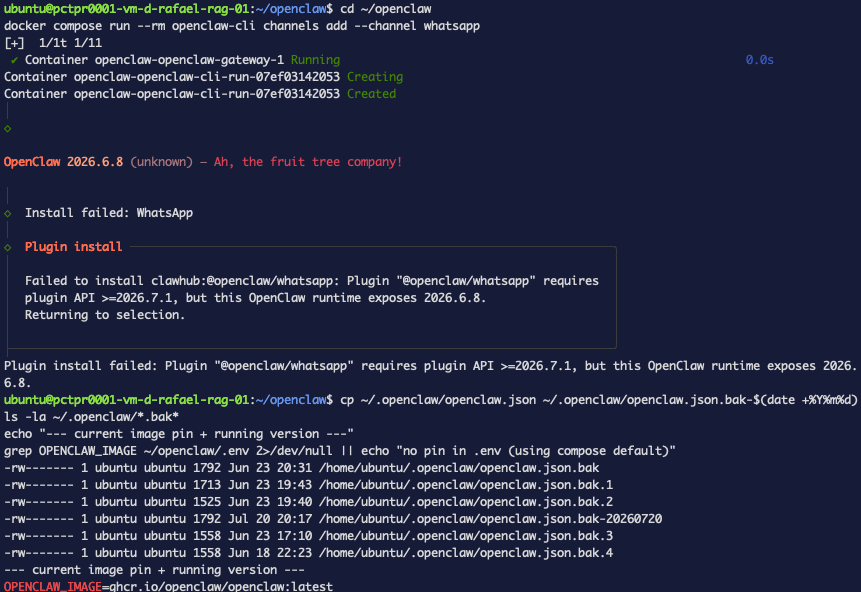 Figure 1. The version wall — the WhatsApp plugin needs OpenClaw ≥2026.7.1.
Back up, pull, recreate, and confirm your existing channels survived (:latest does
not auto-update — you must pull deliberately):
cp ~/.openclaw/openclaw.json ~/.openclaw/openclaw.json.bak-$(date +%Y%m%d)
docker compose pull openclaw-gateway
docker compose run --rm openclaw-cli --version          # expect 2026.7.1+
docker compose up -d --force-recreate openclaw-gateway
docker compose run --rm openclaw-cli channels status    # Telegram should still be connected
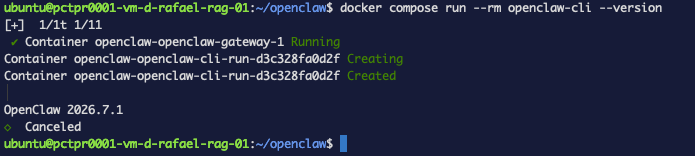 Figure 2. After pulling, the image reports 2026.7.1 — the requirement is met.
Then re-run the channels add above.
Step 2 — Trust the plugin
Check status and the channel is stopped with a cryptic error:
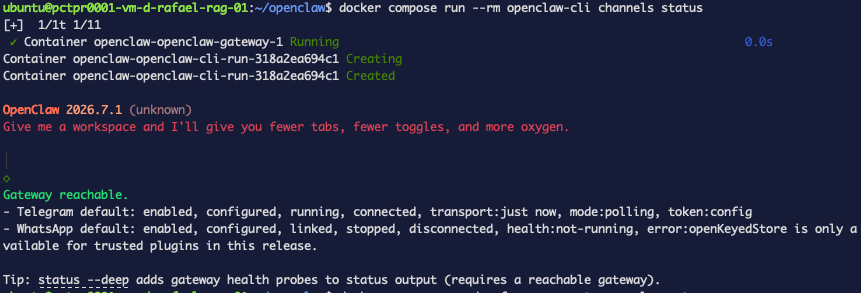 Figure 3.
 stopped — an untrusted plugin can’t use openKeyedStore, so the channel won’t start.
That's a security feature: OpenClaw sandboxes third-party plugins, and an untrusted
one can't use openKeyedStore (the storage WhatsApp needs for its session). Trust it —
include any other non-bundled plugin already loading (here codex) so you don't lock it
out — and recreate:
docker compose run --rm openclaw-cli config set \
  --batch-json '[{"path":"plugins.allow","value":["codex","whatsapp"]}]'
docker compose up -d --force-recreate openclaw-gateway
docker compose run --rm openclaw-cli channels status
 Figure 4. Trusted —
 plugins.allow now lists whatsapp (and codex).
The restart matters — the gateway reads plugins.allow before it initializes the
plugin. Now it's up:
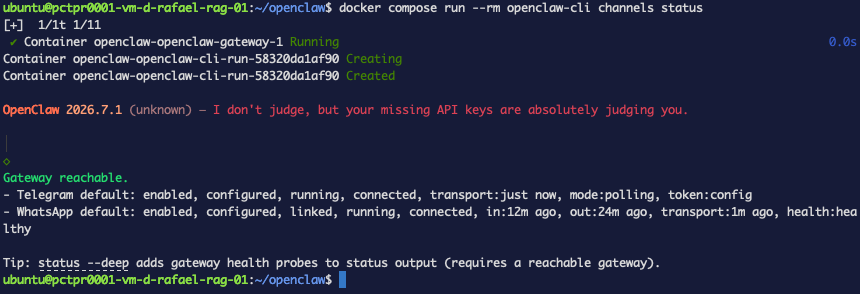 Figure 5. Live — WhatsApp
 running, connected, healthy, and Telegram still up.
Step 3 — Link your phone by QR
docker compose run --rm openclaw-cli channels login
Scan the terminal QR from WhatsApp → Settings → Linked Devices → Link a Device.
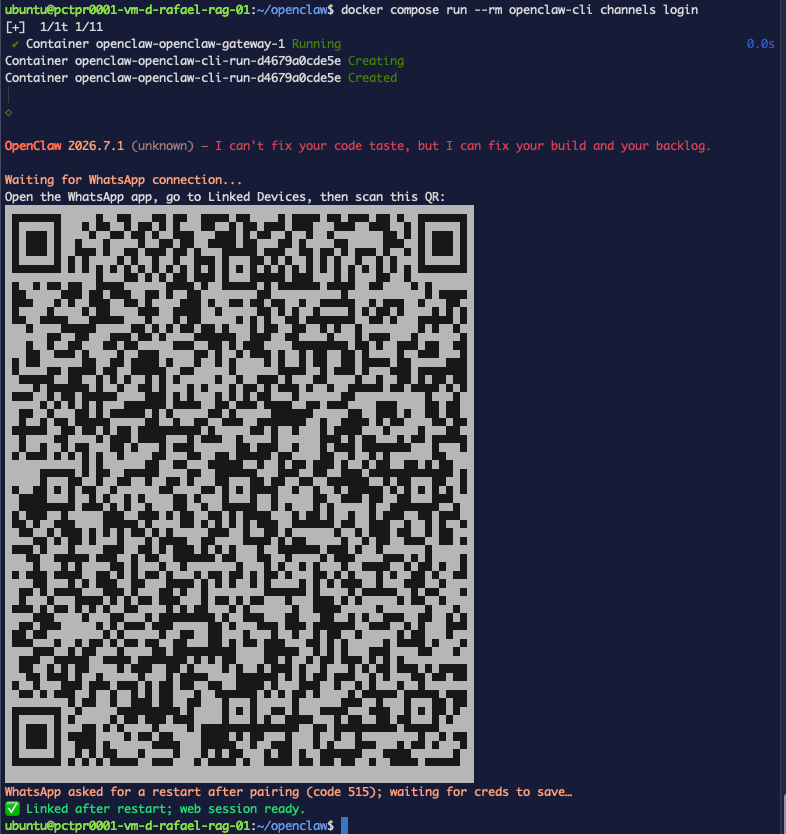 Figure 6. Scan to link;
 ✅ Linked after restart handles the code 515 reconnect.
code 515 restart is normalWhatsApp forces a reconnect right after pairing; OpenClaw handles it automatically. This is exactly where hand-rolled setups get stuck in a loop — here it just works.
Step 4 — Test it
From another phone, message the number:
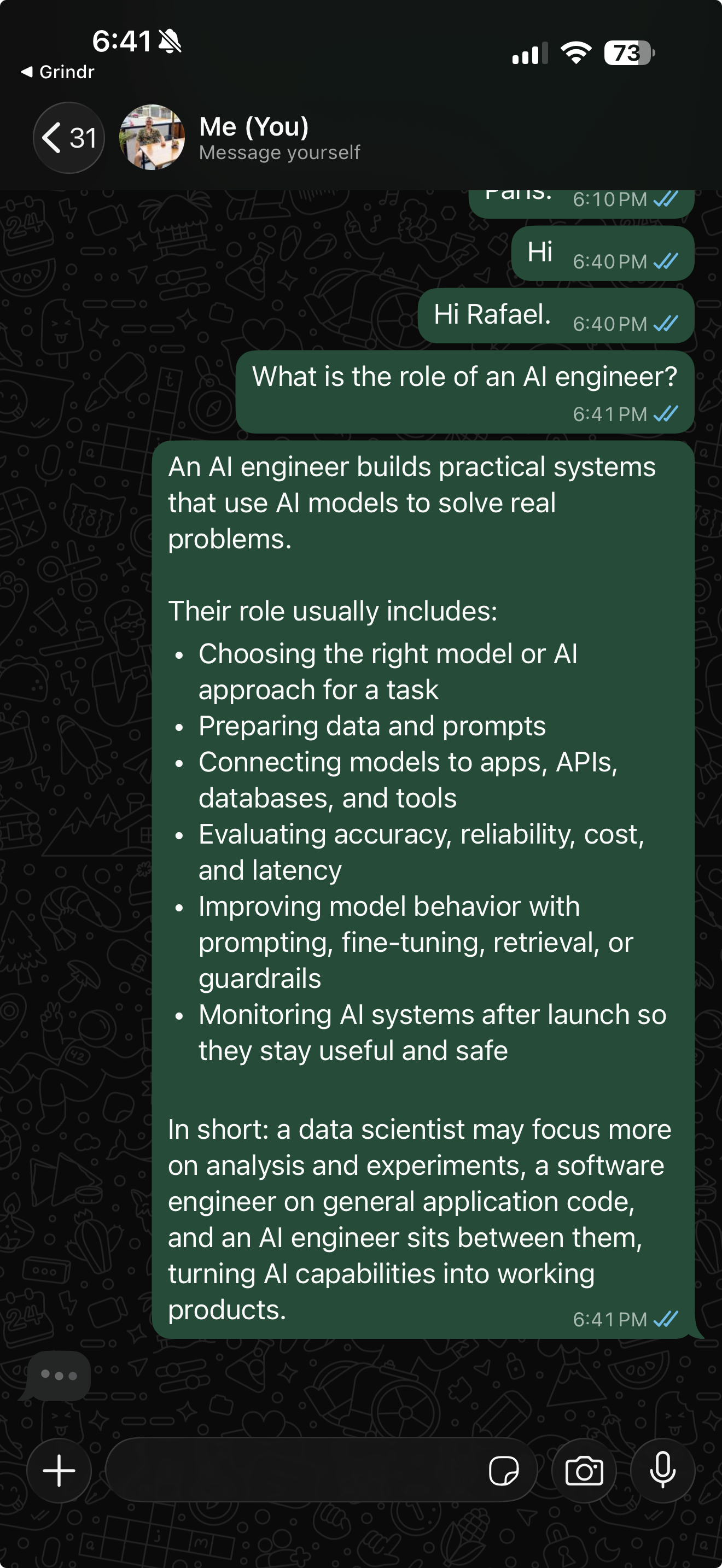 Figure 7. A question in, the agent’s answer back — sent from the number, as the account.
It replies — but notice it answers from your number, as you. That's companion mode: the agent is the account. Great for a personal assistant, and the reason for the warning below.
Your OpenClaw agent answers on WhatsApp — natively, no bridge, no bot account.
Before a real number
It processes every DM and group the account receives (Listening for ... DM + all groups). For anything real: link a dedicated number (a cheap prepaid SIM — virtual
numbers are often rejected), and set an allowlist before exposing it.
Park the channel when you're done testing (Telegram keeps running; your link stays saved):
docker compose run --rm openclaw-cli config set \
  --batch-json '[{"path":"channels.whatsapp.accounts.default.enabled","value":false}]'
docker compose up -d --force-recreate openclaw-gateway
Troubleshooting
openKeyedStore is only available for trusted plugins— channel installs but staysstopped. Add the id toplugins.allowand recreate the gateway (Step 2). A live config change isn't enough once it has already failed to start.- QR loops /
code 515— normal post-pairing restart. If it never settles, remove stale entries in WhatsApp → Linked Devices and scan a fresh QR. - It replied to a real contact — companion mode answers everything; see the warning above and use a dedicated number.
What's next
Part 5 done — your agent reaches Telegram and WhatsApp from a private, hardened box.
- Give it memory that survives restarts — the Hermes Agent series.
- Ground it in your docs — the AI evals & observability series builds a RAG service you can point a channel at.
Teardown
docker compose run --rm openclaw-cli channels remove --channel whatsapp
docker compose restart openclaw-gateway
And unlink the device in WhatsApp → Linked Devices if you're done.