Manage Subnets
Virtual Subnets in WiLine Edge Cloud (WEC) define segmented network ranges inside a Virtual Private Cloud (VPC). They are used to isolate workloads, organize IP allocation, and control internal network architecture.
The Subnets dashboard provides both a high-level summary and a detailed table of all subnets across your environment.
At the top, you’ll see key statistics:
- Total Networks — total number of subnets across all zones
- Active Networks — percentage of subnets currently implemented
- VPC Networks — number of VPCs associated with subnets
- Data Transfer — total network traffic across all subnets
View Subnets
After logging in to the WiLine Edge Cloud:
- Navigate to Networks → Subnets.
You will see a dashboard with summary metrics and a table listing all subnets:
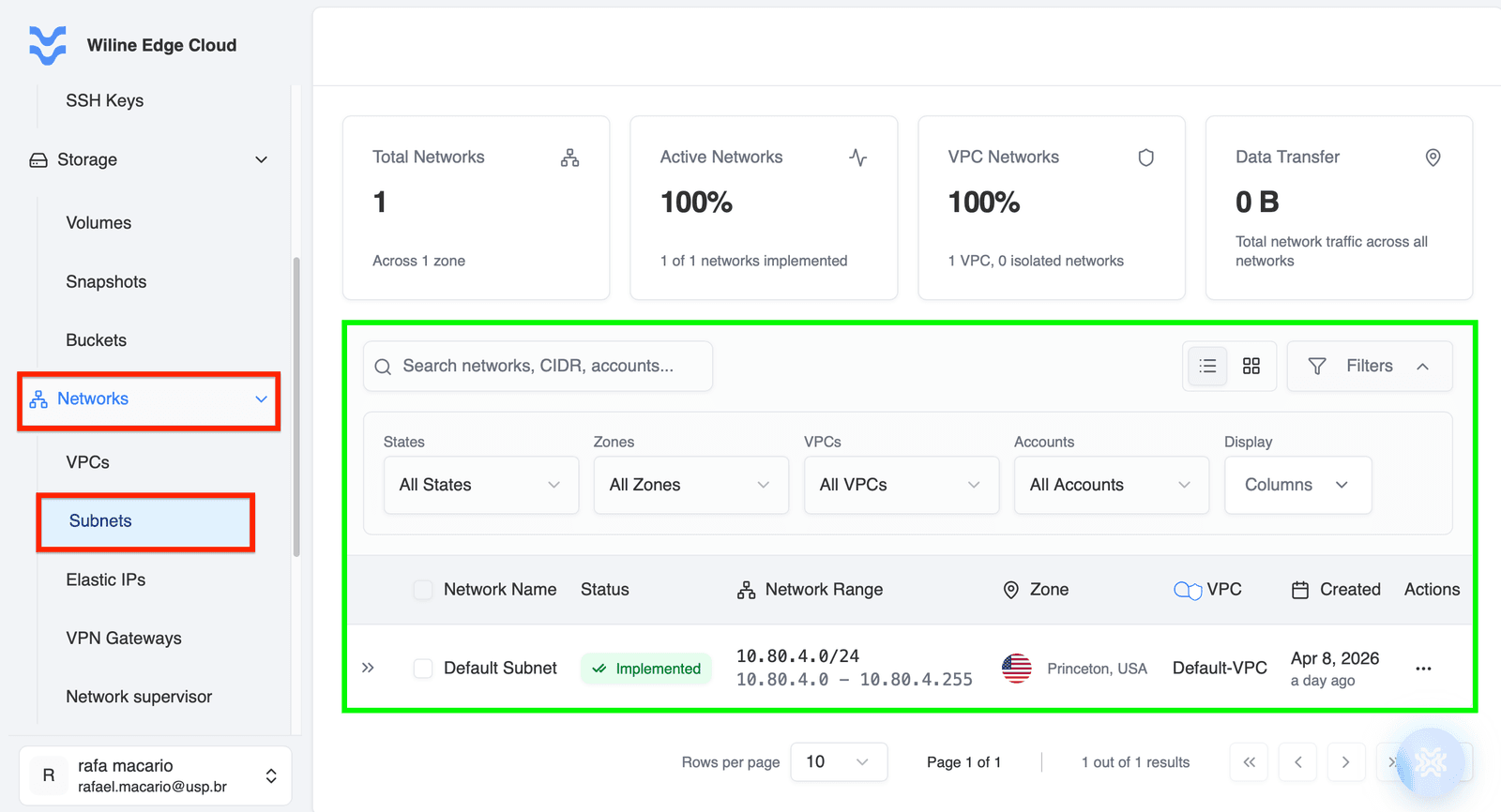 Figure 1: Subnets dashboard displaying subnet metrics and network overview.
Below the statistics, you’ll find a table listing all subnets.
Each row represents a subnet and includes:
- Network Name — subnet identifier
- Status — implementation state (e.g. Implemented)
- Network Range — CIDR block and IP range
- Zone — deployment location
- VPC — associated Virtual Private Cloud
- Created — creation timestamp
Filters
The table can be filtered using multiple dimensions:
- States — filter by subnet status
- Zones — filter by deployment location
- VPCs — filter by associated VPC
- Accounts — filter by account ownership
These filters help narrow down network visibility in large environments.
Display Options
You can customize the table view:
- Show or hide columns
- Adjust visible network attributes
- Improve readability based on operational needs
Actions column
In each row, clicking the icon opens the Network Actions menu:
Available actions include:
- Edit Network — modify subnet configuration (CIDR, metadata)
- Configure — access advanced subnet settings
- Delete Network — permanently remove the subnet
Available actions may be enabled or disabled depending on subnet state and dependencies such as attached instances or routing rules.
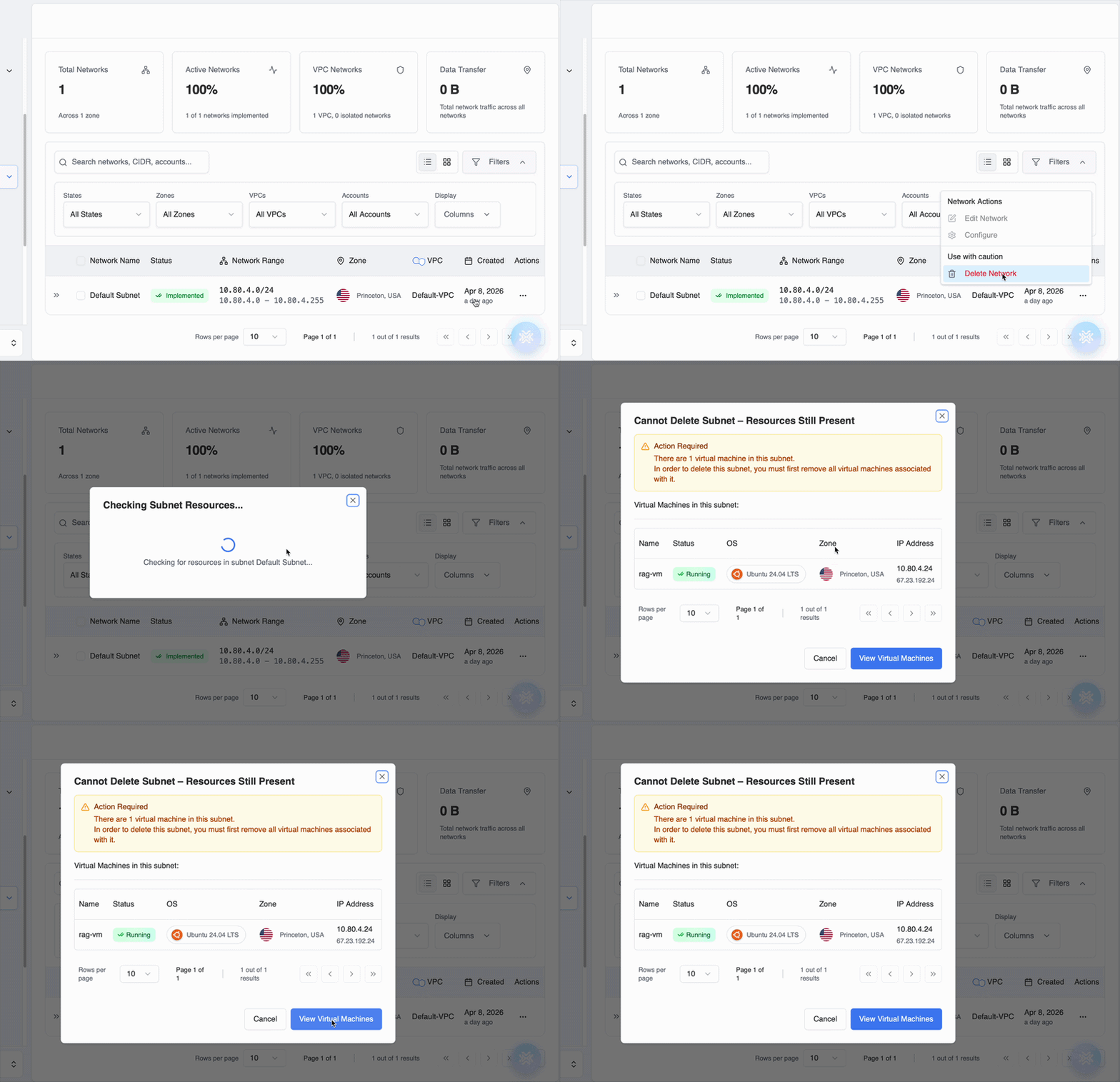 Figure 2: Actions menu for managing a subnet.
Subnet deletion is blocked when virtual machines are still attached.
If instances exist, the system prevents deletion and shows a confirmation modal listing affected VMs.
Modal includes:
- Message: Cannot delete subnet, resources still present
- Attached virtual machines (name, status, OS, zone, IP)
- Actions:
- View Virtual Machines (filtered by subnet)
- Cancel
To proceed:
- Remove or terminate all virtual machines in the subnet
- Ensure no remaining resources use the subnet range
- Retry deletion once the subnet is empty
Manage Subnets
To manage a subnet:
- Locate the subnet in the table (see View Subnets)
- Use filters if needed to refine results
- Click the in the Actions column
- Select the desired action (Edit, Configure, or Delete)
Subnet Details
Each subnet represents a segmented IP range inside a VPC. In this environment:
- Subnets define network boundaries within a VPC
- Each subnet is assigned a CIDR block (e.g. 10.80.4.0/24)
- Subnets are associated with a zone for physical or logical placement
- Subnets can contain instances and network services
Example: Subnet Entry
- Name:
Default Subnet - Status:
Implemented - Network Range:
10.80.4.0/24 - IP Range:
10.80.4.0 - 10.80.4.255 - Zone:
Princeton, USA - VPC:
Default-VPC - Created:
Apr 8, 2026
Key Concept
Subnets are the building blocks of VPC networking, allowing you to:
- Segment networks for security and organization
- Allocate IP ranges to specific workloads
- Control where resources are deployed within a VPC
Next steps
- Create or manage VPCs
- Attach compute instances to subnets
- Configure network ACLs for traffic control