Monitor your Infrastructure
The Network Supervisor provides a visual representation of your cloud networking setup in WiLine Edge Cloud (WEC), showing how VPCs, subnets, Elastic IPs, and virtual machines are connected in real time.
This view is useful for:
- Debugging network issues
- Understanding infrastructure topology
- Validating configurations visually
- Exploring relationships between resources
Open the Network Supervisor
After logging in to the WiLine Edge Cloud:
- Navigate to Networks → Network supervisor
You will see a visual diagram representing your infrastructure:
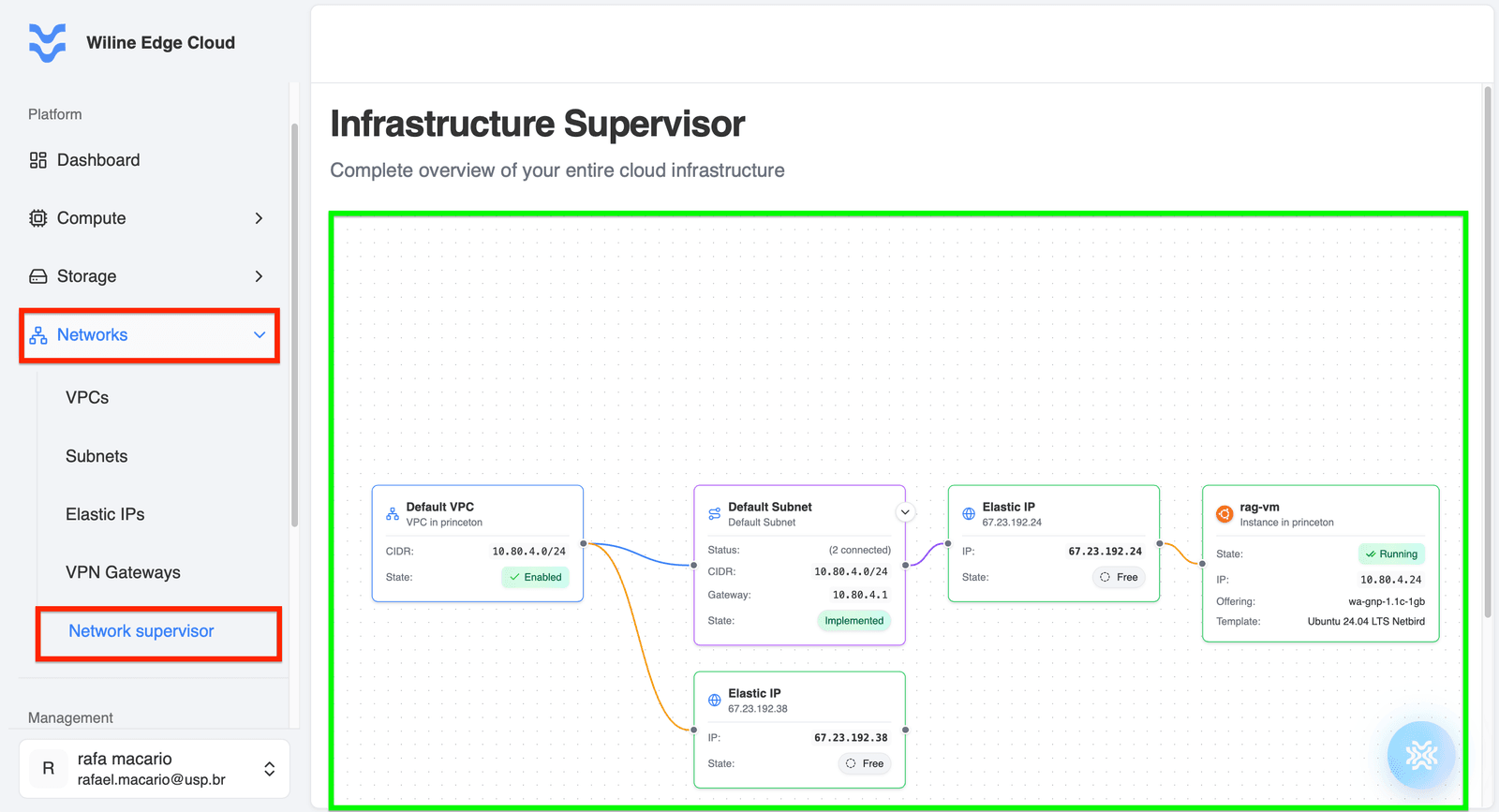
Figure 1: Infrastructure Supervisor showing relationships between VPCs, subnets, Elastic IPs, and virtual machines.
How the Visualization Works
The Network Supervisor displays your infrastructure as a node-based graph, where each component is a block and connections indicate relationships.
Core components
- VPC (Virtual Private Cloud)
- Subnet
- Elastic IP
- Virtual Machine (Instance)
These elements are visually linked to reflect how traffic flows through your infrastructure.
Infrastructure Flow
A typical setup might look like:
VPC → Subnet → Elastic IP → Virtual Machine
Example (from Figure 1)
-
VPC:
Default VPC- CIDR:
10.80.4.0/24 - State:
Enabled
- CIDR:
-
Subnet:
Default Subnet- CIDR:
10.80.4.0/24 - Gateway:
10.80.4.1 - State:
Implemented
- CIDR:
-
Elastic IP:
67.23.192.24- State:
Allocated
- State:
-
Virtual Machine:
rag-vm- Status:
Running - Private IP:
10.80.4.24
- Status:
This chain shows how external traffic reaches your VM:
- The Elastic IP receives public traffic
- It maps to the VM, which resides inside a Subnet within a VPC
Multiple Connections
The diagram supports multiple relationships.
Example:
- A single VPC can connect to multiple subnets
- A subnet can connect to multiple Elastic IPs
- Some Elastic IPs may remain unallocated
Example from your setup:
67.23.192.38→ Free Elastic IP (not attached)
This helps you quickly identify unused or misconfigured resources.
Each block includes important metadata:
- Name of the resource
- Status (e.g., Running, Allocated, Free)
- IP information
- Zone/location
Connections between blocks represent:
- Resource associations
- Network paths
- Public-to-private mappings (Elastic IP → VM)
Key Benefits
The Network Supervisor acts as a live topology map, allowing you to:
- Trace network paths
- Identify unused resources
- Detect misconfigurations
- Understand resource dependencies
- See all components in one place
- Understand relationships visually
- Make faster decisions
Next Steps
- Manage Elastic IPs
- Configure Subnets
- Create or manage VPCs