Browse and compare models
The Models Hub is the catalog of every model on your inference endpoint. Open any model to see its setup code, pricing, and
capabilities — and grab its id, which you pass as the model parameter in your
requests.
Open the Models Hub
After logging in to the WiLine Edge Cloud:
- In the left sidebar, expand Inference.
- Click Models Hub.
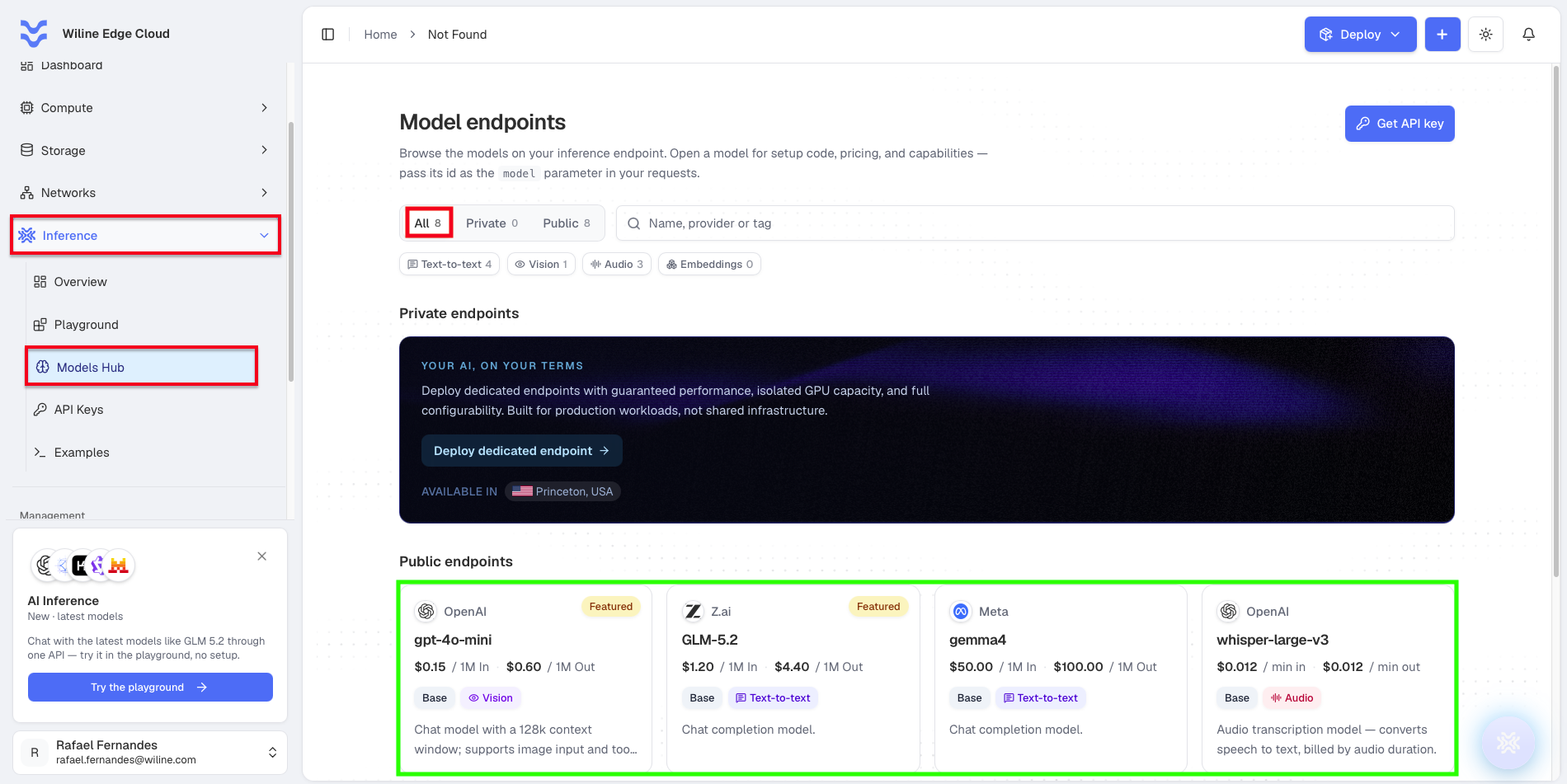
Figure 1: The Models Hub — tabs and filters at the top, the private-endpoints banner, and the public model cards below.
Browse, filter, and search
Three controls help you narrow the catalog:
- Tabs — switch between All, Private, and Public models. Each tab shows a count, so you can see at a glance how many models fall in each group.
- Tag filters — filter by capability: Text-to-text, Vision, Audio, and Embeddings. Each shows how many models match.
- Search — type a name, provider, or tag in the search box to filter instantly.
Open a model
Click any model card to open its endpoint information dialog — here's GLM-5.2 as an
example.
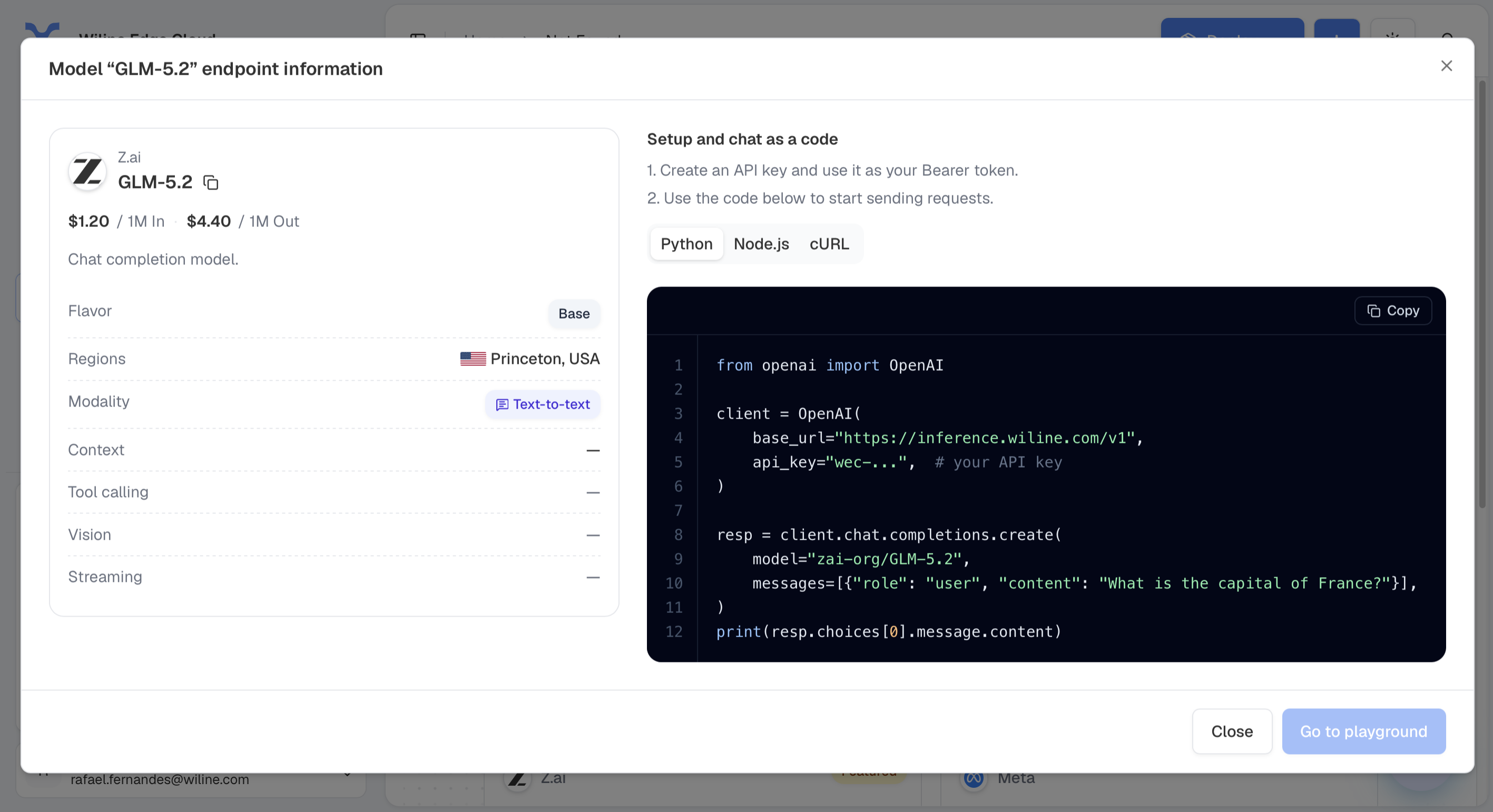
Figure 2: A model's endpoint information — details and pricing on the left, copy-paste setup code (Python / Node.js / cURL) on the right.
On the left, the model's details:
- The provider and model name, with a copy button to copy the model's exact id.
- Pricing — the input and output rates (e.g.
$1.20 / 1M In · $4.40 / 1M Out). - Flavor — the tier (e.g. Base).
- Regions — where it runs (e.g. Princeton, USA).
- Modality — what it does (e.g. Text-to-text).
- Expandable rows for Context window, Tool calling, Vision, and Streaming support.
On the right, under "Setup and chat as a code":
- Create an API key and use it as your Bearer token.
- Use the code below to start sending requests.
Switch between Python, Node.js, and cURL, and use Copy to grab the snippet. The Python tab, for example:
from openai import OpenAI

client = OpenAI(
    base_url="https://inference.wiline.com/v1",
    api_key="wec-...",  # your API key
)

resp = client.chat.completions.create(
    model="zai-org/GLM-5.2",
    messages=[{"role": "user", "content": "What is the capital of France?"}],
)
print(resp.choices[0].message.content)
A model's id isn't always just its display name — it can be namespaced (the dialog
above shows zai-org/GLM-5.2, not GLM-5.2). Use the copy button next to the
model name to grab the exact id, then pass it as the model field in your request.
At the bottom of the dialog, click Close to go back, or Go to playground to try the model interactively in the Playground.
Public vs private endpoints
Public endpoints are the shared, ready-to-use models (the Base tier). You call them with your API key and pay per token (or per minute of audio) — nothing to provision.
Private endpoints — "Your AI, on your terms." The banner on the Models Hub explains the option: deploy a dedicated endpoint with guaranteed performance, isolated GPU capacity, and full configurability — built for production workloads rather than shared infrastructure. Dedicated capacity is currently available in Princeton, USA.
Clicking Deploy dedicated endpoint takes you into the deploy-an-instance flow, where you provision the VM that backs your private endpoint. See Deploy a Virtual Machine for the full walkthrough.
Available models
The public catalog currently includes the models below. Each card shows the provider, per-unit pricing, capability tags, and a short description; Featured marks the recommended picks.
Model (id) | Provider | Capability | Price | Notes |
|---|---|---|---|---|
deepseek-ai/DeepSeek-V3.1 | DeepSeek · Featured | Reasoning | — | 671B MoE reasoning model with 128k context and tool calling support. |
z-ai/GLM-5.2 | Z.ai · Featured | Reasoning | — | 753B MoE model with a 1M token context window. |
meta/llama-4-maverick | Meta · Featured | Text + Vision | — | 400B MoE multimodal model with a 1M context window. |
openai/gpt-oss-120b | OpenAI | Reasoning | — | 120B MoE reasoning model with 128k context window. |
google/gemma-3-27b | Text + Vision | — | 27B model supporting text and image input with a 128k context window. | |
qwen3.5:9B | Qwen | Text-to-text | $0.15 / 1M in · $0.20 / 1M out | Chat completion model. |
whisper-large-v3 | OpenAI | Audio | $0.012 / min in · $0.012 / min out | Audio transcription — converts speech to text, billed by audio duration. |
whisper-base | OpenAI | Audio | $0.012 / min in · $0.012 / min out | Audio transcription — converts speech to text, billed by audio duration. |
whisper-medium | OpenAI | Audio | $0.012 / min in · $0.012 / min out | Audio transcription — converts speech to text, billed by audio duration. |
This is a snapshot — the Models Hub is the source of truth for what's available and the current prices. Text models are billed per token (per 1M input/output); audio models are billed per minute of audio. Always check the Hub or the WEC pricing page before building cost estimates.
Get an API key from here
You don't have to leave the Hub to start calling models. Click Get API key (top right) to open the create-key dialog and generate one on the spot — it's the same dialog you'll find on the API Keys page, which is where you go to manage existing keys (rotate, revoke, and review them).
Next steps
- Create an API key — generate and manage keys for your apps.
- Code examples — call any model from your code.
- Experiment in the Playground — try a model in the browser before you wire it in.